 Fastero Dev Team
Claude can't open a network connection to your database by itself. It needs something in between that can: a connector in claude.ai, a command-line tool or MCP server in Claude Code, or a local server in Claude Desktop. Which one fits depends less on the database than on where it lives, and on which Claude you use.
The short answer: there are four routes in November 2026. In claude.ai (web, desktop and mobile apps), add your database vendor's connector from Claude's connector directory: BigQuery, Snowflake, Databricks Genie, Supabase, Neon, PlanetScale, ClickHouse, MotherDuck and MongoDB Atlas all have one, and for anything else you can add a remote MCP server by its URL as a custom connector (the Free plan can add one). In Claude Code, not on the Free plan, let it run your database's own command-line tool (psql, bq, snow sql) or add an MCP server with claude mcp add. In Claude Desktop, run an MCP server on your own machine, which can reach databases on your network or VPN. Or upload a CSV export when no live connection is allowed. Whichever you choose, connect as a database user that can only read: a server's "read-only mode" is a second layer, and the database's own permissions are the lock.
Fastero
Point Claude at your database.
Add Fastero to claude.ai or Claude Code. Claude builds the dashboard, deploys the app or publishes a live page, and your team opens it in Fastero.
Try free →The four routes compared
| Route | Plans | Reaches a private database? | Best for |
|---|---|---|---|
| Directory connector in claude.ai | All, including Free | No, unless the vendor's service already holds your data | Data in a cloud warehouse or hosted Postgres that has a vendor connector |
| Custom connector (remote MCP server by URL) | All; Free is limited to one | Only if the server is on the public internet or allows Anthropic's addresses | Any other database, through an MCP server you or a service runs |
| Claude Code | Pro, Max, Ultra, Team, Enterprise | Yes: it runs on your machine | Developers, local and dev databases, analysis next to code |
| Claude Desktop with a local server | All Desktop users | Yes: the server runs on your machine | A database only reachable from your laptop or VPN |
| CSV upload | All | Not needed | One-off questions, no live access allowed |
The column that decides most cases is the third one. Connectors, directory or custom, are called from Anthropic's cloud, even when you use them from Claude Desktop. Anthropic's help center says your MCP server "must be reachable over the public internet from Anthropic's IP ranges." A database inside a private network, or one only your office IP can reach, is invisible to claude.ai; a query to it just times out. Claude Code and local Desktop servers run on your own machine and use your network.
Route 1: connectors in claude.ai
From the directory
Claude's connector directory lists connectors built by the companies behind the services. For databases, that means cloud warehouses and hosted databases, each signing you in with that vendor's own login (OAuth), so Claude never sees a password:
| Connector | Made by | What it can query |
|---|---|---|
| Google Cloud BigQuery | Your BigQuery datasets; has a read-only SQL tool alongside one that can write | |
| Snowflake | Snowflake | Through a Snowflake-managed MCP server your admin creates; its SQL tool is read-only by default |
| Databricks Genie | Databricks | Questions in plain English through Genie, within Unity Catalog permissions |
| Supabase | Supabase | Your Supabase Postgres; can run every query as a read-only Postgres user |
| Neon | Neon | Your Neon Postgres; you choose read-only or full access when you sign in |
| PlanetScale | PlanetScale | Postgres and MySQL databases hosted on PlanetScale |
| ClickHouse, MotherDuck, MongoDB Atlas | Each vendor | Their own hosted databases |
To add one: Customize › Connectors, find the database, click +, sign in to the vendor, and switch it on for a chat from the + menu in the message box.
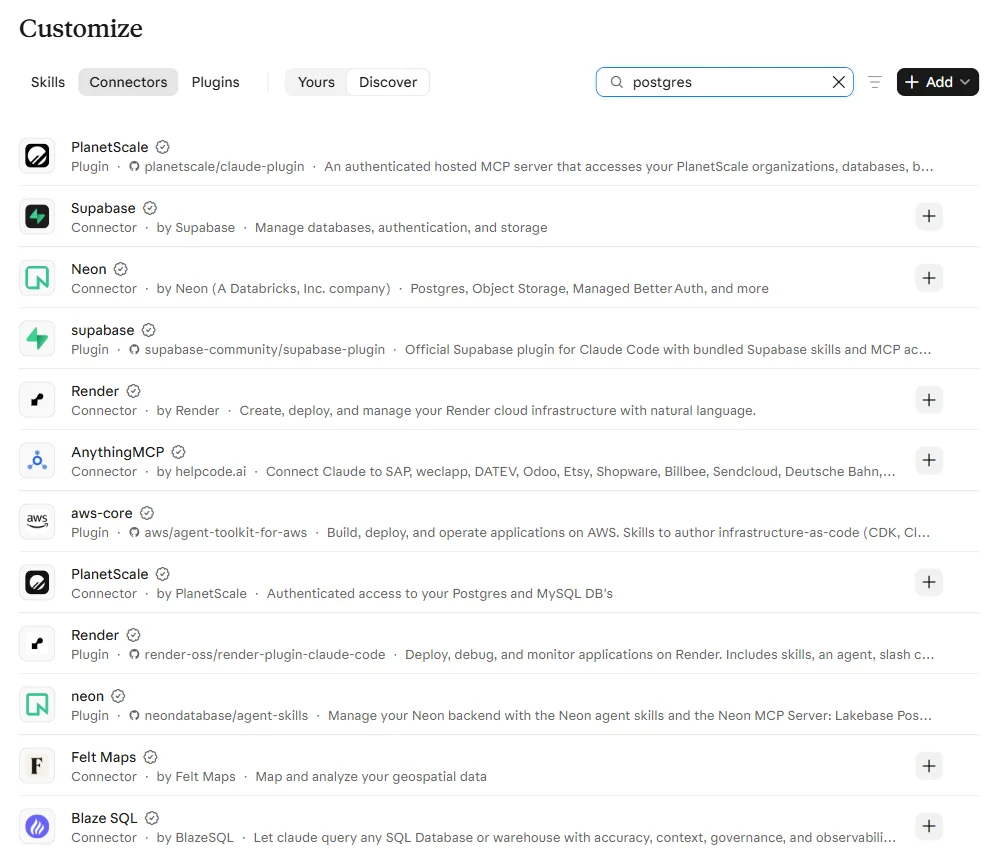
What the directory doesn't have is a connector for your own Postgres, MySQL or SQL Server. We searched it for each: the results are hosting companies (Supabase, Neon, PlanetScale) for databases they host, and a few general third-party services. A database you run yourself, on a server or in AWS, Azure or Google Cloud, needs a custom connector, Claude Code, or a local server.
Custom connectors
A custom connector is any remote MCP server you add by its URL: one you host, such as Google's MCP Toolbox for Databases or Bytebase's DBHub behind authentication, or a hosted service that connects to your database for you. In a Free, Pro or Max account it's Customize › Connectors › Add › Add custom connector: a name, the server's HTTPS address, then Continue and sign-in. On Team and Enterprise plans, an Owner adds it for the organisation first, in Organization settings › Connectors.
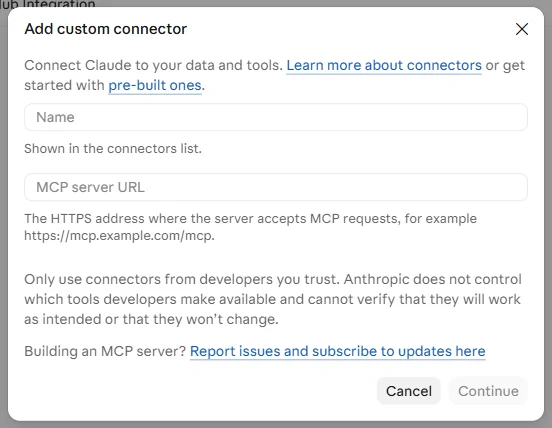
Three things to know before you pick this route:
- The server has to be public. As above, Anthropic's cloud calls it. You can allow only Anthropic's outbound addresses at your firewall; Enterprise plans can also ask for MCP tunnels, a research preview that opens an outbound-only tunnel from your network.
- API-key sign-in is limited. Most custom connectors sign in with OAuth. "Request header authentication is in beta and available to a limited set of organizations."
- A shared key is shared access. On a team plan, a connector that signs in with one API key gives every member that key's access.
What it looks like in a chat
Each time Claude wants to use a connector's tool, it asks first, unless you've chosen Always allow. The request shows exactly what it's about to send, SQL included:
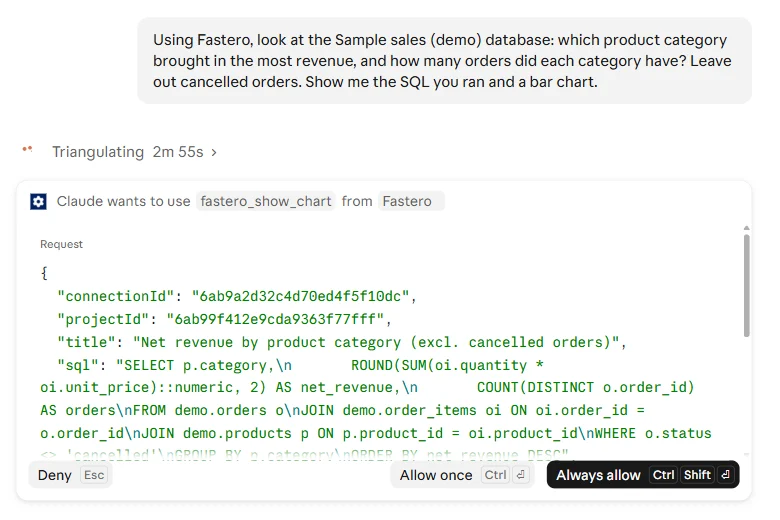
That prompt is your last look at the query before it runs. Leave Needs approval on for any tool that can write. On Team and Enterprise plans, Owners can set each tool to Always allow, Needs approval or Blocked for the whole organisation; Anthropic's own example is to "allow a connector to read data from a service while preventing it from writing any changes back."
Route 2: Claude Code
Claude Code runs on your machine, so it reaches whatever your terminal reaches. It needs a paid plan: "The free claude.ai plan does not include Claude Code access."
With the database's own command-line tool. Install psql, mysql, bq, snow or sqlcmd, keep the credentials where the tool already looks for them (~/.pgpass, environment variables, the CLI's config), and allow the command with a permission rule such as Bash(psql *). Note what that rule does and doesn't check: it matches the command, not the SQL inside it, so it allows any statement the database login permits. For Snowflake, use the newer snow sql; Snowflake says it "will only add new features and enhancements to Snowflake CLI", not to the older SnowSQL.
With an MCP server. Anthropic's own example uses DBHub, with this advice: "Use a read-only database user in the connection string so the queries Claude runs can't modify data":
claude mcp add --transport stdio db -- npx -y @bytebase/dbhub \
  --dsn "postgresql://readonly:pass@prod.db.com:5432/analytics"
Add --scope project to save the server in a .mcp.json file the whole team gets from git, and keep the password out of it with a variable such as ${DB_URL}, which Claude Code fills in from your environment. Claude Code asks each person to approve a project's servers the first time. Here is a real claude mcp list from a fresh project with three servers:
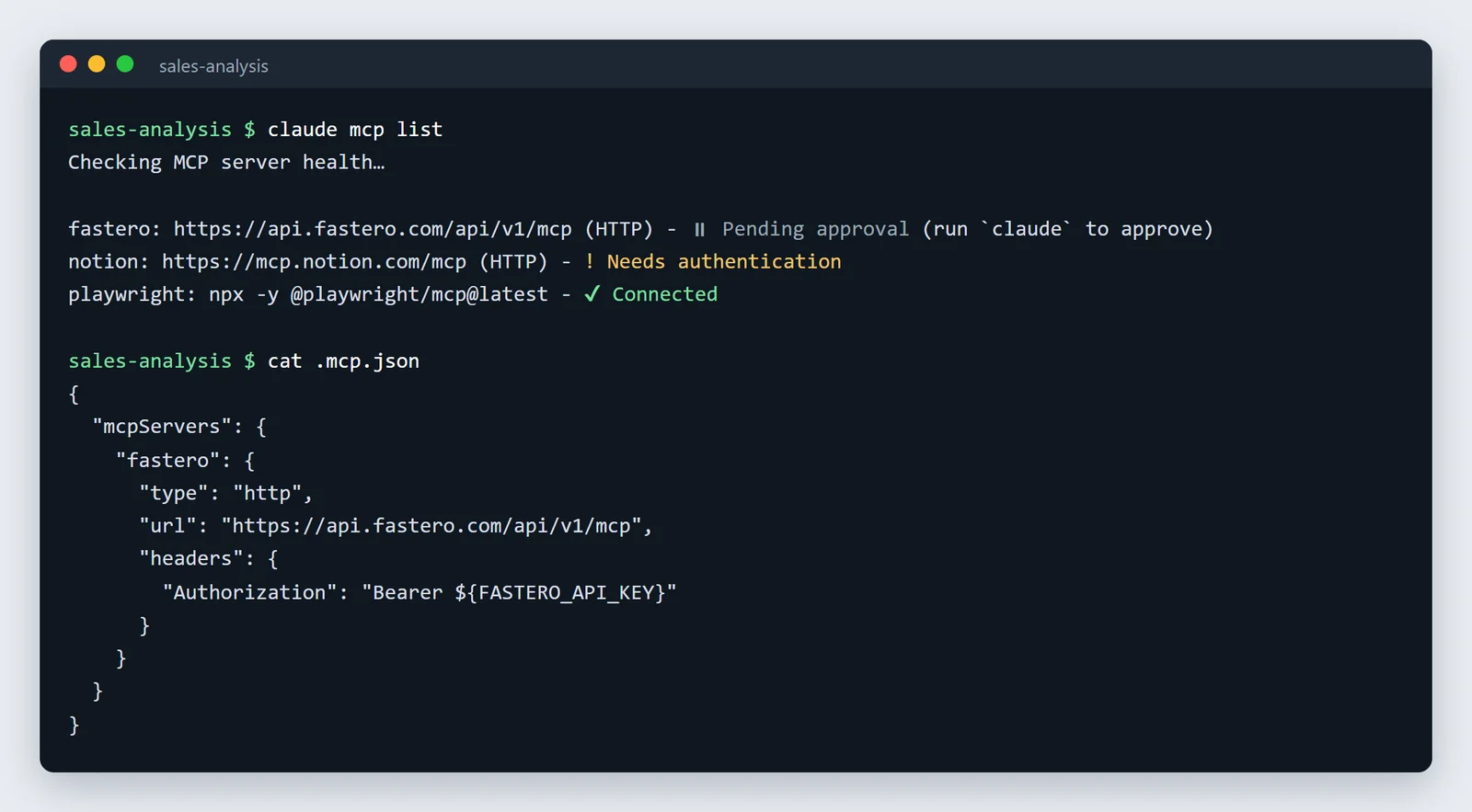
If you've signed in to Claude Code with a claude.ai subscription, the connectors you added in claude.ai show up in Claude Code too.
Route 3: Claude Desktop with a local server
Claude Desktop can also run MCP servers on your own computer, which then use your network: the way to reach a database only your laptop or VPN can see. Install one as a desktop extension (a .mcpb file, which keeps secrets in your system's keychain), or list it in claude_desktop_config.json (%APPDATA%\Claude\ on Windows, ~/Library/Application Support/Claude/ on a Mac) and fully quit and restart the app. A password in that JSON file sits there in plain text, so prefer an extension when one exists. Our guide to claude_desktop_config.json walks through the file.
Route 4: a CSV export
If no live connection is allowed, export the rows and attach the file. Claude analyses it in the chat, and the database is never touched. It's also the right first step when you're not sure the question deserves a connection at all. Claude takes files up to 500 MB, 20 per chat; see Claude's file upload limits for what it does with a big one.
Which MCP server to use, and which to avoid
| Server | Who makes it | Status, November 2026 |
|---|---|---|
| BigQuery remote MCP server | Hosted by Google; on when the BigQuery API is enabled. Results capped at 3,000 rows | |
| Snowflake-managed MCP server | Snowflake | Current. The older Snowflake-Labs/mcp repository says "This project is deprecated and no longer maintained." |
| MCP Toolbox for Databases | Google, open source | Active; runs against Postgres, MySQL, SQL Server, BigQuery and many more |
| DBHub | Bytebase, open source | Active; the example in Anthropic's docs; has a readonly setting, off by default |
| Supabase MCP, Neon MCP | Each vendor | Hosted. Neon recommends its MCP server "for development and testing only" and not for production |
| SQL MCP Server (Data API builder) | Microsoft, open source | Current; exposes chosen tables as tools rather than free-form SQL |
@modelcontextprotocol/server-postgres |
Was the MCP reference server | Archived. Its read-only transaction could be escaped with a stacked COMMIT; (Datadog, August 2025). Don't use it |
The archived Postgres server deserves the warning. It was deprecated in July 2025 and npm now marks it "Archived and unmaintained; no security guarantees", yet it was downloaded 146,540 times in the first week of November 2026, mostly, we'd guess, from tutorials that still recommend it. For MySQL there's no hosted server from Oracle; its own MySQL MCP server is described as "not intended for production use but as a proof of concept." Our Postgres, MySQL, SQL Server and BigQuery guides compare the options for each.
Point Claude at your database.
Start free →The read-only setup that actually holds
Every route above ends at a database login. Make it one that can only read, and the worst a confused model, a bad prompt or a malicious instruction hidden in your data can do is read too much.
We tested this block on throwaway Postgres 17 and Postgres 14 servers:
CREATE ROLE claude_readonly WITH LOGIN PASSWORD 'a-long-random-password';
GRANT CONNECT ON DATABASE analytics TO claude_readonly;
GRANT USAGE ON SCHEMA public TO claude_readonly;
GRANT SELECT ON ALL TABLES IN SCHEMA public TO claude_readonly;
-- tables created later: name the role that creates them
ALTER DEFAULT PRIVILEGES FOR ROLE app_owner IN SCHEMA public GRANT SELECT ON TABLES TO claude_readonly;
ALTER ROLE claude_readonly SET default_transaction_read_only = on;
ALTER ROLE claude_readonly SET statement_timeout = '30s';
-- Postgres 14 and older only (15 and later already do this):
REVOKE CREATE ON SCHEMA public FROM PUBLIC;
What the test showed:
- The grants are the lock; the settings aren't. Any session can run
SET default_transaction_read_only = offandSET statement_timeout = 0; ours did. After switching read-only off, anINSERTstill failed with "permission denied for table orders". The settings stop accidents; the grants stop everything else. - On Postgres 14 and older, the role could create tables. Before version 15, every role may create objects in the
publicschema. Once our test session switched read-only off,CREATE TABLE public.claude_scratchsucceeded on 14. TheREVOKE CREATE ON SCHEMA public FROM PUBLICline closes it. Postgres 14 reaches end of life on 12 November 2026. ALTER DEFAULT PRIVILEGESneedsFOR ROLE. Without it, only tables created by the role that ran the command become readable; a table created later by your app's migration user stays invisible.- The stacked-statement trick fails. The payload that escaped the archived server,
SELECT 1; COMMIT; DROP TABLE public.orders;, failed with "must be owner of table orders".
For MySQL 8.4, GRANT SELECT, SHOW VIEW ON analytics.* TO 'claude_readonly'@'10.0.0.%' does the same job: writes, CREATE TEMPORARY TABLE and SELECT ... INTO OUTFILE were all refused in our test. Set max_execution_time per session or globally, since MySQL has no per-user default; it applies to SELECT statements only.
Three more habits:
- Never paste a password into a chat. Put it in the server's configuration, an environment variable or an extension's secure field, or use a connector that signs in with OAuth.
- Don't mix a database connector with a tool that sends data out (email, Slack, the web) in the same chat. Anthropic warns that "Malicious MCP servers may include hidden instructions that try to make Claude perform unintended actions", and text stored in your own tables, a support ticket for example, can carry them too.
- Audit on the database side. Claude's own audit log is Enterprise-only and lists sign-ins and chats, not tool calls. Your database's query log for the read-only role is the record that counts.
What breaks, and the numbers behind it
| Problem | Limit | Where |
|---|---|---|
| Result too big | About 150,000 characters per tool result | claude.ai and Claude Desktop connectors |
| Query too slow | 240 seconds per tool call | claude.ai and Claude Desktop connectors |
| Result too big | Warning at 10,000 tokens, cut at 25,000 by default (MAX_MCP_OUTPUT_TOKENS) |
Claude Code |
| BigQuery | 3,000 rows; 3 minutes of processing by default | Google's BigQuery MCP server |
| Database on a private network | Times out | claude.ai connectors, which call from Anthropic's cloud |
Large schemas are the quieter problem. A server that lists every table and column fills Claude's context before the first query. Scope the connection to one schema or a set of views, or give Claude a short description of the tables that matter.
Does Anthropic train on your data?
On Team, Enterprise and API plans, no: "We will not use your chats or coding sessions to train our models, unless you choose to participate in our Development Partner Program". On Free, Pro and Max, chats are used for training only if you allow it, and Anthropic says training data "does not include raw content from connectors (e.g. Google Drive), including remote and local MCP servers, though data may be included if it's directly copied into your conversation with Claude." Query results that Claude quotes back to you in its answer are, in practice, in the conversation. The database vendor's own terms also apply to whatever its connector processes.
Connecting through Fastero
Fastero is one of the hosted options: it's in Claude's connector directory, and it connects Claude to the databases your team has already added to Fastero, whether PostgreSQL, MySQL, SQL Server, Redshift, Snowflake, Oracle, BigQuery or uploaded files. The database password is entered once in Fastero's web app and never passes through Claude. Fastero connects from its own servers, directly or through an SSH bastion, so the database doesn't need an MCP server of its own.
Every query Claude runs this way is a single SELECT, WITH, EXPLAIN or SHOW statement; anything that could change data is refused, and on Postgres it runs inside a read-only transaction. Results are capped at 500 rows and about 100 KB. Claude can also read your team's saved definitions, so "revenue" means what your reports mean by it. We asked it which product category in a sample database brought in the most revenue; it used the workspace's own definition, which leaves out cancelled orders, and showed the SQL it ran:
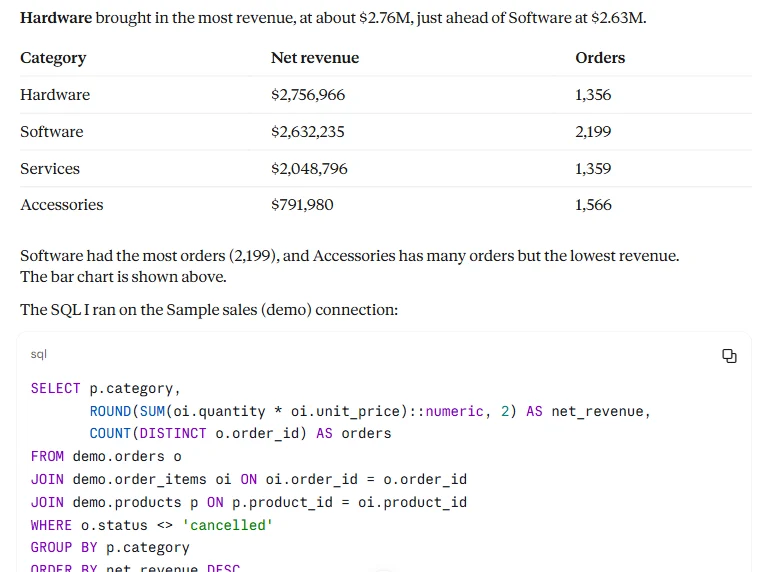
The chart it drew can be saved to a Fastero dashboard your colleagues open with their own login. To try it, add Fastero from Customize › Connectors in claude.ai. Use a read-only database login all the same.
FAQ
Can Claude connect to a database directly?
Not on its own. It needs a connector (claude.ai), a command-line tool or MCP server it can run (Claude Code), or a local MCP server (Claude Desktop). claude.ai connectors can only reach servers on the public internet.
Can I connect Claude to my database on the free plan?
Yes. Free accounts can use directory connectors and add one custom connector. Claude Code isn't included in the Free plan.
Is it safe to connect Claude to a production database?
With a read-only database login limited to the tables it needs, a statement timeout, and tool approval left on, the risk is reading, not changing, data. Some vendors are stricter: Neon recommends its MCP server for development and testing only.
Why does my database connector time out in claude.ai?
Usually because the database or MCP server is on a private network: connectors call from Anthropic's cloud. Otherwise the query ran past the 240-second limit per tool call.
How do I connect Claude to PostgreSQL?
For Postgres hosted on Supabase, Neon or PlanetScale, use their directory connector. For Postgres you run yourself, use Claude Code with psql or DBHub, a local server in Claude Desktop, or a hosted connector such as Fastero. Avoid the archived @modelcontextprotocol/server-postgres.
How do I connect Claude to BigQuery or Snowflake?
Both have directory connectors made by Google and Snowflake. BigQuery needs the MCP Tool User, BigQuery Job User and BigQuery Data Viewer roles; Snowflake needs an admin to create an MCP server object and an OAuth integration first.
Related reading:
- Postgres MCP server: how to connect Claude to PostgreSQL safely
- MySQL MCP server
- BigQuery MCP server
- Claude connectors: what they are and how to add one
- Claude Code MCP: how to add MCP servers to Claude Code
- SQL query examples
Sources: Anthropic: custom connectors (updated 30 October 2026), using connectors, adding an unlisted connector, connector limits, Claude Code MCP, Claude Code setup, file uploads, IP addresses, consumer and commercial training policies. Vendors: BigQuery MCP, Snowflake-managed MCP, Snowflake-Labs/mcp, SnowSQL, Supabase MCP, Neon MCP, MCP Toolbox, DBHub, Microsoft SQL MCP Server, Oracle MySQL MCP, the archived Postgres server on npm, Datadog on its read-only bypass, PostgreSQL 15 release notes, PostgreSQL versioning. Directory searched and read-only SQL tested on 8 November 2026.
Try Fastero free — connect your databases once, then let Claude query them read-only and save what it builds to dashboards your team opens. No credit card required.