
If you have used Claude Code or Cursor to write code, you have probably hit the wall: the AI can write a perfect SQL query, but to run it you either hand the agent a shell with your database password in it, or you copy results back and forth like it is 2019.
MCP — Model Context Protocol — fixes this. It is a standard that lets AI assistants connect to tools and data sources through a server that decides what the assistant may do. Instead of describing your schema in a prompt, you give Claude a governed connection. It reads your tables, runs queries, and builds on top of real data.
For data teams, this changes the workflow. You stop being the middleware between the AI and your database.
Here are the MCP servers worth using for data analysis in 2026 — and two popular ones you should stop using.
Quick comparison
| Server | Maintained by | Data sources | What it can do | Sign-in |
|---|---|---|---|---|
| Fastero | Fastero | Any connected database — Postgres, MySQL, Snowflake, BigQuery and more | 70+ tools: SQL, dashboards, reports, notebooks, Python and Streamlit apps, schedules, sharing | Per-org key or OAuth (claude.ai), scoped to your role |
| MCP Toolbox for Databases | Google (open source) | Postgres, MySQL, BigQuery and more | SQL tools against your own databases | Self-hosted; you configure the database connection |
| BigQuery MCP | Google (hosted) | BigQuery | Explore datasets, read-only SQL, results capped at 3,000 rows | OAuth |
| Neon MCP | Neon | Neon Postgres | SQL, branches, schema comparison | OAuth or API key |
| Supabase MCP | Supabase | Supabase Postgres | SQL, tables and migrations, logs | OAuth or personal access token |
| MotherDuck MCP | MotherDuck (hosted) | MotherDuck / DuckDB | Read-only and read-write SQL, table and column search | OAuth by default, or a token |
Fastero
Fastero is a full analytics workspace with an MCP server built in. The difference from a database MCP server: it does not stop at SQL. Claude can build and update dashboards, write reports, run notebooks, create Python projects, deploy a Streamlit app, schedule dashboard email digests and query alerts, share a dashboard by public link, and invite teammates to a project — 70+ tools in all. The AI works inside the same workspace your team uses, so the dashboard Claude builds is the one your manager opens tomorrow morning.
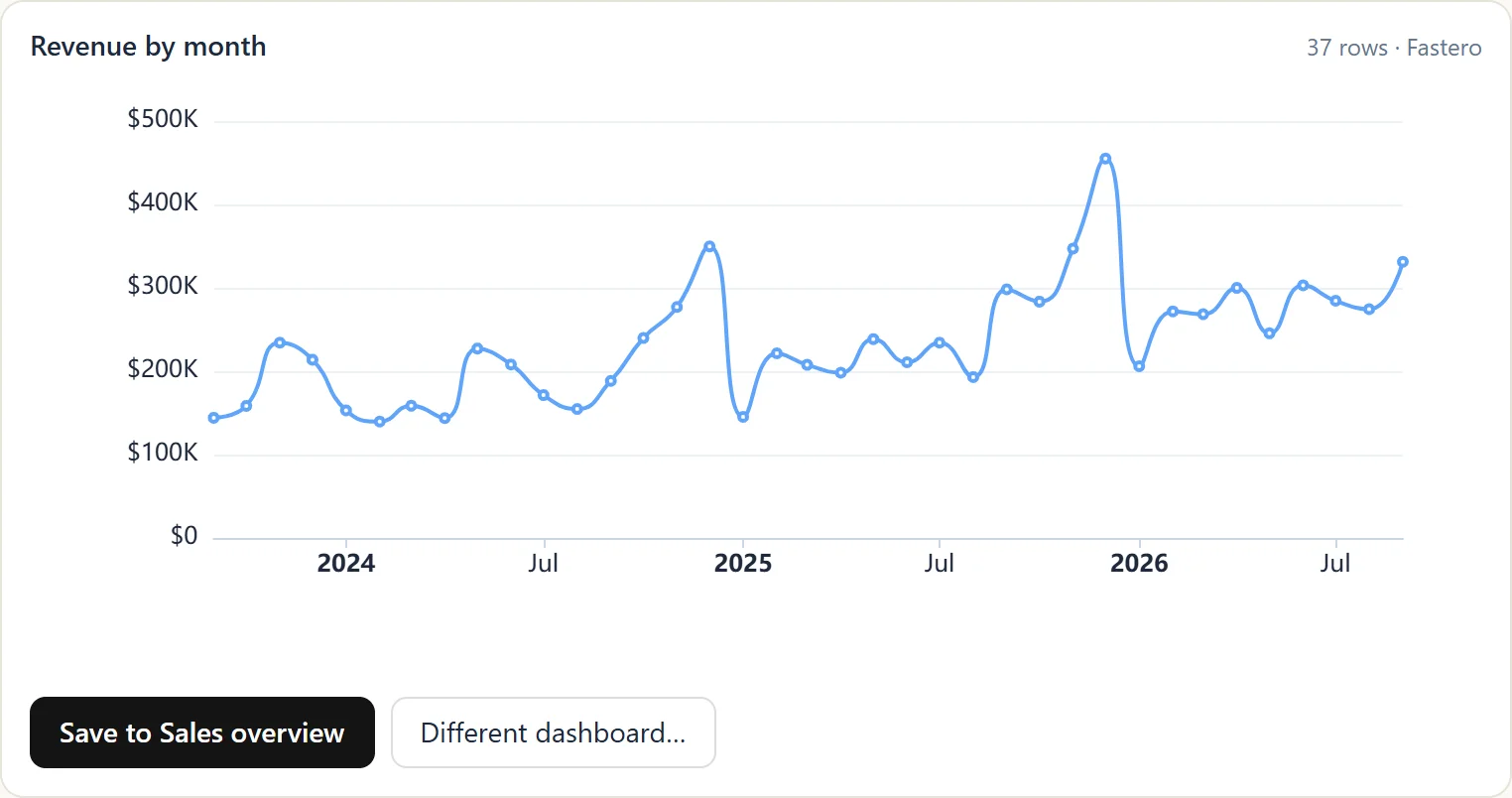
A chart Claude drew in the conversation through the Fastero connector; one click saves it to a dashboard. Sample data.
The access model is built for letting an agent near production data. Each key is bound to one organization and can never do more than your role there allows. A new key reads and runs SQL by default; writing, deleting, running compute, setting secrets and sharing are separate scopes you switch on deliberately. Claude can set a secret for an app but can never read one back. Keys expire within 90 days, and you are warned before they do.
Setup is one command:
claude mcp add --scope user --transport http fastero \
  https://api.fastero.com/api/v1/mcp \
  --header "Authorization: Bearer fst_pat_..."
You get the key and the command from Settings > Developers > AI Agent Access inside Fastero. On claude.ai, add the same URL as a custom connector and sign in. Multi-org setups use separate keys with different names — fastero-acme, fastero-globex — so Claude can work across organizations in one conversation. More on the Fastero MCP server page.
Best for: Teams that want the AI to do more than query — build the dashboard, deploy the app, schedule the refresh and share it — in one workspace with proper access control.
Fastero
Connect your database. Ask questions. Get dashboards.
Postgres, BigQuery, Snowflake, and 10+ sources — live-connected, AI-powered, no dashboard builder learning curve.
Try free →MCP Toolbox for Databases (Google)
Google's open-source MCP server for databases. One server connects Claude to Postgres, MySQL, BigQuery and a long list of other databases, and it is actively maintained — which is exactly what the original reference servers (below) are not.
You run it yourself and point it at your database, so the security model is whatever database user you give it. Give it a read-only role.
Best for: Developers on self-managed Postgres or MySQL who want a maintained, general-purpose database server. For MySQL, this is the practical choice: Oracle's own MySQL MCP server targets HeatWave and MySQL AI and says it is not intended for production use.
BigQuery MCP (Google, hosted)
Google runs an official remote MCP server for BigQuery. Claude signs in with OAuth — as a user or a service account — explores datasets and runs read-only SQL. Results are capped at 3,000 rows, which keeps an over-eager agent from pulling a whole table into its context.
On-demand BigQuery pricing bills by bytes scanned, so watch what Claude runs: a careless SELECT * on a multi-terabyte table gets expensive. Set cost controls on the project.
Best for: BigQuery-native teams who want AI access to the warehouse without running a server.
Neon MCP
Neon is serverless Postgres with instant branching, and its MCP server leans on that: Claude can create and delete branches, run SQL and compare schemas between branches. Let it try a risky ALTER TABLE on a branch, check the result, and throw the branch away.
Neon's own guidance is to use MCP for development and testing, not production environments — a sensible line for any database server.
Best for: Teams already on Neon who want branch-safe exploration during development.
Supabase MCP
Supabase's server signs in with OAuth or a personal access token and gives Claude SQL, table and migration management, and project logs. Storage tools exist but are off by default and cover listing buckets and storage settings, not reading your files.
Best for: Teams building on Supabase who want Claude to work with the project — schema, migrations, logs — not just the Postgres underneath.
MotherDuck MCP
MotherDuck is cloud DuckDB, and its hosted MCP server is the analytical option on this list: aggregations, window functions and large scans on DuckDB's columnar engine. It separates a read-only query tool from a query_rw tool that can change data, and it can search for tables and columns before writing SQL. OAuth is the default; a token works for clients that need one.
Best for: Teams using MotherDuck for analytics. See our DuckDB vs SQLite comparison for when DuckDB is the right engine.
Avoid: the archived reference servers
Many tutorials still tell you to run npx @modelcontextprotocol/server-postgres or the matching SQLite server. Don't.
Both were archived by the MCP project on 29 May 2025 and get no security updates. Datadog Security Labs showed that the Postgres server's read-only mode can be escaped by sending a COMMIT followed by a write, and the fix never reached npm: the last published version, 0.6.2 from December 2024, is marked "no longer supported" — and was still downloaded 106,377 times in the week to 26 September 2026. Trend Micro reported a SQL injection in the SQLite server that lets an attacker plant instructions for the AI; the code has been copied thousands of times and no patch is planned.
If your setup uses either, switch to a maintained server from this list.
How to choose
Start with what you already use. Neon users get branching from the Neon server. Supabase teams get migrations and logs from the Supabase server. BigQuery teams can use Google's hosted server with no infrastructure. Self-managed Postgres or MySQL: MCP Toolbox.
Need more than SQL? If you want Claude to build dashboards, deploy apps, set up scheduled refreshes, or work across multiple data sources — you need a workspace server like Fastero, not a database-specific one. A database server runs queries. Fastero runs the query, builds the dashboard from the result, schedules it to refresh, and shares it with your team.
Security matters. A self-hosted database server runs as whatever database user you configure, so a superuser connection gives Claude superuser access. Hosted servers sign in with OAuth and act as you. Fastero adds per-org keys scoped to your role, opt-in scopes for anything destructive, write-only secrets, and 90-day expiry — granular control over what the AI can and cannot do.
You can run several servers. Nothing stops you from connecting Fastero for dashboards and a database server for ad-hoc queries in the same Claude session. MCP tools are namespaced by server name, so there are no conflicts. Start with one, add more when you need them.
What MCP changes for data teams
The pattern before MCP: export data, upload CSV, describe schema in a prompt, paste results back. Every step is a chance to lose context, make an error, or work with stale data.
The pattern with MCP: Claude reads your schema, queries your live data, and builds on top of real results. The data is current because it comes from your database, not last Tuesday's export. And once a query is saved — as a dashboard, a report or a scheduled alert — it returns the same answer on the same data every time, instead of depending on the model writing the SQL the same way twice.
That connection, plus somewhere to keep what the AI built, is what turns a chat-with-your-data toy into something a team can rely on.
Sources
Checked on 27 September 2026:
- Archived reference servers — modelcontextprotocol/servers-archived; npm status and weekly downloads — api.npmjs.org
- Postgres read-only bypass — Datadog Security Labs, 21 August 2025
- SQLite SQL injection — Trend Micro, 24 June 2025
- MCP Toolbox for Databases — github.com/googleapis/mcp-toolbox; Oracle MySQL MCP server — README
- BigQuery MCP — Google Cloud docs
- Neon MCP — neon.com/docs/ai/neon-mcp-server
- Supabase MCP — supabase.com/docs/guides/getting-started/mcp
- MotherDuck MCP — motherduck.com/docs, MCP setup
Try Fastero free — connect your database and let Claude build dashboards, deploy apps and schedule reports through 70+ MCP tools, with org-level auth and role-based scopes. No credit card required.