 Fastero Dev Team
An MCP server for SQL Server lets Claude read your tables and answer questions from them: "which customers ordered less this quarter than last?", answered from the data rather than a guess. Microsoft has shipped three different things with "SQL" and "MCP" in the name, deleted the one most tutorials still link to, and only one of the remaining ones reads data. This guide sorts them out.
The short answer: Microsoft's official server is SQL MCP Server, part of the free, open-source Data API builder. It became generally available with version 2.0 in June 2026 and gives Claude typed tools over the tables and views you list. By design it doesn't run free-form SQL or join tables. For free-form, read-only SQL, use a community server with a read-only mode, such as DBHub, Google's MCP Toolbox or mssql_mcp_server, or a hosted connector such as Fastero. Whichever you pick, connect it with a login that is a member of db_datareader and nothing more. Avoid the old "MSSQL MCP Server" sample: Microsoft removed it in June 2026 as an unsafe example.
Fastero
Point Claude at your database.
Add Fastero to claude.ai or Claude Code. Claude builds the dashboard, deploys the app or publishes a live page, and your team opens it in Fastero.
Try free →Which SQL Server MCP server to use
| Server | Made by | How Claude reads data | Writes | Good for |
|---|---|---|---|---|
| SQL MCP Server (Data API builder) | Microsoft, open source | Typed tools over tables, views and stored procedures you list in a config file; no free-form SQL, no joins | Create, update and delete tools on by default; switch them off | Agents that should only touch named tables, in a controlled way |
| DBHub | Bytebase, open source | Free-form SQL on SQL Server, Postgres, MySQL and others | Read-only mode, row limits and query timeouts | One local server for several databases |
| MCP Toolbox for Databases | Google, open source | Prebuilt list_tables and execute_sql tools; supports SQL Server |
Depends on the login you give it | Teams already using it for other databases |
| mssql_mcp_server | Community, open source | A query tool that accepts only SELECT and WITH |
Off unless you set MSSQL_ALLOW_WRITES=1 |
Claude Desktop with SQL or Windows authentication |
| Fastero | Fastero | Read-only SQL in SQL Server's own dialect, with charts and saved dashboards | Refuses any statement that could change data | Teams that want answers colleagues can open without Claude |
What happened to Microsoft's MSSQL MCP Server
Many guides still point to "MSSQL MCP Server", a Node and .NET sample in Microsoft's Azure-Samples/SQL-AI-samples repository. Microsoft deleted it on 3 June 2026 in a pull request titled "Removed unsafe MCP sample". The pull request explains: "This demo has been scrubbed from our blogs, but this folder continues to pop up for customers leading them down the wrong road for developing MCP solutions." Its blog post now returns a 404. The sample was read-write by default and included tools to create and drop tables. If a setup guide tells you to clone it, look for a newer guide.
Two Microsoft tools that don't query your data
- Azure MCP Server's SQL tools manage Azure SQL resources: in Microsoft's words, "The Azure MCP Server lets you manage Azure SQL Database resources, including creating, deleting, updating, and listing databases, with natural language prompts." They create servers, rename databases and edit firewall rules. None of them reads a table.
- The MSSQL extension for VS Code gives GitHub Copilot tools such as
run_queryinside VS Code. They belong to Copilot in VS Code, and there is no documented address that Claude can connect to.
Step 1: give Claude a login that can only read
This is the control that holds whatever the server or the model does. On SQL Server, create a login and a database user, and add the user to db_datareader:
CREATE LOGIN claude_readonly WITH PASSWORD = 'a-long-random-password';
GO
USE Sales;
GO
CREATE USER claude_readonly FOR LOGIN claude_readonly;
ALTER ROLE db_datareader ADD MEMBER claude_readonly;
ALTER ROLE db_denydatawriter ADD MEMBER claude_readonly;
Microsoft's docs describe the first role plainly: "Members of the db_datareader fixed database role can read all data from all user tables and views." db_denydatawriter blocks writes even if someone later grants more by mistake. On Azure SQL Database, run CREATE USER claude_readonly WITH PASSWORD = '...'; inside the database instead of creating a server login.
If some tables hold data Claude shouldn't see, such as salaries or personal details, skip db_datareader and GRANT SELECT on the specific tables or on views that leave those columns out.
Option A: Microsoft's SQL MCP Server
SQL MCP Server is a feature of Data API builder (DAB). You describe which tables, views and stored procedures it may use in a JSON file, and it exposes seven tools to Claude: describe_entities, read_records, aggregate_records, create_record, update_record, delete_record and execute_entity. "Data API builder is open source and free to use."
It is deliberately narrow. Microsoft says: "A key example is that SQL MCP Server intentionally doesn't support NL2SQL." Claude can't write its own query; it calls read_records with a filter, a sort and a limit, one table or view at a time ("As a result, JOIN operations aren't supported in this tool."). For anything that joins tables, create a view or a stored procedure and list that. It doesn't change schemas either: "As a result, SQL MCP Server is designed to work with data, not schema."
Set it up with the .NET 9 SDK and SQL Server 2016 or later:
dotnet new tool-manifest
dotnet tool install microsoft.dataapibuilder
dotnet tool restore
Point it at your database through an environment variable and add a table with read-only permission:
dab init --database-type mssql --connection-string "@env('MSSQL_CONNECTION_STRING')" --host-mode Development --config dab-config.json

dab add Products --source dbo.Products --permissions "anonymous:read" --description "Toy store products with inventory, price, and cost."
Descriptions matter more than they look: describe_entities returns your names and descriptions but no data types, so give each field a description (dab update Products --fields.name Price --fields.description "Retail price") or Claude may guess column names wrong.
To make the server read-only at the tool level as well, switch the write tools off in dab-config.json; tools switched off disappear from the list Claude sees:
{
  "runtime": {
    "mcp": {
      "dml-tools": {
        "describe-entities": true,
        "create-record": false,
        "read-records": true,
        "update-record": false,
        "delete-record": false,
        "execute-entity": false,
        "aggregate-records": true
      }
    }
  }
}
Then add it to Claude Desktop's claude_desktop_config.json, using Microsoft's documented entry:
{
  "mcpServers": {
    "sql-mcp-server": {
      "type": "stdio",
      "command": "dab",
      "args": [
        "start",
        "--mcp-stdio", "role:anonymous",
        "--config", "{path}/dab-config.json",
        "--LogLevel", "error"
      ]
    }
  }
}
Mind one default if you later run it over HTTP: "Starting in DAB 2.0, the default authentication provider is Unauthenticated." Every request is then treated as anonymous, so grant the anonymous role only what you would show anyone who can reach the address, or configure Entra ID sign-in.
Point Claude at your database.
Connect Claude →Option B: a community server for free-form SQL
If you want Claude to write its own SQL, joins and all, a community server is the simpler route.
mssql_mcp_server is read-only by default: its query tool accepts only SELECT and WITH, and writes need MSSQL_ALLOW_WRITES=1. Despite its package name, microsoft-sql-server-mcp, it is a community project, not Microsoft's. In claude_desktop_config.json:
{
  "mcpServers": {
    "mssql": {
      "command": "uvx",
      "args": ["--from", "microsoft-sql-server-mcp", "mssql_mcp_server"],
      "env": {
        "MSSQL_SERVER": "localhost",
        "MSSQL_DATABASE": "your_database",
        "MSSQL_USER": "your_username",
        "MSSQL_PASSWORD": "your_password"
      }
    }
  }
}
Use the claude_readonly login from Step 1 as the user. For Windows authentication, replace the user and password with "MSSQL_WINDOWS_AUTH": "true". For Azure SQL, set MSSQL_ENCRYPT=true.
DBHub, from Bytebase, covers SQL Server alongside Postgres, MySQL, Oracle and SQLite, with a read-only mode, row limits and query timeouts. Google's MCP Toolbox for Databases has a SQL Server source and is a good fit if you already use it elsewhere. Both run on your machine, so in Claude they work through Claude Desktop or Claude Code, not claude.ai.
Option C: a hosted connector that works in claude.ai
A server on your laptop works only in Claude Desktop and Claude Code on that machine. To ask questions from claude.ai or your phone, or to share results with colleagues, use a hosted connector. In Fastero you add SQL Server once, from the connection form: host, port, database and the read-only login. Turn on Encrypt connection for Azure SQL. The panel beside the form lists the addresses to allow if your server uses an IP allowlist, and a switch connects through an SSH bastion if the database isn't public.
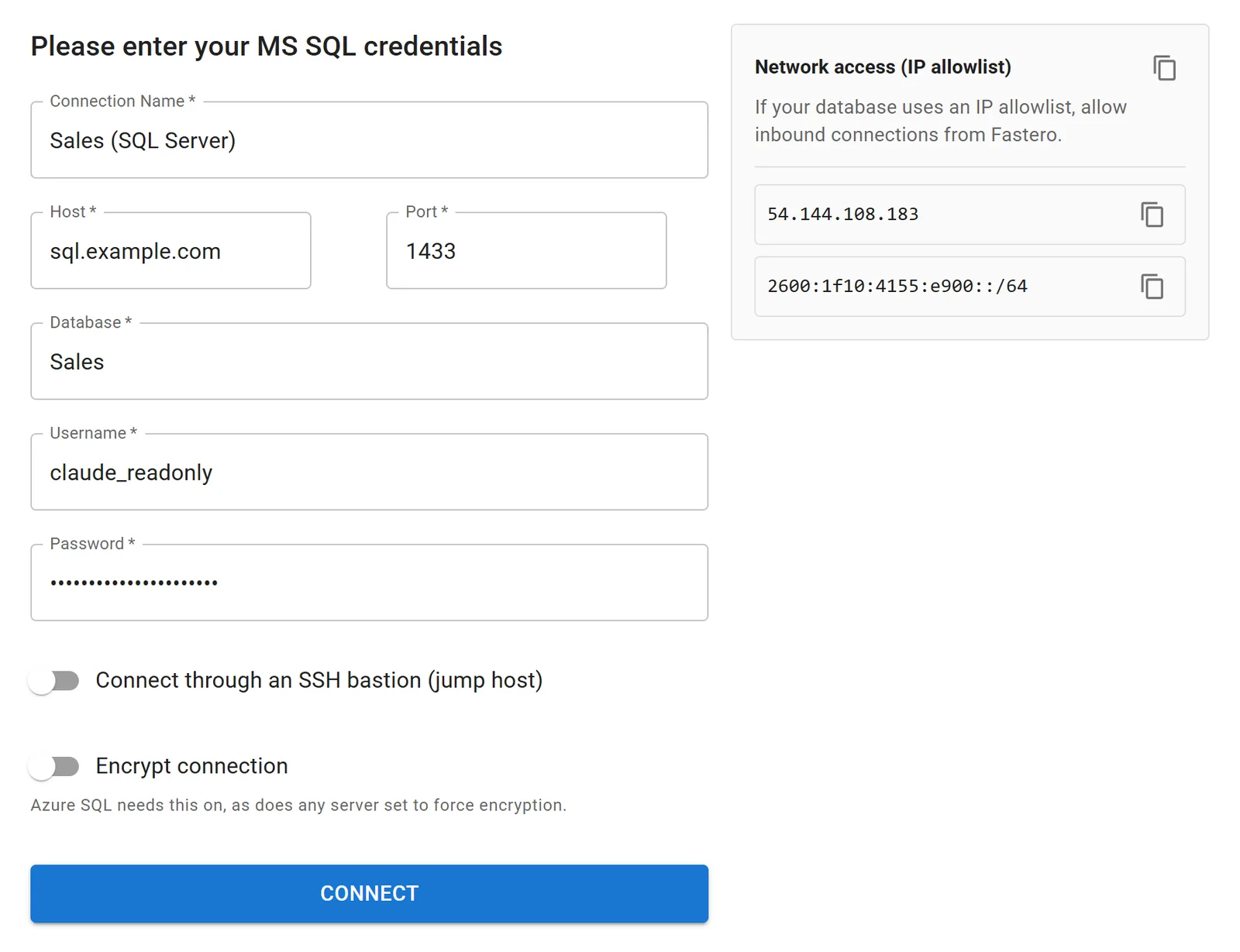
Adding SQL Server to a Fastero workspace with a read-only login. Example values.
Then add Fastero to Claude from its connector directory (Customize › Connectors, search for Fastero, Connect). Claude can then list the tables, read the metric definitions your team has saved, and run SQL in SQL Server's own dialect. Fastero refuses any statement that could change data before it reaches the database, and returns at most 500 rows per query, so a careless SELECT * can't pull a whole table into the chat. Keep the read-only login anyway: two independent checks are better than one.
A chart Claude draws can go straight onto a Fastero dashboard. Colleagues open it with their own login, without Claude, and it refreshes from SQL Server on a schedule.
Ask it something
Start with questions whose answers you already know, to check Claude reads your tables the way you do:
- "List the tables in the Sales database and what each one seems to hold."
- "How many orders shipped last month, and what was the revenue? Show the query you used."
- "Chart monthly revenue by region for the last 12 months."
Then check one number against a report you trust before you rely on the rest.
Keep it safe: a checklist
- A read-only login first, in
db_datareaderanddb_denydatawriter, or withSELECTgranted on specific tables only. - Only the tables Claude needs. Use views to leave out salaries, personal data and secrets.
- A server with its own read-only mode switched on, as a second layer.
- Don't expose a server without sign-in. DAB 2.0 treats callers as anonymous by default; a local server's HTTP mode may have no token unless you set one.
- Watch for instructions hidden in data. A row of text can carry instructions the model may follow. Keep a database server away from tools that can send data out, such as email, in the same session, and read what Claude runs.
FAQ
Is there an official Microsoft SQL Server MCP server?
Yes: SQL MCP Server, part of Data API builder, generally available since version 2.0 in June 2026. It gives an agent typed tools over tables and views you list, rather than free-form SQL.
What happened to the MSSQL MCP Server in Azure-Samples?
Microsoft deleted it on 3 June 2026 in a pull request titled "Removed unsafe MCP sample", and its blog post is gone. Use SQL MCP Server, a maintained community server, or a hosted connector instead.
Can Claude run any SQL query on SQL Server?
Not through Microsoft's SQL MCP Server, which doesn't accept free-form SQL or joins. Community servers such as mssql_mcp_server and DBHub, and hosted connectors such as Fastero, let Claude write SELECT queries, including joins.
How do I make a SQL Server MCP server read-only?
Connect it with a login in db_datareader and db_denydatawriter. Then also use the server's own setting: switch off the write tools in Data API builder, or leave MSSQL_ALLOW_WRITES unset in mssql_mcp_server.
Does the Azure MCP Server let Claude query Azure SQL?
No. Its SQL tools manage resources: servers, databases and firewall rules. To read data in Azure SQL, use one of the servers above with encryption turned on.
Does it work with Azure SQL, on-premises SQL Server and SQL Server in Docker?
Yes. Data API builder supports SQL Server 2016 and later, including LocalDB and Docker. Community servers connect to anything you can reach with a connection string. A hosted connector needs the server reachable from the internet, through an allowlist or an SSH bastion.
Related reading:
- Postgres MCP server
- MySQL MCP server
- SQL MCP servers for every database
- Connect SQL Server to AI dashboards and agents
- claude_desktop_config.json: add MCP servers to Claude Desktop
- MCP security
Sources: SQL MCP Server overview, SQL MCP Server tools, quickstart in VS Code, stdio and Claude Desktop, authentication, what's new in Data API builder 2.0, removal of the MSSQL MCP sample, Azure MCP Server SQL tools, MSSQL extension agent mode, database-level roles, mssql_mcp_server, DBHub, MCP Toolbox for Databases. Checked 5 November 2026.
Try Fastero free — connect SQL Server with a read-only login, then let Claude query it and build dashboards your team opens without Claude. No credit card required.