 Fastero Dev Team
Most pages about Claude's upload limits say 30 MB, and some still say 5 files a message. Anthropic raised the chat limit in April 2026, one of its own help pages still gives the old figure, and the megabyte limit is often not what stops you. We uploaded test files to claude.ai on the Free plan to see what actually happens.
The short answer: in a claude.ai chat, on the web, desktop or mobile apps, a file can be up to 500 MB and a chat can hold up to 20 files. PDFs can run to 1,000 pages and images to 8000×8000 pixels. Files added to a Project are limited to 30 MB each. In our test, claude.ai accepted a 32 MB CSV of 781,561 rows on the Free plan and Claude answered from it correctly, and it refused a 530 MB file as "over the 500 MB limit." A file under the limit can still fail if its text is longer than Claude's context window; data files avoid that when Claude analyses them with code instead of reading them.
Fastero
Point Claude at your database.
Add Fastero to claude.ai or Claude Code. Claude builds the dashboard, deploys the app or publishes a live page, and your team opens it in Fastero.
Try free →The limits
| Where | Limit | Anthropic's wording |
|---|---|---|
| Chat: size per file | 500 MB | "File size: 500MB per file" |
| Chat: number of files | 20 per chat | "Number of files: Up to 20 files per chat" |
| Chat: PDFs | 1,000 pages; pictures read only in the first 100 | "PDFs are limited to 1000 pages" |
| Chat: images | 8000×8000 pixels | "Image dimensions: Up to 8000x8000 pixels" |
| Project: size per file | 30 MB | "File size: 30MB per file" |
| Project: number of files | Unlimited, within the context window | "total content must fit within Claude's context window" |
| Excel files | Code execution must be on | "You must enable code execution and file creation in your account to upload XLSX files." |
| API: Files API | 500 MB a file, 1 TB per organisation | "500 MB for each file" |
| API: one request | 128 MB, up from 32 MB on 28 October 2026 | "from 32 MB to 128 MB on the first-party Claude API" |
The supported document types are PDF, DOCX, CSV, TXT, HTML, ODT, RTF, EPUB, JSON and XLSX. Anthropic doesn't list different upload limits for Free, Pro, Max, Team and Enterprise.
What we saw uploading files to claude.ai
We made test files of invented sales data (date, region, product, units and revenue) and uploaded them to a claude.ai chat on the Free plan, on 6 November 2026, with Claude Sonnet 5.5.
A 32 MB CSV, 781,561 rows: accepted, and answered correctly. We asked for total revenue by region. Claude "Ran 3 commands, read a file" and returned a table whose eight totals, and the grand total of 1,179,277,219.34, matched our own pandas sums to the cent. As text, that file is roughly eight million tokens, far more than any context window, so Claude can only have read it with code in its sandbox.
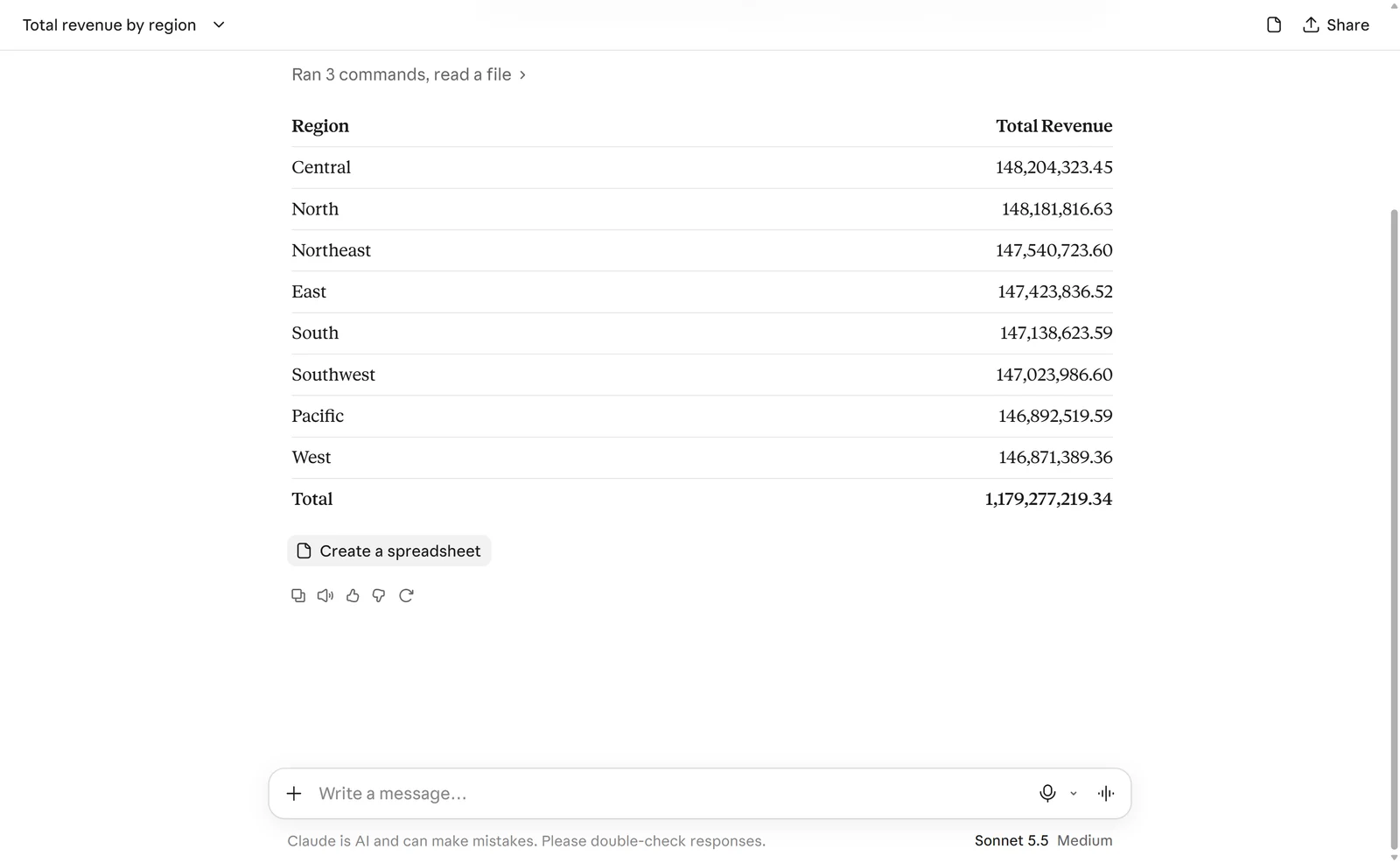
A 32 MB CSV in a Free claude.ai chat. Claude analysed it with code and its totals matched ours to the cent. Invented data.
A 530 MB CSV: refused before upload. The file card turned red with "Too large to send", and a notice read: "over-500MB.csv" is 530 MB, over the 500 MB limit. Choose a smaller file.
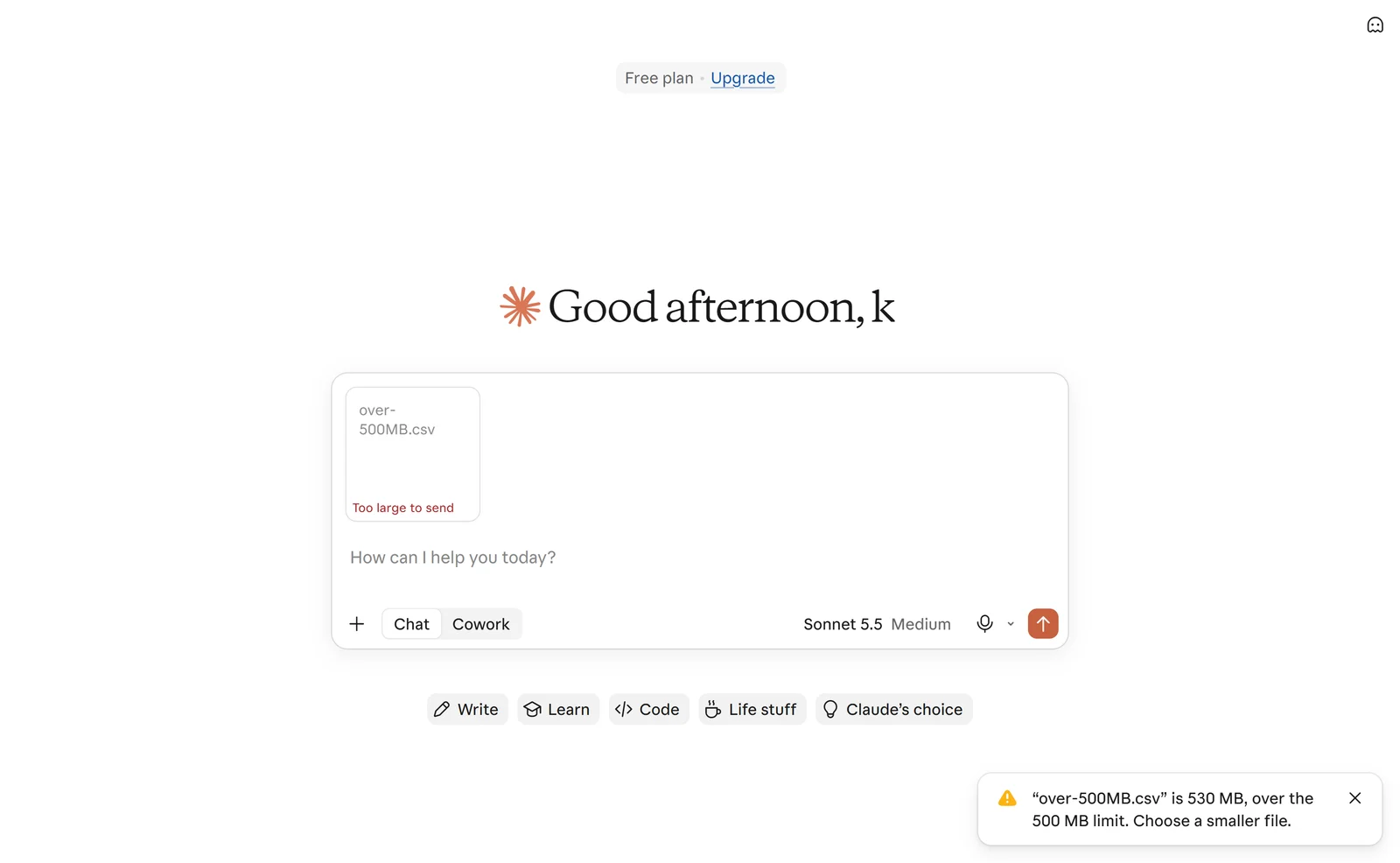
What claude.ai shows for a file over the limit.
The same 781,561 rows as Parquet (2.6 MB): accepted, but slowly. Parquet isn't on Anthropic's list of document types, but the upload went through. Claude then wrote: "no parquet library is installed and there's no network, so I'm reading the file's footer by hand", built its own decoder, and about a minute later returned the same correct totals. It worked, but CSV is the safer format to give claude.ai.
Two official pages disagree
Anthropic's "Upload files to Claude" article gives 500 MB per file in a chat. Its "Create and edit files with Claude" article, updated on 5 November 2026, still says: "The maximum file size is 30MB per file for both uploads and downloads." Copies of the upload article in the Wayback Machine show the change: 30 MB on 21 April 2026, 500 MB on 23 April 2026, with no release note. Our test sides with the 500 MB figure for chats; files added to a Project are still limited to 30 MB.
Why a file under the limit can still fail
The 500 MB figure is about bytes; Claude's context window is about text. On paid plans, "the newest models support up to a 1M token context window, while others support 500K or 200K tokens", and part of that is kept for Claude's answer. Anthropic adds: "Additional token limits may apply based on the length of extracted content."
So a long PDF or a big document can be well under 500 MB and still be too much to read. When that happens, claude.ai shows: "Your message will exceed the length limit for this chat. Try attaching fewer or smaller files or starting a new conversation." Anthropic's own advice for large documents is to split them: "consider dividing them into smaller sections to stay within limits."
Data files are different when code execution is on, as it is on every plan: Claude can open a CSV in its sandbox and compute over it, which is how a file of eight million tokens got a correct answer above. Anthropic says the same of PDFs larger than 30 MB: Claude "can process them through its computing environment without loading them into the context window." Projects work the other way: their files are text-extracted into the context, which is why a Project holds only what fits.
A few related limits worth knowing:
- Projects: 30 MB a file; the free plan allows five projects; paid plans add retrieval that can expand a project's capacity "by up to 10x".
- Google Drive: Claude reads Drive files as text only, and "the files must fit within the conversation's context window", so Drive isn't a way round the limit.
- Excel: XLSX uploads need code execution and file creation switched on in your settings.
Point Claude at your database.
Connect Claude →What to do when your data is too big
- Aggregate or sample first. A table of monthly totals answers most questions a 12-million-row file would, at a fraction of the size.
- Upload a CSV and ask for code. Prompt Claude to analyse the file with code rather than read it; with code execution on, size matters far less than it does for reading.
- Use a compact format, with care. The same rows were 32 MB as CSV and 2.6 MB as Parquet, but claude.ai's sandbox had no Parquet library in our test.
- Leave the data where it lives. Put it in a database, or keep it in the one it's already in, and connect Claude so it queries the data instead of uploading it. Then only the answer travels.
- Use the API for files up to 500 MB, through the Files API and the code execution tool.
Let Claude query the data instead
Uploading a file gives Claude a copy that ends when the chat does. When the data is a company's, in a database, the better pattern is to let Claude ask the database and bring back only the answer.
Fastero is an AI and data platform where people and AI agents work together on a team's data. Through its connector, Claude runs read-only SQL on the team's connected databases (Postgres, MySQL, SQL Server, BigQuery, Snowflake and others) and gets back rows, at most 500 per query, so a question about a table of millions of rows comes back as an answer, not a file. A file too big for a chat can go into a Fastero project, up to 100 MB in the web app, and become a table Claude queries with SQL. Results can show as charts inside Claude, and be saved to a dashboard the team can open.
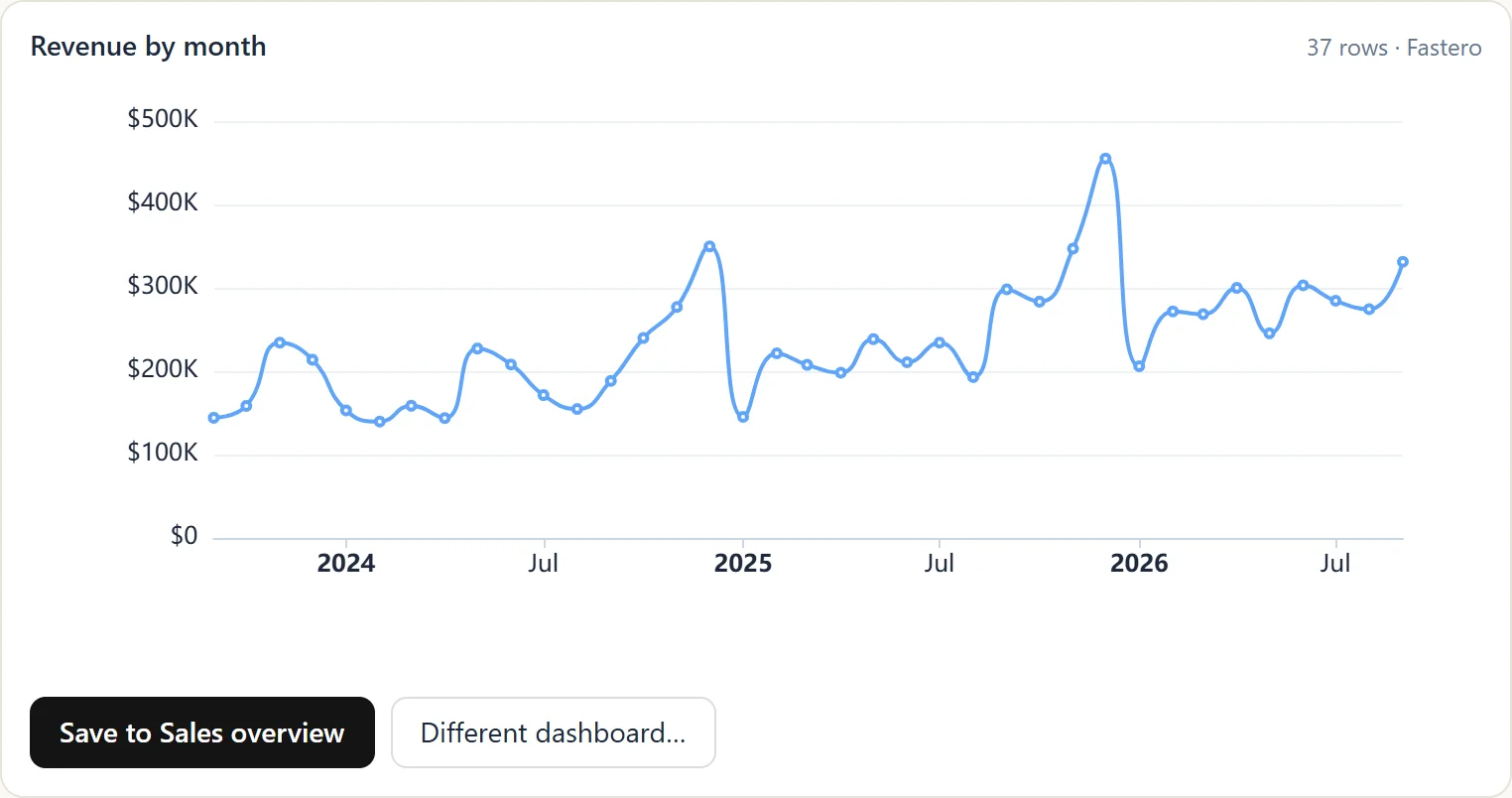
A chart Claude made from a Fastero query: 37 rows came back, not the table. Sample data.
More on Claude connectors and the best Claude connectors for data analysis.
FAQ
What is the file upload limit for Claude?
In a claude.ai chat, 500 MB per file and up to 20 files per chat; PDFs up to 1,000 pages and images up to 8000×8000 pixels. Files in a Project are limited to 30 MB each.
How many files can I upload to Claude at once?
Anthropic's limit is 20 files per chat. Third-party pages report a separate message about 100 files, which Anthropic doesn't document.
Why does Claude say my file is too large when it's under 500 MB?
Usually because its text is longer than the context window. Claude shows "Your message will exceed the length limit for this chat." Split the file, upload a summary, or, for data, ask Claude to analyse it with code.
Can Claude read a large CSV file?
Yes, with code execution on. In our test, Claude analysed a 32 MB CSV of 781,561 rows on the Free plan and its totals matched ours to the cent.
Does Claude Pro have a bigger upload limit than the free plan?
Anthropic lists the same upload limits for every plan. Paid plans get larger context windows on the newest models and retrieval in Projects.
Can I upload Excel files to Claude?
Yes, with code execution and file creation switched on in your settings. Claude reads XLSX files with code.
Can Claude read Parquet files?
claude.ai accepted a Parquet file in our test, but its sandbox had no Parquet library, so Claude decoded the file by hand. It got the right answer, slowly. CSV is safer; the API's code execution container includes pyarrow.
What's the difference between uploading to a chat and to a Project?
A chat takes files up to 500 MB, which Claude can analyse with code. A Project takes files up to 30 MB, extracts their text into the context, and keeps them for every chat in the Project.
Sources
Read on 6 November 2026:
- Anthropic Help Center — Upload files to Claude, Create and edit files with Claude, Usage and length limits, Context window size, Error messages, RAG for Projects, Google Workspace connectors
- Claude platform docs — Files API, API overview, Release notes, Code execution tool
- Wayback Machine copies of the upload article, 21 April 2026 and 23 April 2026
- Our own tests in claude.ai, 6 November 2026
Try Fastero free — connect Claude to your team's databases so it queries the data instead of uploading it. No credit card required.