
Connecting Claude to BigQuery is easier than for any other database: Google runs an official MCP server, and Claude's connector directory lists it. The part that needs thought is cost. BigQuery's on-demand pricing charges for the data a query reads, so an AI that writes SELECT * on a multi-terabyte table can spend real money answering a simple question.
The short answer: on claude.ai, add the Google Cloud BigQuery connector from Claude's directory — it is made by Google and runs Google's hosted BigQuery MCP server, with results capped at 3,000 rows and queries stopped after three minutes. Give the account it uses BigQuery Data Viewer on the datasets Claude should see and BigQuery Job User on the project, and set a custom daily quota on bytes processed, because the hosted server has no per-query cost cap. If you run a server yourself, Google's MCP Toolbox and the open-source mcp-bigquery-server can refuse a query that would read more than a set number of bytes.
Which BigQuery MCP server to use
| Server | Who makes it | Where it runs | Writes | How to cap what a query costs |
|---|---|---|---|---|
| Google BigQuery MCP | Hosted by Google; in Claude's directory as Google Cloud BigQuery | A separate execute_sql_readonly tool; write tools can be blocked with an IAM deny policy |
A daily quota on the project | |
| MCP Toolbox for Databases | Google, open source | Your machine or a server | BIGQUERY_WRITE_MODE=blocked allows only SELECT |
BIGQUERY_MAXIMUM_BYTES_BILLED per query |
| mcp-bigquery-server (ergut) | Open source | Your machine | Read-only by design; each query is checked with a dry run | 1 GB per query by default |
| mcp-server-bigquery (LucasHild) | Open source | Your machine | Not enforced in its code | A daily quota on the project |
| Claude Dashboards | Anthropic | Inside Claude (beta on paid plans) | Builds charts from queries | A daily quota on the project |
| Fastero | Fastero | Hosted: a claude.ai connector, or a key for Claude Code | Refused before they reach BigQuery | A daily quota on the project |
Google's BigQuery MCP server
Google announced managed MCP servers in December 2025, with BigQuery among the first. The server lives at https://bigquery.googleapis.com/mcp and is switched on with the BigQuery API. It gives Claude six tools: list datasets, list tables, read a dataset's and a table's details, and run SQL — either execute_sql or execute_sql_readonly, which refuses inserts, updates, deletes and DDL. Every query is cancelled after three minutes, and a result returns at most 3,000 rows.
On claude.ai, add it from the connector directory, where it is listed as Google Cloud BigQuery, made by Google, and sign in with your Google account. To use it as a custom connector instead, you need your own Google OAuth client with https://claude.ai/api/mcp/auth_callback as its redirect URI. A Google Cloud administrator can block the write tools for the whole organisation with an IAM deny policy on tools that aren't marked read-only.
Fastero
Point Claude at your database.
Add Fastero to claude.ai or Claude Code. Claude builds the dashboard, deploys the app or publishes a live page, and your team opens it in Fastero.
Try free →Step 1: Give Claude the smallest access that works
Two BigQuery roles are enough to read data and run queries:
- BigQuery Data Viewer (
roles/bigquery.dataViewer) reads tables. Grant it on the datasets Claude should see, not on the whole project — it can be granted per dataset or even per table. - BigQuery Job User (
roles/bigquery.jobUser) runs queries. It can only be granted on a project, folder or organisation; grant it on the project that pays for the queries. - Google's hosted server also needs MCP Tool User (
roles/mcp.toolUser).
Use a separate service account, or a person's account with only these roles, rather than an owner's.
Step 2: Cap what a query can cost
BigQuery estimates how much data a query will read before it runs, and three controls act on that estimate:
- Maximum bytes billed, per query. If a query would read more, it fails without a charge. Set it in the console (Query settings → Advanced options), with
bq query --maximum_bytes_billed, or in the server's settings: Toolbox'sBIGQUERY_MAXIMUM_BYTES_BILLED, ormcp-bigquery-server's--maximum-bytes-billed. - Custom daily quotas, per project or per user. Once the bytes processed in a day reach the quota, no more queries run that day. This is the backstop for Google's hosted server, which documents no per-query limit.
- Dry runs, which return the estimate without running the query — useful to show Claude before it runs something big.
Two habits cut the bill further. Ask for the columns you need: BigQuery reads whole columns, so SELECT * reads every one of them. And remember that LIMIT doesn't reduce what a query reads — SELECT * … LIMIT 10 scans the same data as without it. Partitioned tables, filtered on their partition column, read only the partitions they need.
Step 3: Connect a server you run yourself
Google's MCP Toolbox, in Claude Code's .mcp.json or Claude Desktop's claude_desktop_config.json, from Google's documentation:
{
  "mcpServers": {
    "bigquery": {
      "command": "./PATH/TO/toolbox",
      "args": ["--prebuilt", "bigquery", "--stdio"],
      "env": {
        "BIGQUERY_PROJECT": "PROJECT_ID"
      }
    }
  }
}
Add "BIGQUERY_WRITE_MODE": "blocked" and "BIGQUERY_MAXIMUM_BYTES_BILLED": "10000000000" (10 GB) to env to make it read-only and cap each query.
mcp-bigquery-server, read-only with a 1 GB cap out of the box:
{
  "mcpServers": {
    "bigquery": {
      "command": "npx",
      "args": ["-y", "@ergut/mcp-bigquery-server", "--project-id", "your-project-id"]
    }
  }
}
Both sign in with your Google credentials on the machine, such as gcloud auth application-default login or a service account key.
Through Fastero: BigQuery for the whole team
Fastero connects to BigQuery with a Google sign-in or a service account key, set up once in Fastero by whoever owns the data. Claude then reaches it through Fastero's connector: on claude.ai, add https://api.fastero.com/api/v1/mcp as a custom connector and sign in; in Claude Code, use a key from Settings → AI Agent Access:
claude mcp add --scope user --transport http fastero https://api.fastero.com/api/v1/mcp --header "Authorization: Bearer fst_pat_..."Claude's SQL tool runs one SELECT, WITH, EXPLAIN or SHOW statement in BigQuery's own SQL and refuses anything that could change data. Claude reads at most 500 rows or about 100 KB of a result. The difference from a direct connection comes after the answer: a chart Claude draws can go onto a dashboard in Fastero that colleagues open with their own login — without a Claude account and without access to BigQuery — and the dashboard can be emailed as a PDF on a schedule.
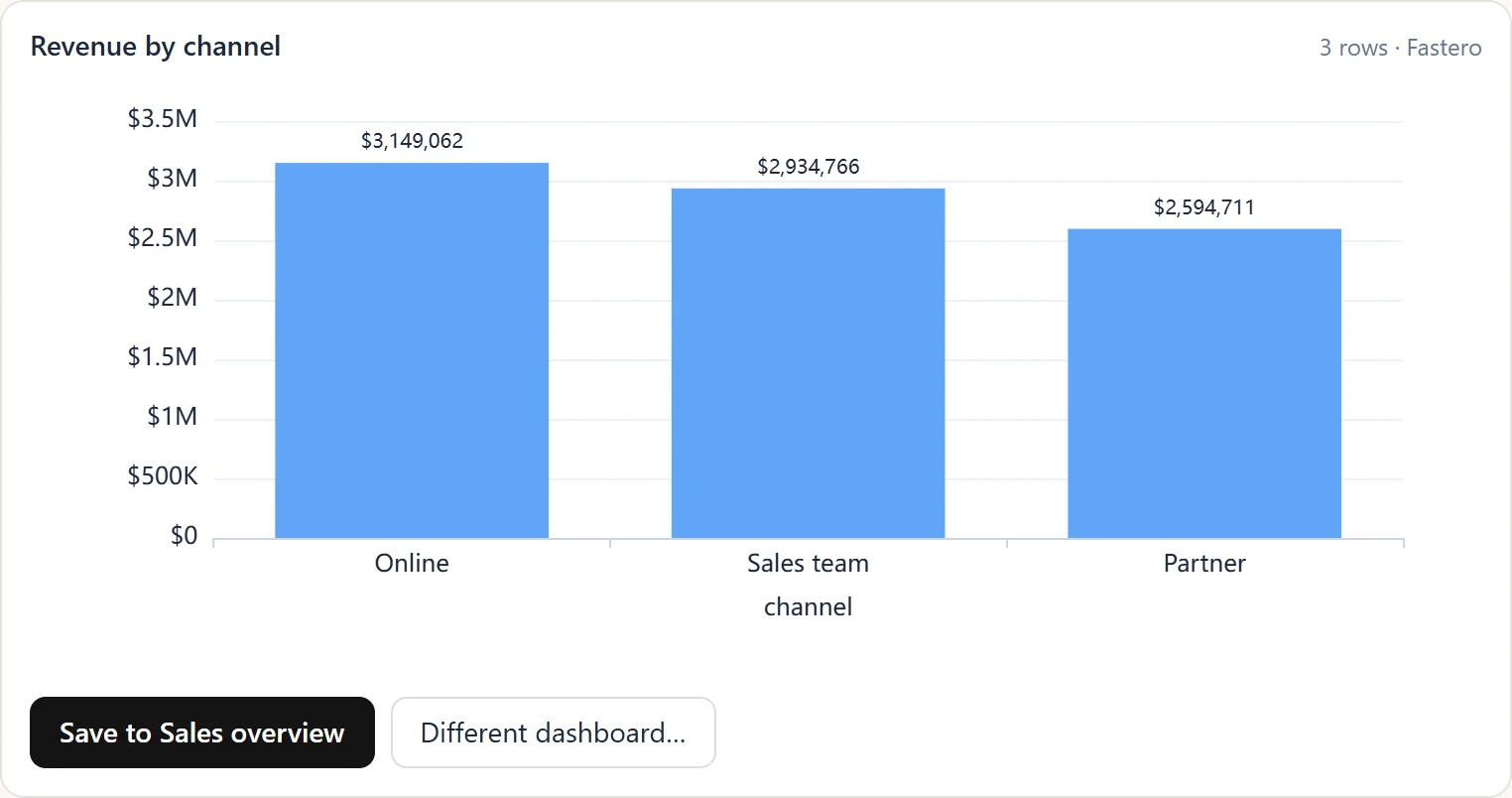
A chart Claude drew from a warehouse through Fastero, ready to save to a dashboard. Sample data.
Whichever route you take, set a custom daily quota on the project Claude's queries run in.
Claude Dashboards and BigQuery
Since 8 October 2026, Claude has a Dashboards feature in beta on Pro, Max, Team and Enterprise plans. Connect a data platform such as BigQuery, ask for a dashboard, and Claude writes one SQL query per chart, showing each chart's query and when it last refreshed. It suits people who live in Claude; for colleagues who don't, see how to build a dashboard with Claude.
Keep it safe: a checklist
- Data Viewer on datasets, Job User on the project — nothing broader.
- A daily quota on bytes processed, and a per-query cap wherever the server supports one.
- The read-only tool, or write tools blocked with an IAM deny policy.
- Keep sensitive datasets out of the Data Viewer grant.
- Watch for instructions hidden in data. Text in a table — a support ticket, a review — can carry instructions an agent may follow. Don't give one agent both your warehouse and a tool that sends data out.
FAQ
Is there an official BigQuery MCP server?
Yes. Google runs a managed BigQuery MCP server at https://bigquery.googleapis.com/mcp, switched on with the BigQuery API, and lists it in Claude's connector directory as Google Cloud BigQuery. Google's open-source MCP Toolbox for Databases also has a BigQuery mode you run yourself.
How do I connect Claude to BigQuery?
On claude.ai, add the Google Cloud BigQuery connector from the connector directory and sign in with a Google account that has BigQuery Data Viewer and Job User roles. In Claude Code or Claude Desktop, run MCP Toolbox or another BigQuery MCP server locally, or connect through a hosted connector such as Fastero's.
How much does it cost to let Claude query BigQuery?
The queries Claude runs are billed as normal BigQuery queries: on demand by the bytes they read, or against your reserved capacity. Cap it with maximum bytes billed per query and a custom daily quota on bytes processed.
Can a BigQuery MCP server modify my data?
It can if the account it uses has write permissions and the server allows writes. Use Google's execute_sql_readonly tool, MCP Toolbox's blocked write mode, or a read-only server, and give the account only BigQuery Data Viewer and Job User.
What's the difference between Claude Dashboards and a BigQuery MCP server?
A BigQuery MCP server lets Claude query BigQuery in any conversation. Claude Dashboards is a feature, in beta on paid plans, that uses a data connection to build a dashboard of charts inside Claude for people with access to it.
Related reading:
- SQL MCP servers for every database
- Postgres MCP server
- Best BI tools for BigQuery
- How to build a dashboard with Claude
Sources: Google BigQuery MCP server, Google's announcement of managed MCP servers (10 December 2025), Controlling MCP use in an organisation, Claude directory: Google Cloud BigQuery, MCP Toolbox with BigQuery, mcp-bigquery-server, mcp-server-bigquery, BigQuery access control, BigQuery cost best practices, Claude Dashboards. Checked 16 October 2026.
Try Fastero free — connect BigQuery once, then point Claude at it with read-only SQL, charts and dashboards your team can open. No credit card required.