Platform capability
Admin & Operations
Zero infrastructure overhead. Automatic idle culling, org/project management, runtime health monitoring—admin & operations without DevOps complexity.
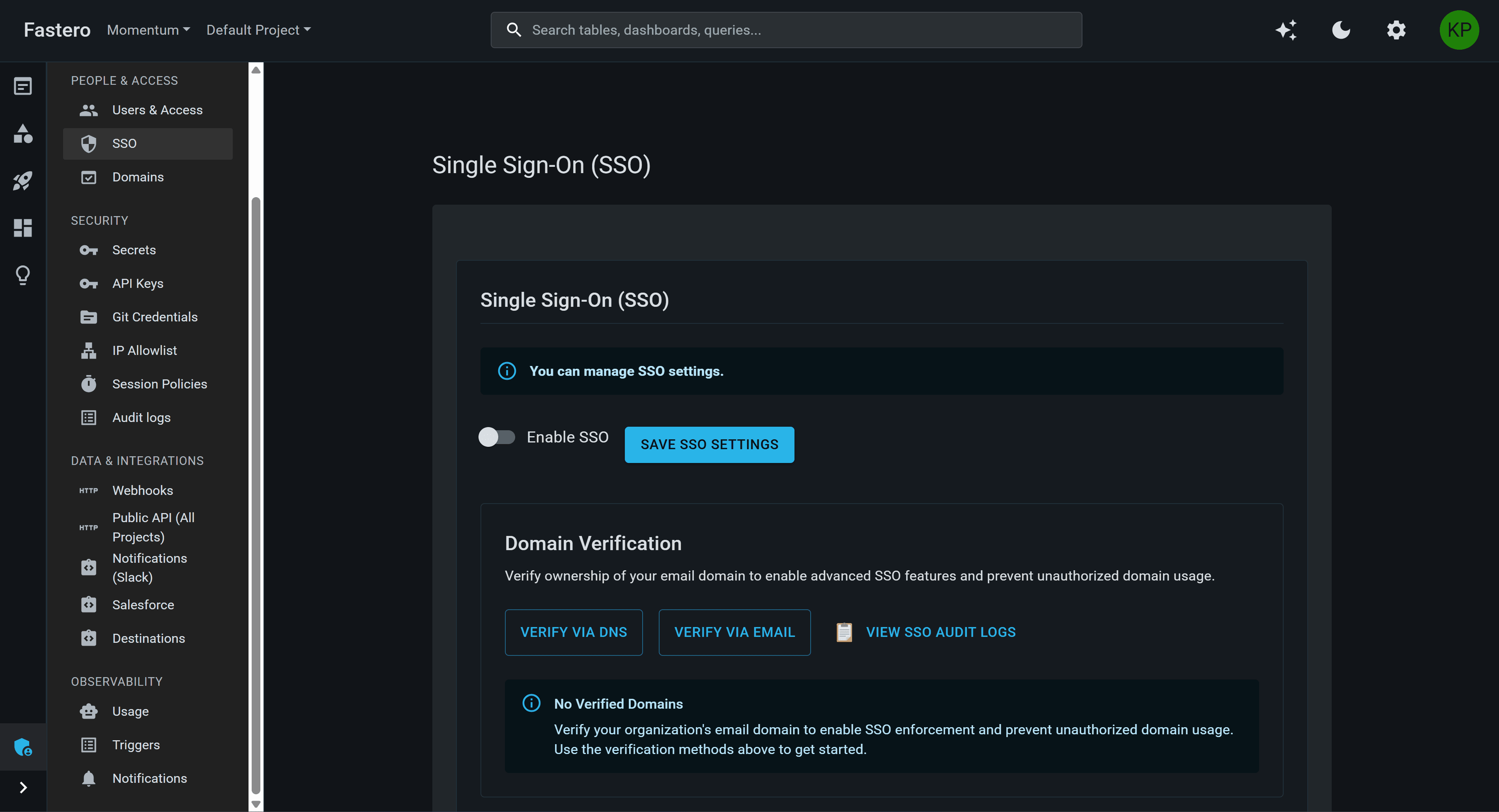
Admin dashboard—org settings, idle culling, audit logs—complete control without complexity
What teams get
Everything you need for operations
Idle culling, org/project management, SSO, audit logs—enterprise admin without DevOps overhead.
Idle Resource Culling
Automatically stop idle notebooks and Streamlit apps. Configurable timeouts, graceful shutdown, rollback on failure—cost protection without manual monitoring.
Org & Project Management
Simple org/project hierarchy with RBAC. Create, update, transfer ownership—multi-tenant governance without catalog complexity.
Member Administration
Invite members, assign roles (Owner, Admin, Member, Viewer), manage permissions—granular access control at org and project level.
Free plan and 14 days of Pro
Self-service sign-up with auto-project creation: a Free plan with no time limit, and every new account starts with 14 days of Pro. No sales contact required.
SSO & Domain Enforcement
Okta SAML integration with domain verification. Enforce SSO for verified domains—enterprise authentication without password sprawl.
Complete Audit Trail
Every admin action logged—org changes, project updates, SSO config, ownership transfers. IP address, user agent, timestamp tracked—compliance-ready.
Why it matters
Why teams choose Fastero for admin
Cost protection built-in. Simple governance model. Compliance without add-ons.
Zero Infrastructure Overhead
Automatic idle culling for notebooks AND apps—no manual container lifecycle management. Graceful shutdown with state transitions (running → stopping → stopped) and rollback on failure.
Cost Protection Built-In
Configurable idle timeouts prevent runaway bills. Activity tracking across user, backend, and kernel dimensions—stop idle resources before they drain your budget.
Simple Governance Model
Org/project hierarchy without catalog complexity. Admin, Member, Viewer roles—no multi-layered permission models like Unity Catalog.
Compliance Without Add-Ons
Audit logs included (not an add-on). Soft-delete with TTL-based purge (restore within 30 days). SSO with domain enforcement—SOC 2, GDPR ready.
Idle Culling Flow
Idle Detection
Track user activity, backend activity, kernel activity. If idle timeout exceeded, proceed to culling.
Graceful Shutdown
Set status to "stopping", deactivate triggers, notify frontend, grace period for UI transition—then stop container.
Rollback on Failure
If container stop fails, rollback status to "running" and notify frontend—transactional approach prevents inconsistent state.
Operating model
How it works
Configure idle timeouts. Manage orgs/projects. Monitor runtime health.
Configure Idle Timeouts
Set idle timeout per resource type (notebooks, apps). Default 30 minutes, configurable via env vars. Silent mode (auto-cull) or warning mode (notify before culling).
Manage Orgs & Projects
Create orgs with billing address, auto-provision default project. Assign members, set roles, transfer ownership—all with audit trail.
Monitor Runtime Health
View running containers, idle time remaining, upcoming culling events. Manually stop or extend timeout—admin control when needed.
Who it helps
Real-world use cases
Platform Admin
Prevent Cost Overruns
Enable idle culling with 30-min timeout. Notebooks left running over weekends are auto-stopped—no surprise bills, no manual monitoring required.
Org Owner
Multi-Project Governance
Create projects for Marketing, Sales, Product teams. Assign project-level admins, enforce SSO for verified domains—centralized governance without blocking teams.
Finance/Ops
Compliance & Audit
Export audit logs for SOC 2 audit. Every admin action tracked (org changes, project updates, SSO config)—complete audit trail for compliance.
Common questions
How does idle culling work?
Idle culling monitors user activity, backend activity, and kernel activity. If no activity for the configured timeout (default 30 min), the resource is gracefully stopped (status transitions: running → stopping → stopped). If the stop fails, status rolls back to running.
Can I exempt specific users or projects from idle culling?
Yes—set cullingEnabled: false at the resource level (notebook or app) to exempt it from idle culling. This is useful for long-running workflows or always-on apps.
What happens if I delete an org?
Org deletion is soft-delete with a 30-day TTL. The org and all its assets (projects, notebooks, queries, apps) are marked isDeleted: true and scheduled for purge. Owners can restore within 30 days.
How do I transfer org ownership?
Only the current owner can transfer ownership. Select a new owner (must be an existing member), confirm transfer—the new owner is promoted to role 0 (Owner), and the previous owner is demoted to role 1 (Admin).
What SSO providers are supported?
Okta SAML is supported now. Azure AD, Google Workspace, and OAuth 2.0 (GitHub, Google, Microsoft) are supported for user login, but org-level SSO enforcement is Okta only.
Can I see which resources are about to be culled?
Yes—the runtime health dashboard (planned) will show idle time remaining for all running resources. Admins can manually stop or extend timeout from the UI.
Ready to simplify admin & operations?
Automatic idle culling. Org/project management. SSO with domain enforcement. Complete audit trail—start free.