
A MySQL MCP server lets Claude read your database's tables and run SQL on them, so a question like "what sold best in the North region last month?" gets answered from the real data instead of a guess. The servers differ in one way that matters more than any other: what happens when Claude, or an instruction hidden in your data, sends a statement that changes something.
The short answer: use a server that is read-only by default — mcp-server-mysql by Ben Borla, MariaDB's own server, AWS's server for Aurora and RDS, or a hosted connector such as Fastero's — and connect it as a MySQL user that has only SELECT. Add max_execution_time so a slow query stops by itself. Then add the server to Claude Code with claude mcp add, to Claude Desktop in claude_desktop_config.json, or to claude.ai as a custom connector.
Which MySQL MCP server to use
| Server | Who makes it | Where it runs | Writes | Good for |
|---|---|---|---|---|
| Fastero | Fastero | Hosted: a claude.ai connector, or a key for Claude Code | Refused before they reach the database | Teams that want charts and dashboards colleagues can open without Claude |
| mcp-server-mysql (Ben Borla) | Open source | Your machine, or a server with a secret key | Off by default; each kind is switched on separately | The most-used community server |
| mysql_mcp_server (designcomputer) | Open source | Your machine | Allowed; there is no read-only mode | Only with a SELECT-only user |
| MariaDB MCP | MariaDB | Your machine or a server | Off by default (MCP_READ_ONLY=true) |
MariaDB |
| AWS Labs MySQL MCP | AWS Labs, open source | Your machine | Off unless you add --allow_write_query |
Aurora MySQL, RDS for MySQL and MariaDB |
| DBHub | Bytebase, open source | Your machine or a server | Off with readonly = true in its config file |
One server for several databases |
| MCP Toolbox for Databases | Google, open source | Your machine or a server | Only the database user you give it | Google Cloud, or many databases at once |
| PlanetScale MCP | PlanetScale | Hosted | Separate read and write tools; an admin can allow reads only | Databases on PlanetScale |
Oracle also publishes a MySQL MCP server, aimed at HeatWave, but its README calls it "not intended for production use but as a proof of concept".
Step 1: Create a user that can only read
Every server's read-only mode works by inspecting the SQL text, and SQL text can be dressed up: AWS's server, for example, has to watch for writes hidden in MySQL's conditional comments (/*!50000 INSERT … */), in PREPARE and EXECUTE, and in stored procedures. Its README says: "The actual security boundary is the database role you connect with." So give Claude a user that has nothing else:
CREATE USER 'claude_readonly'@'%' IDENTIFIED BY 'a-long-random-password';
GRANT SELECT, SHOW VIEW ON shop.* TO 'claude_readonly'@'%';
We ran this on MySQL 8.4 and tried it as claude_readonly:
- It reads every table in
shop, including tables created afterwards, because the grant is on the whole database. INSERTfails: "INSERT command denied to user 'claude_readonly'".DROP TABLEfails, and other databases, such asmysql, are out of reach.
Replace '%' with the address the server connects from, such as 'claude_readonly'@'10.0.0.%', so the user can't sign in from anywhere else. If some tables hold secrets or personal data, grant table by table instead of shop.*.
Fastero
Point Claude at your database.
Add Fastero to claude.ai or Claude Code. Claude builds the dashboard, deploys the app or publishes a live page, and your team opens it in Fastero.
Try free →Step 2: Stop slow queries
A question like "compare every customer with every other customer" becomes a query that runs for an hour. MySQL's max_execution_time stops a SELECT after a set number of milliseconds:
SET SESSION max_execution_time = 30000; -- 30 secondsIn our test, with the limit at one second, SELECT SLEEP(3) stopped after 1,002 ms with "maximum statement execution time exceeded". MySQL has no per-user default for it, so set it where the server opens its connection — mcp-server-mysql applies a 30-second limit by default (MYSQL_QUERY_TIMEOUT) — or with SET GLOBAL max_execution_time, which applies to every new session on the database server.
Step 3: Connect it to Claude
In Claude Code
mcp-server-mysql, with the read-only user instead of root:
claude mcp add mysql -e MYSQL_HOST="db.example.com" -e MYSQL_PORT="3306" -e MYSQL_USER="claude_readonly" -e MYSQL_PASS="a-long-random-password" -e MYSQL_DB="shop" -- npx @benborla29/mcp-server-mysqlIts writes stay off unless you set ALLOW_INSERT_OPERATION, ALLOW_UPDATE_OPERATION, ALLOW_DELETE_OPERATION or ALLOW_DDL_OPERATION to true, and it opens each session as read-only.
Fastero, with a key from Settings → AI Agent Access (read and SQL only by default; a key lasts at most 90 days):
claude mcp add --scope user --transport http fastero https://api.fastero.com/api/v1/mcp --header "Authorization: Bearer fst_pat_..."Run /mcp in Claude Code to check that the server is connected.
In Claude Desktop
Open Settings → Developer → Edit Config and add the server to claude_desktop_config.json (in ~/Library/Application Support/Claude/ on macOS, %APPDATA%\Claude\ on Windows):
{
  "mcpServers": {
    "mysql": {
      "command": "npx",
      "args": ["-y", "@benborla29/mcp-server-mysql"],
      "env": {
        "MYSQL_HOST": "db.example.com",
        "MYSQL_PORT": "3306",
        "MYSQL_USER": "claude_readonly",
        "MYSQL_PASS": "a-long-random-password",
        "MYSQL_DB": "shop"
      }
    }
  }
}
Restart Claude Desktop fully to load it.
In claude.ai
claude.ai takes remote servers only — ones with a web address it can reach from Anthropic's cloud — added under Customize → Connectors → Add custom connector (on Team and Enterprise, an owner adds them under Organization settings → Connectors). Free plans can add one. A server on your laptop won't work here.
With Fastero, connect the MySQL database in Fastero first, as the read-only user, so its password never goes through a chat. Then add https://api.fastero.com/api/v1/mcp as a custom connector, sign in, choose the workspace and approve the permissions.
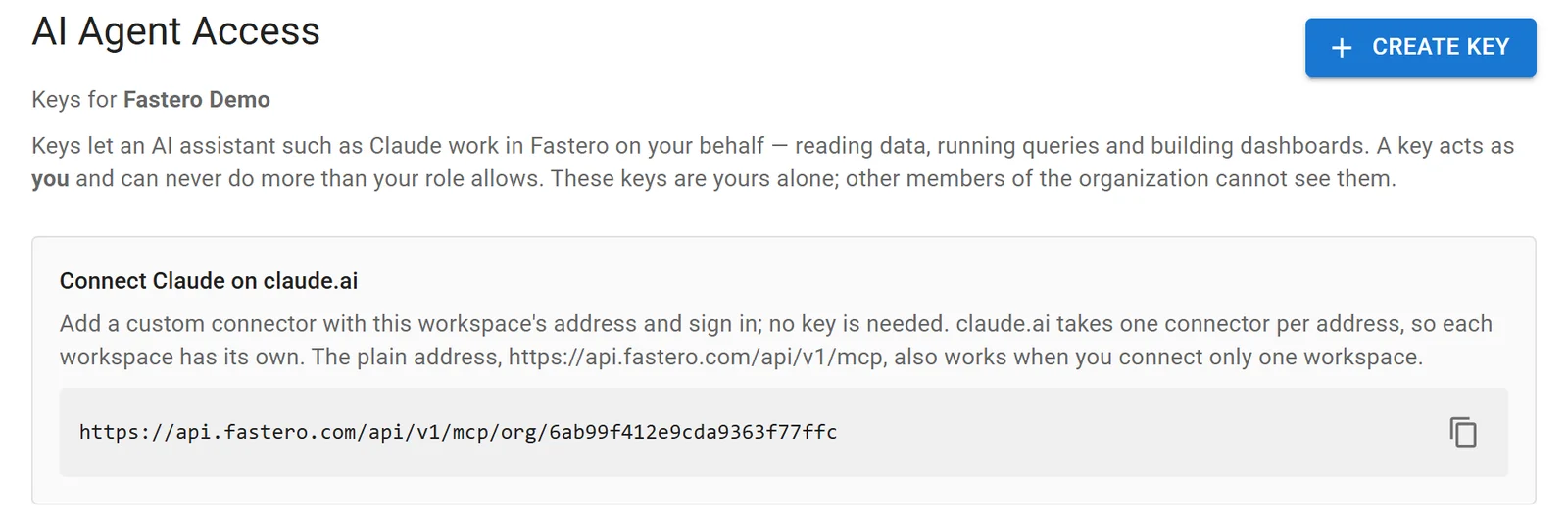
The address to add in claude.ai, in Fastero's settings. Sample data.
Step 4: Ask, and check
Start with a question you can check: "How many orders did we take last month?" If Claude's answer matches your own report, move on to the questions you can't answer quickly yourself — "which products sell together?", "which customers stopped ordering this quarter?" — and ask for a chart.
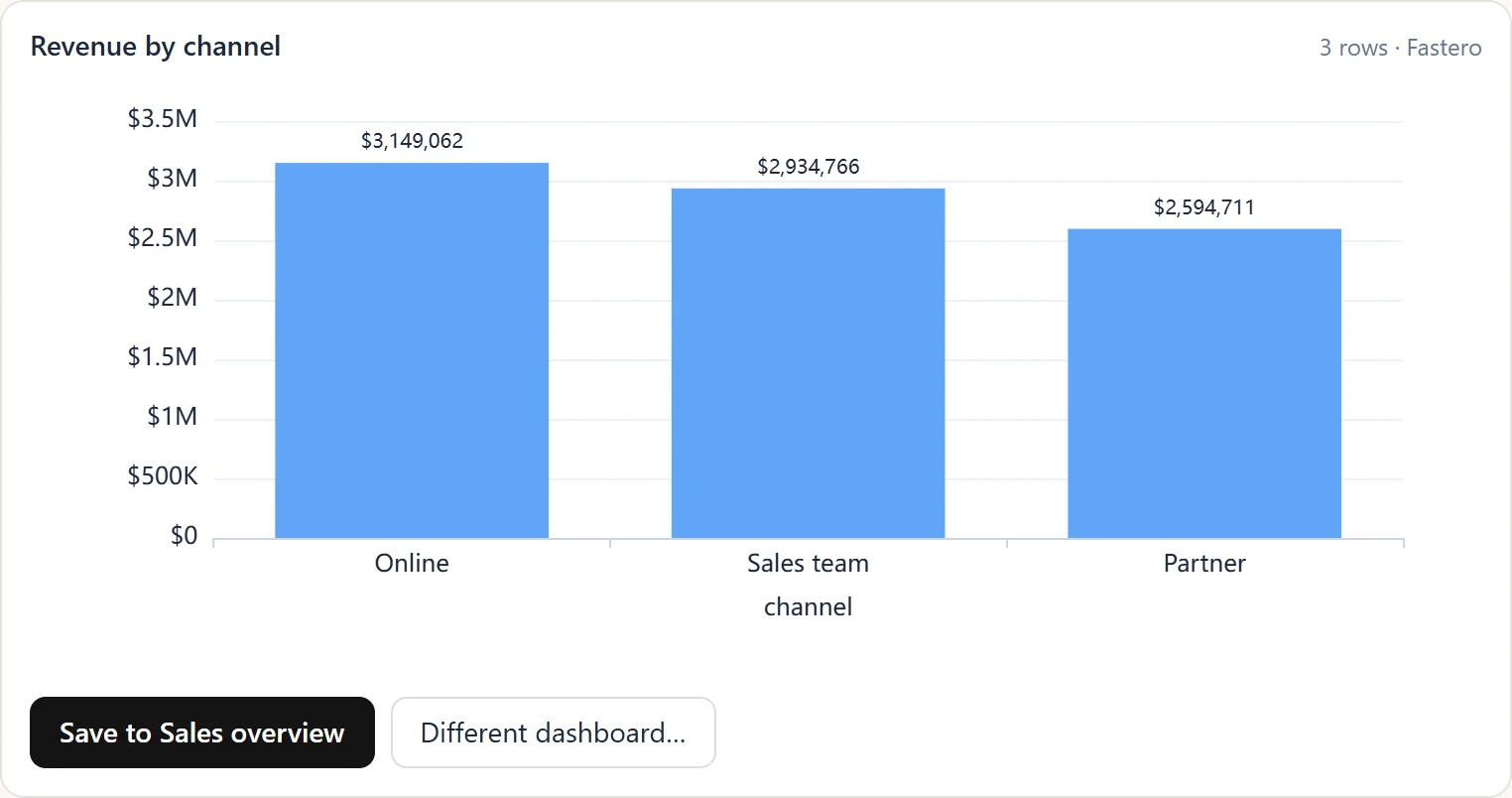
A chart Claude drew from a database through Fastero, ready to save to a dashboard. Sample data.
What Fastero adds
Fastero's SQL tool runs one SELECT, WITH, EXPLAIN or SHOW statement on MySQL and refuses anything that could change data before it reaches the database. Claude reads at most 500 rows or about 100 KB of a result. A key acts as you, inside one workspace, and can never do more than your role allows. And when Claude draws a chart, you can keep it on a dashboard that colleagues open with their own login, refreshed on a schedule or when the data changes — without a Claude account.
Keep it safe: a checklist
- A SELECT-only user, limited to the database and, ideally, the address the server connects from.
max_execution_time, so a heavy query stops on its own.- A server that is read-only by default, as a second layer — not instead of the user.
- No secrets in reach. Leave tables of tokens, passwords and personal data out of the grants.
- Beware instructions inside your data. A row of text — a support ticket, a product review — can carry instructions an agent may follow. Don't give one agent both a database server and a tool that can send data out, and review what it runs.
- A remote server needs authentication.
mysql_mcp_server's SSE mode has none built in; put it behind a proxy that checks who is calling.
FAQ
What is a MySQL MCP server?
A program that gives an AI assistant such as Claude tools to list a MySQL database's tables, read their columns and run SQL, using the Model Context Protocol. Claude calls the tools and answers your question from the results.
Is there an official MySQL MCP server?
Oracle publishes one for MySQL HeatWave, which its README calls a proof of concept not intended for production. MariaDB has its own, read-only by default. Most people use a community server such as mcp-server-mysql, a multi-database server such as DBHub or Google's MCP Toolbox, or a hosted connector.
How do I make a MySQL MCP server read-only?
Connect it as a MySQL user that has only SELECT (and SHOW VIEW) on the database, as shown above, and use a server whose write operations are off by default. The grant is what stops writes; the server's setting is a backup.
Can Claude connect to MySQL on Amazon RDS or Aurora?
Yes. AWS Labs publishes a MySQL MCP server for Aurora and RDS that is read-only by default, and every server here connects to RDS with an ordinary host, user and password. Fastero connects to managed MySQL the same way.
Does it work with MariaDB?
Yes. MariaDB has its own MCP server, and MySQL servers such as DBHub and AWS's also support MariaDB.
Related reading:
- Postgres MCP server
- SQL MCP servers for every database
- Connect MySQL to AI dashboards and agents
- Best MCP servers for data analysis
Sources: mcp-server-mysql, mysql_mcp_server, MariaDB MCP, AWS Labs MySQL MCP server, DBHub, MCP Toolbox for Databases, PlanetScale MCP, Oracle MySQL MCP server, MySQL max_execution_time, MySQL GRANT, Claude Code MCP docs, Claude custom connectors. Checked 16 October 2026.
Try Fastero free — connect your MySQL database, then point Claude at it with read-only SQL, charts and dashboards your team can open. No credit card required.