 Fastero Dev Team
MCP, the Model Context Protocol, is "an open source standard for AI-tool integrations", in the words of Claude Code's docs. An MCP server is a program, on your machine or hosted, that offers Claude a set of tools: query this database, read that issue tracker, drive a browser. Add one to Claude Code and Claude can use those tools directly instead of working from whatever you paste in.
The short answer: one command adds a server: claude mcp add --transport http <name> <url> for a remote server, or claude mcp add <name> -- <command> [args...] for a local one. Then type /mcp in a session to sign in, if the server uses OAuth. Add --scope project to share the server with your team through a .mcp.json file in the repo, or --scope user to have it in every project; the default keeps it private to you, in this project. SSE servers are deprecated: since version 2.1.265 Claude Code tries HTTP first and falls back to SSE on its own.
Fastero
Point Claude at your database.
Add Fastero to claude.ai or Claude Code. Claude builds the dashboard, deploys the app or publishes a live page, and your team opens it in Fastero.
Try free →Remote servers (HTTP)
Most services that offer an MCP server now host it, and you add it by URL. "HTTP servers are the recommended option for connecting to remote MCP servers":
claude mcp add --transport http notion https://mcp.notion.com/mcpIf the server signs in with OAuth, start Claude Code, type /mcp, pick the server and finish the sign-in in your browser. Since version 2.1.186 you can also sign in from the shell with claude mcp login notion (and out with claude mcp logout notion).
If it takes an API key instead, pass it as a header:
claude mcp add --transport http github https://api.githubcopilot.com/mcp/ \
  --header "Authorization: Bearer $GITHUB_PAT"
claude mcp add doesn't check the credentials. A wrong or placeholder key is saved happily and fails later, when Claude Code connects.
SSE. You may still see --transport sse in older guides. "The SSE (Server-Sent Events) transport is deprecated. Use HTTP servers instead, where available." The flag still works, and for a server that only speaks SSE you no longer need it: "Claude Code tries the HTTP transport first and switches to SSE when the server doesn't accept it."
Local servers (stdio)
A local server is a program Claude Code starts on your machine and talks to over standard input and output. Everything after -- is the command that starts it, and "Everything after -- is passed to the server untouched":
claude mcp add playwright -- npx -y @playwright/mcp@latestEnvironment variables go between the name and the --. Put the name first: "If the server name comes directly after --env, the CLI reads the name as another pair and rejects it". We got exactly that error:
$ claude mcp add --scope project --env DEMO_KEY=abc envdemo -- npx ...
Invalid environment variable format: envdemo, environment variables should be added as: -e KEY1=value1 -e KEY2=value2
claude mcp add --scope project envdemo --env DEMO_KEY=abc -- npx ... works.
On Windows
Two pieces of Windows advice are worth updating.
You no longer need cmd /c. Older guides tell you to wrap npx as cmd /c npx .... Claude Code 2.1.119 (April 2026) removed the warning that prompted it as a false positive, and on Windows 11 a server added with plain npx connected fine in our test.
In PowerShell, an npm install swallows the --. If you installed Claude Code with npm, PowerShell runs it through a claude.ps1 script that drops a bare --, so Claude Code reads the server's own flags as its own:
PS> claude mcp add --scope project fs -- npx -y @modelcontextprotocol/server-filesystem .
error: unknown option '-y'
Either quote the separator, '--', or call claude.cmd instead of claude; both added the server correctly. Windows PowerShell 5.1 won't run the .ps1 script at all under its default policy, so use claude.cmd there. The native installer, which Anthropic recommends over npm, doesn't use the .ps1 script; we didn't test it.
Scopes: who gets the server, and where it's saved
| Scope | Who gets it | Saved in | Shared through git |
|---|---|---|---|
local (default) |
You, in this project only | ~/.claude.json, under this project's path |
No |
project |
Everyone who clones the repo | .mcp.json in the project root |
Yes |
user |
You, in every project | ~/.claude.json |
No |
On Windows, ~/.claude.json is %USERPROFILE%\.claude.json. When the same server name exists in more than one place, local beats project, project beats user, and "The entire server entry from that source is used; fields are not merged across scopes."
Here's a project with three servers, one of each kind, and the .mcp.json that the project-scoped one wrote:
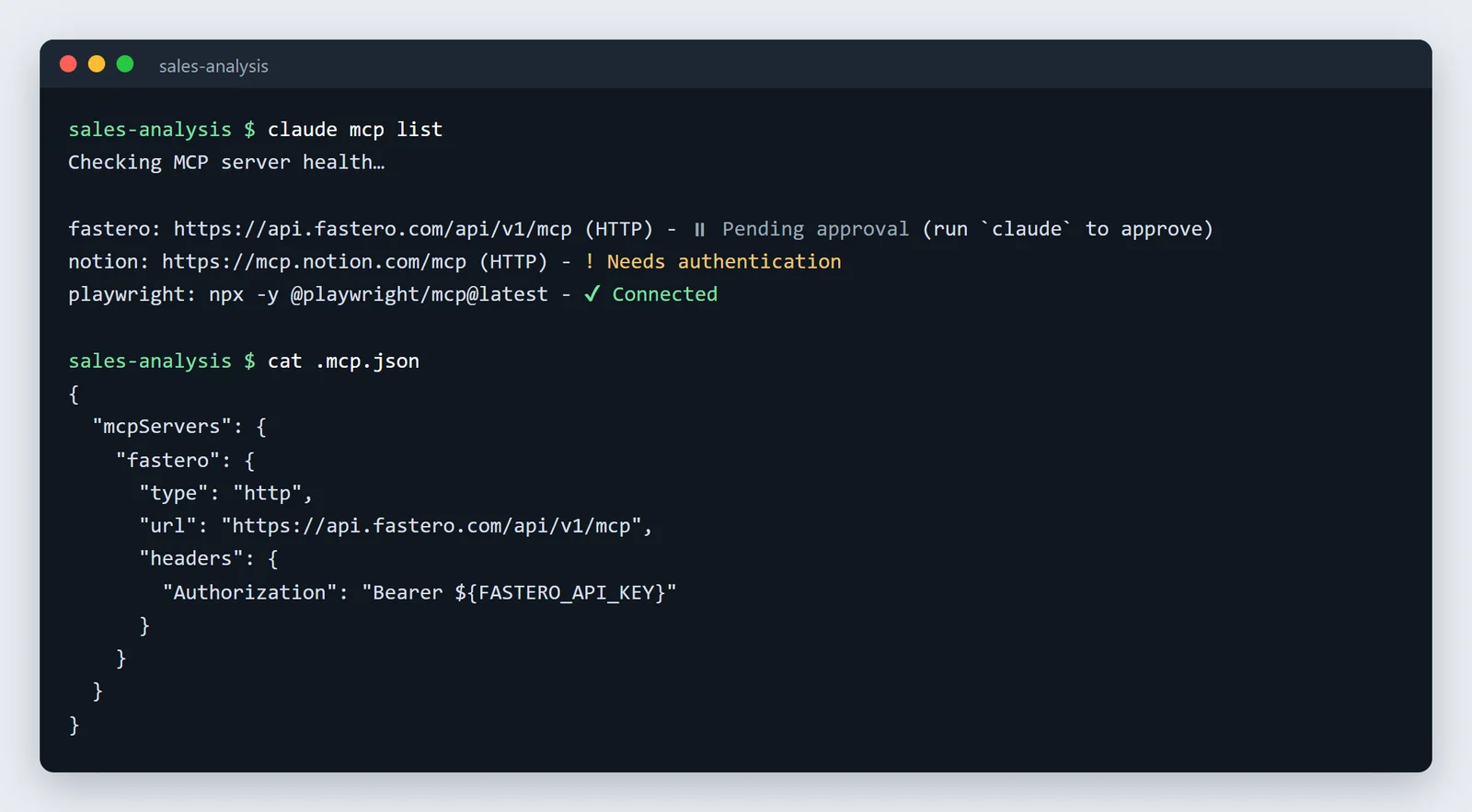
The three statuses are the three you'll meet most:
- ✔ Connected: working.
- ! Needs authentication: added, but you haven't signed in yet. Run
/mcp. - ⏸ Pending approval: a server from the repo's
.mcp.jsonthat you haven't approved. "For security reasons, Claude Code prompts for approval in interactive sessions before using project-scoped servers from.mcp.jsonfiles." Startclaudein the folder to review it.
Note the exception to that last one. In non-interactive runs (claude -p, the Agent SDK), Claude Code "loads project-scoped servers without asking." A pipeline that runs claude -p in a cloned repo uses whatever servers the repo's .mcp.json lists. If you've approved something you shouldn't have, claude mcp reset-project-choices clears your answers.
.mcp.json and keeping secrets out of git
A project-scoped server ends up in .mcp.json, which you commit. Keep keys out of it with environment variables, which Claude Code expands in command, args, env, url and headers:
{
  "mcpServers": {
    "fastero": {
      "type": "http",
      "url": "https://api.fastero.com/api/v1/mcp",
      "headers": {
        "Authorization": "Bearer ${FASTERO_API_KEY}"
      }
    }
  }
}
${VAR:-default} supplies a fallback. If the variable is missing, claude mcp list warns you ("Missing environment variables: FASTERO_API_KEY" in our run), and a server that receives the unexpanded text fails: our GitHub test with GITHUB_PAT unset came back "Authorization header is badly formatted". One safety detail: "In a remote server's url and headers, Claude Code reads credential variables from your environment as empty rather than expanding them", so a careless ${ANTHROPIC_API_KEY} can't leak your own key to a third-party server.
To write an entry like this from the command line, use claude mcp add-json:
claude mcp add-json --scope project github '{"type":"http","url":"https://api.githubcopilot.com/mcp/","headers":{"Authorization":"Bearer ${GITHUB_PAT}"}}'And to see what a server resolves to, claude mcp get:
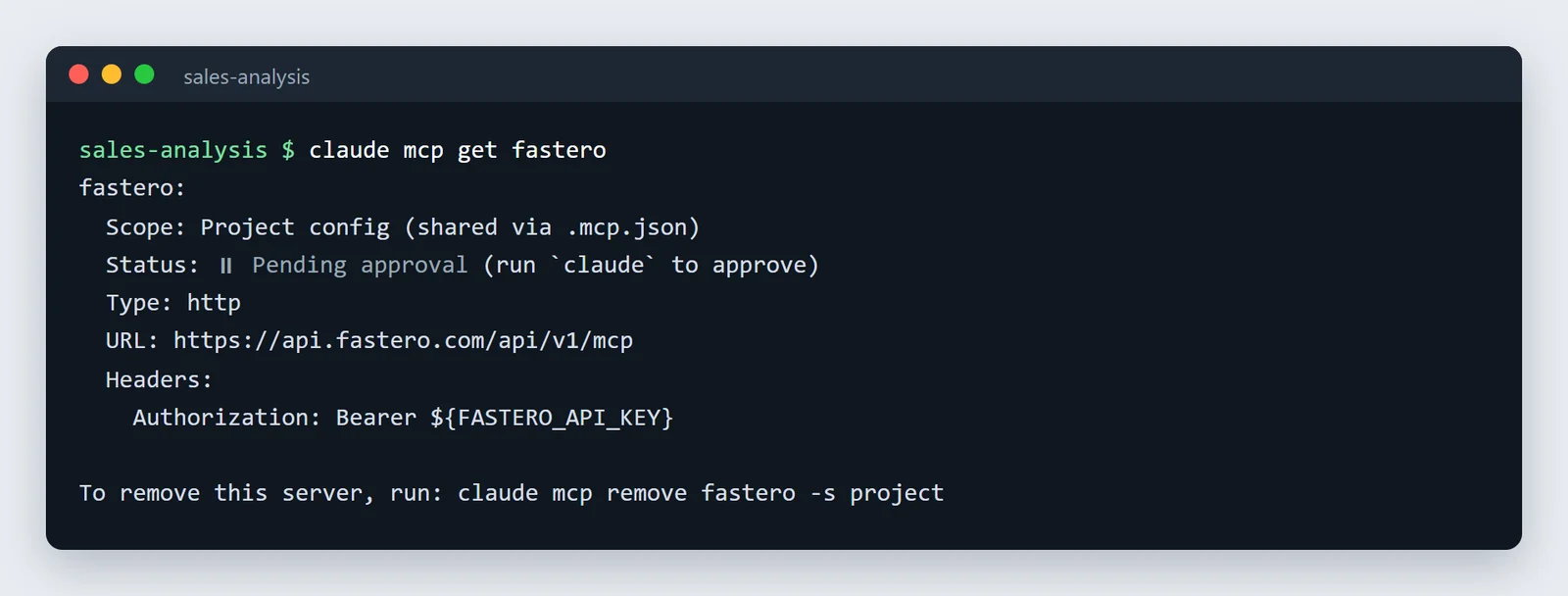
Every claude mcp command
| Command | What it does |
|---|---|
claude mcp add |
Adds a remote (--transport http) or local (-- <command>) server |
claude mcp add-json |
Adds a server from a JSON definition |
claude mcp add-from-claude-desktop |
Imports Claude Desktop's servers; "This feature only works on macOS and Windows Subsystem for Linux (WSL)" |
claude mcp list |
Lists servers and checks each one's health |
claude mcp get <name> |
Shows one server's scope, status and settings |
claude mcp remove <name> |
Removes it; add -s project or -s user for those scopes |
claude mcp login / logout <name> |
Signs in to or out of an OAuth server from the shell |
claude mcp reset-project-choices |
Forgets which .mcp.json servers you approved |
claude mcp serve |
Runs Claude Code itself as an MCP server for another client |
Inside a session, /mcp lists the servers with their tools and lets you sign in, reconnect or switch one off. Removing a server doesn't sign you out at the service: "Claude Code doesn't revoke the tokens at the authorization server that issued them." Run claude mcp logout <name> first.
Permissions for MCP tools
Each MCP tool is named mcp__<server>__<tool>, and permission rules use those names. mcp__github__* matches every tool from the GitHub server; mcp__github__create_issue matches one. Two details catch people out:
- An allow rule needs the server name. "Allow rules accept tool-name globs only after a literal
mcp__<server>__prefix", somcp__*in an allow list does nothing. - A deny rule doesn't.
"mcp__*"in a deny list blocks every MCP tool from every server.
{
  "permissions": {
    "allow": ["mcp__fastero__*"],
    "deny": ["mcp__github__delete_file"]
  }
}
Deny rules hold in every permission mode, auto included. For a server that can change things, deny its write tools and let Claude ask for the rest. Companies can go further with managed settings: an allowedMcpServers list, made binding with allowManagedMcpServersOnly: true.
Point Claude at your database.
Start free →Output limits, timeouts and context
| Limit | Default | Change it with |
|---|---|---|
| Tool output | Warning at 10,000 tokens, cut at 25,000 | MAX_MCP_OUTPUT_TOKENS |
| Very long text results | Over 50,000 characters are saved to a file Claude can read | (fixed) |
| Server startup | 30 seconds | MCP_TIMEOUT (milliseconds) |
| One tool call | About 28 hours | MCP_TOOL_TIMEOUT, or a timeout field on one server |
| A slow call | Moves to the background after two minutes | (fixed) |
Many servers no longer cost you context just by being installed: "Tool search is enabled by default: MCP tools are deferred and discovered on demand." Only tool names and server instructions load at the start of a session. A server you use constantly can be exempted with "alwaysLoad": true. /context shows what's using the space.
MCP servers worth adding for data work
| Server | Add it with | Notes |
|---|---|---|
| DBHub (Postgres, MySQL, SQL Server, MariaDB, Oracle, SQLite) | claude mcp add --transport stdio db -- npx -y @bytebase/dbhub --dsn "postgresql://readonly:pass@host:5432/db" |
The example in Anthropic's own docs, with a read-only database user |
| MCP Toolbox for Databases (Google) | npx -y @toolbox-sdk/server --prebuilt=postgres --stdio |
Prebuilt tool sets for Postgres, BigQuery, Snowflake, MySQL and more |
| BigQuery (Google, hosted) | https://bigquery.googleapis.com/mcp |
OAuth and IAM; on when the BigQuery API is enabled |
| Supabase, Neon (hosted) | https://mcp.supabase.com/mcp, https://mcp.neon.tech/mcp |
Both have a read-only mode |
| ClickHouse | uvx mcp-clickhouse |
Read-only unless you allow writes |
| DuckDB / MotherDuck | uvx mcp-server-motherduck --db-path <file> |
Local files and MotherDuck |
| dbt | dbt Labs' MCP server | Models, the Semantic Layer and SQL |
| Fastero | https://api.fastero.com/api/v1/mcp |
Your team's connected databases, read-only SQL, dashboards |
Skip @modelcontextprotocol/server-postgres: it was the reference Postgres server, it's archived, and its read-only mode could be escaped. Whichever database server you use, give it a database login that can only read; our guide to connecting Claude to a database has the SQL, tested. For more servers, see the best MCP servers for Claude Code.
claude.ai connectors in Claude Code
If you sign in to Claude Code with a claude.ai account, connectors you added in claude.ai "are automatically available in Claude Code", listed as servers named claude.ai <name>. That doesn't happen if you use an API key, Bedrock or Vertex. If the same server is configured both ways, the local one wins.
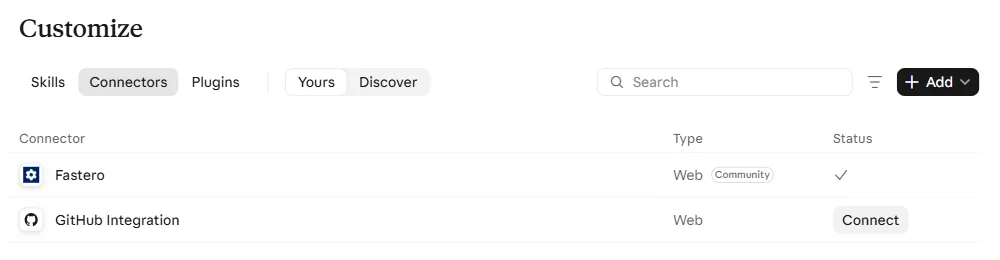
To add Fastero directly instead, so the server exists only in Claude Code: claude mcp add --scope user --transport http fastero https://api.fastero.com/api/v1/mcp, then /mcp to sign in through your browser. For scripts that can't sign in, Fastero's AI Agent Access settings create a key, passed as an Authorization: Bearer header, which expires within 90 days. Claude then queries the databases your team connected in Fastero, read-only, and can save what it builds as dashboards your colleagues open with their own login.
Troubleshooting
| You see | Usually means | Fix |
|---|---|---|
⏸ Pending approval |
A .mcp.json server you haven't approved |
Start claude in that folder and approve it |
! Needs authentication |
OAuth server, not signed in | /mcp, or claude mcp login <name> |
✘ Failed to connect |
Bad key, missing variable, wrong URL, or the program won't start | claude mcp get <name>, then run the command yourself |
error: unknown option '-y' on Windows |
PowerShell dropped the -- |
Quote it as '--' or use claude.cmd |
MCP server <name> already exists |
Same name in the same scope | Remove it first, or pick another name |
| A result is cut off | Over 25,000 tokens | Ask for less (a LIMIT, fewer columns) or raise MAX_MCP_OUTPUT_TOKENS |
FAQ
How do I add an MCP server to Claude Code?
Run claude mcp add --transport http <name> <url> for a hosted server, or claude mcp add <name> -- <command> for one that runs on your machine. Then /mcp in a session to sign in if it needs it.
Where is Claude Code's MCP config file?
Servers in the local and user scopes are in ~/.claude.json (%USERPROFILE%\.claude.json on Windows). Project-scoped servers are in .mcp.json at the root of the project, which you commit.
What's the difference between local, project and user scope?
Local is you, in one project. Project is everyone who clones the repo, through .mcp.json. User is you, in every project.
Is SSE deprecated in Claude Code?
Yes. Use HTTP. Since version 2.1.265, Claude Code tries HTTP first and switches to SSE by itself for a server that only supports SSE.
Do I need cmd /c for MCP servers on Windows?
No, not any more. But if you installed Claude Code with npm and use PowerShell, quote the separator as '--' or run claude.cmd, or the server's own flags are read as Claude Code's.
How do I pass an API key to an MCP server?
--env KEY=value for a local server, --header "Authorization: Bearer ..." for a remote one, and ${VAR} references inside .mcp.json so the key itself stays out of git.
Related reading:
- Best MCP servers for Claude Code
- How to connect Claude to your database
- claude_desktop_config.json: adding MCP servers to Claude Desktop
- What is an MCP server?
- Claude Code for data analysis
- Claude skills examples
Sources: Anthropic: Claude Code MCP, MCP quickstart, permissions, environment variables, managed MCP settings, changelog. Servers: DBHub, MCP Toolbox, archived reference servers. Every command and output above was run on Claude Code 2.1.284 on Windows 11, in empty test folders, on 8 November 2026; the docs were at version 2.1.319.
Try Fastero free — add one MCP server and Claude Code can query your team's databases read-only, then save dashboards your colleagues open with their own login. No credit card required.