Workbench
Ship data products faster with Git-native SQL, notebooks, and dashboards—governed by default, built for production.
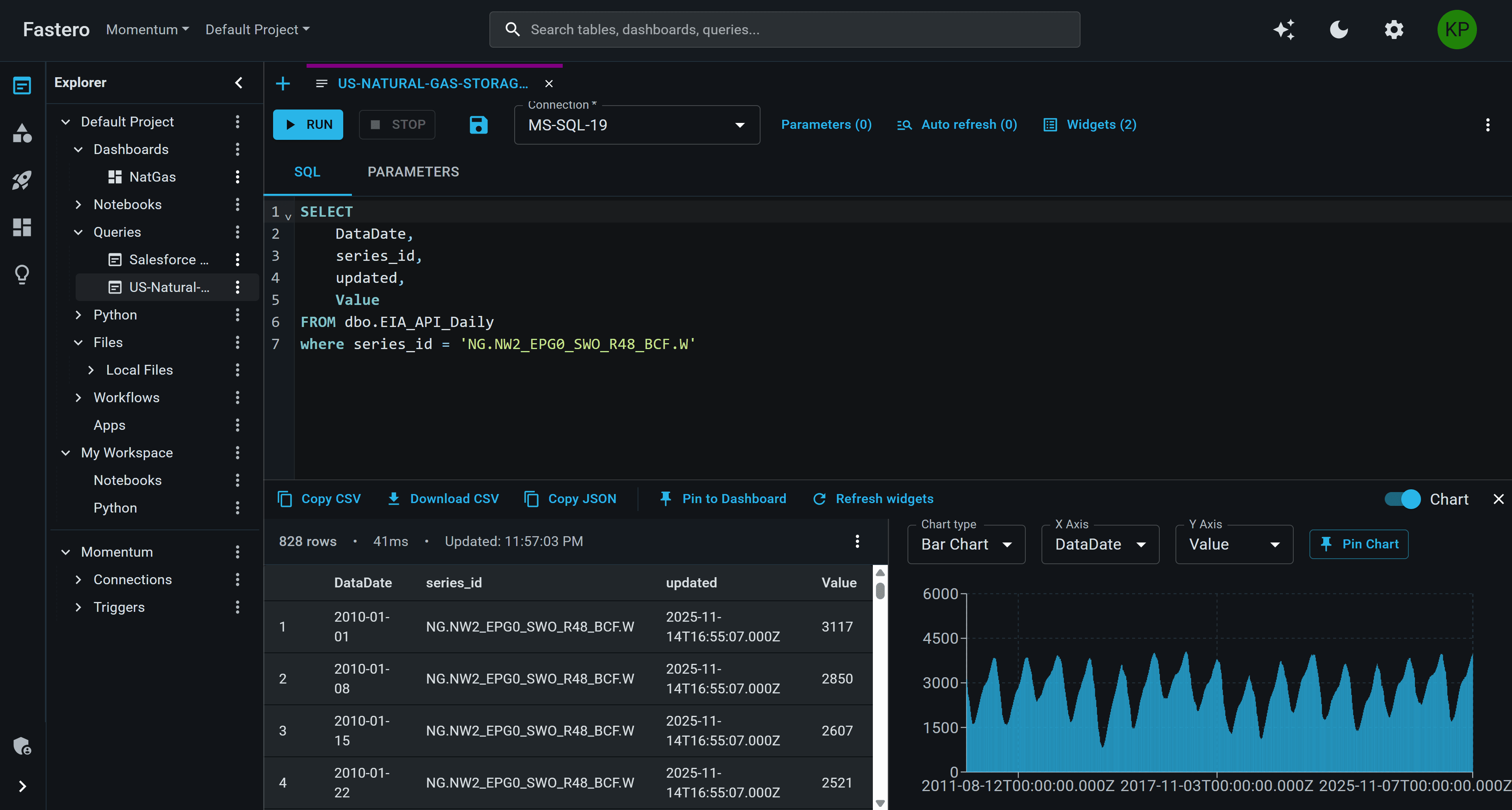
SQL editor, Git status, lineage tracking, and approval workflows—all in one interface
Everything you need, no context switching
Develop SQL, Python notebooks, and dashboards in a unified environment—with version control, lineage tracking, and collaboration baked in.
SQL Editor
Write queries with syntax highlighting, autocomplete, and instant results. Every query is automatically versioned and tracked.
Python Notebooks
Mix SQL and Python cells with inline visualization. SQL cells run on your connections with stored credentials and hand the rows to Python as a DataFrame, on a managed notebook server nobody has to run.
Interactive Dashboards
Build visualizations and reports directly from queries. Lineage tracking shows exactly which dashboards use which data.
Git Integration
Import notebooks from your project's Git repository, or upload any .ipynb. They stay standard Jupyter files, with Python and SQL cells.
Semantic Layer
Define metrics, glossary terms, and catalog entries once. AI assistance respects your business definitions.
Secrets Management
Centralized secret management with scope inheritance. No more hardcoded credentials or scattered API keys.
Collaborate with confidence
Version-controlled collaboration with comment threads and approval workflows—no more overwriting each other's work or manual review processes.
Version-controlled collaboration
Every save creates a version. See change history, compare versions, and roll back instantly.
Threaded comments
Discuss queries, notebooks, and dashboards inline. Tag teammates, resolve threads, and keep context close to code.
Editors and viewers
Everyone signs in with their own login. Viewers read notebooks without running or saving them, and viewers are free.
Lineage tracking
See which dashboards, apps, and workflows use this query or notebook. Track dependencies automatically from source to consumer.
Jane Doe
Updated sales_summary.sql
Comment on line 42:
"Should we filter out test accounts here?"
Mike Smith
Replied to comment
"Good catch! I'll add that filter now."
Deploy with confidence
Lock production workflows to specific versions. Automated guardrail checks catch issues before they reach users. Every change is audited.
Version locking
Production workflows reference specific notebook versions—never worry about dev changes breaking scheduled reports.
Automated guardrails
Policy checks run before deployment: query cost limits, data access rules, compute quotas all enforced automatically.
Complete audit trail
Every query and notebook run is logged.
Lineage tracking
See the full dependency graph—from source tables through queries to dashboards and apps. Impact analysis in seconds.
Cost visibility
Track compute spend per query, notebook, and user. Set alerts for cost overruns before they hit your bill.
Runtime management
Each workspace gets its own notebook server on Kubernetes, which sleeps when idle so a quiet workspace costs nothing. No manual tuning needed.
How teams use Workbench
Analytics Engineering
Build governed metrics
Define semantic metrics in the catalog, build dbt models with lineage, and promote to production with approval workflows.
Data Science
Productionize notebooks
Prototype in notebooks with managed runtimes, register models with MLflow (coming soon), and deploy as scheduled workflows or hosted apps.
Business Analysts
Self-service with guardrails
Query data with AI assistance, build dashboards from semantic metrics, and publish insights—all while respecting access policies.
Common questions
How do notebooks work with Git?
Bring them in from your project's Git repository, or upload an .ipynb, then edit, run and schedule them in Fastero.
Can I use my existing Git repo?
Yes. Import the notebooks from the Git repository connected to your project, and they open in Fastero's notebook editor as standard .ipynb files.
What happens if two people edit the same query?
Every save creates a new version, so no work is lost. If you both edit simultaneously, the last save wins—but you can compare versions and merge changes manually if needed.
How do I promote a notebook to production?
Put it on a cron schedule, turn a SQL cell's rows or a pandas DataFrame into a dashboard widget that refreshes with each run, or click "Promote to App" to make it an app behind your team's login, with the cells you choose hidden.
Ready to ship data products faster?
Start free and see how Workbench helps your team collaborate, deploy, and govern data products—all in one place.