 Fastero Dev Team
Google Colab's GPU depends on your plan and on what's free at that moment. Google publishes which GPUs exist, but not how long you can use them or what they cost per hour, so this guide puts Google's statements next to what users have measured.
The short answer: free Colab gives you an Nvidia T4 GPU "subject to quota restrictions and availability"; signed out, the runtime dialog offers exactly a CPU, a T4 GPU and a v5e-1 TPU. Paid compute units, from $9.99 for 100, unlock the L4 and the A100 (40 or 80 GB). Since August 2026 the H100 and the G4 (an RTX PRO 6000 with 96 GB) are for Colab Pro+ only. To use one, choose Runtime › Change runtime type, pick the GPU, save, and run !nvidia-smi to see what you got. Google publishes neither free GPU hours nor units per hour; users measured about 1.1 units an hour for a T4 and 18 for an H100.
Fastero
Jupyter notebooks for your team, with nothing to install.
Start a notebook or bring your .ipynb files. SQL cells query your databases with no password in the code, and a notebook runs now or on a schedule. Colleagues open it with their own login; viewers are free.
Try free →How to turn on a GPU in Colab
- Open the notebook and choose Runtime › Change runtime type.
- Under Hardware accelerator, choose a GPU. On the free plan the only one is T4 GPU.
- Click Save. Colab connects you to a new runtime with that GPU, so anything you'd loaded into memory before is gone: run your cells again.
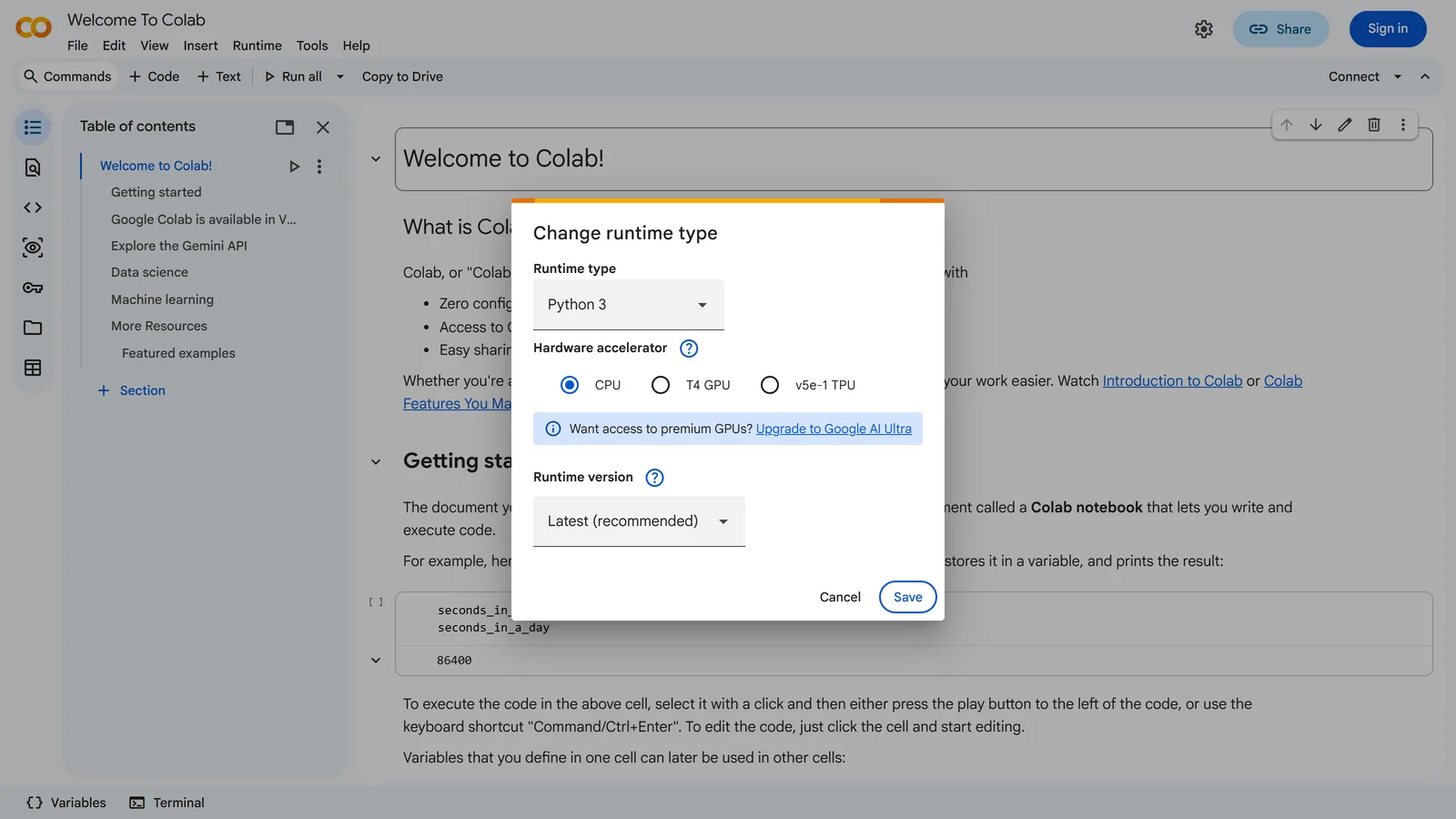
The free plan's choices on 11 November 2026: CPU, a T4 GPU or a v5e-1 TPU.
On a paid plan, the same dialog lists the L4, A100 and, on Pro+, the H100 and G4. Google's own help notebook puts it this way: "In order to use a GPU with your notebook, select the Runtime > Change runtime type menu, and then set the hardware accelerator to the desired option." Signed out, the dialog's upsell now points at Google's consumer AI plan: "Want access to premium GPUs?" … "Upgrade to Google AI Ultra".
When you've finished with the GPU, switch back. Google's advice is to "Choose Runtime > Change Runtime Type and set Hardware Accelerator to None"; the current dialog calls that option CPU. A GPU left attached uses up your free allowance or your units.
Check which GPU you got
Google's notebook checks with a single cell; if it prints "Not connected to a GPU", change the runtime as above and run it again:
gpu_info = !nvidia-smi
gpu_info = '\n'.join(gpu_info)
if gpu_info.find('failed') >= 0:
  print('Not connected to a GPU')
else:
  print(gpu_info)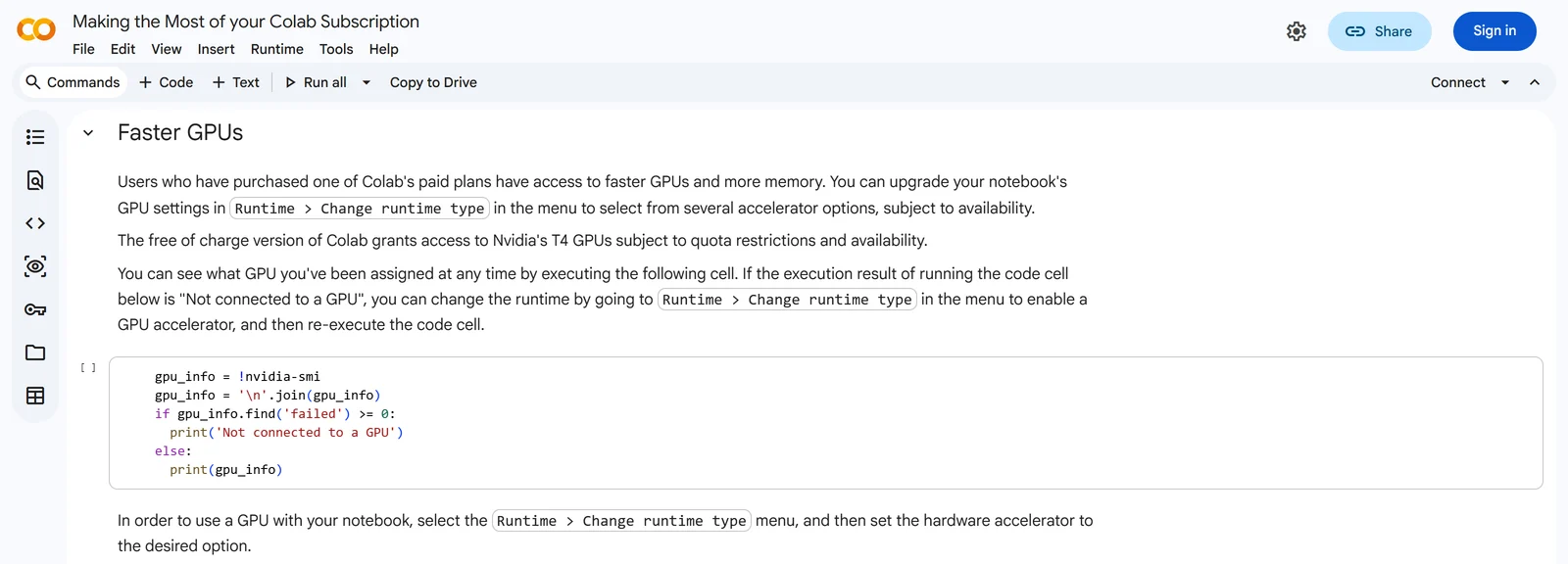
Google's own notebook: "The free of charge version of Colab grants access to Nvidia's T4 GPUs subject to quota restrictions and availability."
Colab's published package list includes PyTorch and TensorFlow, so you can also ask the library which GPU it sees:
import torch
print(torch.cuda.is_available(), torch.cuda.get_device_name(0) if torch.cuda.is_available() else None)

import tensorflow as tf
print(tf.config.list_physical_devices('GPU'))
If torch.cuda.is_available() prints False, the runtime has no GPU: change it as above. Models and tensors also have to be moved onto the GPU (model.to('cuda')), or the code runs on the CPU while the GPU sits idle.
Colab's GPUs, and which plan gets each
| GPU | Memory | Free | Pay As You Go, Pro | Pro+ | Compute units an hour (measured by users) |
|---|---|---|---|---|---|
| T4 | 16 GB | Yes, when one is free | Yes | Yes | about 1.1 to 1.2 |
| L4 | 24 GB | No | Yes | Yes | about 1.5 to 1.7 |
| A100 | 40 GB | No | Yes | Yes | about 5.3 to 5.4 |
| A100, high memory | 80 GB | No | Yes | Yes | about 6.8 to 7.5 |
| G4 (RTX PRO 6000 Blackwell) | 96 GB | No | No, since August 2026 | Yes | about 8.7 to 8.9 |
| H100 | 80 GB | No | No, since August 2026 | Yes | about 18 (one measurement) |
| TPU v5e-1 | Yes, in the free dialog | Yes | Yes | about 2.9 | |
| TPU v6e-1 | No | Yes | Yes | about 4.1 |
The unit rates come from two people who measured them, on 10 March and 27 July 2026; Google publishes none. Since 29 October 2026, several users on Colab's issue tracker have reported higher rates for the same GPUs, for example "the usage rate increased from 6.77 per hr to 8.88 per hour" on the 80 GB A100, and Google hadn't replied by 5 November. Colab's resource panel shows your balance and current rate, so check it before you plan around these numbers. What the units cost in money is in our Colab Pro guide.
Two more things the table doesn't show:
- Paid GPUs come with bigger machines. "More powerful GPUs are always offered with high-memory VMs."
- The H100 change is meant to stay. A Colab product manager wrote in August 2026 that "H100 and G4(RTX Pro 6000) runtimes are only available to Pro+ users for the time being", and that "The H100 change is likely permanent, but we are looking to bring back G4 to Pro users in the near future." The Pay As You Go column for those two follows from his naming Pro+ only. Google AI Ultra subscribers also "unlock uninterrupted background execution and Premium GPU access".
Which GPU to pick
- T4 for courses, small models, inference and anything that fits in 16 GB. It has no bfloat16 support, so mixed-precision training on it uses float16.
- L4 as the cheap paid step up: newer than the T4, with more memory, for about 40% more units an hour.
- A100 when the model or batch doesn't fit in 24 GB, or training on an L4 is too slow. Take the 80 GB version only if 40 GB isn't enough.
- G4 or H100, on Pro+, for the largest models. The H100 uses about two and a half times the units of an 80 GB A100.
Jupyter notebooks for your team.
Start free →How Colab's GPUs changed, 2023 to 2026
- 5 May 2023: paid users can choose their GPU type.
- 15 April 2024: "L4 runtime is now available for paid users".
- 14 October 2025: "GPUs (A100, L4, T4) up to 13% cost reduction", and the high-memory A100 with "double the GPU and system RAM."
- 20 January 2026: "H100 is being rolled out for more users."
- 25 March 2026: the G4, "Nvidia RTX Pro 6000 Blackwell Server Edition GPUs".
- 18 June 2026: the Colab CLI, to "Access GPUs/TPUs, run scripts remotely, and supercharge your AI agents".
- August 2026: the H100 and G4 become Pro+ only.
- 16 to 22 September 2026: Colab becomes part of Google's AI plans, which include compute units every month.
"You cannot currently connect to a GPU due to usage limits"
That message means the free GPU allowance is used up for now. Google doesn't say how much the allowance is: "Colab does not publish these limits, in part because they can vary over time." It's small: "In the version of Colab that is free of charge there is very limited access to GPUs." Nor does Google say how long the block lasts; users on Stack Overflow report a day, and in one case "I was able to use the GPUs after 5 days".
Meanwhile you can:
- Keep working on CPU. CPU runtimes still connect.
- Buy units. Pay As You Go needs no subscription. Paid users who run out "will revert to the free-of-charge tier policies and restrictions until the balance is increased."
- Use another free GPU. Kaggle publishes its weekly quota, "30 hours or sometimes higher depending on demand and resources", on a P100 or two T4s.
- Not open a second account. Colab's FAQ bans "using multiple accounts to work around access or resource usage restrictions".
Other Colab messages, session lengths and idle timeouts are in our guide to Google Colab's limits.
When Colab's GPU isn't enough
For a GPU you can count on, Google points to "guaranteed resources without Colab-enforced usage limitations via GCP Marketplace or Colab Enterprise or use your own compute via a local runtime you control." Colab Enterprise bills Google Cloud's hourly rates in your own project. GPU clouds rent an A100 or H100 by the hour; our Colab Pro guide compares their prices, and Paperspace and Databricks Free Edition have small free GPU offers of their own.
When the notebook is a team's, not a GPU job
Plenty of Colab notebooks don't need a GPU at all: a weekly report on the company's sales database, a cleaning job, an analysis colleagues should open. Those need a database connection, a schedule and a sign-in rather than an accelerator, and consumer Colab switched off scheduled notebooks in March 2026.
Fastero is an AI and data platform where people and AI agents work together on a team's data. Its notebooks are .ipynb files in a shared workspace, with SQL cells that query the team's saved connections, passwords kept in the workspace's Secrets, runs on a schedule on the Free plan, and colleagues who sign in to read them; viewers are free. Fastero runs notebooks on CPU machines and has no GPUs, so keep Colab or Kaggle for training.
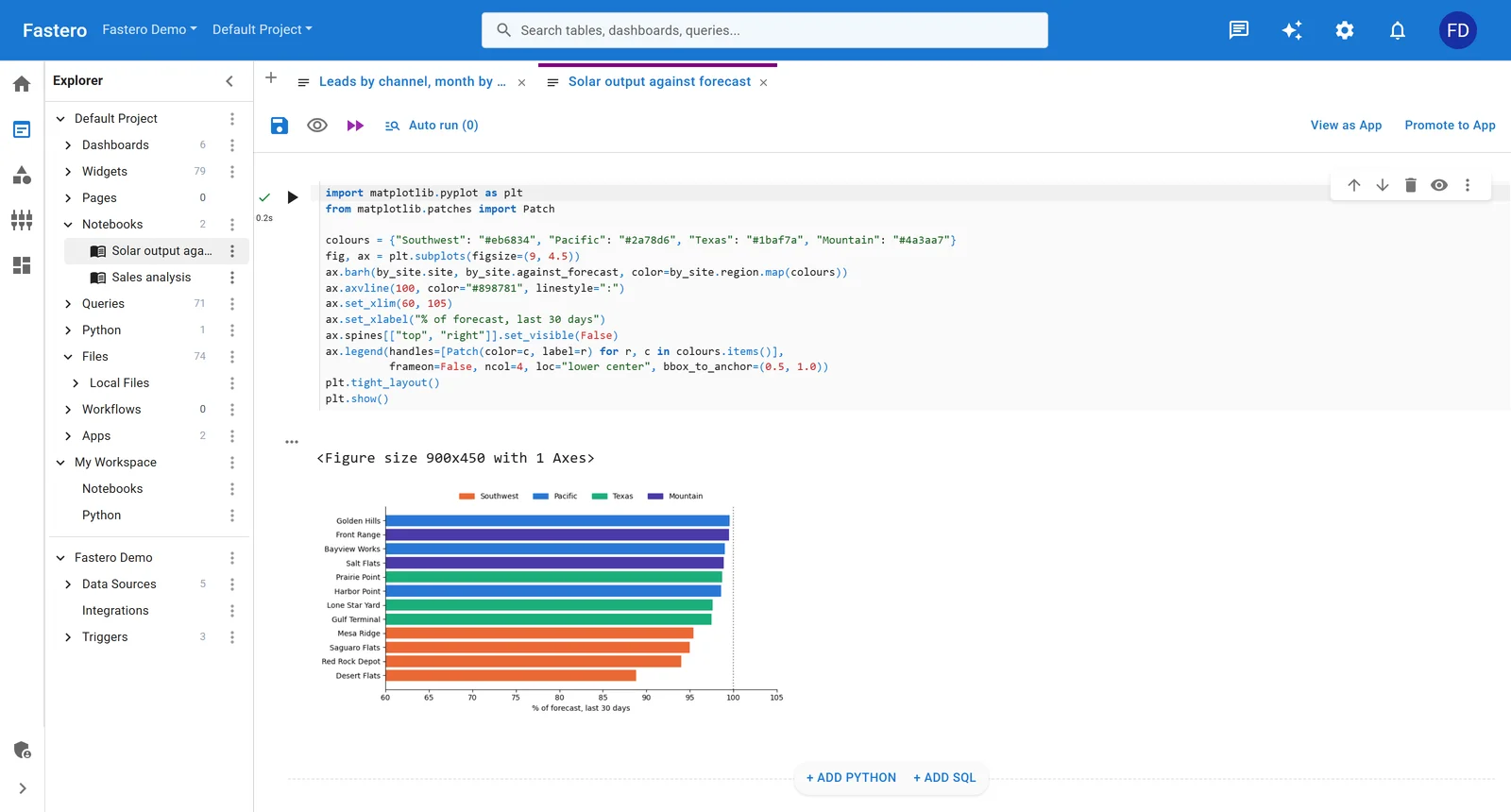
A notebook in Fastero: a Python cell and the chart it drew. Sample data.
More on Colab alternatives, Kaggle vs Colab and scheduling a Jupyter notebook.
FAQ
What GPU does Google Colab give you for free?
An Nvidia T4 with 16 GB of memory, when one is available and you're within the free quota. The free plan can't choose any other GPU.
How do I enable a GPU in Google Colab?
Choose Runtime › Change runtime type, select a GPU under Hardware accelerator, and click Save. The runtime restarts, so run your cells again, then check with !nvidia-smi.
How long can I use Colab's free GPU?
Google doesn't say. Free notebooks run "for at most 12 hours, depending on availability and your usage patterns", and the GPU allowance is smaller and unpublished. When it's used up, Colab shows "You cannot currently connect to a GPU due to usage limits in Colab."
Does Colab have the A100 and H100?
Yes, on paid plans. The A100 (40 or 80 GB) is available with Pay As You Go, Pro and Pro+. Since August 2026 the H100 and the G4 are for Pro+ only.
How many compute units does each Colab GPU use per hour?
Google doesn't publish it. Users measured about 1.1 for a T4, 1.5 for an L4, 5.3 for a 40 GB A100, 7 for an 80 GB A100, 9 for a G4 and 18 for an H100 in 2026, and some reported higher rates from late October 2026.
What is the G4 GPU in Colab?
A machine with an Nvidia RTX PRO 6000 Blackwell Server Edition GPU and 96 GB of GPU memory, added in March 2026. It's for Pro+ subscribers.
Why does Colab say I'm not using the GPU?
Your runtime has a GPU but the code isn't using it, usually because the model or data is still on the CPU. Move it with .to('cuda'), or switch the runtime back to CPU to save your allowance.
Sources
Read on 11 November 2026, signed out of Colab; the US prices come from the Internet Archive's copy of Colab's sign-up page from 9 October 2026:
- Google: Colab FAQ, Making the Most of your Colab Subscription, Colab release notes, Colab sign-up and plans (archived US copy), Colab is now part of your Google AI plan, Local runtimes, Colab's installed packages
- Colab's issue tracker: H100 and G4 for Pro+ only, higher unit rates from 29 October 2026
- Measured unit rates: Cody Collier, 27 July 2026 and Chris McCormick, updated March 2026
- Stack Overflow: the usage-limit message and how long it lasts; Kaggle's GPU quota