 Fastero Dev Team
Colab Pro is Google's paid plan for Colab notebooks. You don't buy hours or a GPU: you buy compute units, and how long they last depends on which machine you run.
The short answer: Colab Pro costs $9.99 a month in the US and gives you 100 compute units, which buy roughly 80 to 90 hours on a T4 GPU or about 18 hours on an A100. Google doesn't publish those rates; independent users measured them in 2026. Units expire after 90 days, no GPU is guaranteed, and a session still stops after 12 hours. Only Pro+, at $49.99, keeps running with the browser closed. Pro is worth it for a few dozen GPU hours of experiments a month. It isn't the answer for guaranteed hardware, long training runs, or a notebook that should run on a schedule: Google switched scheduling off in consumer Colab in March 2026.
Fastero
Jupyter notebooks for your team, with nothing to install.
Start a notebook or bring your .ipynb files. SQL cells query your databases with no password in the code, and a notebook runs now or on a schedule. Colleagues open it with their own login; viewers are free.
Try free →Colab plans and prices
| Plan | Price (US) | Compute units | What else you get |
|---|---|---|---|
| Free | $0 | None; the free quota isn't published | A T4 GPU when one is available, sessions of up to 12 hours |
| Pay As You Go | $9.99 per 100 units, $49.99 per 500 | What you buy | Paid machines without a subscription |
| Colab Pro | $9.99 a month | 100 a month | Faster GPUs and high-memory machines when available, a larger Gemini quota |
| Colab Pro+ | $49.99 a month | 600 a month | Priority for premium GPUs, background execution for up to 24 hours, the largest Gemini quota |
| Google AI Pro | $19.99 a month | 200 a month | Colab units come with Google's AI plan; see below |
| Colab Enterprise | Google Cloud's hourly rates | No units | Runs inside Google Cloud, with access control and scheduled runs |
Google's sign-up page shows prices in local currency, with tax where it applies: a visitor from Portugal sees Pro at €11.38 and Pro+ at €51.97. Paid Colab is sold in about 66 countries, which the page lists.
What 100 compute units buy
A compute unit is Colab's currency for machine time. Every machine uses units at its own rate per hour, faster GPUs much faster, and Google says only that "the amount of access a compute unit gives you depends on the configuration of your VM and use of specialized accelerators." It publishes no rate table, so these figures come from two people who measured them in March and July 2026:
| Machine | Hours per 100 units | Cost per hour at $0.10 a unit |
|---|---|---|
| T4 GPU | about 80 to 90 | about $0.11 to $0.12 |
| L4 GPU | about 60 | about $0.15 to $0.17 |
| A100 GPU, 40 GB | about 18 | about $0.54 |
| A100 GPU, 80 GB (high memory) | about 13 to 15 | about $0.68 to $0.75 |
| G4 GPU (RTX PRO 6000, 96 GB) | about 11 | about $0.88 |
| H100 GPU | about 5 to 6 (one measurement) | about $1.80 |
| TPU v6e-1 | about 25 | about $0.41 |
| TPU v5e-1 | about 33 | about $0.29 |
So a month of Colab Pro is about 18 hours on an A100, and a month of Pro+ about 110. Google cut its GPU rates by up to 13% in October 2025, so older tables, often quoting about 15 units an hour for an A100, overstate the cost. A GPU left attached while you read or think keeps using units: Google's advice is to disconnect when you're done. Colab's resource monitor shows your balance and current rate.
Colab Pro's limits
All of these come from Google's own Colab pages:
- Sessions stop after 12 hours. "In general, notebooks can run for at most 12 hours", on Pro as on the free tier. Runs of up to 24 hours, carrying on after you close the browser, are a Pro+ feature. Many 2026 guides still say Pro gets 24 hours; Google's FAQ doesn't.
- Idle runtimes time out, after a period Google doesn't publish.
- No GPU is guaranteed. Faster GPUs are "subject to availability and your compute unit balance", and "the types of GPUs and TPUs that are available in Colab vary over time."
- Units expire after 90 days and are "not refundable and not transferable." Google may stop you buying more while you hold "a substantial compute unit balance."
- When units run out, you're back on the free tier's rules, and a running job can be stopped. Buying more may give you a fresh runtime, so save first.
- Memory and disk sizes aren't published. Paid plans get "a high memory system profile subject to availability." The disk is bigger on Pro; buying more Google Drive storage doesn't change it.
- No scheduled notebooks. Google switched them off on 27 March 2026, "due to low usage", and no consumer plan has them now.
- Sharing a notebook doesn't share the machine. Colleagues get the notebook's code, output and comments; each runs it in their own virtual machine, without your files or installed packages.
Colab Pro vs Pro+
| Colab Pro | Colab Pro+ | |
|---|---|---|
| Price (US) | $9.99 a month | $49.99 a month |
| Compute units | 100 a month | 600 a month |
| Cost per unit | $0.10 | about $0.083 |
| GPUs | Faster GPUs when available | Priority access to premium GPUs |
| Longest run | 12 hours | Up to 24 hours |
| Keeps running with the browser closed | No | Yes, while code is running |
| Gemini in Colab | Larger quota | Largest quota |
Pro+ makes sense only if you'll use most of its 600 units: per unit it's about 17% cheaper, and background execution is the one feature Pro doesn't have. You can upgrade mid-month at a prorated price; there's no downgrade, only cancelling Pro+ and subscribing to Pro.
Jupyter notebooks for your team.
Start free →Google AI plans now include Colab
Since 22 September 2026, Google's AI subscriptions carry Colab compute units every month: 50 with Google AI Plus, 200 with Google AI Pro, and 1,000 or 2,000 with the two Ultra plans. They add to any Colab plan you already have, into the same balance. Only Ultra adds background execution and premium GPUs. At $19.99 for 200 units, Google AI Pro costs the same per unit as Colab Pro, so if you already pay for it, check your Colab balance before buying Pro.
Is Colab Pro worth it?
Yes, if you need tens of GPU hours a month for experiments, coursework or small fine-tuning runs, start from Google Drive, and can live with whichever GPU is free. At about $0.11 an hour for a T4 and $0.54 for an A100, the unit price is low.
Try free first if your work fits a T4: Kaggle gives two T4s for free, in sessions of up to 12 hours, with a weekly quota users put at about 30 GPU hours. Colab Pro subscribers get 15 extra Kaggle GPU hours a week, and Pro+ subscribers 30.
Rent a GPU by the hour if you need a particular GPU, runs longer than a day, or the same machine every time:
| Provider | A100 80 GB, per hour | H100, per hour |
|---|---|---|
| Colab, at unit prices | about $0.68 to $0.75, when you get one | about $1.80, when you get one |
| Vast.ai (marketplace median) | about $0.63 to $0.87 | about $2.40 |
| RunPod | from $1.19 | from $1.99 |
| Lambda | $2.79 (40 GB: $1.99) | from $3.29 |
| Colab Enterprise (Google Cloud) | $4.71 | $11.76 |
Prices from each provider's pricing page on 27 October 2026; Vast.ai's change daily. Colab's figure is only for the hours you actually get the GPU.
Look elsewhere if the notebook is for a team rather than for a GPU: one that runs every morning against the company's database, that colleagues open with their own login, and whose results should end up in a dashboard. That is the work Colab stopped scheduling in March.
When the notebook is for a team
Fastero is an AI and data platform where people and AI agents work together on a team's data. Its notebooks run in a shared workspace, next to the team's database connections:
- SQL cells query a workspace connection with its stored credentials and hand the result to Python as a pandas DataFrame, so no password sits in the notebook.
- Secrets reach cells as environment variables, in interactive and scheduled runs alike.
- Schedules: run a notebook now, or on a cron schedule, on the Free plan.
- Sharing: colleagues sign in and open it; viewers are free and can read without running or changing it. Promote to App turns a notebook into an app behind the same login.
- The rest of the work is there too: the same workspace holds the team's SQL, dashboards and Streamlit apps, and Claude can create, write, run and schedule its notebooks through Fastero's connector.
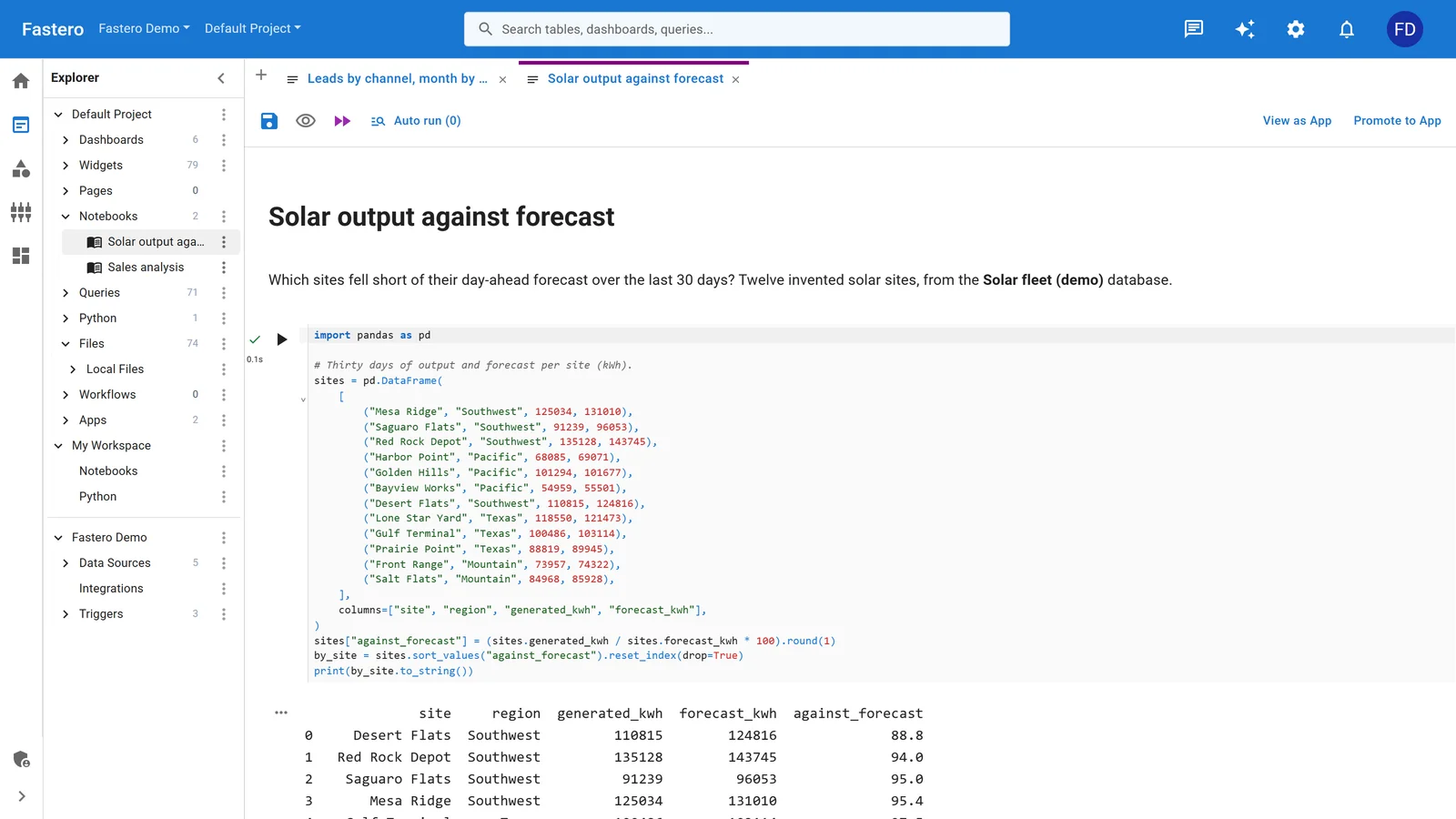
A notebook in a Fastero project, beside the project's queries and data sources. Sample data.
More on scheduling a Jupyter notebook, sharing one with your team, where to run one online, and 12 Google Colab alternatives.
How to cancel Colab Pro
Cancel at payments.google.com, under Subscriptions & services. Pro's benefits last until a month after your final payment. Units you hold aren't refunded, except where the law gives you a right to withdraw: 14 days in the EEA and a few other places. A Colab plan your school or employer manages through Google Workspace is cancelled by its administrator.
FAQ
How much is Google Colab Pro?
$9.99 a month in the US, for 100 compute units a month. Colab Pro+ is $49.99 a month for 600 units, and Pay As You Go sells 100 units for $9.99 without a subscription. Prices are shown in local currency outside the US.
How many hours do I get with Colab Pro?
There's no hours allowance, only 100 units a month. Measured in 2026, they last about 80 to 90 hours on a T4, 60 on an L4 and 18 on a 40 GB A100. A single session runs at most 12 hours.
Does Colab Pro give you an A100?
Sometimes. Faster GPUs, the A100 included, are offered "subject to availability and your compute unit balance", and no plan guarantees one. Pro+ gets priority for premium GPUs.
Do unused Colab compute units roll over?
For up to 90 days. Units expire 90 days after you get them, and they can't be refunded or transferred.
Can Colab run with my browser closed?
On Pro+, yes: a running notebook carries on for up to 24 hours with background execution. On Pro and the free tier it stops soon after you leave. Google AI Ultra includes background execution too.
Can I schedule notebooks in Google Colab?
Not in consumer Colab since 27 March 2026, when Google switched scheduled notebooks off. Colab Enterprise on Google Cloud schedules notebooks, Kaggle reruns them daily, weekly or monthly, and Fastero runs them on a schedule on its Free plan.
Is Colab Pro free for students?
Not any more for new students: Google's free year of Colab Pro for verified US students and faculty is closed to new sign-ups. Students who already have it keep it until the year is up.
Sources
- Google — Colab sign-up page and plan FAQ, Colab FAQ, Colab release notes, Deprecation notice of scheduled notebooks (27 March 2026), Colab is now part of your Google AI plan (22 September 2026), Google AI plans, Colab Enterprise pricing
- Measured compute-unit rates — Chris McCormick, Colab GPUs, features and pricing (March 2026), Cody Collier, Google Colab accelerators (July 2026)
- Kaggle — Notebooks documentation
- GPU prices — RunPod, Lambda, Vast.ai
Try Fastero free — run notebooks next to your team's data, on a schedule, and share them with a sign-in. No credit card required.