 Fastero Dev Team
Colab Enterprise is the version of Google Colab that runs inside your own Google Cloud project. It looks like Colab, but it is bought, secured and billed like the rest of Google Cloud, and since consumer Colab dropped scheduled notebooks in March 2026, it is the only Colab that still runs a notebook on a timetable. This guide covers what it costs, with the disks most price comparisons forget, how it differs from Colab Pro, and how to set it up.
The short answer: Colab Enterprise is Google's managed Colab notebook in your Google Cloud project, now part of Gemini Enterprise Agent Platform (the April 2026 name for Vertex AI). There's no subscription: you pay Google Cloud's hourly rate for the runtime's machine, any GPU and its disks. The default runtime in us-central1 costs about $0.16 an hour for the machine and about $0.20 with its two disks, and the disks keep billing while the runtime is shut down. Choose it over Colab Pro when you need scheduled runs, access control through IAM, your data in Google Cloud, or hardware you pick rather than whatever is free.
Fastero
Jupyter notebooks for your team, with nothing to install.
Start a notebook or bring your .ipynb files. SQL cells query your databases with no password in the code, and a notebook runs now or on a schedule. Colleagues open it with their own login; viewers are free.
Try free →What Colab Enterprise is
Google calls it "a collaborative, managed notebook environment with the security and compliance capabilities of Google Cloud." In practice:
- Notebooks live in your project, stored regionally in Dataform rather than in Google Drive.
- Access goes through IAM, Google Cloud's permissions, rather than Drive sharing.
- Code runs on runtimes, virtual machines in your project shaped by runtime templates: machine type, GPU, disk, network and idle shutdown.
- Network controls apply: VPC Service Controls, customer-managed encryption keys, and runtimes without public internet if you want them.
- It opens from the Google Cloud console and from BigQuery Studio, where its notebooks sit next to your tables.
On 22 April 2026, Google renamed Vertex AI to Gemini Enterprise Agent Platform, so the docs now say "Colab Enterprise is a part of Gemini Enterprise Agent Platform." Colab's own sign-up page, and most articles about Colab Enterprise, still say Vertex AI.
What it costs
Google's pricing model is short: "To calculate pricing, sum the costs of the virtual machines you use." Accelerators are charged on top. A runtime always includes a 100 GiB SSD boot disk that "can't be configured", and the default runtime adds a 100 GiB standard data disk. Using Google's us-central1 on-demand rates:
| Runtime | Running, per hour | Shut down (disks only), per hour |
|---|---|---|
| Default CPU: e2-standard-4 (4 vCPUs, 16 GB) | about $0.195 ($0.161 machine + $0.035 disks) | about $0.035 |
| Default GPU: g2-standard-4 with one L4 | about $0.89 | about $0.04 |
| n1-standard-4 with one T4 | about $0.68 | about $0.03 |
| a2-highgpu-1g with one A100 40 GB | about $4.44 | about $0.03 |
| a2-ultragpu-1g with one A100 80 GB | about $6.07 | about $0.03 |
| a3-highgpu-1g with one H100 | about $13.21 | about $0.03 |
The machine figures are Google's listed prices for Colab Enterprise, a page that also shows a management fee for each machine family; our sums add the GPU and the disks. Prices vary by region, and one- and three-year savings plans cut them by 10% and 20%. Runtime templates cost nothing to create or keep. There's no free tier beyond the $300 of credits Google Cloud gives new customers.
The part of the bill that keeps running
Three documented rules decide what a day costs more than the hourly rate does:
- A runtime shuts down after 180 idle minutes by default, and only when "the runtime isn't connected to a notebook." Leaving a notebook tab open keeps it running.
- Shut down isn't free. "Compute charges aren't generated because there isn't any CPU or GPU usage", but "Boot disk and data disk storage is charged."
- Default runtimes are deleted 18 hours after they're created, and "any files that you upload are deleted" with them.
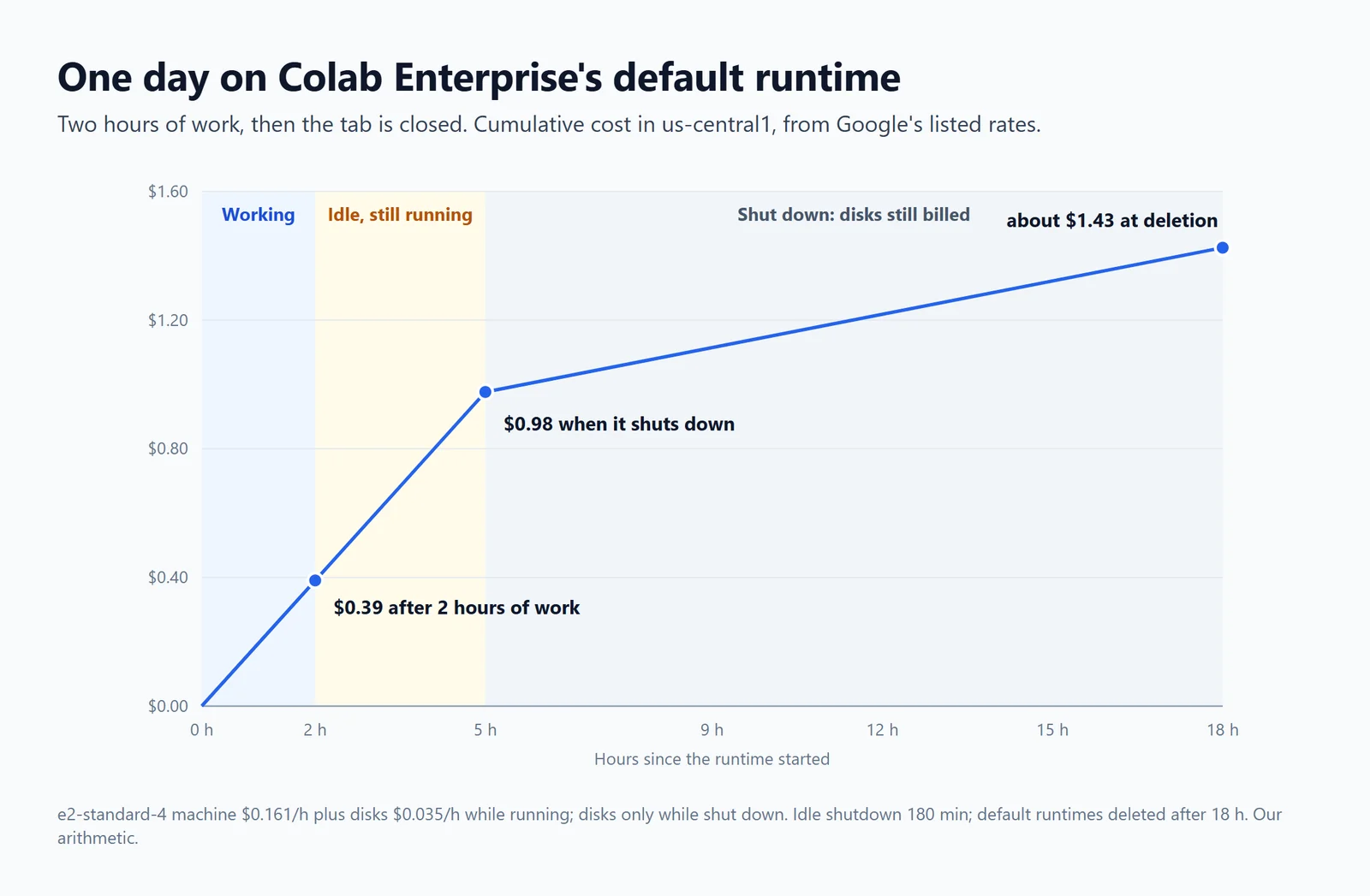
One day on the default runtime in us-central1, from Google's listed rates: two hours of work, then the tab closed. Our arithmetic.
So two hours of work on the default runtime, after which you close the tab, comes to about $1.43 for the day: five hours of machine time while it waits out the idle period, then thirteen hours of disks until deletion. Deleting the runtime when you finish brings it down to about $0.39. Set a shorter idle shutdown in your runtime template (anything from 10 minutes to 24 hours) before you create runtimes from it, because a template can't be changed afterwards.
Colab Enterprise vs Colab Pro
| Colab Pro | Colab Enterprise | |
|---|---|---|
| Billing | $9.99 a month for 100 compute units (US) | Google Cloud's hourly rates: machine, GPU and disks |
| Hardware | Whatever is free, "subject to availability" | The machine and GPU you choose; reservations possible |
| Longest run | "Longer runtimes" than free; stops when you close the browser | Your idle setting; default runtimes deleted after 18 hours |
| Storage | Google Drive | Dataform, in a region you choose |
| Access | Drive sharing | IAM: users, groups, domains |
| Network | Always on the internet | Your VPC, VPC Service Controls, no public internet if you choose |
| Scheduled runs | None since 27 March 2026 | One-off and recurring schedules |
| AI | Gemini, consumer terms | Gemini for Google Cloud, which doesn't train on your prompts |
| Support | A feedback form | Google Cloud support |
Since February 2026, consumer Colab can also connect to a Colab Enterprise runtime ("Connect to Google Cloud runtime"), but the runtime "must already be running", and scheduling stays in the Cloud console. Our guide to Colab Pro covers what its units buy, and our guide to Colab's limits what each consumer plan allows.
Scheduled notebook runs
This is the feature that sends many people from consumer Colab to Colab Enterprise. "You can schedule a notebook to run immediately one time, or on a recurring schedule", in cron format; Google's example is "00 19 * * MON", weekly on Monday at 19:00. When a run finishes, its results are "stored in a shareable Cloud Storage bucket", and "anyone with access to the bucket can see the notebook file's code and" output, so choose the bucket with care. Scheduling needs the Colab Enterprise User role plus Storage Admin, runs use your Compute Engine quota, and schedules can also be created with gcloud, Python or Terraform.
Jupyter notebooks for your team.
Start free →Gemini and the Data Science Agent
Gemini in Colab Enterprise explains errors, writes and completes code, and runs the Data Science Agent, generally available since 26 May 2026, which works from CSV files and BigQuery tables. Google says Gemini in Colab Enterprise "is currently available to try at no additional cost", and Gemini for Google Cloud's data terms apply: "Gemini doesn't use your prompts or its responses as data to train its models." That is the opposite of consumer Colab, covered in our Colab AI guide. The agent isn't in every region: 21 of Colab Enterprise's 35 regions had it in November 2026, and Paris, Sydney and Warsaw were among those without it.
How to set it up
- Use a Google Cloud project with billing enabled.
- Enable three APIs: "Enable the Agent Platform, Dataform, and Compute Engine APIs".
- Grant the Colab Enterprise User role. It can't create the first default runtime template, which needs a separate permission, so an administrator may have to do that once. Both names are below.
- Open Colab Enterprise in the Cloud console, choose a region, and create a notebook. A notebook and its runtime must be in the same region.
- Approve the sign-in dialog on the first run: by default, notebooks run with your own credentials.
- For Gemini, an administrator enables the Gemini for Google Cloud API and grants its user role.
roles/aiplatform.colabEnterpriseUser         # the Colab Enterprise User role
aiplatform.notebookRuntimeTemplates.create   # creates the first default runtime template
Two gotchas: the Colab Enterprise User role "can see all notebooks in the" project, so give teams separate projects or a custom role if that matters, and GPU runtimes need GPU quota in both the region and globally.
When Colab Enterprise is the wrong size
Colab Enterprise is a good answer for a team that already runs on Google Cloud and has someone to look after projects, roles, quotas and buckets. For a team that just needs its notebooks to run next to its data on a schedule, and to be shared with colleagues behind a login, it is a lot of cloud to take on.
Fastero is an AI and data platform where people and AI agents work together on a team's data, with notebooks as one part of it:
- Schedules without a cloud project. Run a notebook now or on any cron schedule, on the Free plan.
- SQL cells on your own databases (Postgres, MySQL, SQL Server, BigQuery, Snowflake and more), with credentials kept in the workspace, so no password sits in the notebook.
- Sharing with a sign-in. Invite colleagues as editors or viewers; viewers are free.
- One price: a Free plan, then Pro at $20 per editor a month, with 750 compute hours per editor.
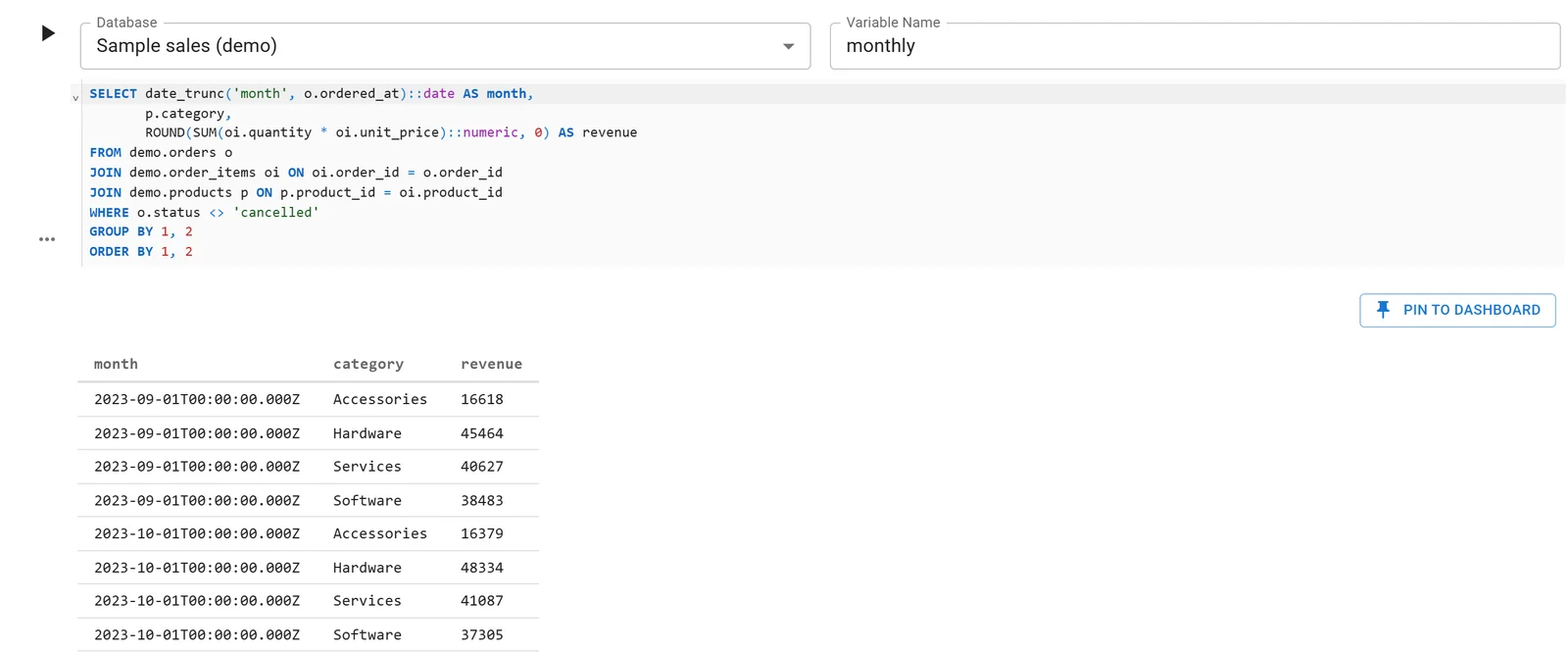
A Fastero notebook whose SQL cell reads a database connection; the rows arrive in Python as a DataFrame. Sample data.
Fastero has no GPUs, so for training on an A100 or H100, Colab Enterprise or another GPU cloud is the right tool. More on Colab alternatives.
FAQ
How much does Colab Enterprise cost per hour?
The default runtime (e2-standard-4) is about $0.16 an hour for the machine in us-central1, about $0.20 with its two disks. GPU runtimes run from about $0.68 an hour with a T4 to about $13 with an H100. Disks keep billing at about $0.03 an hour while a runtime is shut down.
Is Colab Enterprise free?
No. There's no free tier: you pay Google Cloud's hourly rates. New Google Cloud customers get $300 of credits, and Gemini in Colab Enterprise is "currently available to try at no additional cost".
What's the difference between Colab Enterprise and Colab Pro?
Colab Pro is a $9.99 monthly plan in consumer Colab, with compute units, Drive storage and whatever GPU is free. Colab Enterprise runs in your Google Cloud project, billed by the hour, with IAM, regional storage, network controls, scheduled runs and the hardware you choose.
Can you schedule notebooks in Colab Enterprise?
Yes: one-off or recurring runs in cron format, with results saved to a Cloud Storage bucket. Consumer Colab stopped scheduling notebooks on 27 March 2026.
Is Colab Enterprise part of Vertex AI?
It was. On 22 April 2026, Google renamed Vertex AI to Gemini Enterprise Agent Platform, and Colab Enterprise is now part of that.
Does Colab Enterprise shut down idle runtimes?
Yes, after 180 minutes by default, and only once no notebook is connected; an open tab keeps it running. The setting is in the runtime template, from 10 minutes to 24 hours.
Does Colab Enterprise have GPUs?
Yes: T4, L4, V100, A100 (40 and 80 GB) and H100, at Google Cloud's rates, subject to your project's GPU quota. Google's Colab Enterprise pricing page lists no TPUs.
Can I use my regular Colab notebook with Colab Enterprise?
Since February 2026, consumer Colab can connect to a Colab Enterprise runtime that is already running, through "Connect to Google Cloud runtime". The notebook itself stays in Drive.
Sources
Read on 6 November 2026:
- Google Cloud — Introduction to Colab Enterprise, Colab Enterprise pricing, Runtimes, Idle shutdown, Schedule a notebook run, Create a notebook (quickstart), Access control, Set up Gemini in Colab Enterprise, Use the Data Science Agent, How Gemini for Google Cloud uses your data, Colab Enterprise release notes, Gemini Enterprise Agent Platform release notes, BigQuery pricing: notebook runtimes
- Google — Colab sign-up page, Enterprise runtimes in consumer Colab (February 2026), Deprecation notice of scheduled notebooks (27 March 2026)
Try Fastero free — schedule notebooks on your own databases and share them with a sign-in, with no cloud project to set up. No credit card required.