 Fastero Dev Team
Most guides to Colab's limits give exact numbers: 90 minutes idle, 12 hours a session, so many GPU hours a week. Google publishes almost none of them, and says so. This guide separates what Google states from what users report, explains the messages you see when you hit a limit, and covers what you can do about it without breaking Colab's rules.
The short answer: Google doesn't publish most of Colab's limits: its FAQ says idle timeouts, maximum runtime, GPU types and usage caps "vary over time" and that "Colab does not publish these limits". What it does say: a free notebook runs for at most 12 hours, the free GPU is an Nvidia T4 when one is available, runtimes stop when you're idle, and only Colab Pro+ keeps code running, for up to 24 hours, after you close the browser. Paid plans buy compute units rather than hours, and when they run out you're back on free-tier limits. The "90-minute idle timeout" in most guides comes from a 2019 Stack Overflow question, not from Google.
Fastero
Jupyter notebooks for your team, with nothing to install.
Start a notebook or bring your .ipynb files. SQL cells query your databases with no password in the code, and a notebook runs now or on a schedule. Colleagues open it with their own login; viewers are free.
Try free →What Google publishes, and what it doesn't
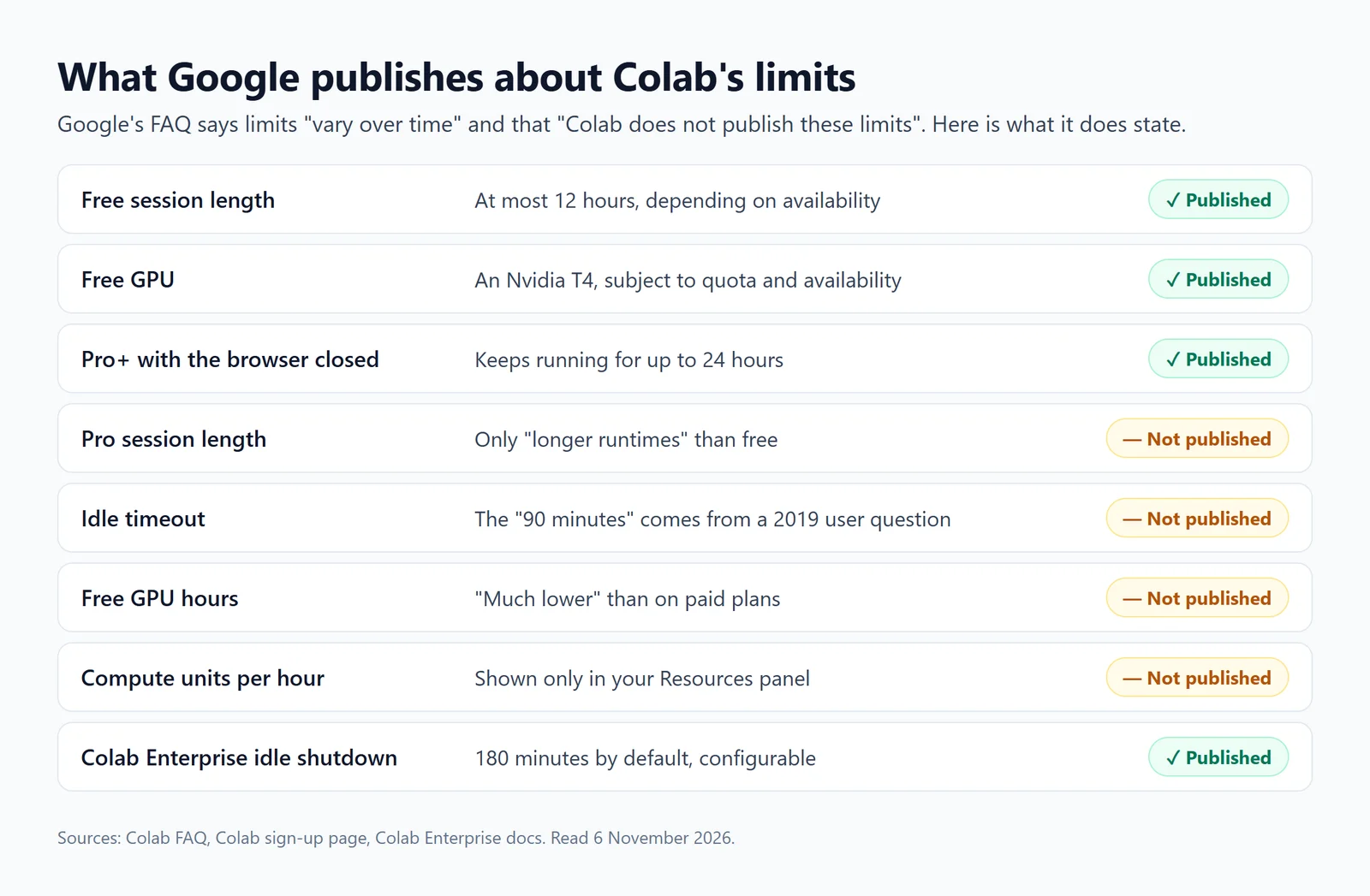
What Google's own pages state about Colab's limits, as of November 2026.
Google gives its reason in the FAQ: "In order to dynamically offer powerful GPUs at scale for a low price, Colab needs to maintain the flexibility to adjust usage limits and hardware availability dynamically." Free access is rationed toward people actively working: Colab "prioritizes users who are actively programming in a notebook."
Limits by plan
| Plan (US price) | Longest run | Closing the browser | GPU access |
|---|---|---|---|
| Free ($0) | "At most 12 hours, depending on availability and your usage patterns" | Execution stops and the machine is deleted soon after | A T4, "subject to quota restrictions and availability" |
| Pay As You Go ($9.99 per 100 units) | Not stated | Stops, as on Free | Paid GPUs while you have units |
| Colab Pro ($9.99 a month, 100 units) | "Longer runtimes" than free, no number | Stops, as on Free | T4, L4, A100 and TPUs; not H100 or G4 since August 2026 |
| Colab Pro+ ($49.99 a month, 600 units) | Up to 24 hours with units | Keeps running for up to 24 hours | All of them, H100 and G4 included |
Two notes on that table. On Pro's session length, Google gives no number, only "extended execution times"; a member of the Colab team wrote "Runtimes last up to 24 hours in Colab Pro" in 2024, which is not the same as a guarantee. And in August 2026 a Colab product manager wrote that "H100 and G4(RTX Pro 6000) runtimes are only available to Pro+ users for the time being", adding that "the H100 change is likely permanent". What units buy on each GPU is in our Colab Pro guide.
The idle timeout
Google's whole statement is: "Runtimes will time out if you are idle." It publishes no number. The 90 minutes repeated across the web traces back to a 2019 Stack Overflow question; 2026 guides now give anything from 30 to 90 minutes. Treat any figure as a guess.
Two details matter more than the number:
- Idle means no code running. "Idle timeouts only apply if code execution terminates." A long training loop isn't idle; a notebook you left open after it finished is.
- Pro+ background execution only covers running code. "Background execution only applies during an execution state: idle times will still result in VM deletion." A Colab engineer said the same in April 2026 about Pro+ runtimes that ended early.
Only Colab Enterprise, the Google Cloud version, publishes a figure: its runtimes shut down after 180 idle minutes by default, a setting you can change.
The messages you see, and what they mean
"You cannot currently connect to a GPU due to usage limits in Colab." You've used up the free GPU allowance for now. Google doesn't say for how long; users report anything from a day to five days. CPU runtimes still work.
"Cannot connect to GPU backend." No GPU is free at that moment. Pro subscribers see a version that reads: "As a Colab Pro subscriber you have higher usage limits than non-subscribers, but availability is not unlimited."
"You are connected to a GPU runtime, but not utilising the GPU." A warning, not an error. Google's advice is "switching to a standard runtime if you are not utilizing the GPU": a GPU left idle counts against your allowance or burns compute units.
"Your session crashed after using all available RAM." The notebook ran out of memory. Google doesn't publish machine sizes; users measured about 12 GB of RAM on a free runtime in 2026. Load less data at once, or use a paid High-RAM runtime.
"Runtime disconnected." It has more than one cause. A Colab engineer explained a batch of Pro+ cases in 2026: some runtimes were deleted for being idle, others "due to becoming unhealthy", which "indicates that your notebook executions crashed somehow (likely from out-of-memory or other such application issues)." Check memory first.
"Unable to connect to the runtime." Often not a limit at all. In October 2026, Colab staff traced a wave of these to home internet providers' DNS failing to resolve Colab's new runtime address.
"This account has been blocked from accessing Colab managed runtime sessions due to suspected abusive activity." An abuse flag, not a usage limit. Users who were flagged by mistake have had accounts unblocked after sending feedback.
Jupyter notebooks for your team.
Start free →What you can do about it
- Free the GPU when you're not using it. Google's own advice: "Consider closing your Colab tabs or disconnecting from your runtime when you are done working and avoid utilizing GPUs when it is unnecessary for your work." At the end of a long job,
from google.colab import runtime; runtime.unassign()ends the runtime from code. - Save as you go. A runtime's disk is deleted with it. Write checkpoints and results to Google Drive, and copy one archive rather than thousands of small files; the FAQ warns that an interrupted move between Drive folders can lose the data in transit.
- Pay for what you need. Pro or Pay As You Go buy faster GPUs and longer runs; only Pro+ keeps running with the browser closed. Since September 2026, Google AI subscriptions include Colab compute units too.
- Use Kaggle for a published GPU quota. Kaggle states its weekly GPU allowance, "30 hours or sometimes higher depending on demand and resources", and runs sessions for up to 12 hours. See our Kaggle vs Colab comparison.
- Use your own hardware. Colab can connect to a local runtime that runs on your machine, without the cloud limits.
- Move up to Colab Enterprise for runtimes you choose and pay for by the hour, in your own Google Cloud project. See our Colab Enterprise guide.
What not to do: Colab's FAQ lists "using multiple accounts to work around access or resource usage restrictions" among banned activities, and keep-alive scripts that click the page work against a service that "prioritizes users who are actively programming"; users report Colab has shown CAPTCHAs to idle sessions since 2021. Google's FAQ also still suggests buying a dedicated machine on GCP Marketplace, but Colab staff announced that route's deprecation for new deployments in March 2025.
Scheduled notebooks are gone from consumer Colab
Until March 2026, Pro+ could run a notebook on a schedule. On 27 March 2026, a Colab product manager announced: "Due to low usage of scheduled notebooks and our need to focus on areas of growing interest, we're turning this feature off starting today". If you need a notebook to run every morning without a browser open, consumer Colab can no longer do it. Colab Enterprise and Kaggle still schedule notebooks.
When a notebook has to run without you
Colab's limits exist because it's built for someone working at a keyboard. A notebook that refreshes a report or checks a database every morning needs something else: a machine that starts it on time, keeps its files, and holds the passwords it uses.
In Fastero, notebooks run next to a team's data and keep running when nobody is watching:
- Schedules on the Free plan. Run a notebook now, or on any cron schedule; a scheduled run starts its own session, so no browser has to be open.
- Nothing to set up again. The notebook and its project files stay in the workspace between runs, and database passwords live in the workspace's Secrets, reaching cells as environment variables.
- SQL cells query a workspace connection and hand the rows to Python as a pandas DataFrame.
- Sharing with a sign-in. Colleagues open the notebook with their own login; viewers are free.
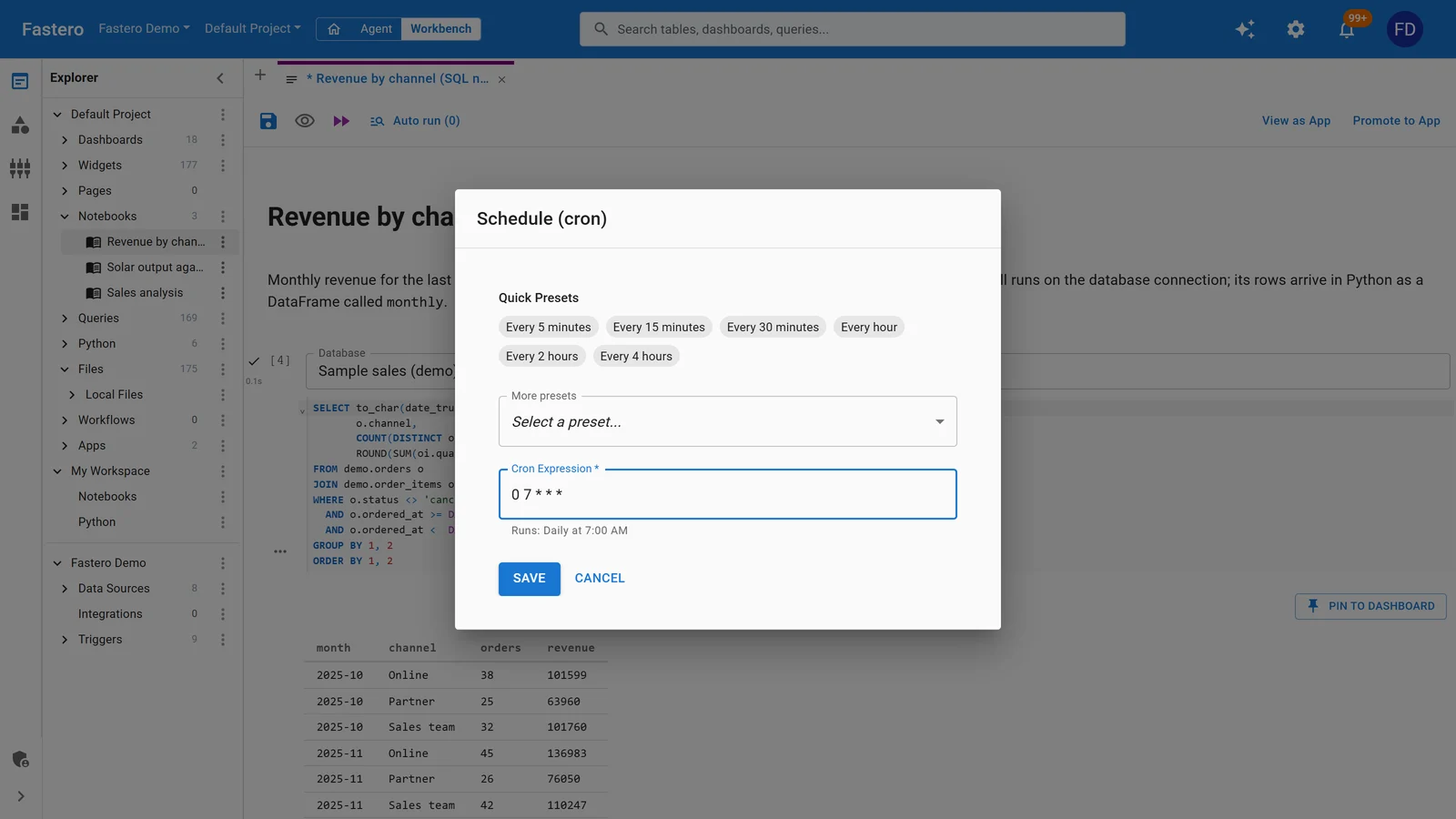
Scheduling a notebook in Fastero: presets or any cron expression. Sample data.
Fastero's notebooks run on CPU machines and it has no GPUs, so it doesn't replace Colab for training models. More on Colab alternatives and running a notebook on a schedule.
FAQ
How long can a Google Colab notebook run for free?
At most 12 hours, "depending on availability and your usage patterns", and less if it sits idle. The machine is deleted when the session ends, with any files on its disk.
What is the free GPU limit on Google Colab?
Google doesn't publish one. The free tier gets an Nvidia T4 "subject to quota restrictions and availability", and when you've used your allowance you see "You cannot currently connect to a GPU due to usage limits in Colab." Users report waits of one to five days before it comes back.
How long does Colab's usage limit last?
Google doesn't say. Users have reported a day in some cases and up to five days in others. CPU runtimes keep working in the meantime.
What is the idle timeout in Google Colab?
Google doesn't publish one: "Runtimes will time out if you are idle." The 90 minutes most guides repeat comes from a 2019 Stack Overflow question. Code that's running doesn't count as idle.
Does Colab keep running if I close the browser?
Only on Colab Pro+ (or Google AI Ultra), for up to 24 hours, and only while code is executing. On the free plan, Pay As You Go and Pro, execution stops when you leave and the machine is deleted soon after.
Is Colab Pro limited to 12 hours?
Google doesn't say. It promises Pro "longer runtimes" than the free plan without a number; a Colab team member put it at up to 24 hours in 2024. Pro doesn't keep running with the browser closed.
Why does Colab keep disconnecting?
Usually idleness, running out of memory, or a GPU allowance used up; sometimes your internet provider's DNS. Colab staff describe early disconnects as idle deletion or an "unhealthy" runtime, most often out of memory.
Can I schedule a notebook in Colab?
Not in consumer Colab since 27 March 2026. Colab Enterprise schedules notebooks in Google Cloud, Kaggle reruns notebooks daily, weekly or monthly, and Fastero runs them on any cron schedule on its Free plan.
Sources
Read on 6 November 2026:
- Google — Colab FAQ, Colab sign-up page and plan FAQ, Making the most of your Colab subscription, Colab release notes, Local runtimes, Colab Enterprise idle shutdown
- Colab team on GitHub — Deprecation notice of scheduled notebooks (27 March 2026), H100 and G4 for Pro+ only (August 2026), Pro runtime length (2024), Early Pro+ disconnects explained (2026), DNS and "Unable to connect" (October 2026), GCP Marketplace deprecation (2025)
- Kaggle — Efficient GPU usage tips, Notebooks documentation
- User reports — Stack Overflow: the 2019 "90 minutes" question, Stack Overflow: GPU usage limits, Stack Overflow: how long the limit lasts
Try Fastero free — run notebooks next to your team's data, on a schedule, with no browser tab to keep open. No credit card required.