 Fastero Dev Team
Lightning AI Studios are cloud machines from the team behind PyTorch Lightning: you open one in the browser and get VS Code and JupyterLab on a Linux box that keeps your files and installed packages between sessions. The free tier is real, but it isn't "free GPU hours" in the way Kaggle's is, and Lightning's own pages disagree on some of the numbers.
The short answer: Lightning AI's free tier gives you one CPU Studio that runs free but must be restarted every 4 hours, plus up to 30 credits to start: 5 when you sign up and 25 more when you add a card. One credit is $1. GPUs are paid from those credits, billed by the second, from $0.55 an hour for a T4 to $5.45 for an H100, so 30 credits buy about 54 hours on a T4. Lightning advertises "up to 50 free GPU hours", which counts cheaper interruptible machines. Studios sleep after 10 idle minutes and keep everything when they do. Pro costs $20 a month billed yearly or $50 monthly. Prices and limits checked 12 November 2026.
Fastero
Jupyter notebooks for your team, with nothing to install.
Start a notebook or bring your .ipynb files. SQL cells query your databases with no password in the code, and a notebook runs now or on a schedule. Colleagues open it with their own login; viewers are free.
Try free →What the Lightning AI free tier gives you
From Lightning's pricing page and docs, checked 12 November 2026:
| Lightning AI Free | |
|---|---|
| Price | $0, no credit card needed to start |
| Credits | Up to 30: 5 on registration, 25 more when you add a card. Unused credits expire after 12 months |
| Free machine | One CPU Studio at a time, free; the billing FAQ calls it a "4-CPU Studio" and the pricing page lists it at 16 GB |
| Free Studio rule | "Free Studios run 24/7 but require restart every 4 hours." |
| Studios | As many as you like; only one runs free at a time |
| GPUs | Paid from credits; 1 GPU per Studio, 2 running at once |
| Big-GPU sessions | A100, H100 and H200 sessions limited to 4 hours; T4, L4 and L40S unlimited |
| CPUs | Up to 32 per Studio |
| Storage | First 10 GB free, then $0.10 per GB a month |
| Idle | Sleeps after 10 idle minutes; you can't extend that on Free |
| Seats | Up to 2 |
| Sign-up | A real (non-virtual) phone number |
A credit is worth one US dollar, and credits pay for "compute, storage and tokens". Running machines and storage above 10 GB are the two things that use them, by Lightning's billing FAQ.
Lightning AI GPU prices
Lightning bills GPUs by the second. The pricing page lists several prices for most GPUs, depending on where the machine runs; this table shows the lowest it listed for each, and what the 30 starting credits buy at that price.
| GPU | Memory | Lowest listed price per hour | Hours for 30 credits |
|---|---|---|---|
| T4 | 16 GB | $0.55 | about 54 |
| L4 | 24 GB | $0.79 | about 38 |
| A100 | 40 GB | $2.19 | about 13.7 |
| L40S | 48 GB | $2.97 | about 10 |
| H200 | 141 GB | $4.50 | about 6.7 |
| RTX PRO 6000 | 96 GB | $4.63 | about 6.5 |
| H100 | 80 GB | $5.45 | about 5.5 |
| B200 | 180 GB | $9.86 | about 3 |
Prices from the pricing page, checked 12 November 2026; the hours column is our arithmetic. Bigger CPU machines are paid too: $0.51 an hour for 32 GB, $0.99 for 64 GB.
Where "50 free GPU hours" comes from. The pricing page says: "Up to 30 free credits gets you ~50 GPU hours on interruptible machines." Interruptible machines are spare capacity that can be taken back, which Lightning says saves "50-80%". Two things to know: Lightning's own interruptible machines doc says you need a paid tier to use them, while the pricing page lists "Up to 80% off on interruptible" under Free; and the Studio docs promise "up to 80 free GPU hours to start" after phone verification. Three figures, one page each. Plan on the credits, not the hours.
Lightning AI's limits, in practice
- The free Studio restarts every 4 hours. It's free around the clock, but a long job on it has to survive a restart. Pro removes the rule: "No restrictions in Pro or higher."
- Studios sleep after 10 idle minutes. "If the Studio is running anything such as model training, hosting an API server, etc, it will not go to sleep." On Free you can't stretch that: "Disabling or extending auto-sleep to >10 minutes of inactivity require a Lightning Pro subscription."
- Sleep keeps everything. Files, installed packages and downloaded data are there when the Studio starts again, and "There is no cost for sleeping Studios, other than the storage costs for the files on that Studio." This is Lightning's real advantage over Colab.
- Studios wake up on a CPU. "Studios always restart on a CPU machine." Switch back to a GPU when you need it, or change the Teamspace setting that keeps the last machine type.
- Scripts keep running with the browser closed; notebooks less so. A training script in the terminal carries on after you close the tab. For notebooks the docs say: "Notebooks require the browser tab to remain open but can run in the background." For a long run, use a script.
- Big GPUs stop at 4 hours on Free. A100, H100 and H200 sessions are capped; T4, L4 and L40S sessions aren't.
- The storage cap depends on which page you read. The pricing page says 50 GB of persistent storage on Free; the billing FAQ says a 200 GB limit. Both agree the first 10 GB are free.
- Verification can take days. Lightning asks for a phone number "to prevent abuse of the platform", and "Personal emails are typically harder to verify and may take 2-3 business days." A work or university email is faster. Free credits go to one account per person.
Lightning AI pricing: Free, Pro and Teams
| Free | Pro | Teams | |
|---|---|---|---|
| Price | $0 | $20 a month billed yearly, or $50 monthly | $119 per user a month billed yearly, or $140 monthly |
| Credits included | Up to 30 to start | 40 a month on monthly billing, 240 a year on yearly | 50 a month, or 600 a year |
| Seats | Up to 2 | Up to 5 | Up to 10 |
| Free CPU Studio | One, restarts every 4 hours | One, runs 24/7 | One, runs 24/7 |
| GPUs per Studio / at once | 1 / 2 | 4 / 6 | 8 / 12 |
| A100, H100, H200 sessions | 4 hours | Unlimited | Unlimited |
| Persistent storage | 50 GB | 200 GB | 2 TB |
| Auto-sleep | Fixed at 10 minutes | Can be changed or turned off | Can be changed or turned off |
From the pricing page's plan cards and comparison table, checked 12 November 2026. Purchased credits expire after 12 months. Enterprise is priced on request and adds SAML/SSO, SOC 2 Type 2, your own VPC and the use of AWS or GCP credits. The pricing page also mentions academic pricing.
Is Pro worth it? At $20 a month billed yearly it's cheap if you live in a Studio every day, mainly for the 24/7 Studio without restarts, longer idle timeouts and multi-GPU Studios. If you only need a GPU now and then, Free plus bought credits covers it within Free's limits of one GPU per Studio and 4-hour sessions on the big ones, since GPU time is pay-as-you-go on every plan.
Jupyter notebooks for your team.
Start free →Lightning AI vs Google Colab vs Kaggle
| Lightning AI Studios (Free) | Google Colab (free) | Kaggle Notebooks | |
|---|---|---|---|
| Price | $0 to start, then credits | Free | Free |
| Free GPU | None: GPUs use credits, up to 30 to start | A GPU when available; access "heavily restricted" | One P100 or two T4s |
| How much | About 54 T4 hours from 30 credits | "Colab does not publish these limits" | "30 hours or sometimes higher" a week |
| Longest session | Free CPU Studio restarts every 4 hours; A100/H100/H200 4 hours | Up to 12 hours, "depending on availability and your usage patterns" | 12 hours (9 on TPU) |
| Idle stop | Sleeps after 10 minutes, state saved | Times out, period not published | 20 minutes in the notebook docs; the GPU tips page says 60 |
| Files and packages kept | Yes, across sleeps | No: "Virtual machines are deleted when idle for a while" | 20 GB of output in /kaggle/working |
| Runs with the browser closed | Scripts yes; notebooks need the tab, says Lightning | On Pro+, up to 24 hours, and the higher Google AI plans | Save & Run All runs the notebook as its own session |
| Editors | VS Code, JupyterLab, SSH from your own IDE | Colab's notebook | Kaggle's notebook editor |
Colab and Kaggle details from the Colab FAQ and Kaggle's notebook docs, checked 12 November 2026.
Pick Lightning AI when you want one machine that keeps its setup, pay-per-second GPUs up to an H100 or B200, and VS Code or SSH instead of a notebook-only editor. Pick Kaggle for the most free GPU time you can plan around. Pick Colab when your files are in Google Drive or you want to pay a small monthly fee for faster GPUs: our Colab Pro guide has the prices. Our list of Google Colab alternatives covers the other options.
When to move on from Lightning AI
- You need a particular GPU for days. Lightning sells reserved clusters on request; renting a machine by the hour elsewhere may be simpler.
- The credits run out faster than expected. A GPU Studio bills by the second while it runs, until it sleeps after 10 idle minutes. Switch back to CPU when you're done.
- The notebook is for a team, not a GPU. It reads the company database, runs every morning, and is read by people who will never open a Studio.
When the notebook is for a team
Keep Lightning for training. Fastero is for the everyday notebooks: it's an AI and data platform where people and AI agents work together on a team's data, and its notebooks run next to that data. It has no GPUs: each workspace's notebook server has 1 CPU and 2 GB.
- SQL cells query a workspace connection with its stored credentials and hand the result to Python as a pandas DataFrame, so no password sits in the notebook.
- Secrets reach cells as environment variables, in interactive and scheduled runs alike.
- Schedules: run a notebook now, or on a cron schedule, on the Free plan.
- Sharing: colleagues sign in to open it; viewers are free and can read without running or changing it. Promote to App turns a notebook into an app behind the same login.
- The rest of the work is there too: a SQL cell's result can become a dashboard widget that refreshes, and Claude can create, write and run the workspace's notebooks through Fastero's connector.
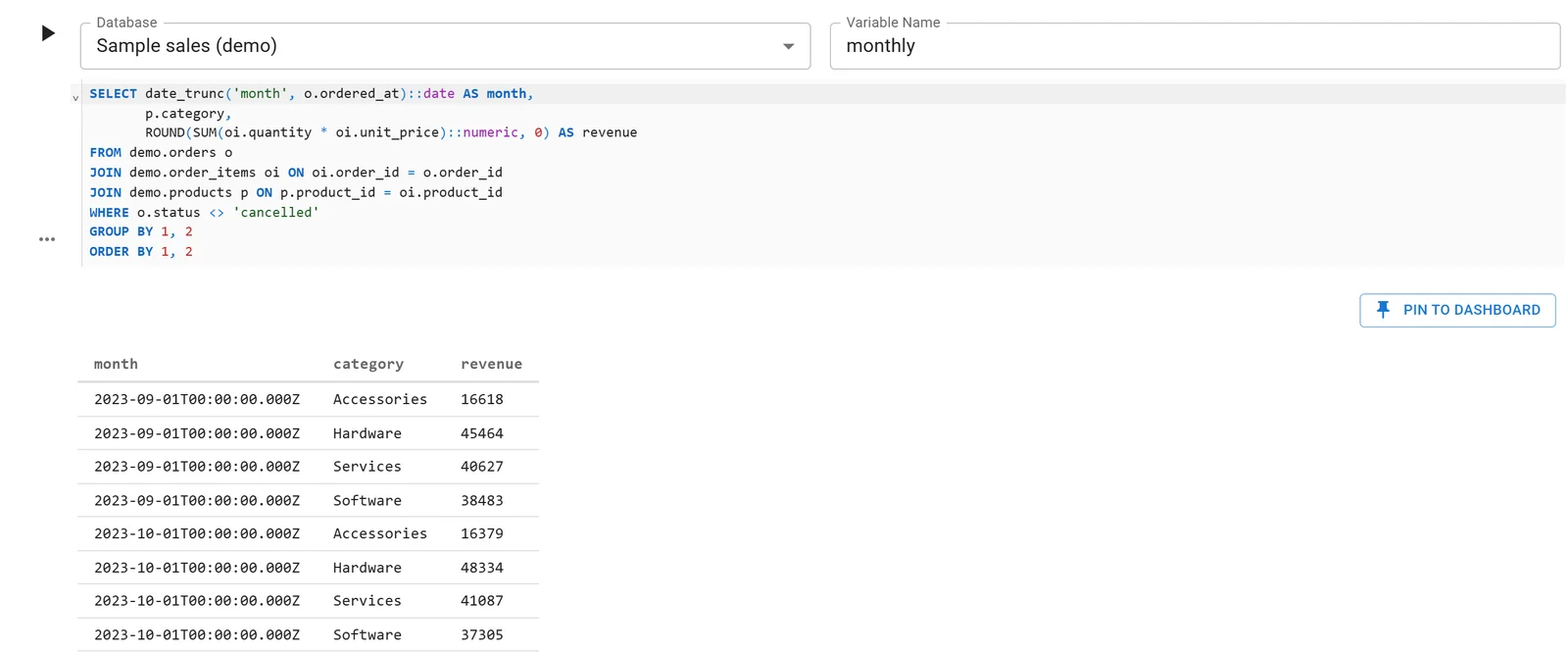
A Fastero notebook whose SQL cell reads a database connection; the rows arrive in Python as a DataFrame. Sample data.
Fastero's Free plan has no end date, and Pro is $20 per editor a month. More on sharing a notebook with your team and scheduling a Jupyter notebook.
FAQ
Is Lightning AI free?
The free tier is: you get one CPU Studio that runs free, with a restart every 4 hours, and up to 30 credits to start. GPUs and bigger machines are paid from credits, so free GPU time ends when the credits do.
How many free GPU hours does Lightning AI give?
It depends on the GPU. You get up to 30 credits, worth $30: about 54 hours on a $0.55 T4 or 5.5 hours on a $5.45 H100. Lightning advertises "up to 50 free GPU hours" on interruptible machines, and its Studio docs say "up to 80". Treat both as maximums.
What happens to the free Studio after 4 hours?
It has to be restarted. Free Studios "run 24/7 but require restart every 4 hours"; your files and packages are kept, but a running process is not. Pro and higher have no restart rule.
Does a Lightning AI Studio keep running when I close the browser?
Scripts do: Lightning calls it background execution, and the Studio sleeps when the script finishes. Its docs say notebooks need the browser tab open. An idle Studio sleeps after 10 minutes either way.
How much does Lightning AI Pro cost?
$20 a month billed yearly, or $50 month to month, as of 12 November 2026. Pro includes 40 credits a month on monthly billing or 240 a year on yearly billing, a 24/7 Studio without restarts, up to 4 GPUs per Studio and 200 GB of storage. Teams is $119 per user a month billed yearly.
Is Lightning AI better than Colab?
For work that should stay put, yes: a Studio keeps files and packages between sessions and lets you choose the GPU. For free GPU time, Kaggle publishes a weekly quota of about 30 hours, while Lightning's free GPUs come out of $30 of credits.
Why does Lightning AI need my phone number?
"To prevent abuse of the platform." It has to be a real, non-virtual number, and accounts with personal email addresses can take two or three business days to verify.
Sources
Read on 12 November 2026:
- Lightning AI: Pricing, AI Studio, Billing FAQ, FAQ, Account creation, Auto sleep, Background execution, Interruptible machines, Notebooks, Collaboration
- Google: Colab FAQ
- Kaggle: Notebooks documentation, Efficient GPU usage tips