 Fastero Dev Team
Paperspace Gradient was one of the first places to get a free GPU notebook. DigitalOcean bought Paperspace in July 2023, and three years on the product still runs, but its owner now treats it as something for existing users.
The short answer: Paperspace's Gradient notebooks still work in November 2026: the free plan has a free M4000 GPU and a free CPU machine, sessions that stop after at most 6 hours, 5 GB of storage, and a queue when free machines are busy. Pro costs $8 a month (15 GB and more free GPU types) and Growth $39 (50 GB, up to a free A100 80 GB); paid GPUs cost from $0.45 an hour for an M4000 to $5.95 for an H100. But DigitalOcean's own FAQ says existing users keep access while new users should sign up for DigitalOcean's AI products instead, and nothing new has shipped since December 2023. For new GPU work, DigitalOcean's successor is a GPU Droplet, with an H100 at $4.41 an hour.
Fastero
Jupyter notebooks for your team, with nothing to install.
Start a notebook or bring your .ipynb files. SQL cells query your databases with no password in the code, and a notebook runs now or on a schedule. Colleagues open it with their own login; viewers are free.
Try free →What happened to Paperspace
- 6 July 2023: DigitalOcean "acquired Paperspace for $111 million in cash", according to its filing with the SEC.
- December 2023: Paperspace's own changelog stops. Its last entry, on 26 December, announced "Nvidia H100s are Available On Demand", and "Paperspace changes are now tracked through DigitalOcean's release notes."
- 2024: "the Paperspace brand was folded into DigitalOcean." On 15 July, "Gradient API endpoints are deprecated and no longer available for Paperspace users"; Windows templates closed to new users.
- 14 January 2026: "Paperspace support emails now use the digitalocean.com domain."
DigitalOcean's page about the merger answers the obvious question directly:
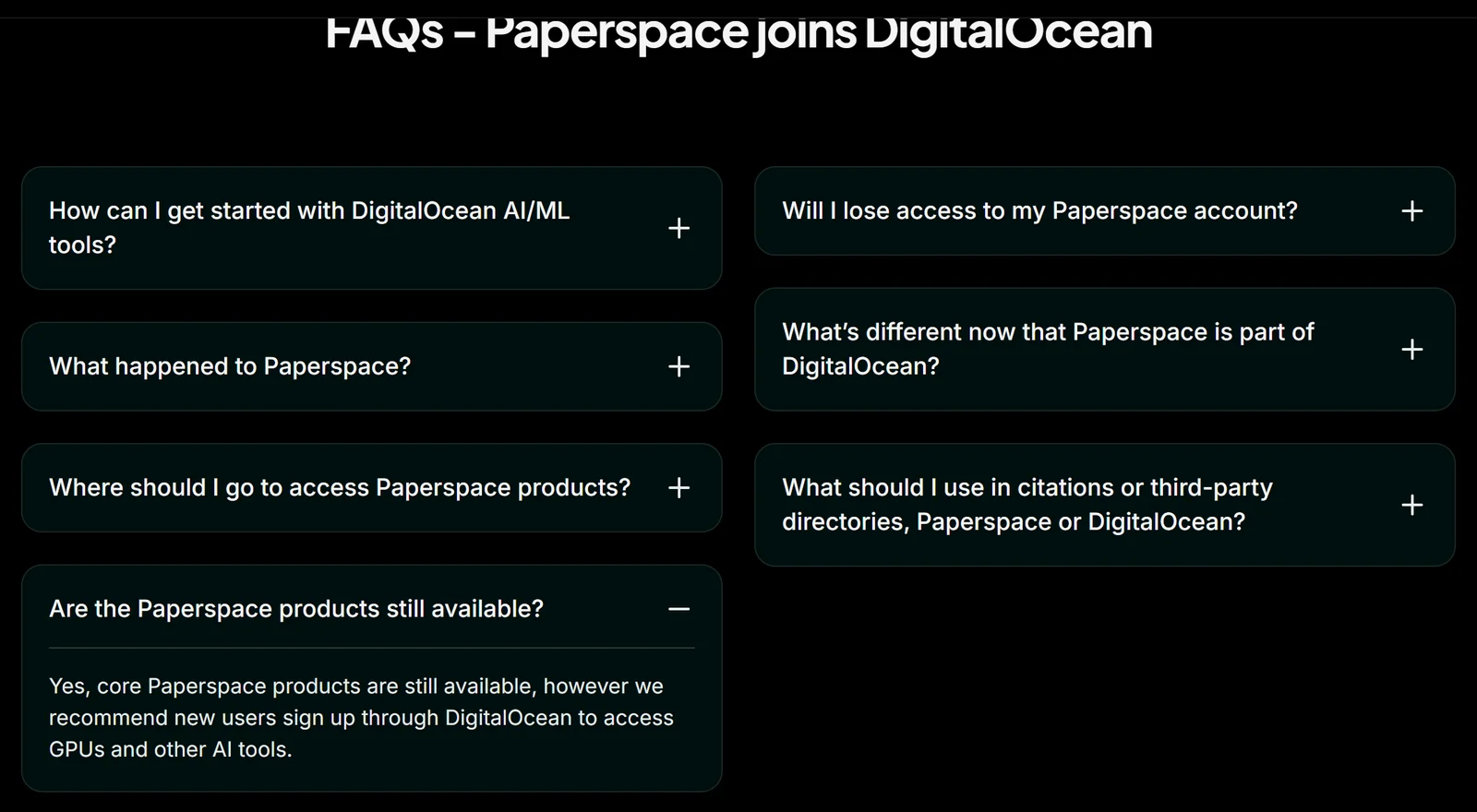
DigitalOcean's FAQ on the merger, 11 November 2026.
The same page says "While existing Paperspace users can still access legacy products, new users should view DigitalOcean's AI/ML product suite", and promises that "Any changes will be communicated with current Paperspace users before they take effect." No shutdown date has been announced. The product is still operated: on 30 October 2026 the status page reported "Gradient Notebooks Stuck in Pending State - Recovery Underway", resolved the same morning.
"Gradient" now means two things
DigitalOcean used the Gradient name for its own AI platform for a while, "a label that has since been deprecated." Its documentation now tells writers: "Do not use Gradient, Gradient AI Platform, or GenAI Platform as product names", and adds that "Gradient still names separate Paperspace products (Gradient Notebooks, Deployments, and Workflows, the deprecated Gradient CLI, and Gradient subscription plans)." So a 2025 article about "DigitalOcean Gradient" is about DigitalOcean's AI agents, not these notebooks.
Gradient Notebooks' free tier
"Notebooks include a free GPU plan." What it gives you, from DigitalOcean's Paperspace docs:
- Free machines: a free CPU machine (C4) and a free GPU (M4000) on every plan. Pro and Growth add more free GPU types (below).
- 6-hour sessions. "When using free-tier machines, the maximum auto-shutdown timeout is 6 hours." Paid machines can run from 1 hour up to a week, or with the timer off.
- Private workspaces only. Free machines "can only be used for Notebooks in private workspaces."
- A queue. "If your notebook is pending, then it is in queue for the next available free machine."
- Storage that stays. "Anything you store in the /storage directory is accessible across multiple runs of notebooks in a given storage region." The free plan includes 5 GB.
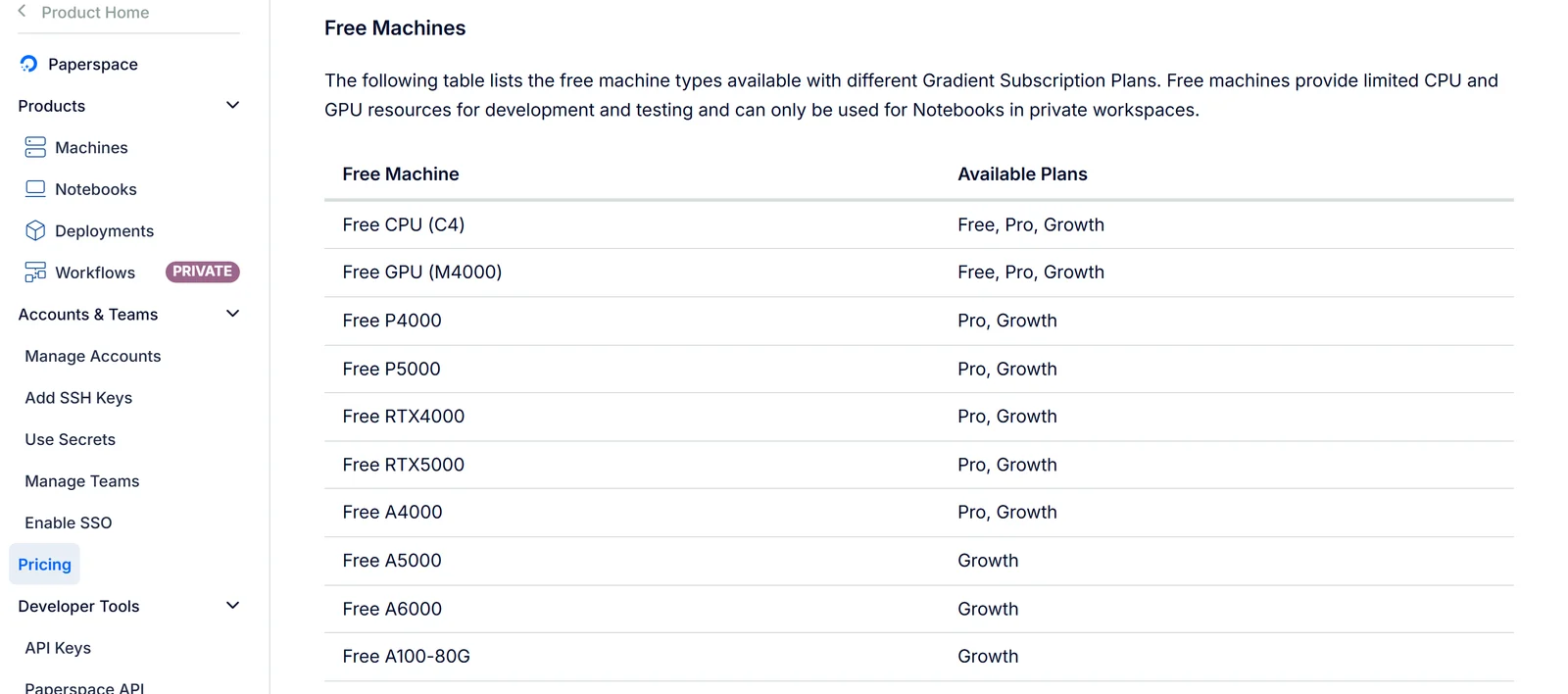
The free machines on each plan, from DigitalOcean's Paperspace pricing page.
Plans and GPU prices
| Plan, for one user | Price | Storage included | Free machines |
|---|---|---|---|
| Free | $0 | 5 GB | C4 CPU, M4000 GPU |
| Pro | $8 a month | 15 GB | adds P4000, P5000, RTX4000, RTX5000, A4000 |
| Growth | $39 a month | 50 GB | adds A5000, A6000, A100-80G |
Team plans cost $12 a month for Pro and $39 for Growth. Storage beyond the plan's allowance "is billed at $0.29/GB/mo."
Paid machines are billed by the hour, and "Machine compute charges apply only while a machine is powered on":
| GPU | Price an hour |
|---|---|
| M4000 | $0.45 |
| P4000 | $0.51 |
| RTX4000 | $0.56 |
| A4000 | $0.76 |
| A5000 | $1.38 |
| A6000 | $1.89 |
| V100 | $2.30 |
| A100 | $3.09 |
| A100, 80 GB | $3.18 |
| H100 | $5.95 |
Multi-GPU machines multiply the single price: "8 × $5.95 = $47.60/hr" for eight H100s. The docs list the A5000 and everything above it except the H100 under the Growth plan. Two figures there don't follow the docs' own rule: eight V100s are listed at $9.20 an hour and eight A6000s at $7.56, which is the price of four. Ask before you rely on them.
paperspace.com is out of date
Paperspace's old website still loads with a "Paperspace is now part of DigitalOcean!" banner, and its pricing page contradicts DigitalOcean's docs: it describes the free plan as "Public projects" with an "Auto-shutdown (12 hour limit)", while the docs say free machines are for private workspaces and stop after 6 hours. Its H100 price is still labelled a "special promo price". Use DigitalOcean's docs, which were last checked on 13 July 2026.
Deployments and Workflows
Gradient's other two products, Deployments (models served as endpoints) and Workflows (pipelines, "based on the Argo runtime engine"), are still documented and still billed under the Gradient plans. Neither is marked deprecated. But their last feature note dates from December 2023, the Gradient API and CLI that drove them are deprecated, and DigitalOcean's docs menu marks Workflows "private", the label it uses elsewhere for previews "available by invitation only". Don't start anything new on them.
The successor: DigitalOcean GPU Droplets
DigitalOcean's recommendation for new GPU work is "GPU Droplets or Bare Metal GPUs for GPU compute". A GPU Droplet is a virtual machine with one or eight GPUs and "AI/ML-ready images", priced per GPU from 1 August 2026:
| GPU Droplet | On-demand price per GPU an hour |
|---|---|
| RTX 4000 Ada | $0.76 |
| RTX 6000 Ada, L40S | $1.57 |
| H100 | $4.41 |
| H200 | $4.47 |
That H100 is cheaper than Paperspace's $5.95. The catch is billing: unlike Paperspace machines, Droplets "are billed per second for as long as the Droplet exists", running or not, so delete one when you're done. A Droplet is a server, not a notebook service: you install Jupyter yourself.
Jupyter notebooks for your team.
Start free →Paperspace vs Colab vs Kaggle for a free GPU
| Paperspace (free plan) | Google Colab (free) | Kaggle | |
|---|---|---|---|
| Free GPU | M4000 | T4, when one is free | P100 or two T4s |
| Session | Up to 6 hours | Up to 12 hours | Up to 12 hours |
| Free GPU time | Not published; a queue when busy | Not published | "30 hours or sometimes higher" a week |
| Files kept | 5 GB in /storage | Only what you save to Google Drive | 20 GB in /kaggle/working |
| Paid tier | $8 and $39 plans, hourly GPUs | Compute units, from $9.99 | None |
| Outlook | Legacy product | Active | Active |
The M4000 is the oldest and smallest of the three free GPUs. Paperspace's advantage is storage that persists with the notebook; its drawbacks are short free sessions and an owner pointing new users elsewhere. More on Colab's GPUs, Kaggle notebooks, Databricks Free Edition's GPUs and 12 Colab alternatives.
When the notebook is for a team, not a GPU
Many people kept a Paperspace notebook for work that never needed a GPU: a report on the company's data, a scheduled clean-up, an analysis colleagues should open. That work needs a database connection, a schedule and a sign-in more than an accelerator.
Fastero is an AI and data platform where people and AI agents work together on a team's data. Its notebooks are .ipynb files in a shared workspace: SQL cells query the team's saved connections, passwords stay in the workspace's Secrets, notebooks run on a schedule on the Free plan, and colleagues sign in to read them; viewers are free. Fastero runs notebooks on CPU machines and has no GPUs, so for training models keep a GPU service.
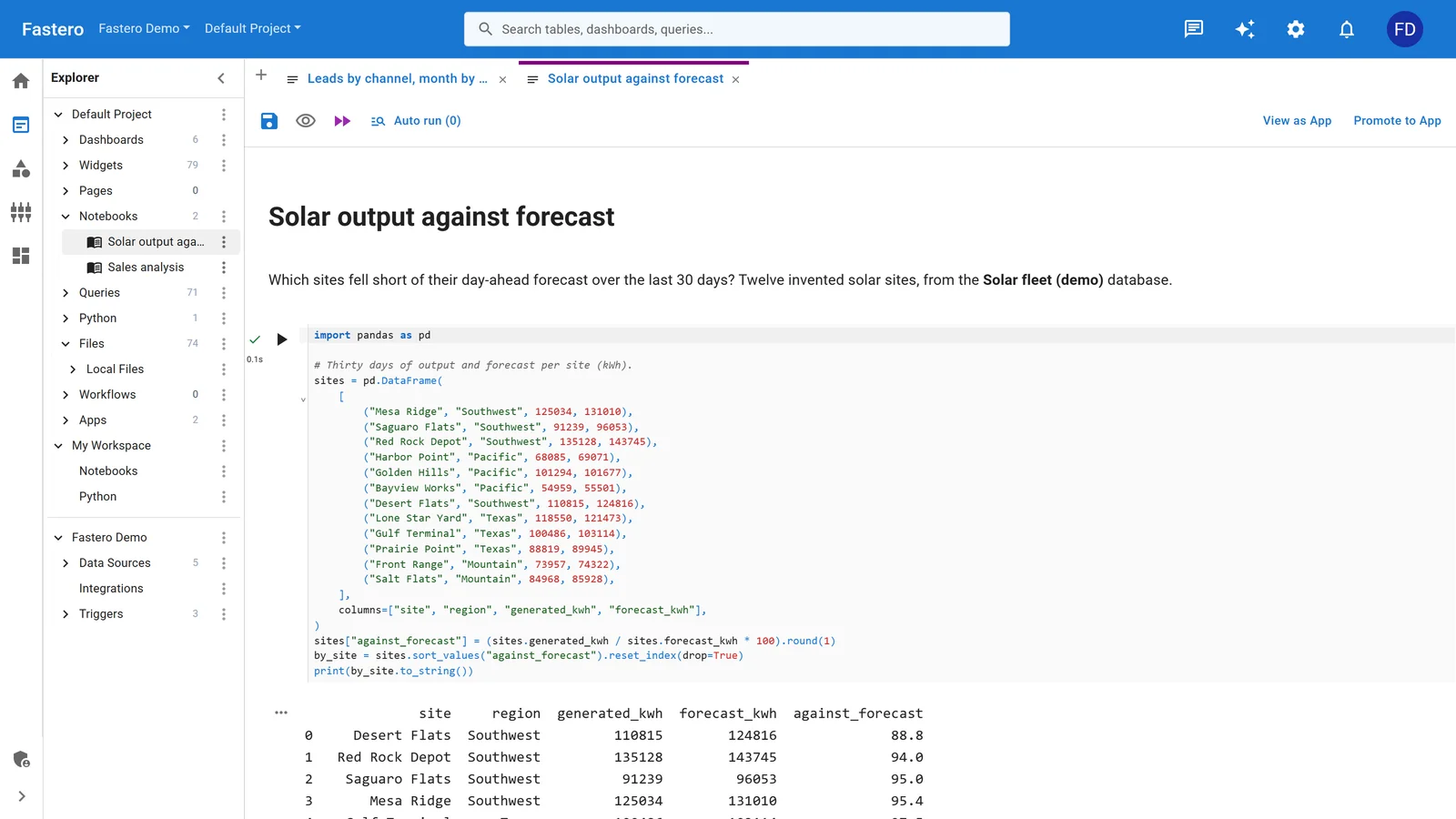
A notebook in Fastero, beside the project's queries and data sources. Sample data.
More on scheduling a Jupyter notebook and sharing one with your team.
FAQ
Is Paperspace Gradient still available in 2026?
Yes, as a legacy product. DigitalOcean says "core Paperspace products are still available" but recommends that new users sign up through DigitalOcean instead. No shutdown date has been announced.
Is Paperspace free?
The free plan includes a free M4000 GPU and a free CPU machine for notebooks in private workspaces, with sessions of up to 6 hours, 5 GB of storage, and a queue when free machines are busy.
Why is my Paperspace notebook stuck in pending?
It's waiting for a free machine: "If your notebook is pending, then it is in queue for the next available free machine." Wait, try another free machine type, or pay for a machine by the hour. On 30 October 2026 a platform outage also left notebooks pending for some hours.
How much does Paperspace cost per hour?
From $0.45 an hour for an M4000 to $3.09 for an A100, $3.18 for an 80 GB A100 and $5.95 for an H100, billed only while the machine is on. Pro costs $8 a month and Growth $39.
What is DigitalOcean Gradient?
Two things. DigitalOcean used "Gradient" for its own AI platform before retiring the name; today the name belongs only to Paperspace's products: Gradient Notebooks, Deployments, Workflows and the Gradient plans.
What replaces Paperspace?
DigitalOcean's GPU Droplets, virtual machines with one or eight GPUs billed per second while they exist, with an H100 at $4.41 an hour. For free notebook GPUs, Colab and Kaggle are the usual alternatives.
Sources
Read on 11 November 2026, signed out:
- DigitalOcean: Paperspace joins DigitalOcean, Paperspace docs, Paperspace pricing, Notebooks features, Creating notebooks, Notebook storage, Deployments, Workflows and Workflows features, Gradient CLI reference, product lifecycle, docs index, What is DigitalOcean
- GPU Droplet pricing, GPU Droplets docs
- Paperspace: paperspace.com, paperspace.com pricing, changelog, status page
- DigitalOcean's 8-K filing on the acquisition; Kaggle's notebook docs and GPU quota