 Fastero Dev Team
Databricks Free Edition is the free version of Databricks for learning and personal projects. It replaced Community Edition, and it has changed more in 2026 than most guides to it say: it gained GPUs, an AI coding assistant and a Postgres database, and its app limit went from one to three.
The short answer: Databricks Free Edition is free with no card and no end date, for non-commercial use only. You get Python and SQL notebooks on serverless compute (no Scala or R), one 2X-Small SQL warehouse, up to 5 job tasks at once, 3 apps and Genie Code, under a daily compute quota Databricks doesn't publish: go over it and compute stops for the rest of the day, with your data kept. Since June 2026 it also offers limited serverless GPUs, "subject to availability", once you verify your identity with LinkedIn. For work, Databricks offers a 14-day trial with up to $400 of credits instead.
Fastero
Jupyter notebooks for your team, with nothing to install.
Start a notebook or bring your .ipynb files. SQL cells query your databases with no password in the code, and a notebook runs now or on a schedule. Colleagues open it with their own login; viewers are free.
Try free →For the story of Community Edition's retirement and other free places to practise Spark, see Databricks Community Edition is gone. This post is about Free Edition itself, as it stands on 11 November 2026.
Databricks Free Edition limits
All of these come from Databricks' own limits page, last updated on 18 October 2026:
| Free Edition | |
|---|---|
| Price | Free; "Free Edition is provided at no cost to all users and is perpetually free to use" |
| Use | Personal and non-commercial: "Free Edition accounts may not be used for commercial purposes" |
| Compute | Serverless only; "Custom compute configurations are not supported" |
| Languages | Python and SQL; "Scala and R are not supported in notebooks" |
| Spark | "Only Spark Connect APIs are supported. Spark RDD APIs are not supported." No Spark UI |
| SQL warehouse | "One SQL warehouse, limited to a 2X-Small cluster size." |
| Jobs | "Max of 5 concurrent job tasks per account." |
| Apps | "Up to 3 Databricks Apps per account. Apps run for up to 24 hours after being started, updated, or redeployed." |
| Postgres | "One Lakebase project per account, with scale-to-zero compute." |
| Model serving | "No GPU serving endpoints" and "No custom models on GPU or batch inference" |
| Internet from notebooks | "restricted to a limited set of trusted domains" |
| Workspaces | "One workspace and one metastore per account." |
| Sign-in | Email code, Google or Microsoft; "No SSO or SCIM support." |
| Support | No "guaranteed reliability, support, or service-level agreements" |
| Inactive accounts | "Databricks may delete Free Edition accounts that are inactive for a prolonged period." |
Also unsupported: custom workspace storage locations, online tables, clean rooms, legacy features and Knowledge Assistant. No storage size is published anywhere; the docs mention only default storage.
The daily quota
Free Edition doesn't give you a machine. Every notebook, query and job runs on serverless compute, and "each account is subject to the Databricks fair usage policy." What happens when you go over is published; how much you get isn't:
"If you exceed your quota, your workspace's compute resources will be shut down and unavailable for the rest of the day (and in extreme cases, the rest of the month)."
"While your compute will be unavailable, your data and settings will not be deleted." Asked for the number on Databricks' forum, a Databricks solution architect replied that "GPU access is not governed by a publicly documented fixed numeric quota." So plan around the quota as a soft daily ceiling, and don't build anything on Free Edition that has to run every day.
GPUs in Free Edition, after LinkedIn verification
GPUs weren't part of Free Edition at launch. In June 2025 its limits page said "Custom compute configurations and GPUs are not supported." On 17 June 2026 Databricks' blog announced: "Free Edition now includes access to GPUs, subject to availability."
To get them you verify who you are. "Some Free Edition feature limits can be increased after you verify your identity using LinkedIn":
- If your account is eligible, a Verify identity button appears in the top bar of your workspace. Click it.
- In the dialog, click Verify on LinkedIn. A LinkedIn window opens; allow pop-ups if your browser blocks it.
- Sign in to LinkedIn and approve sharing your name, email and verification status. Databricks says it doesn't post on your behalf or see your connections.
- A notification confirms it, and the button disappears.
"After you verify, you get limited access to AI Runtime." AI Runtime is Databricks' "serverless GPU compute on Databricks for training, fine-tuning, and batch inference of deep learning models on A10 and H100 GPUs." On every plan its capacity can run short: "there may be periods where capacity is constrained or unavailable in your region."
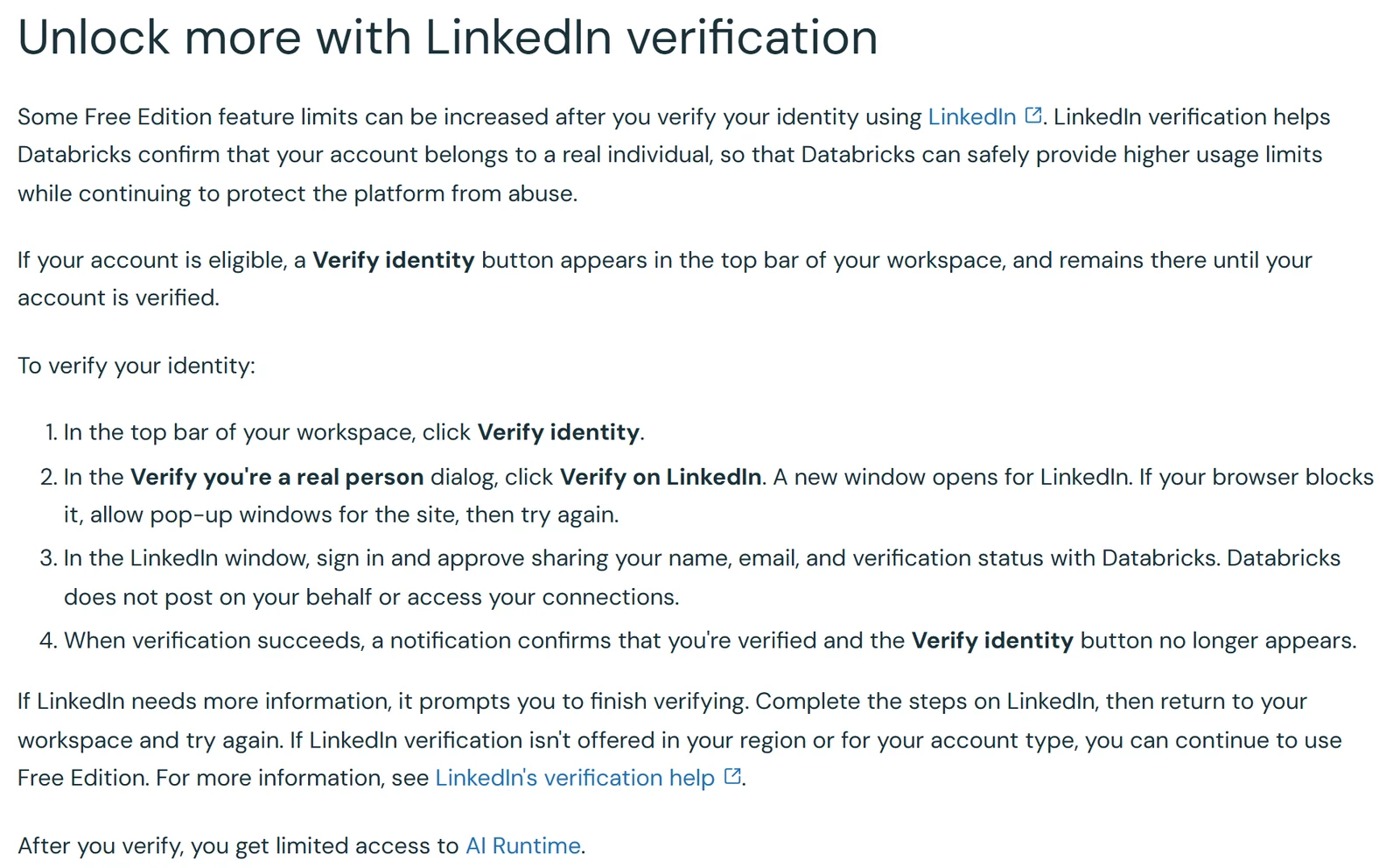
Databricks' limits page, 11 November 2026: the LinkedIn steps and what they unlock.
What "limited" means isn't published: no GPU type, no hours, no quota. Three more things to know before you count on it:
- The wording keeps changing. Databricks' limits page described the GPU offer four different ways between June and October 2026. On 20 July it said verification unlocked GPUs and outbound internet access; since 29 September it lists GPUs only.
- Only the AWS copy of the docs mentions it. The Azure and Google Cloud versions of the same limits page have no LinkedIn section.
- It may not be offered to you. The page says that if LinkedIn verification "isn't offered in your region or for your account type", you can keep using Free Edition without it.
GPU model serving stays off either way: no GPU endpoints, and no custom models on GPU.
What changed in Free Edition, June 2025 to November 2026
- 11 June 2025: launched at Data + AI Summit, "in Public Preview". No GPUs, and "One Databricks App per account."
- 7 November 2025: a tool to move Community Edition workspaces into Free Edition.
- 1 January 2026: Community Edition retired.
- 11 March 2026: "Databricks Assistant is now Genie Code", the in-notebook coding help Free Edition includes.
- 19 March 2026: AI Runtime, Databricks' serverless GPUs, in Public Preview on the paid platform.
- 17 June 2026: Free Edition adds GPUs, Genie Code, Lakebase, Agent Bricks and Lakeflow Designer. Databricks said "More than 500,000 people have used Databricks Free Edition."
- 30 June to 18 October 2026: the GPU wording changed four times, ending at "limited access to AI Runtime" after LinkedIn verification. Apps now number 3.
Databricks' own Free Edition landing page hasn't kept up. Its FAQ still says "Access to legacy CE accounts will continue to be available for the remainder of this year", which was true in 2025; Community Edition is gone.
Free Edition vs the 14-day free trial
The sign-up page asks you to pick a path. Both are free and neither needs a card:
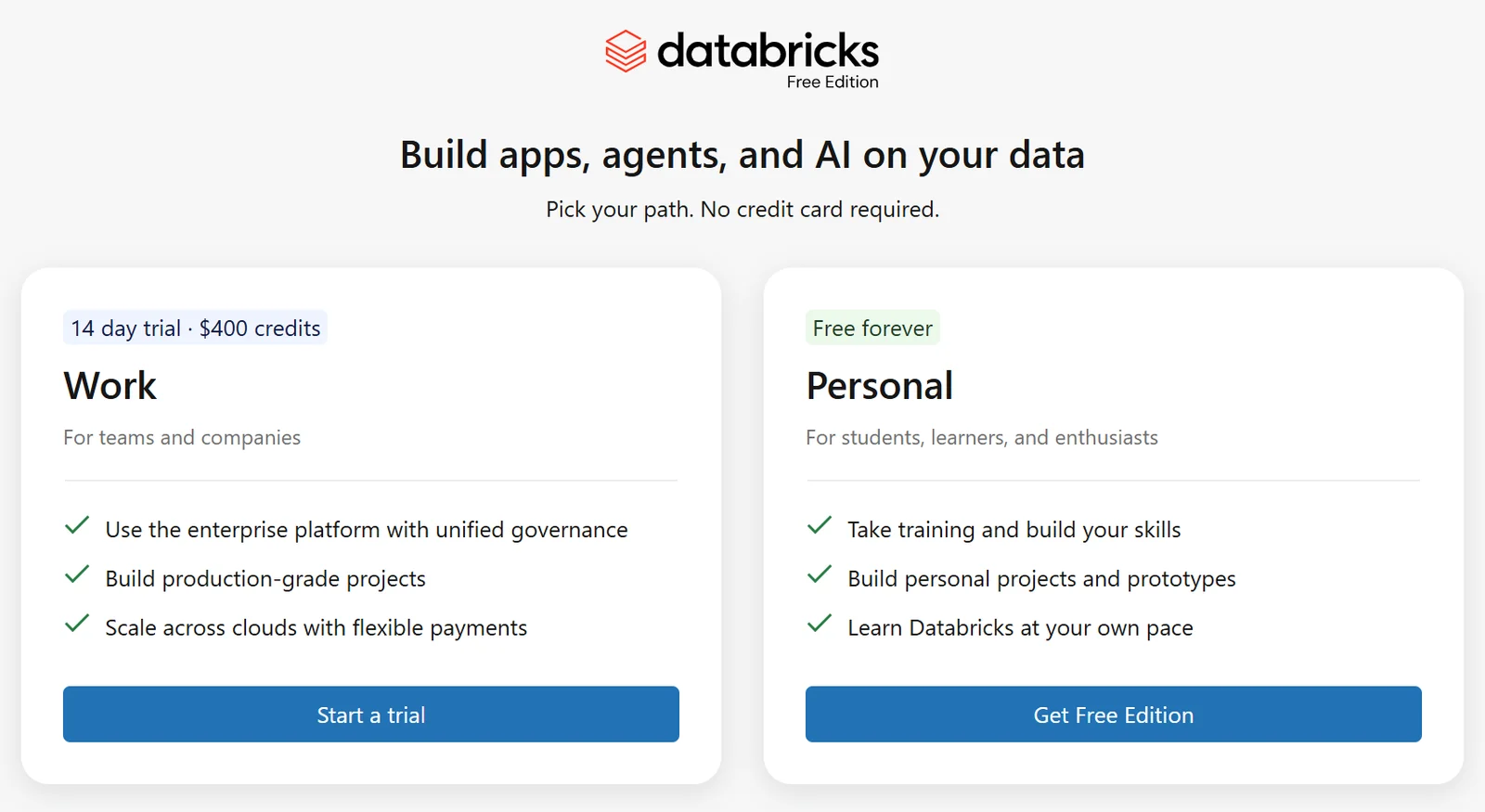
Databricks' sign-up chooser: the trial for work, Free Edition for personal use.
| Free Edition | 14-day free trial | |
|---|---|---|
| Price | "Forever free with daily limits on usage" | "Up to $400 in credits", valid for 14 days |
| Who it's for | Learning, training and other non-commercial use | Evaluating Databricks for a business |
| Personal | Work email recommended for the full trial | |
| Compute | One serverless workspace, "No access to classic compute" | The full platform, more than one workspace |
| GPUs | Limited, after LinkedIn verification | Possibly none: with a personal email, the trial page lists "No access to GPUs (CPU only)." |
| Your data | "Databricks reserves the right to train on your data" | Connect proprietary data for a proof of concept |
| After it ends | Doesn't end | Pay as you go, if you added a payment method |
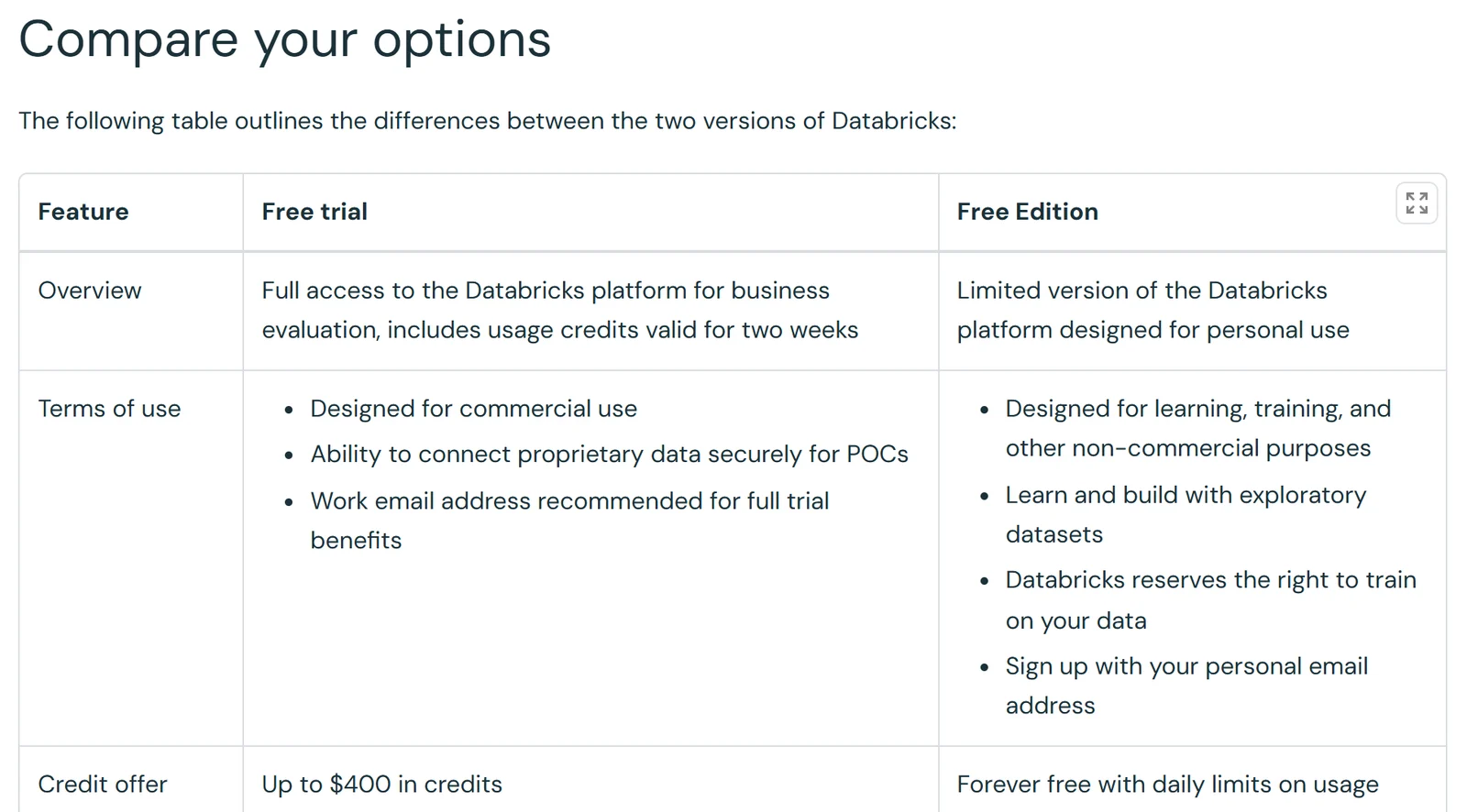
Databricks' own comparison page, with the line about training on your data.
Jupyter notebooks for your team.
Start free →The terms worth reading
Free Edition has its own terms, and three lines in them matter more than the limits:
- Personal use, adults only. "Your use of the Free Edition Services must be personal and not-for-profit", and you may not use it "if you are not at least 18 years of age".
- Databricks can use what you put in. The terms give Databricks a licence over your content that includes the right to "train and improve AI models", and its comparison page says so plainly. Use public or made-up data, never your employer's.
- No commercial use. The limits page repeats it: "Free Edition accounts may not be used for commercial purposes."
Getting started
Sign up at Databricks' login page and choose Get Free Edition, then sign in with an email code, Google or Microsoft. Your notebooks are standard Jupyter files: "By default, notebooks in Databricks are created in .ipynb (IPython or Jupyter) format", so they open anywhere else too. Install extra Python packages inside a notebook with %pip install. Use Genie Code for help with the code, and read the Community Edition post for what serverless compute can't run.
When the notebook is for work
Free Edition is for learning Databricks. Work notebooks need a place that allows commercial use and keeps your company's data out of anyone's training set: Databricks' paid platform, or, if you don't need Spark at all, a smaller tool.
Fastero is an AI and data platform where people and AI agents work together on a team's data. Its notebooks are standard .ipynb files in a workspace your team shares:
- Notebooks next to your databases. A SQL cell queries a saved connection, Postgres or BigQuery for example, and hands the result to Python as a pandas DataFrame. Passwords stay in the workspace's Secrets.
- Run now or on a schedule, on the Free plan.
- Colleagues sign in to open them. Viewers are free, and a cell's results can become a dashboard widget.
- Claude can help. Through Fastero's connector, Claude creates, writes, runs and schedules notebooks.
Fastero runs notebooks on CPU machines and has no GPUs, so for training models use Free Edition's GPUs, Kaggle or Colab.
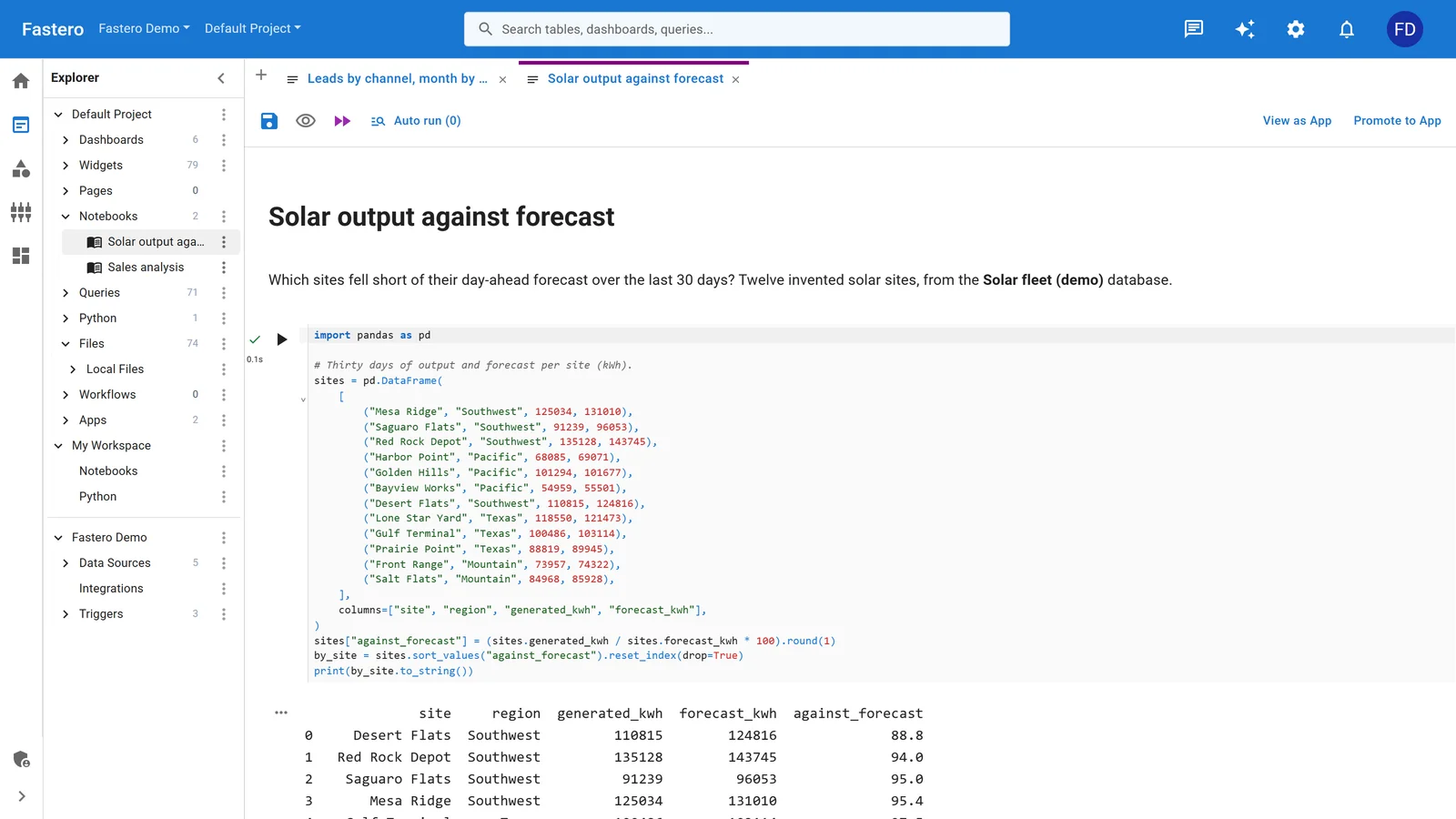
A notebook in Fastero, beside the project's queries and data sources. Sample data.
More on Jupyter vs Databricks notebooks, the best Databricks alternatives and where to run a Jupyter notebook online.
FAQ
Is Databricks Free Edition really free?
Yes. There's no card, no trial period and no charge. It runs under a daily compute quota that Databricks doesn't publish, and it may not be used for commercial work.
What happens when I hit the Free Edition quota?
Your workspace's compute shuts down for the rest of the day, and "in extreme cases, the rest of the month". Your notebooks, data and settings are kept.
Does Databricks Free Edition have GPUs?
Yes, since June 2026, in a limited form: verify your identity with LinkedIn and you get "limited access to AI Runtime", Databricks' serverless GPUs, when capacity allows. Databricks publishes no GPU type or hours for Free Edition, and GPU model serving isn't included.
Can I use Databricks Free Edition for work?
No. Its terms require "personal and not-for-profit" use, and Databricks reserves the right to train on your data. For work, use the 14-day trial or a paid account.
What's the difference between Free Edition and the free trial?
The trial gives the full platform for 14 days with up to $400 of credits, for evaluating Databricks at a business. Free Edition is a limited, serverless-only version that never ends, for personal learning.
Does Free Edition support Scala or R?
No. Notebooks run Python and SQL only, Spark runs through Spark Connect, and RDD APIs and the Spark UI aren't available.
Is Databricks Community Edition still available?
No. It was retired at the turn of 2026 and Free Edition replaced it. See what happened to Community Edition.
Will Databricks delete my Free Edition account?
It may, if the account sits unused "for a prolonged period". Databricks doesn't say how long.
Sources
Read on 11 November 2026. Earlier versions of the limits page come from the Internet Archive.
- Free Edition limitations, with archived copies from 19 June 2025, 10 July 2026, 6 September 2026 and 10 October 2026; the Azure and Google Cloud copies
- Databricks Free Edition, Free trial vs Free Edition, Free trial, Serverless compute limitations, AI Runtime, Notebook formats
- Free Edition terms, Free Edition landing page, What's coming next for Free Edition, launch press release
- Release notes for November 2025 and March 2026; Community Edition retirement notice; forum answer on the GPU quota