
Google Colab is the easiest way to get a free notebook with a GPU, and for a quick experiment it is hard to beat. The reasons people look elsewhere are almost all written in Colab's own FAQ: limits that aren't published, sessions that end, a machine that forgets everything, and features such as scheduling that only the most expensive plan gets.
The short answer: for free GPUs with a quota you can plan around, use Kaggle Notebooks — about 30 GPU hours a week, published. For notebooks whose files and setup stay put, GitHub Codespaces, Paperspace or Lightning AI. For notebooks a team shares, on company data and on a schedule, Deepnote, Hex, Databricks or Fastero. And if you were using Colab to serve an app, host the app properly: Colab's free tier ends sessions that serve a web interface.
Why people leave Colab
All of these come from Google's own Colab FAQ:
- You can't plan around the limits. "Colab does not publish these limits", and they "vary over time".
- The free GPU isn't guaranteed. On the free tier, "access to expensive resources like GPUs is heavily restricted".
- Sessions end. A free notebook runs "at most 12 hours", and idle runtimes time out. Running 24 hours straight needs Pro+.
- The machine forgets. Virtual machines are deleted when idle, so installed packages and files outside Google Drive go with them.
- Sharing a notebook doesn't share the setup. "The virtual machine you're using, including any custom files and libraries that you've setup, will not be shared."
- Scheduling is Pro+ only. Notebooks that run by themselves need the top consumer plan, or Colab Enterprise on Google Cloud.
- Apps aren't welcome on the free tier. Using a web interface instead of the notebook — a Streamlit or Gradio app, say — commonly ends in a terminated runtime.
12 Google Colab alternatives
| Tool | What you get free | Paid from | Best when you need |
|---|---|---|---|
| Kaggle Notebooks | About 30 GPU hours and 20 TPU hours a week; scheduled reruns | No paid plan | Free GPUs you can plan around |
| Paperspace Notebooks | A free M4000 GPU, 6 hours at a time; 5 GB of storage | $8 a month | A free GPU with files that stay |
| Lightning AI Studios | Free credits and one free Studio | $20 a month, yearly | Big GPUs by the hour, in JupyterLab or VS Code |
| Modal Notebooks | $30 of credits a month | Pay as you go | Up to 8 GPUs, billed by the second |
| GitHub Codespaces | 120 core-hours a month on personal accounts | $0.18 an hour (2 cores) | Notebooks next to your code |
| Deepnote | 3 editors, 5 projects, Postgres and MySQL connections | $39 per editor a month, yearly | Collaborative notebooks with SQL |
| Hex | A free Community plan | $36 per editor a month | Notebooks that become shareable apps |
| Databricks Free Edition | Non-commercial use with a daily quota | Databricks' paid plans | Learning Spark and Databricks |
| Datalore | 120 CPU hours a month and 10 GB | €29.17 per user a month, yearly | JetBrains' notebooks with database connections |
| JupyterHub | Free software, on your own server | Your server's cost | Full control over a team's notebooks |
| Colab Enterprise | No free tier | Google Cloud rates | Colab with Google Cloud security and schedules |
| Fastero | Notebooks, scheduled runs and sharing on the Free plan | $20 per editor a month | Team notebooks on company data, next to dashboards and apps |
Prices are the vendors' own, checked on 16 October 2026; Datalore showed prices in euros.
Fastero
Connect your database. Ask questions. Get dashboards.
Postgres, BigQuery, Snowflake, and 10+ sources — live-connected, AI-powered, no dashboard builder learning curve.
Try free →For free GPUs you can plan around
Kaggle Notebooks are the strongest free option for GPU work, because Kaggle tells you what you get: about 30 GPU hours a week — two T4s or a P100 — up to 20 TPU hours, 12-hour sessions (9 on TPU) and 20 GB of output that survives between sessions. Free GPUs can queue at busy times, and your work lives on Kaggle, built around its datasets.
Paperspace Notebooks, now part of DigitalOcean, include a free M4000 GPU on personal accounts, shut down after six hours, with 5 GB of storage that stays; the $8 Pro plan adds faster free GPUs. Lightning AI Studios give free credits and one free Studio, and charge by the second for GPUs from a T4 at $0.55 an hour to an H100. Modal Notebooks are hosted Jupyter with up to eight GPUs, $30 of free credits a month and nothing charged while a notebook is idle — but files outside an attached volume don't survive.
marimo's cloud notebooks, molab, also offer free GPUs in preview, in marimo's own reactive format rather than Jupyter's.
For work that doesn't disappear
GitHub Codespaces opens a repository in a cloud machine with JupyterLab or VS Code; your files and installed packages stay until the codespace is deleted, 30 days after it stops. Personal accounts get 120 core-hours a month — about 60 hours on the smallest machine. Codespaces has no generally available GPUs. Anaconda Notebooks keep 5 GB of files on the free plan, and CoCalc keeps projects with a collaborative editor and edit history.
For a team, and notebooks on company data
Colab's free tier is built for one person and Google Drive. A team needs the notebook next to the company's databases, passwords kept out of the code, colleagues who sign in, and runs on a timetable.
Deepnote and Hex are data workspaces with SQL and Python, live collaboration and database connections; scheduled runs come with their Team plans. Databricks Free Edition suits learning Databricks itself, for non-commercial use. Datalore, from JetBrains, adds unlimited database connections and scheduled notebooks on its paid plan.
In Fastero, notebooks are real .ipynb files — import the notebooks you made in Colab — running next to the workspace's data connections, with database passwords kept in the workspace's Secrets. Run a notebook now or on a schedule; colleagues open it with their own login, and viewers are free. The same workspace holds the SQL, dashboards and Streamlit apps built from the same data, so a notebook's analysis can become something people use every week.
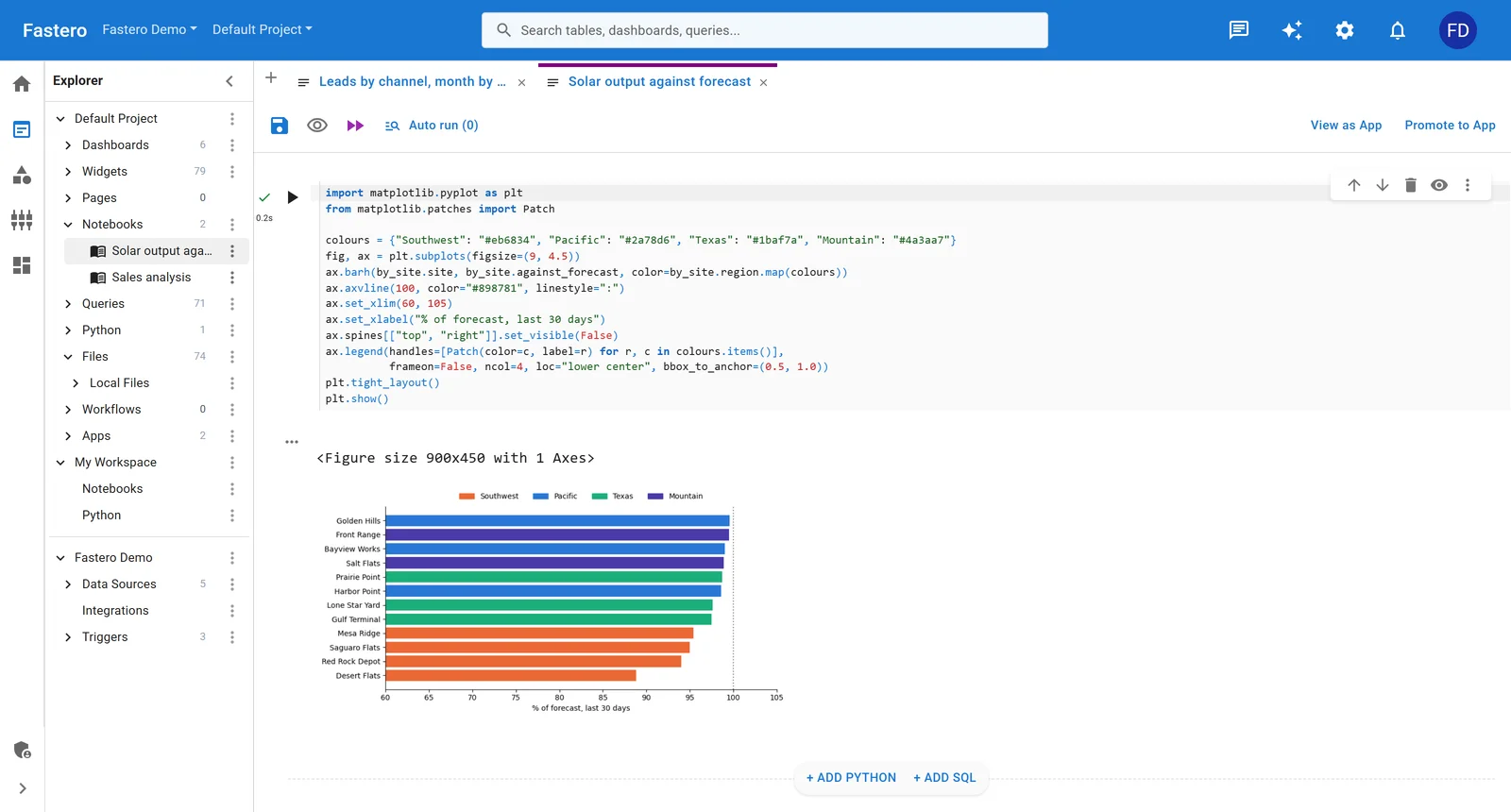
A notebook in Fastero: a Python cell and the chart it drew. Sample data.
If you were running an app in Colab
Colab's free tier isn't meant for web apps: its FAQ lists "bypassing the notebook UI to interact primarily via a web UI" among the things that can get a runtime terminated. If your notebook has turned into a Streamlit app that colleagues use, host it as an app — behind a sign-in, with its secrets, awake when someone opens it. That is what Fastero does for Streamlit apps.
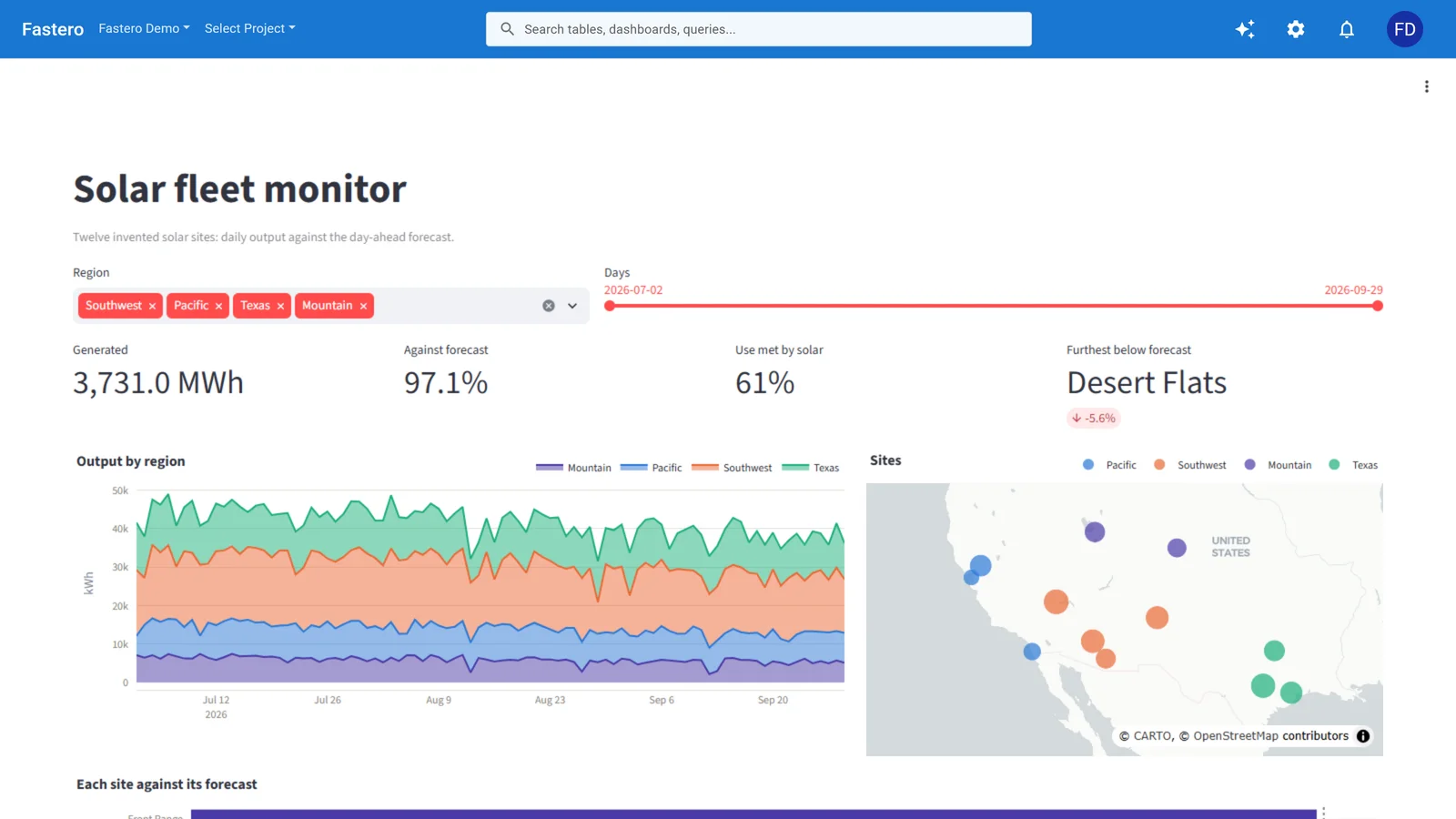
A Streamlit app hosted in Fastero. Sample data.
If you'd rather stay with Google
Colab's paid options are Pay As You Go, Colab Pro and Colab Pro+, all metered in compute units; since September 2026, Google's consumer AI plans include Colab compute too. Since November 2025 an official VS Code extension runs local notebooks on Colab's machines. For a company, Colab Enterprise on Google Cloud adds IAM access control, scheduled runs and Google Cloud's network security, billed at Google Cloud rates. Note that Amazon's free SageMaker Studio Lab, once a common Colab alternative, no longer accepts new customers.
FAQ
What is the best free alternative to Google Colab?
For GPU work, Kaggle Notebooks: about 30 free GPU hours a week, with the quota published. For running Jupyter with nothing to install, JupyterLite at jupyter.org/try. For a team's notebooks on company data, a free plan from a workspace such as Fastero, Deepnote or Hex.
Which Colab alternative gives the most free GPU time?
Kaggle publishes the most: about 30 GPU hours and 20 TPU hours a week. Paperspace offers a free M4000 GPU on personal accounts, Lightning AI gives free credits for GPUs, and Modal gives $30 of credits a month.
Is Kaggle better than Colab?
For free GPU time you can plan around, often yes: Kaggle publishes a weekly quota and saves 20 GB of output, while Colab doesn't publish its free limits. Colab is quicker to start from Google Drive and has more paid options.
Can I schedule a notebook to run automatically without Colab Pro+?
Yes. Kaggle reruns notebooks daily, weekly or monthly for free. Fastero runs notebooks on a schedule on its Free plan, and Deepnote, Hex and Datalore schedule notebooks on their paid plans.
What can a team use instead of Google Colab?
A shared workspace with sign-in, database connections and scheduling: Fastero, Deepnote, Hex, Databricks or Datalore — or JupyterHub on your own server, if you have someone to run it.
Related reading:
- Jupyter Notebook online: 12 ways to run Jupyter in your browser
- Best notebook platforms
- Jupyter vs Google Colab
- Streamlit login: 6 ways to add authentication
- AI tools for data scientists
Sources: Colab FAQ, Colab release notes, Kaggle Notebooks docs, Paperspace pricing, Lightning AI pricing, Modal pricing, GitHub Codespaces billing, Deepnote pricing, Hex pricing, Databricks Free Edition limitations, Datalore pricing, Colab Enterprise, SageMaker Studio Lab, marimo. Checked 16 October 2026.
Try Fastero free — bring your notebooks, run them next to your team's data and on a schedule, and share them with a sign-in. No credit card required.