
Claude Code is Anthropic's coding agent: it runs in your terminal, reads your files, writes and runs code, and keeps going until the job is done. That makes it an unusually good assistant for data work. In one session it can profile a CSV, query a warehouse, fix a notebook and chart the result — as long as you know where its file reader stops, what it now does without asking, and how to check the numbers it hands back.
The short answer: run Claude Code in a folder next to your data and let it write Python or SQL. It reads CSVs, JSON and notebooks, charts included, directly, and reaches databases through their command-line tools or MCP servers. Three things catch people out. It refuses Excel and Parquet files and writes a script to read them instead. It edits notebook cells but doesn't run them; jupyter nbconvert --execute does. And since version 2.1.283 it no longer asks before most actions, so connect it to a database with a read-only login. It comes with every paid Claude plan, from Pro at $20 a month.
What Claude Code can and can't do with data
| Data | What Claude Code does | Watch for |
|---|---|---|
| CSV, TSV, JSON | Reads them directly | One read returns at most 25,000 tokens, so big files are read in pages, searched, or loaded by a script |
| Excel, Parquet | Writes a pandas or DuckDB script to read them | Its file reader refuses .xlsx and .parquet |
| Jupyter notebooks | Reads every cell with its saved output, charts included, and edits one cell at a time | It doesn't run cells |
| PDFs | Reads short ones whole, longer ones 20 pages at a time | Long PDFs need poppler's pdftoppm installed |
| Databases and warehouses | Runs SQL through tools such as psql, bq, snow and duckdb, or through MCP servers | It can do whatever the login you give it can do |
| Charts | Writes matplotlib or Plotly code, saves the image and can look at it | Models tend to see what they expect in a chart |
| Python and shell | Runs any command your user account can | A command that runs past its limit, 2 minutes by default and 10 at most, carries on in the background |
Before you start
Which plan you need
Claude Code comes with every paid Claude plan: Pro at $20 a month ($17 billed yearly), Max at $100 or $200, every Team seat, and Enterprise. "The free claude.ai plan does not include Claude Code access." Terminal work and chats draw on one usage allowance that resets every five hours, with weekly limits on top. With an API key instead, you pay per token; Anthropic puts the average at about $13 per developer per active day.
What it does without asking
Since version 2.1.283, interactive sessions start in auto mode: a safety classifier, not you, approves most actions. Its default blocklist covers things like production deploys, mass deletion in cloud storage and printing a live credential, but no rule is about databases specifically. So for data work:
- Start in Plan mode (Shift+Tab) when you want Claude to explore and propose before it changes anything. It can still run queries while it plans.
- Connect databases with read-only logins. That is the one control that holds whatever the model decides.
- Commit to git before a long run.
/rewindundoes Claude's own file edits only: "Checkpoints only track changes made through Claude's file editing tools." A script that overwrites a CSV, or a SQL statement, can't be rewound.
What leaves your machine
Whatever Claude reads — file contents, query results — goes into the conversation, which is sent to Anthropic. On Pro and Max, Anthropic trains on your sessions only if the training setting is on, and keeps them for five years if it is, 30 days if not. Team, Enterprise and API usage isn't used for training and is kept 30 days. On your own disk, Claude Code keeps a transcript of every session for 30 days, and "these files are plaintext": anything a command printed is in there, a password echoed by a script included.
Fastero
Point Claude at your database.
Add Fastero to claude.ai or Claude Code. Claude builds the dashboard, deploys the app or publishes a live page, and your team opens it in Fastero.
Try free →Seven setups that work
1. A project folder, with Python or DuckDB
The setup most people need: put the files in a folder, activate your Python environment, and start Claude Code there.
cd ~/analysis/q3-sales
source .venv/bin/activate
claude
Then ask for something you can check:
Profile orders_2026.csv: row count, column types, nulls per column, and anything that looks wrong. Write the script to profile.py so I can rerun it.
Asking for a script, not just an answer, is the habit that pays off: the script records how a number was made, and next month you rerun it instead of asking again. Excel and Parquet files always go through a script, because Claude's file reader refuses both. DuckDB queries them where they sit — SELECT * FROM 'data/*.parquet' reads a whole folder of Parquet files — and if you sign in with a claude.ai account, Anthropic's xlsx skill syncs into Claude Code for spreadsheets.
2. Jupyter notebooks
Claude Code reads a notebook with every cell's saved output, charts included, and edits it one cell at a time. It doesn't run cells. To run a notebook, it uses the shell:
jupyter nbconvert --to notebook --execute analysis.ipynb --ExecutePreprocessor.timeout=600That writes the result to analysis.nbconvert.ipynb; --inplace overwrites the original instead, and each cell gets 30 seconds unless you raise the limit as above. For a live kernel — run a cell, look at the result, write the next — add a Jupyter MCP server such as Datalayer's. Commit the notebook before Claude runs it in place, because rewind can't undo a shell command.
3. A database or warehouse through its command-line tool
Anthropic's own advice is that "CLI tools are the most context-efficient way to interact with external services": they reuse the sign-in you already have and add no tool descriptions to the conversation. Give Claude the commands you'd use yourself, set up to read only:
# Postgres: a read-only session with a 60-second limit
PGOPTIONS='-c default_transaction_read_only=on -c statement_timeout=60000' psql "$DATABASE_URL" -c "SELECT ..."

# A DuckDB file, opened read-only
duckdb -readonly warehouse.duckdb -json -c "SELECT ..."

# BigQuery: price the query first, then cap what it may bill
bq query --use_legacy_sql=false --dry_run 'SELECT ...'
bq query --use_legacy_sql=false --maximum_bytes_billed=1000000000 'SELECT ...'

# Snowflake CLI (SnowSQL is now legacy)
snow sql -c analytics -q "SELECT ..."
The Postgres line is a seatbelt, not a lock: any session can switch default_transaction_read_only off again. The lock is a database role that can only read, and our Postgres MCP guide has the SQL, tested on Postgres 17. Remember too that anything you export before starting Claude Code, such as DATABASE_URL, is visible to every command it runs.
4. A database through an MCP server, read-only
An MCP server gives Claude database tools with sign-in, row caps and read-only modes built in. Anthropic's documentation shows the pattern with DBHub and a read-only user:
claude mcp add --transport stdio db -- npx -y @bytebase/dbhub --dsn "postgresql://readonly:pass@prod.db.com:5432/analytics""Use a read-only database user in the connection string so the queries Claude runs can't modify data," the docs say, and in that example the user does all the work: DBHub has no read-only switch on its command line. Defaults differ a lot from server to server:
| Server | Read-only by default? |
|---|---|
| ClickHouse Cloud, hosted | Yes: every tool is read-only |
ClickHouse mcp-clickhouse, local |
Yes, until you allow writes |
MotherDuck mcp-server-motherduck, local |
Yes, until you add --read-write |
| Snowflake's managed server | Its SQL tool defaults to read-only |
| Google's hosted BigQuery server | A read-only SQL tool sits beside one that can write |
| Supabase | Only with read_only=true in the address |
| MongoDB | No: --readOnly is off by default |
| MCP Toolbox for Databases, BigQuery tools | No: writes are allowed until you set BIGQUERY_WRITE_MODE=blocked |
| DBHub | Set per tool in its config file; its Claude Code plugin ships read-only |
Google and Snowflake don't publish a claude mcp add line for their hosted servers. Add them as custom connectors in claude.ai instead, and they appear in Claude Code when you sign in with the same account. Our guides to MCP servers for Claude Code, BigQuery and Supabase go further.
5. Your team's definitions, written down as skills
The biggest lever isn't the model or the connector; it's context. Anthropic described its own analytics setup in June 2026: "95% of business analytics queries are automated via Claude, with ~95% accuracy in aggregate." The same article says that without skills — folders of markdown describing the tables, the metrics and how to answer common questions — accuracy "didn't exceed 21% on our evals", and that it drifted from about 95% to "~65% over a month" when nobody kept them up to date. Today, in their words, "Roughly 90% of our data-model PRs now include a skill change in the same diff", and every query passes a SQL-reviewer subagent before Claude answers.
The pattern works at any size:
- A skill per subject in
.claude/skills/<name>/SKILL.md: what "active customer" means, which table is the source of truth for revenue, which filters always apply. Claude loads a skill's body only when it's relevant. - A reviewer: a subagent in
.claude/agents/that checks each query against those definitions before the answer goes out. - A starting point: Anthropic's
dataplugin adds skills for writing queries, exploring data and building charts. Install it withclaude plugin marketplace add anthropics/knowledge-work-plugins, thenclaude plugin install data@knowledge-work-plugins. Its Snowflake and Databricks addresses ship empty, for you to fill in.
If you add a hook to block destructive SQL, don't copy the one in Anthropic's hooks guide as it stands: it checks with grep -q "drop table", which is case-sensitive, so DROP TABLE gets through. The validator on Anthropic's subagents page uses grep -iE and catches both.
6. Pipelines and recurring reports
claude -p runs a single prompt without the interactive screen, so it fits a script or a cron job:
claude -p "Summarise yesterday's failed orders in orders.duckdb as JSON" --output-format json --allowedTools "Bash(duckdb -readonly *)"Since version 2.1.302, claude -p refuses anything you haven't allowed in advance, so name the tools it may use. For a report that should run while your laptop is closed, a cloud scheduled task — Anthropic's new name for routines — runs Claude Code in Anthropic's cloud at most once an hour, with your claude.ai connectors. It may use every tool on every included connector, writes too, without asking, so trim the list to what the job needs. And a green status in the run list "does not mean the work your prompt describes succeeded", in Anthropic's words. Our routines guide has the setup and ten examples.
7. Put the answer where your team can open it
Everything above ends in your terminal. When the result is for other people — a dashboard the sales team checks on Mondays, a report a client gets every week — it has to live somewhere they can open.
Fastero is an AI and data platform where people and AI agents work together on a team's data. Claude Code connects to it with one command and a key from Settings → AI Agent Access:
claude mcp add --scope user --transport http fastero https://api.fastero.com/api/v1/mcp --header "Authorization: Bearer fst_pat_..."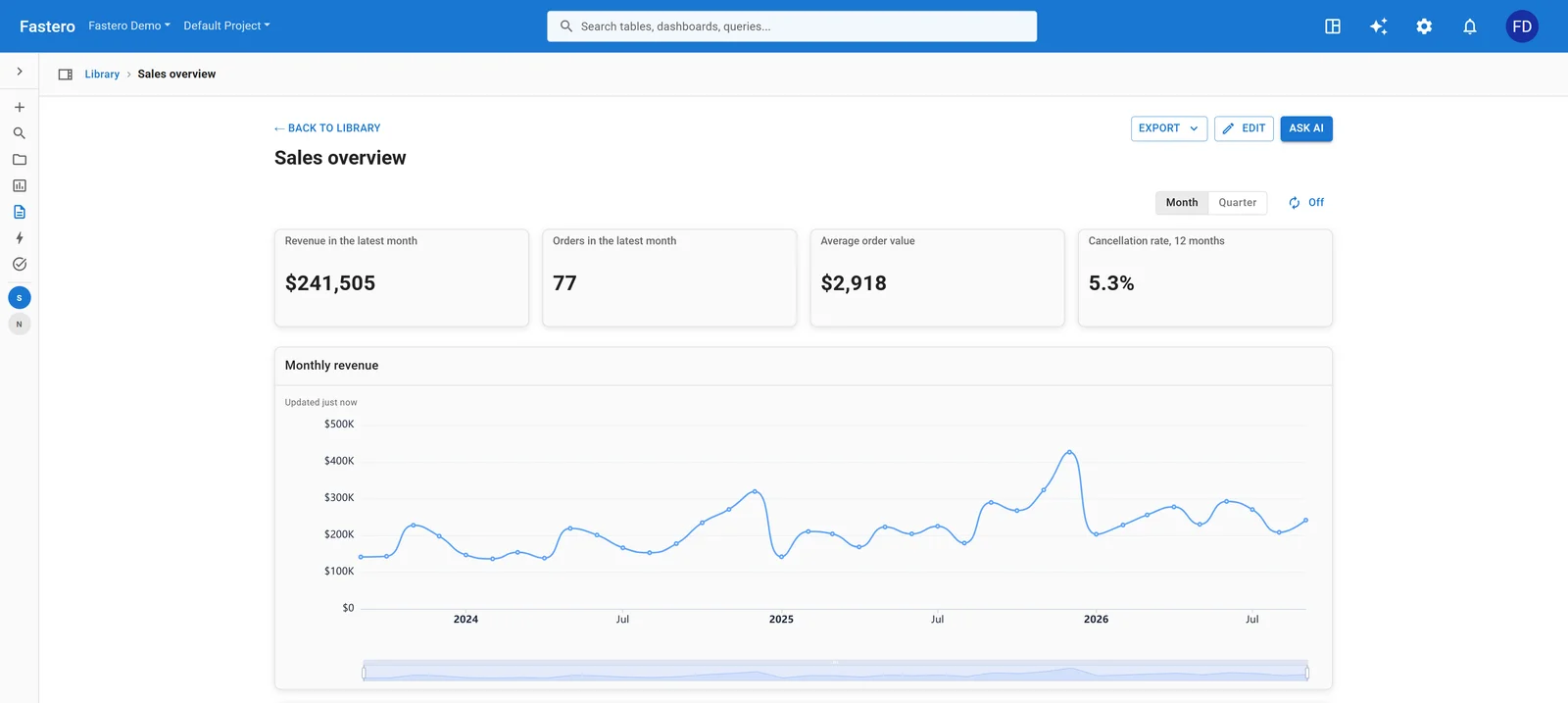
A sales dashboard of the kind Claude Code builds through Fastero's connector, opened by colleagues with their own login. Sample data.
- Definitions live in the workspace. Claude reads your team's metric definitions from Fastero, so Claude Code, Fastero's own assistant and your colleagues use the same expression for "revenue" — the context that moved Anthropic's accuracy, kept where the whole team can see it.
- Read-only SQL by design. Fastero's SQL tool takes one
SELECT,WITH,EXPLAINorSHOWstatement and refuses anything that could change data; on Postgres it also runs in a read-only transaction. Results reach Claude capped at 500 rows or about 100 KB, so it works from aggregates instead of pulling tables into the conversation. - Keys that start small. A new key reads and queries only, never does more than your role in the workspace allows, and expires within 90 days. Switch on building when you want Claude to save queries and dashboards.
- Results the team opens. Claude can build the dashboard, notebook or Streamlit app, and colleagues open it with their own login, no Claude account needed. Our step-by-step tutorial goes from a database to a shared dashboard in about fifteen minutes.
Keep the numbers right and the data safe
- Check every number. Simon Willison's workshop for data journalists at NICAR 2026 put it plainly: "Not everything an agent finds will be genuinely interesting - and some findings might be wrong." Robin Moffatt, after Claude Code built him a dbt project he called "pretty good": "Wrong is worse than absent because you can't trust it." Ask for the query behind every figure, and check one against a source you trust.
- Read the chart yourself. Simon Couch at Posit tested how models describe plots and found that "LLMs appear to see what they expect to see".
- Compute in code, return aggregates. Claude Code's default model has a million-token context, but Anthropic warns that performance drops as the context fills. A script that sums ten million rows beats a session that reads them.
- Keep untrusted text away from write access. A CSV cell, a support ticket or a scraped page can carry instructions for the model. Don't give one session write access to data, untrusted text and a way to send things out at the same time; our MCP security guide explains why.
- Keep secrets out of the session. Deny rules on
.envstop Claude's file tools, not a Python script that opens the file, and the sandbox is off by default — and unavailable on native Windows. Paul Goldsmith-Pinkham's rule for researchers: "If you wouldn't put it on Dropbox, don't put it in front of Claude." - Run unattended jobs somewhere disposable. Willison ran his workshop's agents in GitHub Codespaces for that reason. The worst stories — Replit's agent deleting a production database in July 2025, a Claude Code session running
terraform destroyagainst an old state file in March 2026 — came from agents with more access than the task needed.
Claude Code, claude.ai or another agent?
| Tool | Where the code runs | What it reaches | Who can use it |
|---|---|---|---|
| Claude Code | On your machine, or in a cloud session | Your files, command-line tools and credentials, plus MCP servers | Pro, Max, Team and Enterprise |
| claude.ai with code execution | In Anthropic's sandbox | Files you upload, and connectors | Every plan, Free included |
| OpenAI Codex CLI | On your machine, with network access off by default | The same as Claude Code, once you allow the network | ChatGPT plans from Free and Go up, according to OpenAI |
| Gemini CLI | On your machine | The same as Claude Code | Gemini API keys; the free sign-in tier moved to Antigravity CLI on 18 June 2026 |
claude.ai suits a file you can upload and a question you can answer in one sitting. Claude Code suits work that needs your own tools and credentials, data too big or too private to upload, a live database, or a script you'll run again. Our ChatGPT vs Claude comparison covers the chat side.
FAQ
Can Claude Code analyze Excel files?
Yes, by writing code. Its file reader refuses .xlsx, so it writes a pandas or DuckDB script that reads the workbook, or uses Anthropic's xlsx skill, which syncs into Claude Code when you sign in with a claude.ai account. Ask it to save the script, so next month's file takes one command.
Can Claude Code run Jupyter notebooks?
It reads and edits them, outputs and charts included, but doesn't run cells itself. It runs a whole notebook from the shell with jupyter nbconvert --to notebook --execute, or runs cells in a live kernel through a Jupyter MCP server. Commit first: rewind can't undo a notebook run.
Is Claude Code free?
No. It comes with every paid Claude plan — Pro at $17 a month billed yearly or $20 monthly, Max, Team and Enterprise — and the free plan doesn't include it. You can also use it with an API key and pay per token.
Does Claude Code send my data to Anthropic?
What Claude reads goes into the conversation, which is sent to Anthropic over an encrypted connection. Team, Enterprise and API usage isn't used for training and is kept 30 days. On Pro and Max it's used for training only if your training setting is on, and then kept five years.
How do I stop Claude Code from changing my database?
Give it a database login that can only read. A server's read-only mode, a hook and auto mode's classifier all help, but they're checks on top; the role is the lock. For a warehouse that bills by the byte, cap the bytes too, as with bq --maximum_bytes_billed.
Claude Code or claude.ai for data analysis?
claude.ai for a file you can upload and a question you can answer in one sitting. Claude Code when the work needs your own tools and credentials, a database, files too big or private to upload, or a script you'll rerun.
Related reading:
- Claude Code + Postgres: build a dashboard your team can open
- The best MCP servers for Claude Code
- Claude Code routines, now scheduled tasks
- The best Claude Code plugins
- ChatGPT vs Claude for data analysis
Sources: Claude Code tools reference, Permission modes, Best practices, Claude Code MCP docs, Skills, Subagents, Hooks guide, Scheduled tasks, Data usage, The .claude directory, Sandboxing, Costs, Set up Claude Code, Claude pricing, How Anthropic enables self-service data analytics with Claude (June 2026), Anthropic's data plugin, DBHub, ClickHouse remote MCP, MotherDuck MCP server, Snowflake managed MCP, BigQuery MCP, MCP Toolbox for Databases, MongoDB MCP server, nbconvert, Jupyter MCP Server, BigQuery cost controls, Snowflake CLI, Simon Willison's NICAR 2026 handout, Robin Moffatt on Claude Code and dbt, Paul Goldsmith-Pinkham's setup guide, Simon Couch: LLMs see what they expect to see, Fortune on the Replit database deletion, How I dropped our production database, Codex pricing, Gemini CLI. Checked 22 October 2026.
Try Fastero free — connect Claude Code to your team's data with read-only SQL and shared definitions, and turn its answers into dashboards your team can open. No credit card required.