
A Claude Code plugin is a bundle of skills, agents, hooks, MCP servers and other pieces that Claude Code installs and loads as one unit. Anthropic's official marketplace, claude-plugins-official, is added to Claude Code the first time you open an interactive session, and on 21 October 2026 it listed 315 plugins: 39 maintained by Anthropic, the rest from partners such as GitHub, Figma and Supabase and from independent authors.
The short answer: install the language server for your language, Context7 for current library documentation, and Anthropic's Code Review and Security Guidance. Add Superpowers if you want Claude to plan, test and debug in a set order, and the plugin for each tool your team already uses. Keep the list short: every enabled plugin adds to the context of every session, and whatever a plugin runs, it runs as you.
How to install a plugin
/plugin opens the plugin panel on its Discover tab, which you can search and which already holds the official marketplace. To install a plugin by name:
/plugin install context7@claude-plugins-officialBefore anything installs, Claude Code shows a pane where you choose a scope and see what the plugin will add: commands, agents, skills, hooks, and MCP and language servers. For official plugins it also estimates the context cost, per message and when the plugin is used. From a terminal, the same install is claude plugin install context7@claude-plugins-official.
For a plugin in another marketplace, add the marketplace first, then install from it:
/plugin marketplace add EveryInc/compound-engineering-plugin
/plugin install compound-engineering@compound-engineering-plugin
Older tutorials, including Anthropic's launch post from October 2025, use /plugin marketplace add anthropics/claude-code. That adds a 13-plugin demo marketplace, not the official one, and can leave you with two copies of plugins such as Code Review.
15 plugins worth installing
| Plugin | Made by | Installs | What it adds |
|---|---|---|---|
| Frontend Design | Anthropic | 1,134,112 | A skill for interfaces that don't look like every other AI-built page |
| Superpowers | Jesse Vincent | 1,009,371 | Skills for brainstorming, planning, test-driven development and debugging |
| Code Review | Anthropic | 438,525 | Several agents review a pull request, with a confidence score on each finding |
| Context7 | Upstash | 417,801 | Documentation for the library version you're actually using |
| Code Simplifier | Anthropic | 346,763 | An agent that tidies recently changed code without changing what it does |
| Playwright | Microsoft | 319,887 | Browser automation and end-to-end tests |
| GitHub | GitHub | 319,381 | GitHub's MCP server: issues, pull requests and code search |
| CLAUDE.md Management | Anthropic | 287,247 | Audits your CLAUDE.md files and records what a session learned |
| Feature Dev | Anthropic | 256,017 | A feature workflow with explorer, architect and reviewer agents |
| Security Guidance | Anthropic | 241,800 | Security checks on each edit, each turn's changes and each commit |
| TypeScript LSP | Anthropic | 212,522 | Type errors and definitions from a language server |
| Ralph Loop | Anthropic | 196,527 | Keeps Claude working on a task until it reaches a phrase that means finished |
| Figma | Figma | 167,556 | Design files, components and tokens, for turning designs into code |
| Supabase | Supabase | 118,617 | Database, auth and storage through Supabase's MCP server |
| Chrome DevTools MCP | 102,569 | Drives and inspects a live Chrome browser, including performance traces |
Installs are the counts on each plugin's page at claude.com/plugins, read on 21 October 2026. Every plugin in the table installs with /plugin install <name>@claude-plugins-official, using its short name: frontend-design, superpowers, code-review, context7, code-simplifier, playwright, github, claude-md-management, feature-dev, security-guidance, typescript-lsp, ralph-loop, figma, supabase and chrome-devtools-mcp.
Fastero
Point Claude at your database.
Add Fastero to claude.ai or Claude Code. Claude builds the dashboard, deploys the app or publishes a live page, and your team opens it in Fastero.
Try free →Plugins that change how Claude works
Superpowers changes a session the most. It is a set of skills that make Claude brainstorm before it builds, write a plan, work through the plan with subagents, test first and debug methodically, picked up from what you ask rather than from commands you have to remember. It has about 303,000 stars on GitHub.
Feature Dev gives one feature a fixed route, from exploring the codebase through design to review, with an agent for each step. Code Simplifier goes over the code Claude just changed for clarity, without changing behavior. Ralph Loop runs a prompt in a loop with a maximum number of iterations and a phrase that means finished, for long jobs you would otherwise keep nudging along. CLAUDE.md Management audits the instructions file every session reads. Frontend Design is a single skill, and the most-installed plugin of all.
Review and security
Code Review reviews a pull request with several agents in parallel and keeps the findings it is confident about. PR Review Toolkit splits a review across separate agents for comments, tests, error handling, type design and simplification.
Security Guidance checks Claude's work at three points: a pattern match on every edit, which makes no model call; a model review of each turn's changes; and a deeper review in the background whenever Claude commits or pushes. The two model reviews count toward your usage. None of the three blocks a write or a commit, so treat the findings as warnings, not a gate.
Plugins that connect Claude to your tools
Many partner plugins are the vendor's own MCP server packaged as a plugin, sometimes with the vendor's skills on top. The official marketplace has them for GitHub, Linear, Sentry, Atlassian (Jira and Confluence), Slack, Notion, Figma, Vercel, Stripe, Supabase, Playwright and Chrome DevTools. Context7 is the one most people keep: it fetches documentation for the version of a library you have installed, so Claude writes against that version rather than the one in its training data.
Language servers
Anthropic's language-server plugins, for TypeScript, Python (Pyright), Go, Rust, C and C++, C#, Java, Kotlin, Lua, PHP, Ruby and Swift, give Claude the type errors and definitions an editor shows. They don't include the language server itself: install that first, for TypeScript with npm install -g typescript-language-server typescript, then the plugin. Language servers don't start in cloud sessions.
For data work
The official catalog has 39 plugins in its database category, and no other list of Claude Code plugins seems to mention them. Among them are BigQuery (bigquery-data-analytics), Databricks, DuckDB (duckdb-skills, which reads data files and queries DuckDB databases), ClickHouse, Neon, MongoDB, Supabase and Looker. Outside that category sit Snowflake's snowflake-cortex-code, altimate-code for dbt work, astronomer-data-agents for Airflow, and PostHog and Amplitude for product analytics.
What none of them covers is the step after the query: a dashboard a colleague opens, an app the team signs in to, a job that runs every morning. Neither of Anthropic's catalogs has a plugin for Streamlit.
Fastero covers that step, as an MCP server rather than a plugin. Claude Code reaches your team's databases through one connector whose SQL tool runs only read-only queries, and builds where your colleagues already look: dashboards they open with their own login, Streamlit apps behind that login, and notebooks and Python jobs that run on a schedule. If you have added Fastero as a connector in claude.ai, Claude Code signed in with the same account picks it up. Otherwise, create a key under Settings → Developers → AI Agent Access and add it:
claude mcp add --scope user --transport http fastero https://api.fastero.com/api/v1/mcp --header "Authorization: Bearer fst_pat_..."A new key can read and run SQL; building, running code and sharing are permissions you switch on.
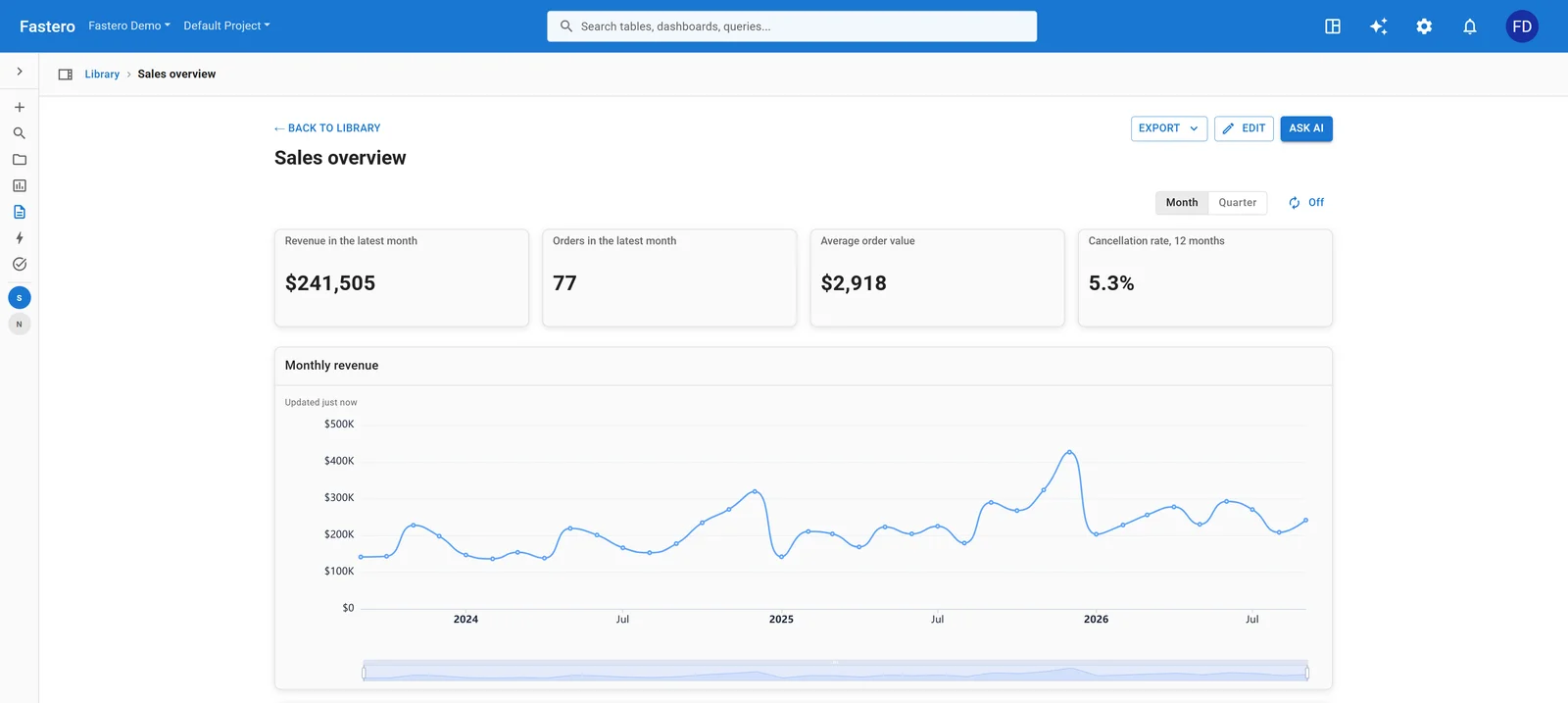
A dashboard built through Fastero's MCP server, which colleagues open with their own login. Sample data.
Popular plugins outside Anthropic's marketplace
| Plugin | Stars on GitHub | What it does | Install |
|---|---|---|---|
| ECC | about 285,000 | 71 agents, 311 skills, hooks and memory that take Claude from plan to test to review | /plugin marketplace add affaan-m/ECC, then /plugin install ecc@ecc |
| Ponytail | about 169,000 | Guidance that stops Claude building more than the task needs | /plugin marketplace add DietrichGebert/ponytail, then /plugin install ponytail@ponytail |
| Caveman | about 114,000 | Terse replies, to spend fewer tokens | /plugin marketplace add JuliusBrussee/caveman, then /plugin install caveman@caveman |
| claude-mem | about 102,000 | Saves what happened in a session and brings it back in later ones | /plugin marketplace add thedotmack/claude-mem, then /plugin install claude-mem@thedotmack |
| Marketing Skills | about 56,000 | Skills for copywriting, conversion, SEO and ads | /plugin marketplace add coreyhaines31/marketingskills, then /plugin install marketing-skills@marketingskills |
| Agents by Seth Hobson | about 41,000 | 94 plugins of agents, skills and commands, by language and job | /plugin marketplace add wshobson/agents, then for example /plugin install python-development@claude-code-workflows |
| Compound Engineering | about 26,000 | Every's loop of planning, working, reviewing and recording what was learned | /plugin marketplace add EveryInc/compound-engineering-plugin, then /plugin install compound-engineering@compound-engineering-plugin |
Stars read on 21 October 2026. Ponytail, Caveman, claude-mem and Marketing Skills, like Superpowers, are also listed in Anthropic's community marketplace, which scans what it lists. Anthropic doesn't review other third-party marketplaces, and their plugins don't update automatically unless you turn that on.
Before you install: what a plugin can do
Anthropic's documentation is blunt about it: "A Claude Code plugin you install can execute arbitrary code on your machine with your user privileges." Hooks, MCP servers, language servers and background monitors run outside Claude Code's sandbox and outside its permission rules, which cover the tools Claude calls, not the code a plugin runs by itself. The warning shown before every install adds that Anthropic "does not control what MCP servers, files, or other software are included in plugins and cannot verify that they will work as intended or that they won't change."
So before installing from anywhere:
- Read what it will install. The install pane lists every command, agent, skill, hook and server.
- Open the parts that run without asking: the plugin's
hooks/hooks.json, its.mcp.jsonand anything inbin/. - Prefer the official marketplace, then the community one (
claude-community), whose entries Anthropic scanned and pinned to a fixed commit. - Know how updates arrive. Official plugins update themselves in the background, so the files you reviewed can change; plugins from community and third-party marketplaces stay as they are unless you turn auto-update on.
Every plugin costs context
"An enabled plugin is part of every session, not only the sessions where you use it," in the documentation's words. The name and description of each skill, agent and command a plugin adds are in the context on every turn, its MCP servers run alongside the session, and its hooks fire on every matching event. The install pane's Context cost line gives the per-message estimate for official plugins, and the Installed tab in /plugin groups the ones you haven't used recently, which are the first to switch off.
Turning plugins on for a team
To give everyone working in a repository the same plugins, commit them to the repository's .claude/settings.json:
{
  "extraKnownMarketplaces": {
    "your-marketplace": {
      "source": { "source": "github", "repo": "your-org/your-marketplace" }
    }
  },
  "enabledPlugins": {
    "code-review@claude-plugins-official": true,
    "code-formatter@your-marketplace": true
  }
}
Three caveats from the documentation. The marketplace entries apply only once a colleague has trusted the folder. A plugin whose marketplace entry points at its own GitHub repository is enabled but not installed until each colleague runs claude plugin install <name>@<marketplace> --scope project. And cloud sessions, including Claude Code on the web, don't load plugins from a repository's settings at all.
Plugins, skills, connectors and Claude app plugins
- A skill is one folder with a
SKILL.mdfile. It works without a plugin, in~/.claude/skills/or a project's.claude/skills/; a plugin is how you ship several skills, agents, hooks or servers together and update them as one. - A connector is a remote MCP server added in claude.ai. Claude Code signed in with the same account can use it too.
- Plugins in the Claude app (formerly Cowork) use the same folder format and are added under Customize → Plugins, but chat skips agents and hooks, and language servers load only in Claude Code. A plugin added to your claude.ai account appears in Claude Code; one installed from Claude Code's command line stays on that machine.
- Claude Marketplace at claude.com/marketplace is a catalog of connectors, partner products and service partners, not something you add with
/plugin.
FAQ
What are Claude Code plugins?
Bundles of skills, agents, hooks, MCP servers and other components that Claude Code installs and loads as one unit, usually from a marketplace such as Anthropic's claude-plugins-official.
How do I install a Claude Code plugin?
Run /plugin and pick one from the Discover tab, or type /plugin install <name>@claude-plugins-official. For a plugin from another marketplace, run /plugin marketplace add <owner>/<repo> first.
Are Claude Code plugins safe?
A plugin runs code with your user's permissions, and Anthropic says it can't verify what plugins contain. Prefer the official and community marketplaces, read what a plugin will install, and check its hooks and MCP servers before you enable it.
What is the most popular Claude Code plugin?
On Anthropic's own plugin pages, Frontend Design, with 1,134,112 installs, followed by Superpowers with 1,009,371, read on 21 October 2026.
What's the difference between a plugin and an MCP server?
An MCP server gives Claude tools from another system. A plugin can include MCP servers along with skills, agents, hooks and other components, and installs and updates them together.
Is there a Claude Code plugin for databases or data analysis?
Yes: Anthropic's official marketplace lists 39 database plugins, including BigQuery, Databricks, DuckDB, ClickHouse, MongoDB, Neon and Supabase. For dashboards, apps and scheduled jobs your team opens, Fastero connects through its MCP server.
Related reading:
- Best MCP servers for Claude Code
- Claude Code routines, now called scheduled tasks
- Claude Code + Postgres: build a dashboard your team can open
- Best Claude connectors for data analysis
- MCP registry and marketplaces compared
Sources: Plugins overview (Claude Code docs), Install plugins, Plugin security and trust, Anthropic's marketplaces, Plugins for your organization, Code intelligence, Security Guidance, Official marketplace catalog, Community marketplace, Plugins on claude.com, Plugin platform support, Customize Claude Code with plugins (9 October 2025), and each plugin's repository: Superpowers, ECC, Ponytail, Caveman, claude-mem, Marketing Skills, wshobson/agents, Compound Engineering. Checked 21 October 2026.
Try Fastero free — connect Claude Code to your team's databases, and give it somewhere to put the dashboards and apps people open. No credit card required.