
MCP, the Model Context Protocol, lets an AI agent use tools: query a database, read an issue, send an email. Every tool is also a way for something to go wrong — a server that can do more than you meant it to, a document that carries instructions for the agent, a package that changes after you installed it. Since April 2025, researchers and attackers have shown each of these in practice.
The short answer: prefer remote servers that sign in with OAuth over local servers holding a long-lived key. Give the agent read-only access to one project unless it needs more. Keep approval prompts on for anything that writes, pin server versions, and look again when a tool's description changes. Above all, don't give one agent private data, untrusted content and a way to send data out at the same time — Simon Willison's "lethal trifecta", behind most of the real incidents below.
What goes wrong
Prompt injection through what the agent reads. In May 2025, Invariant Labs planted an issue in a public GitHub repository; when Claude, through the GitHub MCP server, was asked to look at the issues, it copied data from the user's private repositories into a public pull request. Invariant called it "not a flaw in the GitHub MCP server code itself" but "a fundamental architectural issue". In mid-2025, General Analysis did the same to a Supabase project: hidden instructions in a support ticket made Cursor's agent read a table of integration tokens and post them back into the ticket, through a connection using the service_role key, which bypasses row-level security.
Tool poisoning and rug pulls. Invariant showed in April 2025 that instructions hidden in a tool's description are invisible to the user but read by the model, and that a server can change a description after the user approved it — a "rug pull". In August 2025, Check Point found that Cursor never re-checked an approved MCP configuration even when its commands changed later; Cursor 1.3 now asks again.
Malicious servers. In September 2025, a look-alike of Postmark's MCP server on npm published 15 clean versions, then added one line to version 1.0.16 that copied every email it sent to an attacker's address; it had about 1,500 downloads a week. In February 2026, a trojanized clone of the Oura MCP server spread an infostealer through fake forks and public registries. And in April 2026, OX Security reported that 9 of 11 MCP registries accepted its test package.
Bugs in servers and tools. MCP Inspector, Anthropic's debugging tool, allowed remote code execution before version 0.14.1 (CVE-2025-49596, June 2025). mcp-remote, which Claude Desktop, Cursor and Windsurf used to reach remote servers, could be made to run commands by a malicious server (CVE-2025-6514, CVSS 9.6, July 2025). Anthropic's own Filesystem and Git servers had path-validation flaws in July 2025 and January 2026. In March 2026, nginx-ui — a third-party nginx dashboard, not an NGINX project — shipped an MCP endpoint with no authentication at all (CVE-2026-33032, CVSS 9.8), reported exploited in the wild.
Mistakes on the server's side. In June 2025, Asana took its MCP server offline for almost two weeks after a logic flaw exposed some customers' data to other organisations; about 1,000 customers were affected. Smithery, which hosts MCP servers, had a path-traversal bug that leaked a token covering more than 3,000 hosted apps; it was fixed in June 2025, with no evidence of exploitation.
Configuration in the repository. A project's .mcp.json starts servers on whoever opens it. In May 2026, Adversa AI showed that accepting a folder-trust prompt starts a project's MCP servers in Claude Code, Gemini CLI, Cursor CLI and Copilot CLI — Anthropic called this "design intent" — and in June 2026 Amazon Q Developer was found loading MCP servers from workspace files without asking, handing them the user's AWS credentials.
The lethal trifecta
Simon Willison named the pattern behind the GitHub, Supabase and Atlassian incidents on 16 June 2025. An agent is exposed when it has all three of:
- "Access to your private data"
- "Exposure to untrusted content"
- "The ability to externally communicate"
MCP makes the combination easy, he wrote, because "it encourages users to mix and match tools from different sources" — and "we still don't know how to 100% reliably prevent this from happening". The practical defence is to break the triangle: an agent that reads public issues shouldn't also hold write access to private data, and one that queries your database shouldn't also be able to post to the internet.
Fastero
Point Claude at your database.
Add Fastero to claude.ai or Claude Code. Claude builds the dashboard, deploys the app or publishes a live page, and your team opens it in Fastero.
Try free →How MCP authentication works
Authorization is optional in MCP, and it depends on how the server runs. A local server started over stdio takes its credentials "from the environment" — usually a long-lived API key in a config file — and runs with the same permissions as your editor. A remote server over HTTP uses OAuth.
The rules tightened with each version of the spec:
| Spec version | What changed for authentication |
|---|---|
| 2025-03-26 | OAuth 2.1 with PKCE required for HTTP servers |
| 2025-06-18 | Servers became OAuth resource servers (RFC 9728); clients must name the server a token is for (RFC 8707); passing a client's token through to another API is forbidden |
| 2025-11-25 | Client ID Metadata Documents became the recommended way to register a client; dynamic client registration became optional |
| 2026-07-28 (current) | Clients must check the token issuer (RFC 9207); dynamic client registration is deprecated; protocol sessions are gone |
Two notes for anyone following a tutorial. Many still describe dynamic client registration and sessions, which the current spec deprecates or removes. And "OAuth 2.1" is still an IETF draft, not an RFC. For companies, an Enterprise-Managed Authorization extension, stable since June 2026, lets the company's identity provider grant access to MCP servers centrally; Okta was the first provider to support it.
The spec is also blunt about tools: there "SHOULD always be a human in the loop with the ability to deny tool invocations", and clients "MUST consider tool annotations to be untrusted unless they come from trusted servers".
12 checks before you connect a server
- Prefer a remote server with OAuth to a local one holding a broad, long-lived token: OAuth tokens are per person, scoped, tied to one server and revocable. Remote isn't automatically safe — Asana and Smithery were remote — but local servers run with your own permissions.
- Start read-only. Many servers have a read-only mode; Supabase's runs queries as a read-only Postgres user. Read-only still lets the agent read everything that role can see.
- Scope it to one project, repository or workspace, not your whole account.
- Keep approval prompts on for writes, and don't "Always allow" a server that reads untrusted content; the GitHub demonstration ran with "Always Allow" on.
- Pin versions and check who published the server. postmark-mcp was clean for 15 versions.
- Read the tool descriptions, and read them again when they change. Microsoft's advice: "Treat tool descriptions as system prompts".
- Check the server's own permissions model. Does a token act as you, or as a service account with more access than you have?
- Break the lethal trifecta. Don't combine private data, untrusted content and a way out in one agent.
- Treat MCP configuration in a repository as code. Review changes to
.mcp.jsonand similar files, and don't run agents unattended on pull requests from strangers. - Use allowlists where your client offers them: Claude Code's managed settings, VS Code's registry-only policy, Cursor's MCP allowlist.
- Keep local tooling patched and on localhost: MCP Inspector, mcp-remote and the official SDKs have all had security fixes.
- Keep a log. The spec says clients should "Log tool usage for audit purposes"; know where yours goes.
What your client asks before a tool runs
- Claude Code asks before using a project's
.mcp.jsonservers in an interactive session, but loads them without asking inclaude -p, the SDK and cloud sessions. Its default "Auto mode" has a classifier review actions; manual mode starts read-only and asks before edits and commands. - Claude Desktop and claude.ai ask before connector tools run and offer "Allow always". Anthropic's advice: "Only connect Claude to servers built and hosted by organizations and applications you trust."
- VS Code requires approval for MCP tool calls, and workspace MCP configuration follows Workspace Trust; its auto-approve settings and "Allow all" skip that.
- Cursor asks before running MCP tools by default, shows their arguments, and since version 1.3 asks again when an approved configuration changes.
- ChatGPT's developer mode confirms write actions by default and treats a tool without a read-only hint as a write; OpenAI called it "powerful but dangerous".
Guidance worth reading
- NSA: a Cybersecurity Information Sheet on MCP security design, May 2026, advising adopters to "proceed with caution".
- OWASP: the MCP Top 10 (still in beta), practical guides to using third-party MCP servers safely (November 2025) and to building secure servers (February 2026), and an MCP security cheat sheet.
- Coalition for Secure AI: a white paper cataloguing nearly 40 MCP threats across 12 categories, January 2026.
- Anthropic "does not security-audit or manage any MCP server" it lists, and recommends "writing your own MCP servers or using MCP servers from providers that you trust".
How Fastero's MCP server handles this
Fastero's MCP server gives Claude Code and claude.ai access to a team's data — its databases, dashboards, notebooks and apps — so it was built around the checks above.
- It can't do more than the app lets you do. Every tool reuses the permission check of the app's own route for the same action; a tool can't define its own, and a test fails the build if one tries.
- A key acts as you, in one workspace, never beyond your role, and the role is checked live on every call, so a change takes effect on the next one. Viewers can't call tools that write.
- New keys read and query only. Building dashboards is a preset you choose; deleting, running compute, setting secrets and sharing are separate permissions in no preset. Keys expire within 90 days, you're warned before they do, and revoking one takes effect at once.
- claude.ai connects through OAuth with PKCE. Access tokens last an hour, refresh tokens rotate, tokens are tied to your workspace's address, and disconnecting ends the chain.
- SQL through Fastero is read-only: one statement, beginning with SELECT, WITH, EXPLAIN or SHOW, run inside a read-only transaction on Postgres, with at most 500 rows returned to the model.
- Every call is logged with the person, key and tool, without its arguments; every tool declares whether it reads or writes, so clients can ask before a write; and each key is limited to 300 calls a minute.
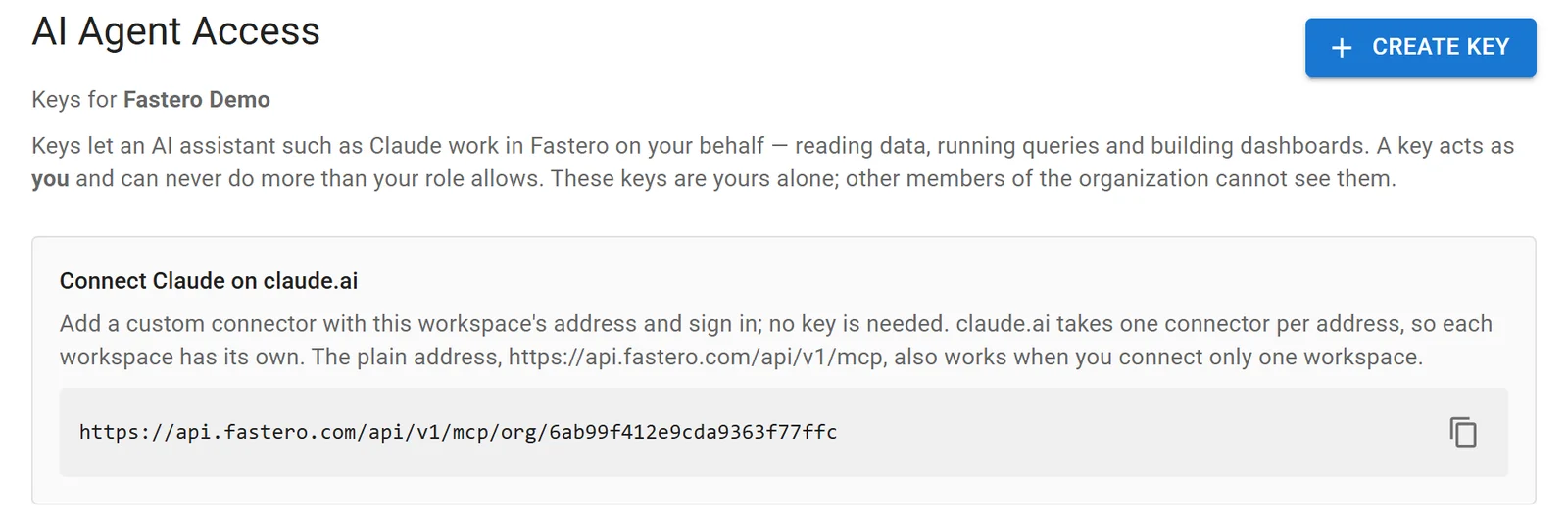
Fastero's agent access settings. Sample data.
FAQ
Is MCP secure?
The protocol defines OAuth-based authentication for remote servers and security requirements for clients, but much of the risk sits outside it: what a server can reach, what content the agent reads, and whether the package you installed is the one you think. Connect trusted servers, with the least access that works, and keep approvals on for writes.
What is tool poisoning in MCP?
Instructions hidden in a tool's description, which the model reads but the user usually doesn't see. A "rug pull" is the same trick played after approval: the server changes the description once you've said yes.
How does MCP authentication work?
Remote MCP servers use OAuth 2.1 with PKCE: the client discovers the server's authorization server, the user signs in and consents, and the client gets a token issued for that specific server. Local servers started over stdio don't use OAuth; they take credentials from environment variables or config files.
Are local MCP servers safe?
A local server runs with your own permissions and usually holds a long-lived key, so it's only as safe as its code and its publisher. Install from publishers you trust, pin the version, and review any change to the command your client runs.
What is the lethal trifecta?
Simon Willison's name for an agent that has access to private data, is exposed to untrusted content, and can communicate externally. Together they let injected instructions steal data; removing any one of the three closes that path.
Should I let my agent approve MCP tools automatically?
Only for read-only tools from servers you trust, and never for a server that reads content strangers can write, such as public issues, tickets or email.
Related reading:
- Best MCP servers for Claude Code
- MCP registry and marketplaces: where to find servers
- Supabase MCP server
- Postgres MCP server
Sources: MCP authorization (2026-07-28), MCP 2026-07-28 changelog, MCP 2025-06-18 changelog, MCP 2025-11-25 changelog, MCP security best practices, MCP tools, Enterprise-Managed Authorization, OAuth 2.1 draft, Invariant Labs: tool poisoning, Invariant Labs: GitHub MCP, General Analysis: Supabase MCP, Check Point: MCPoison, CSO Online: postmark-mcp, Security Affairs: Oura clone, OX Security, MCP Inspector advisory, JFrog: mcp-remote, Cymulate: Filesystem server, The Register: Git server, BleepingComputer: nginx-ui, BleepingComputer: Asana, GitGuardian: Smithery, Adversa AI: TrustFall, Wiz: Amazon Q, Simon Willison: the lethal trifecta, Microsoft: securing AI agents, Claude Code security, Claude Code managed MCP, Claude custom connectors, VS Code security, Cursor MCP, VentureBeat: ChatGPT developer mode, NSA guidance (Intelligence Community News), OWASP MCP Top 10, OWASP: using third-party MCP servers, OWASP MCP security cheat sheet, CoSAI MCP security, Supabase MCP docs. Checked 22 October 2026.
Try Fastero free — connect Claude to your team's data through an MCP server that can never do more than your role allows. No credit card required.