
The best data notebook platforms in 2026 are JupyterHub (self-hosted control), Google Colab (free GPU access), Hex (SQL+Python workflow), Deepnote (managed Jupyter with collaboration), Databricks Notebooks (enterprise Spark), Observable (JavaScript-first), Fastero (notebook-to-production in one workspace), Apache Zeppelin (polyglot big data), and Marimo (reactive Python newcomer). The right pick depends on what happens after you finish the analysis.
Why does local Jupyter break down?
It doesn't — not for the thing it was designed for. JupyterLab is a fantastic exploration environment. You spin up a kernel, test a hypothesis, visualize something, iterate. For solo work on your laptop, nothing beats it.
The problems show up everywhere else:
- Collaboration:
.ipynbfiles are JSON blobs stuffed with Base64-encoded chart output. Git diffs are useless. Merge conflicts are nightmares. Two people editing the same notebook means someone loses work. - Scheduling: There's no built-in way to run a notebook on a cron. You bolt on Papermill, write a script, maintain it forever.
- Sharing with non-technical people: You email an HTML export. They open it, can't change the date range, and Slack you. Now you're a dashboard.
- Production deployment: The gap between "it works in my notebook" and "it runs reliably every morning" is massive.
Here's the shape of the problem:
   YOUR LAPTOP                          PRODUCTION
  ┌──────────────┐                    ┌──────────────┐
  │  JupyterLab  │                    │  Scheduled   │
  │              │                    │  Runs        │
  │  Explore     │    THE GAP         │  Auth        │
  │  Prototype   │◄──────────────────►│  Monitoring  │
  │  Iterate     │  git? Docker?      │  Sharing     │
  │              │  Airflow? cron?    │  Alerting    │
  └──────────────┘  hope?             └──────────────┘
Every platform in this list exists because that gap is painful. They just close it in different ways — and with different trade-offs.
What do notebook users actually care about?
After reading hundreds of "which notebook tool" threads on Reddit, Hacker News, and internal Slack channels, the same six things keep coming up:
- Real-time collaboration — can two people edit the same notebook without destroying each other's work?
- Git integration — does version control work, or do you get unreadable JSON diffs?
- SQL + Python in one place — can I write a SQL query and use the result as a DataFrame without ceremony?
- Scheduling and automation — can I run this notebook every Monday at 6 AM without a separate orchestration tool?
- Sharing with stakeholders — can my VP see the output without installing Python?
- Compute management — do I need to provision my own GPUs or does the platform handle it?
Keep these six in mind as you read through the platforms. No tool nails all six.
Fastero
Connect your database. Ask questions. Get dashboards.
Postgres, BigQuery, Snowflake, and 10+ sources — live-connected, AI-powered, no dashboard builder learning curve.
Try free →The 9 notebook platforms worth evaluating
1. JupyterHub / JupyterLab — the open-source foundation
You know this one. JupyterLab is the editing interface; JupyterHub is the multi-user deployment layer. Together, they give you the most flexible notebook stack that exists. Any language kernel (100+), any Python package, any compute backend. Run it on a laptop, on Kubernetes, on a university HPC cluster.
The Real-Time Collaboration extension (Yjs-based) now works, but "works" and "easy" remain different words. You're managing auth (OAuth, LDAP, PAM), spawner configuration, persistent storage, compute sizing, and TLS — before anyone writes a single cell of code.
Best for: Teams with DevOps capacity who want full control and zero vendor lock-in. Weak spot: Everything after the notebook is written — scheduling, sharing, deployment — is your problem.
2. Google Colab — free GPUs, no setup
Colab is the lowest-friction way to start running Python. Open a browser, write code, get free GPU and TPU access for training. It's built on top of Jupyter's protocol but the execution environment is Google-managed. For ML experimentation and education, nothing else comes close on price (free).
But Colab is an island. Collaboration is "share a Google Drive link." There's no native database connectivity. No scheduling in the free tier. No way to publish results as an app. You can't even install system packages persistently — every session starts from a clean VM. Colab Pro ($12/month) and Pro+ ($50/month) improve the compute, not the workflow.
Best for: ML experiments, learning, quick prototyping where you need GPU and don't want to manage infrastructure. Weak spot: Anything team-based. Colab is a single-player game with a share button taped on.
3. Hex — the best SQL+Python integration
Hex made the sharpest bet in the notebook space: combine SQL and Python as equals, then let you publish the result as an interactive app without a deployment step.
Write a SQL cell that queries your Snowflake warehouse. The result becomes a named DataFrame. Write a Python cell that transforms it. Add a chart. Toggle to "app mode" and your notebook becomes an interactive application — code cells disappear, input widgets and visualizations stay. A product manager can open the URL, change a date picker, and see updated charts. No Streamlit rewrite. No Docker container.
Hex's SQL editor has proper autocomplete, schema browsing, and query plan visualization. If your analysts think in SQL first and reach for Python second, this is the best combined experience available.
The cost is real: ~$38-65/seat/month, proprietary notebook format (your work lives in Hex), and cloud-only. Export means conversion, not portability.
Best for: Analytics teams that need to ship interactive analyses to stakeholders regularly. Weak spot: Format lock-in and price. See our Hex deep-dive for more on the trade-offs.
4. Deepnote — managed Jupyter without the overhead
Deepnote is the best answer to "I want Jupyter, but managed." Real-time collaboration, native SQL cells, scheduling, database connectors (Snowflake, BigQuery, Databricks, Postgres, S3) — all built on top of the standard .ipynb format. Your notebooks are portable. You can download them and run them in vanilla Jupyter tomorrow.
Environment management uses Docker-based custom images or automatic requirements.txt installation. Each project gets isolated compute. The free tier is generous: unlimited viewers, one editor, limited compute hours. Team plan runs ~$29/editor/month.
Deepnote doesn't try to be a deployment platform — and that honesty is refreshing. It's a collaborative notebook. It does that well.
Best for: Data science teams that want Jupyter's ecosystem with real-time collaboration, without running JupyterHub. Weak spot: No app publishing like Hex. Sharing means showing a notebook, not an interactive dashboard.
For a detailed comparison: Deepnote vs Hex vs Jupyter.
5. Databricks Notebooks — enterprise Spark, enterprise price
Databricks notebooks are the default interface for teams already on the Databricks Lakehouse Platform. They support Python, SQL, Scala, and R in the same notebook (switch languages per cell). Collaboration works. Git integration works. Scheduling via Databricks Workflows is built-in and production-grade.
The compute is the draw and the deterrent. You get managed Spark clusters, serverless SQL endpoints, GPU clusters for ML — the full Databricks stack. If your data lives in a lakehouse and your workloads are Spark-scale, the notebook is tightly integrated in ways no standalone tool can match.
But the starting price for a Databricks workspace makes Hex look cheap. This is an enterprise platform. Minimum contracts, Spark overhead for simple analyses, and a learning curve that assumes you know distributed computing. If your dataset fits in memory, you're paying for a freight train to deliver a letter.
Best for: Data engineering and ML teams already committed to Databricks/Spark. Weak spot: Cost and complexity for small-to-medium workloads. Overkill for "I just want to query Postgres and make a chart."
6. Observable — notebooks reimagined for JavaScript
Observable is the outlier on this list because it doesn't use Python at all. It's built around JavaScript (and Observable's own reactive notebook model) with a heavy focus on D3-quality data visualization. Cells are reactive — change one value and everything downstream updates instantly, like a spreadsheet.
Observable Framework (their newer product) builds static sites from notebooks, compiling data loaders and visualizations into deployable dashboards. It's genuinely excellent for published data journalism and interactive documentation.
The trade-off: your team needs to think in JavaScript. The data science ecosystem (pandas, scikit-learn, statsmodels) lives in Python. Observable sits in a different universe.
Best for: Data visualization specialists, newsroom data teams, JavaScript-native developers who build published data stories. Weak spot: No Python. That disqualifies it for most data science workflows.
7. Fastero — notebook to production in one workspace
Fastero approaches the problem from the deployment side. The notebook isn't the product — it's one layer in a workspace that also includes hosted Streamlit apps with built-in auth, 20+ database connectors, and an AI agent that can write and run SQL against your live data.
The pitch: stop juggling Jupyter + dbt + a BI tool + a hosting platform. Write Python in a notebook, build a Streamlit app from the results, deploy it with custom domains and access control — all without leaving the workspace. The AI agent handles the SQL so analysts who think in questions rather than joins can still get answers.
Where Hex turns notebooks into apps through a toggle, Fastero turns notebooks into production Streamlit apps through a deployment pipeline. Different philosophy — Hex hides the code, Fastero ships it.
Best for: Teams that need notebooks, Streamlit deployment, and database access in one place without stitching tools together.
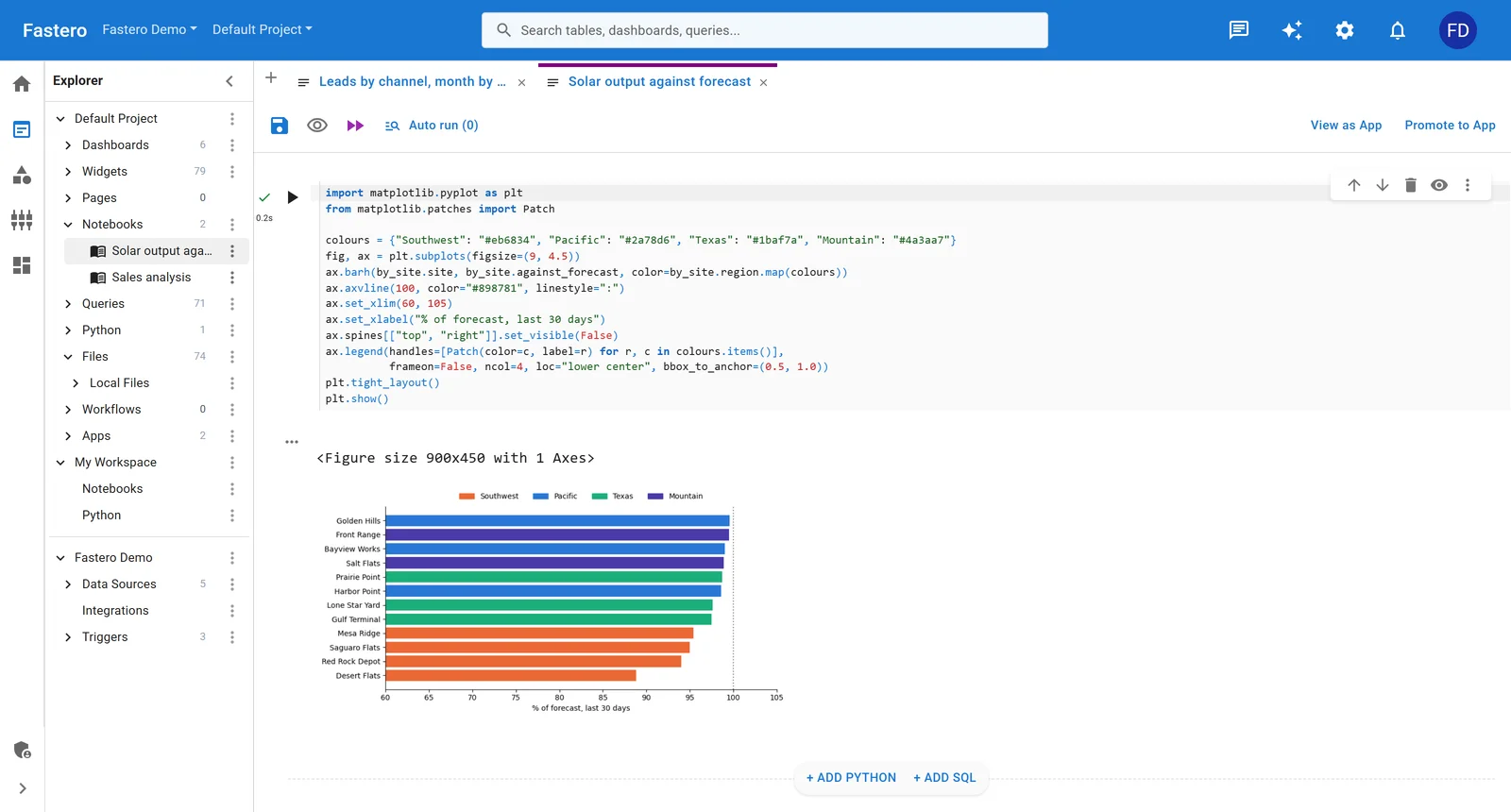
A Python notebook in Fastero. Sample data.
8. Apache Zeppelin — the polyglot big data notebook
Zeppelin is the open-source notebook that most people have heard of but few have used recently. It supports interpreters for Spark, Flink, Hive, Presto, Python, R, JDBC, and more — all in the same notebook. Built-in visualization and a dashboard mode that lets you arrange paragraph outputs into a grid layout.
It's powerful for big data workflows where you need to write Spark SQL, run a Python transformation, then visualize results — all against a Hadoop or Spark cluster. The angular-based frontend is showing its age, though, and the community has slowed compared to 2020.
Best for: On-premise big data teams using Spark/Hadoop who need a self-hosted polyglot notebook. Weak spot: Aging frontend, shrinking community, no cloud-hosted option.
9. Marimo — the exciting newcomer
Marimo is a reactive Python notebook that stores notebooks as pure .py files — not JSON. Change a variable and every cell that depends on it re-executes automatically, like a spreadsheet. The dependency graph is explicit: no hidden state, no "restart kernel and run all" to check if your notebook actually works top-to-bottom.
This is the most opinionated notebook on the list, and the opinions are good. No hidden state means reproducibility by default. Pure .py files mean git diffs actually work. Built-in UI elements (sliders, tables, forms) let you build interactive apps without a separate framework.
Marimo is early-stage — no managed cloud hosting yet, limited database connectors, small but growing community. But the architecture is right, and it solves the two deepest Jupyter complaints (hidden state and unreadable diffs) at the format level.
Best for: Python developers who care about reproducibility and are willing to adopt a new notebook format. Weak spot: Early ecosystem. You're an early adopter, with everything that implies.
How do these platforms compare side by side?
  EXPLORATION ◄───────────────────────────► PRODUCTION

  Colab       Jupyter    Deepnote    Hex       Fastero    Databricks
  ├───────────┼──────────┼───────────┼─────────┼──────────┤
  Free GPU    Full       Managed     SQL+App   Deploy     Enterprise
  Solo use    control    collab      mode      pipeline   Spark

  ──── Marimo (reactive, .py files, early stage) ────
  ──── Zeppelin (big data, self-hosted, aging) ────
──── Observable (JavaScript, visualization) ────| Feature | JupyterHub | Colab | Hex | Deepnote | Databricks | Observable | Fastero | Zeppelin | Marimo |
|---|---|---|---|---|---|---|---|---|---|
| Real-time collab | Extension | Google Drive sharing | Built-in | Built-in | Built-in | Built-in | -- | Limited | -- |
| SQL cells (native) | Extension | No | First-class | Yes | Yes | No (JS) | AI-driven | Yes | Limited |
| Scheduling | DIY (cron/Papermill) | No (free) | Built-in | Built-in | Workflows | No | Yes | Built-in | No |
| App publishing | Voila (limited) | No | App mode | Presentation | Dashboards | Framework | Streamlit | Dashboard mode | Built-in UI |
| Git integration | .ipynb (painful) | Google Drive | Proprietary | .ipynb native | Git folders | GitHub sync | Yes | Git storage | .py files |
| Free tier | Open-source | Yes (generous) | 1 user | 1 editor | Trial only | Free tier | Free tier | Open-source | Open-source |
| Compute | Self-managed | Google (free GPU) | Managed | Managed | Managed Spark | N/A | Managed | Self-managed | Local |
| Python support | Full (any package) | Managed env | Managed env | Docker images | Full + Spark | JavaScript | Full | Interpreters | Full |
| Self-host | Yes | No | No | No | Yes (costly) | No | No | Yes | Yes |
| Lock-in risk | None | Low | High | Low | Medium | Low | Low | None | None |
| Starting price | Free + ops cost | Free | ~$38/seat/mo | ~$29/editor/mo | $$$+ | Free | Free | Free + ops cost | Free |
Which platform fits which team?
Skip the feature matrix — here's the opinionated version:
Solo data scientist or researcher: JupyterLab locally, Colab for GPU access. You don't need collaboration features. Spend zero dollars.
Small analytics team (3-10 people) presenting to stakeholders: Hex. The app mode alone justifies the price if you're currently rebuilding notebook analyses as dashboards.
Data science team that wants managed Jupyter: Deepnote. Portable .ipynb files, real-time collaboration, fair pricing. No regrets.
Teams that need notebook + deployment + database access: Fastero. One workspace instead of Jupyter + Streamlit Cloud + a database client + a BI tool. The AI agent handles the SQL so you can focus on the analysis.
Enterprise data engineering on Spark: Databricks. No other notebook integrates as deeply with lakehouse architecture.
Visualization-first, JavaScript-native: Observable. Different tool for a different job.
Reproducibility purists: Marimo. The architecture is correct, the ecosystem is catching up.
Big data teams with existing Hadoop/Spark infrastructure: Zeppelin, though honestly — evaluate whether migrating to Databricks is worth the hassle.
What's the trend for 2026 and beyond?
Three shifts are reshaping the notebook space:
1. The "notebook + dashboard + deployment" convergence. Teams are tired of maintaining three separate tools for analysis, visualization, and production. Hex's app mode, Fastero's Streamlit hosting, and Databricks' dashboard builder all reflect the same insight — the notebook shouldn't be where the workflow ends, it should be where the workflow ships from.
2. AI-assisted coding is table stakes. Every major platform now has an AI assistant (Hex Magic, Deepnote AI, Colab's Gemini integration, Databricks Assistant). The question is no longer "does it have AI?" but "how deeply is the AI integrated with my data connections?" An AI that can see your schema and write correct SQL is useful. An AI that generates generic Python snippets is a fancy autocomplete. See our comparison of Hex and Mode for how this plays out in practice.
3. Reactive notebooks are coming. Marimo proved that reactive execution (cells re-run when dependencies change) eliminates hidden state — the source of most "works on my machine" notebook bugs. Observable had this for JavaScript. Marimo brought it to Python. Expect every major platform to adopt some version of reactive execution within two years.
FAQ
Is Jupyter still worth learning in 2026?
Yes — overwhelmingly. Jupyter is the lingua franca of data science. Every platform on this list either builds on top of Jupyter's protocol, reads .ipynb files, or was designed in response to Jupyter's limitations. Learning Jupyter means your skills transfer everywhere. The question isn't "Jupyter or something else" — it's "Jupyter plus what?"
Can I use Colab for production workloads?
Not reliably. Colab sessions time out, environments reset between runs, and there's no scheduling in the free tier. Colab Pro+ helps with longer runtimes and more GPU access, but it's still fundamentally a prototyping environment. If your analysis needs to run every morning at 6 AM without you touching it, Colab is the wrong tool.
Is Hex worth the price?
For the right team, absolutely. If your analysts spend significant time turning notebook analyses into stakeholder-facing deliverables, Hex's app mode eliminates an entire step in that pipeline. For teams that just need notebooks for internal exploration, it's expensive for what you get. We wrote a full breakdown if you're on the fence.
What's the biggest risk with cloud notebook platforms?
Format lock-in. Deepnote uses .ipynb (portable). Marimo uses .py (portable). Hex uses a proprietary format (not portable). Before committing to a platform, ask: "If this company shuts down tomorrow, can I take my notebooks and run them somewhere else?" If the answer is no, price that into your decision.
Should my team use one notebook platform or multiple?
Most teams end up with two: one for exploration (Jupyter, Colab, or Deepnote) and one for production/sharing (Hex, Fastero, or Databricks). The exception is teams that go all-in on a platform that covers both — Hex and Fastero both aim to be the single workspace. Whether they succeed depends on whether their exploration experience is good enough to replace your current notebook.
How does Marimo compare to Jupyter long-term?
Marimo's reactive model and .py file format are architecturally superior to Jupyter's .ipynb approach for reproducibility and version control. The ecosystem gap is the issue — Jupyter has 20 years of extensions, integrations, and community knowledge. Marimo is catching up fast, but "catching up" and "caught up" are different things. Watch it. Don't bet your team's workflow on it yet unless you're comfortable being an early adopter.
Try Fastero free — run Python notebooks, deploy Streamlit apps, query databases with AI. One workspace for your entire data stack. No credit card required.
Last updated: August 2026.