
You don't need to install anything to use Jupyter. A dozen services run notebooks in the browser, several of them free, and they differ in what matters once you start: how long a session lasts, whether there is a GPU, and whether your files are still there tomorrow.
The short answer: to try Jupyter right now with no account, open JupyterLite at jupyter.org/try — it runs entirely in your browser. For free GPU time, use Google Colab or Kaggle Notebooks; Kaggle publishes its quota, about 30 GPU hours a week. To run a notebook from a public GitHub repository, use Binder. For notebooks a team shares, on the company's data and on a schedule, use a hosted workspace such as Fastero, Deepnote or Hex, or run JupyterHub on your own server.
12 places to run a Jupyter notebook online
| Tool | What you get free | Your files | Best for |
|---|---|---|---|
| Google Colab | Free; limits unpublished; sessions up to 12 hours; GPUs when available | Notebooks in Google Drive; the machine itself is wiped | Quick experiments and machine learning |
| Kaggle Notebooks | 12-hour sessions; about 30 GPU hours and 20 TPU hours a week | 20 GB of output saved | Free GPUs with published limits |
| JupyterLite | Runs inside your browser, with no account | Kept in the browser's storage | Trying Jupyter with nothing to install |
| Binder | 1–2 GB of memory, up to 6 hours; stops after 10 minutes idle | Not kept | Running a public repository's notebooks |
| GitHub Codespaces | 120 core-hours a month on personal accounts — about 60 hours on the smallest machine | Kept until deleted, 30 days after stopping | Notebooks inside a code project |
| Deepnote | 3 editors and 5 projects, with Postgres and MySQL connections | Kept | Collaborative notebooks with SQL |
| Hex | A free Community plan with small machines | Kept | Notebooks that become shareable apps |
| Databricks Free Edition | Free for non-commercial use, with a daily quota | Kept | Learning Spark and Databricks |
| Lightning AI Studios | Free credits and one free Studio that restarts every 4 hours | 10 GB kept | GPU work in JupyterLab or VS Code |
| Paperspace Notebooks | A free M4000 GPU, shut down after 6 hours | 5 GB kept | A free GPU notebook |
| CoCalc | 2 GB of memory and 3 CPU-hours every 5 hours | Kept | Teaching and live collaboration |
| Fastero | Notebooks, scheduled runs and free viewers on the Free plan | Kept in your workspace | Teams: notebooks on company data, run on a schedule |
The quickest start: JupyterLite and Binder
JupyterLite is JupyterLab compiled to run in the browser: the Python kernel runs on WebAssembly, so there is no server and nothing to sign up for. Open jupyter.org/try and pick JupyterLab or Notebook. The catches: files live in your browser's storage — clearing browser data deletes them — and Python packages that need compiled C code or threads may not work.
Binder turns a public GitHub repository into a temporary Jupyter session: paste the repository's address at mybinder.org and it builds the environment from the repository's requirements.txt. It is a free service run on donated computing, and it has run with reduced capacity since 2023. Each session gets 1–2 GB of memory and up to six hours, stops after 10 minutes of inactivity, and keeps nothing afterwards. Never put secrets in a repository you launch: there is no private launch.
Fastero
Connect your database. Ask questions. Get dashboards.
Postgres, BigQuery, Snowflake, and 10+ sources — live-connected, AI-powered, no dashboard builder learning curve.
Try free →Free GPUs: Google Colab and Kaggle
Google Colab opens .ipynb notebooks from Google Drive or GitHub in Google's own notebook interface, and is the usual first stop for machine learning. Google is open about one thing: it doesn't publish the limits. Free sessions last at most 12 hours, idle ones time out, and GPUs are "heavily restricted" on the free tier. The machine is recycled, so anything not saved to Drive disappears. In September 2026, Colab became part of Google's consumer AI plans, which add compute units and faster GPUs.
Kaggle Notebooks are the most generous free GPU option with published numbers: about 30 GPU hours and up to 20 TPU hours a week, 12-hour sessions (9 on TPU), and 20 GB of output saved between sessions. Kaggle notebooks can also rerun on a schedule — daily, weekly or monthly — for free. The trade-off is that your work lives on Kaggle, built around its datasets and competitions.
Paperspace Notebooks, now part of DigitalOcean, include a free M4000 GPU on personal accounts, shut down after six hours; free GPUs are in demand during US working hours. Lightning AI Studios give free credits to start and one free Studio, in JupyterLab or VS Code, that has to be restarted every four hours.
Notebooks that are part of your work: Codespaces, Deepnote, Hex and others
GitHub Codespaces opens a repository in a cloud machine with JupyterLab or VS Code. Personal accounts get 120 core-hours a month free; the smallest machine has two cores, so that is about 60 hours. Anaconda Notebooks run JupyterLab with Anaconda's packages and 5 GB of storage on the free plan. CoCalc (now at cocalc.ai) runs .ipynb notebooks in its own collaborative editor, with a shared kernel, edit history and nbgrader for marking assignments.
Deepnote and Hex are data workspaces built around notebooks with SQL and Python, live collaboration and connections to databases. Both save notebooks in their own formats and import .ipynb files; scheduled runs are on their paid Team plans.
Databricks Free Edition, launched in June 2025, replaced the old Community Edition. It is free for non-commercial use with a daily compute quota, and new notebooks there are .ipynb by default.
For a team: notebooks on company data, on a schedule
A notebook that runs in a browser tab is fine for one person exploring. A team needs more: the notebook next to the company's databases, passwords kept out of the code, runs on a timetable, and colleagues who can open the results without installing anything. You can build that with JupyterHub on your own server — The Littlest JupyterHub for one server, Zero to JupyterHub on Kubernetes for more — or use a workspace that does it for you.
In Fastero, notebooks are real .ipynb files — import the ones you have — running Python 3.11 with pandas, SQLAlchemy, seaborn and the Postgres and BigQuery drivers installed. Database passwords and keys come from the workspace's Secrets, not from the notebook. Run a cell, run the whole notebook, or run it on a schedule; colleagues open it with their own login, and viewers are free. The same workspace holds the SQL queries, dashboards and Streamlit apps built from the same data, and Claude can read and run the notebooks through Fastero's connector.
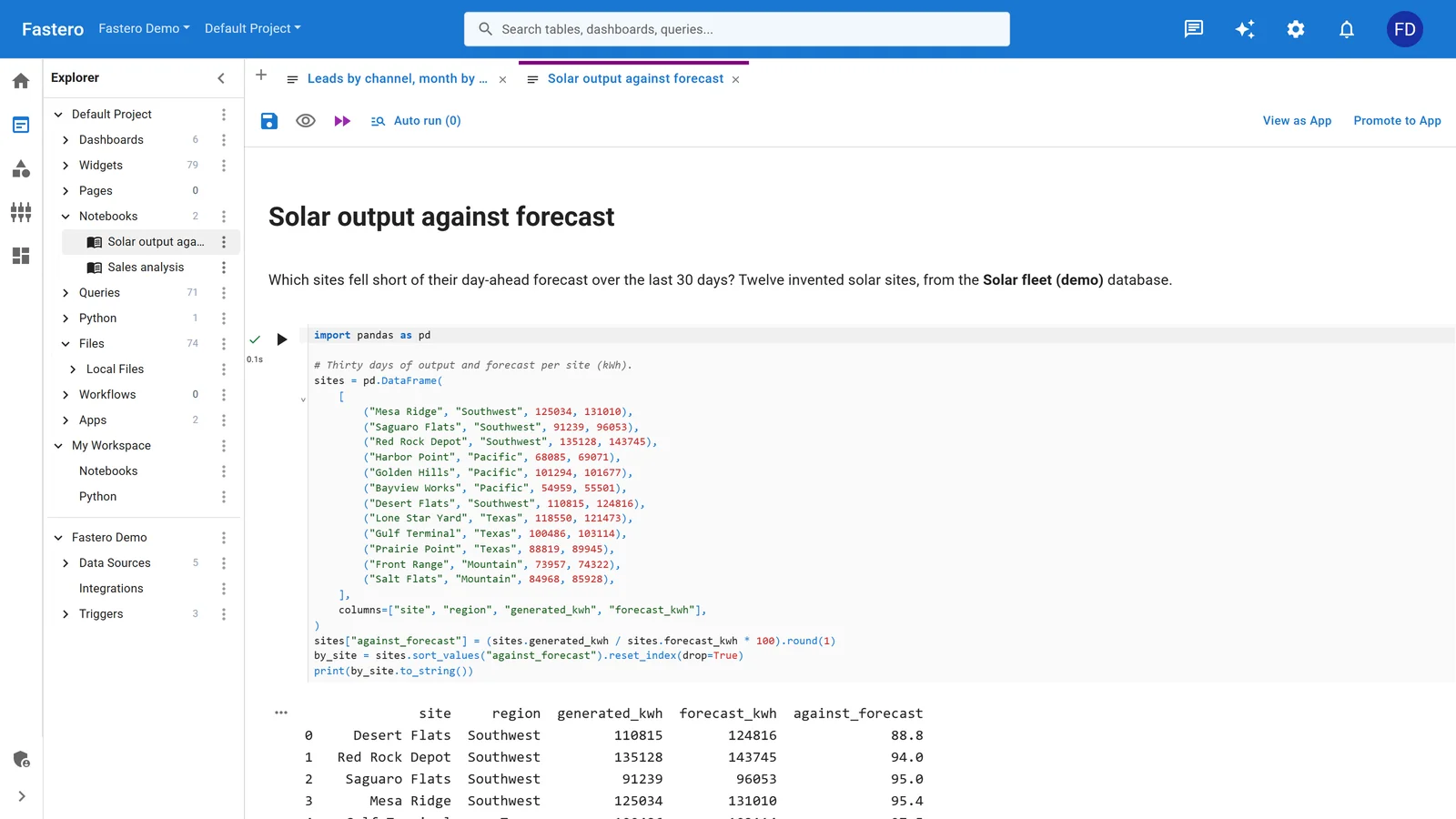
A notebook in Fastero, with the project's queries, apps and data sources beside it. Sample data.
Names you'll see in older lists
- Amazon SageMaker Studio Lab no longer accepts new customers; existing users keep it, with no new features.
- Databricks Community Edition was retired in 2025 for the Free Edition.
- Vertex AI Workbench managed notebooks were deleted on 30 March 2026; Google Cloud now offers Colab Enterprise and Workbench instances instead.
- marimo and its cloud service molab are notebooks, with free GPUs in preview, but they use their own Python-file format rather than
.ipynb.
How to open an .ipynb file online
- To read it: GitHub shows
.ipynbfiles with their saved outputs. Open the file in the repository. - To run it now: in Colab, use File → Upload notebook; in Kaggle, import it into a new notebook; in JupyterLite, drag it into the file browser.
- To run it from a public repository: paste the repository into mybinder.org.
- To run it with a team: import it into a workspace such as Fastero, Deepnote or Hex, where colleagues can open it too.
FAQ
Can I run Jupyter Notebook online for free?
Yes. JupyterLite at jupyter.org/try runs Jupyter in your browser with no account. Google Colab and Kaggle Notebooks are free with a Google or Kaggle account and include GPU time, and Binder runs notebooks from public GitHub repositories for free.
Which online Jupyter service has a free GPU?
Kaggle Notebooks give about 30 GPU hours a week and publish the quota. Google Colab's free tier includes GPUs when they are available, with limits Google doesn't publish. Paperspace offers a free M4000 GPU on personal accounts, and Lightning AI gives free credits to spend on GPUs.
Is Google Colab the same as Jupyter Notebook?
Colab is built on Jupyter and stores notebooks in the standard .ipynb format, but it uses Google's own interface instead of JupyterLab, stores notebooks in Google Drive, and runs them on Google's machines with its own limits.
Do online Jupyter notebooks save my files?
It depends. Binder and JupyterLite keep nothing on a server; Colab keeps notebooks in Google Drive but wipes the machine; Kaggle saves 20 GB of output; Codespaces, Deepnote, Hex, CoCalc and Fastero keep your files in your account or workspace.
How can a team share Jupyter notebooks online?
Use a shared workspace — Fastero, Deepnote, Hex or Databricks — or run JupyterHub on your own server. Look for sign-in for colleagues, a place for database passwords outside the notebook, and scheduled runs if the notebook produces a regular report.
Related reading:
- Google Colab alternatives
- Best notebook platforms
- How to turn a Jupyter notebook into a live dashboard
- Python cron job: how to schedule a Python script
Sources: Colab FAQ, Colab release notes, Kaggle Notebooks docs, JupyterLite, Try Jupyter, Binder user guidelines, GitHub Codespaces billing, Deepnote pricing, Hex pricing, Databricks Free Edition, Lightning AI pricing, Paperspace pricing, CoCalc pricing, Anaconda Notebooks, SageMaker Studio Lab, JupyterHub, marimo. Checked 16 October 2026.
Try Fastero free — run your Jupyter notebooks next to your team's data, on a schedule, shared with a sign-in. No credit card required.