
JupyterHub is the open-source server that logs a team in and gives each person their own Jupyter environment. Installing it is quick: the one-server version takes five to ten minutes. The real decision is who keeps it running afterwards — security patches, upgrades, the package environment, disks, backups and logins.
The short answer: for a small team on one Linux server, with someone comfortable looking after it, use The Littlest JupyterHub. For a large or changing group, with a Kubernetes cluster and an engineer to run it, use Zero to JupyterHub. A research or teaching group that wants a hub run for it can join 2i2c, a non-profit that publishes its prices. If the company already works in AWS, Google Cloud or Azure, their machine-learning services give each person a JupyterLab machine billed by the hour. And if what you need is shared notebooks next to the company's data, rather than a hub to operate, use a workspace that replaces JupyterHub: Fastero, Deepnote, Hex or Colab Enterprise.
8 ways to run JupyterHub, or replace it
| Option | Who runs it | Best for | What it costs |
|---|---|---|---|
| The Littlest JupyterHub | You, on one Linux server | Up to 100 users on one machine | Free software, plus the server |
| Zero to JupyterHub | You, on Kubernetes | Large or changing groups | Free software, plus the cluster, nodes and disks |
| DockerSpawner | You, on one machine | Trying JupyterHub out | Free software, plus the server |
| 2i2c | 2i2c, a non-profit | Research and education groups | $15,000 a year, plus per-user fees and the cloud at cost |
| Amazon SageMaker Studio | AWS | Teams already on AWS | From $0.05 an hour for each person's machine |
| Google Workbench | Google Cloud | Teams already on Google Cloud | The machine's price, plus a management fee |
| Azure Machine Learning | Microsoft | Teams already on Azure | The machine's price, by the second |
| A notebook workspace | The vendor | Shared notebooks on company data | Free plans; paid plans $20 to $75 per editor a month |
What JupyterHub is, and what it isn't
JupyterHub has four parts: the hub, which keeps track of users; a proxy that sends each person's browser to their own server; a spawner that starts those servers, as local Unix users, Docker containers or Kubernetes pods; and an authenticator that decides how people log in. It is not an editor. Each person works in JupyterLab, whose current release, 4.6.4, came out in September 2026, or in Jupyter Notebook 7, which is built on JupyterLab. All of them save the same .ipynb files, and JupyterLab has been the default interface since JupyterHub 2.0.
The newest release is JupyterHub 6.1.1, from 20 October 2026. Version 6.0 arrived on 1 September with a database migration and a minimum of Python 3.10, and the 5.5 line is still patched alongside it. The project is plain about its security model: JupyterHub is built "for modestly sized groups of semi-trusted users" and is "not suitable for untrusted users in its default configuration".
Fastero
Connect your database. Ask questions. Get dashboards.
Postgres, BigQuery, Snowflake, and 10+ sources — live-connected, AI-powered, no dashboard builder learning curve.
Try free →On one server: The Littlest JupyterHub
The Littlest JupyterHub (TLJH) is the official distribution for "a small (0-100) number of users on a single server". It needs Ubuntu 22.04 or Debian 11 or later, root access, and at least 1 GB of memory to install:
sudo apt install python3 python3-dev git curl
curl -L https://tljh.jupyter.org/bootstrap.py | sudo -E python3 - --admin <admin-user-name>
Once a domain points at the server, HTTPS with Let's Encrypt is four tljh-config commands. Out of the box, people choose their own password the first time they log in; for a company, switch to GitHub, Google, an OpenID Connect provider or LDAP. Idle servers stop after an hour.
What you still own:
- Operating-system patches and distribution upgrades.
- TLJH upgrades. Re-run the bootstrap script after taking a disk snapshot. The docs say upgrades are tested "with automation", but "there are no guarantees".
- One shared package environment. An admin's
pip installchanges everyone's packages. - Backups of the home directories and
/opt/tljh/state. Deleting a user in the admin panel leaves their Unix account behind.
Two things to know before you choose it. TLJH's last release, 2.0.0, came out in October 2024 and pins JupyterHub below version 6, so it installs a JupyterHub 5 release. And its own security page still says it "is in beta state & should not be used in security critical situations".
How big a server? TLJH's sizing guide: memory = concurrent users × memory per user + 128 MB, and concurrent users are usually 40–60% of the total. Ten people with six working at once need about 12 GB at 2 GB each, or 24 GB at 4 GB each — a 16 GB or a 32 GB machine.
Docker on one machine: DockerSpawner
DockerSpawner gives each user their own container on the same host, so different people can use different images. The project's reference setup, jupyterhub-deploy-docker, runs the hub with Docker Compose and lets anyone sign up, and it says in bold that it is "NOT intended for a production environment". Home directories aren't kept unless you map a volume per user, HTTPS needs a reverse proxy such as nginx in front, and every user image has to carry the same JupyterHub version as the hub. It is a good way to try JupyterHub; for a team, the project points you to Kubernetes.
On Kubernetes: Zero to JupyterHub
Zero to JupyterHub (Z2JH) is the Helm chart for running JupyterHub on Kubernetes: GKE, EKS, AKS or your own cluster. The current chart, 4.4.4 from 20 October 2026, ships JupyterHub 5.5.4 and needs Kubernetes 1.28 and Helm 3.5 or later; JupyterHub 6 exists only in a development chart so far. Installing is two commands, helm repo add and helm upgrade --install with your config.yaml.
The defaults are a starting point, not a deployment. Each user gets a 10 GiB disk that stays until an admin deletes it, idle servers stop after an hour, and the login accepts "any username and password" until you configure GitHub, Google, Microsoft Entra ID (still called Azure AD in the docs), OpenID Connect or LDAP.
Then comes the ongoing work:
- Chart upgrades. Back up the hub database and try each upgrade on a staging cluster first, as the docs advise.
- Kubernetes upgrades, about every four months. On EKS, a cluster that falls out of standard support pays $0.60 an hour instead of $0.10.
- User images, which can take five to ten minutes to pull onto a new node, and placeholder pods so the autoscaler adds nodes before people arrive.
- Hardening. Keep RBAC on, block pods from the cloud's metadata server, and restrict who can reach the load balancer.
Run for you: 2i2c
2i2c is a non-profit that runs more than 140 JupyterHubs for universities, agencies and research institutes, on AWS or Google Cloud, with Azure on request. Hubs come with JupyterLab, persistent home directories, and logins through GitHub or institutional accounts.
It publishes its prices: $15,000 a year for membership, plus a monthly fee for each active user — $10 each for the first ten, $5 each from 11 to 100 — plus the cloud bill at cost, with no markup. For ten active people that comes to about $16,200 a year before cloud costs; a Premier tier starts at $50,000 a year. 2i2c also promises a "right to replicate": you can rebuild the same setup elsewhere, without it. Its offer is written for research and education communities, so if you are a company, ask before you plan around it.
Your cloud's own JupyterLab: SageMaker, Workbench and Azure ML
The big clouds don't run JupyterHub for you, but they solve the same problem: each person gets their own JupyterLab machine, signs in with the cloud's own accounts, and pays while it runs.
- Amazon SageMaker Studio is free to open. Each JupyterLab space runs on its own instance, billed by the hour — from $0.05 an hour for the smallest one in US East — and a private space belongs to one person. Shared spaces allow live co-editing for small groups.
- Google's Workbench was renamed Agent Platform Workbench when Google turned Vertex AI into the Gemini Enterprise Agent Platform in April 2026. Each instance is JupyterLab on a Compute Engine machine, priced at the machine's rate plus a management fee, and idle instances shut down after three hours by default.
- Azure Machine Learning compute instances are workstations with Jupyter and JupyterLab. Each has exactly one owner and can't be shared, and you pay the machine's price by the second.
For one person working eight hours a day on a mid-sized machine, that is roughly $19 to $49 a month, depending on the cloud and the machine, plus storage.
What running JupyterHub really takes
- Security patches. JupyterHub published ten security advisories between July and October 2026: one rated High (CVSS 8.7) in August, and six on a single day, 21 October. Each one means an upgrade.
- Upgrades. Back up the database, the config and the home directories; upgrade the hub and every user environment to matching versions; migrate the database. The move to 6.x also needs Python 3.10 and restricts the names of named servers.
- Packages. One shared environment on TLJH; images you build and pin on Docker and Kubernetes.
- Disks and backups. Per-user disks are mostly empty space you pay for — 2i2c found about 90% of theirs unused, and warns that "storage costs can easily dwarf everything else". Set quotas: at the Rubin Observatory, one user filled more disk than the other thousand combined.
- Memory. The JupyterHub docs suggest starting each user at 2 GB. Size for the people working at the same time, not the total.
- People. 2i2c's comparison calls hiring cloud engineers for this "Very expensive", and points out that a single engineer is a single point of failure.
If you need team notebooks, not a hub: Fastero, Deepnote, Hex and Colab Enterprise
Many teams install JupyterHub because they want shared notebooks: colleagues signing in, notebooks next to the company's databases, passwords kept out of the code, and reports that run on a timetable. A notebook workspace gives you that without a server to run.
Deepnote went open source in November 2025 with its own YAML project format, and its hosted Team plan costs $39 per editor a month, billed yearly. Hex saves projects in its own format too — exporting to .ipynb breaks its SQL cells — and costs $36 or $75 per editor a month. Colab Enterprise keeps standard .ipynb files on Google Cloud, shared through Google Cloud permissions, with runtimes billed like Workbench. Databricks now saves new notebooks as .ipynb by default, inside its own platform.
In Fastero, the Jupyter part is already running: each workspace has its own notebook server on Kubernetes, with nothing for you to install, patch or upgrade, and your team signs in with their Fastero login. Notebooks are .ipynb files — upload them, or bring them in from your Git repository — running Python 3.11 with pandas, SQLAlchemy, seaborn and the Postgres and BigQuery drivers. Database passwords live in the workspace's Secrets and reach the notebook as environment variables, and SQL cells query the workspace's databases and hand the result to Python as a DataFrame. Run a notebook now or on a schedule, turn it into an app behind the same login, and give colleagues the Viewer role to read the results: viewers are free. Claude can read and run the notebooks too, through Fastero's connector.
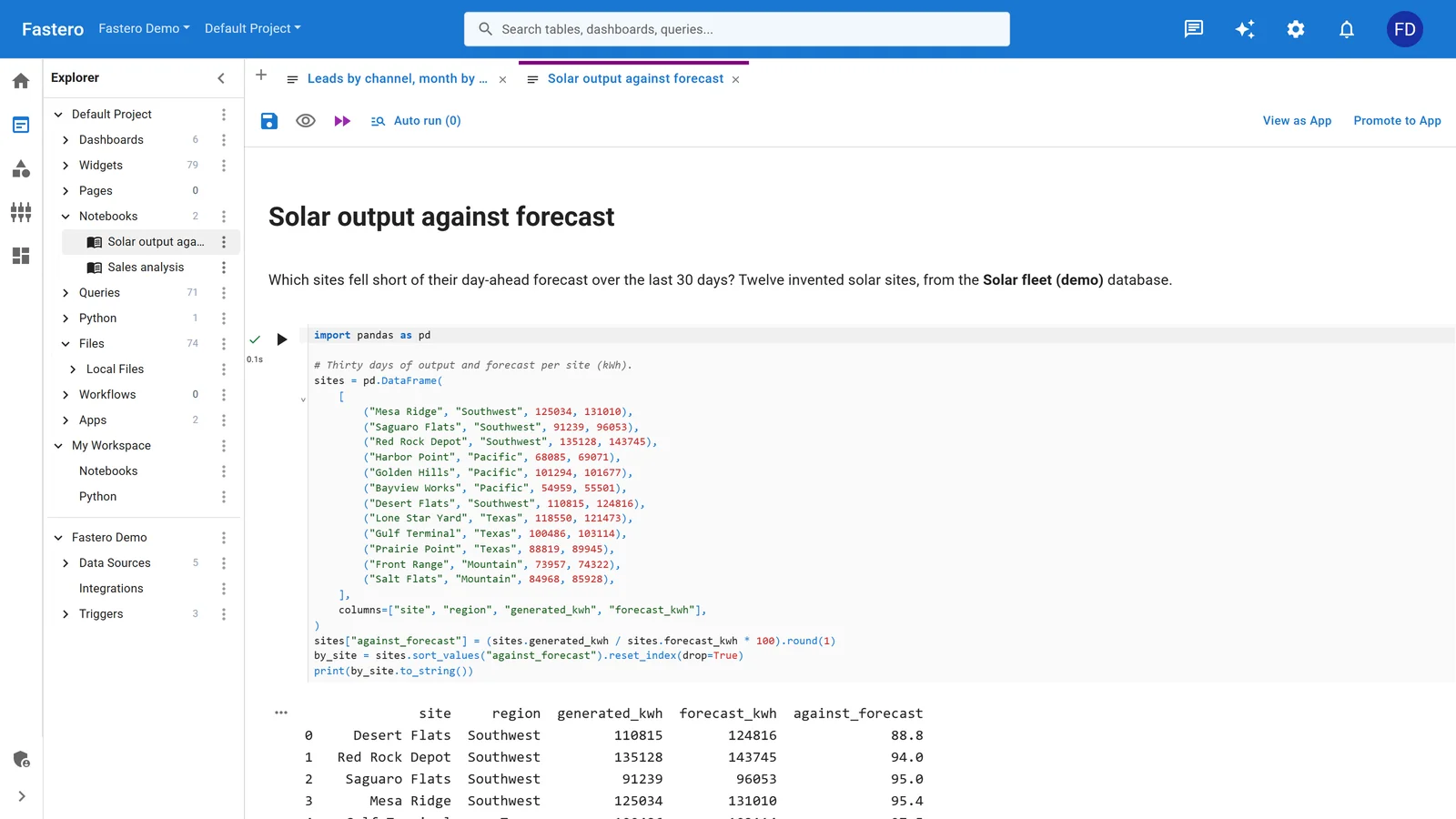
A notebook in Fastero, with the project's queries, apps and data sources beside it. Sample data.
Names you'll see in older guides
- Nebari (formerly QHub): the JupyterHub-and-Dask platform, now called Nebari Classic, is in maintenance mode, with security fixes expected through the end of 2026, while the project rebuilds itself as an AI platform.
- Saturn Cloud now calls itself "the control plane for GPU clouds", though it still rents JupyterLab workspaces by the hour, from $0.15.
- Vertex AI Workbench managed notebooks were retired, and Google deleted the remaining ones on 30 March 2026; Workbench instances replaced them.
- Posit Workbench, Coder and Domino host JupyterLab alongside other editors. Coder's Community edition is free to self-host; Posit and Domino quote their prices.
FAQ
What is JupyterHub?
JupyterHub is a free, open-source server that logs people in and starts a separate Jupyter server for each of them, so a team or a class can share one installation. Each person still works in JupyterLab or Jupyter Notebook.
What's the difference between JupyterHub and JupyterLab?
JupyterLab is the editor where you open and run notebooks. JupyterHub sits in front of it for several users: it handles the logins and starts one JupyterLab server per person.
How many users can The Littlest JupyterHub handle?
Its documentation targets 0 to 100 users on one server. What matters more is how many work at the same time — usually 40–60% of the total — and how much memory each of them needs.
Is JupyterHub free?
The software is free and open source. You pay for the servers, storage and network it runs on, and for the time it takes to keep it patched, upgraded and backed up.
How much does it cost to run JupyterHub for a team?
For ten people on one server: a 16–32 GB machine, plus disks, backups and part of someone's time every month. 2i2c charges about $16,200 a year for ten active users, plus the cloud bill. The clouds' own JupyterLab costs roughly $19 to $49 per person a month at eight hours a day.
Is there a managed JupyterHub?
2i2c runs managed JupyterHubs for research and education groups. The cloud providers offer managed JupyterLab for each person — SageMaker Studio, Workbench and Azure Machine Learning — and notebook workspaces such as Fastero, Deepnote, Hex and Colab Enterprise replace the hub altogether.
Related reading:
- Jupyter notebook online: 12 ways to run Jupyter in your browser
- How to share a Jupyter notebook
- How to schedule a Jupyter notebook
- SQL in Jupyter notebooks
Sources: JupyterHub documentation, JupyterHub changelog, JupyterHub security advisories, JupyterHub capacity planning, The Littlest JupyterHub, TLJH requirements, TLJH security, TLJH resource estimation, Zero to JupyterHub, Z2JH Helm chart repository, Z2JH security, DockerSpawner, jupyterhub-deploy-docker, 2i2c service description, 2i2c platform, 2i2c on chargeable resources, 2i2c service comparison, Amazon SageMaker pricing, SageMaker Studio JupyterLab, Workbench instances, Workbench idle shutdown, Azure Machine Learning compute instances, Amazon EKS Kubernetes versions, Nebari Classic, Saturn Cloud plans, Deepnote open source, Hex import and export, Hex pricing, Colab Enterprise, Databricks notebook formats, Rubin Observatory SQR-104. Checked 22 October 2026.
Try Fastero free — Jupyter notebooks for your team with nothing to install: their own logins, your data, scheduled runs. No credit card required.