 Fastero Dev Team
An MCP server is a program that gives an AI assistant tools and data it doesn't have on its own, using the Model Context Protocol (MCP), an open standard. It's how Claude can query your database, read your Slack or file a ticket: the assistant calls a tool, the server does the work with its own access, and the result comes back.
The short answer: MCP is "an open-source standard for connecting AI applications to external systems", which its docs compare to a USB-C port. A server exposes tools, resources and prompts over JSON-RPC. It runs on your computer (stdio) or on the internet (Streamable HTTP), and any compatible app can use it: Claude, ChatGPT, VS Code, Cursor and many more. Anthropic created MCP in November 2024 and donated it to the Agentic AI Foundation, under the Linux Foundation, in December 2025.
Fastero
Point Claude at your database.
Add Fastero to claude.ai or Claude Code. Claude builds the dashboard, deploys the app or publishes a live page, and your team opens it in Fastero.
Try free →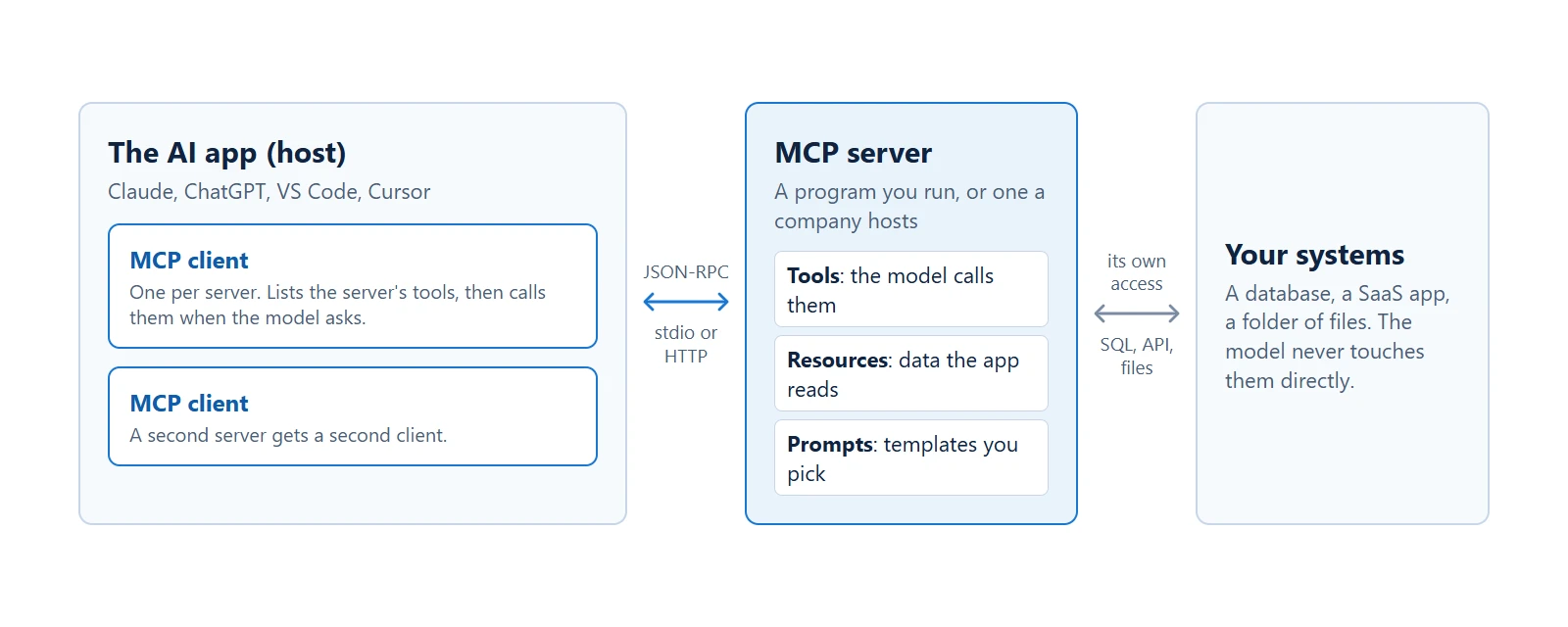
The model asks for a tool. The app makes the call. The server holds the access.
How an MCP server works
Say you ask Claude "which sales channel earned the most last month?" and a database server is connected:
- Claude's app asks the server what it can do. The server replies with a list of tools, each with a name, a description and the inputs it takes.
- The model picks one. It reads the descriptions, as a person would read documentation, and asks to run
querywith some SQL it wrote. - The app routes the call. The app, not the model, sends it to the server, usually after asking you first.
- The server does the work and replies. It runs the SQL with its own login and returns rows. If it fails, the error goes back to the model, which can fix its query and try again.
There are three roles. The host is the AI app. The client is the part of the app that talks to one server, one client per server. The server is what provides the tools. MCP "focuses solely on the protocol for context exchange": it doesn't dictate how an app uses its model.
What a server can offer
| Primitive | What it is | Who decides to use it |
|---|---|---|
| Tools | Functions the model can call, such as run a query or create a ticket | The model, with your approval |
| Resources | Read-only data for context, such as a file or a schema | The app |
| Prompts | Ready-made instruction templates | You |
Tools do most of the work in practice. Servers can also pause to ask you a question, through a feature called elicitation. Two features many older guides list, sampling and roots, were deprecated in the current version of the spec.
A real MCP server in about 20 lines
Here's a working server with one tool: read-only SQL on a SQLite file. We ran this on Python 3.14 with pip install mcp (version 2.3.0).
import sqlite3
import sys

from mcp.server import MCPServer
from mcp.server.mcpserver.exceptions import ToolError

DB = sys.argv[1]
READ_ONLY = {sqlite3.SQLITE_SELECT, sqlite3.SQLITE_READ, sqlite3.SQLITE_FUNCTION, sqlite3.SQLITE_RECURSIVE}
mcp = MCPServer("sqlite-readonly")


@mcp.tool()
def query(sql: str) -> list[dict]:
    """Run one read-only SQL query on the sales database and return up to 100 rows."""
    conn = sqlite3.connect(f"file:{DB}?mode=ro", uri=True)
    conn.row_factory = sqlite3.Row
    conn.set_authorizer(lambda action, *_: sqlite3.SQLITE_OK if action in READ_ONLY else sqlite3.SQLITE_DENY)
    try:
        return [dict(row) for row in conn.execute(sql).fetchmany(100)]
    except sqlite3.Error as e:
        raise ToolError(f"SQL error: {e}") from e  # the model reads this and can fix its query
    finally:
        conn.close()


mcp.run()
The docstring is what the model reads to decide when to use the tool. Type hints become the input schema. Write both for a reader who has never seen your database.
If a tutorial's code fails: version 2 of the package renamed the class, so from mcp.server.fastmcp import FastMCP now raises an error telling you to use MCPServer, or to pin mcp<2 for version 1 code.
What actually goes over the wire
MCP messages are lines of JSON. You can talk to this server with no AI involved, by piping one in:
printf '%s\n' '{"jsonrpc":"2.0","id":1,"method":"tools/list","params":{"_meta":{"io.modelcontextprotocol/protocolVersion":"2026-07-28","io.modelcontextprotocol/clientCapabilities":{}}}}' | python server.py sales.dbHere's the real traffic when the official Python client called the tool, shortened where marked:
>> {"jsonrpc":"2.0","id":2,"method":"tools/list","params":{"_meta":{…}}}
<< {"jsonrpc":"2.0","id":2,"result":{"tools":[{
     "name":"query",
     "description":"Run one read-only SQL query on the sales database and return up to 100 rows.",
     "inputSchema":{"type":"object","properties":{"sql":{"title":"Sql","type":"string"}},"required":["sql"]},
     …}],…}}

>> {"jsonrpc":"2.0","id":3,"method":"tools/call","params":{"name":"query",
     "arguments":{"sql":"SELECT channel, SUM(amount) AS total FROM orders GROUP BY channel ORDER BY total DESC"},"_meta":{…}}}
<< {"jsonrpc":"2.0","id":3,"result":{"isError":false,
     "structuredContent":{"result":[{"channel":"partner","total":300.0},{"channel":"web","total":200.5},{"channel":"email","total":42.0}]},…}}
Most tutorials show an old handshake. Since the spec's July 28, 2026 revision, there's no initialize step: each request carries its own version and capabilities, and clients can open with server/discover. Older clients and servers still use initialize, and clients that speak both versions fall back. In our test, the same server answered both. The protocol is now stateless, so "REST is stateless and MCP isn't" is no longer true.
"Read-only" is harder than it looks
We expected mode=ro to make the tool read-only, and it didn't. SQLite refused DELETE, but a query could still write files:
| What the model sends | mode=ro only |
With the allow-list above |
|---|---|---|
DELETE, INSERT, DROP, CREATE |
Blocked | Blocked |
ATTACH DATABASE 'file:x.db?mode=rwc' AS p |
Allowed; created a new file | Blocked |
VACUUM INTO 'copy.db' |
Allowed; wrote a full copy of the database | Blocked |
PRAGMA journal_mode=DELETE |
Allowed | Blocked |
SELECT and recursive queries |
Work | Work |
That's why the server above sets an authorizer. The lesson travels: a tool's guard needs testing against what a model might send, and on a real database the safest lock is a login that can only read. Postgres MCP servers walks through such a role.
Point Claude at your database.
Connect Claude →Local or remote
| Local server (stdio) | Remote server (Streamable HTTP) | |
|---|---|---|
| Runs | On your computer, started by the app | On someone's server, at a URL |
| Talks over | Standard input and output | HTTP POST to one endpoint |
| Sign-in | Credentials from the environment | Usually OAuth, or a static header |
| Good for | Local files, private tools, development | Sharing with a team, hosted services |
| Works in claude.ai | No: it must be reachable from Anthropic's servers | Yes |
Authorization is optional in the spec, but HTTP servers that support it should follow its OAuth 2.1 rules, including PKCE and tokens issued for that server alone. The older HTTP+SSE transport is deprecated. SSE as a way to stream a reply inside Streamable HTTP is still fine, and these two get mixed up often.
MCP compared with an API and with function calling
| REST API | Function calling | MCP | |
|---|---|---|---|
| What it is | How programs call a service | How a model asks for a tool | How an app finds and reaches tools |
| Endpoints | One per resource | None; your code runs the call | One, or none on stdio |
| Discovery | Docs, read by a developer | You define the tools in each request | tools/list, at run time |
| Written for | Developers | Your own app | Any compatible AI app |
This comparison is our reading: the MCP docs don't make one. MCP doesn't replace APIs, and many servers wrap one. It doesn't replace function calling either, because the model still asks for a tool the same way. The difference is reuse: build one server, and every compatible app can use it, without separate integration work for each.
Which apps support MCP
- Claude: claude.ai, Desktop, mobile, Cowork and Claude Code. Anthropic says Claude "implements a subset" of the spec.
- ChatGPT: custom MCP servers, on eligible plans. Check OpenAI's current help page for which.
- Coding tools: VS Code with GitHub Copilot, Visual Studio, JetBrains IDEs, Xcode, Eclipse and Cursor.
- Gemini: the Gemini app, Gemini Enterprise, the Gemini API and the Gemini CLI each have their own support and limits.
- SDKs: official ones for TypeScript, Python, C#, Go, Rust and Ruby at the top tier, plus Java, Swift, PHP and Kotlin.
To find servers, start with the MCP registry and other catalogs, or our list of MCP servers for data analysis. The official registry stores metadata only, had more than 55,000 server names when we counted in November 2026, and leaves security scanning to others.
How to add an MCP server
Claude Code:
# A remote server
claude mcp add --transport http notion https://mcp.notion.com/mcp

# A local server: everything after -- starts it
claude mcp add sales -- python server.py sales.db

# Check what's connected
claude mcp list
A server added with --scope project goes into .mcp.json in your repository, and teammates approve it before it runs. We saw that prompt ourselves: the server sat at "Pending approval" until a person said yes.
Claude Desktop: open Settings → Developer → Edit Config and add the server, then fully quit and restart. Use absolute paths.
{
  "mcpServers": {
    "sales": {
      "command": "/absolute/path/to/.venv/bin/python",
      "args": ["/absolute/path/to/server.py", "/absolute/path/to/sales.db"]
    }
  }
}
claude.ai: open Customize → Connectors, then pick one from the directory or add a custom one by its address. Full steps and plan limits are in Claude connectors: how to add one.
The real risks
The spec is blunt about its limits: "MCP itself cannot enforce these security principles at the protocol level." So these fall to you, and to the app you use.
- Prompt injection. A server that reads outside content can carry instructions aimed at the model. Anthropic warns that "Servers that fetch external content can expose you to prompt injection risk".
- Malicious tool descriptions. Descriptions go to the model. Anthropic warns of servers that "include hidden instructions", and the spec says descriptions "should be considered untrusted, unless obtained from a trusted server".
- Tokens that can do too much. The spec's advice is scope minimization: "Poor scope design increases token compromise impact". Passing a token through to another service is "explicitly forbidden".
- Unofficial local servers. A local server runs with your own privileges. The project says its own reference servers are "meant to serve as educational examples", not production software. Read what you install.
- Over-trust in hints. A tool's read-only label is a hint, not a lock, unless the server is one you trust.
Keep a person in the loop for anything that writes. For incidents and a 12-point checklist, read MCP security.
An MCP server for your team's data
A database server gives a model SQL. A team usually needs more: a chart someone can open next week, one definition of revenue and access that follows each person's role.
Fastero runs an MCP server of about 90 tools over a workspace. Claude can query the databases you've connected, then build dashboards, notebooks and Streamlit apps your colleagues open with their own login. It's listed in Claude's connector directory with a Community label, or you can add it to Claude Code:
claude mcp add --scope user --transport http fastero https://api.fastero.com/api/v1/mcp --header "Authorization: Bearer fst_pat_..."The risks above shaped how it works:
- It acts as you. A key or connector never exceeds your role, and the role is checked on every call.
- Keys start narrow. A new key's preset reads and queries only, and deleting, sharing and running compute are separate scopes you opt into.
- SQL can't write. The SQL tool runs one read-only statement and refuses write keywords.
- Every tool is labeled. Each one declares whether it's read-only or destructive, which is what clients such as Cowork check before skipping an approval.
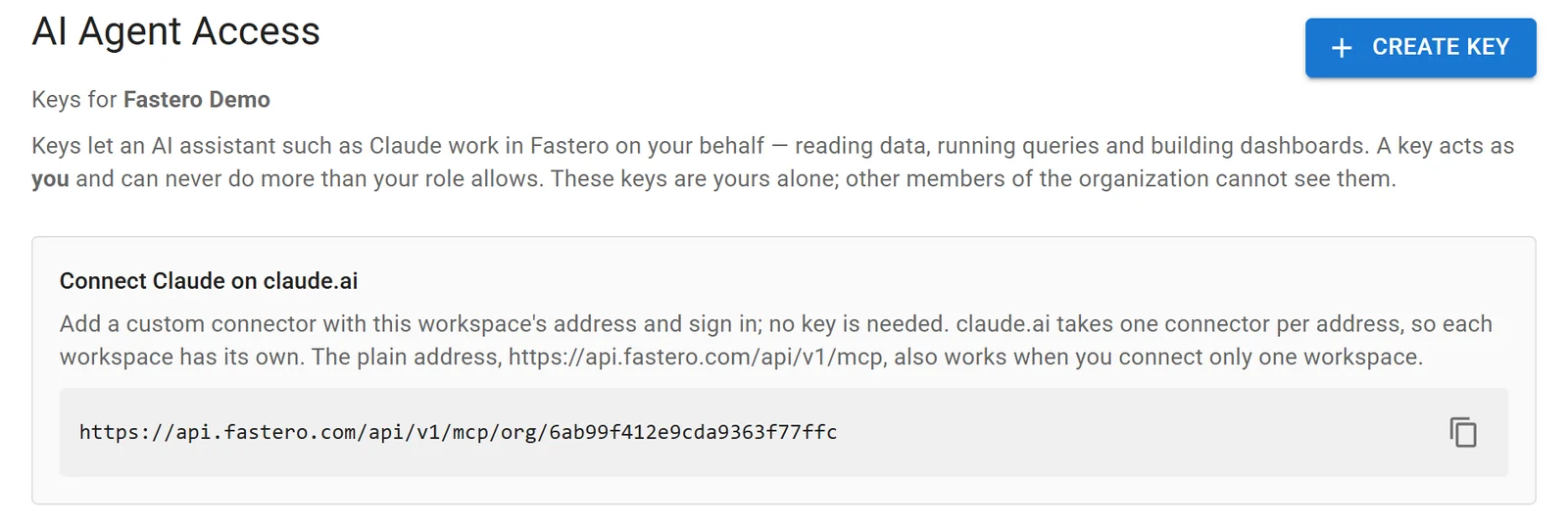
Keys and connectors for one workspace. Sample data.
Once you're connected, here's what to ask first.
FAQ
Is MCP only for Claude?
No. Anthropic created it, but ChatGPT, VS Code, Cursor, Gemini and many others support it, and it now sits under the Linux Foundation's Agentic AI Foundation, with OpenAI, Google and Microsoft among the members.
What's the difference between an MCP server and an API?
An API is written for developers to call. An MCP server describes its tools so a model can pick and call them at run time, and it often wraps an existing API. Any compatible app can use it, with no integration work per app.
Do I need to code to use an MCP server?
No. In claude.ai you pick a connector, sign in and start asking. You only write code to build your own server.
Is MCP dead?
No. The MCP project reported close to half a billion SDK downloads a month in July 2026, and its specification had a major revision that month. The complaint with substance is that many tool definitions can fill the model's context. Claude now looks tools up as it needs them, which we saw in our own tests.
Is MCP stateless?
Yes, since the July 28, 2026 revision: "Every request contains all the information needed to process it." Earlier versions held a session open.
What's the difference between an MCP server and a Claude skill?
A server gives Claude access to something. A skill teaches it how to do a task. In Anthropic's words, "MCP connectors give Claude access to a tool or data source, and skills teach it how to do a task the way you or your team does it."
Sources
Read 2 to 3 November 2026. We ran the server, the client and the read-only tests ourselves, on stdio. Streamable HTTP and Claude Desktop were not part of the test.
- MCP: Introduction, Architecture, Server concepts, Specification 2026-07-28, Changelog, Deprecated features, Transports, Authorization, Tools, Security best practices, SDKs, Registry, Reference servers, Blog, July 28, 2026
- Origin: Anthropic's announcement, Donation to the Agentic AI Foundation, Linux Foundation
- Clients: Claude connectors for builders, Claude Code MCP, Custom connectors, OpenAI Apps SDK, VS Code, GitHub Copilot, Cursor, Claude tool use
Try Fastero free — connect Claude to your data through an MCP server built for teams, and share what it builds with a login. No credit card required.