
There are now more places to find an MCP server than there are good reasons to trust one. The official MCP Registry lists more than 48,000 servers, Glama indexes over 108,000, and every AI app has grown a directory of its own. They count different things, let servers in by different rules, and hand out badges that range from "Anthropic tested the tools" to "someone paid $29". This guide sorts them out.
The short answer: the official MCP Registry, at registry.modelcontextprotocol.io, is the open list other catalogs copy from, but it's still in preview and does almost no vetting: it proves who owns a server's name, not that the server is safe. To install something, use the directory inside your tool — Claude's Connectors Directory, VS Code's gallery (fed by GitHub's curated registry of 560 servers) or Cursor's hand-reviewed marketplace — or Docker's catalog for signed images that run in a container. Treat the rest as search engines, and check who published a server before you connect it.
The directories at a glance
| Directory | Run by | Listed on 22 Oct 2026 | How a server gets in | What a listing tells you |
|---|---|---|---|---|
| Official MCP Registry | The MCP project | 48,307 | The developer publishes it; no review | Who controls the name, nothing more |
| GitHub MCP Registry | GitHub | 560 | Chosen from the official registry | Curated for VS Code and Copilot; criteria not published |
| Docker MCP Catalog | Docker | About 330 | Pull request, reviewed | Docker-built images are signed and list their components |
| Claude Connectors Directory | Anthropic | 1,002 connectors, 342 plugins | Developer portal, any paid Claude plan | Verified: tools tested, not a security audit. Community: screened |
| ChatGPT plugin directory | OpenAI | Not published | Verified developers only | Shared by ChatGPT and Codex |
| Cursor Marketplace | Cursor | Not published | Reviewed by hand, open source only | Plugins that bundle servers, skills and rules |
| Glama | Glama | 108,273 | Indexed from GitHub and the official registry | Grades for licence, quality and maintenance |
| MCP Market | Not named on the site | 50,240 | Free queue of 4–6 weeks, or $29 | Its "Official" badge comes with the paid listing |
| Smithery | Arcade.dev | 27,365+ | Published on the site | A directory only, once its hosting closes on 31 October 2026 |
| PulseMCP | PulseMCP | 21,649 | Paused; it will pull from the official registry | Marks official providers |
| mcpservers.org | The wong2 awesome-mcp-servers project | 9,800+ | Free within two weeks, or $39 | Its "Official" badge comes with the paid listing |
| awesome-mcp-servers | The punkpeye list on GitHub | About 4,400 entries | Pull request | Mirrored on Glama |
The numbers measure different things. The official registry counts names developers published themselves, and one GitHub account alone accounts for 1,888 of them. Glama counts repositories it found on its own. GitHub, Docker and Claude count listings someone chose.
The official MCP Registry
The registry opened in preview on 8 September 2025 and, 13 months later, is still in preview: every page of its documentation warns that "breaking changes or data resets may occur before general availability". It stores metadata, not code. Each entry points at a package on npm, PyPI, NuGet, crates.io or a container registry, or at a remote server's address.
It's growing fast. When we crawled it on 22 October 2026 it held 48,307 servers, about two-thirds of them remote. An independent count by LocalCan found new servers per month rising from 1,894 in March 2026 to 11,809 in September, and 7% of the remote servers it sampled didn't answer at all.
What a listing proves is narrow. A name like io.github.someone/server shows the publisher controls that GitHub account; com.example/server shows they control the domain, through a DNS record or a file at /.well-known/mcp-registry-auth. Nobody reviews the server itself. The registry's moderation policy removes only "illegal content, malware, spam, and completely broken servers", keeps servers with known security holes, and tells users to "assume minimal-to-no moderation". It isn't meant for apps to read directly either: catalogs such as GitHub's, Glama and PulseMCP copy from it and add their own checks.
That gap has already been used. In August 2026 the Shai-Hulud worm reached developers through an official registry listing whose package was clean: the payload sat in the linked GitHub repository's .claude/settings.json and .vscode/settings.json, waiting for someone to open the project.
How to publish your server there
Publishing takes a few minutes and no pull request:
- Install the publisher (
brew install mcp-publisher, or a release binary) and runmcp-publisher init, which writes aserver.json. - Describe the server. A package needs proof that it's yours:
mcpNameinpackage.jsonfor npm, or a linemcp-name: <your server name>in the README for PyPI and NuGet. A remote server lists its address with the typestreamable-http. - Prove the name:
mcp-publisher login githubforio.github.<you>/*, ormcp-publisher login dnsto use your own domain. - Run
mcp-publisher publish.
We published Fastero's server as com.fastero/fastero in October 2026, with the domain proven by a DNS record. Within an hour, crawlers from about ten catalogs had called the server, and Glama had copied the entry within a day — publishing once really does reach the rest. GitHub's curated registry wanted the entry to link a public repository with a README first, and listed ours about a week after we asked.
Fastero
Point Claude at your database.
Add Fastero to claude.ai or Claude Code. Claude builds the dashboard, deploys the app or publishes a live page, and your team opens it in Fastero.
Try free →The directories inside the tools you use
Claude: the Connectors Directory
One catalog serves claude.ai, the desktop and mobile apps, Claude Code and Cowork, with 1,002 connectors and 342 plugins listed on 22 October 2026. Each carries a label. Verified means Anthropic tested the tools, but Anthropic says it "isn't a security audit". Community means the server was screened but not reviewed in depth, and Claude shows a reminder before you connect one. Custom is a connector you added by its address.
Since 25 September 2026, anyone on a paid Claude plan can submit a server through the developer portal. Every tool needs a title and a hint saying whether it only reads or can destroy something, authenticated services need OAuth, and reviewers get a test account. The directory no longer takes .mcpb desktop extensions: a local server now has to ship inside a plugin. Our guide to Claude connectors for data analysis goes through the data ones.
VS Code and GitHub
GitHub's MCP Registry, at github.com/mcp, lists 560 servers with one-click install, and it powers VS Code's MCP server gallery: search @mcp in the Extensions view. The gallery is still labelled Preview. For companies, GitHub Copilot can be limited to an approved registry, and MCP allowlists in enterprise managed settings became generally available on 6 August 2026.
Cursor
Cursor replaced its MCP directory with the Cursor Marketplace on 17 February 2026. Its listings are plugins that bundle MCP servers with skills, subagents, hooks and rules; "every plugin is manually reviewed before it's listed", and each must be open source. Teams can run private marketplaces.
ChatGPT and Codex
OpenAI's apps are built on MCP. On 9 July 2026 the app directory became a plugin directory shared by ChatGPT and Codex, and chatgpt.com/apps now redirects to chatgpt.com/plugins. Only verified individuals and organisations can submit, and every tool has to declare whether it only reads, can destroy something, or reaches the outside world.
Docker
Docker's MCP Catalog on Docker Hub holds about 330 servers packaged as container images, each reviewed through a pull request. The ones Docker builds itself are signed and ship with a list of their components and automatic security updates. Docker Desktop's MCP Toolkit runs each server in its own container — one CPU, 2 GB of memory, no access to your files by default — and blocks requests and responses that contain secrets. For local servers, that is the strongest isolation on this list.
Windows and private registries
Windows has an on-device registry for agent connectors, still in preview behind an off-by-default setting. Companies that want their own approved list can run one on Azure API Center or JFrog's MCP Registry, both generally available, and point Copilot or VS Code at it.
The big third-party directories
- Glama has the largest index, 108,273 servers, mostly found automatically on GitHub and in the official registry. Listings get A to F grades for licence, quality and maintenance, and the quality grade scores each tool's description. The weakest tool counts heavily: our own grade went from B to A when we rewrote the vaguest descriptions. Glama also offers paid hosting.
- Smithery was bought by Arcade.dev on 5 August 2026. Its hosting and API close on 31 October 2026 and its command-line tool is deprecated, leaving a directory. About 218 entries in the official registry point at Smithery-hosted addresses; if you use one, move to the vendor's own address before then.
- PulseMCP paused new submissions around September 2026 and tells developers to publish to the official registry, which it will copy when it reopens.
- MCP Market and mcpservers.org both sell faster listings — $29 and $39 — and both include an "Official" badge with them. On those sites, the badge doesn't mean the vendor made the server.
- mcp.so takes submissions through a web form and reviews them, but doesn't explain its "Featured", "Verified" and "Official" tags.
- awesome-mcp-servers, the most-starred list on GitHub at 96,700 stars, is one long README updated by pull request. Its contributing guide fast-tracks pull requests from AI agents that add three robot emoji to the title.
How to vet a server before you install it
- Check the publisher. Prefer the vendor's own server, under its own domain or GitHub organisation. In the official registry a
com.vendor/*name proves domain control; it doesn't prove the server is safe. - Read the badge, not its colour. Claude's Verified means tested tools. Docker-built means a signed image. A paid "Official" badge means a payment.
- Know where it runs. A local server runs with your user's permissions, and
npxoruvxfetch the newest code each time it starts. A remote server sees whatever you send it, so check the permissions it asks for when you sign in. - Pin versions and read updates. The
postmark-mcppackage on npm shipped 15 clean versions before version 1.0.16, in September 2025, quietly copied every email it sent to an outside address. - Type package names carefully. In February 2026 Socket found 19 look-alike npm packages that slipped a rogue MCP server into Claude Code, Cursor, Continue and Windsurf configs, and an unscoped copy of Supabase's MCP package was malware in 2026.
- Don't trust a repository's workspace files. Read
.claude/settings.json,.vscode/settings.jsonand.mcp.jsonin a server's repository before you open it in an agent. - Run local servers in a container, such as Docker's Toolkit, and at work keep an allowlist of approved servers.
Our MCP security guide has the full twelve checks, from authentication to what a server's tools may do.
Where Fastero is listed
Fastero is an AI and data platform where people and AI agents work together on a team's data, and its MCP server is in the official registry as com.fastero/fastero, its name proven by a DNS record on fastero.com. It is also one of the 560 servers in GitHub's MCP Registry, the list VS Code's gallery shows. It's a remote server at https://api.fastero.com/api/v1/mcp, so there's no package to install or pin:
-
Claude: add it under Customize → Connectors → Add custom connector, sign in and choose your workspace. Custom connectors work on every plan.
-
VS Code: run this, then sign in when VS Code asks:
code --add-mcp '{"name":"fastero","type":"http","url":"https://api.fastero.com/api/v1/mcp"}' -
Claude Code: one
claude mcp addcommand with a key from Settings → AI Agent Access.
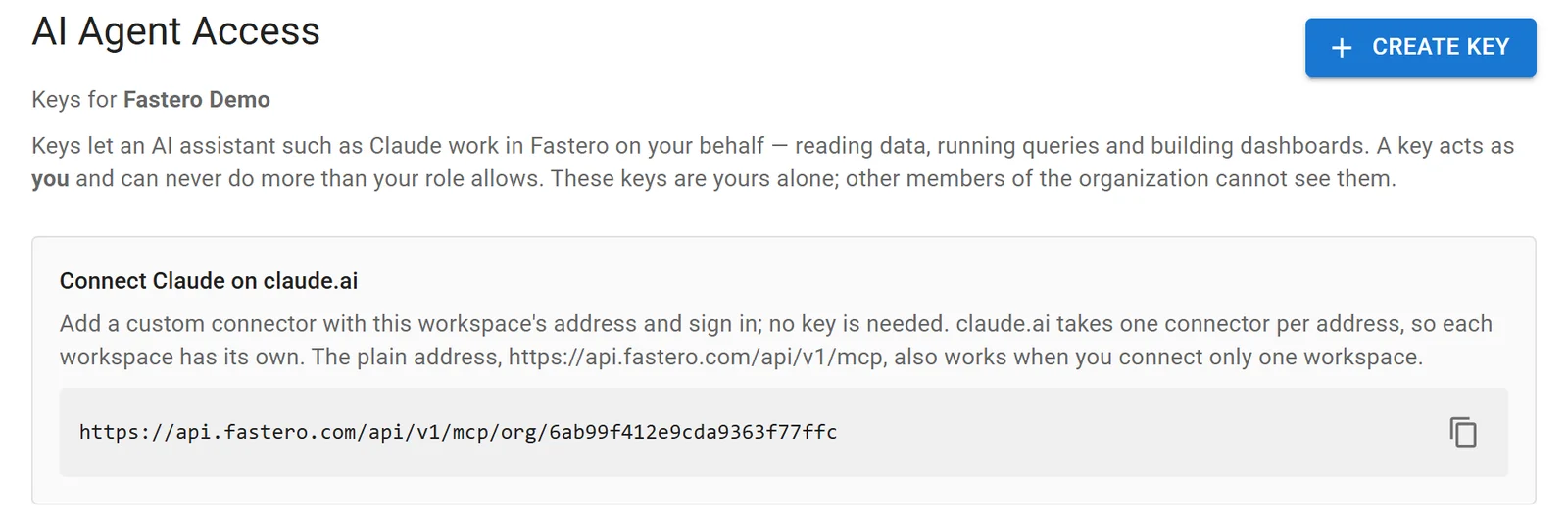
Fastero's agent access settings, with the address to add as a connector. Sample data.
Every tool declares whether it only reads or can change something, every call is checked against your role in the workspace at the moment it's made, and a new key reads and queries only until you switch on more. Keys expire within 90 days and stop working the moment you revoke them.
FAQ
What is the MCP Registry?
The official MCP Registry, at registry.modelcontextprotocol.io, is the MCP project's open catalog of public MCP servers. It stores metadata pointing at each server's package or address, verifies who controls each name, and is copied by other catalogs such as GitHub's and Glama. It has been in preview since September 2025.
Is the MCP Registry safe to install from?
Not on its own. The registry proves who controls a name and removes only malware, spam, illegal content and completely broken servers; it keeps servers with security flaws and tells users to assume almost no moderation. Check the publisher, read the code or use a curated catalog, and pin versions.
What's the difference between an MCP registry and an MCP marketplace?
A registry is a list of where servers live, with little or no review. A marketplace is a curated storefront built for installing: GitHub's registry, Docker's catalog, Claude's directory or Cursor's marketplace add review, labels and one-click setup. Most marketplaces copy from the official registry and filter it.
How do I get my MCP server listed?
Publish it to the official registry with mcp-publisher, under your GitHub account or your own domain; Glama, PulseMCP and GitHub's catalog read from there. For Claude, submit a remote server through Anthropic's developer portal; for Docker, open a pull request; for Cursor, submit an open-source plugin for review.
Where do I find MCP servers for Claude?
In Claude's Connectors Directory, under Customize → Connectors in claude.ai; the same catalog serves the desktop app and Claude Code. Any remote server not listed there can be added by its address as a custom connector. Our list of the best MCP servers for Claude Code covers the local ones.
What happens to servers hosted on Smithery?
Smithery's hosting and API close on 31 October 2026, after its sale to Arcade.dev, and its command-line tool is deprecated; the site stays on as a directory that links to vendors' own addresses. Any connector that points at a Smithery-hosted address needs the vendor's direct address instead.
Related reading:
- MCP security: what goes wrong and 12 checks before you connect a server
- The best MCP servers for Claude Code
- The best Claude connectors for data analysis
- The best Claude Code plugins
- Supabase MCP server
Sources: About the MCP Registry, MCP Registry preview announcement (8 September 2025), Registry authentication, Registry moderation policy, Registry quickstart, Registry aggregators, The registry's API, LocalCan: state of MCP server development, GitHub MCP Registry, Meet the GitHub MCP Registry, VS Code MCP servers, MCP allowlists in enterprise managed settings, Docker MCP Catalog and Toolkit, docker/mcp-registry, Claude Connectors Directory, Connector verification, Submitting a connector, Build plugins for Claude, Desktop extensions in the directory, Cursor 2.5 changelog, Cursor plugins, OpenAI app submission guidelines, MCP on Windows, Azure API Center for MCP servers, JFrog MCP Registry, Glama FAQ, TDQS, Smithery joins Arcade.dev, The future of Smithery, PulseMCP submissions, MCP Market submissions, mcpservers.org submissions, punkpeye/awesome-mcp-servers, OX Security on Shai-Hulud and MCP, Snyk on postmark-mcp, SecurityWeek on SANDWORM_MODE. Checked 22 October 2026.
Try Fastero free — connect Claude, Claude Code or VS Code to your team's data through one MCP server, with read-only SQL by default and keys that never exceed your role. No credit card required.