 Fastero Dev Team
An MCP server is a small program that gives an AI assistant such as Claude a set of tools: read a repository, search a Notion workspace, run a query, refund a payment. The Model Context Protocol (MCP) is the common language between the two, so any server works with any assistant that speaks it. The quickest way to understand what that buys you is to look at servers people actually run.
The short answer: the seven official reference servers (Everything, Fetch, Filesystem, Git, Memory, Sequential Thinking and Time) are teaching examples. The servers in daily use are mostly run by the companies whose products they connect: GitHub, Notion, Linear, Sentry, Stripe, Atlassian, Supabase, Cloudflare and Figma host remote servers you add by URL. Playwright and Brave Search run on your own machine. For more, the official MCP Registry holds about 9,700 entries, and Claude's connector directory listed 9,472 connectors when we checked on 5 November 2026. Building your own takes about 15 lines of Python.
Fastero
Point Claude at your database.
Add Fastero to claude.ai or Claude Code. Claude builds the dashboard, deploys the app or publishes a live page, and your team opens it in Fastero.
Try free →15 MCP server examples at a glance
| Server | Made by | What it gives the assistant | Runs | Address or command |
|---|---|---|---|---|
| Filesystem | MCP project (reference) | Read and write files in folders you allow | Your machine | npx -y @modelcontextprotocol/server-filesystem <folders> |
| Fetch | MCP project (reference) | Fetch a web page and turn it into text a model can read | Your machine | uvx mcp-server-fetch |
| Git | MCP project (reference) | Read, search and change Git repositories | Your machine | uvx mcp-server-git |
| Memory | MCP project (reference) | A knowledge graph that persists between chats | Your machine | npx -y @modelcontextprotocol/server-memory |
| GitHub | GitHub | Repositories, issues, pull requests, Actions, code security | Remote, or local in Docker | https://api.githubcopilot.com/mcp/ |
| Notion | Notion | Search the workspace, create and edit pages and databases | Remote | https://mcp.notion.com/mcp |
| Linear | Linear | Find, create and update issues, projects and comments | Remote | https://mcp.linear.app/mcp |
| Atlassian | Atlassian | Jira, Confluence, Jira Service Management, Bitbucket, Loom | Remote | https://mcp.atlassian.com/v2/mcp |
| Sentry | Sentry | Errors, issues and traces, for debugging with a coding agent | Remote | https://mcp.sentry.dev/mcp |
| Stripe | Stripe | The Stripe API plus a search of Stripe's docs | Remote | https://mcp.stripe.com |
| Supabase | Supabase | Tables, project settings and queries | Remote | https://mcp.supabase.com/mcp |
| Cloudflare | Cloudflare | Broad Cloudflare API access, plus docs and other servers | Remote | https://mcp.cloudflare.com/mcp |
| Figma | Figma | Design context for writing code, and writing to the canvas | Remote, or the desktop app | https://mcp.figma.com/mcp |
| Playwright | Microsoft | Drive a browser through accessibility snapshots | Your machine | npx @playwright/mcp@latest |
| Fastero | Fastero | Read-only SQL on your databases, charts in the chat, and dashboards, notebooks and apps your team opens | Remote | https://api.fastero.com/api/v1/mcp |
Remote servers are hosted by their maker and sign you in, usually through OAuth: you click Connect and approve access in the browser. Servers that run on your machine start as a local process when the assistant needs them and read keys from environment variables.
What an MCP server looks like from inside Claude
A server tells the assistant what it offers in three kinds of things: tools (actions the model can call, such as "run this query"), resources (data it can read, such as a file) and prompts (ready-made instructions). In practice, tools do almost all the work.
Claude shows a connected server's tools and lets you decide, tool by tool, whether it may use each one freely, must ask first, or may not use it at all.
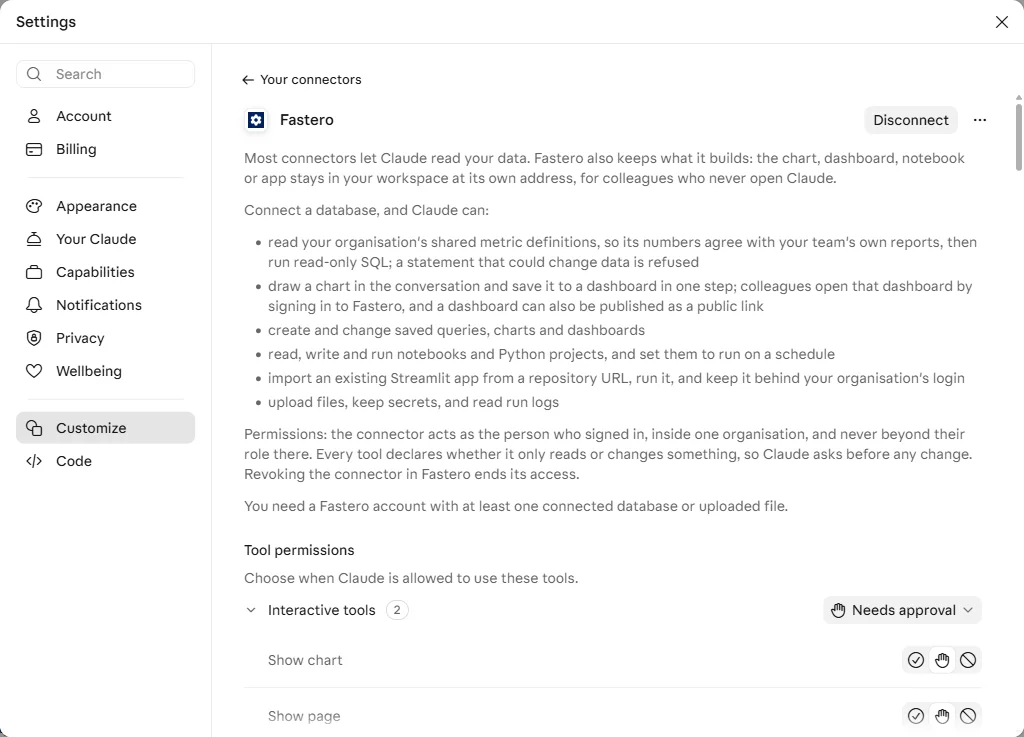
A connected MCP server in Claude, with its description and a permission setting for each tool. Taken on a Free plan test account, 5 November 2026.
The official reference servers: examples to learn from
The modelcontextprotocol/servers repository on GitHub now holds only seven servers, maintained by the MCP steering group. The project is direct about what they are for: "They are meant to serve as educational examples for developers building their own MCP servers, not as production-ready solutions."
- Everything is a test server with a prompt, a resource and a tool of every kind, for checking that a client handles them all.
- Fetch turns a web page into text a model can read.
- Filesystem reads and writes files in the folders you list, and nowhere else. It is the most installed of the seven: about 1.3 million npm downloads in the week to 4 November 2026.
- Git reads and searches a repository's history and can make commits.
- Memory keeps facts in a small knowledge graph so the assistant can recall them in a later chat.
- Sequential Thinking gives the model a structured way to work through a problem step by step.
- Time converts between time zones.
Archived servers that people still install
Many older tutorials point at reference servers for GitHub, PostgreSQL, Slack, Sentry, SQLite, Puppeteer, Google Drive and Brave Search. All of these were archived, and their npm packages now say "Archived and unmaintained; no security guarantees." They are still being installed in large numbers: the archived GitHub server had 182,289 npm downloads and the archived Postgres server 157,028 in the week to 4 November 2026.
The Postgres one matters most. In August 2025, Datadog Security Labs showed its read-only mode could be bypassed with a stacked COMMIT; statement. The fix landed in the GitHub repository, but the version on npm was never patched. Use a maintained server instead: GitHub's own, and for Postgres your provider's server or one of the options in our Postgres MCP server guide.
Developer tool examples
GitHub's MCP server reads code, opens and reviews issues and pull requests, checks Actions runs and reads code-scanning and Dependabot alerts. GitHub hosts it at https://api.githubcopilot.com/mcp/, and you can also run it yourself from the ghcr.io/github/github-mcp-server Docker image. One catch for Claude Desktop users: GitHub's own guide says its remote server can't yet be added as a Claude custom connector, because it needs OAuth through a registered GitHub App, and recommends the local Docker setup instead. Try: "List the open pull requests that touch the billing module and summarise what each changes."
Sentry's server is built for coding agents: it pulls an error's stack trace, the release it appeared in and the traces around it, so the agent can find the line to fix. Try: "What are the three most frequent unresolved errors in production this week, and where in the code does each start?"
Linear's server creates and updates issues, projects and comments, and has a read-only address, https://mcp.linear.app/mcp/readonly, for when the assistant should look but not touch.
Playwright, from Microsoft, lets the assistant open pages, click and fill in forms. It reads the page through accessibility snapshots rather than screenshots; in Microsoft's words, it works "bypassing the need for screenshots or visually-tuned models." It runs on your machine with npx @playwright/mcp@latest, or in Claude Code with claude mcp add playwright npx @playwright/mcp@latest.
Work app examples
Notion hosts its server at https://mcp.notion.com/mcp. It searches the workspace and creates and edits pages and databases. Its older local server is no longer maintained, so use the hosted one.
Atlassian's server covers Jira, Confluence, Jira Service Management, Bitbucket, Compass and Loom. The current address is https://mcp.atlassian.com/v2/mcp. The old /v1/sse address stopped working after 30 June 2026, which breaks many older setup guides.
Figma's server gives a coding assistant a design's structure, styles and components so the code it writes matches the file, and can now write back to the canvas. The remote server at https://mcp.figma.com/mcp is the recommended way to connect.
Payments, infrastructure and database examples
Stripe hosts its server at https://mcp.stripe.com. It calls the Stripe API (customers, payments, refunds, subscriptions) and searches Stripe's documentation. If you connect with a key instead of OAuth, plan for a change: from December 2026 Stripe accepts only keys tagged for agents, and asks you to migrate by 30 November.
Cloudflare now recommends one broad server, https://mcp.cloudflare.com/mcp, which reaches the Cloudflare API by writing and running code, plus separate servers for docs, containers and browser rendering. Its retired /sse addresses answer every request with 410 Gone.
Supabase hosts a server at https://mcp.supabase.com/mcp that manages tables, reads project settings and runs queries. Neon has one for its Postgres projects at https://mcp.neon.tech/mcp. For a database you run yourself, Postgres MCP Pro and Google's MCP Toolbox for Databases run locally and connect with a connection string.
Fastero is an example of a data server that keeps what it builds. Claude reads the definitions your team has saved for metrics such as revenue, runs read-only SQL on your connected databases (a statement that could change data is refused), draws the result as a chart in the chat, and can save that chart to a dashboard colleagues open with their own login, without Claude. It is in Claude's connector directory under the Community label.
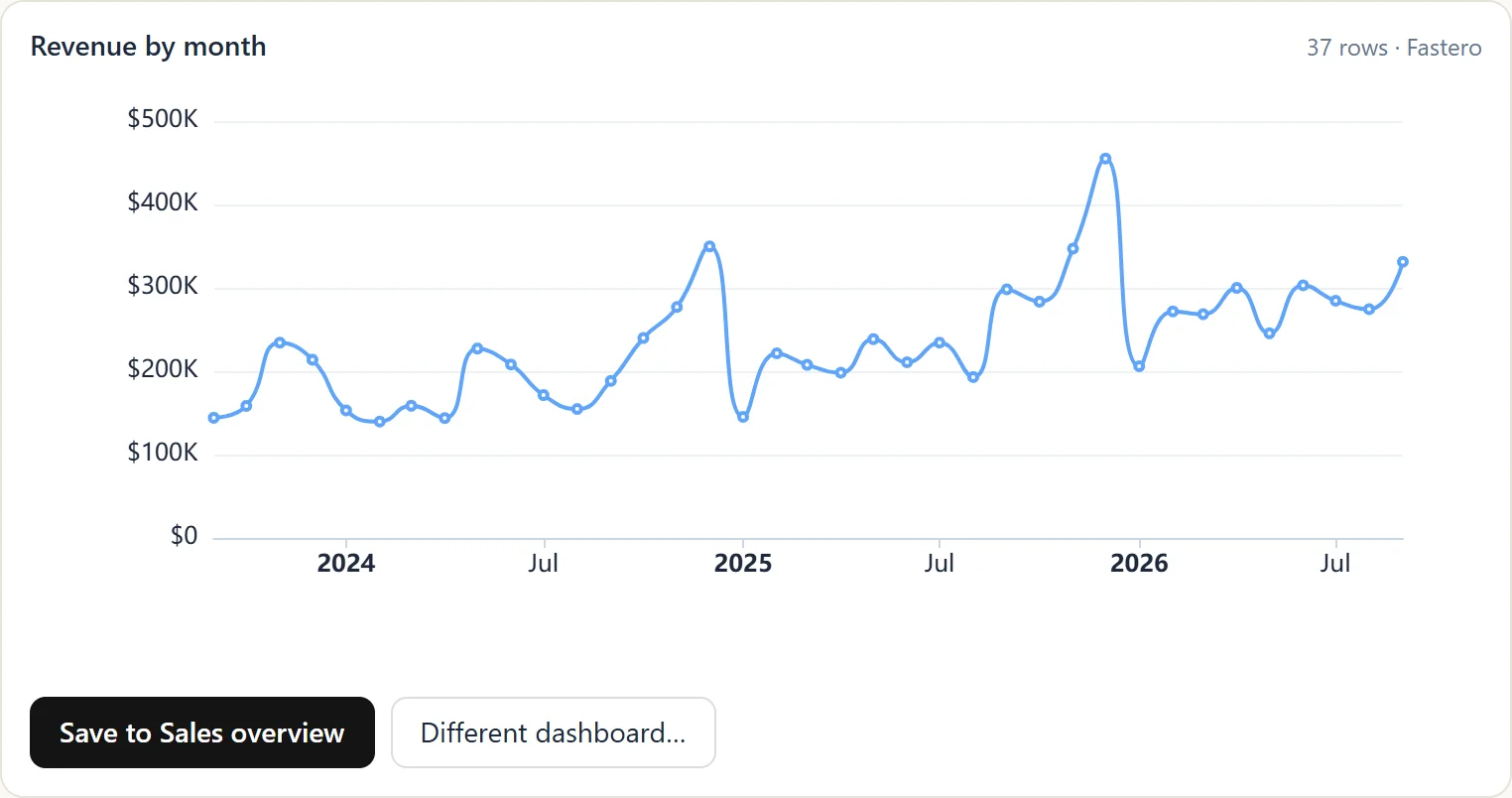
Revenue by month, queried from a database and drawn inside Claude by Fastero's MCP server. Sample data.
Try: "Which five products had the biggest drop in revenue last month compared with the month before? Chart it and save it to the Sales overview dashboard."
Point Claude at your database.
Connect Claude →Build your own MCP server in 15 lines
The official SDKs changed in 2026, and most code you'll find online is out of date. In the Python SDK's version 2 (pip install mcp installs it), the class every tutorial calls FastMCP is now MCPServer, and the old import path is gone, not deprecated. This is the server from the SDK's README:
from mcp.server import MCPServer

mcp = MCPServer("Demo")


@mcp.tool()
def add(a: int, b: int) -> int:
    """Add two numbers."""
    return a + b


@mcp.resource("greeting://{name}")
def greeting(name: str) -> str:
    """Greet someone by name."""
    return f"Hello, {name}!"
The type hints are the schema: a: int, b: int tells the client what arguments the tool takes, with no JSON Schema to write. Install with pip install "mcp[cli]", then uv run mcp dev server.py opens the MCP Inspector, where you can call the tool by hand. To run it over HTTP for a remote client, use uv run mcp run server.py --transport streamable-http; the server then answers at http://localhost:8000/mcp.
The TypeScript SDK split in two at version 2: servers now come from @modelcontextprotocol/server (npm install @modelcontextprotocol/server), while @modelcontextprotocol/sdk is the version 1 line. The README's example:
import { McpServer } from '@modelcontextprotocol/server';
import { StdioServerTransport } from '@modelcontextprotocol/server/stdio';
import * as z from 'zod/v4';

const server = new McpServer({ name: 'greeting-server', version: '1.0.0' });

server.registerTool(
    'greet',
    {
        description: 'Greet someone by name',
        inputSchema: z.object({ name: z.string() })
    },
    async ({ name }) => ({
        content: [{ type: 'text', text: `Hello, ${name}!` }]
    })
);

async function main() {
    const transport = new StdioServerTransport();
    await server.connect(transport);
}

main();
Two habits that save time. First, never print to standard output in a server that talks over stdio: that stream carries the protocol messages, so log to standard error. Second, a stdio server that "hangs" when you run it in a terminal is working; it is waiting for a client to send it messages.
Local or remote: the two ways a server runs
| Local (stdio) | Remote (Streamable HTTP) | |
|---|---|---|
| Where it runs | A process on your computer, started by the assistant | On the maker's servers, or yours, at an HTTPS address |
| Sign-in | Keys in environment variables | Usually OAuth in the browser, sometimes a token |
| Works in | Claude Desktop, Claude Code, other desktop clients | claude.ai, Claude Desktop, mobile and Claude Code |
| Reaches | Files and services on your machine and network | Only what is reachable from the internet |
| Examples | Filesystem, Git, Playwright | GitHub, Notion, Stripe, Fastero |
An older transport, HTTP with Server-Sent Events (SSE), has been deprecated since March 2025. If a guide gives you an address ending in /sse, look for the /mcp one instead.
The protocol itself also changed. The current specification, dated 28 July 2026, made MCP stateless: there is no longer an opening handshake or a session ID, and each request carries the version and capabilities it needs. The SDKs negotiate this for you, so the code above works with clients on either version.
Where to find more MCP servers
- The official MCP Registry at
registry.modelcontextprotocol.iois a catalogue of public servers, backed by Anthropic, GitHub, PulseMCP and Microsoft. It stores metadata that points to each server's package or address rather than hosting code, and it is still labelled a preview. Paging through its API on 5 November 2026 found about 9,700 server names, though a few publishers list hundreds each. - Claude's connector directory lists servers that work in claude.ai, Claude Desktop, mobile and Claude Code. Entries carry a label: Verified (Anthropic tested the tools), Community (screened, not reviewed in depth) or Custom (one you added yourself). As Anthropic puts it, "Verification isn't a security audit."
- Vendor docs. For any product you use, search its docs for "MCP": the official server is usually newer and better maintained than any community one.
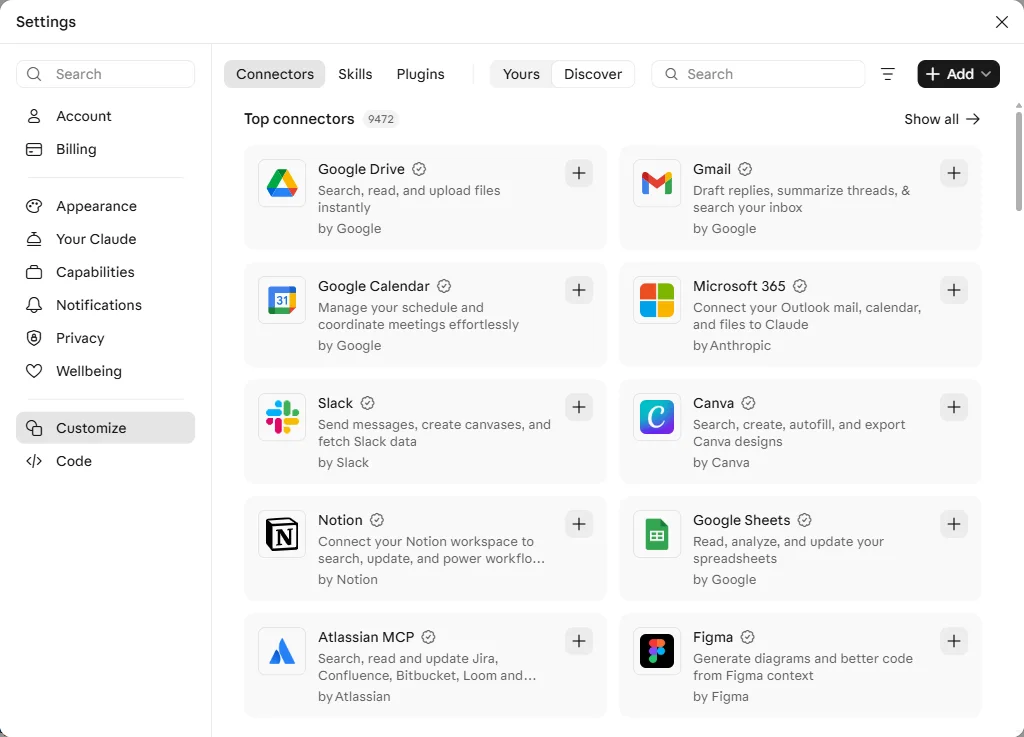
Claude's connector directory, under Customize › Connectors, on 5 November 2026.
How to add one of these to Claude
- A remote server (an
https://address): in claude.ai or Claude Desktop, open Customize › Connectors, pick it from the directory, or choose Add › Add custom connector and paste the address. Free plans can add one custom connector. - A local server: add it to
claude_desktop_config.jsonin Claude Desktop. Our Claude Desktop MCP guide has the file's location on each system, the format and fixes for the usual errors. - Claude Code:
claude mcp add --transport http notion https://mcp.notion.com/mcpfor a remote server, orclaude mcp add <name> -- <command>for a local one.
FAQ
What is an example of an MCP server?
The Filesystem server is the classic local example: it lets Claude read and write files in folders you choose. GitHub's server is a common remote one: Claude can read code and open pull requests after you sign in with GitHub. Data servers such as Fastero let Claude query a database and chart the result.
What are the official MCP servers?
The MCP project maintains seven reference servers: Everything, Fetch, Filesystem, Git, Memory, Sequential Thinking and Time. They are teaching examples. Production servers for GitHub, Notion, Stripe and others are maintained by those companies.
Is the Postgres MCP server still maintained?
No. The reference Postgres server was archived, its npm package says "no security guarantees", and its read-only mode can be bypassed. Use your provider's server (Supabase, Neon), Postgres MCP Pro, Google's MCP Toolbox, or a hosted connector.
Where can I find a list of MCP servers?
The official MCP Registry at registry.modelcontextprotocol.io, with about 9,700 entries, and Claude's connector directory under Customize › Connectors. The modelcontextprotocol/servers repository now points to the Registry instead of keeping its own list.
Is FastMCP still the way to build an MCP server?
In the official Python SDK's version 2, the class is called MCPServer and is imported with from mcp.server import MCPServer; from mcp.server.fastmcp import FastMCP no longer works. FastMCP now names a separate open-source project, installed with pip install fastmcp.
What is the difference between a local and a remote MCP server?
A local server runs on your computer over stdio and can reach your files and private network. A remote server runs at an HTTPS address, usually signs you in with OAuth, and works in claude.ai and on mobile as well as on the desktop.
Related reading:
- What is an MCP server?
- claude_desktop_config.json: add MCP servers to Claude Desktop
- Best MCP servers for Claude Code
- Best MCP servers for data analysis
- The MCP Registry explained
- MCP security
Sources: MCP reference servers, archived servers, MCP specification changelog (2026-07-28), Python SDK, what's new in Python SDK v2, TypeScript SDK, MCP Registry, Claude connector directory, Datadog Security Labs on the Postgres server, GitHub MCP server, Notion MCP, Linear MCP, Atlassian MCP server, Sentry MCP, Stripe MCP, Supabase MCP, Cloudflare MCP servers, Figma MCP server, Playwright MCP, npm weekly download counts (29 October to 4 November 2026). Checked 5 November 2026.
Try Fastero free — connect a database, then let Claude query it, chart it and save dashboards your team opens without Claude. No credit card required.