 Fastero Dev Team
Connecting Claude to your data takes two minutes. Then the box is empty and you have to think of something to ask. These twelve prompts run in the order that works: find out what's there, check a number you already know, ask real questions, then keep the answers somewhere your team can open them.
The short answer: start with "In Fastero, what's in my workspace? List my databases, dashboards and saved queries, then tell me five questions you could answer from this data." Claude reads what's there and suggests questions that fit it. Then ask for a number you already know, with the SQL and the date range, so you can judge the answers that follow. Naming the tool, the period and the comparison does most of the work in any data prompt.
Fastero
Point Claude at your database.
Add Fastero to claude.ai or Claude Code. Claude builds the dashboard, deploys the app or publishes a live page, and your team opens it in Fastero.
Try free →| Step | Prompts | What you get |
|---|---|---|
| Find out what's there | 1–2 | A map of your data, and questions worth asking |
| Check it against a number you know | 3 | A reason to trust the rest |
| Ask real questions | 4–6 | Answers, tables and a data check |
| See it and keep it | 7–8 | A chart in the chat, saved to a dashboard |
| Teach it your words | 9 | One meaning for "active customer", for everyone |
| Hand it to your team | 10–12 | A dashboard that refreshes, emails itself and raises alerts |
The prompts use Fastero, which connects Claude to databases, spreadsheets and uploaded files, and keeps what Claude builds. Most of them work with any data connector if you change the first words.
Before the first prompt
- Check that the connector is on. In the message box, click +, then Connectors, and make sure the switch is on. Adding a connector and switching it on in a chat are separate steps.
- Say "In Fastero". Naming it tells Claude to use your data rather than answer from general knowledge.
- Expect Claude to ask permission. Each tool asks once: Deny, Allow once or Always allow. Choosing Always allow for tools that only read, such as listing dashboards or running a query, saves a lot of clicks. Keep Allow once for tools that change something.
- No database yet? Every new Fastero workspace starts with invented sales data and a sample dashboard, so you can try these prompts before you connect anything.
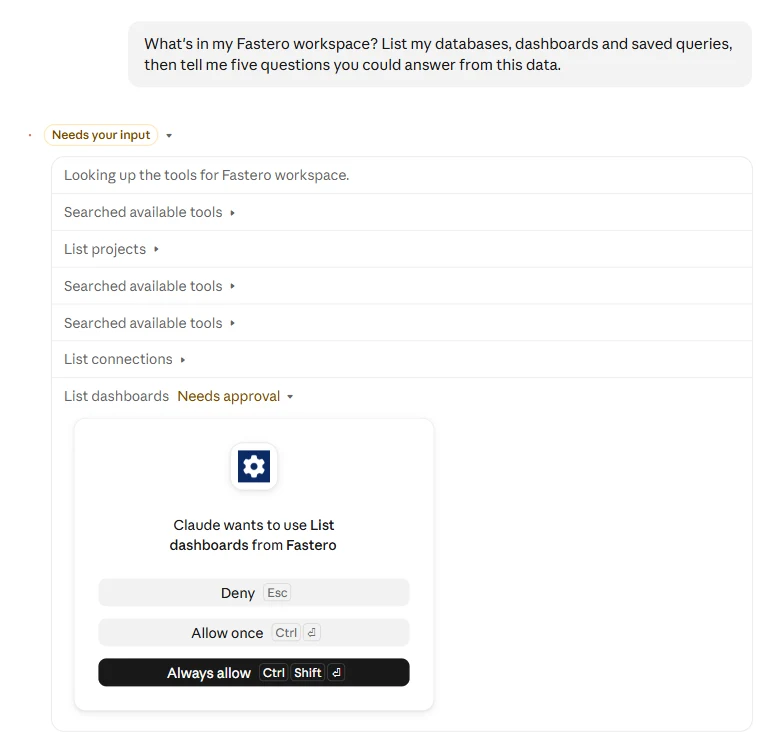
The approval prompt during a first question. Tools you've already allowed run without asking.
Find out what's there
1. Ask what Claude can see. This is the best first message, because the answer tells you what the next ten should be.
In Fastero, what's in my workspace? List my databases, dashboards and saved queries, then
tell me five questions you could answer from this data.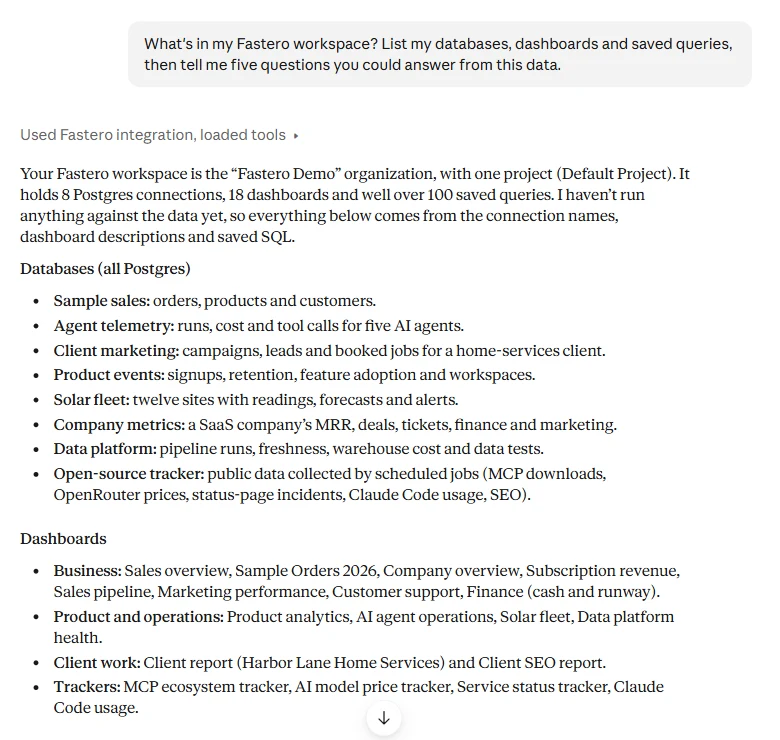
Claude's real answer in the demo workspace, which holds invented data. It went on to suggest five questions.
2. Get a map of one database. Claude reads the schema itself, so you don't need to know the table names.
In Fastero, look at the tables in [database]. Which ones hold customers, revenue and product
use, how do they join, and which columns would you not trust without checking?
Check it against a number you know
3. Ask for something you can verify. Pick a figure from last month's board deck or finance report. If it matches, you've learned you can rely on the method. If it doesn't, you've found out what Claude needs to know about your business.
In Fastero, what was revenue in September? Show the SQL, the date range and the table you
used. Our finance report says [number].
Ask real questions
4. Compare two periods. Say what to compare and what counts as a full period, or Claude may include a month that's still running.
In Fastero, compare revenue last month with the month before, by product. Use full months,
and list the three biggest changes first.
5. Ask for a list you can act on. A table of names gets used. A summary often doesn't.
In Fastero, which customers bought in each of the last three months and then stopped this
month? Give me a table, largest first, with their last order date.
6. Check the data itself. Run this on any table you're about to rely on. In our test, Claude noticed unprompted that one sample table stopped days before the others, and said it looked like a stalled feed.
In Fastero, check the orders table: missing values, duplicates, odd dates, and the date the
data stops. Tell me what you'd fix before using it in a report.
Point Claude at your database.
Connect Claude →See it and keep it
7. Ask for a chart. Claude draws it inside the conversation, from a live query. Nothing is saved yet.
In Fastero, chart revenue per week for the last 12 full weeks, as one line.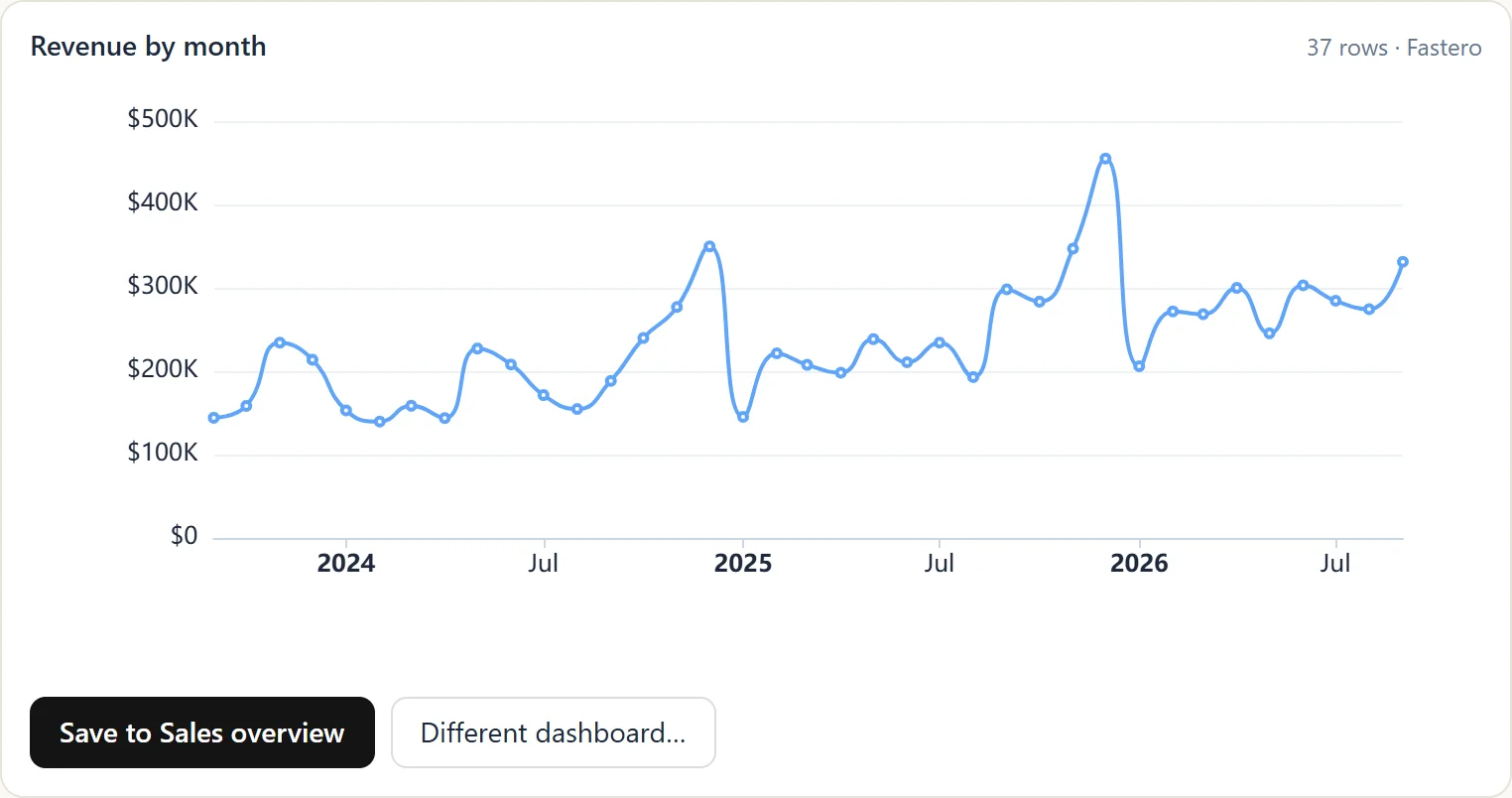
A chart in the chat, with its Save button. Sample data.
8. Keep the chart. Use the chart's own button, or ask.
Save that chart to a new Fastero dashboard called Weekly numbers.Teach it your words
9. Settle what a word means. "Active", "revenue" and "churn" mean something specific at your company. Once you've agreed a meaning, save it: later conversations, and Fastero's own assistant, then use the same expression.
In our company, an active customer is one with a paid invoice in the last 30 days. Save that
as a definition in Fastero, then count our active customers using it.
Hand it to your team
10. Build the whole dashboard. Name the reader, the numbers, the period and the comparison. There are twelve more worked examples in Claude dashboard examples.
In Fastero, build a dashboard for our Monday meeting: revenue, new customers and open tickets
as number cards with the change on the week before, then revenue per week for 12 full weeks.
11. Send it to people. Colleagues get a button that opens it in Fastero; anyone else gets the email and a PDF of the dashboard. People outside the workspace confirm once before they receive anything.
Refresh the Weekly numbers dashboard every morning, and email it to me and
finance@example.com every Monday at 8:00.
12. Stop checking by hand. An alert watches one number from a saved query and emails you when it crosses a line.
In Fastero, save a query for yesterday's signups, and email me when it falls below 10.When an answer looks wrong
Ask these before you rewrite the question. They fix most bad answers.
- "Show me the SQL and the date range." Most wrong numbers come from the wrong period or table, and you'll spot it here.
- "Use full weeks, Monday to Sunday." A week still in progress looks like a collapse on a chart.
- "Use the [name] query." If a saved query already calculates it, Claude should use that query, and your dashboards and the chat will agree.
- "By revenue I mean…" Say it once, then save it with prompt 9.
- "How sure are you, and what would change the answer?" It brings out the assumptions Claude made along the way.
FAQ
Can Claude analyze my database?
Yes, through a connector. Claude sends read-only SQL and reads the results, and with Fastero it can also chart them, save them and build dashboards. It works with your own login, so it sees only what your role allows.
Can Claude change or delete my data?
Not through Fastero's SQL tool. It runs one read-only statement at a time and refuses anything that writes. Tools that create or delete things in Fastero, such as dashboards, are separate, and Claude asks you first unless you've told it not to.
Which Claude plan do I need?
Any of them, including Free. Our tests for this page ran on a Free account connected to Fastero's demo workspace. Paid plans give you higher usage limits for long sessions.
What if my data is in a spreadsheet?
Upload the CSV or Excel file to Fastero, where it becomes a table you can query with the same prompts. For a one-off, you can also upload it straight to Claude and ask in the chat; see Claude artifact examples.
Do these prompts work in Claude Code?
Yes. Claude Code uses the same connector, and it's a good fit for prompts 2 and 10. See Claude Code for data analysis.
Related reading:
- Claude connectors: how to add one
- Claude dashboard: 5 ways to build one
- Claude Projects: keep the same instructions across chats
- How to automate reports with Claude
Try Fastero free — connect Claude, and try these prompts on sample data or your own database. No credit card required.