 Fastero Dev Team
Vertex AI Workbench is Google Cloud's JupyterLab on a virtual machine in your own project. Since April 2026 Google's docs call it Agent Platform Workbench. We read Google's docs and price tables on 20 November 2026 and priced three team setups with a small script.
The short answer: Vertex AI Workbench instances are JupyterLab 4 VMs with TensorFlow and PyTorch preinstalled, optional GPUs, and built-in browsers for BigQuery and Cloud Storage. Managed and user-managed notebooks are gone: on 30 March 2026 Google deleted managed notebooks and turned user-managed ones into plain Compute Engine VMs. You pay the VM's Compute Engine price plus a 20% management fee: an e2-standard-4 (4 vCPUs, 16 GB) lists at $0.161 an hour in us-central1, against $0.134 on Compute Engine, and disks keep billing while the instance is stopped. Instances shut down after 180 idle minutes by default, and scheduled runs work even when the instance is off. Pick Colab Enterprise instead if you want notebooks shared with Google groups and runtimes Google starts for you. There's no free tier beyond the $300 Google Cloud gives new customers. Checked 20 November 2026.
Fastero
Jupyter notebooks for your team, with nothing to install.
Start a notebook or bring your .ipynb files. SQL cells query your databases with no password in the code, and a notebook runs now or on a schedule. Colleagues open it with their own login; viewers are free.
Try free →What Workbench is now, and what happened to managed notebooks
From Google's release notes and deprecations page:
| Date | What changed |
|---|---|
| 16 January 2024 | Managed notebooks and user-managed notebooks deprecated |
| 14 April 2025 | Support for both ended and creating new ones was removed (the first notice had said 30 January 2025) |
| 30 March 2026 | Managed notebooks and their data deleted, with "no recovery"; user-managed notebooks converted to standard Compute Engine VMs, outside Workbench and still billed |
| 30 March 2026 | New image family: Debian 12, Python 3.12 by default, JupyterLab 4 only |
| 22 April 2026 | Vertex AI renamed Gemini Enterprise Agent Platform; "Vertex AI Workbench" became "Agent Platform Workbench" |
So "Workbench" now means Workbench instances: JupyterLab, conda kernels you can add (R and Apache Beam are Google's examples), custom containers, GitHub sync, Spark through Managed Service for Apache Spark, and the CPU or GPU you choose. Files live on the instance, under /home/jupyter.
Vertex AI Workbench pricing
Google's rule: "To calculate pricing, sum the costs of the virtual machines you use", plus any GPUs. For CPUs, memory and disks, Workbench's listed price is Compute Engine's plus a management fee of 20% of Compute Engine's price. In us-central1 (Iowa), on demand, checked 20 November 2026:
| Resource | Workbench price | Of which management fee | Compute Engine alone |
|---|---|---|---|
| e2-standard-4 (4 vCPUs, 16 GB), per hour | $0.1608 | $0.0268 | $0.1340 |
| n1-standard-8 (8 vCPUs, 30 GB), per hour | $0.4560 | $0.0760 | $0.3800 |
| NVIDIA T4 GPU, per hour | $0.525 | $0.07 | $0.35 |
| Standard persistent disk, per GB a month | $0.048 | $0.008 | $0.040 |
- GPUs don't add up: Workbench's table lists a T4 at $0.525 an hour, 50% above Compute Engine's $0.35, while the fee beside it is $0.07. Colab Enterprise's price table, whose CPU and memory rows match Workbench's, lists the same T4 at $0.42, which is $0.35 plus $0.07. Google doesn't explain the gap; we priced at the Workbench figure.
- CPUs and GPUs bill in every state from starting to stopping; disks also bill while the instance is stopped or suspended.
- One- and three-year Flexible Savings Plans cut the listed rates by 10% and 20%.
- BigQuery queries from the notebook are billed separately, by BigQuery (its rates).
- Two more tables lower on the page, with no heading, list flat fees of $0.05 and $0.005 per vCPU; we used the per-region tables.
There's no free tier. New Google Cloud customers get "$300 in free credits", which Workbench can use.
What three team setups cost a month
The setups are examples, not measurements. Each person has an instance with gcloud's default disks (100 GB boot plus 100 GB data, both standard), works the stated hours on 21 workdays, then leaves it to shut itself down. Setup 1 also runs a 20-minute scheduled notebook every night. The script reads every rate from Google's pages as saved on 20 November 2026; it ran in a Python 3.14.3 venv. Real output, rate echo left out:
Setup                                      Hours each   Machines      GPUs    Disks  Sched.      Total  Per person  Fee incl.
1. Three analysts, CPU                          189.0     $91.19     $0.00   $28.80   $1.54    $121.53      $40.51     $20.00
2. Two ML engineers, one T4 each                168.0    $153.22   $176.40   $28.80   $0.00    $358.42     $179.21     $53.86
3. Eight analysts, idle shutdown 30 min         136.5    $175.62     $0.00   $76.80   $0.00    $252.42      $31.55     $42.07

Setup 2 if each T4 billed at $0.42/h (Compute Engine $0.35 + the $0.07 fee, as Colab Enterprise lists it): $323.14 instead of $358.42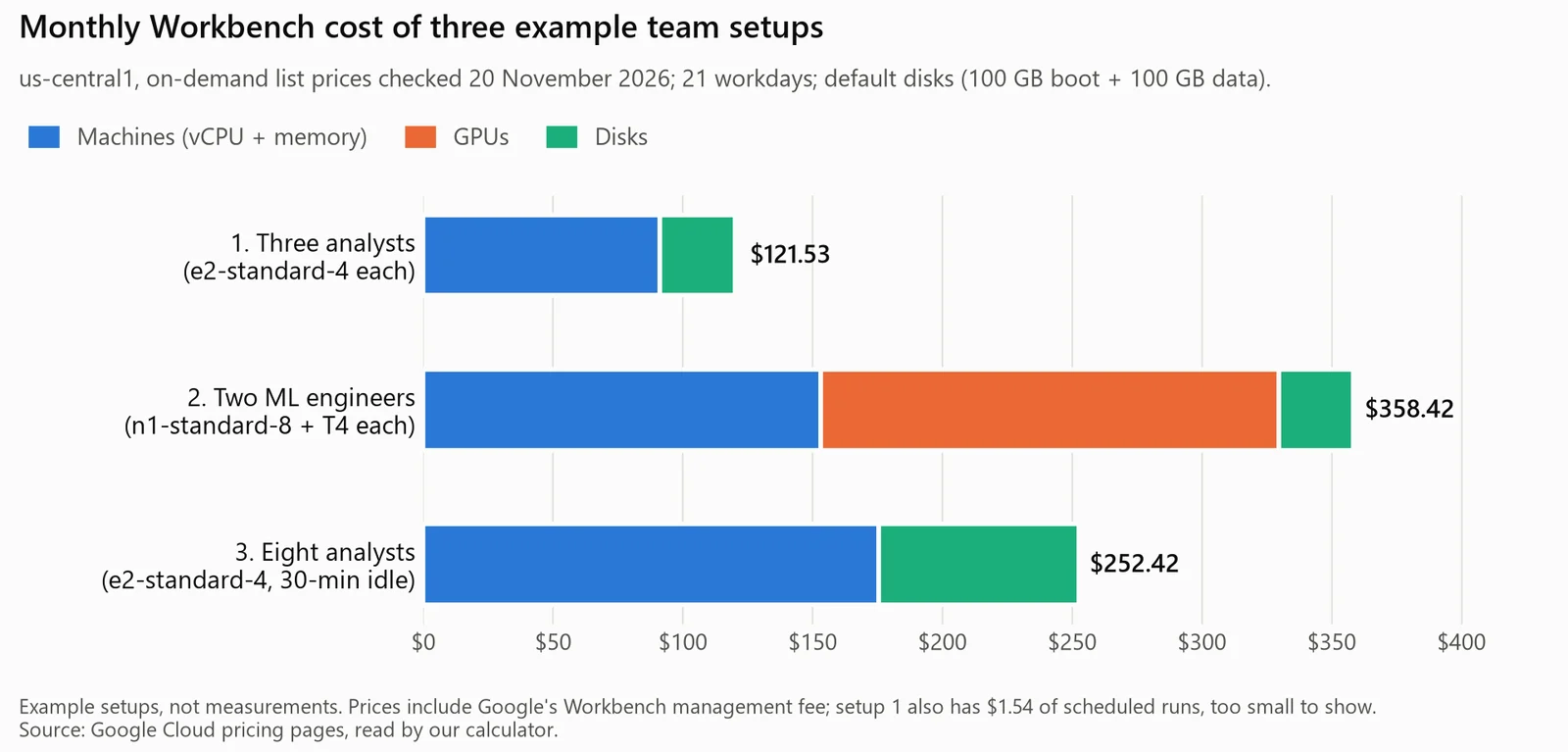
The calculator's output, drawn. Example setups at Google's list prices, checked 20 November 2026.
What the numbers say:
- About $40 a person a month for the analysts; $20.00 of setup 1's $121.53 is management fee.
- Disks are 24% of setup 1's bill: they bill all month, used or not.
- The T4s are half of setup 2. At Colab Enterprise's T4 price it would be $35 less.
- Setup 3 costs less per person ($31.55) mainly because its instances stop after 30 idle minutes, not 180.
Idle shutdown: the setting that decides the bill
Instances shut down after 180 minutes without kernel activity by default; the console accepts 10 to 1,440 minutes, or off. Three details matter:
- An open tab doesn't keep it alive: "If you leave JupyterLab open and you don't interact with the window, the instance will shut down". Running a cell resets the timer; "CPU usage doesn't".
- It watches port 8080: if you move Jupyter to another port, idle shutdown "won't detect any kernel activity".
- Shut down still costs money: "Disk storage charges still apply while your instance is shut down."
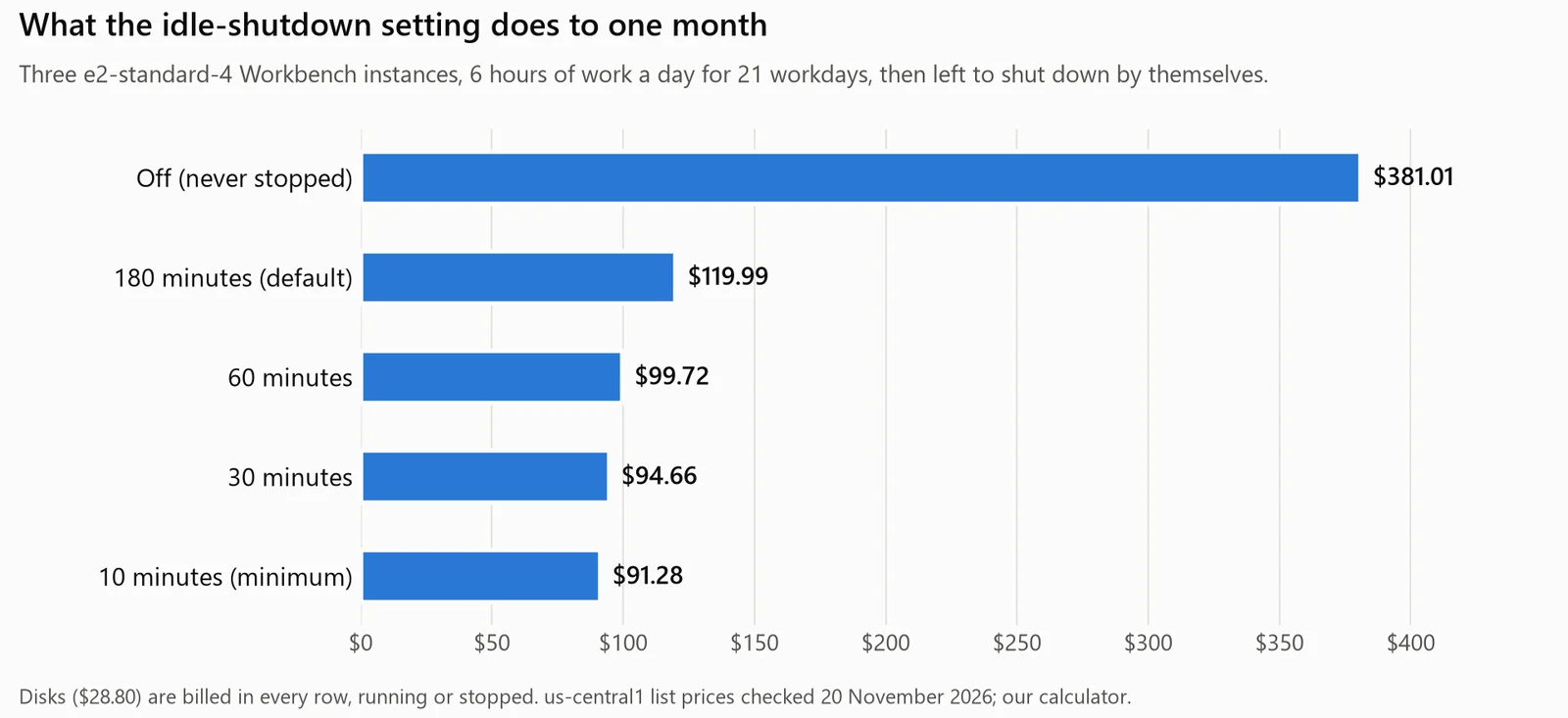
Setup 1 under each idle-shutdown setting, from the same calculator. Disks bill in every row.
Going from 180 to 30 minutes saves about $25 a month for three people; turning it off and forgetting to stop the instances more than triples the bill. Google's Terraform example for the setting, copied from its idle-shutdown page:
resource "google_workbench_instance" "default" {
  name     = "workbench-instance-example"
  location = "us-central1-a"

  gce_setup {
    machine_type = "n1-standard-1"
    vm_image {
      project = "cloud-notebooks-managed"
      family  = "workbench-instances"
    }
    metadata = {
      idle-timeout-seconds = "10800"
    }
  }
}
Parsed offline with python-hcl2 8.2.0, nothing sent to Google Cloud:
python-hcl2 8.2.0: parsed main.tf without errors
resource      google_workbench_instance.default
zone          us-central1-a
machine_type  n1-standard-1
image         cloud-notebooks-managed/workbench-instances
idle shutdown idle-timeout-seconds = 10800 -> 180 minutes
So Google's example sets the default; for 30 minutes use "1800". For an existing instance the docs give gcloud workbench instances update INSTANCE_NAME --metadata=idle-timeout-seconds=43200 (12 hours).
Scheduled notebook runs
Workbench's executor runs a notebook once or on a recurring schedule (hourly by default), without your instance: "Your notebook's code will run on Agent Platform custom training", which has its own price list (an e2-standard-4 is $0.154 an hour there), and "if your instance is shut down, the executor still runs your notebook file on schedule". Results land in a Cloud Storage bucket; the instance's service account needs the Notebooks Runner and Storage Admin roles. One trap: on JupyterLab 4, a schedule runs a copy of the notebook taken when you created it, so "If you edit the original notebook, you must create a new schedule". Other ways are in our guide to scheduling a Jupyter notebook.
Vertex AI Workbench vs Colab Enterprise
Google puts it this way: Colab Enterprise if your priorities are "to collaborate with others and to avoid spending time managing infrastructure", Workbench if they are "control and customizability". In detail:
| Workbench instance | Colab Enterprise | |
|---|---|---|
| What you get | A JupyterLab VM: terminal, conda kernels, custom containers, optional root access | Colab's editor; Google creates the runtime when you run code |
| Where notebooks live | On the instance, under /home/jupyter |
"Regional storage in Dataform" |
| Sharing | One user, or users of a service account; "Group access is not supported" | A user, a Google group or a Workspace domain, through IAM |
| Idle shutdown | 180 minutes by default; an open tab doesn't prevent it | 180 minutes by default, but only once no notebook is connected |
| Machine | The type and GPU you pick, changeable later | Default runtime: an e2-standard-4, deleted "18 hours after creation" |
| Prices | The shared rate table; T4 listed at $0.525 | The same table; T4 listed at $0.42 |
Our Colab Enterprise guide covers its costs and setup in full.
Access control for a team
Creating instances takes the Notebooks Admin role. Who can open JupyterLab is set once, at creation, and "can't be changed":
- Single user only (one named account) or service account (everyone you grant
iam.serviceAccounts.actAson it, which also decides what the notebook can read). Neither takes groups. - Instance roles are separate: start, stop and reset come from IAM on the instance, and "even granting a principal full access" there "doesn't grant the ability to use the instance's JupyterLab interface".
- Revocation lags: a removed user "might still be able to access the JupyterLab web interface for up to five days" in an open browser session; stop or reset the instance to cut them off.
The setups above give each person an instance, the simplest arrangement under these rules, so cost grows with headcount. For one shared server, see JupyterHub for a team.
Jupyter notebooks for your team.
Start free →Where to run a team's notebooks
| Option | What you get free | The right pick when |
|---|---|---|
| Workbench instance | Nothing beyond Google Cloud's $300 for new customers | You want a configurable VM, GPUs or custom containers in your own project |
| Colab Enterprise | The same $300 credit | You want notebooks shared with Google groups and runtimes started for you |
| Google Colab | Free, GPUs included, within limits Colab "does not publish"; notebooks "can run for at most 12 hours" | Quick experiments on files in Google Drive |
| Kaggle Notebooks | Free, GPUs included (limits in our Kaggle guide) | Training models on public datasets |
| Fastero | A Free plan with no end date: notebooks, SQL cells and cron schedules, on CPU | Everyday notebooks on company databases, run on a schedule and read by colleagues |
More choices are in our list of Google Colab alternatives.
When the notebook is for a team, not a VM
Workbench gives each person a machine; sharing and schedules go through IAM, service accounts and buckets. Fastero is an AI and data platform where people and AI agents work together on a team's data, and its notebooks come ready the minute you sign up:
- Real
.ipynbfiles: upload yours, or import them from a project's Git repository, onto a workspace notebook server nobody has to run, with Python 3.11, pandas, SQLAlchemy and the BigQuery client. - SQL cells query a saved connection (BigQuery, Postgres, MySQL, SQL Server, Redshift or Oracle) with its stored credentials and hand the rows to Python as a pandas DataFrame.
- Secrets reach cells as environment variables, so no service-account key sits in the notebook.
- Run now or on a cron schedule on the Free plan, which is $0 with no end date and includes notebooks and Python for up to 6 hours a day.
- Colleagues open notebooks with their own login, and viewers are free. Pro is $20 per editor a month, and a new account starts with 14 days of Pro and $20 of AI.
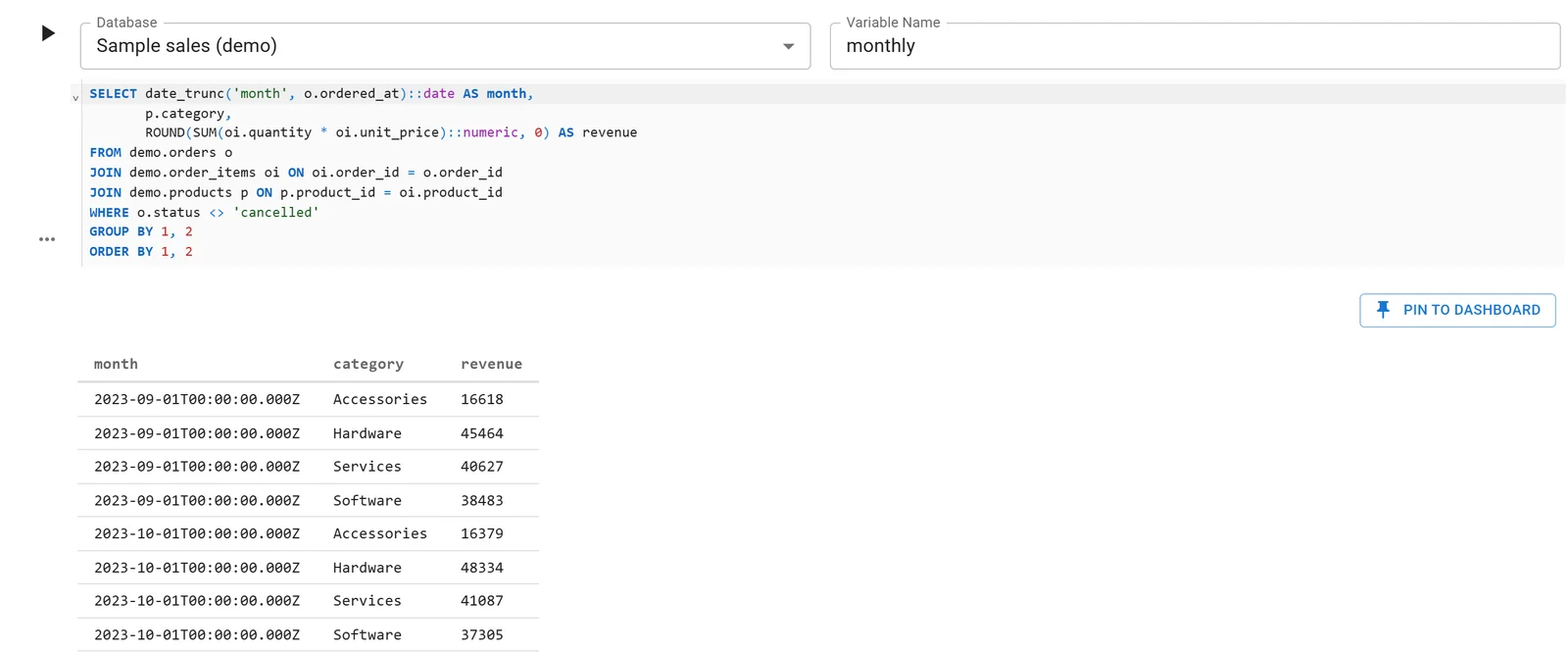
A Fastero notebook whose SQL cell reads a database connection; the rows arrive in Python as a DataFrame. Sample data.
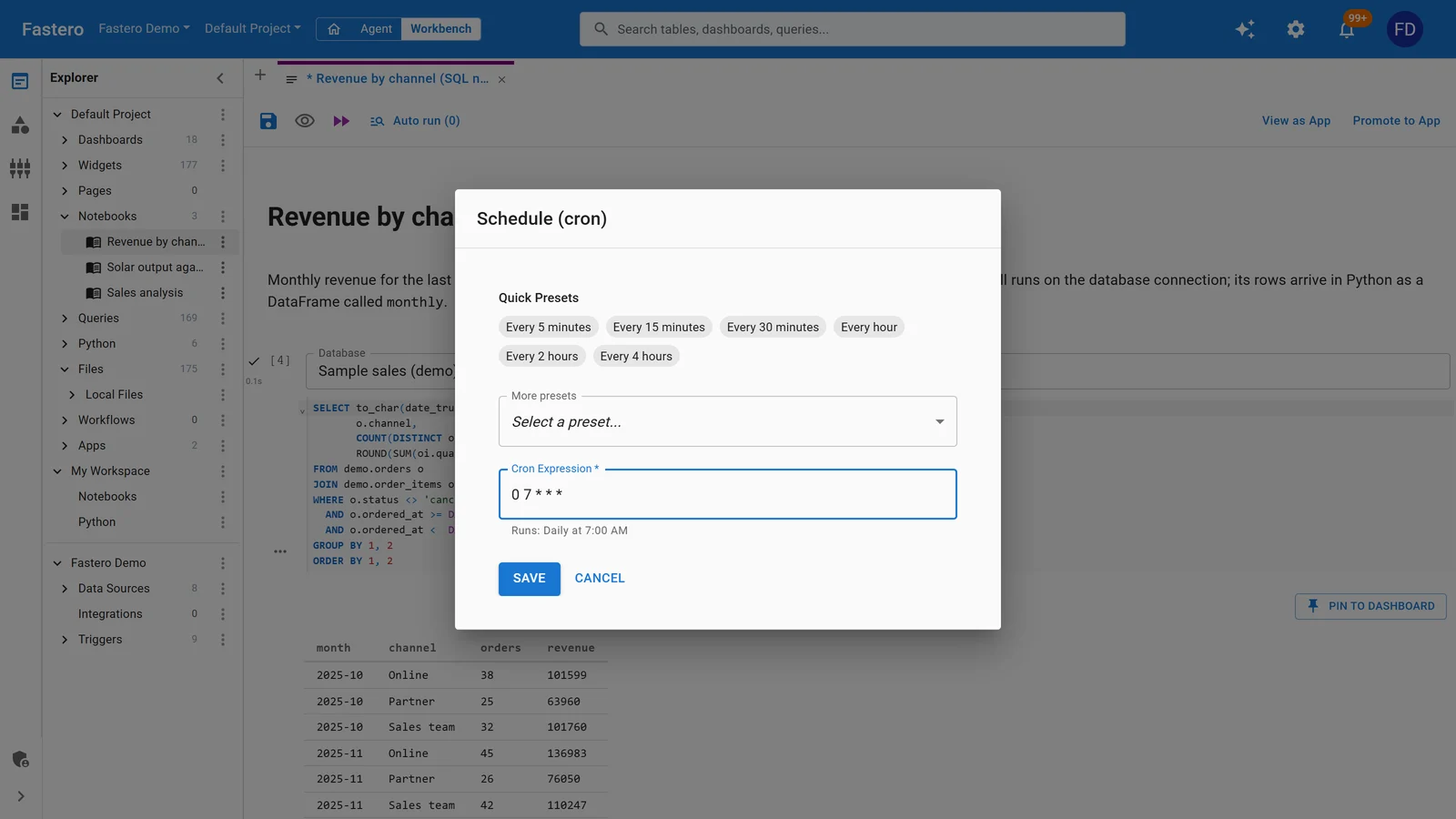
Scheduling a notebook in Fastero: presets or any cron expression. Sample data.
Workbench is the better fit for GPU work: Fastero runs each workspace's notebook server on 1 CPU and 2 GB, with no GPUs. It also wins when your data already sits in Google Cloud behind IAM, or when a notebook pulls more from BigQuery than 2 GB holds and you want a bigger VM or Spark beside it.
FAQ
Is Vertex AI Workbench free?
No. You pay Compute Engine's rates for the VM, its disks and any GPU, plus a management fee. New Google Cloud customers get $300 of credits, which Workbench can use.
How much does Vertex AI Workbench cost per hour?
An e2-standard-4 (4 vCPUs, 16 GB) lists at $0.1608 an hour in us-central1, fee included. A T4 adds $0.525 an hour, and each 100 GB of standard disk $4.80 a month. Checked 20 November 2026.
What happened to Vertex AI Workbench managed notebooks?
Google deprecated them in January 2024, stopped new ones on 14 April 2025, and deleted the rest with their data on 30 March 2026; user-managed notebooks became plain Compute Engine VMs that day. Workbench instances, renamed Agent Platform Workbench in April 2026, replaced both and still get new features.
What is the difference between Vertex AI Workbench and Colab Enterprise?
Workbench is a JupyterLab VM you configure, opened by one user or a service account's users. Colab Enterprise is Colab's editor on runtimes Google creates and deletes, with notebooks shared through IAM to users, groups or domains. Both price CPUs and memory from the same table.
Does Vertex AI Workbench shut down idle instances?
Yes, after 180 minutes without kernel activity by default, even with JupyterLab open in a tab. You can set 10 to 1,440 minutes or turn it off, and disks keep billing while the instance is shut down.
Can you schedule a notebook in Vertex AI Workbench?
Yes. The executor runs a notebook once or on a recurring schedule, on Agent Platform custom training, even while the instance is shut down, and saves the results to a Cloud Storage bucket.
Sources
Read on 20 November 2026. The calculator and the Terraform check ran that day in a Python 3.14.3 venv; nothing was run against Google Cloud.
- Google Cloud, Workbench: Introduction to Agent Platform Workbench, Choose a notebook solution, Create an instance, Idle shutdown, Shut down an instance, Schedule a notebook run, Manage access to an instance's JupyterLab interface, Manage access to an instance, Migrate data to a new instance, Provision resources using Terraform, Workbench release notes, Deprecations, Agent Platform release notes, gcloud workbench instances create
- Google Cloud, pricing: Agent Platform pricing (Workbench and custom training), Compute Engine general-purpose machines, GPU pricing, Disk pricing, Colab Enterprise pricing
- Google Cloud, Colab Enterprise: Introduction, Runtimes, Idle shutdown, Schedule a notebook run; Colab FAQ
- python-hcl2 8.2.0, for the offline Terraform check