 Fastero Dev Team
BigQuery bills a query by the data it reads, not by how long it runs or how many rows it returns. So the columns a chart selects, and how often a dashboard refreshes, are what you pay for.
The short answer: on-demand queries cost $6.25 per TiB processed in the US and EU multi-regions and us-central1 (London $7.8125, Tokyo $7.50), and the first 1 TiB a month is free per billing account. You pay for the columns a query reads, in logical (uncompressed) bytes, at least 10 MB per query; LIMIT doesn't lower it, and cached results and failed queries are free. Storage has 10 GiB free a month, then $0.023 per GiB a month for active logical storage in us-central1 ($0.02 in the US multi-region), less after 90 days untouched. Capacity pricing charges per slot-hour instead: $0.04 on Standard, $0.06 on Enterprise, $0.10 on Enterprise Plus. Cap spending with maximum bytes billed and daily quotas. Checked 20 November 2026.
Fastero
Connect your database. Ask questions. Get dashboards.
Postgres, BigQuery, Snowflake, and 10+ sources — live-connected, AI-powered, no dashboard builder learning curve.
Try free →BigQuery prices at a glance (checked 20 November 2026)
| Item | Price (USD) | Free each month |
|---|---|---|
| On-demand queries | $6.25 per TiB processed (US, EU, us-central1) | First 1 TiB |
| Active logical storage | $0.023 per GiB (us-central1), $0.02 (US multi-region) | First 10 GiB |
| Long-term logical storage | $0.016 per GiB (us-central1), $0.01 (US multi-region) | First 10 GiB |
| Active / long-term physical storage | $0.04 / $0.02 per GiB (us-central1 and US) | First 10 GiB |
| Slots, pay as you go | $0.04 (Standard), $0.06 (Enterprise), $0.10 (Enterprise Plus) per slot-hour | None |
Prices vary by region: these are what Google's pricing page shows for us-central1 and the US multi-region. A TiB is 1,024 GiB, and "Pricing models apply to accounts, not individual projects", so a billing account's projects share the free TiB.
How BigQuery counts the bytes you pay for
- Columns, not rows. "You're charged according to the total data processed in the columns you select."
- Logical bytes. "BigQuery always uses logical (uncompressed) bytes to calculate on-demand query costs", whichever storage billing model the dataset uses. Each value's size comes from its type: 8 bytes for
INT64,FLOAT64andDATE, 2 bytes plus the UTF-8 length for aSTRING, 0 forNULL. - A 10 MB floor. Charges are rounded up to the nearest MB, "with a minimum 10 MB data processed per table referenced by the query, and with a minimum 10 MB data processed per query."
LIMITdoesn't help. You're charged for the columns you select "even if you set an explicit LIMIT on the results." Filtering on a clustered or partitioned column does cut the bytes.- What's free. "You aren't charged for queries that return an error or for queries that retrieve results from the cache."
Measured: what choosing columns does to the data read
Parquet, a columnar file format, shows the column effect on a laptop. We converted an invented sample of 4,734 sales orders (10 columns) to Parquet with DuckDB, repeated it 1,000 times so the file is big enough to measure, and ran EXPLAIN ANALYZE on two queries, three times each. This illustrates columnar storage. It is not BigQuery's billing.
python 3.14.3 | duckdb 2.0.0
CSV 382,923 bytes -> sample-sales.parquet 83,784 bytes (4,734 rows)
sample-sales-x1000.parquet: 34,686,881 bytes (4,734,000 rows)

EXPLAIN ANALYZE 'Data Read' on sample-sales-x1000.parquet (fresh connection per query, DuckDB's file cache off)
  run 1  SELECT * FROM 'sales.parquet'                  Data Read: 34.0 MB
  run 1  SELECT region, revenue FROM 'sales.parquet'    Data Read: 8.8 MB
  run 2  SELECT * FROM 'sales.parquet'                  Data Read: 34.0 MB
  run 2  SELECT region, revenue FROM 'sales.parquet'    Data Read: 8.6 MB
  run 3  SELECT * FROM 'sales.parquet'                  Data Read: 34.0 MB
  run 3  SELECT region, revenue FROM 'sales.parquet'    Data Read: 12.8 MB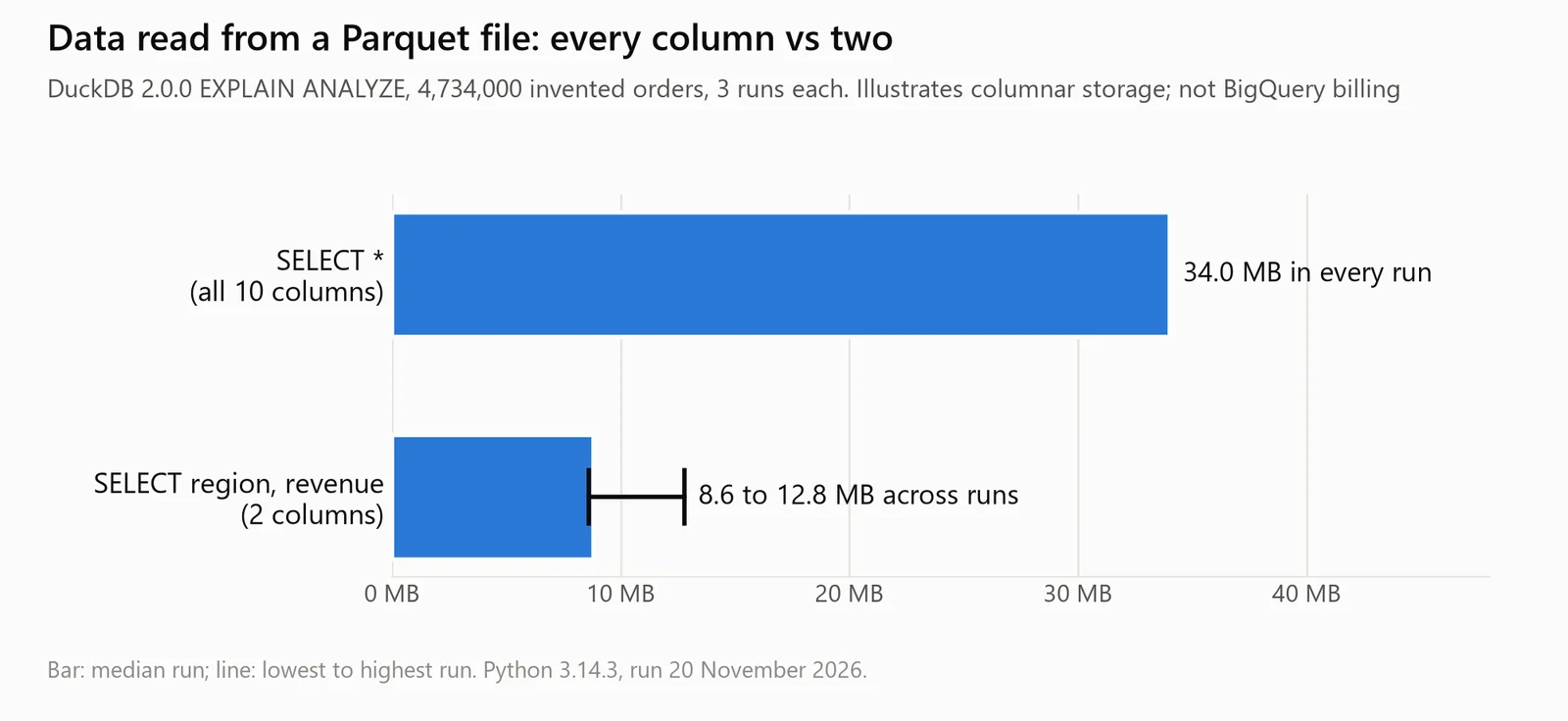
The runs above as a chart: DuckDB 2.0.0 on invented data. An illustration of columnar storage, not BigQuery's billing.
The script also summed each column's size, as stored and as BigQuery's type sizes count it:
| Columns | Parquet, compressed (measured) | Logical bytes by BigQuery's type sizes (calculated) |
|---|---|---|
All 10 (SELECT *) |
32.38 MiB | 422.78 MiB |
region, revenue |
8.20 MiB (25%) | 65.38 MiB (15%) |
Two columns read a quarter to a third of what all ten did: 8.6 to 12.8 MB across runs, against 34.0 MB. The logical size is 13 times this file's compressed size, and logical bytes are what an on-demand query is billed on, so compression helps only the storage bill, under physical billing. And the original 4,734 rows are 0.42 MiB of logical data: any query on a table that small is billed as 10 MB.
Storage: active, long-term, logical and physical
Active storage is any table or partition changed in the last 90 days. After 90 days without changes, Google says "The price of storage for that table automatically drops by approximately 50%", with no change in performance. Its own price table agrees for the US multi-region ($0.02 to $0.01) but shows a smaller drop in us-central1 ($0.023 to $0.016). Querying a table doesn't reset the clock; loading, DML or overwriting it does.
Each dataset picks a billing model. Logical, the default, bills "the uncompressed size of the data"; physical bills "the compressed size of the data on disk" at a higher rate, plus time travel and fail-safe storage. A switch can't be reversed for 14 days.
Editions and slot pricing
Capacity pricing buys compute in slots ("virtual CPUs") instead of paying per TiB. Prices in us-central1:
| Standard | Enterprise | Enterprise Plus | |
|---|---|---|---|
| Pay as you go, per slot-hour | $0.04 | $0.06 | $0.10 |
| 1-year / 3-year slot commitment | Not available | $0.048 / $0.036 | $0.08 / $0.06 |
| Largest reservation | 1,600 slots | Quota | Quota |
| BI Engine | No | Yes | Yes |
| Monthly service level objective | ≥99.9% | ≥99.99% | ≥99.99% |
Slots are billed per second with a one-minute minimum; commitments come in blocks of 50 slots. The pricing page also lists "BigQuery CUD" prices for all three editions, 10% off for one year and 20% for three. The catch: "it's not possible to estimate the exact cost of an individual query before execution with precise accuracy", since cost depends on slot use you only see afterwards. Google pitches capacity for "a predictable cost for query workloads"; on-demand is the one you can price query by query.
Connect any database. Ask in plain English.
Start free →The free sandbox
The sandbox needs only a Google account, no credit card. It gives 1 TiB of queries a month and "a lifetime limit of 10 GiB of storage"; tables expire after 60 days, and DML and streaming aren't supported. Our BigQuery sandbox guide covers the limits and the upgrade.
Cost controls
- Dry run before you run. "Dry runs don't use query slots, and you are not charged for performing a dry run." The console's query validator and
bq query --dry_runboth show the estimate, an upper bound. - Maximum bytes billed per query. If the estimate is over your limit, "the query fails without incurring a charge". Set too low, it tells you the floor: Google's example error reads
Query exceeded limit for bytes billed: 1000000. 10485760 or higher required. - Daily quotas.
QueryUsagePerDaycaps a project andQueryUsagePerUserPerDayeach user. The project default is 200 TiB a day, up to $1,250 a day at $6.25, and per user it's unlimited. They reset at midnight Pacific time. - Preview instead of querying. The Preview tab and
bq headshow rows "at no charge and without affecting quotas."
What one dashboard costs to refresh
The inputs are examples: 8 charts, each scanning 2 GiB per run (16 GiB a refresh), a 30-day month, the on-demand price after the free TiB, and nothing else using the free tier. Output of our Python calculator, unedited:
| Refresh | Refreshes a month | Data scanned a month | Billed after the free 1 TiB | Cost a month | Cost a year |
|---|---|---|---|---|---|
| Every 15 minutes | 2,880 | 45.00 TiB | 44.00 TiB | $275.00 | $3,300.00 |
| Every hour | 720 | 11.25 TiB | 10.25 TiB | $64.06 | $768.75 |
| Only when the data changes (6 loads a day) | 180 | 2.81 TiB | 1.81 TiB | $11.33 | $135.94 |
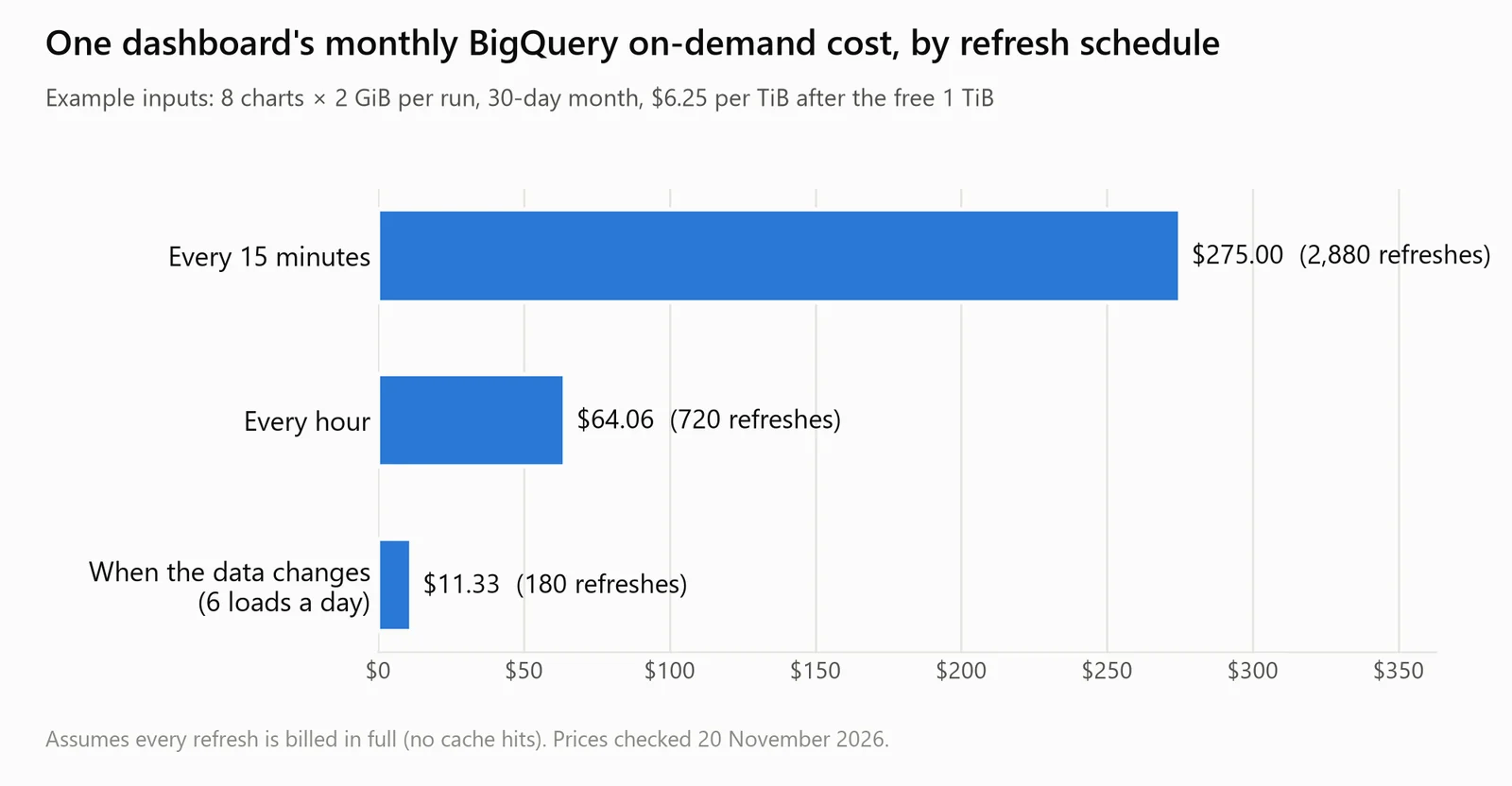
The calculator's output as a chart. Example inputs: 8 charts scanning 2 GiB each, at $6.25 per TiB after the free 1 TiB, with no cache hits.
One refresh of all 8 charts costs about $0.10 once the free TiB is gone. The table assumes every refresh is billed in full. Cached results, kept "per user and per project for approximately 24 hours", can make a repeat free, but they aren't used when a table has changed or recently received streaming inserts, or when the query uses CURRENT_DATE or CURRENT_TIMESTAMP(), as a chart of the last 30 days often does. For a live dashboard, plan on the refresh schedule being the bill.
When the dashboard is for a team
Fastero is an AI and data platform where people and AI agents work together on a team's data. On BigQuery:
- Refresh to match the data. A dashboard refreshes on a timer (1, 5, 15 or 60 minutes) or, for Postgres and BigQuery data only, when the data changes. On a BigQuery dashboard the shortest timer is 5 minutes, because every query is billed.
- Connect once. BigQuery connects with a service account's JSON key, the option the form recommends for long-lived work, or with a Google sign-in to try it.
- Viewers are free. Colleagues open the dashboard with their own login, without access to BigQuery. Pro is $20 per editor a month.
- Share or send it. Public links you can revoke, and scheduled email, daily, weekly or monthly, with the numbers, charts and tables plus a PDF.
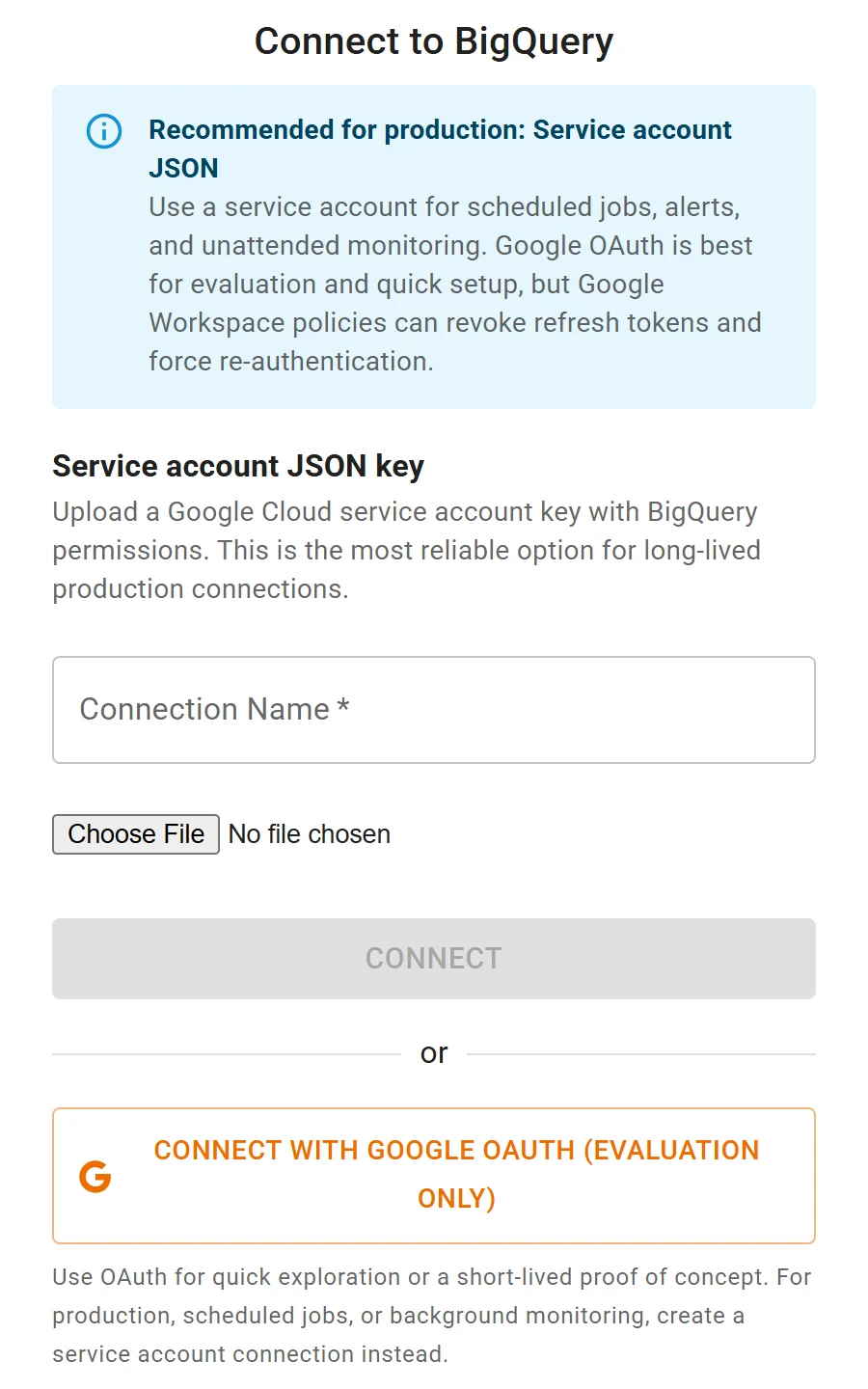
Connecting BigQuery to Fastero: a service account key for scheduled work, or Google sign-in to try it out.
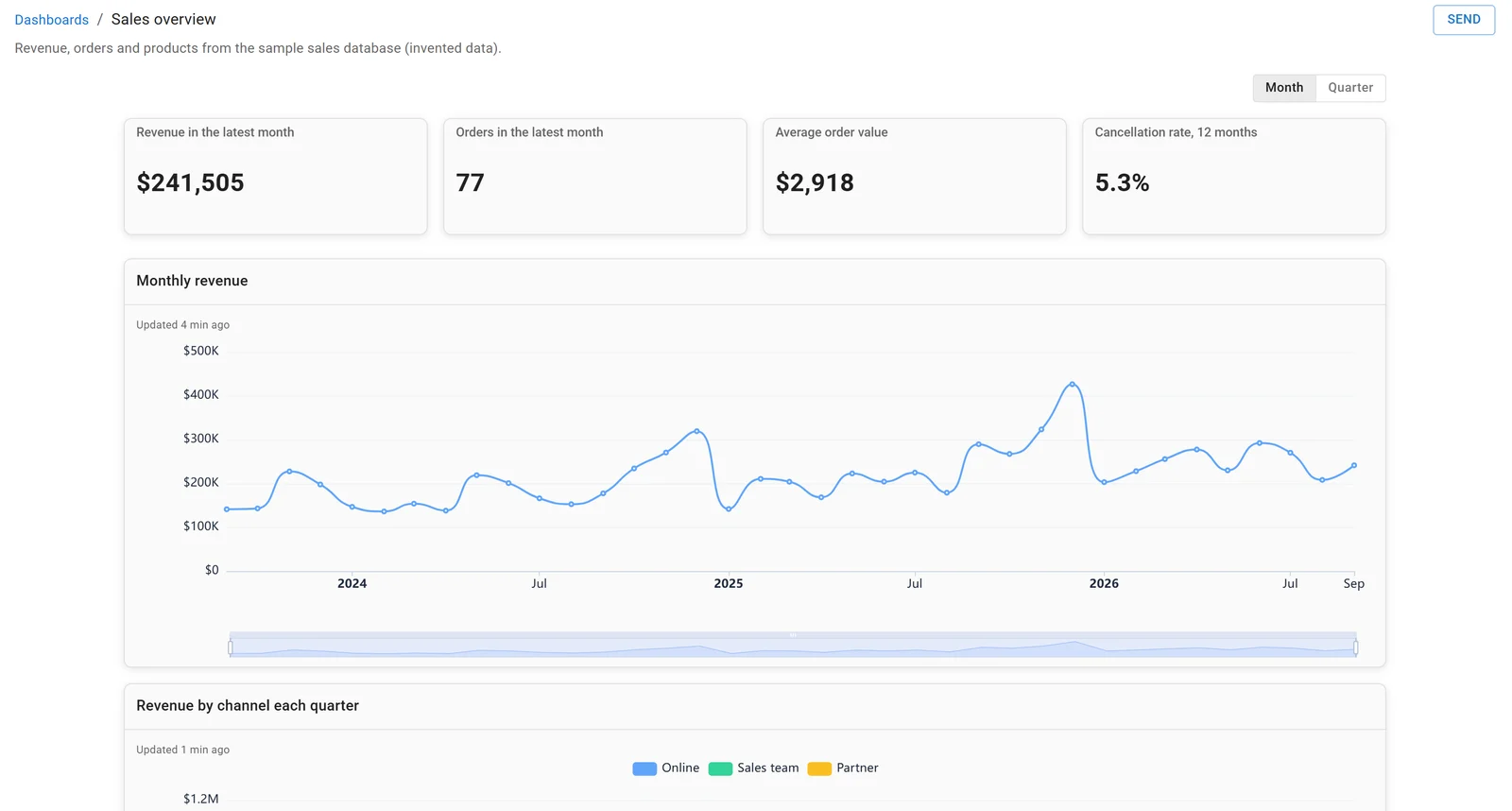
A dashboard in Fastero, built on the sample sales database. Invented data.
More on connecting Claude to BigQuery, BI tools for BigQuery and BigQuery alternatives.
FAQ
How much does a BigQuery query cost?
On demand, $6.25 per TiB of data processed in the US and EU, after the first free TiB each month, which is about $0.0061 per GiB. Every query is billed at least 10 MB per table it reads. Checked 20 November 2026.
Is BigQuery free?
Partly. Every billing account gets 1 TiB of queries and 10 GiB of storage free each month. The sandbox gives the same query allowance with no credit card, but its tables expire after 60 days.
Does LIMIT reduce BigQuery cost?
Not on a table that isn't clustered: you pay for every row of the columns you select. Select fewer columns, filter on partitioned or clustered columns, or use the free table preview.
How do I estimate a BigQuery query's cost before running it?
Do a free dry run: the console's query validator or bq query --dry_run reports the bytes the query would process, an upper bound. Divide by 1,024 four times for TiB and multiply by $6.25.
How do I stop BigQuery costs running away?
Set maximum bytes billed, so an expensive query fails without a charge, and lower the daily quotas from their defaults: 200 TiB a day per project, unlimited per user.
Sources
Read on 20 November 2026. The calculator and the DuckDB measurement ran that day, in Python 3.14.3 venvs, on invented data.
- Google Cloud: BigQuery pricing, Estimate and control costs, Use cached query results, Create custom query quotas, Run a query (dry runs), Storage overview, Data types and their sizes, Introduction to BigQuery editions, Try BigQuery using the sandbox
- DuckDB 2.0.0, for the Parquet measurement