 Fastero Dev Team
Amazon SageMaker has more than one place to run a Jupyter notebook, and since 2023 AWS has renamed one, closed another to new customers and moved a third to a new operating system. We read AWS's docs and price data on 20 November 2026 and priced four team setups with a small script.
The short answer: a SageMaker notebook in 2026 runs in one of three places. SageMaker Studio's JupyterLab spaces are AWS's recommended choice; notebook instances, one Jupyter server per instance, are still supported and now run Amazon Linux 2023; and SageMaker Unified Studio, part of what AWS calls "the next generation of Amazon SageMaker", has notebooks of its own. All three bill by the instance hour plus storage. In US East (N. Virginia), checked 20 November 2026, an ml.t3.medium is $0.05 an hour, an ml.m5.xlarge $0.23 and an ml.g4dn.xlarge with one NVIDIA T4 $0.7364, which is 20% to 40% more than the same EC2 machine. The Studio interface itself is free. The free tier is 250 hours of ml.t3.medium a month for your first two months. Nothing stops itself by default: Studio's idle shutdown is a setting an administrator turns on, and notebook instances need a script. Studio Lab, the free version, no longer takes new customers.
Fastero
Jupyter notebooks for your team, with nothing to install.
Start a notebook or bring your .ipynb files. SQL cells query your databases with no password in the code, and a notebook runs now or on a schedule. Colleagues open it with their own login; viewers are free.
Try free →The three SageMaker notebooks, side by side
From AWS's documentation, checked 20 November 2026:
| Studio JupyterLab space | Notebook instance | Unified Studio notebook | |
|---|---|---|---|
| What it is | JupyterLab 4 on one instance with one EBS volume, inside Studio | A "compute instance running the Jupyter Notebook application" | A notebook "with a built-in AI agent for data analysis", for SQL, Python and natural language |
| Setup | An administrator creates a SageMaker AI domain and user profiles | None beyond IAM; no domain needed | An administrator sets up a domain and invites you to projects |
| Sign-in | IAM Identity Center or IAM | The console opens a presigned URL "valid only for 5 minutes" | Single sign-on or IAM, at the domain's URL |
| Sharing | Private spaces "cannot be shared"; shared spaces are open to every user in the domain | Whoever IAM allows to open it | Within a project |
| Status | AWS's "Recommended" environment | Supported; AL2023 the default since 15 May 2026 | Part of "the next generation of Amazon SageMaker" |
| Example price | ml.m5.xlarge $0.23 an hour | ml.m5.xlarge $0.23 an hour | sc.m5.xlarge $0.23 an hour |
Shared spaces allow real-time co-editing, which AWS says is "best suited for small groups of two to five users". SageMaker Studio Classic, the older interface, lives on as an app inside Studio and is still the default for domains created before 30 November 2023.
Notebook instances: what changed in 2025 and 2026
- 30 June 2025: JupyterLab 1 and JupyterLab 3 notebook instances lost support; you "can no longer create new or restart stopped" ones.
- 15 May 2026:
notebook-al2023-v1(JupyterLab 4) became the default platform for new instances. - 30 June 2026: Amazon Linux 2 reached end of support. From 1 July you can't create AL2 instances or restart stopped ones.
- From 1 August 2026: AWS began upgrading the remaining AL2 instances to AL2023 "in phases".
AWS still patches notebook instances "at least once every 90 days" and recommends a restart every 30 days. During those updates, "data outside of the folder /home/ec2-user/SageMaker is not persisted", so keep work in that folder.
SageMaker notebook pricing
AWS's pricing page loads its tables with JavaScript, so we read the same numbers from AWS's Price List API file for SageMaker AI in US East (N. Virginia), dated 20 November 2026:
| Item | Studio JupyterLab | Notebook instance |
|---|---|---|
| ml.t3.medium (2 vCPUs, 4 GiB) | $0.05 an hour | $0.05 an hour |
| ml.m5.xlarge (4 vCPUs, 16 GiB) | $0.23 an hour | $0.23 an hour |
| ml.g4dn.xlarge (4 vCPUs, 16 GiB, one T4) | $0.7364 an hour | $0.736 an hour |
| ml.g5.xlarge (one A10G) | $1.41 an hour | $1.41 an hour |
| Storage | $0.112 per GB-month (gp3) | $0.14 per GB-month (gp2) |
- The Studio UI costs nothing; what costs money is storage, jobs you start, and "Launching a JupyterLab application, even if no resources or jobs launched in the application."
- Notebook instance volumes default to 5 GB and can grow to 16,384 GB, but "you can't decrease the volume size".
- Unified Studio notebooks have their own rows at the same rates (sc.t3.medium $0.05, sc.m5.xlarge $0.23); its Data Agent costs $0.04 per credit.
- Free tier: "250 hours of ml.t3.medium instance on Studio notebooks OR ml.t3.medium instance on notebook instances" a month for the first two months, from the month you create your first SageMaker AI resource. That's $12.50 of usage a month at list price. New AWS accounts also get $100 of credits, and up to $100 more, over six months.
The same machine costs more as a SageMaker notebook than as a plain EC2 instance:
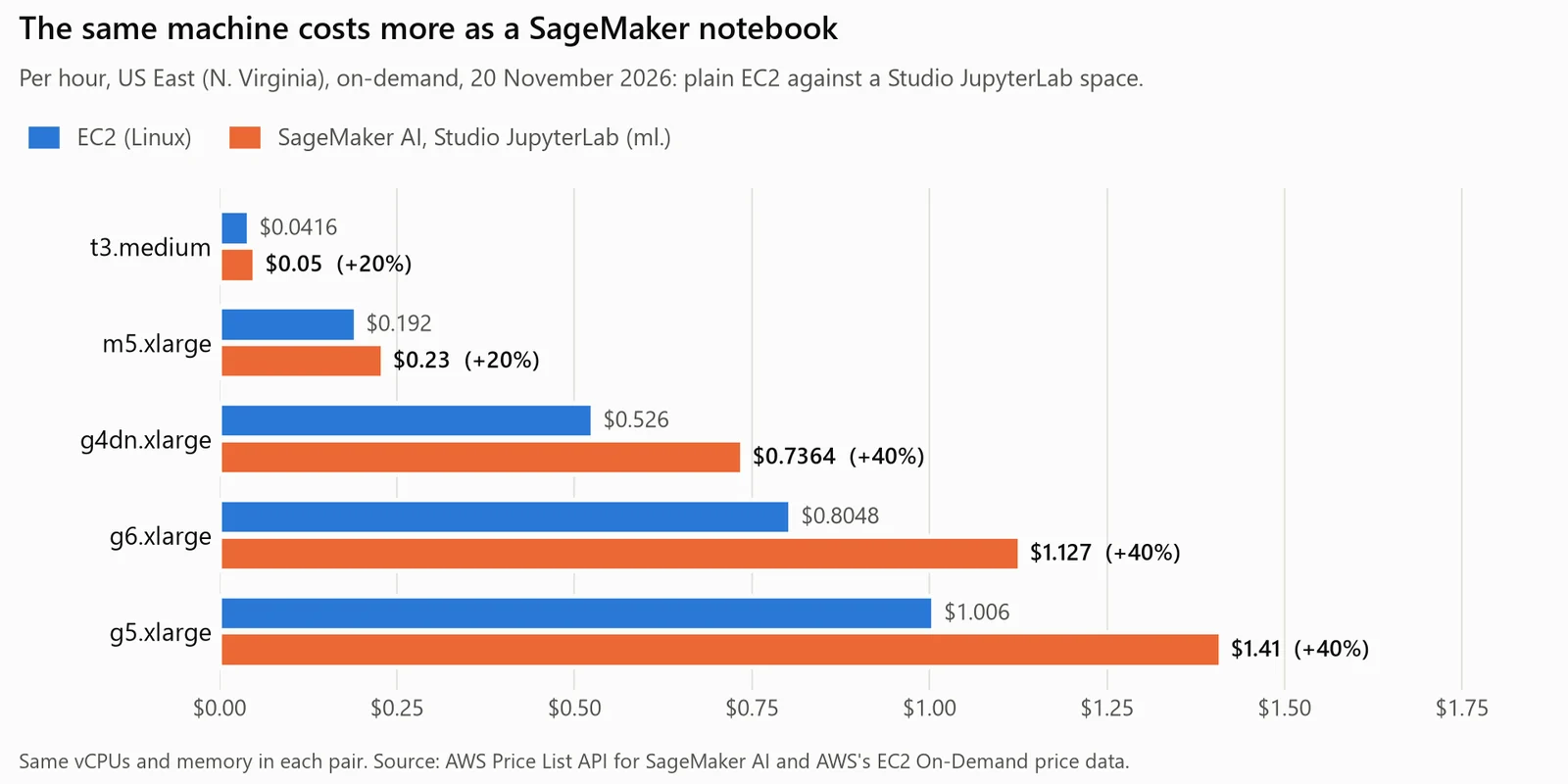
Per hour, US East (N. Virginia), on-demand, from AWS's price data on 20 November 2026.
That's 20% more on the CPU machines and 40% more on the GPU ones.
What four team setups cost a month
The setups are examples, not measurements. Analysts work 6 hours on each of 21 workdays, ML engineers 5; Studio spaces stop after 60 idle minutes, the lowest setting AWS allows; analysts keep 20 GB each and engineers 50 GB. Setup 1 adds a 20-minute notebook job every night. Setup 3 puts the analysts on notebook instances, never stopped or with AWS's auto-stop script. Every price comes from AWS's files saved on 20 November 2026; the script ran in a Python 3.14.3 venv. Real output, rate echo left out:
Setup                                                     Hours each    Compute  Storage    Jobs      Total  Per person
1. Three analysts, JupyterLab ml.m5.xlarge, idle 60 min        147.0    $101.43    $6.72   $2.30    $110.45      $36.82
2. Two ML engineers, JupyterLab ml.g4dn.xlarge (T4)            126.0    $185.57   $11.20   $0.00    $196.77      $98.39
3a. Three analysts, notebook instances, never stopped          730.0    $503.70    $2.10   $0.00    $505.80     $168.60
3b. Same, auto-stop script at its 1-hour default               147.0    $101.43    $2.10   $0.00    $103.53      $34.51

Setup 1 if idle shutdown is off, or left at its 10,080-minute default, and nobody stops the spaces: $512.72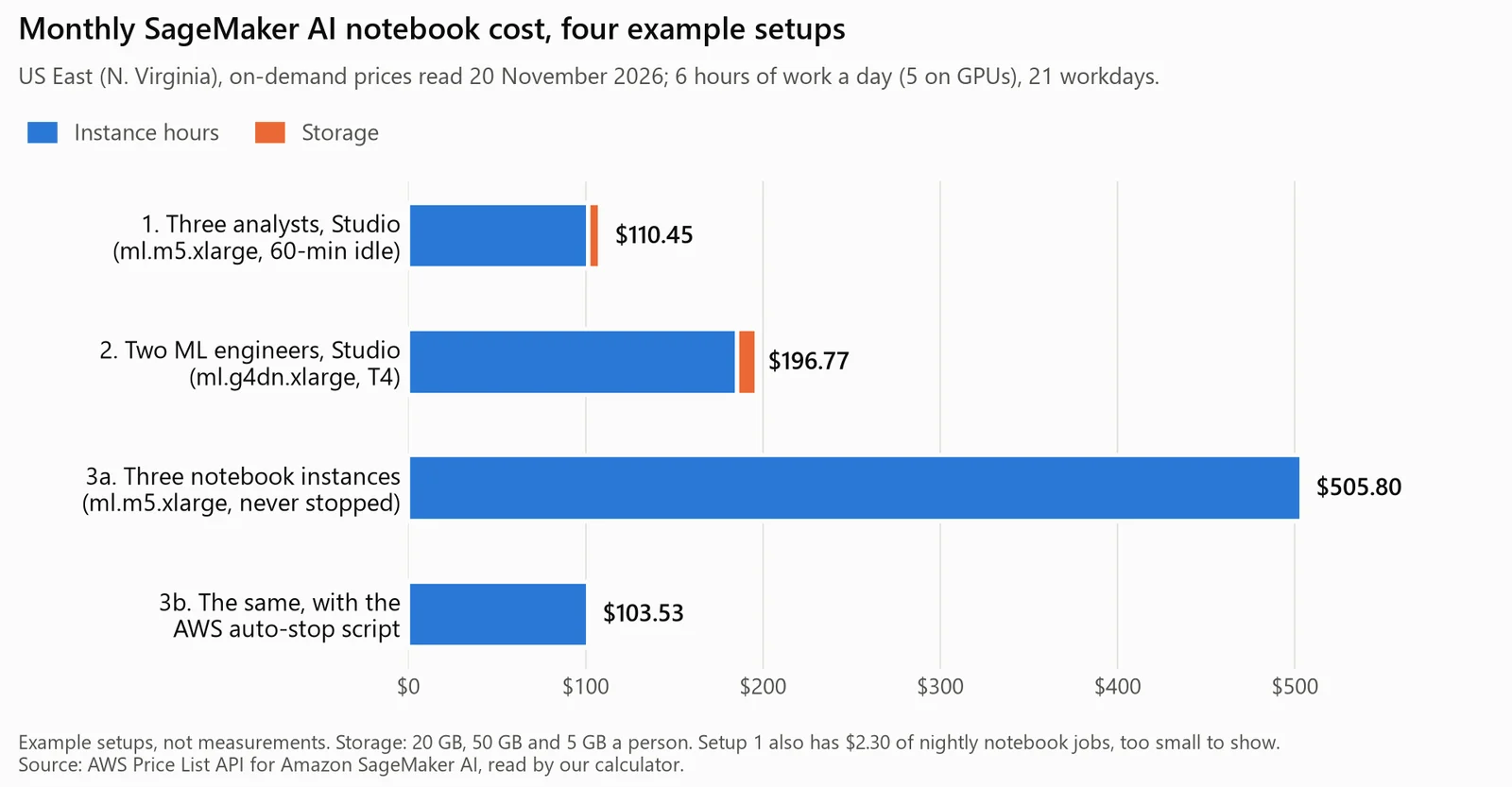
The calculator's output, drawn. Example setups at AWS's list prices, read 20 November 2026.
Storage is a rounding error; hours are the bill. The same three analysts cost $103.53 or $505.80 depending only on whether something stops their machines at night.
SageMaker idle shutdown
In Studio, idle shutdown is set for JupyterLab (and separately for Code Editor) at the domain or user-profile level. An administrator has to enable it, and with no value entered the timeout "defaults to 10,080" minutes: seven days, which never fires for someone who opens their notebook every workday. The minimum is 60. An app is idle when it has no active kernel or terminal session, and the feature needs SageMaker Distribution image 2.0 or newer.
AWS's "Set up idle shutdown" page gives this command and file to enforce a two-hour timeout, copied from the page:
aws sagemaker update-domain --region region --domain-id domain-id \
--default-user-settings file://default-user-settings.json

## default-user-settings.json example for enforcing the default timeout
{
    "JupyterLabAppSettings": {
        "AppLifecycleManagement": {
            "IdleSettings": {
                "LifecycleManagement": "ENABLED",
                "IdleTimeoutInMinutes": 120,
                "MaxIdleTimeoutInMinutes": 120,
                "MinIdleTimeoutInMinutes": 120
        }
    }
}
We saved the JSON part to a file and parsed it with Python's json module, nothing sent to AWS:
aws-doc-default-user-settings.json: invalid JSON: Expecting ',' delimiter: line 12 column 1 (char 307)
default-user-settings.json: valid JSON
AWS's example opens four braces and closes three. The second file is the same settings with the missing } added; pass that one. Running apps must restart before a new setting applies.
On notebook instances there's no built-in setting. AWS's docs point to its samples repository, whose auto-stop-idle lifecycle script does the job. An excerpt of its on-start.sh, copied from that repository:
# PARAMETERS
IDLE_TIME=3600

(crontab -l 2>/dev/null; echo "*/5 * * * * $PYTHON_DIR $PWD/autostop.py --time $IDLE_TIME --ignore-connections >> /var/log/jupyter.log") | crontab -
It checks every five minutes and stops the instance after an hour idle, even with a browser tab open (--ignore-connections). The instance needs internet access, because the script downloads autostop.py from GitHub, and its role needs permission to describe and stop notebook instances. Lifecycle scripts run as root, are limited to 16,384 characters, and fail if they run longer than 5 minutes.
Jupyter notebooks for your team.
Start free →Scheduling a SageMaker notebook
SageMaker Notebook Jobs run a notebook on demand or on a schedule from the JupyterLab widget or the SageMaker Python SDK. SageMaker runs each one "as an underlying training job", on its own instance at training rates (ml.m5.xlarge is $0.23 an hour). Jobs can start from Studio, Studio Classic, notebook instances or a local JupyterLab. More options are in our guide to scheduling a Jupyter notebook.
SageMaker Studio vs Studio Lab
Studio Lab was the free one: no AWS account, fixed at 12 GB of RAM and 15 GB of storage. It "is no longer open to new customers", and AWS calls Studio "a complete replacement". Since 15 October 2026, new customers can sign up for Studio with a Google, GitHub or Apple login and get "free credits as part of the AWS Free Tier with no credit card required in most cases", then invite colleagues by email. That's credit that runs out, where Studio Lab was free. More in our Studio Lab guide and our Colab vs SageMaker Studio comparison.
Where to run a team's notebooks
| Option | What you get free | The right pick when |
|---|---|---|
| SageMaker Studio | 250 hours of ml.t3.medium a month for two months; AWS Free Tier credits | Training and GPUs next to data in S3, with an AWS administrator to run the domain |
| Notebook instances | The same 250 hours (one allowance, shared with Studio) | One long-lived Jupyter server, no domain to set up |
| Unified Studio | Your existing Free Tier allocations carry over | SQL, Python and an agent on an AWS lakehouse, governed in SageMaker Catalog |
| Google Colab | Free, GPUs included; notebooks "can run for at most 12 hours" | Quick experiments with no cloud account |
| Fastero | A Free plan with no end date: notebooks, SQL cells and cron schedules, on CPU | Everyday notebooks on company databases, run on a schedule and read by colleagues |
For the Google Cloud equivalent, see our Vertex AI Workbench guide; for every other option, where to run a Jupyter notebook online.
When the notebook is for a team, not a training job
SageMaker is built for training and deploying models, with a domain, IAM roles and idle-shutdown policy to run. For the notebooks a data team runs every week against its own databases, Fastero is an AI and data platform where people and AI agents work together on a team's data, and its notebooks are ready the minute you sign up:
- Real
.ipynbfiles: upload yours or import them from a project's Git repository; the workspace's notebook server runs Python 3.11 with pandas, SQLAlchemy and psycopg2, and nobody has to run it. - SQL cells query a saved connection (Redshift, Postgres, MySQL, SQL Server, Oracle or BigQuery) with its stored credentials and hand the rows to Python as a pandas DataFrame.
- Secrets reach cells as environment variables, so no AWS key or database password sits in the notebook.
- Run now or on a cron schedule on the Free plan, which is $0 with no end date and includes notebooks and Python for up to 6 hours a day.
- Colleagues sign in with their own login, and viewers are free. Pro is $20 per editor a month; a new account starts with 14 days of Pro and $20 of AI.
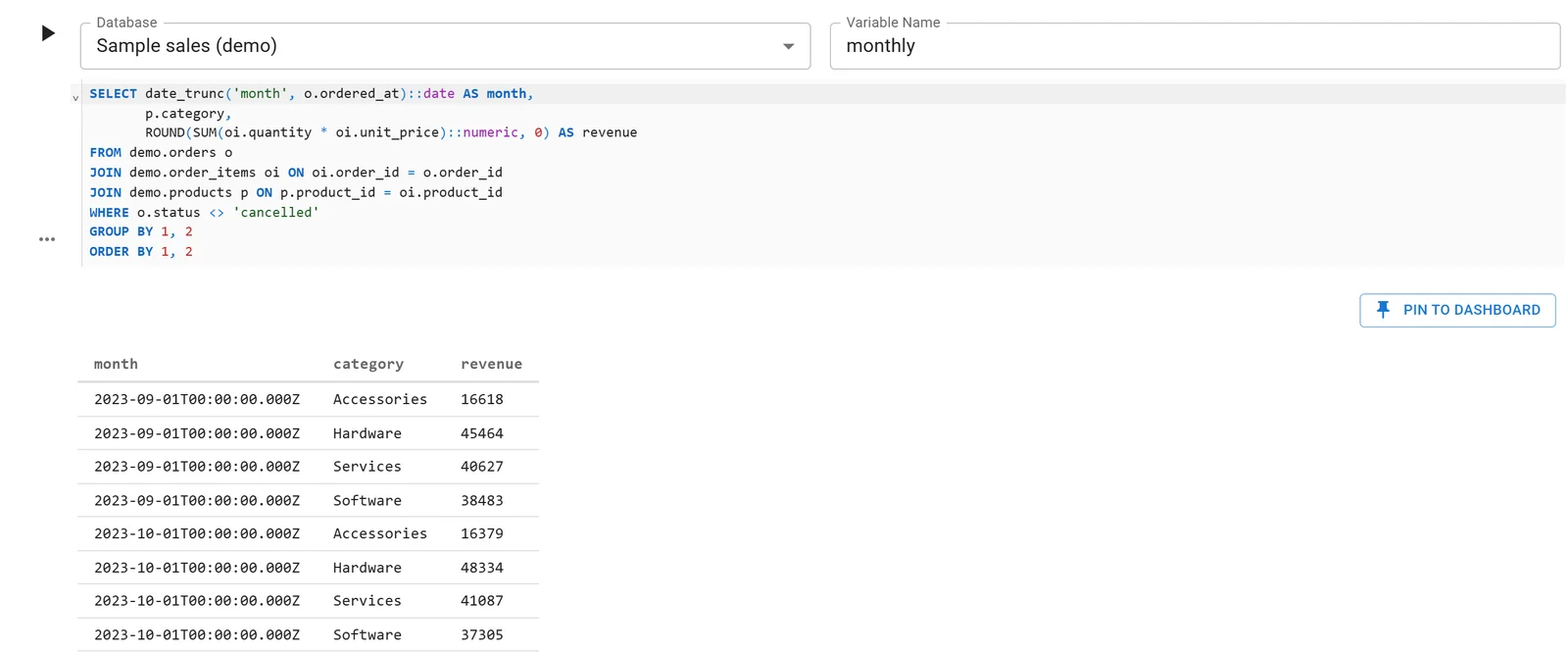
A Fastero notebook whose SQL cell reads a database connection; the rows arrive in Python as a DataFrame. Sample data.
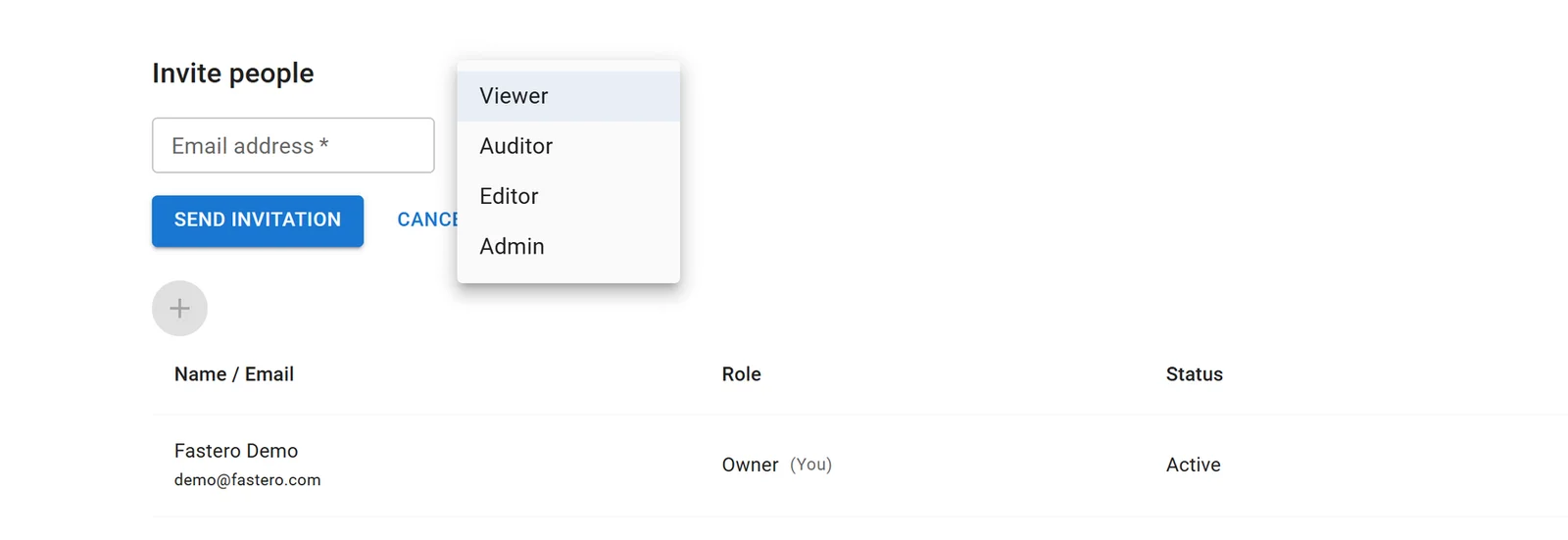
Inviting someone to a Fastero workspace. Viewers read everything shared with them and don't count as paid editors.
SageMaker is the better fit for training models and anything that needs a GPU: Fastero runs each workspace's notebook server on 1 CPU and 2 GB, with no GPUs. It's also the right place when your data lives in S3 and your security model is IAM roles and VPCs. More on sharing a Jupyter notebook with a team.
FAQ
How much does a SageMaker notebook cost?
You pay for the instance by the hour plus storage. In US East (N. Virginia), checked 20 November 2026, an ml.t3.medium is $0.05 an hour, an ml.m5.xlarge $0.23 and an ml.g4dn.xlarge with a T4 GPU $0.7364; Studio storage is $0.112 per GB-month.
Is SageMaker Studio free?
The Studio interface has no charge, but the JupyterLab instances and storage you use do. The free tier gives 250 hours of ml.t3.medium a month for the first two months, and new AWS accounts get up to $200 of credits over six months.
What is the difference between SageMaker Studio and notebook instances?
Studio is AWS's recommended environment: JupyterLab and other editors in spaces, inside a domain with user profiles, shared spaces and central idle-shutdown settings. A notebook instance is one Jupyter server on its own instance, with no domain.
Are SageMaker notebook instances deprecated?
No. Notebook instances are supported and run on Amazon Linux 2023 by default since 15 May 2026. What's deprecated is the old platform: Amazon Linux 2 reached end of support on 30 June 2026, and JupyterLab 1 and 3 on 30 June 2025.
Does SageMaker shut down idle notebooks?
Only if you set it up. In Studio, an administrator enables idle shutdown for the domain or user profiles, with a minimum of 60 minutes. Notebook instances need a lifecycle script, such as AWS's auto-stop-idle sample.
Can you schedule a notebook in SageMaker?
Yes. SageMaker Notebook Jobs run a notebook on demand or on a schedule as a training job, billed at training rates, from Studio, notebook instances or a local JupyterLab.
Sources
Read on 20 November 2026. The calculator and the JSON check ran that day in a Python 3.14.3 venv; nothing was run against AWS.
- AWS docs: SageMaker Studio, SageMaker JupyterLab, Studio spaces, Shared spaces, Studio pricing, Idle shutdown, Set up idle shutdown, JupyterLab storage size, Machine learning environments, Notebook instances, Create a notebook instance, Access notebook instances, AL2023 notebook instances, Amazon Linux 2 notebook instances, JupyterLab versioning, Notebook instance lifecycle configurations, SageMaker Notebook Jobs, Studio Lab availability change, What is SageMaker Unified Studio?
- AWS pricing: SageMaker AI pricing, SageMaker (Unified Studio) pricing, AWS Price List API file for SageMaker AI, us-east-1, EC2 On-Demand pricing, AWS Free Tier
- AWS other: Amazon SageMaker, SageMaker Studio sign-in options (15 October 2026), auto-stop-idle lifecycle script
- Google: Colab FAQ