 Fastero Dev Team
Saturn Cloud is a hosted data science platform: JupyterLab and R servers, Dask clusters, scheduled jobs and deployments, on machines from 2 vCPUs to 192, with or without GPUs, paid by the hour. In 2026 its home page sells inference on dedicated GPUs first, but the notebook product is still there. We read its pricing pages and docs and priced three ordinary workloads with a small script.
The short answer: Saturn Cloud's self-service plan bills by the hour while a resource runs, with no Saturn fee on top of the machine. As of 20 November 2026, AWS sizes cost from $0.04 an hour (Medium: 2 vCPUs, 4 GB) to $26.69 (128 vCPUs, 3,904 GB), GPUs from $0.53 (one T4), and an H100 on Nebius $2.95; disks cost $0.10 per GB-month. Your card is charged $5 of credit when you start Hosted Pro, then every $10 you use. A Free plan exists, but Saturn Cloud's current pages don't say how many hours it includes, and jobs, deployments and choosing the auto-shutoff are paid features. Our calculator put three example workloads at $75.94 a month. For free GPUs, use Kaggle or Colab; for GPUs billed by the second, Lightning AI; for a team's everyday notebooks on company data, Fastero.
Fastero
Jupyter notebooks for your team, with nothing to install.
Start a notebook or bring your .ipynb files. SQL cells query your databases with no password in the code, and a notebook runs now or on a schedule. Colleagues open it with their own login; viewers are free.
Try free →What Saturn Cloud is in 2026
The home page now leads with "Open models at full speed, on dedicated GPUs": inference endpoints on GPUs from Saturn Cloud's partners, from $1.10 per GPU-hour for an L40S to $6.65 for a B300. The docs call the development platform "AI Studio, our development environment for notebooks, jobs and deployments", the pricing page "Saturn Cloud Serverless", and "In the app, the plans are still named Hosted Free and Hosted Pro."
What you can start, by the quickstart guide (Enterprise also runs Prefect Cloud flows):
| Resource | What it is | Plans |
|---|---|---|
| Jupyter server | JupyterLab in the browser, or SSH from VS Code or PyCharm | All |
| R server | The R IDE in the browser, or SSH | All |
| Job | "A task that runs on command or on a schedule" | Hosted Pro and Enterprise |
| Deployment | "A continuously running activity like a hosted dashboard or API" | Hosted Pro and Enterprise |
Any resource except an R server can have a Dask cluster attached, so a notebook can spread work across several machines. Ready-made images cover Python (plain, PyTorch, RAPIDS or TensorFlow), R and Julia; you add conda, pip or apt packages at start-up, attach Git repositories and store secrets.
What you need: an account from the "Start for Free" button, and a credit card for Hosted Pro. On Serverless, "You don't create a cloud account, a Kubernetes cluster or any servers". Enterprise is different: Saturn Cloud installs in your own AWS, Google Cloud, Azure, Nebius, Crusoe or Oracle account or Kubernetes cluster, and "Self-hosted deployments are fully managed by our team".
Saturn Cloud pricing: hourly rates
From the Saturn Cloud Serverless pricing page, checked 20 November 2026. Every size lists a Saturn Cloud price of $0.00 an hour; what you pay is the "hosting price" of the machine.
| Size | Cloud | vCPUs | GPU | Memory | Per hour |
|---|---|---|---|---|---|
| Medium (t3.medium) | AWS | 2 | None | 4 GB | $0.04 |
| Large (r5.large) | AWS | 2 | None | 16 GB | $0.13 |
| Large | Nebius | 4 | None | 16 GB | $0.09 |
| 2XLarge (r5.2xlarge) | AWS | 8 | None | 64 GB | $0.50 |
| X1e.32XLarge | AWS | 128 | None | 3,904 GB | $26.69 |
| T4-XLarge (g4dn.xlarge) | AWS | 4 | 1 T4 | 16 GB | $0.53 |
| A10G-G5XLarge (g5.xlarge) | AWS | 4 | 1 A10G | 16 GB | $1.00 |
| V100-2XLarge (p3.2xlarge) | AWS | 8 | 1 V100 | 61 GB | $3.06 |
| 1xH100 | Nebius | 16 | 1 H100 | 200 GB | $2.95; $1.99 on a 3-month term, through sales |
| 8xH100 | Nebius | 128 | 8 H100 | 1,600 GB | $23.60 |
| Storage | $0.10 per GB-month |
The page lists 35 AWS sizes in all: t3, r5, c5 and x1 CPU machines and T4, A10G and V100 GPU machines.
How Saturn Cloud billing works
- You pay while a resource runs. "A workspace or deployment keeps running, and billing, until you stop it". A job's machine is released when the job finishes.
- Auto-shutoff stops an idle Jupyter or R server after 1 hour by default, or 6 hours, 3 days, 7 days or never. A Jupyter server counts as busy while a JupyterLab tab or an SSH connection is open. Choosing the interval is for Hosted Pro and Enterprise only.
- A Dask cluster shuts down with its Jupyter server, but one started on its own never shuts itself down.
- Disks bill on their size, not on your files, at $0.10 per GB-month; a new Jupyter server's disk defaults to 10 GB. Shared folders cost $0.30 per GB-month, on the files.
- Your card is charged "$5 for initial up front credits", then each time you use $10, or after 30 days if that comes first.
- "Under the paid plan, there is no free tier." Miss a payment and the account drops to the free tier, and your data "will be deleted after approximately 30 days of inactivity".
Is Saturn Cloud free?
There is a free plan: the pricing page says "Start with the Free Plan to gain free access and familiarize yourself with our platform", and the billing docs say running on Saturn Cloud's machines "is free for Hosted Free users". Free accounts can't create jobs or deployments, or choose their auto-shutoff.
How much is free isn't on any current page we found. Saturn Cloud's blog announced 30 free hours a month in October 2021 and "150 hours of free computing each month" in August 2023; both posts now open with a note that "some product details in it may be out of date". Check the app before you plan around either number.
Three workloads, priced out
The workloads are examples, not measurements:
- A. An analyst's notebook: a Large Jupyter server, 4 hours a workday for 22 workdays, closed without stopping each evening, so the 1-hour auto-shutoff adds an hour a day. 10 GB disk.
- B. GPU fine-tuning: a T4-XLarge Jupyter server, twelve 3-hour sessions a month, each followed by an idle hour. 50 GB disk.
- C. A dashboard deployment, on around the clock (730 hours) on a Medium machine. 10 GB disk.
The script reads every price from the Saturn Cloud pages we saved on 20 November 2026 and ran in a Python 3.14.3 venv with matplotlib 3.10.9. Real output, sections 1 and 2:
Parsed 35 AWS sizes and 6 Nebius sizes from the Serverless page, 35 AWS sizes from the organisation page. Storage $0.10 per GB-month (organisation page: $0.20). Card charged every $10.

1) Saturn Cloud Serverless (one person, Hosted Pro), AWS sizes, per month
Workload                                            $/hour  Hours  Idle h Disk GB   Compute    Idle   Disk    Total
A. Analyst notebook, Large (r5.large)                 0.13     88      22      10     11.44    2.86   1.00    15.30
B. GPU fine-tuning, T4-XLarge (g4dn.xlarge)           0.53     36      12      50     19.08    6.36   5.00    30.44
C. Dashboard deployment 24/7, Medium (t3.medium)      0.04    730       0      10     29.20    0.00   1.00    30.20
All three                                                                                     59.72    9.22   7.00    75.94
At the $10 threshold that is about 7 card charges a month.

2) The same hours on a bigger machine (Serverless page)
A on 2XLarge (r5.2xlarge), 8 vCPU / 64 GB             0.50     88      22      10     44.00   11.00   1.00    56.00
B on A10G-G5XLarge (g5.xlarge)                        1.00     36      12      50     36.00   12.00   5.00    53.00
B on 1xH100 (Nebius, on-demand)                       2.95     36      12      50    106.20   35.40   5.00   146.60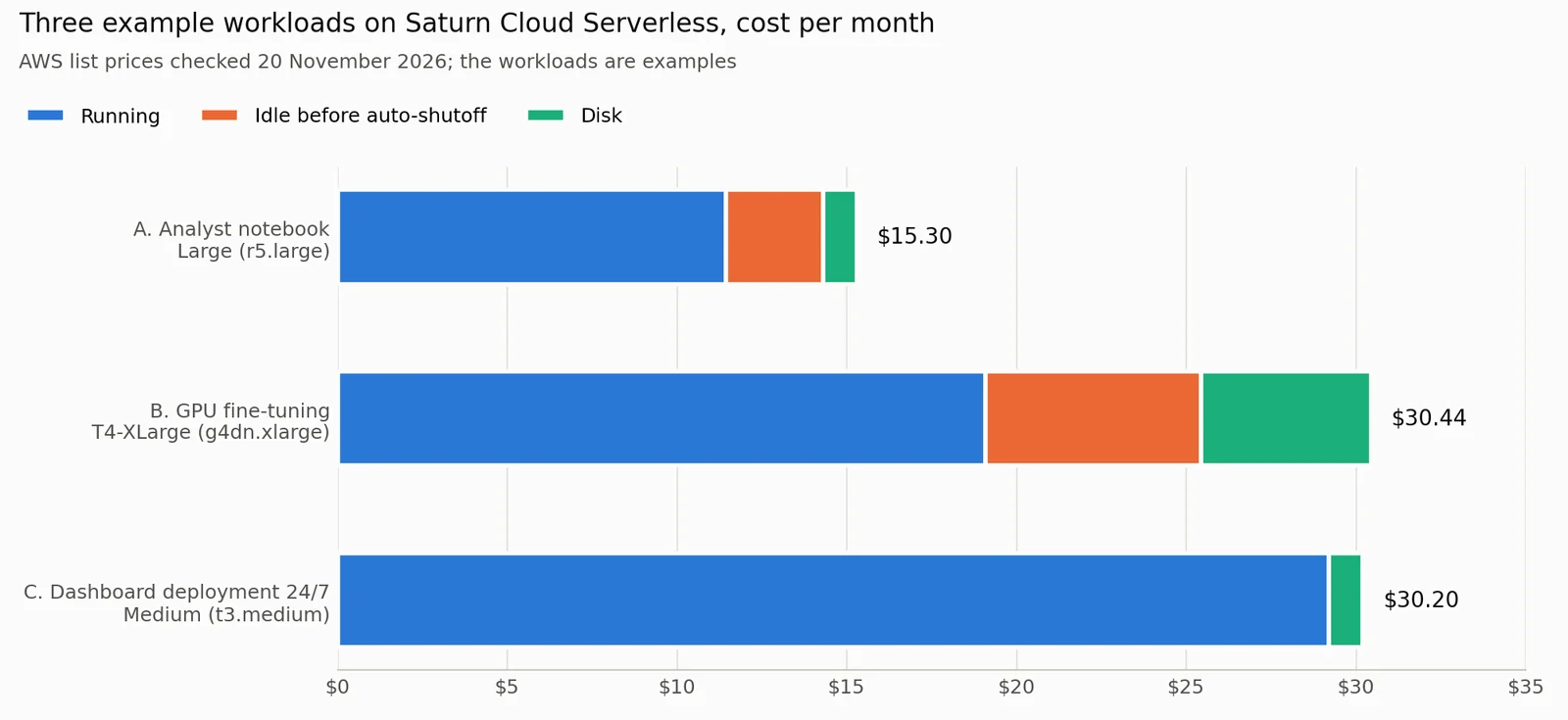
Section 1 of the calculator's output, drawn. Example workloads at Saturn Cloud's list prices, checked 20 November 2026.
What the numbers say:
- Idle hours are 12% of the bill. A server left to time out costs as much per hour as one doing work; in workload B the idle hour after each session adds $6.36.
- The disk bills all month, running or not: $5 for workload B's 50 GB.
- A GPU is the big lever. The same 48 billed hours cost $25.44 on a T4, $48.00 on an A10G and $141.60 on an H100.
Saturn Cloud's two price lists don't match
Saturn Cloud's Pro page for organisations, where "All organization usage will be charged to a single credit card", lists different prices for the same AWS machines, and $0.20 per GB-month for storage. Section 3 of the output:
3) What the organisation page lists for the same instances
Instance        Serverless page  Organisation page  Difference
t3.medium                 0.040              0.150        275%
r5.large                  0.130              0.195         50%
r5.2xlarge                0.500              0.750         50%
g4dn.xlarge               0.530              0.150        -72%
g5.xlarge                 1.000              1.500         50%
p3.2xlarge                3.060              1.095        -64%

The three workloads at organisation-page prices: $152.15 a month, against $75.94.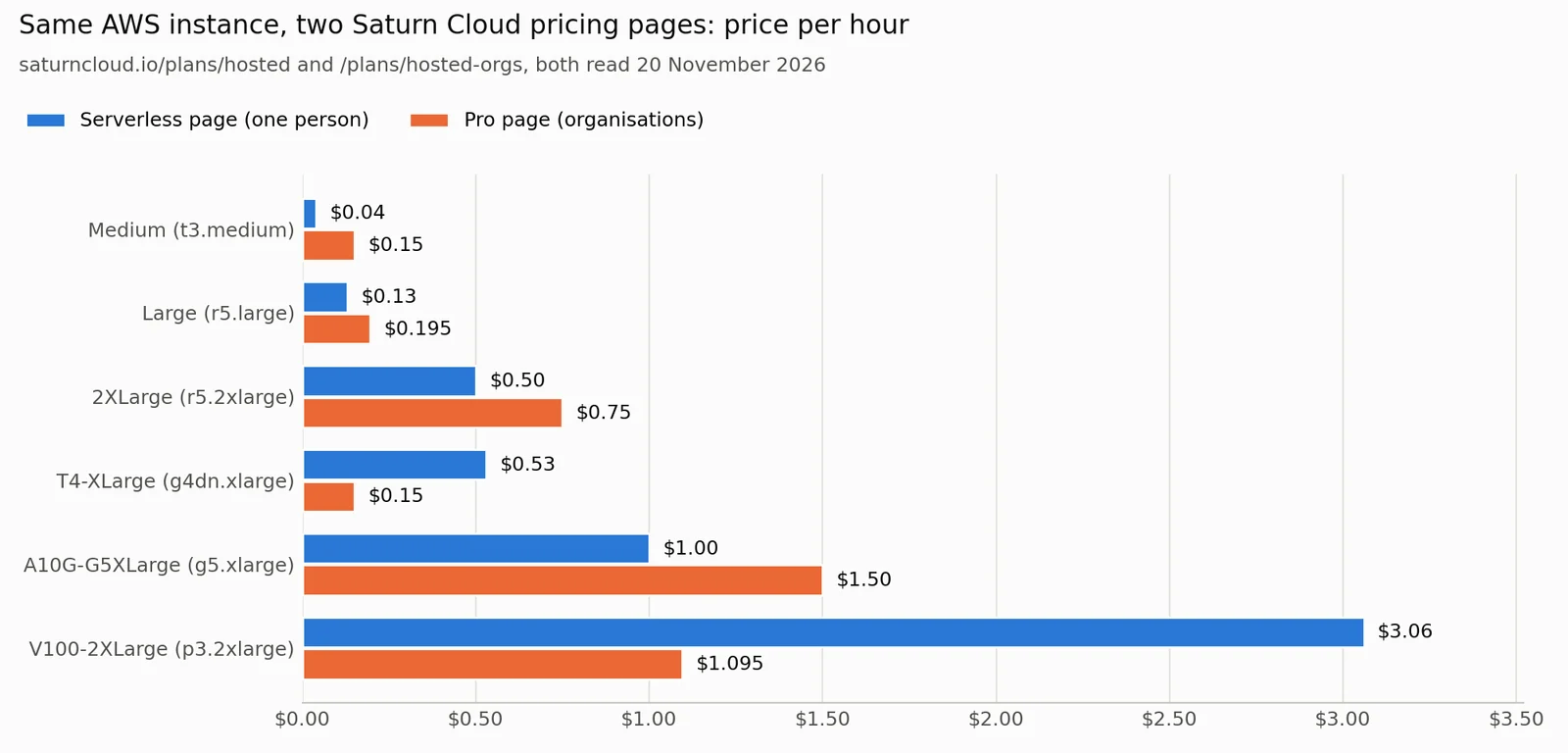
Saturn Cloud's two pricing pages, read on 20 November 2026. Most sizes cost exactly 50% more on the organisation page; the T4 and V100 machines cost less.
A second short script compared all 35 AWS sizes: 27 cost exactly 50% more on the organisation page, all seven T4 and V100 machines cost less, and Medium costs almost four times as much. Saturn Cloud's pages don't explain the difference. A Saturn Cloud blog post from August 2025 also put team plans at "$39 per user/month plus usage costs", a fee the current page doesn't mention. Before budgeting for a team, get the price in writing.
Jupyter notebooks for your team.
Start free →Saturn Cloud alternatives
| Option | What you get free | What you pay after | Pick it when |
|---|---|---|---|
| Saturn Cloud | A Free plan; hours not stated | By the hour, $0.04 to $26.69; H100 $2.95 | You want big CPU or GPU machines by the hour, Dask clusters or R |
| Google Colab | Free; limits not published; sessions up to 12 hours | Compute units: Pay As You Go, Pro, Pro+ | You want a quick GPU experiment |
| Kaggle Notebooks | A weekly GPU and TPU quota; two T4s by default | Colab Pro subscribers can get extra Kaggle GPU hours | You want free GPU hours you can plan a week around |
| Lightning AI | Up to 50 free GPU hours; one free Studio, restarted every 4 hours | By the second: a T4 from $0.55 an hour, an H100 from $5.45 | You want a persistent GPU workspace |
| Fastero | Notebooks and cron schedules on the Free plan, 6 hours of notebooks and Python a day | Pro $20 per editor a month; viewers free | A team's notebooks on company data, opened by colleagues |
All checked 20 November 2026. Colab's free GPUs are "heavily restricted", and Google switched off scheduled notebooks in consumer Colab on 27 March 2026. Kaggle retired its P100 GPU on 15 September 2026. More in 12 Google Colab alternatives, our Kaggle Notebooks guide, Lightning AI Studio and where to run Jupyter online. To run notebooks for a team on your own servers instead, see JupyterHub hosting.
When the notebook is for a team, not a GPU
For notebooks that query a company database each morning and get read by colleagues, Fastero is an AI and data platform where people and AI agents work together on a team's data. What you get when you sign up:
- Real
.ipynbnotebooks: upload the ones you have, or import them from the project's Git repository. - SQL cells query a workspace connection (Postgres, MySQL, SQL Server, Redshift, Oracle or BigQuery) with its stored credentials and hand the rows to Python as a pandas DataFrame.
- Secrets reach cells as environment variables, so no password sits in the notebook.
- Run now or on a cron schedule on the Free plan, which is $0 with no end date. Saturn Cloud keeps scheduled jobs for paying accounts.
- Colleagues open the notebook with their own login, and viewers are free. Pro is $20 per editor a month, with 750 compute hours per editor.
- One CPU and 2 GB per workspace server, and no GPUs. For training on a GPU, or anything that needs a big machine, Saturn Cloud, Kaggle or Colab is the right tool.
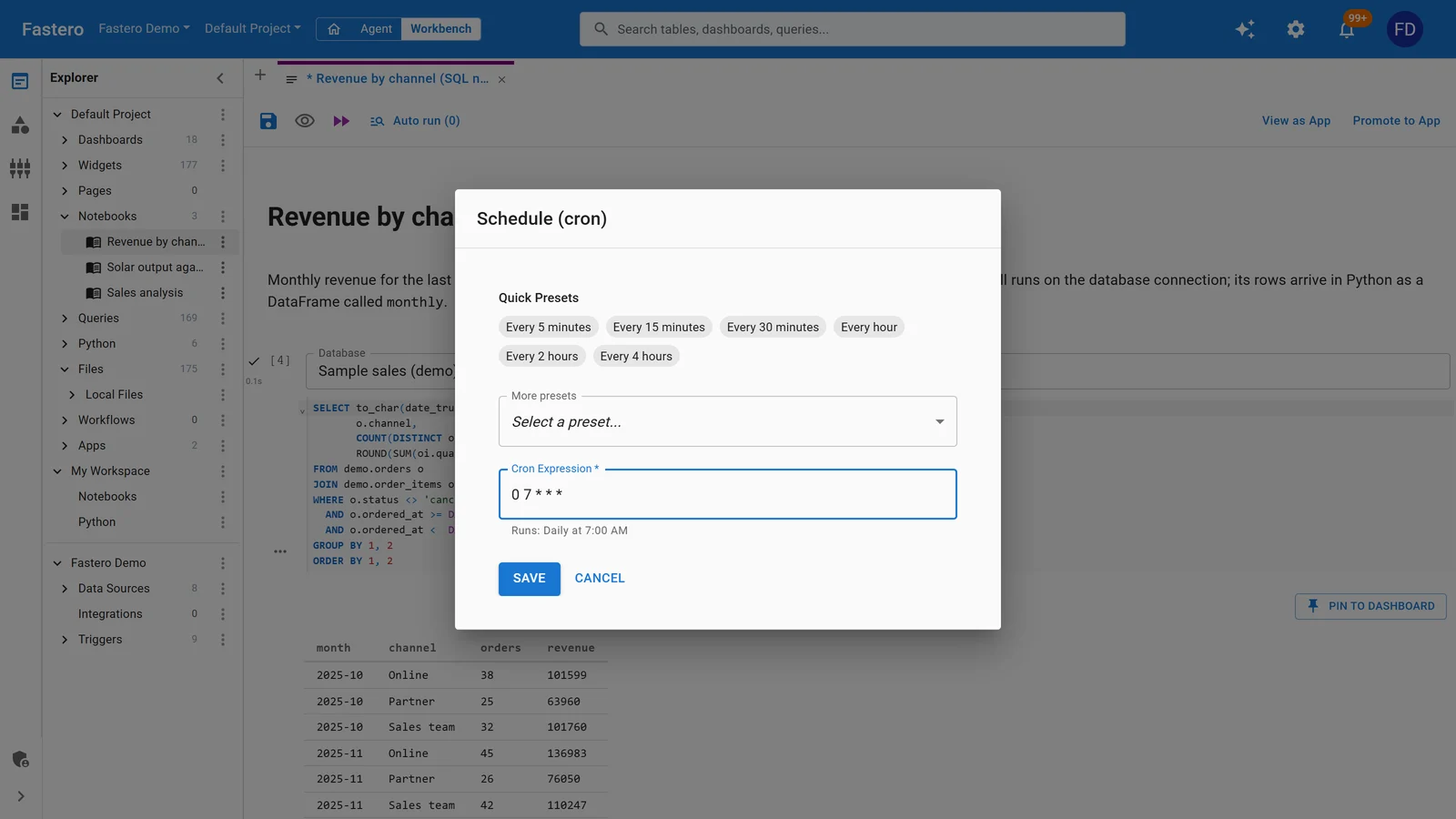
Scheduling a notebook in Fastero: presets or any cron expression. Sample data.
FAQ
How much does Saturn Cloud cost?
Saturn Cloud bills by the hour while a resource runs: from $0.04 an hour for a 2-vCPU, 4 GB machine to $26.69 for the largest, $0.53 for a T4 GPU and $2.95 for an H100, as of 20 November 2026. Disks cost $0.10 per GB-month.
Is Saturn Cloud free?
It has a Free plan for trying the platform, but its current pages don't say how many hours are included; blog posts gave 30 hours a month in 2021 and 150 in 2023. Jobs and deployments need Hosted Pro, which has no free allowance.
Does Saturn Cloud have GPUs?
Yes. On AWS it lists T4, A10G and V100 machines from one GPU to eight, and on Nebius one or eight H100s. Its inference business also rents GPUs up to the B300 for dedicated model endpoints.
Do I need an AWS account for Saturn Cloud?
Not on the self-service plans: resources run in Saturn Cloud's own cloud account and are billed to your card. Saturn Cloud Enterprise installs in your own AWS, Google Cloud, Azure, Nebius, Crusoe or Oracle account, or on a Kubernetes cluster.
What are the best Saturn Cloud alternatives?
For free GPUs, Kaggle Notebooks (a weekly quota) and Google Colab. For GPUs billed by the second, Lightning AI. For a team's notebooks on company data with schedules and sign-in, Fastero, or JupyterHub on your own servers.
Sources
Read on 20 November 2026.
- Saturn Cloud: Saturn Cloud Serverless pricing, Saturn Cloud Pro for organisations, Plans & Pricing, home page
- Saturn Cloud docs: Quickstart, Billing for Saturn Cloud Pro, Auto-shutoff, Jupyter servers, Dask clusters, Jobs, Enterprise, release notes
- Saturn Cloud blog: 30 hours of free compute (2021), 150 free hours (2023), Pro plan for teams (2025)
- Google: Colab FAQ, Deprecation notice of scheduled notebooks
- Kaggle: kernels command reference, quota command reference, P100 retirement, extra GPU with Colab Pro
- Lightning AI pricing