 Fastero Dev Team
Julia was there at the start of notebooks: Jupyter's name comes from Julia, Python and R. Today there are three good ways to write Julia in a notebook, and they behave differently enough that the choice matters more than it does for Python.
The short answer: for a classic notebook, install Julia, run using Pkg; Pkg.add("IJulia"), then using IJulia; notebook() (or jupyterlab()), and pick the Julia kernel in Jupyter. For a reactive notebook, where changing a value reruns every cell that depends on it, use Pluto.jl: import Pkg; Pkg.add("Pluto"), then import Pluto; Pluto.run(); notebooks are saved as plain .jl files. In VS Code, install the Julia and Jupyter extensions, open an .ipynb and choose a Julia kernel. To skip installing anything, Google Colab has a Julia runtime (Runtime → Change runtime type → Julia), Pluto runs on Binder at binder.plutojl.org, and CoCalc and JuliaHub offer hosted Julia. Kaggle notebooks are Python or R only.
Fastero
Jupyter notebooks for your team, with nothing to install.
Start a notebook or bring your .ipynb files. SQL cells query your databases with no password in the code, and a notebook runs now or on a schedule. Colleagues open it with their own login; viewers are free.
Try free →Install Julia first
From julialang.org, read on 12 November 2026: "The current stable release is Julia 1.13.3 (October 25, 2026). The long-term support (LTS) release is Julia 1.10.13." The recommended install also gives you juliaup, which manages Julia versions:
# macOS and Linux
curl -fsSL https://install.julialang.org | sh

# Windows, through the Microsoft Store
winget install --name Julia --id 9NJNWW8PVKMN -e -s msstore
Then type julia to open the REPL. We didn't run these on our own machine: Julia isn't installed there and we chose not to install it for this guide, so the commands on this page come from each project's documentation.
Jupyter with IJulia
IJulia is the Julia kernel for Jupyter: "IJulia is a Jupyter language kernel and works with a variety of notebook user interfaces", including the classic Notebook, JupyterLab and nteract. At the julia> prompt:
using Pkg
Pkg.add("IJulia")      # installs the kernel, not Jupyter itself

using IJulia
notebook()             # or jupyterlab(); notebook(detached=true) keeps it running after you quit Julia
What to know:
- Jupyter is separate. "The command,
Pkg.add("IJulia"), does not install Jupyter Notebook itself." If you already have Jupyter, runjupyter notebookorjupyter laband choose Julia. If not, the firstnotebook()offers to install a minimal Python and Jupyter through Conda.jl, "private to Julia (not in yourPATH)". - Install it in the global environment. The README: IJulia "should generally be installed in Julia's global package environment". The default kernel starts Julia with
--project=@., so a notebook picks up aProject.tomlin its folder. - New Julia version, rebuild. With juliaup, "for every Julia minor release (1.11, 1.12, etc) you will need to explicitly update the IJulia installation": run
Pkg.build("IJulia")from the Julia command line, not inside a notebook. - Extra kernels are one line:
installkernel("Julia (4 threads)", env=Dict("JULIA_NUM_THREADS"=>"4"))adds a kernel that runs with four threads.
Choose IJulia when you want the standard .ipynb format, JupyterLab's extensions, or notebooks that colleagues open in the same tools they use for Python. For installing Jupyter itself, see how to install Jupyter Notebook.
Pluto.jl: the reactive Julia notebook
Pluto is written in Julia for Julia, and works differently from Jupyter: "When you change a variable, Pluto automatically re-runs the cells that refer to it." Cells can sit in any order, and there's no hidden state left over from cells you deleted or ran out of order: "At any instant, the program state is completely described by the code you see."
import Pkg; Pkg.add("Pluto")
import Pluto; Pluto.run() # opens Pluto in your browser, usually at http://localhost:1234/- Version 1.0 shipped on 27 May 2026, after six years, according to its author's announcement. The site says "Pluto works on Julia 1.10 until 1.13."
- Packages manage themselves. Pluto "automatically manages a package environment for your notebook" and stores it in the notebook file, so
using DataFramesjust works and the next person gets the same versions. - Notebooks are plain Julia. They're "saved as pure Julia files", which diff cleanly in git and can be imported as code. They export to HTML and PDF, and pluto.land is "a free web service to easily share Pluto HTML exports".
- Sliders bind to variables.
@bindwith the PlutoUI package ties a slider, text box or button to a Julia variable, and reactivity reruns everything that uses it. - Hardware: "at least 4GB RAM, but 8GB is recommended" when running several notebooks or large packages.
The trade-off is the format: a Pluto notebook is a .jl file, not an .ipynb, and Pluto is built around Julia alone. Choose Pluto for teaching, exploring a model with sliders, or any notebook that has to rerun correctly for someone else. Python has a similar idea in marimo; we compared the two styles in marimo vs Jupyter.
Julia notebooks in VS Code
VS Code opens .ipynb files with the Jupyter extension and runs whatever kernel you pick from the kernel picker at the top right, so an IJulia kernel shows up there once it's installed. The Julia extension (julialang.language-julia) adds its own route: version 1.3, in 2021, brought "Experimental native Jupyter notebook support" that worked "by just installing the Julia and Jupyter extension", without IJulia or Jupyter. Its docs page is being rewritten ("This documentation is currently being updated and revamped"), so check the extension's changelog for the current state.
Choose VS Code when the notebook sits next to .jl source files you're also editing, and you want one editor with the Julia REPL, debugger and plot pane.
Jupyter vs Pluto vs VS Code
| Jupyter + IJulia | Pluto.jl | VS Code | |
|---|---|---|---|
| Install | Pkg.add("IJulia"), plus Jupyter |
Pkg.add("Pluto") |
Julia and Jupyter extensions |
| File format | .ipynb |
.jl |
.ipynb |
| Runs cells | When you run them | Automatically, by dependency | When you run them |
| Hidden state | Possible | No | Possible |
| Packages | Your Julia environment | Stored in each notebook | Your Julia environment |
| Best for | Mixed teams, JupyterLab users | Teaching, interactive models, reproducibility | Notebooks beside a codebase |
Jupyter notebooks for your team.
Start free →Where to run a Julia notebook online
| Service | Julia support, checked 12 November 2026 | Notes |
|---|---|---|
| Google Colab | A built-in Julia runtime: Runtime → Change runtime type → Julia | Announced in March 2025; the April 2025 release notes list it "with GPU and TPU support", May 2025 added CUDA.jl and Pluto.jl, and August 2025 moved it to Julia 1.11 |
| Binder (mybinder.org) | A Git repository with a Project.toml, which "can specify both the version of Julia to be used and a list of Julia packages" |
Free; 1 to 2 GB of RAM, stops after "more than 10 minutes of inactivity"; Pluto's own demo runs here at binder.plutojl.org |
| CoCalc | A Julia image with the Jupyter kernel, Pluto and VS Code in the browser | Real-time co-editing. Pluto's install page lists CoCalc as "(deprecated)", while CoCalc's own page still offers Pluto. Limits in our CoCalc guide |
| JuliaHub | Cloud Pluto notebooks and a VS Code-based Julia IDE, with a "Start for Free" sign-up | A 2023 post described "20 thread hours every month" free; today's pricing page only asks you to contact sales |
| Kaggle | Not offered | Kaggle's docs: "Notebooks may be written in either R or Python." |
Colab's Julia runtime is the quickest start for a one-off notebook, especially if you want a GPU. Colab's runtime was on Julia 1.11 at its last release note, two minor versions behind the current 1.13, so test any package that needs a newer Julia. For a notebook you want others to rerun exactly, Pluto on Binder is hard to beat. More free options, for Python too, in where to run a Jupyter notebook online and Google Colab alternatives.
When the notebook is for a team
Julia notebooks are usually research: models, simulations, a course. When the same team also has notebooks that read the company database every morning and feed numbers to people who never open a notebook, that's a different job. Fastero is an AI and data platform where people and AI agents work together on a team's data. Fastero's notebooks run Python only: there is no Julia kernel. For the Python side:
- SQL cells query a workspace connection with its stored credentials and hand the rows to Python as a pandas DataFrame, so no password sits in the notebook.
- Secrets reach cells as environment variables, in interactive and scheduled runs.
- Schedules: run a notebook on any cron schedule, on the Free plan.
- Readers sign in: colleagues open it with their own login, and viewers are free; Promote to App turns it into an app behind the same login.
- Limits to know, as of 12 November 2026: one editor at a time (no real-time co-editing), and each workspace's notebook server has 1 CPU and 2 GB of RAM, with no GPUs.
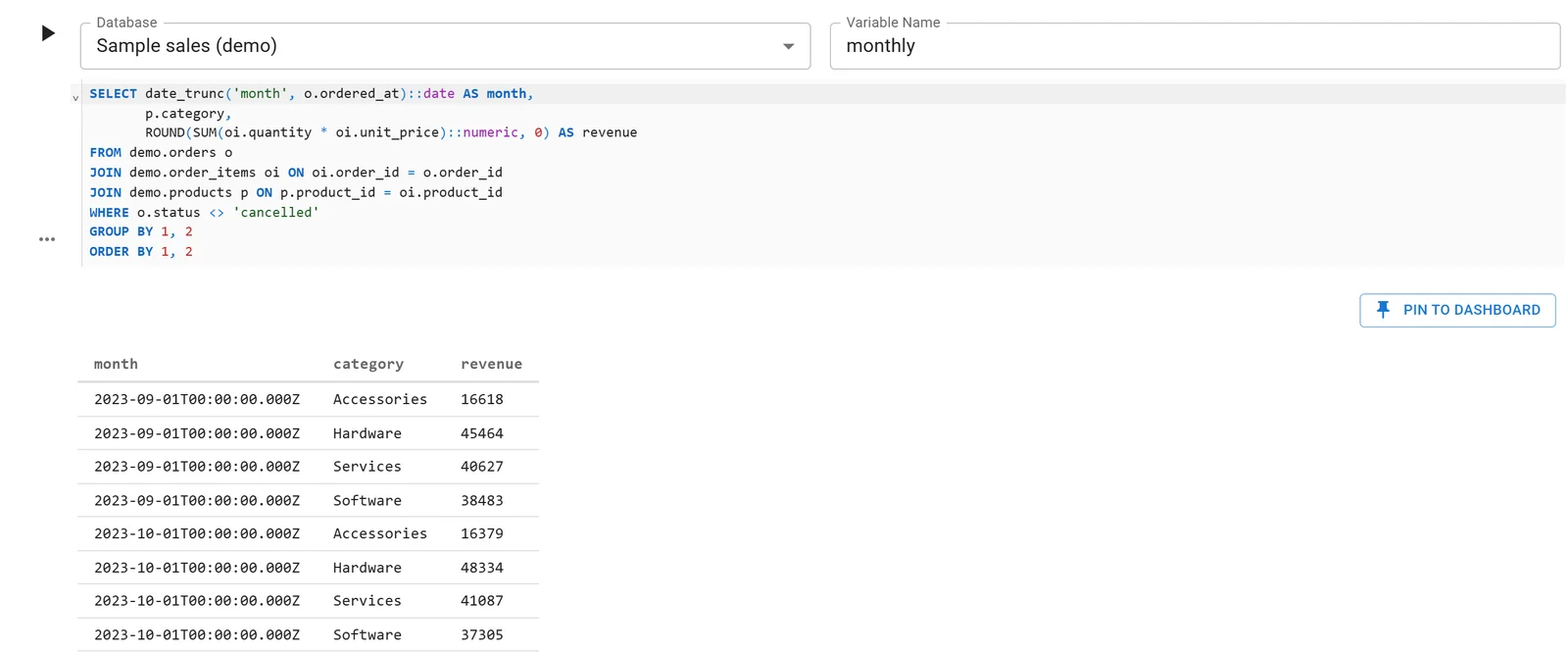
A Fastero notebook whose SQL cell reads a database connection; the rows arrive in Python as a DataFrame. Sample data.
More on sharing a notebook with your team.
FAQ
Can you use Julia in Jupyter Notebook?
Yes. Install the IJulia package with using Pkg; Pkg.add("IJulia"), then choose the Julia kernel in Jupyter Notebook or JupyterLab, or start one from Julia with using IJulia; notebook().
What is Pluto.jl?
A reactive notebook for Julia: changing a variable reruns every cell that uses it, notebooks are saved as plain .jl files, and each notebook records its own package environment. Version 1.0 was released in May 2026.
Should I use Pluto or Jupyter for Julia?
Pluto for teaching, interactive exploration and notebooks others must rerun reliably. Jupyter with IJulia when you need .ipynb files, JupyterLab extensions, or a setup shared with Python and R users.
Does Google Colab support Julia?
Yes. Choose Runtime → Change runtime type → Julia. Colab's release notes moved the runtime to Julia 1.11 in August 2025, and GPUs and TPUs work with it.
Can I run a Julia notebook on Kaggle?
Not as a supported language: Kaggle's documentation says notebooks "may be written in either R or Python". Use Colab, Binder or CoCalc instead.
How do I run Julia notebooks in VS Code?
Install the Julia and Jupyter extensions, open or create an .ipynb file, and pick a Julia kernel from the kernel picker at the top right.
Sources
Read on 12 November 2026. Julia isn't installed on our test machine, so no commands were run for this post:
- Julia: Install Julia; IJulia README, installation, running IJulia
- Pluto: plutojl.org, installation, README, Pluto 1.0 release
- VS Code: Julia in VS Code docs, extension README, VS Code extension 1.3 announcement, Jupyter notebooks in VS Code
- Online: Colab release notes, JuliaHub: Julia now available on Google Colab, repo2docker configuration, mybinder.org user guidelines, CoCalc: Run Julia online, JuliaHub, JuliaHub pricing, JuliaHub free tier (2023), Kaggle notebooks docs