
Marimo is the better notebook if reproducibility and clean diffs are your top priorities. Jupyter is the better notebook if you need the ecosystem — thousands of extensions, kernels for R/Julia/Scala, and the fact that every tutorial on earth ships as .ipynb. Neither one deploys your work to production. Pick by what hurts you more: hidden state bugs or a smaller library of integrations.
What does "reactive" actually mean here?
In Jupyter, you run cells manually. You decide the order. The kernel holds state between executions, and nothing stops you from running cell 7 before cell 3. That flexibility is also the source of the most common Jupyter bug: a notebook that runs top-to-bottom on a fresh kernel produces different results than the one you've been interactively editing for an hour. Variables linger. Deleted cells leave ghosts in memory. Everyone who's shared a .ipynb to a colleague and heard "it doesn't run" knows this pain.
Marimo eliminates the problem by building a dependency graph. Each cell declares what it reads and what it writes. Change a cell, and every downstream cell re-executes automatically — in the correct order. You can't run things out of sequence because there is no manual execution order. The notebook is a DAG, not a script you click through.
  Jupyter: Manual execution, state accumulates

  Cell 1 ──run──→ Cell 3 ──run──→ Cell 2 ──run──→ Cell 5
     │               │               │               │
     ▼               ▼               ▼               ▼
  ┌─────────────────────────────────────────────────────┐
  │              Shared kernel state (mutable)          │
  │   x=1 from Cell 1... or x=7 from Cell 3?           │
  └─────────────────────────────────────────────────────┘

  Marimo: Reactive DAG, deterministic order

  Cell A (x=1) ──→ Cell B (y=x+1) ──→ Cell D (plot(y,z))
                                         ↑
  Cell C (z=load()) ─────────────────────┘

  Change Cell A → Cell B and Cell D re-run automatically.
  Cell C is unaffected.
The trade-off is real. Marimo won't let you hold a half-explored state while you poke at something upstream. Every change cascades. If you're doing messy, iterative EDA where you want to freeze one variable while mutating another, Marimo's reactivity can feel like a straightjacket.
How do the file formats compare?
This is where Marimo makes its strongest argument.
A Jupyter .ipynb file is JSON. It contains your code, your outputs (Base64-encoded PNGs, HTML blobs, stderr dumps), execution counts, and kernel metadata. Diffing two .ipynb files in git produces unreadable noise. Merge conflicts are nightmarish. Tools like nbstripout help by stripping outputs before commits, but they're band-aids over a format that was never designed for version control.
A Marimo notebook is a plain .py file. Standard Python. You can open it in VS Code, diff it in git, review it in a PR, and run it with python notebook.py. No special tooling required. The file is the source of truth — no hidden outputs, no embedded metadata, no JSON wrapping.
  .ipynb (Jupyter)              .py (Marimo)

  {                             import marimo as mo
   "cells": [{
    "cell_type": "code",        @app.cell
    "source": ["x = 1"],        def _(df):
    "outputs": [{                    filtered = df[df.value > 0]
     "data": {                       return filtered
      "text/plain": "1"
     }                          @app.cell
    }],                         def _(filtered):
    "execution_count": 42,           mo.ui.table(filtered)
    "metadata": { ... }
   }],
   "metadata": { ... }
  }
For solo work, the format difference is a quality-of-life improvement. For teams doing code review on notebooks, it's transformative. PRs that touch .py files get real reviews. PRs that touch .ipynb files get rubber-stamped because nobody wants to read JSON diffs.
Fastero
Connect your database. Ask questions. Get dashboards.
Postgres, BigQuery, Snowflake, and 10+ sources — live-connected, AI-powered, no dashboard builder learning curve.
Try free →What does the ecosystem look like?
Jupyter's ecosystem is enormous and mature. JupyterLab extensions for git integration, LSP-based autocomplete, variable inspectors, table of contents, and dozens of visualization widgets. Kernels exist for Python, R, Julia, Scala, JavaScript, and more. Every ML framework, every data science library, every cloud provider has a Jupyter integration or a tutorial built on .ipynb. This is a 10+ year head start that no newcomer can replicate quickly.
Marimo's ecosystem is young. It has a growing set of built-in UI elements — sliders, dropdowns, tables, interactive plots — that tie into the reactive model. Third-party integrations are limited. If you need a specific JupyterLab extension or a non-Python kernel, Marimo doesn't have an answer yet. The community is active and growing fast, but "growing fast" and "mature" are different things.
| Dimension | Marimo | Jupyter |
|---|---|---|
| Execution model | Reactive DAG — cells auto-re-run on dependency change | Manual — you pick the order |
| Reproducibility | Deterministic by design | Requires discipline (restart + run all) |
| File format | Pure .py — git-native |
.ipynb JSON — painful diffs |
| Ecosystem | Young, growing | Massive, 10+ year head start |
| Kernels | Python only | Python, R, Julia, Scala, etc. |
| UI elements | Built-in reactive widgets (sliders, tables, forms) | ipywidgets, Plotly, Bokeh |
| App deployment | marimo run notebook.py serves as a web app |
Voila, Streamlit, separate tooling |
| Collaboration | Git (clean diffs, real PRs) | Git (messy diffs) or JupyterHub RTC |
| IDE support | Any Python editor + dedicated Marimo editor | JupyterLab, VS Code, Colab, dozens more |
| Learning curve | New patterns (DAG thinking, no global state) | Familiar to anyone who's written Python |
Can Marimo replace Jupyter for app deployment?
Marimo has a trick Jupyter doesn't: marimo run notebook.py serves your notebook as an interactive web app. Code cells are hidden, UI elements are exposed, and the reactive execution model means the app stays consistent as users interact with it. No separate framework, no rewrite. The notebook IS the app.
Jupyter's equivalent path is more fragmented. You can use Voila to serve notebooks as dashboards, but you lose interactivity beyond ipywidgets. More commonly, you rewrite notebook logic in Streamlit or Dash — a separate codebase, a separate deployment, a separate maintenance burden.
That said, Marimo's app deployment is local-first. Running marimo run on your laptop doesn't give you a production URL with auth, HTTPS, and uptime monitoring. You still need to host it somewhere. The notebook-to-production gap shrinks with Marimo, but it doesn't close.
This is where platforms like Fastero fit. Fastero runs Python in managed containers with database connections baked in, deploys Streamlit apps with auth and scheduling, and includes an AI agent that can write and iterate on code with you. It takes the "notebook to production" idea further than either Marimo or Jupyter alone — your analysis connects to real data sources and ships as a live app without a devops detour.
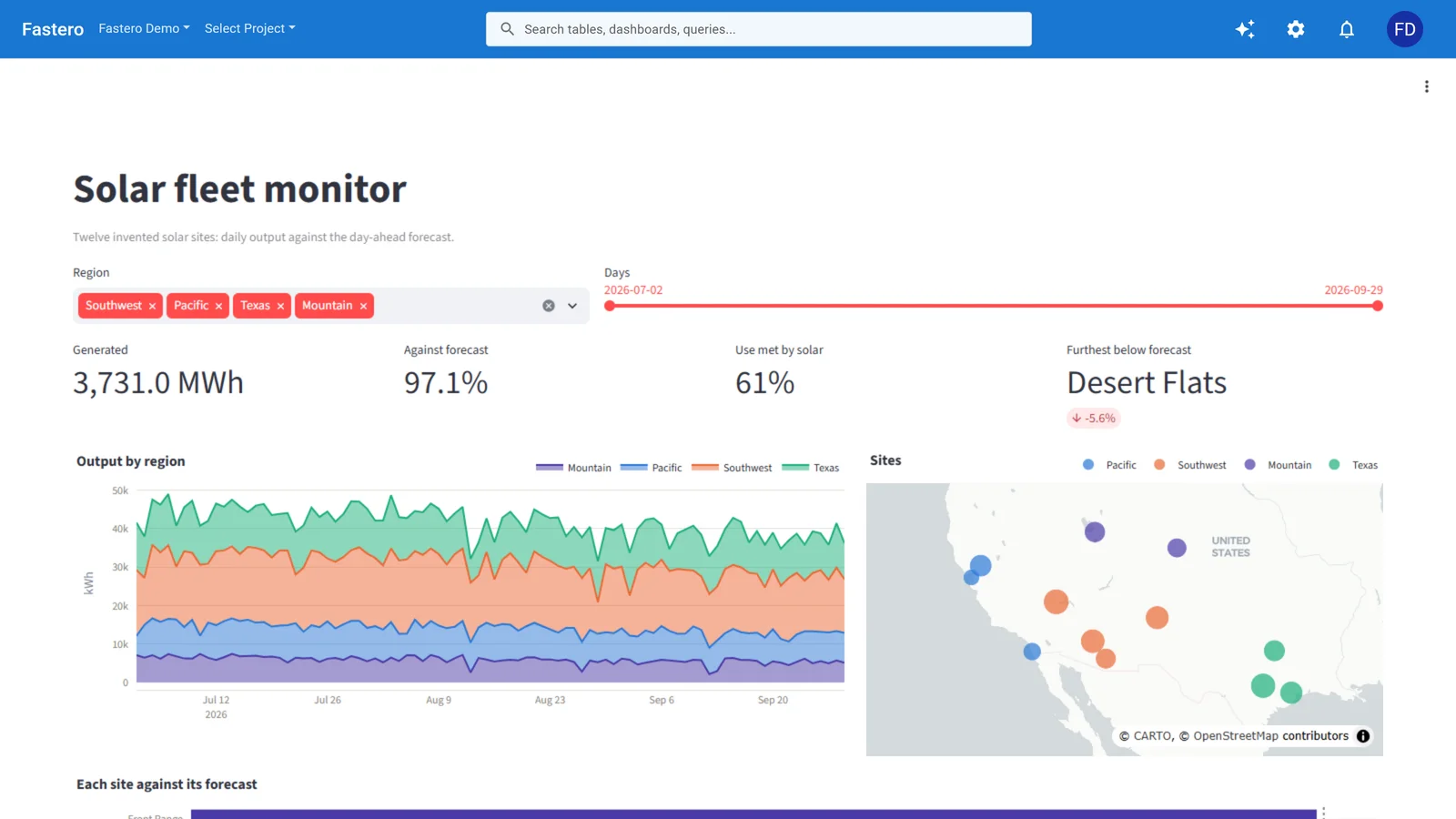
A Streamlit app running in Fastero, behind the team's login. Sample data.
What are the gotchas nobody warns you about?
Marimo's DAG constraint kills some workflows. You can't define the same variable in two cells. You can't mutate a global DataFrame across multiple cells the way you casually do in Jupyter. Exploratory work that relies on overwriting variables — df = df.dropna() in one cell, df = df.merge(other) in the next — needs restructuring. Marimo forces you to write cleaner code. Whether that's a feature or a tax depends on your workflow.
Jupyter's "Restart and Run All" culture is a lie. Teams tell themselves they always restart the kernel and run all cells before committing. They don't. Hidden state bugs ship to production inside .ipynb files every day. Marimo's reactive model eliminates this entire category of bug — not by discipline, but by architecture.
Marimo's community size matters for debugging. Hit a weird error in Jupyter? Stack Overflow has 500 answers. Hit a weird error in Marimo? You might be filing the GitHub issue. The project is well-maintained, but the support surface is thinner.
Jupyter extensions can conflict. Install enough JupyterLab extensions and things start breaking in subtle ways — CSS collisions, kernel crashes, incompatible APIs between extension versions. Marimo's smaller extension surface means fewer integration headaches, but also fewer capabilities.
When should you pick one over the other?
Pick Marimo when:
- Reproducibility is non-negotiable (regulated industries, scientific publishing)
- Your team reviews notebooks in pull requests and needs real diffs
- You want to serve notebooks as lightweight apps without a framework rewrite
- You're starting a new project and don't need R/Julia kernels or specific JupyterLab extensions
Pick Jupyter when:
- You need the ecosystem — specific extensions, non-Python kernels, or integrations that only exist for
.ipynb - Your team already has JupyterHub infrastructure and workflows built around it
- You want maximum flexibility in execution order for messy, iterative exploration
- Compatibility matters more than purity — sharing notebooks with collaborators who expect
.ipynb
For a broader look at how Jupyter compares to cloud-hosted alternatives, or where Hex fits as a collaborative layer on top, we've covered those matchups separately.
FAQ
Can I convert existing Jupyter notebooks to Marimo?
Yes. Marimo includes a marimo convert notebook.ipynb command that translates .ipynb files into .py Marimo notebooks. The conversion handles straightforward cases well — sequential cells with clear variable dependencies. Notebooks that rely on execution-order tricks, heavy use of %% magics, or global state mutation will need manual cleanup after conversion.
Does Marimo work with VS Code?
Marimo notebooks are plain .py files, so any editor opens them. For the full reactive editing experience — live cell re-execution, UI element rendering — you use Marimo's own browser-based editor (marimo edit). VS Code gives you syntax highlighting and linting but not the reactive runtime. The Marimo team is working on tighter IDE integrations.
Is Marimo production-ready? Marimo hit 1.0 and is used in production by teams that value reproducibility. The core runtime is stable. The ecosystem around it — third-party integrations, deployment tooling, enterprise features — is still maturing. For internal tools and data apps, it's solid. For mission-critical pipelines, evaluate the specific integrations you need.
Can I use Marimo with non-Python languages?
Not yet. Marimo is Python-only. If you need R, Julia, or SQL-first notebooks, Jupyter (or a platform like Hex for SQL) is still your option. Marimo does support SQL through its built-in mo.sql interface, which returns results as DataFrames, but this is Python-wrapped SQL — not a separate SQL kernel.
Why not just use Jupytext with Jupyter?
Jupytext syncs .ipynb files to .py (or .md) counterparts, giving you git-friendly diffs while keeping the Jupyter editing experience. It's a good middle ground. The difference is that Jupytext doesn't give you reactivity, deterministic execution, or app deployment. It solves the file format problem but not the execution model problem. If git diffs are your only pain point, Jupytext plus Jupyter might be enough.
Does Marimo support interactive visualizations?
Yes. Marimo has built-in support for Plotly, Altair, matplotlib, and its own mo.ui elements (sliders, tables, dropdowns, file uploaders). Because the notebook is reactive, changing a slider automatically re-runs every cell that depends on its value. For visualization library comparisons, see our separate breakdown.
Try Fastero free — run Python, deploy Streamlit apps, query databases with AI. Notebooks that connect to your real data. No credit card required.