 Fastero Dev Team
You can install Jupyter Notebook with four commands in about a minute. It needs Python and around 250 MB of disk, and most of what goes wrong later comes from skipping the first step below: a virtual environment.
The short answer: with Python 3.10 or newer, run python -m venv jupyter-env, activate it, then pip install notebook, and start it with jupyter notebook. That also gives you JupyterLab. You don't need Anaconda. If you see "'jupyter' is not recognized", use python -m notebook. To skip installing altogether, open jupyter.org/try for a notebook in your browser, or see 12 ways to run Jupyter online.
Fastero
Jupyter notebooks for your team, with nothing to install.
Start a notebook or bring your .ipynb files. SQL cells query your databases with no password in the code, and a notebook runs now or on a schedule. Colleagues open it with their own login; viewers are free.
Try free →We ran these commands with Notebook 7.6.4 on Windows 11 with Python 3.14, and on Debian with Python 3.11. The macOS steps come from the official docs.
Install Jupyter Notebook on Windows
Open PowerShell or Command Prompt and check that you have Python. If you don't, get it from python.org/downloads.
python --version
python -m venv jupyter-env
jupyter-env\Scripts\activate
pip install notebook
jupyter notebook
The install took 43 seconds and downloaded 59 MB, for 251 MB on disk. If PowerShell refuses the activate step with "running scripts is disabled on this system", allow scripts for this window and try again:
Set-ExecutionPolicy -Scope Process -ExecutionPolicy RemoteSigned -ForceInstall Jupyter Notebook on Mac or Linux
python3 --version
python3 -m venv jupyter-env
source jupyter-env/bin/activate
pip install notebook
jupyter notebook
If a system Python refuses to install packages with an "externally managed environment" error, that's what the virtual environment is for: activate it and run pip again. Homebrew also has its own package: brew install jupyterlab.
What you should see
The command prints an address with a token, and your browser opens on it:
Jupyter Server 2.21.1 is running at:
http://localhost:8888/tree?token=2a30d4d212b74513...
Use Control-C to stop this server and shut down all kernels (twice to skip confirmation).
Click New → Python 3 (ipykernel) to start a notebook, or open an existing one with jupyter notebook sample.ipynb.
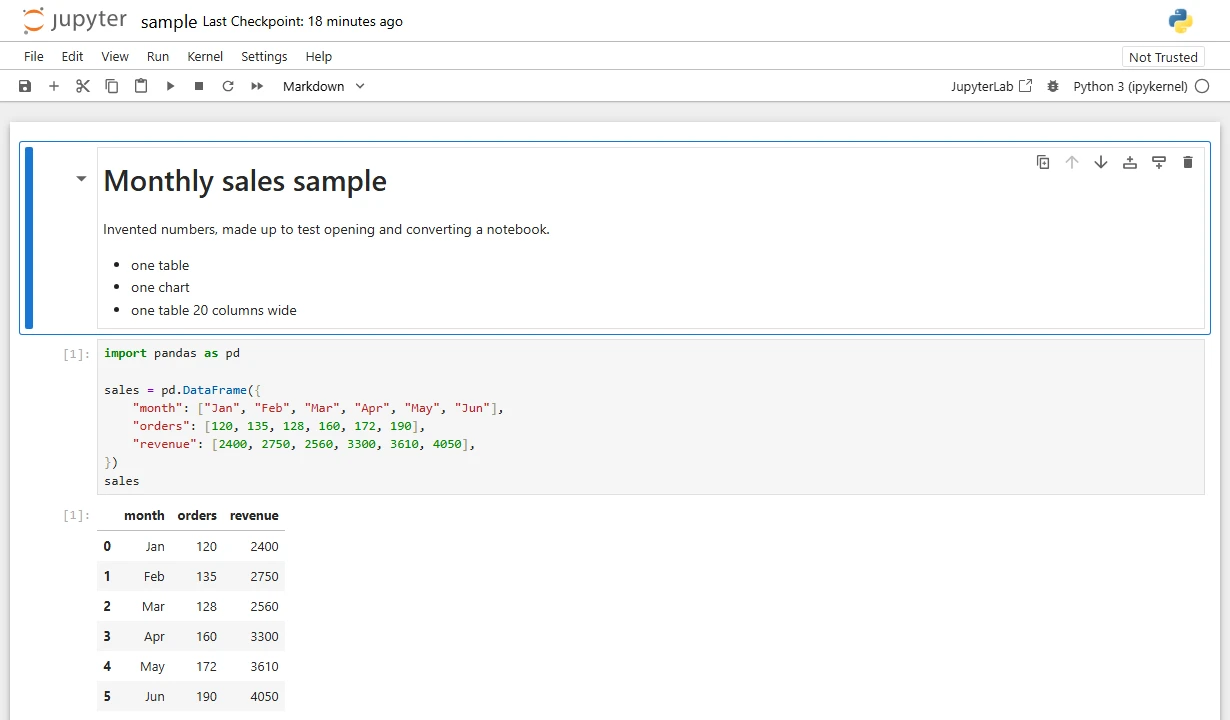
Notebook 7.6.4 running locally, on an invented table.
Next time, activate the environment and run jupyter notebook again. To stop it, press Control-C in that window. jupyter server stop did stop the server in our test, but it printed "Could not stop server", so don't let that message worry you.
Add the packages you need
A fresh environment has Jupyter and little else. With the environment active:
pip install pandas matplotlibOr from a cell inside a running notebook, which installs into the kernel's own environment:
%pip install pandas matplotlibJupyter Notebook or JupyterLab?
pip install notebook installs both, and they open the same .ipynb files. The reverse isn't true: pip install jupyterlab gets you JupyterLab only.
| Jupyter Notebook | JupyterLab | |
|---|---|---|
| Start with | jupyter notebook |
jupyter lab |
| Feels like | One document at a time | A workspace with tabs, a file browser and terminals |
| Best for | Learning, reading, simple notebooks | Daily work across many files |
| Address | /tree |
/lab |
Notebook 7 is built on JupyterLab's parts. If you rely on old extensions, pip install nbclassic brings back the classic interface.
Other ways to install it
| Route | Command | When to choose it |
|---|---|---|
| pip | pip install notebook |
The default, and what jupyter.org recommends |
| uv | uvx --from jupyter-core --with jupyter jupyter lab |
You want it with no environment to manage. uv can even fetch its own Python |
| Anaconda | The Anaconda installer | You want hundreds of data packages in one go; needs at least 5 GB |
| conda | conda install -c conda-forge jupyterlab |
You already use conda |
| VS Code | The Jupyter extension | You already work in VS Code; it still needs Python and ipykernel |
| JupyterLab Desktop | winget install jupyterlab on Windows |
You want a desktop app and double-clicking .ipynb files |
A note on Anaconda at work. Its terms make use free for individuals, and for "a for-profit organization with 200 or fewer total employees or contractors". Bigger for-profit organizations must pay for a Business plan, so check before installing it on a work laptop. pip has no such rule.
The VS Code route isn't a way to avoid Python. The extension's listing says "you must have Python environment in which you've installed the Jupyter package". See Jupyter vs VS Code to choose.
Fix common errors
"'jupyter' is not recognized as an internal or external command". PowerShell words it "The term 'jupyter' is not recognized", and Mac or Linux says "command not found". Your environment isn't active, or the install folder isn't on your PATH. Either activate the environment, or run it through Python, which needs no PATH at all:
python -m notebook
python -m jupyterlab
That has to be the Python holding Jupyter. Any other replies No module named notebook.
ModuleNotFoundError: No module named 'pandas', though you installed it. The notebook's kernel is running from a different environment. Check with import sys; print(sys.executable) in a cell. To fix it, register the environment that has your packages as a kernel, then pick it under Kernel → Change Kernel:
pip install ipykernel
python -m ipykernel install --user --name my-project
An old version installed without complaint. Notebook 7.6 needs Python 3.10 or newer, and pip quietly picks an older Notebook on an older Python. Run jupyter notebook --version, and upgrade Python if you're behind.
"Running as root is not recommended". This appears in containers. Use a normal user, or add --allow-root inside a throwaway container only.
Jupyter notebooks for your team.
Start free →Skip the install
For trying something out or learning, nothing needs installing:
| Option | Needs | Good to know |
|---|---|---|
| JupyterLite | Just a browser, no account | Python runs in your browser; we ran pandas and matplotlib there. Files stay in the browser |
| Google Colab | A Google account | Free GPUs when available; see what Colab Pro buys |
| Kaggle Notebooks | A Kaggle account | Free GPUs with a weekly quota |
| Binder | A public GitHub repository | Temporary; nothing is kept |
There's more in Jupyter Notebook online and Google Colab alternatives.
For a team: no install on anyone's laptop
A local install works for one person. For a team, it means everyone maintains their own Python, passwords sit in notebooks, and nothing runs when your laptop is shut.
Fastero gives your team hosted Jupyter notebooks with nothing to install. They're real .ipynb files running Python 3.11, with pandas, SQLAlchemy, seaborn and the Postgres and BigQuery drivers already there. SQL cells query your databases with no password in the code, and secrets reach cells as environment variables. A notebook runs now or on a schedule, and colleagues open it with their own login, with viewers free.
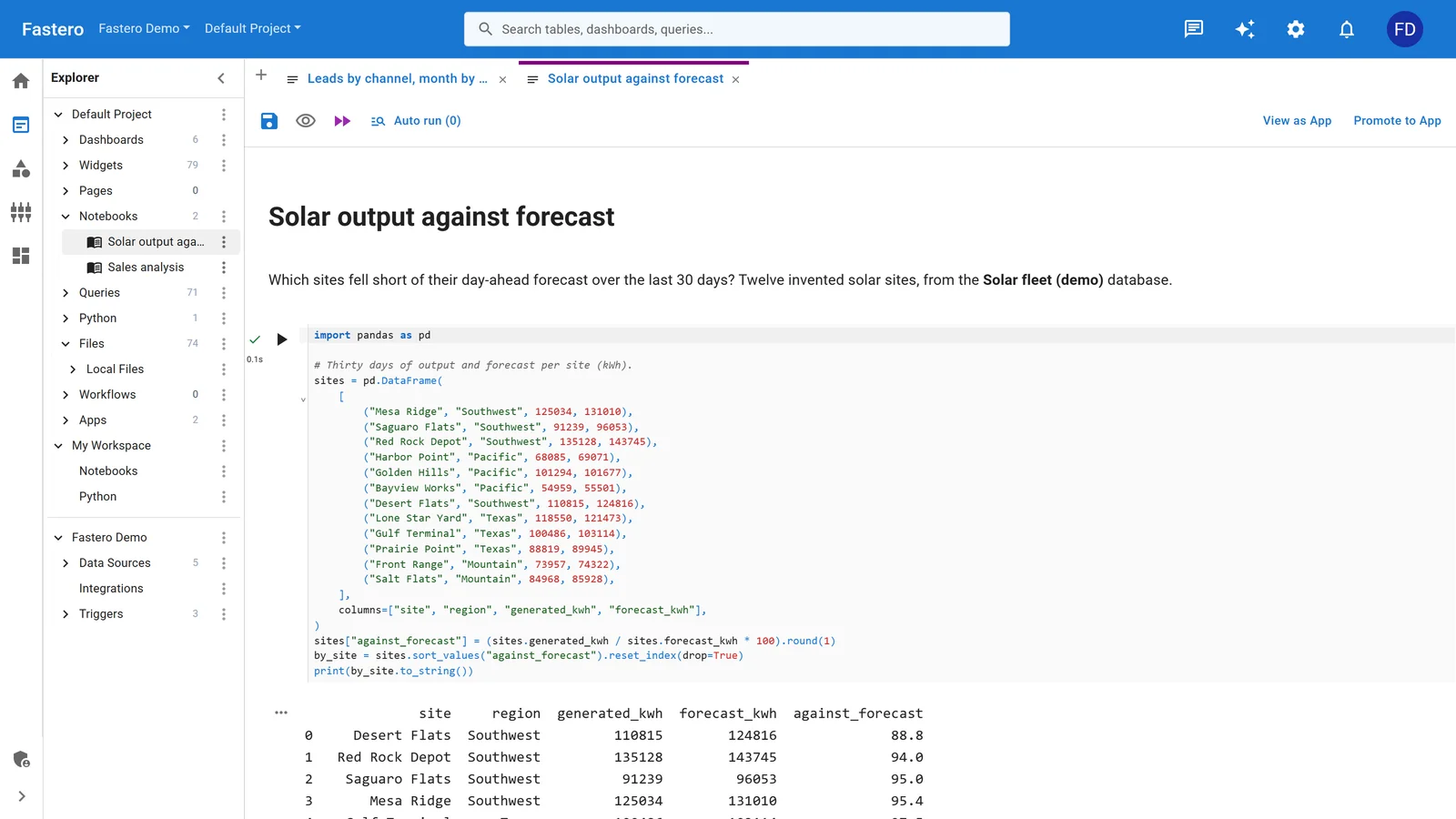
A notebook in Fastero, with the project's queries, apps and data sources beside it. Sample data.
Bring the notebooks you have: how to open an ipynb file covers uploading one.
FAQ
Do I need Anaconda to install Jupyter Notebook?
No. pip install notebook is the route jupyter.org recommends. Anaconda bundles hundreds of packages and needs at least 5 GB, and for-profit organizations of more than 200 people must pay for it.
What Python version does Jupyter Notebook need?
Notebook 7.6 needs Python 3.10 or newer. It ran for us on 3.11 and 3.14, and an older Python silently gets an older Notebook.
How do I install Jupyter Notebook on Windows 11?
Install Python, then in PowerShell or Command Prompt run python -m venv jupyter-env, jupyter-env\Scripts\activate, pip install notebook and jupyter notebook.
How do I install Jupyter Notebook in VS Code?
Install the Python and Jupyter extensions, and make sure Python is installed. VS Code opens .ipynb files itself, and offers to install ipykernel the first time you run a cell.
Why does it say jupyter is not recognized?
The folder holding jupyter isn't on your PATH, usually because the virtual environment isn't active. Activate it, or run python -m notebook with the Python that holds Jupyter.
Is Jupyter Notebook free?
Yes. It's open source, and running it on your own computer costs nothing.
Sources
Read 2 to 3 November 2026. Commands were run on Windows 11 and Debian; macOS, conda, Anaconda, Homebrew and the VS Code window were not.
- Jupyter: Install, Try Jupyter, Notebook docs, Migrating to Notebook 7, JupyterLab install, JupyterLab Desktop, JupyterLite
- Python: venv, Python on Windows, Installing with pip and virtual environments, uv and Jupyter
- Anaconda: Terms of service, System requirements
- VS Code: Jupyter Notebooks, Jupyter extension
Try Fastero free — run Jupyter notebooks with nothing to install, next to your team's data. No credit card required.