 Fastero Dev Team
CoCalc is an online workspace where Jupyter notebooks, LaTeX documents and Linux terminals live together in shared projects, and several people can edit the same notebook at once. It started in 2013 as SageMathCloud, and in 2026 it moved: cocalc.com now redirects to cocalc.ai, rebuilt around AI agents that work in the same projects as people.
The short answer: CoCalc runs collaborative Jupyter notebooks, LaTeX with PDF preview, terminals, SageMath, R and Julia in the browser, with real-time co-editing and a full edit history. The free membership gives each project 2 GB of RAM, 4 GB of disk and low CPU priority, with up to five projects and one running at a time. Projects on the free membership have no internet access, so pip install from PyPI and git clone from GitHub don't work. Paid memberships start at $8 a month, or $6 billed yearly, which adds network access; Standard is $24 ($18) and Pro $200 ($150). CoCalc suits teaching and research groups. For free GPUs, look at Kaggle or Colab instead. Prices and limits checked 12 November 2026.
Fastero
Jupyter notebooks for your team, with nothing to install.
Start a notebook or bring your .ipynb files. SQL cells query your databases with no password in the code, and a notebook runs now or on a schedule. Colleagues open it with their own login; viewers are free.
Try free →What CoCalc is
A CoCalc project is a Linux workspace in the cloud, with its files, installed software and terminals, that you share with collaborators. Inside it you can open:
- Jupyter notebooks that several people edit at once: "Multiple people can edit the same notebook in realtime." Cells keep running after a browser disconnect while the project and kernel stay up, and TimeTravel records the notebook's history.
- LaTeX documents, with "collaboration, PDF preview, source synchronization, anchored discussions and edit history".
- Terminals: shared, persistent Linux shells, which CoCalc's older manual says competitors' free tiers lack.
- Other tools: SageMath, R, Julia, Markdown, slides, whiteboards and task lists, plus chat beside each file.
Two kinds of access are built in. A collaborator can edit, run code and use terminals. A viewer gets "Read-only access to allowed files, without editing, code execution, terminals, SSH, or project management." You can also publish a file, folder or project as an unlisted link for signed-in readers.
CoCalc is now CoCalc.ai
On 12 November 2026, every cocalc.com page we requested answered with a permanent redirect to the same page on cocalc.ai. The company behind it, SageMath, Inc., now describes CoCalc as "the agent platform where your agents work alongside your team": Codex is built in, Claude Code is available where the site enables it, and an agent works in a project with its files, terminals and a shared web browser.
If you had a cocalc.com account, CoCalc's migration guide explains the move: sign in to cocalc.ai with the same email address, verify it, and a banner offers to move legacy billing credit and restore old projects, up to 50 at a time. Some accounts are offered a free membership period; the guide quotes the banner as "Your 30-day membership grant is active." Restored projects can open before all their files are back.
The notebooks, LaTeX editor and course tools are still there. Pricing for the hosted site is now by membership, where cocalc.com sold licences that you applied to projects.
CoCalc pricing: Free, Basic, Standard and Pro
From CoCalc's pricing page, checked 12 November 2026:
| Free | Basic | Standard | Pro | |
|---|---|---|---|---|
| Price, billed monthly | $0 | $8 a month | $24 a month | $200 a month |
| Price, billed yearly | $0 | $6 a month | $18 a month | $150 a month |
| RAM per project | 2 GB | 4 GB | 8 GB | 16 GB |
| Disk per project | 4 GB | 8 GB | 16 GB | 50 GB |
| CPU priority | Low | Low | Medium | High |
| Projects you own | 5 | 10 | 20 | 250 |
| Running at once | 1 | 2 | 5 | 50 |
| Total disk | 8 GB | 16 GB | 50 GB | 500 GB |
| Internet access in projects | No | Yes | Yes | Yes |
| Dedicated VM, pay as you go | No | Yes | Yes | Yes, billed at month end |
Some memberships include AI usage, but the pricing page doesn't say how much, and Codex can use "your membership's included AI allowance or your own OpenAI API key". For a group, team seats let one account buy memberships and assign them to people, and departments or universities can arrange one licence for many users by contacting CoCalc. GPUs come from a dedicated project host or a remote Jupyter kernel on another machine, not from the membership itself.
What the CoCalc free tier can't do
- Reach the internet. CoCalc's comparison of its hosted service with the self-hosted CoCalc Star puts it plainly: internet access in projects comes "With a paid membership". So on Free you can upload files from your computer, but you can't
pip installfrom PyPI,git clonefrom GitHub or call an API. CoCalc's older manual gives the reason: when free projects had internet, "malicious users launched attacks on other computers from CoCalc". - Run much. 2 GB of RAM and low CPU priority are, in the pricing page's words, "just enough resources to explore the platform and do basic work". One project runs at a time.
- Keep running unattended. The docs warn that "A configured browser-idle policy can stop a hosted project even while a cell runs," and a stop loses variables held in memory. The current pricing page doesn't publish the free idle timeout; the older manual put it at "about 30 minutes" for free projects.
- Use the better hosts. The old manual called it member hosting: free projects ran on busy shared machines that "might also shutdown at any time", and paid ones on quieter machines. The new Basic membership lists "Access better shared hosts".
- Hold big data. 4 GB of disk per project and 8 GB in total.
The free tier is fine for trying CoCalc, reading a shared course notebook or writing a LaTeX paper. Anything that installs packages from the internet needs Basic or better.
Who CoCalc suits
Teaching. CoCalc has course tools built in. An instructor creates a course file, adds students, assigns files into each student's own project, then collects, grades and returns them; nbgrader handles autograded notebook assignments. Payment can come from students buying a course membership, the instructor buying seats, or a site licence, with a grace period before payment is required. Because the instructor can open any student's project, helping someone stuck on an error means looking at their actual notebook, at the same time, rather than a screenshot.
Research. Papers, code and data sit in one project with full history, which suits groups writing LaTeX papers around computations, mathematicians using SageMath, and anyone who wants a terminal and a notebook side by side. For heavier work, a project can move to a dedicated machine, or a notebook can use a remote kernel on a GPU machine you can reach over SSH.
Less so for free GPU training, a team's scheduled reporting on a company database, or anyone who wants a notebook tool with no Linux in it.
Running CoCalc yourself
Besides the hosted service, CoCalc offers two ways to run it on your own hardware:
| What it is | Price | Internet in projects | |
|---|---|---|---|
| CoCalc.ai | The hosted service | Memberships, above | With a paid membership |
| CoCalc Plus | A local, one-user runtime on Linux or an Apple silicon Mac | Not listed | Not stated |
| CoCalc Star | A shared CoCalc site in one Docker container, on a computer or server you control | Free of charge | Every project |
With Star you operate it, back up its Docker volume and bring your own OpenAI API key for Codex. For a school with a server and someone to look after it, that gives every student a full project without a per-student fee.
Jupyter notebooks for your team.
Start free →CoCalc alternatives
| Tool | Free tier | Paid from | Best for |
|---|---|---|---|
| CoCalc | 2 GB RAM, 4 GB disk, no internet | $6 a month billed yearly | Courses, LaTeX and research in shared projects, with live co-editing |
| JupyterLite | Runs in your browser, no account | Free | Trying Jupyter or teaching with nothing to install |
| Kaggle Notebooks | GPUs, about "30 hours or sometimes higher" a week | Free | GPU training on public data |
| Datalore (JetBrains) | 120 CPU hours a month, 10 GB | $29.17 per user a month billed yearly | Notebooks with SQL cells, reports and schedules |
| Lightning AI Studios | One free CPU Studio, up to 30 credits | Pro $20 a month billed yearly | A persistent cloud machine with pay-per-second GPUs |
| Fastero | Free plan with no end date | Pro $20 per editor a month | A team's notebooks on company data, run on a schedule |
Figures from each vendor's pages, checked 12 November 2026. Our guide to running a Jupyter notebook online compares more of them, and Kaggle Notebooks covers the GPU quota in detail. For a whole class on your own servers, JupyterHub is the other common route: see JupyterHub hosting.
Pick CoCalc when people need to edit the same notebook or LaTeX file at the same time, with history: a class, a lab, or two co-authors. CoCalc has real-time co-editing and Fastero does not; if live co-editing is what you need, CoCalc is the better choice. Pick something else when you need free GPUs (Kaggle, Colab), nothing to sign up for (JupyterLite), or a notebook that reads a company database every morning and that colleagues open as a finished result.
When the notebook is for a team
That last case is what Fastero is for. It's an AI and data platform where people and AI agents work together on a team's data, and its notebooks run next to the team's database connections. There's no live co-editing: it's built for one person writing a notebook and the rest of the team reading the result.
- SQL cells query a workspace connection with its stored credentials and hand the result to Python as a pandas DataFrame, so no password sits in the notebook.
- Secrets reach cells as environment variables, in interactive and scheduled runs alike.
- Schedules: run a notebook now, or on a cron schedule, on the Free plan.
- Sharing: colleagues sign in to open it; viewers are free and can read without running or changing it. Inviting someone to a single project makes them a guest who sees that project and nothing else.
- Results that travel: Promote to App turns a notebook into an app behind the same login, and a SQL cell's result can become a dashboard widget that refreshes.
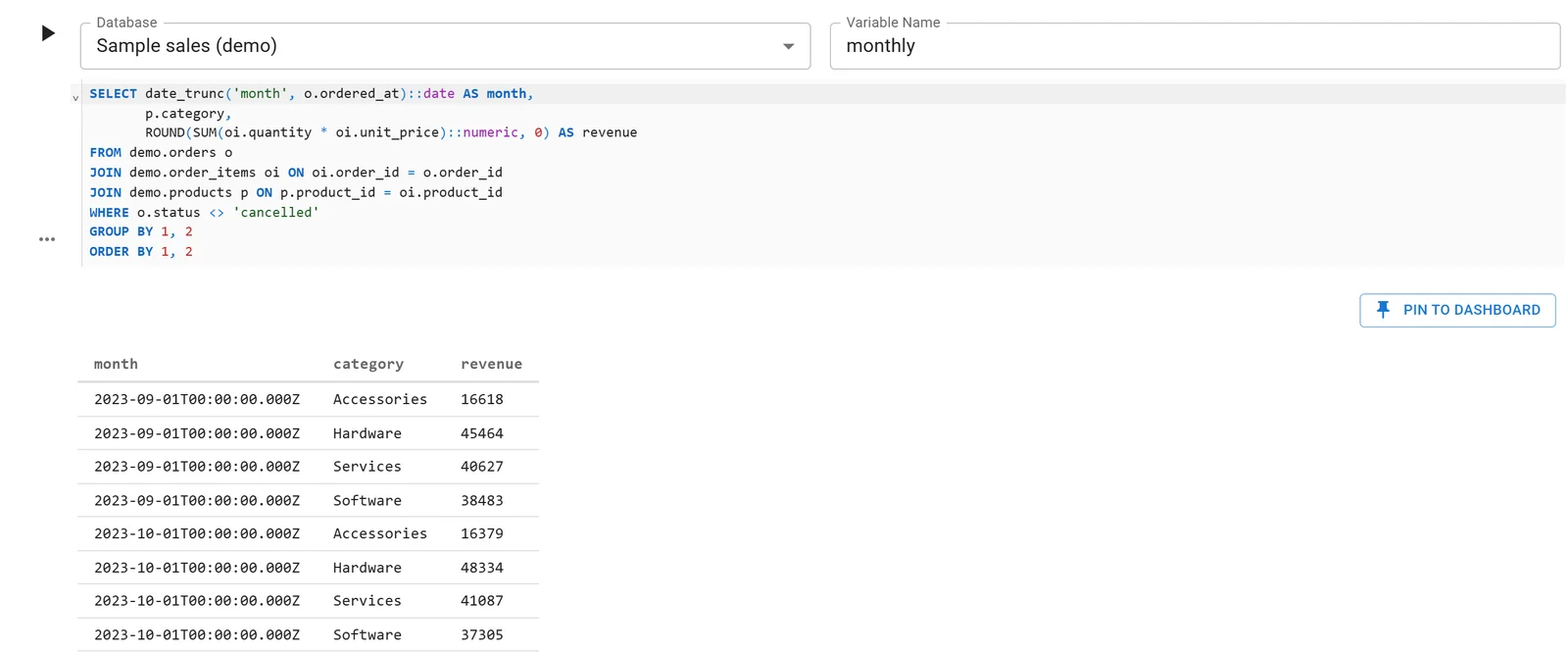
A Fastero notebook whose SQL cell reads a database connection; the rows arrive in Python as a DataFrame. Sample data.
Fastero's Free plan has no end date, and Pro is $20 per editor a month. More on sharing a Jupyter notebook with your team.
FAQ
Is CoCalc free?
There is a free membership: five projects, one running at a time, each with 2 GB of RAM and 4 GB of disk, low CPU priority and no internet access. Paid memberships start at $8 a month, or $6 a month billed yearly, as of 12 November 2026.
Why can't I pip install in CoCalc?
On the free membership, projects have no internet access, so pip can't reach PyPI. Internet access comes with any paid membership, starting with Basic. You can still upload files from your own computer.
What happened to cocalc.com?
It redirects to cocalc.ai, where CoCalc has been rebuilt around AI agents that work in projects alongside people. Old accounts move over by signing in with the same verified email address, which brings legacy billing credit and lets you restore old projects.
Does CoCalc support real-time collaboration?
Yes. Several people can edit the same Jupyter notebook, LaTeX file or terminal at once, and TimeTravel keeps the edit history.
Is CoCalc good for teaching?
Yes, it has course tools built in: course files assign work into each student's project, then collect, grade and return it, with nbgrader for autograded notebooks. Students can pay for a course membership, or the instructor or institution can pay.
Can I host CoCalc myself?
Yes. CoCalc Star is a free CoCalc site in one Docker container that you run on your own server, with internet access in every project. CoCalc Plus is a local version for one person on Linux or an Apple silicon Mac.
Does CoCalc have GPUs?
Not on the memberships themselves. You can move a project to a dedicated machine, paid as you go, or connect a notebook to a remote kernel on a GPU machine you can reach over SSH.
Sources
Read on 12 November 2026:
- CoCalc: Pricing, Where to run CoCalc, Features, About, Docs index, Migrating from cocalc.com, Use Jupyter notebooks, Add project collaborators, Use terminals, Build LaTeX documents, Teach a course, Course student pay, nbgrader
- CoCalc's older manual, for the cocalc.com service: Trial projects, Upgrades: member hosting, internet access, idle timeout
- Other tools: Kaggle efficient GPU usage, Datalore pricing, Lightning AI pricing