 Fastero Dev Team
"Claude Desktop" is the name of an app, and the app holds two different things: a chat, which is merging with Cowork, and a Code tab that is Claude Code. Most of the confusion behind "Claude Code vs Claude Desktop" comes from treating them as one. Below we compare the Code tab with chat and with every other place Claude Code runs, from Anthropic's docs as of 20 November 2026.
The short answer: Claude Code Desktop is the Code tab of the Claude desktop app. It runs the same engine as the claude command in a terminal, on a project folder on your computer (or in the cloud, over SSH, or in WSL), and adds parallel sessions, visual diffs, an app preview and an integrated terminal. It needs a paid plan: Pro ($20 a month, or $17 a month billed yearly, checked 20 November 2026), Max, Ultra, Team or Enterprise; Free gets chat only. Chat in the same app is built for answers and finished files, not for working in a codebase. Use the CLI for scripts (claude -p), agent teams and third-party providers; VS Code or JetBrains to stay in your editor; and the web when a task should keep running with your laptop closed.
Fastero
Point Claude at your database.
Add Fastero to claude.ai or Claude Code. Claude builds the dashboard, deploys the app or publishes a live page, and your team opens it in Fastero.
Try free →What the Code tab is
In Anthropic's words, "In the Claude Desktop app, Claude Code is the Code tab." Each conversation is a session with its own history and project folder, and the sidebar runs several at once. Before the first message you pick where it runs: Local (a folder on your machine), Cloud (Anthropic-managed, keeps going if you close the app), SSH (a remote machine, where Desktop installs Claude Code on first connect) or WSL (a WSL 2 distribution on Windows).
"The desktop app includes Claude Code, so you don't need to install Node.js or the CLI to use the Code tab." Over a terminal it adds sessions that can each run in their own git worktree, a diff view you can comment on, pull request status through CI, a Browser pane that previews your running app, and an integrated terminal and file editor. Dispatch (tasks sent from your phone) and computer use, "a research preview on macOS and Windows", are Pro, Max and Ultra only.
Claude Code Desktop vs chatting in Claude Desktop
| Chat (and Cowork) in Claude Desktop | Code tab (Claude Code) | |
|---|---|---|
| Built for | Answers, research, documents, spreadsheets, decks | Working on a codebase: edits, commands, git |
| Your files | A folder you give it, where it can "read, organize, and create files" | A project folder per session, a cloud repository, an SSH machine or a WSL distribution |
| Where work runs | Longer tasks run in Anthropic's cloud; local files need the app open | Your machine by default; cloud, SSH or WSL if you pick them |
| Control | One Auto or Manual setting for the conversation | Five permission modes, from Manual to Bypass permissions |
| What you review | Finished files and artifacts | Diffs, an app preview, PR status |
| Local MCP servers | Desktop extensions or claude_desktop_config.json |
Servers from claude_desktop_config.json, plus ~/.claude.json and .mcp.json |
| Plans | Free and every paid plan | Pro, Max, Ultra, Team, Enterprise |
A local server you put in claude_desktop_config.json for chat also works in the Code tab; the standalone CLI doesn't read that file. Chat and Cowork are becoming one conversation, rolling out to Pro, Max and Ultra first, and "The model picker and the “Code” tab are where they were." More in Cowork vs Claude Code and adding MCP servers to Claude Desktop.
Every Claude Code surface compared
"Claude Code runs the same underlying engine everywhere", and "Configuration, project memory, and MCP servers are shared across the local surfaces." What differs is where it runs and what it can reach.
| Surface | Where it runs | What it can touch | Plans and accounts | Operating systems |
|---|---|---|---|---|
| Desktop (Code tab) | Your machine, or Cloud, SSH or WSL per session | The session's folders and shell; your screen, with computer use | Pro, Max, Ultra, Team, Enterprise | macOS 13+ (Intel and Apple Silicon), Windows 10+ (x64 and ARM64), Linux beta: Ubuntu 22.04+, Debian 12+ |
| CLI | Your machine or a remote server | The working directory and folders you add with --add-dir; the shell |
Any paid plan, a Console (API) account, or Bedrock, Google Cloud, Foundry | macOS 13.0+, Windows 10 1809+, Ubuntu 20.04+, Debian 10+, Alpine 3.19+ |
| VS Code | Your machine, in VS Code or Cursor | The workspace, plus your selection and open file | Any paid plan, a Console account, or third-party providers | Wherever VS Code 1.94.0+ runs |
| JetBrains | Your machine: the plugin runs the CLI in the IDE terminal | As the CLI, plus the IDE's selection and diagnostics | As the CLI | IntelliJ IDEA, PyCharm, Android Studio, WebStorm, PhpStorm, GoLand |
| Web and mobile | Anthropic's cloud, or your organisation's self-hosted environment | A clone of your repository, not your computer | Pro, Max, Ultra, Team; Enterprise premium or Chat + Claude Code seats | Desktop browsers at claude.ai/code; the iOS and Android app |
An administrator can also route Desktop through a gateway, and Claude Desktop on 3P runs the Code tab on Bedrock, Google Cloud, Foundry or a Console API key. The same surfaces as a map:
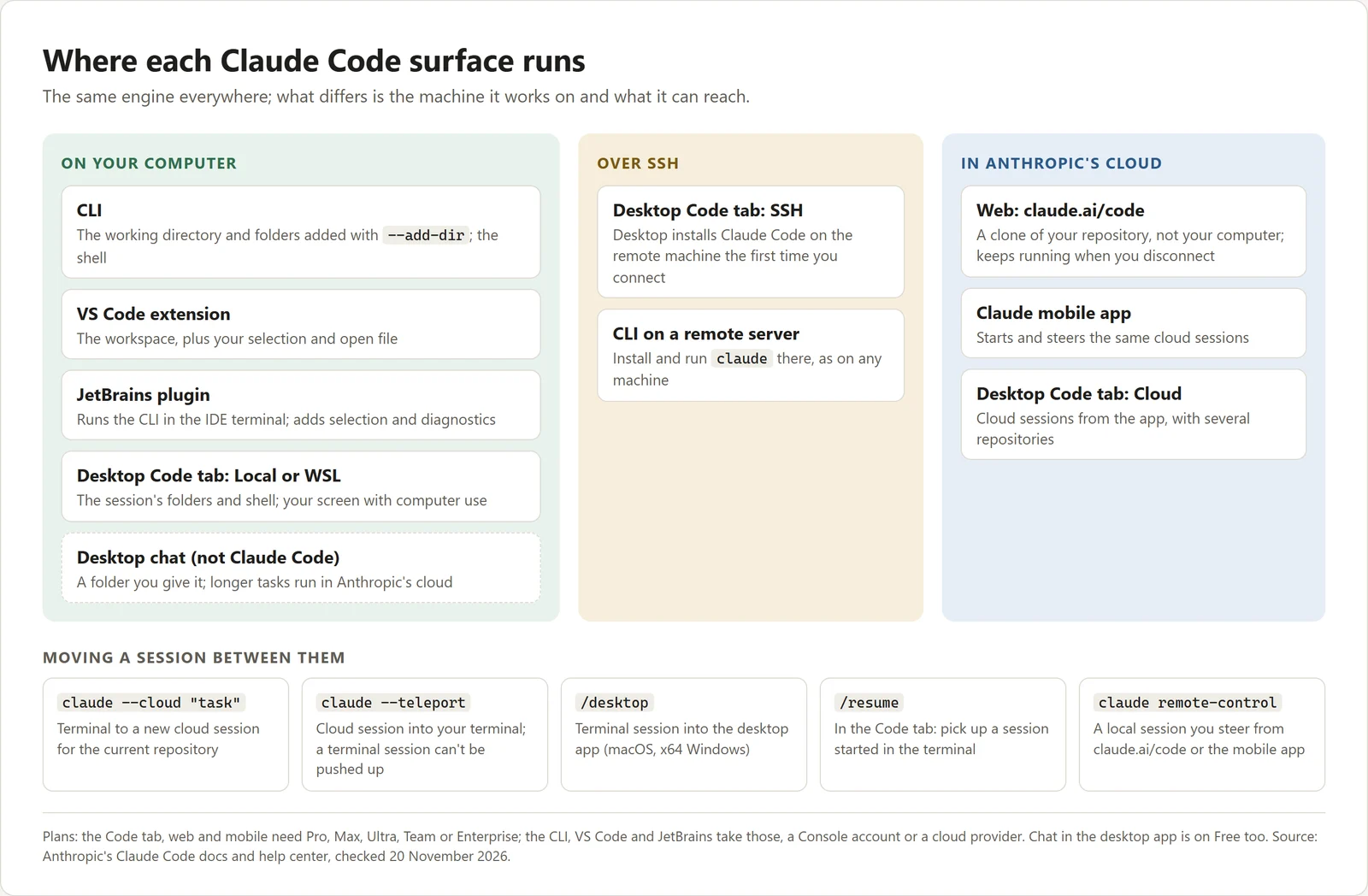
Where each surface runs, and how a session moves between them. Drawn from Anthropic's docs, checked 20 November 2026.
| Surface | Notable features | Missing, per the docs |
|---|---|---|
| Desktop | Parallel sessions, visual diffs, app preview, integrated terminal, Dispatch, scheduled tasks, computer use on macOS and Windows | -p and --output-format ("Desktop is interactive only"), dontAsk mode, agent teams, inline code suggestions, panels such as /permissions |
| CLI | Every permission mode and command, -p and the Agent SDK, agent teams, third-party providers, computer use on macOS |
Dispatch; the Desktop panes |
| VS Code | Plans opened as a Markdown document you can comment on, inline diffs, @-mentions with line ranges, conversations in tabs | Some commands and skills, the ! shell shortcut, tab completion |
| JetBrains | The IDE's diff viewer, selection sharing, IDE diagnostics, Ctrl+Esc (Cmd+Esc on a Mac) to open |
No bundled CLI: install it separately |
| Web | Keeps running when you disconnect, several repositories per session, claude --teleport to pull a session into your terminal |
Bypass permissions; pushing a terminal session up ("session handoff is one-way") |
Point Claude at your database.
Start free →What claude --help shows
We ran the CLI's help on Windows 11 on 20 November 2026, without starting a session. Our install was 2.1.284, released 28 September; the newest release that day was 2.1.329, from 19 November.
$ claude --version
2.1.284 (Claude Code)

$ claude --help | grep -E -- "--(ide|cloud|teleport|remote-control|chrome) "
  --chrome                              Enable Claude in Chrome integration
  --cloud [description|session_id|url]  Create a cloud session with the given
  --ide                                 Automatically connect to IDE on startup
  --remote-control [name]               Start an interactive session with Remote
  --teleport [session]                  Resume a teleport session, optionally

$ claude --help | grep -ci desktop
0
The five entries in full, as --help prints them:
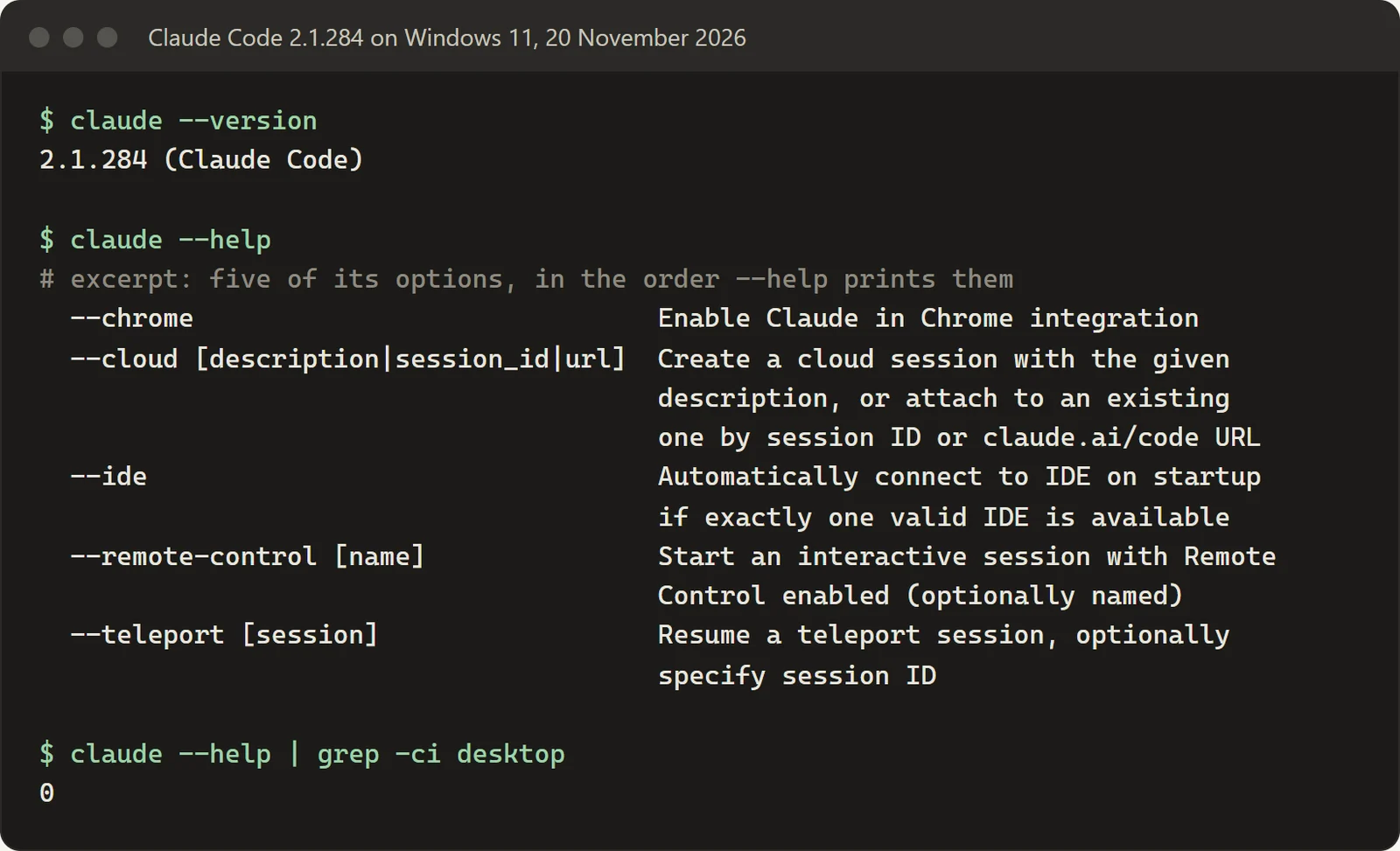
Our claude --help on Windows 11, 20 November 2026: the flags that reach the other surfaces, and no --desktop yet.
Those five flags are the CLI's doors to the other surfaces: an IDE, a new cloud session, a cloud session pulled back down, Remote Control from a phone or browser, and Chrome. Nothing mentions the desktop app: the changelog line "Added claude --desktop to open the Claude desktop app on the current directory" belongs to 2.1.285, one version after ours. Inside a session, /desktop moves the conversation into the app (Claude subscription, macOS or x64 Windows), and /resume in the Code tab picks up a terminal session. The cheat sheet lists the other flags; plan mode works on every surface above.
When Claude Code's work is for a team
Whatever the surface, the work ends in one person's folder or account. A number, chart or report colleagues need has to land somewhere they can open.
Fastero is an AI and data platform where people and AI agents work together on a team's data. It is a remote HTTP MCP server with OAuth sign-in, tested with Claude and Claude Code:
- In chat and the Code tab: add Fastero from Claude's connector directory (Customize › Connectors, listed as Community) and sign in to your workspace. In the Code tab, the + beside the prompt box opens the connector directory.
- In the CLI:
claude mcp add --scope user --transport http fastero https://api.fastero.com/api/v1/mcp, then/mcpto sign in through the browser. - Read-only SQL: one
SELECT,WITH,EXPLAINorSHOWstatement per call, anything that could change data refused, at most 500 rows. - Results the team opens: saved queries and dashboards stay in the workspace, colleagues sign in to see them, and viewers are free.
- Keys for scripts that can't sign in: at most 90 days, read and SQL by default (limits as of 20 November 2026).
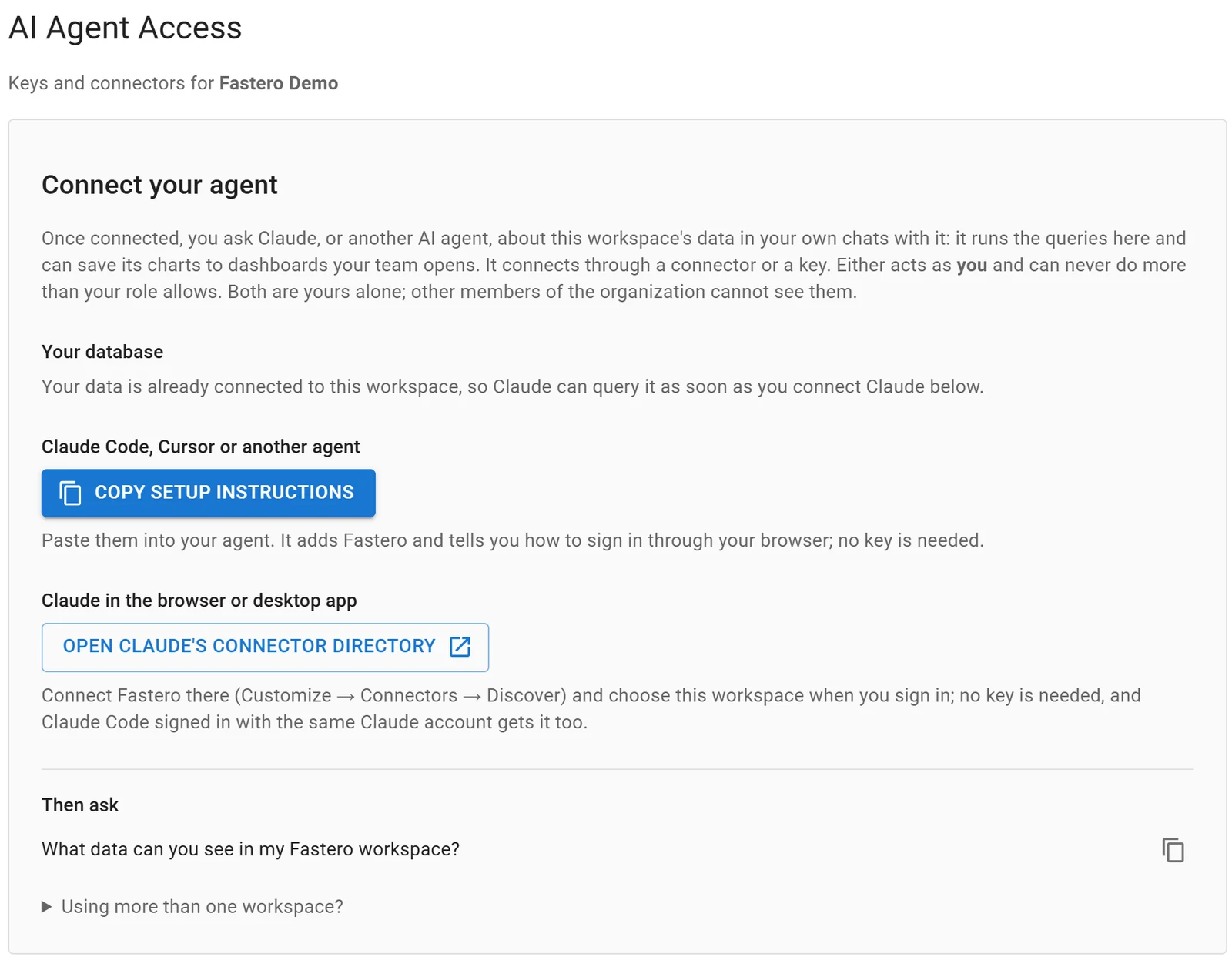
Settings, AI Agent Access: an agent signs in through the browser, so there is no key to copy.
More in Claude Code and MCP.
FAQ
Is Claude Code available in the Claude desktop app?
Yes. It is the Code tab, on macOS, Windows and Linux (beta), with Claude Code built in, so you don't need Node.js or the CLI. The tab needs a Pro, Max, Ultra, Team or Enterprise plan.
What is the difference between Claude Code and Claude Desktop?
Claude Desktop is the app; Claude Code is the coding agent, found in the app's Code tab, a terminal, VS Code, JetBrains and the web. Chat in Claude Desktop answers and makes files; Claude Code edits a project, runs its commands and shows you diffs.
Is Claude Code Desktop free?
No. Free includes chat in the desktop app but not Claude Code. Pro, the cheapest plan with it, is $20 a month, or $17 a month billed yearly; Max is $100 and Ultra $200, checked 20 November 2026. See Claude Code pricing.
Does Claude Code Desktop work on Linux?
Yes, in beta, on Ubuntu 22.04+ or Debian 12+, x86_64 or arm64, installed with apt. Computer use isn't available there yet, and on Fedora or Arch Anthropic says to run the CLI instead.
Do the CLI and the desktop app share settings?
Yes. Both read CLAUDE.md, ~/.claude/settings.json, ~/.claude.json and .mcp.json, so permission rules, hooks, skills and MCP servers carry over. Each keeps its own session list; /desktop and /resume move a session between them.
Sources
Read on 20 November 2026; the --help output is from Claude Code 2.1.284 on Windows 11:
- Claude Code docs: Desktop application, Get started with the desktop app, Desktop on Linux, Desktop in WSL, Platforms and integrations, Overview, Advanced setup, VS Code, JetBrains, Cloud sessions, Feature availability, CLI reference, Changelog
- Anthropic help center: Install Claude Desktop, Claude Cowork and chat are one Claude, Local MCP servers on Claude Desktop, Claude Code with Pro, Max or Ultra
- Anthropic: Pricing, Download