 Fastero Dev Team
Claude Code reads its settings from several JSON files, and the one you just edited isn't always the one that wins. We built a small project with user, project, local and managed settings files, validated each one against the schema Anthropic's docs link to, and checked every flag against claude --help on Claude Code 2.1.284.
The short answer: Claude Code settings live in ~/.claude/settings.json (you, every project), .claude/settings.json (the project, committed for your team), .claude/settings.local.json (you, this project, kept out of git) and managed settings your organisation deploys. When a key is set in several places, the highest level wins: managed, then --settings on the command line, then local, project and user. Lists such as permissions.allow merge instead. Permissions are three arrays of rules, allow, ask and deny, written as Tool or Tool(specifier): Bash(npm run *), Read(./.env), WebFetch(domain:example.com), mcp__github__*. Claude Code checks deny first, then ask, then allow, and the first match decides. Change options with /config, rules with /permissions, and run /status to see which files loaded. The files are strict JSON: no comments.
Fastero
Point Claude at your database.
Add Fastero to claude.ai or Claude Code. Claude builds the dashboard, deploys the app or publishes a live page, and your team opens it in Fastero.
Try free →Where Claude Code settings files live
From Anthropic's settings docs (checked 20 November 2026):
| Scope | File | Who it affects | Use it for |
|---|---|---|---|
| User | ~/.claude/settings.json |
You, in every project on this machine | Theme, default model, your own permission rules |
| Shared project | .claude/settings.json |
Everyone working in the folder; commit it | Team permissions, hooks, plugins, the env vars the project needs |
| Project local | .claude/settings.local.json |
You, in this project only | Personal overrides, testing before you share |
| Managed | managed-settings.json, MDM, or the claude.ai console |
Everyone your organisation deploys it to | Security policy |
"Installing Claude Code doesn't create any settings file." Claude Code writes the local file when you answer a permission prompt with "Yes, and don't ask again", and adds it to your global git excludes; if you create it by hand, add it to .gitignore yourself. On Windows ~/.claude is %USERPROFILE%\.claude. A fifth file, ~/.claude.json, is Claude Code's own (account, MCP servers, folder trust); you don't edit it.
Which settings file wins
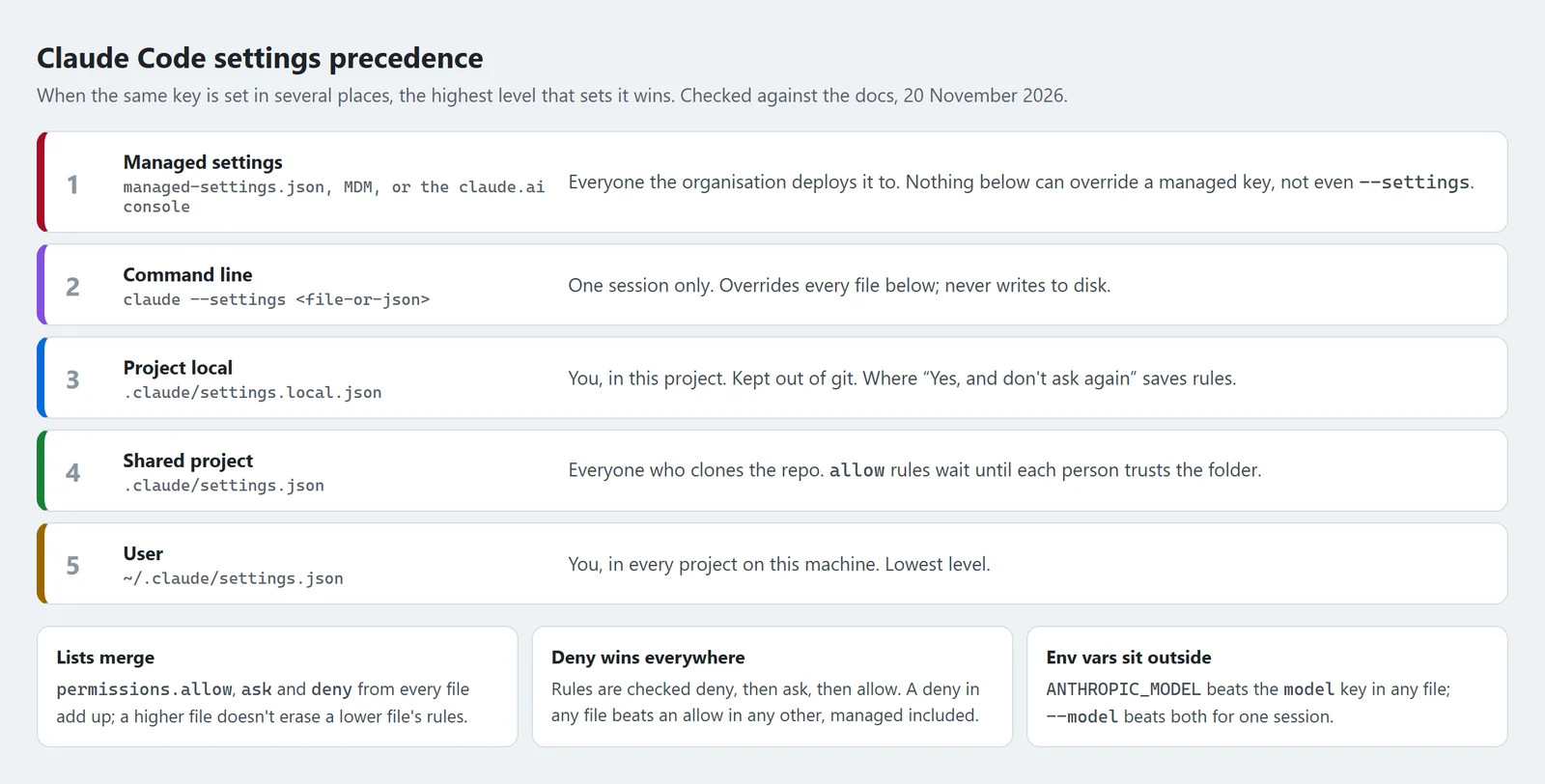
Settings precedence as the docs describe it on 20 November 2026.
A key set at a higher level overrides the same key lower down. Three exceptions matter in practice:
- Lists merge.
permissions.allowfrom your project file and your local file both apply. - Environment variables aren't a level.
ANTHROPIC_MODELin your shell beats themodelkey in any file, and--modelbeats both for one session. - Some values only count from some files.
"defaultMode": "auto"and"bypassPermissions"don't take effect from project or local settings, only from user or managed settings. And for a few security keys, such asdisableClaudeAiConnectors: true, Claude Code honours the stricter value from any file, even over managed settings.
Nothing in your own files overrides a managed key, not even --settings.
Permission rules: allow, ask and deny
"Rules are evaluated in order: deny, then ask, then allow. The first match in that order determines the outcome, and rule specificity doesn't change the order." So Bash(aws *) in deny blocks aws s3 ls even if allow names it exactly, and a deny in any file beats an allow in any other.
| Rule | What it matches | Watch out for |
|---|---|---|
Bash or Bash(*) |
Every shell command | As a deny rule it removes the tool from Claude entirely |
Bash(npm run *) |
npm run build, npm run test --watch, bare npm run |
Put the * after the subcommand: Bash(git *) allows every git command |
Bash(ls *) vs Bash(ls*) |
The space is part of the rule | ls* also matches lsof |
Bash(git push *) |
git push origin main |
Not git -C . push origin main |
Read(./.env) |
Claude's file tools, plus cat .env, head, sed, redirects |
Not a Python or Node script that opens the file itself |
Edit(/data/**) |
A path relative to the settings file's project | In user settings, /data means ~/.claude/data |
Read(//**/.env) |
An absolute path; // is the filesystem root |
Windows paths are matched as /c/Users/... |
WebFetch(domain:*.example.com) |
Any subdomain | Not example.com itself |
mcp__github__* |
Every tool of the server named github |
MCP rules with parentheses are skipped |
Compound commands are split: Bash(safe-cmd *) doesn't allow safe-cmd && other-cmd, and a deny or ask rule applies if any part matches. Read-only commands such as ls, cat, grep and read-only git run without a prompt in every mode, bar a few documented cases; add an ask rule to be asked.
Write(path), Glob(path) and Grep(path) rules are accepted but never match: use Edit(path) and Read(path). A project's allow rules and additionalDirectories wait until each person accepts the folder's trust dialog, while deny and ask rules apply at once. claude -p never shows that dialog, yet still runs a repository's hooks and env block, so read a repo's .claude/settings.json before running claude -p in it, or pass --setting-sources user.
A worked example: four files for one project
Our example is a small reporting repo, sales-reports/: tests and report scripts run without asking, commits and pushes ask, and Claude stays away from .env, secrets/ and the raw data.
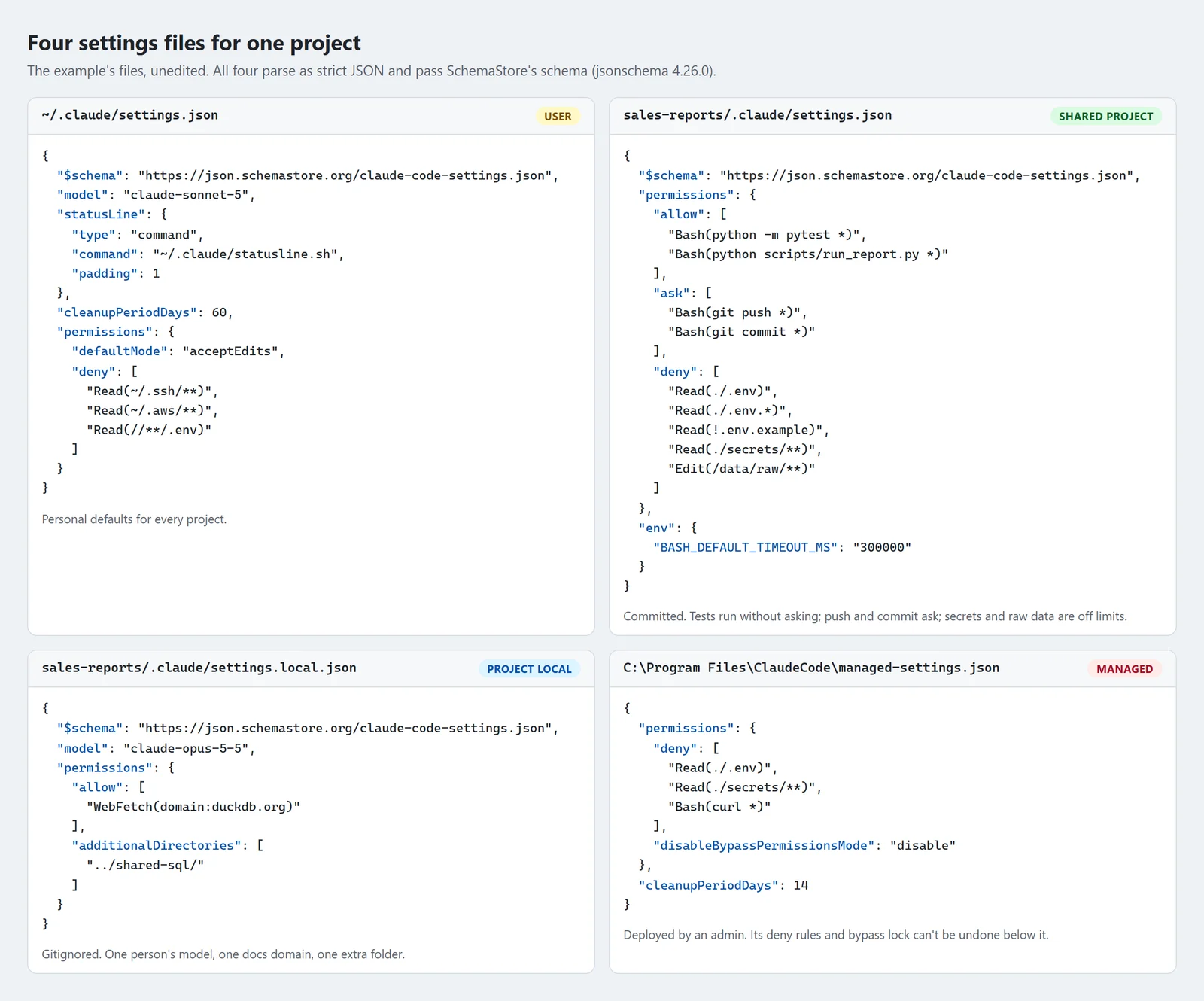
The example's four settings files. All four parse as strict JSON and pass SchemaStore's schema.
Choices worth copying:
- No rule for reading the repo. Reads inside the working directory and read-only
gitdon't ask, soallowlists only pytest and the report script. Read(!.env.example)carves the template out ofRead(./.env.*). A!rule only reaches earlier rules in the same file.Edit(/data/raw/**)starts with one slash, so it anchors at the project, not the drive.- The user file guards secrets everywhere:
Read(~/.ssh/**),Read(~/.aws/**)andRead(//**/.env), which matches a.envon any drive. additionalDirectoriesin the local file gives file access to../shared-sql/and nothing else: settings, skills andCLAUDE.mdthere don't load.
What applies, by the documented rules:
| Key | Set in | What Claude Code uses |
|---|---|---|
model |
User claude-sonnet-5, local claude-opus-5-5 |
Opus in this project, Sonnet everywhere else |
cleanupPeriodDays |
User 60, managed 14 | 14: transcripts go after two weeks |
permissions.allow |
Project 2 rules, local 1 | All 3 |
permissions.deny |
User 3, project 4 plus the carve-out, managed 3 | All of them |
permissions.defaultMode |
User acceptEdits |
acceptEdits, unless --permission-mode says otherwise |
disableBypassPermissionsMode |
Managed "disable" |
--dangerously-skip-permissions is rejected |
Validate a settings file before Claude Code reads it
The docs point editors at SchemaStore's schema with a $schema line. We checked each file with Python's strict JSON parser, then against that schema (Python 3.14.3, jsonschema 4.26.0, schema downloaded 20 November 2026):
$ python ../checks/check_settings.py ../schema/claude-code-settings.schema.json home/.claude/settings.json sales-reports/.claude/settings.json sales-reports/.claude/settings.local.json managed/managed-settings.json
jsonschema 4.26.0, schema http://json-schema.org/draft-07/schema#
home/.claude/settings.json: valid JSON, 0 schema errors
sales-reports/.claude/settings.json: valid JSON, 0 schema errors
sales-reports/.claude/settings.local.json: valid JSON, 0 schema errors
managed/managed-settings.json: valid JSON, 0 schema errors
Then four broken files: one with a // comment and a trailing comma; one that sets blockReadsOutsideWorkingDirectories under permissions, a documented key; one with "acceptEdit", "read(./.env)" and "Write(./secrets/**)"; and one with the top-level keys misspelled as "modle" and "permisions":
$ python check_settings.py ../schema/claude-code-settings.schema.json negative/with-comment.json negative/newer-keys.json negative/typos.json negative/top-level-typos.json
jsonschema 4.26.0, schema http://json-schema.org/draft-07/schema#
negative/with-comment.json: NOT JSON: Expecting property name enclosed in double quotes at line 2, column 3
negative/newer-keys.json: valid JSON, 1 schema error(s)
  at permissions: Additional properties are not allowed ('blockReadsOutsideWorkingDirectories' was unexpe...
negative/typos.json: valid JSON, 2 schema error(s)
  at permissions/defaultMode: 'acceptEdit' is not one of ['acceptEdits', 'bypassPermissions', 'default', 'delegate', ...
  at permissions/deny/0: 'read(./.env)' does not match '^((Agent|Artifact|Bash|Cd|Edit|EnterWorktree|ExitPlanMod...
negative/top-level-typos.json: valid JSON, 0 schema errors
The schema caught the defaultMode typo and the lowercase tool name. It passed Write(./secrets/**), a rule the docs say never matches, and "permisions", so that deny rule would protect nothing: the schema accepts any unknown top-level key. It rejected blockReadsOutsideWorkingDirectories, a real key since v2.1.257, and 42 of the 173 top-level settings.json keys the docs list are missing from it. As the docs warn, "The schema can lag behind the newest CLI releases."
Claude Code checks too: invalid JSON or a rejected value gets a Settings Error dialog at startup, and a single bad entry, such as a malformed rule, a Settings Warning and is skipped. The docs say claude doctor lists rejected entries; we didn't run it.
Point Claude at your database.
Start free →The settings keys worth knowing
The settings reference indexes 249 keys. These cover most setups:
| Key | What it does |
|---|---|
model |
The model new sessions start with; /model still switches mid-session |
permissions |
allow, ask, deny, defaultMode, additionalDirectories, disableBypassPermissionsMode |
env |
Environment variables for every session and its subprocesses |
hooks |
Commands run at lifecycle events; they merge across files (hooks guide) |
statusLine |
A script that renders the bottom line (status line guide) |
cleanupPeriodDays |
Days transcripts are kept; default 30, and 0 fails validation |
apiKeyHelper |
A command that prints the API credential, re-run every five minutes by default |
enableAllProjectMcpServers |
Approves every server in a project's .mcp.json without a prompt |
disableAllHooks |
Turns off hooks and the custom status line together |
sandbox |
OS-level limits on what shell commands can read, write and reach (macOS, Linux, WSL2) |
Standing instructions belong in CLAUDE.md. The docs track the newest release (2.1.329 on 19 November), and a few keys need a newer version than 2.1.284, such as permissions.denyInsteadOfPrompting (v2.1.319).
/config, /permissions and the command-line flags
/config(alias/settings) opens a short list of personal options such as theme and editor mode, "not every settings key". Most go to~/.claude/settings.json./config verbose=truesets one directly./permissions(alias/allowed-tools) lists every rule with the file it comes from, and lets you add or remove rules mid-turn./statusshows aSetting sourcesline naming each file that loaded.- There's no
claude configcommand: it was deprecated in 1.0.7 and removed in 2.0.0, and 2.1.284's--helplists none.
Settings files reload when you save them, apart from a few keys read at start, such as model. The settings-related flags, from claude --help on 2.1.284:
  --add-dir <directories...>            Additional directories to allow tool
                                        access to
  --allowedTools, --allowed-tools <tools...>
      Comma or space-separated list of tool names to allow (e.g. "Bash(git *)
      Edit")
  --dangerously-skip-permissions        Bypass all permission checks.
                                        Recommended only for sandboxes with no
                                        internet access.
  --disallowedTools, --disallowed-tools <tools...>
      Comma or space-separated list of tool names to deny (e.g. "Bash(git *)
      Edit")
  --model <model>                       Model for the current session. Provide
                                        an alias for the latest model (e.g.
                                        'fable', 'opus', or 'sonnet') or a
                                        model's full name.
  --permission-mode <mode>              Permission mode to use for the session
                                        (choices: "acceptEdits", "auto",
                                        "bypassPermissions", "manual",
                                        "dontAsk", "plan")
  --setting-sources <sources>           Comma-separated list of setting sources
                                        to load (user, project, local).
  --settings <file-or-json>             Path to a settings JSON file or a JSON
                                        string to load additional settings from
manual is the documented alias for default. Since v2.1.283, terminal sessions start in auto mode unless a flag or defaultMode says otherwise, or a settings file sets disableAutoMode to "disable". Plan mode covers the six modes.
Environment variables that matter
The reference lists more than 400. Set them in your shell or in an env block:
| Variable | What it does |
|---|---|
ANTHROPIC_API_KEY |
Used instead of your subscription "even if you are logged in"; always used in -p |
ANTHROPIC_MODEL |
The model, read before the model key |
CLAUDE_CONFIG_DIR |
Moves ~/.claude; project and local files can't set it |
BASH_DEFAULT_TIMEOUT_MS |
Command timeout, default 120000 (2 minutes) |
BASH_MAX_TIMEOUT_MS |
The longest timeout Claude may ask for, default 600000 |
DISABLE_TELEMETRY |
Opts out; "Setting it to 0 or false still opts out" |
CLAUDE_CODE_DISABLE_NONESSENTIAL_TRAFFIC |
Turns off auto-updates, telemetry, error reporting and /feedback |
Managed settings for teams
Managed settings reach a machine four ways, and by default Claude Code uses the highest-ranked source that delivers a policy key and ignores the rest:
| Mechanism | Where it lives | When Claude Code reads it |
|---|---|---|
| Server-managed | claude.ai admin console; Team or Enterprise, set by an Owner | At startup, then hourly |
| MDM or OS policy | macOS com.anthropic.claudecode; Windows HKLM\SOFTWARE\Policies\ClaudeCode |
At startup, then every 30 minutes |
| File | managed-settings.json in /Library/Application Support/ClaudeCode/, /etc/claude-code/ or C:\Program Files\ClaudeCode\ |
At startup, and when the file changes |
| Windows HKCU | HKCU\SOFTWARE\Policies\ClaudeCode |
Only when no admin source is present |
Some keys work only from managed settings: allowManagedPermissionRulesOnly (ignore every other file's rules and --allowedTools), allowManagedHooksOnly, allowManagedMcpServersOnly, strictKnownMarketplaces and requiredMinimumVersion. Endpoint-managed files don't reach cloud sessions; server-managed settings do.
When Claude Code works on a team's database
If Claude Code reaches your team's data through Fastero, an AI and data platform where people and AI agents work together on a team's data, permissions decide which of its tools run without asking. After claude mcp add --scope user --transport http fastero https://api.fastero.com/api/v1/mcp and /mcp to sign in through the browser, the tools are named mcp__fastero__<tool>. This project file (it validates against the schema) lets Claude look and query freely, asks before it builds, and blocks deletes:
{
  "permissions": {
    "allow": [
      "mcp__fastero__fastero_list_connections",
      "mcp__fastero__fastero_list_connection_schemas",
      "mcp__fastero__fastero_get_definitions",
      "mcp__fastero__fastero_run_sql"
    ],
    "ask": [
      "mcp__fastero__fastero_create_dashboard",
      "mcp__fastero__fastero_update_dashboard"
    ],
    "deny": [
      "mcp__fastero__fastero_delete_dashboard",
      "mcp__fastero__fastero_delete_connection"
    ]
  }
}- Allowing
fastero_run_sqldoesn't allow writes. Fastero runs oneSELECT,WITH,EXPLAINorSHOWstatement, refuses anything that could change data, uses a read-only transaction on Postgres and returns at most 500 rows (as of 20 November 2026). - No password for a deny rule to guard. The database connects once in the Fastero workspace, so none sits in
.envor theenvblock. - You can't narrow an MCP allow rule to one connection. Claude Code skips
mcp__rules with parentheses, so what Claude can reach is set by your Fastero role and key, not by the rule. - Scripts that can't sign in use a key: at most 90 days, read and SQL by default.
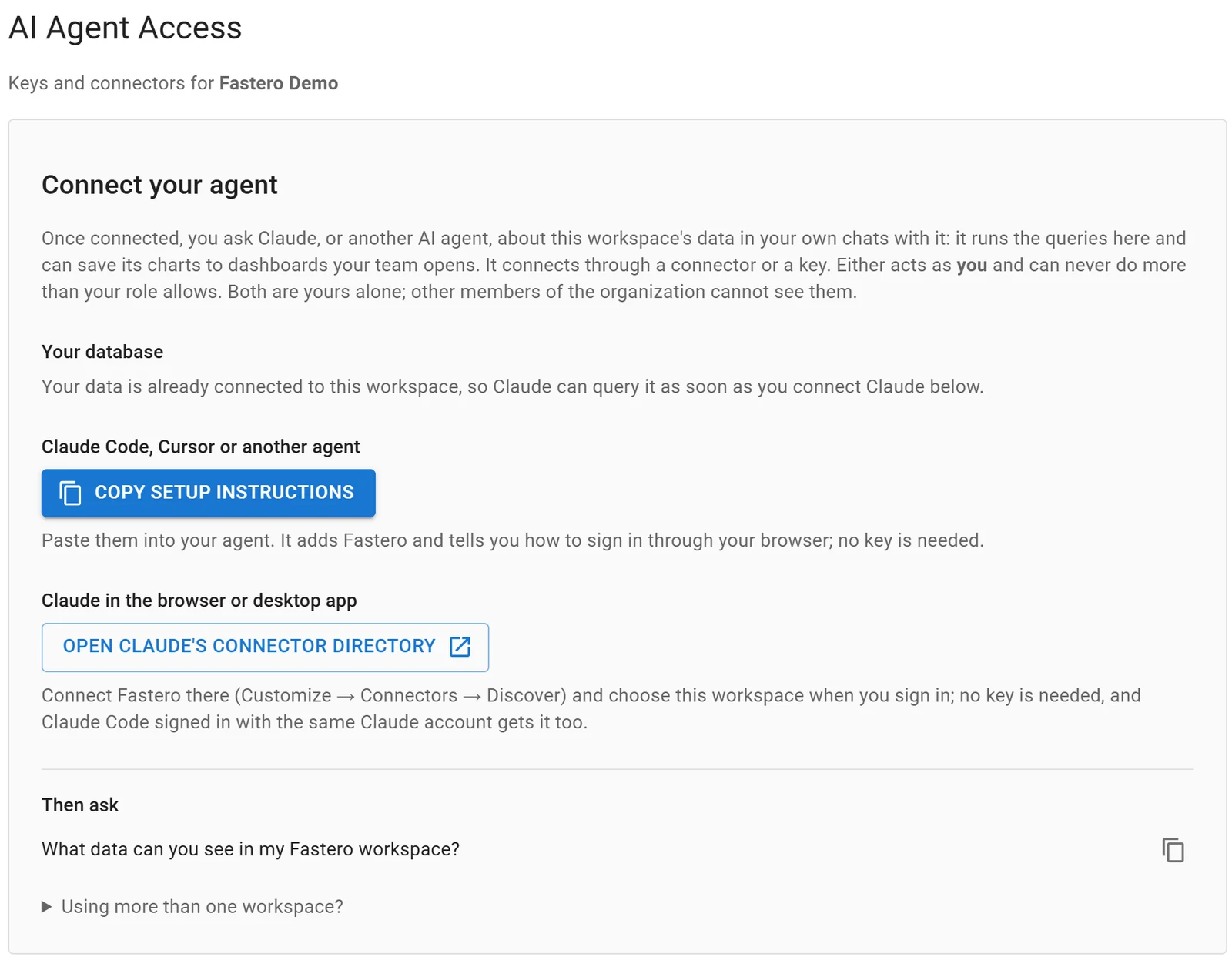
Settings, AI Agent Access: an agent signs in through the browser, so there is no key to copy.
More in Claude Code and MCP and Claude Code best practices.
FAQ
Where is the Claude Code settings.json file?
Your personal file is ~/.claude/settings.json (%USERPROFILE%\.claude\settings.json on Windows). Each project can add .claude/settings.json, shared through git, and .claude/settings.local.json, for you alone.
What is settings.local.json in Claude Code?
It's your own settings for one project, applied over the shared .claude/settings.json. Claude Code saves "Yes, and don't ask again" approvals there and keeps it out of git when it creates it. Its allow rules don't wait for the trust dialog while the file is untracked.
How do I stop Claude Code asking for permission?
Add allow rules for the commands you trust, or start in acceptEdits to approve file edits. Since v2.1.283 terminal sessions start in auto mode, where a classifier approves routine actions. Keep deny rules for what must never run: they hold in every mode, bypassPermissions included.
Can Claude Code settings.json have comments?
No. Settings files are strict JSON, so a // comment or a trailing comma is a syntax error, and Claude Code shows a Settings Error at the next start, offering to fix the file, exit, or continue without it.
Can I override my organisation's managed settings?
No. Managed settings sit above every file and above --settings. For a few security keys, Claude Code honours a stricter value from your own files, and /status names the managed source that applies to you.
Sources
Read on 20 November 2026. Commands ran on Windows 11 with Claude Code 2.1.284 (released 28 September 2026; the newest release that day was 2.1.329), Python 3.14.3 and jsonschema 4.26.0. No Claude session was started and no real settings file was changed.
- Claude Code docs: Settings files and precedence, All settings, Example settings files, Configure permissions, Permission modes, Deploy managed settings, Server-managed settings, Environment variables, Commands, CLI reference, Debug your configuration, Changelog. The old IAM page, code.claude.com/docs/en/iam, now serves the Authentication page.
- SchemaStore's Claude Code settings schema, linked from the settings docs