 Fastero Dev Team
Claude Code's status line is a row at the bottom of the terminal that shows whatever your own script prints: the model, the folder, the git branch, how full the context window is, what the session has cost. Claude Code pipes session data to the script as JSON and refreshes it as you work. We wrote three scripts, tested each against JSON built from the documented fields, and timed them.
The short answer: run /statusline followed by what you want, such as /statusline show model name and context percentage with a progress bar, and Claude Code writes a script into ~/.claude/ and updates your settings. To do it by hand, add "statusLine": {"type": "command", "command": "~/.claude/statusline.sh"} to ~/.claude/settings.json; optional fields are padding, refreshInterval and hideVimModeIndicator. Your script reads JSON on stdin (model.display_name, workspace.current_dir, context_window.used_percentage, cost.total_cost_usd, rate_limits.five_hour.used_percentage and dozens more) and prints one or more lines. It runs after each assistant message, debounced to 300 ms, and it "does not consume API tokens".
Fastero
Point Claude at your database.
Add Fastero to claude.ai or Claude Code. Claude builds the dashboard, deploys the app or publishes a live page, and your team opens it in Fastero.
Try free →Set it up: /statusline or settings.json
/statusline takes a plain description and generates the script for you; with no description it will "auto-configure from your shell prompt". /statusline delete (or clear, or remove it) takes it away again.
By hand, the statusLine setting goes in your user settings, ~/.claude/settings.json, or in a project's settings. Its fields, from Claude Code's settings reference:
| Field | Value | What it does |
|---|---|---|
type |
"command" |
Run a shell command |
command |
A script path or inline shell command | What runs; its stdout becomes the status line |
padding |
Characters, default 0 |
Extra horizontal spacing, on top of the interface's own |
refreshInterval |
Seconds, minimum 1 |
Also re-runs the command on a timer, for clocks and countdowns |
hideVimModeIndicator |
true or false |
Hides -- INSERT -- when your script shows vim.mode itself |
Claude Code "reloads settings automatically and runs your script as soon as you save the file." The row sits above the footer badges and doesn't replace them, though some hints such as ? for shortcuts disappear.
The JSON Claude Code sends your script
Every field in the status line docs, checked 20 November 2026:
| Group | Fields |
|---|---|
| Model and session | model.id, model.display_name, session_id, session_name, prompt_id, transcript_path, version, output_style.name, agent.name |
| Folders and repo | cwd, workspace.current_dir, workspace.project_dir, workspace.added_dirs, workspace.git_worktree, workspace.repo.host, workspace.repo.owner, workspace.repo.name |
| Cost and time | cost.total_cost_usd, cost.total_duration_ms, cost.total_api_duration_ms, cost.total_lines_added, cost.total_lines_removed |
| Context window | context_window.total_input_tokens, total_output_tokens, context_window_size, used_percentage, remaining_percentage, current_usage (input_tokens, output_tokens, cache_creation_input_tokens, cache_read_input_tokens), and exceeds_200k_tokens |
| Modes | fast_mode, effort.level, thinking.enabled, vim.mode |
| Limits | rate_limits.five_hour and rate_limits.seven_day (used_percentage, resets_at); rate_limits.spend_limit (used_percentage, resets_at, used_usd, limit_usd, period) |
| Prompt cache | prompt_cache: warm, caching_observed, ttl, expires_at, requests, misses, expected_rebuilds, hit_ratio, cache_write_tokens, miss_recache_tokens, last_miss_at, last_miss_cause, miss_causes, recache_tokens_if_cold |
| Pull request and worktree | pr.number, pr.url, pr.review_state, pr.kind, worktree.name, worktree.path, worktree.branch, worktree.original_cwd, worktree.original_branch |
Four things to know before you build on them:
- Cost is an estimate.
cost.total_cost_usdis "computed client-side at list price" and "May differ from your actual bill". It resets to $0 after/clear. On a subscription it isn't what you pay; Claude Code usage covers what is. - Context use counts input only.
used_percentageisinput_tokens + cache_creation_input_tokens + cache_read_input_tokensover the window size, without output tokens. Claude's context window explains the sizes. - Plenty can be missing.
rate_limitsappears "only for claude.ai Pro, Max, and Ultra subscribers" (or behind a gateway with a spend limit) and only after the first API response.used_percentageandcurrent_usagecan benullearly in a session. Fall back rather than crash. - Fields depend on your version.
prompt_cacheneeds Claude Code 2.1.251 and the spend-limit dollar fields 2.1.284. We checked against 2.1.284; npm's latest was 2.1.329 on 20 November 2026, and the docs already describe 2.1.295 behaviour.
When it updates
The script runs when a session starts or resumes, then again when a new assistant message arrives, /compact finishes, the permission mode or vim mode changes, you edit the command, a refreshInterval timer fires, a rate-limit window reaches resets_at, or a warm prompt cache reaches expires_at. Updates are debounced at 300 ms, and "If a new update triggers while your script is still running, Claude Code cancels the in-flight script."
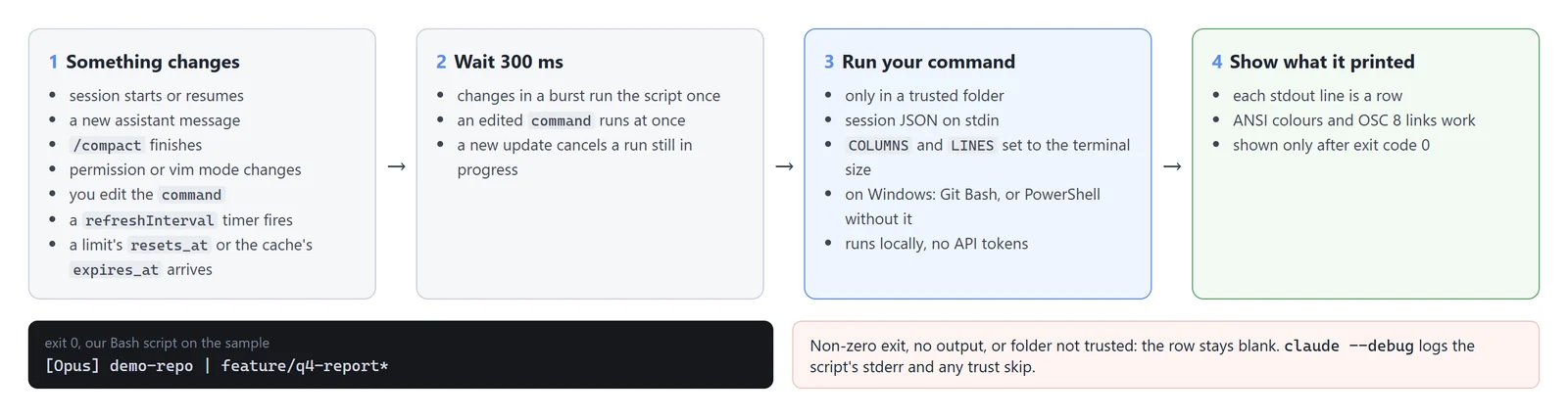
What happens on each update, drawn from Claude Code's status line docs (checked 20 November 2026).
Output can be several lines, ANSI colours and OSC 8 links. Because Claude Code captures the output, tput cols can't see the terminal; read the COLUMNS and LINES variables it sets instead.
Point Claude at your database.
Start free →Three status line scripts, tested on Windows
We piped two payloads built only from documented fields into each script: a subscriber mid-session, and the first render of a new session for an API-key user, with no rate_limits and null context fields. Both point at a throwaway git repo on a branch called feature/q4-report, with one staged and one untracked file. We ran them on Windows 11 with Git Bash (git 2.52), Python 3.14.3, Windows PowerShell 5.1 and PowerShell 7.7, outside a live session.
1. Bash: model, folder and git branch, no jq
The docs' Bash examples use jq, which our Git Bash didn't have. This one pulls the two string fields it needs with grep and sed, and asks git about the session's folder rather than wherever the script happens to start:
#!/usr/bin/env bash
# Claude Code status line: model, folder, git branch (* when there are uncommitted changes).
input=$(cat)

# Pull one string field out of the JSON; tolerates spaces and line breaks around the colon.
field() { printf '%s' "$input" | tr -d '\n' | grep -o "\"$1\" *: *\"[^\"]*\"" | head -1 | sed 's/.*: *"\(.*\)"$/\1/'; }

model=$(field display_name)
dir=$(field current_dir)
dir=${dir//\\\\/\\}   # JSON doubles Windows backslashes; undo that

line="[$model] ${dir##*[/\\]}"
branch=$(git -C "$dir" branch --show-current 2>/dev/null)
if [ -n "$branch" ]; then
  [ -n "$(git -C "$dir" status --porcelain 2>/dev/null | head -1)" ] && branch="$branch*"
  line="$line | $branch"
fi
printf '%s\n' "$line"
$ ./statusline.sh < sample-mid-session.json
[Opus] demo-repo | feature/q4-report*
$ ./statusline.sh < sample-session-start.json
[Sonnet] demo-repo | feature/q4-report*Save it as ~/.claude/statusline.sh, run chmod +x on it, and set "command": "~/.claude/statusline.sh". On Windows, Claude Code runs the command "through Git Bash when Git Bash is installed", so the same line works; write any full path with forward slashes, since Git Bash eats backslashes. String matching like this breaks on a value containing an escaped quote, which model names and folder names rarely have. With jq installed, the docs' version is sturdier.
2. Python: context bar, cost, 5-hour limit and cache
#!/usr/bin/env python3
"""Claude Code status line: model, context bar, session cost, 5-hour limit and prompt cache."""
import json
import os
import sys
import time

sys.stdout.reconfigure(encoding="utf-8")  # Windows pipes default to cp1252, which can't print the bar

data = json.load(sys.stdin)
ctx = data.get("context_window") or {}
pct = ctx.get("used_percentage")  # null until the first API response
cost = (data.get("cost") or {}).get("total_cost_usd") or 0
five_h = (data.get("rate_limits") or {}).get("five_hour")  # absent unless Pro, Max or Ultra
cache = data.get("prompt_cache")  # absent until the first API response

parts = [f"[{data['model']['display_name']}]"]
if pct is None:
    parts.append("ctx --")
else:
    filled = int(pct) // 10
    color = "\033[31m" if pct >= 80 else "\033[33m" if pct >= 60 else "\033[32m"
    parts.append(f"{color}{'█' * filled}{'░' * (10 - filled)}\033[0m {pct:.0f}%")
parts.append(f"${cost:.2f}")
if five_h:
    mins = max(0, int(five_h["resets_at"] - time.time()) // 60)
    parts.append(f"5h {five_h['used_percentage']:.0f}% (resets in {mins // 60}h{mins % 60:02d}m)")
if cache and cache.get("hit_ratio") is not None and int(os.environ.get("COLUMNS", 120)) >= 100:
    parts.append(f"cache {'warm' if cache['warm'] else 'cold'} {cache['hit_ratio']:.0%}")

print(" | ".join(parts))
Output, with the colour codes not shown:
$ COLUMNS=120 python statusline.py < sample-mid-session.json
[Opus] | █████░░░░░ 59% | $1.87 | 5h 24% (resets in 2h13m) | cache warm 91%
$ COLUMNS=80 python statusline.py < sample-mid-session.json
[Opus] | █████░░░░░ 59% | $1.87 | 5h 24% (resets in 2h13m)
$ python statusline.py < sample-session-start.json
[Sonnet] | ctx -- | $0.00
The reconfigure line is there because of what happened to the docs' own Python context-bar example, copied verbatim and piped the same way:
UnicodeEncodeError: 'charmap' codec can't encode characters in position 7-16: character maps to <undefined>Python on Windows writes to a pipe in the system code page, cp1252 here, which has no ▓ or ░. The script exits with code 1, and the docs say a script that exits non-zero leaves the status line blank. We didn't run it inside Claude Code, but nothing in the docs says Claude Code sets PYTHONUTF8 for you. Use "command": "python3 ~/.claude/statusline.py" (python on Windows), with "refreshInterval": 60 so the reset countdown moves while you're idle.
3. PowerShell, for Windows without Git Bash
Without Git Bash, Claude Code runs the command through PowerShell.
# Claude Code status line for Windows PowerShell: folder, model, git branch, context use.
$data = $input | Out-String | ConvertFrom-Json
$dir = $data.workspace.current_dir
$line = "$(Split-Path $dir -Leaf) [$($data.model.display_name)]"

$branch = git -C $dir branch --show-current 2>$null
if ($branch) { $line += " | $branch" }

$pct = $data.context_window.used_percentage
if ($null -ne $pct) { $line += " | ctx $([math]::Round($pct))%" }

Write-Output $line
The docs' command, powershell -NoProfile -File C:/Users/username/.claude/statusline.ps1, failed on this machine:
$ powershell -NoProfile -File statusline.ps1 < sample-mid-session.json
File ...\statusline.ps1 cannot be loaded because running scripts is disabled on this system.
$ powershell -NoProfile -ExecutionPolicy RemoteSigned -File statusline.ps1 < sample-mid-session.json
demo-repo [Opus] | feature/q4-report | ctx 59%
$ pwsh -NoProfile -File statusline.ps1 < sample-session-start.json
demo-repo [Sonnet] | feature/q4-report
Windows PowerShell 5.1 here reported Restricted, which Microsoft says is the default when nothing is set: "If no execution policy is set in any scope, the effective execution policy is Restricted, which is the default for Windows clients." Add -ExecutionPolicy RemoteSigned, which applies only to that one process and still blocks unsigned scripts downloaded from the internet, or call PowerShell 7 (pwsh), whose policy here was already RemoteSigned. A Group Policy set by your organisation overrides both.
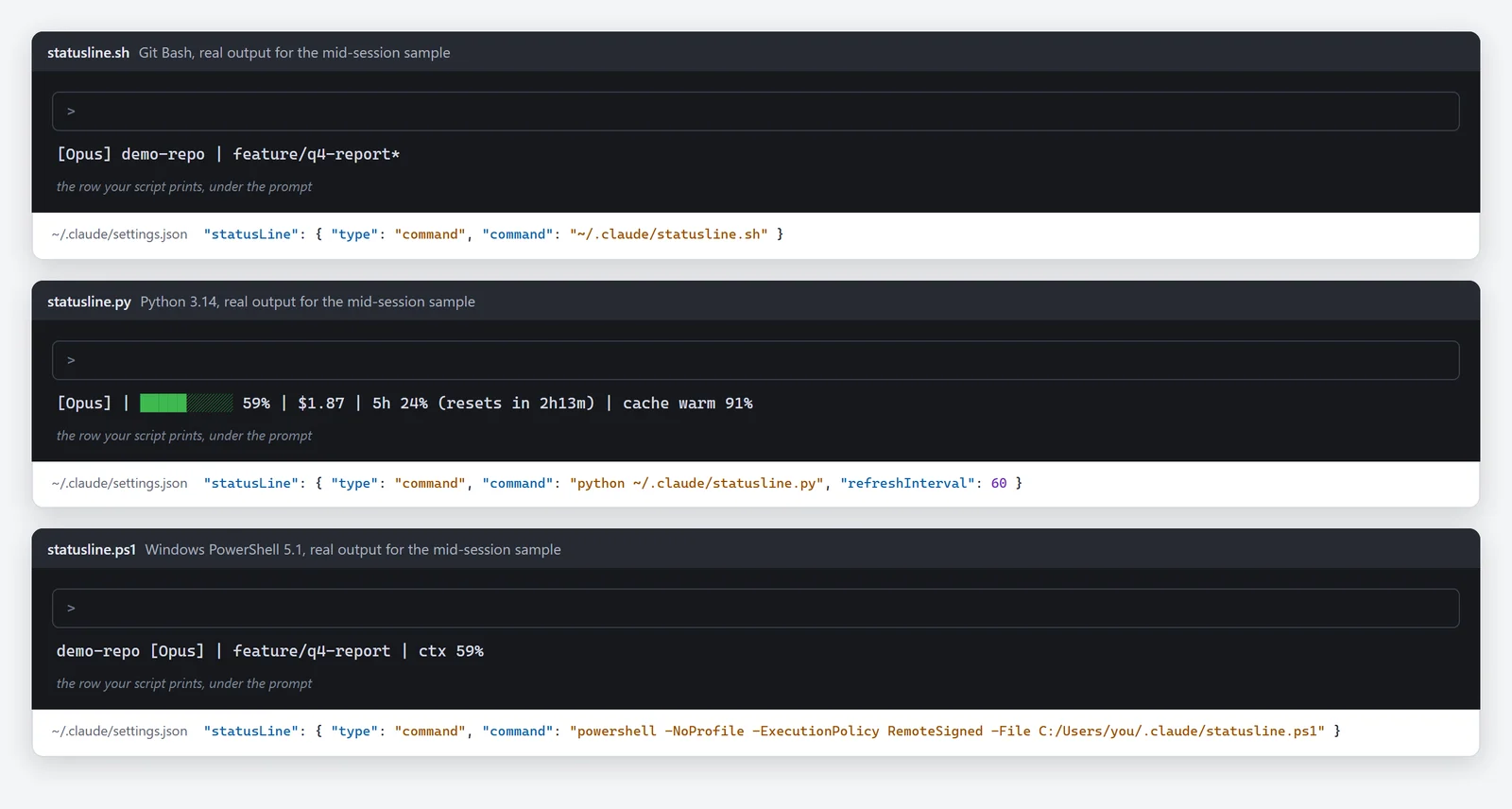
feature/q4-report". Python: a green context bar at 59%, $1.87, the 5-hour limit at 24% resetting in 2h13m, and the cache warm at 91%. PowerShell 5.1: "demo-repo [Opus] | feature/q4-report | ctx 59%" | Each script's real output for the same sample JSON, drawn as a terminal row with the setting beside it. Not a screenshot of Claude Code.*
How long each takes
The status line reruns after every reply, and a slow script holds it back. Each command started through Git Bash, as Claude Code does on Windows, median of seven runs on one laptop:
| Command | What it runs | Median |
|---|---|---|
echo only |
Baseline: Git Bash start-up | 72 ms |
statusline.py |
Python, no git | 246 ms |
statusline.sh |
About a dozen processes, two of them git | 468 ms |
statusline.ps1 in PowerShell 5.1 |
One git call | 502 ms |
statusline.ps1 in PowerShell 7 |
One git call | 554 ms |
An earlier batch differed by up to 110 ms. On Windows every extra process costs time, so in a big repo use the docs' example that caches git output for five seconds per session_id.
It runs as you, like a hook
The command runs in a shell with your permissions, and it sees your session data, transcript_path included. Claude Code treats it like a hook: it runs "under the same workspace trust rule as hooks in settings files", so until you accept the trust dialog the row stays blank and claude --debug logs Status line command skipped: workspace trust not accepted.
The setting can live in any settings file, a repository's .claude/settings.json included, so a repo you clone can bring a status line command with it. Read it before you trust the folder. disableAllHooks: true turns off hooks and the status line together, and an organisation that sets allowManagedHooksOnly allows only its own. Claude Code hooks covers the same trust model in depth.
Ready-made status lines
Claude Code's docs point to two community projects, and ccusage has a third:
| Tool | Stars | Set-up | What it adds |
|---|---|---|---|
| ccstatusline | 13,645 | npx -y ccstatusline@latest opens a setup screen |
Widgets, themes, several lines; writes a statusLine with refreshInterval 10 |
| starship-claude | 151 | A Claude Code plugin, then /starship |
Renders the line with the Starship prompt |
| ccusage statusline | 19,521 (ccusage) | "command": "npx -y ccusage statusline" |
Session and today's cost, the 5-hour block, burn rate (beta) |
Stars read on GitHub on 20 November 2026. ccstatusline's README measured npx -y ccstatusline@latest at "1082 ms" per launch on Windows, and suggests its pinned global install instead.
When the session's work is for a team
A status line tells you about your own session. When the session produces a query or a chart that colleagues need, Fastero, an AI and data platform where people and AI agents work together on a team's data, gives Claude Code a place to put it:
- One command to connect:
claude mcp add --scope user --transport http fastero https://api.fastero.com/api/v1/mcp, then/mcpto sign in through the browser. Settings → AI Agent Access shows the steps; it's tested with Claude and Claude Code. - Read-only SQL on the team's connected databases, one
SELECT,WITH,EXPLAINorSHOWstatement at a time. - Results colleagues open: saved queries and dashboards stay in the workspace, and viewers are free.
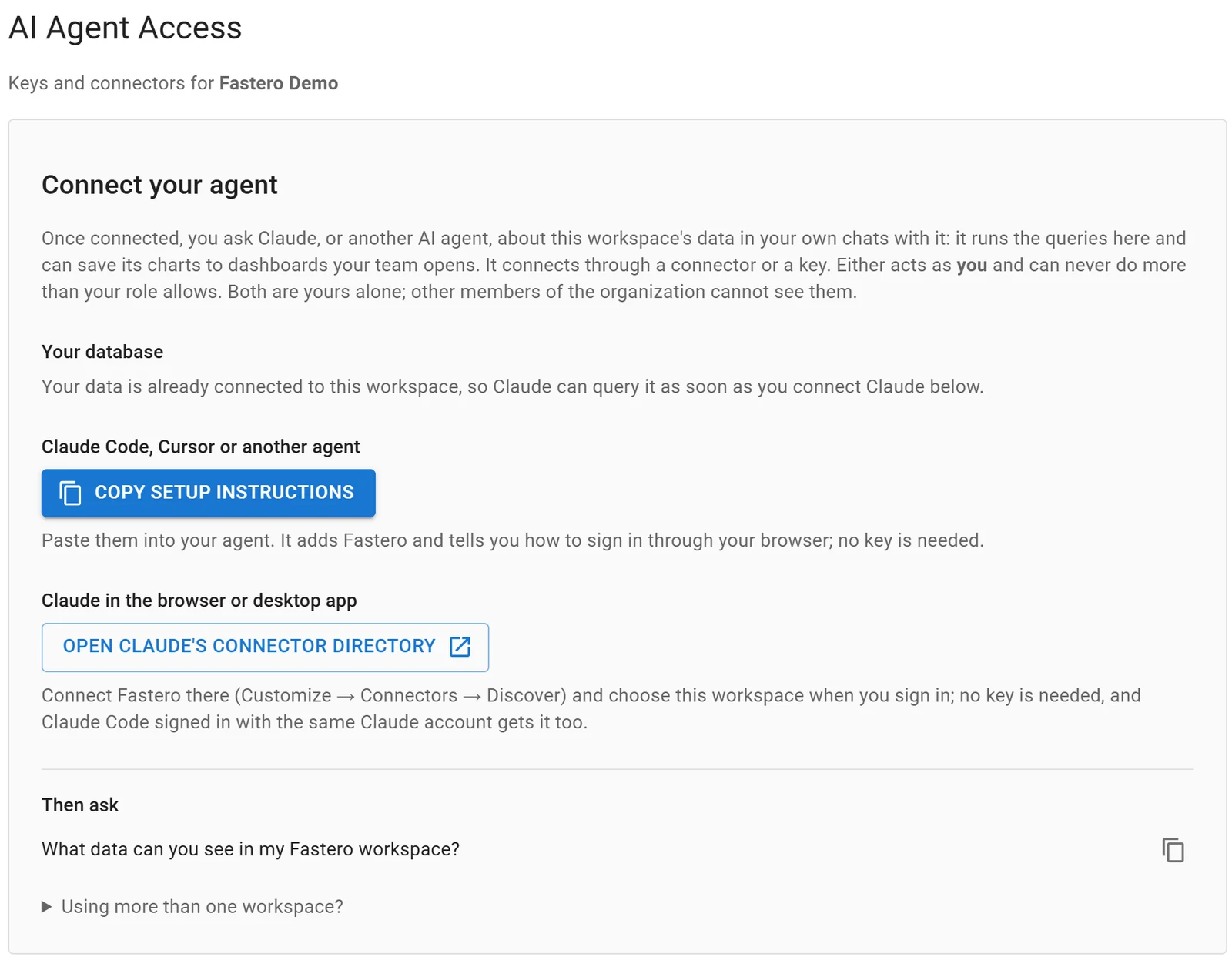
Settings, AI Agent Access: an agent signs in through the browser, so there is no key to copy.
More commands and settings in the Claude Code cheat sheet, and servers in Claude Code MCP.
FAQ
How do I set up the Claude Code status line?
Run /statusline with a description of what you want, and Claude Code writes the script and the setting. Or add "statusLine": {"type": "command", "command": "~/.claude/statusline.sh"} to ~/.claude/settings.json and write a script that reads JSON on stdin and prints a line.
Why is my Claude Code status line blank?
The usual causes: the folder isn't trusted yet, the script exits with a non-zero code or prints nothing, the script isn't executable, or on Windows a backslash path was mangled by Git Bash. disableAllHooks also turns it off. Run claude --debug to log the script's errors.
Can the status line show context usage?
Yes. context_window.used_percentage is the share of the context window in use, counting input tokens only, and context_window_size is the window's size. It can be null until the first reply.
Does the status line use tokens?
No. The docs say it "runs locally and does not consume API tokens." It does run your script after every reply, so keep the script fast.
Does the Claude Code status line work on Windows?
Yes. Claude Code runs the command through Git Bash if it's installed, otherwise through PowerShell. In our tests, PowerShell 5.1 needed -ExecutionPolicy RemoteSigned, and Python needed UTF-8 output to print bar characters.
How do I remove the status line?
Run /statusline delete, or delete the statusLine field from your settings file.
Sources
Read on 20 November 2026; versions from npm and stars from GitHub the same day. The scripts were tested on Windows 11 by piping JSON to them, with Claude Code 2.1.284 installed, not inside a live session.
- Claude Code docs: Customize your status line, Settings reference, Commands, Permissions and workspace trust
- ccstatusline, starship-claude, ccusage statusline guide
- Microsoft: about_Execution_Policies
- @anthropic-ai/claude-code on npm
Try Fastero free: connect Claude Code to your team's databases and save what it builds where colleagues can open it. No credit card required.