 Fastero Dev Team
Cowork and Claude Code are the same agent pointed at different jobs. Anthropic says Cowork "uses the same agentic architecture that powers Claude Code, with no terminal required". For data work, the choice comes down to where your data lives and what you want back: a finished spreadsheet or deck, or code you can run again.
The short answer: use Cowork when you want finished files, such as a spreadsheet with working formulas, a deck or a written analysis, from your connected apps and documents, without a terminal. New Cowork tasks on Pro, Max and Ultra run in Anthropic's cloud, scheduled ones included. Use Claude Code when the result is code (SQL, Python, notebooks, dbt models or a dashboard app), when the data sits on your machine or private network, or when the work belongs in a Git repository. Neither is priced on its own: both come with every paid Claude plan (Pro is $20 a month, or $17 billed yearly), share one usage allowance, and neither is on Free.
Fastero
Point Claude at your database.
Add Fastero to claude.ai or Claude Code. Claude builds the dashboard, deploys the app or publishes a live page, and your team opens it in Fastero.
Try free →What each one is
Claude Cowork is where you hand Claude a task instead of a question: you describe the outcome, and Claude plans it, runs code in a sandbox, uses your connected apps and returns files. In Anthropic's words, "Cowork is built for non-coding knowledge work". It is also being folded into Claude itself: the product page opens with "Claude Cowork is now just Claude", and the merged experience is "rolling out gradually, starting with Pro, Max, and Ultra plans on web, desktop, and mobile". If your message box still shows Chat and Cowork, you don't have it yet.
Claude Code is "an agentic coding tool that reads your codebase, edits files, runs commands, and integrates with your development tools". It runs in a terminal, in VS Code and JetBrains, in the desktop app's Code tab, and as cloud sessions in a browser or on your phone.
Where each one runs
| Cowork | Claude Code | |
|---|---|---|
| Default | Anthropic's cloud. On Pro, Max and Ultra, "new sessions run in the cloud on every surface" since 6 October 2026 | Your machine: terminal, IDE or the desktop app's Code tab |
| Cloud option | The default; on Team it's on, on Enterprise an owner turns it on | Cloud sessions on Pro, Max, Ultra and Team, and on Enterprise premium or Chat + Claude Code seats |
| Computer must be on | No, except for tasks that use local files, your browser or your screen | Yes for local sessions; no for cloud sessions |
| Surfaces | Web, desktop, mobile, Chrome side panel | Terminal, VS Code, JetBrains, desktop, web, mobile |
Since 6 October, Pro, Max and Ultra users can't make Cowork run only on their computer, and Anthropic points them elsewhere: "For new tasks that run only on your computer, use Claude Code in the desktop app."
Files and folders
Cowork reaches folders on your computer only through the desktop app, while it's open, and "When a task needs a file in the cloud, Claude fetches a copy of just that file", so local files are processed on Anthropic's servers. It reads CSV, JSON, Excel and Jupyter notebooks, saves Excel files with working formulas, decks and documents to your Claude account, and asks before permanently deleting anything.
Claude Code works in your project folder directly: it edits files in place, runs your scripts and tests, and leaves changes for you to review or commit. Its cloud sessions work on a clone of a GitHub repository instead.
Connectors and MCP
Both use the connectors on your claude.ai account. The difference is what else they can reach.
Cowork loads the connectors you've enabled in Customize → Connectors. Its cloud sandbox has "No access to your network by default", connector calls are made on Anthropic's side, and "Local MCP servers don't run in sessions in the cloud."
Claude Code gets the same claude.ai connectors when you sign in with a claude.ai account, and you can add any other MCP server with claude mcp add, including local servers that run on your machine. That is the practical split for data work: a database on localhost, behind a VPN or on a private network is reachable from Claude Code on your machine and not from Cowork's cloud. More in Claude connectors.
Plugins and skills
Plugins bundle skills, connectors and sub-agents, and "A plugin you add is saved to your account, so it works in chat and Claude Code as well as Cowork." A Claude Code cloud session, though, "doesn't load the plugins in your local settings".
Skills you turn on in claude.ai load in Cowork and in Claude Code sessions signed in with that account. Skills in ~/.claude/skills/ or a project's .claude/skills/ are Claude Code only: Cowork and cloud sessions "don't read ~/.claude/skills/ on your machine". For a skill in both, add it in claude.ai.
Scheduled tasks
| Cowork scheduled tasks | Claude Code | |
|---|---|---|
| Where it runs | Anthropic's cloud, "with no device online" | Cloud scheduled tasks (formerly routines) in Anthropic's cloud; Desktop tasks and /loop on your machine |
| Cadence | Hourly, daily, weekly, weekdays or by hand | Cloud: at most hourly, plus API calls and GitHub events. Desktop: down to a minute when Claude sets it. /loop: down to a minute, ends after 7 days |
| What it can use | Your connectors, skills and plugins | Cloud: connectors and a fresh repository clone. Desktop and /loop: your files and MCP servers |
| Set it up | Type /schedule in a task, or Scheduled in the sidebar |
/schedule in the CLI, claude.ai/code/routines, or the desktop app |
Every run uses your plan's allowance. Our comparison of every way to schedule Claude covers the limits of each.
Plans and pricing
Cowork has no price of its own; neither does Claude Code. Checked 12 November 2026 on Anthropic's pricing page:
| Plan | Price | Cowork | Claude Code |
|---|---|---|---|
| Free | $0 | No | No |
| Pro | $20 a month, or $17 a month billed yearly ($200 up front) | Yes | Yes |
| Max | $100 a month, 5x Pro usage | Yes | Yes |
| Ultra | $200 a month, 10x Pro weekly usage, no 5-hour limit for verified accounts | Yes | Yes |
| Team, standard seat | $25 a seat monthly, $20 billed yearly, 2 to 150 people | Yes | Yes |
| Team, premium seat | $125 a seat monthly, $100 billed yearly, 5x standard usage | Yes | Yes |
| Enterprise | $20 a seat a month billed yearly, 20-seat minimum, plus usage at API rates | Yes; on web and mobile once an owner enables it | Yes |
Both draw on one allowance: "Your activity across Claude on web, desktop, mobile, and Claude Code all draws from the same pool", and "Claude Cowork consumes limits faster than Chat". Claude Code can also run on pay-as-you-go API credits through a Console account, and on paid plans usage credits let either continue past a limit at API rates. See Claude Code pricing.
Cowork vs Claude Code side by side
| Cowork | Claude Code | |
|---|---|---|
| Built for | Research, analysis, documents, recurring reports | Software and anything that should end up as code |
| Interface | A conversation in the Claude app | A terminal, an IDE or the desktop Code tab |
| Runs | Anthropic's cloud by default | Your machine by default; cloud sessions optional |
| Local files | Through the desktop app, copied to the cloud when used | Directly, in your project folder |
| Private databases | Only if reachable from the internet through a connector | Yes, through a local MCP server or your own tools |
| MCP | claude.ai connectors | claude.ai connectors plus any server you add |
| Output | Spreadsheets, decks, documents, artifacts | Code, files, commits, pull requests |
| Approvals | Auto by default on Pro, Max, Ultra and Team; Manual on Enterprise | Permission modes from manual to auto, set per session |
| Schedules | Built in, in the cloud | Cloud tasks, Desktop tasks or /loop |
| Plans | Pro and above | Pro and above, or an API key |
Point Claude at your database.
Start free →Pick Cowork when
- you want a finished file, such as a variance spreadsheet, a weekly deck or a memo, not a script,
- the inputs are connected apps, Drive folders and documents rather than a database you run,
- the job repeats and needs judgement each time, like writing up what changed,
- you don't want to install anything, or you'll check in from your phone.
Pick Claude Code when
- the answer should be a query, a notebook, a dbt model or an app you can run again,
- the data is on your machine, a private network or a warehouse you reach with your own tools,
- the work should be reviewed and committed like other code,
- you need an MCP server that isn't a claude.ai connector, or want to pay per token.
Many teams use both: Cowork for the write-up, Claude Code for the pipeline behind it. See Claude Cowork for data work and Claude Code for data analysis.
The same weekly report, in each
In Cowork, as a scheduled task:
Every Monday at 8 AM, pull last week's orders from the Fastero connector, compare revenue and
order count with the week before by region, flag anything that moved more than 10%, and save a
two-slide deck to my Weekly folder. If a number can't be pulled, say so on the first slide.
In Claude Code, as code you keep:
Write weekly_revenue.sql for revenue and orders by region for the last two full weeks, then a
Python script that runs it, flags changes over 10% and writes report.md. Add a test with a
fixed fixture, and commit both on a new branch.
The first gives you a deck every Monday, rebuilt by the model each time. The second gives you code that returns the same answer every time, which you still have to run somewhere.
When the result is for a team
Both tools leave their work in one person's account. In Cowork, "Sessions can't be shared with others, but you can share individual artifacts you create during a session", and an artifact that pulls from connected apps "uses the viewer's connections, not yours". A repository is no easier for someone who doesn't write code.
Fastero is an AI and data platform where people and AI agents work together on a team's data, and its connector works in both tools:
- One connector, both tools. Add Fastero from Claude's connector directory and Cowork loads it; Claude Code signed in with the same account picks it up, or add it with
claude mcp add --transport http. - Your database, read-only. Connect it in Fastero once, so the password never enters the conversation. Claude queries it with a SQL tool that refuses anything that writes.
- Results colleagues open. Dashboards open with each person's own Fastero login, with no Claude account or connections of their own. Viewers are free.
- Reports that rerun the queries. A dashboard can be emailed on a schedule with its queries run fresh, so the Monday numbers match the dashboard without a Cowork run.
- A home for Claude Code's output. Notebooks run on a cron schedule, and Streamlit apps run behind the workspace login.
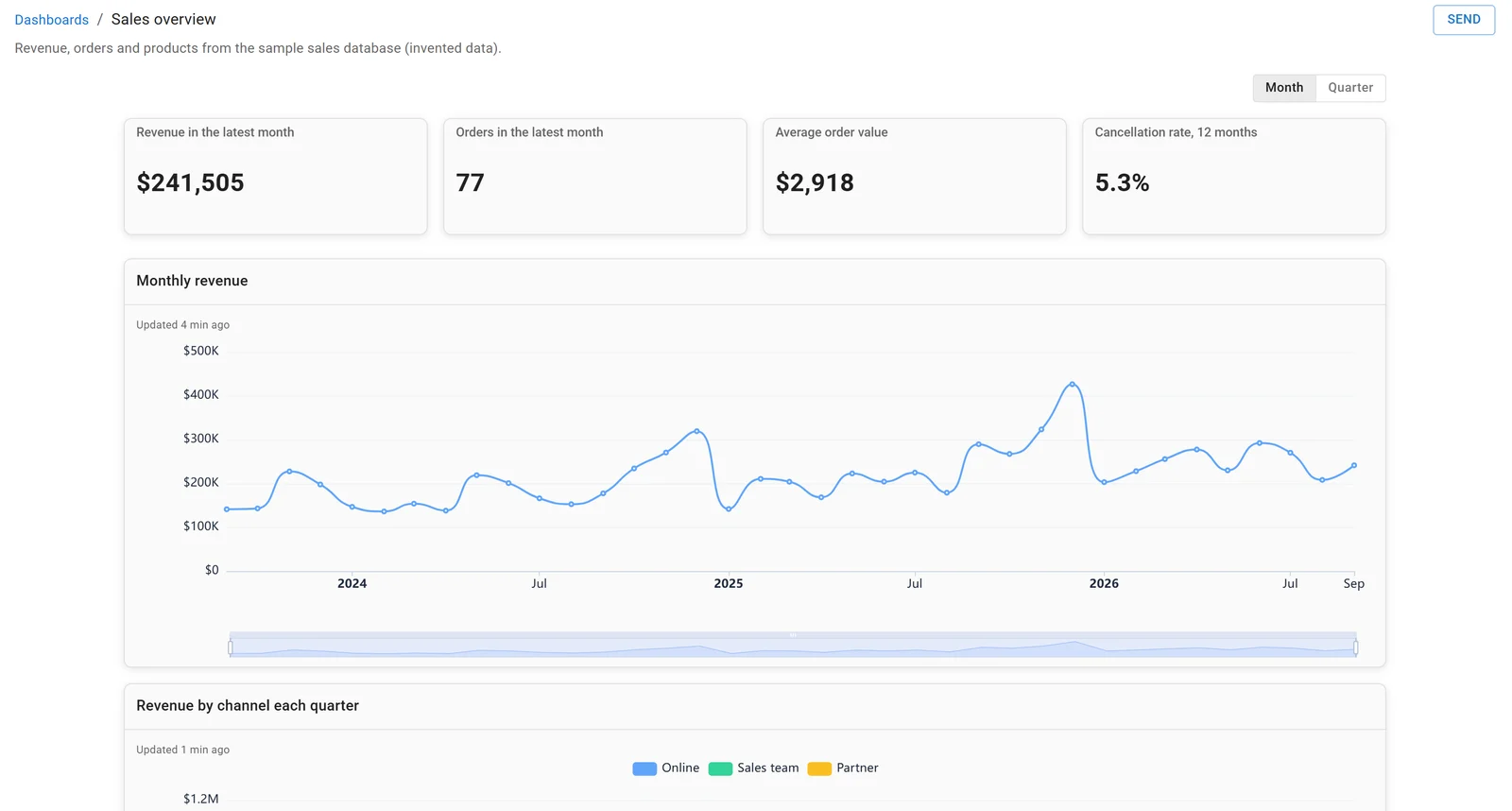
A dashboard in Fastero, built on the sample sales database. Invented data.
FAQ
What is the difference between Claude Cowork and Claude Code?
They share one agent. Cowork is for knowledge work in the Claude app, runs in Anthropic's cloud by default and returns files. Claude Code is for software, runs in your terminal, IDE or desktop app by default, and works on your project's files and tools.
How much does Claude Cowork cost?
Nothing extra. It's included in Pro ($20 a month, or $17 billed yearly), Max ($100), Ultra ($200), Team (from $20 a seat billed yearly) and Enterprise, along with Claude Code. It isn't on Free, and it uses your allowance faster than chat.
Does Cowork need my computer on?
Not for cloud tasks, scheduled ones included. Tasks that use local folders, your browser or your screen need the desktop app open.
Can Cowork connect to my database?
Through a connector on your Claude account, if the database or the service in front of it is reachable from the internet. A database on your laptop or behind a VPN needs Claude Code on your machine.
Which is better for data analysis?
Cowork when the analysis ends in a document, spreadsheet or deck. Claude Code when it should become code: queries, notebooks or a pipeline that gives the same answer every time.
What happened to Claude Cowork?
It's merging with chat into one conversation, rolling out to Pro, Max and Ultra first. Your tasks, projects, connectors and files carry over.
Sources
Checked 12 November 2026:
- Anthropic help center: Share artifacts, Get started with Claude Cowork, Claude Cowork and chat are one Claude, Use Cowork on web, desktop and mobile, Schedule recurring tasks, Cowork on Team and Enterprise, Cowork architecture, Use Cowork safely
- Anthropic: Claude Cowork, Pricing
- Claude Code docs: Overview, Platforms, Cloud sessions, MCP, Plugins, Skills