 Fastero Dev Team
Plan mode is for the first half of a task, when you want Claude to look before it touches anything. Turning it on takes one key, but what it blocks depends on how the session started, and the approval screen decides how Claude works once you say yes.
The short answer: plan mode is one of Claude Code's six permission modes. Claude reads files, runs commands to explore and writes a plan, and Claude Code blocks edits to your source until you approve it. Turn it on with Shift+Tab (three presses from auto mode, where sessions start since v2.1.283; two from Manual), by starting a prompt with /plan, with claude --permission-mode plan, or for a whole project with "defaultMode": "plan" in .claude/settings.json. When the plan is ready you approve it and continue in auto mode (or accept edits), approve it and review each edit, or keep planning; Ctrl+G opens the plan in your editor first. The opusplan model setting plans on Opus and builds on Sonnet.
Fastero
Point Claude at your database.
Add Fastero to claude.ai or Claude Code. Claude builds the dashboard, deploys the app or publishes a live page, and your team opens it in Fastero.
Try free →How to turn on plan mode
| Way | How | Applies to |
|---|---|---|
| Keyboard | Shift+Tab until the status bar shows ⏸ plan mode on; Alt+M on Windows when the runtime doesn't enable VT input mode |
This session (terminal and JetBrains) |
| Slash command | /plan, or /plan fix the auth bug to enter plan mode and start that task |
This session |
| CLI flag | claude --permission-mode plan; works with -p too |
One session |
| Setting | "permissions": { "defaultMode": "plan" } in .claude/settings.json |
Every terminal session in the project |
| VS Code | Plan in the mode indicator, a typed /plan (v2.1.280+), or claudeCode.initialPermissionMode set to plan |
One conversation, or every new one |
| Desktop and web | Plan in the mode selector under the prompt box | That session only |
From auto, "the first press switches to default, and the cycle then runs default → acceptEdits → plan": three presses. Claude Code's own tip, "Press Shift+Tab twice to enable", counts from Manual. Claude can also switch itself with its EnterPlanMode tool, which needs no permission; ExitPlanMode, which presents the plan, does.
What Claude can and can't do in plan mode
From the docs: "Claude reads files, runs shell commands to explore, and writes a plan, but does not edit your source." Research can go to the built-in Plan subagent, whose tools are read-only ("Write and Edit are denied"), so the exploration stays out of your main conversation; more in Claude Code subagents. The plan itself is a file in ~/.claude/plans, unless plansDirectory names a folder inside the project.
Shell commands follow the first rule that matches:
- Interactive terminal session with bypass permissions available: no prompt and no classifier.
- Auto mode available and
useAutoModeDuringPlanon, which is the default: the auto-mode classifier reviews each command instead of you; approved ones run, rejected ones are blocked. - Anything else: commands outside the built-in read-only set ask first.
The first rule is the trap: "In interactive terminal sessions with bypass permissions available, Claude Code also doesn't enforce plan mode's blocks." Claude is still told to plan, but an edit it attempts runs. Bypass is available after starting with --dangerously-skip-permissions, --allow-dangerously-skip-permissions or --permission-mode bypassPermissions, or with it as your default; since v2.1.299 a one-time note says so. In -p runs, the Agent SDK and VS Code's chat panel, plan mode keeps its blocks.
When the plan is ready: your three choices
- Yes, and use auto mode: approve and continue in auto mode. It reads "Yes, auto-accept edits" when auto mode isn't available, and offers bypass permissions if the session started with them.
- Yes, manually approve edits: approve, then review every edit.
- No, keep planning: stay in plan mode and say what to change.
Before you pick, Ctrl+G opens the plan in your text editor to change it directly. "showClearContextOnPlanAccept": true adds a first option that approves and clears the planning context, so Claude builds from the plan alone; it has been hidden by default since v2.1.81. At this prompt Shift+Tab approves, so press Esc first if you only meant to leave. In VS Code the plan opens as a Markdown document you can comment on inline. The whole flow:
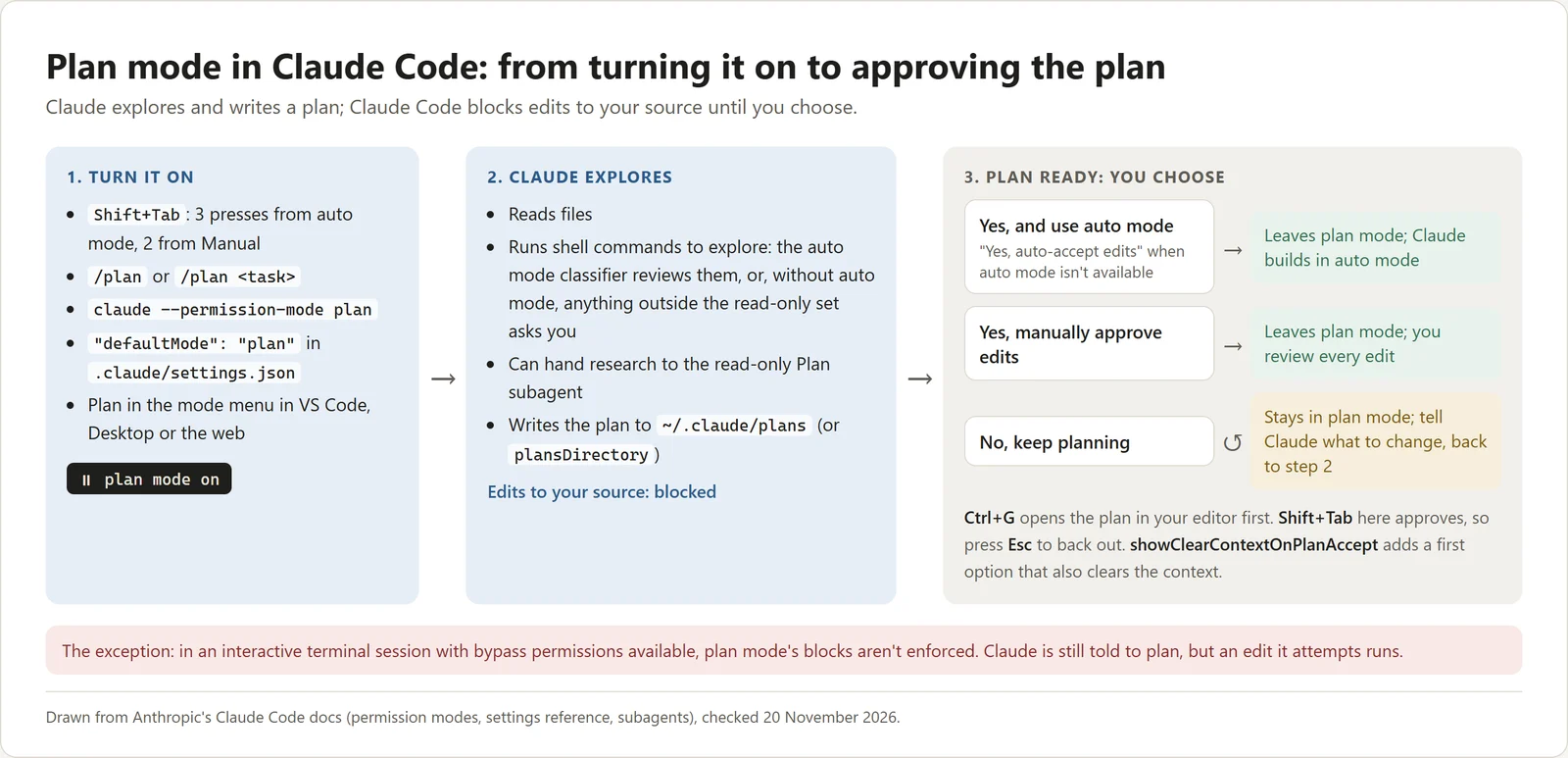
Plan mode from start to approval, drawn from Anthropic's Claude Code docs, checked 20 November 2026.
Plan on Opus, build on Sonnet: opusplan
The opusplan model setting "uses opus during plan mode, then switches to sonnet for execution". Pick it with /model opusplan or claude --model opusplan; opusplan[1m] asks for the 1M-token context window. A haiku session likewise plans on Sonnet. One cost note: since 2.1.326, automatic compaction in plan mode uses "the model answering you, such as Opus with opusplan, so it can cost more".
Plan mode and the other permission modes
| Mode | Status bar | What runs without asking | Best for, per Anthropic |
|---|---|---|---|
default (Manual) |
⏸ manual mode on |
File reads in your working directories and other actions that need no approval | Sensitive work, unfamiliar code |
acceptEdits |
⏵⏵ accept edits on |
Reads, file edits, common filesystem commands (mkdir, touch, mv, cp) |
Iterating on code you're reviewing |
plan |
⏸ plan mode on |
Reads, plus classifier-approved commands when auto mode is available | Exploring a codebase before changing it |
auto |
⏵⏵ auto mode on |
Everything, with background safety checks | Long tasks, fewer prompts |
dontAsk |
⏵⏵ don't ask on |
Reads and pre-approved tools; anything that would prompt is denied | Locked-down CI and scripts |
bypassPermissions |
⏵⏵ bypass permissions on |
Everything | Isolated containers and VMs only |
"Deny rules block in every mode, including bypassPermissions." dontAsk never appears in the Shift+Tab cycle; the desktop app lacks it, and cloud sessions offer only Accept edits, Plan and Auto. Flags and shortcuts for every mode are in our Claude Code cheat sheet.
Point Claude at your database.
Start free →What claude --help lists
We ran it on Windows 11 on 20 November 2026 without starting a session. Our install was 2.1.284; the newest release that day was 2.1.329.
$ claude --version
2.1.284 (Claude Code)

$ claude --help
  ...
  --allow-dangerously-skip-permissions  Enable bypassing all permission checks
                                        as an option, without it being enabled
                                        by default. Recommended only for
                                        sandboxes with no internet access.
  ...
  --permission-mode <mode>              Permission mode to use for the session
                                        (choices: "acceptEdits", "auto",
                                        "bypassPermissions", "manual",
                                        "dontAsk", "plan")
The list says manual where the docs say default; both work, and "claude --help lists it in place of default". The first flag is the one that weakens plan mode: with bypassPermissions in the cycle of an interactive terminal session, "most edits and commands Claude attempts in plan mode run with no prompt, before you approve a plan."
A worked example: add a column to a SQL report
An example we wrote, not a transcript of a session. The repository holds reports/monthly_channel.sql: orders and revenue per sales channel for the last three full months, over the invented sample data Fastero ships (4,734 orders, November 2024 to October 2026). The task, as a prompt:
/plan Add an average order value column to reports/monthly_channel.sql.
AOV = revenue divided by distinct orders, per month and channel.
Find everything that reads this report (scripts, tests, dashboards, docs)
and say which of them change. Don't rename or reorder existing columns.
End the plan with how you will check the numbers.
A plan worth approving:
- Names the files it will change, and the readers it checked and will leave alone.
- Writes the formula out:
SUM(revenue) / NULLIF(COUNT(DISTINCT order_id), 0), rounded likerevenue. - Adds the column last, so anything reading columns by position keeps working.
- Lists the follow-on edits: a test's expected output, the README's column list, an export header.
- Ends with a check you can rerun: run the query, recompute one row by hand.
Push back when the plan averages the wrong thing. AVG(unit_price) sounds like average order value but ignores quantity. We ran both on the sample with DuckDB 2.0.0 (Python 3.14):
month       channel     avg_unit_price  avg_order_value
----------  ----------  --------------  ---------------
2026-08-01  Online              131.52           345.20
2026-08-01  Partner             139.41           346.30
2026-08-01  Sales team          179.40           351.44
2026-09-01  Online              129.14           291.11
2026-09-01  Partner             103.54           263.53
2026-09-01  Sales team          125.54           291.56
2026-10-01  Online              116.57           282.14
2026-10-01  Partner             112.31           271.27
2026-10-01  Sales team          149.40           300.25
The query file and the full run, unedited:
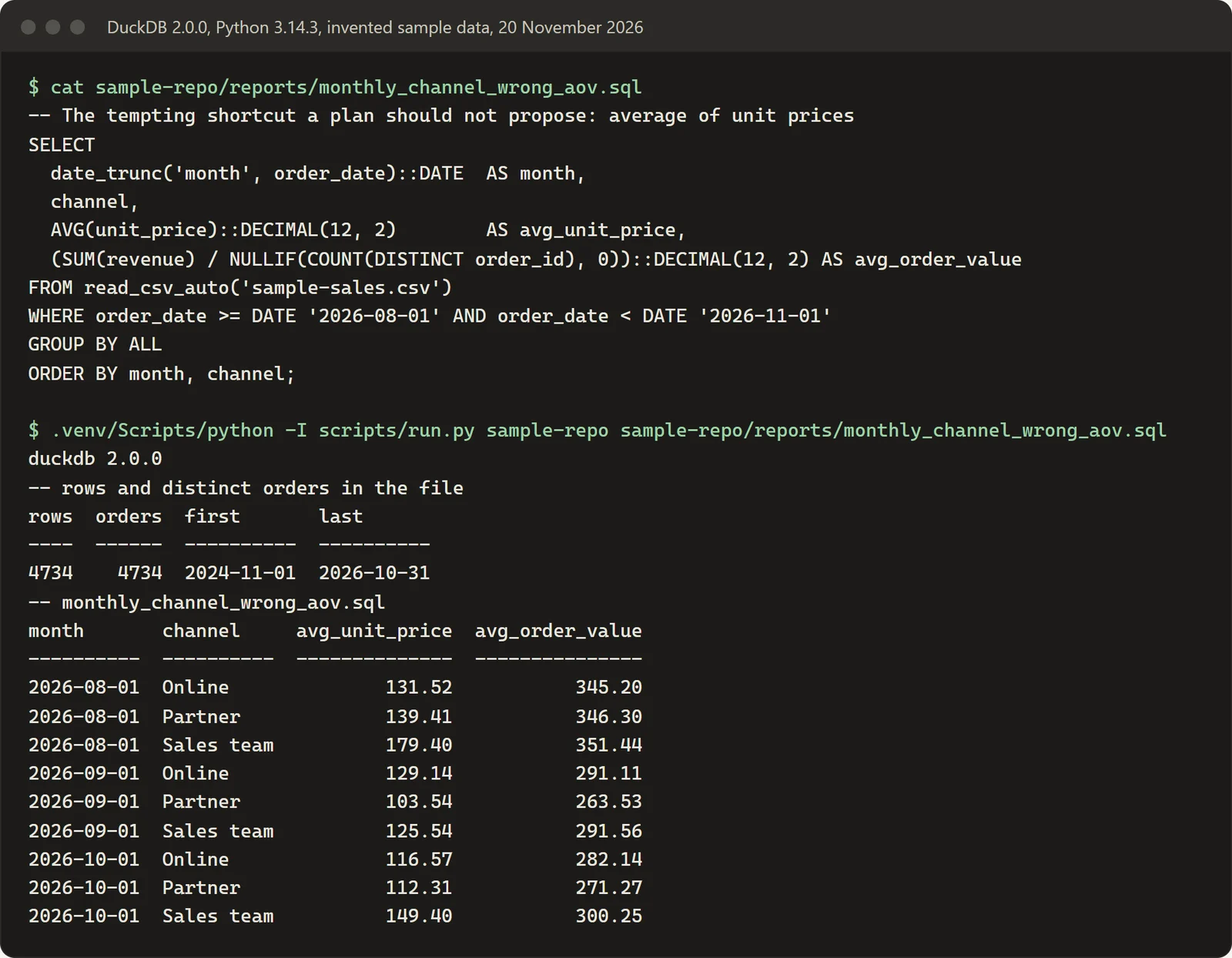
Average unit price against average order value on invented sample data, run in DuckDB 2.0.0 on 20 November 2026.
The shortcut comes out at 38% to 51% of the real figure. The hand check from step 5 holds: August's Online row is 42,460.16 of revenue over 123 orders, which is 345.20.
Push back, too, on a plan that reaches past the ask (renaming revenue, tidying other reports), that says "update related files" without naming them, or that checks its numbers against a production database it can write to. For a report other people read, choose "Yes, manually approve edits": there are few enough edits to read each one. If every plan should end with a check, say so once in CLAUDE.md.
When the plan needs a team's real numbers
Claude Code enforces plan mode on your machine, with the exception above. When the report reads a team's database, a server that can't write is a second lock. Fastero is an AI and data platform where people and AI agents work together on a team's data, and a remote HTTP MCP server with OAuth sign-in, tested with Claude and Claude Code:
- Add it with
claude mcp add --scope user --transport http fastero https://api.fastero.com/api/v1/mcp, then/mcpto sign in through the browser. - Its SQL tool runs one
SELECT,WITH,EXPLAINorSHOWstatement and refuses anything that could change data, in any permission mode, and returns at most 500 rows (as of 20 November 2026). fastero_get_definitionsreturns the SQL your team saved for a number such as average order value, so the plan can use it instead of inventing its own.- The finished chart can go on a dashboard colleagues open with their own login; viewers are free.
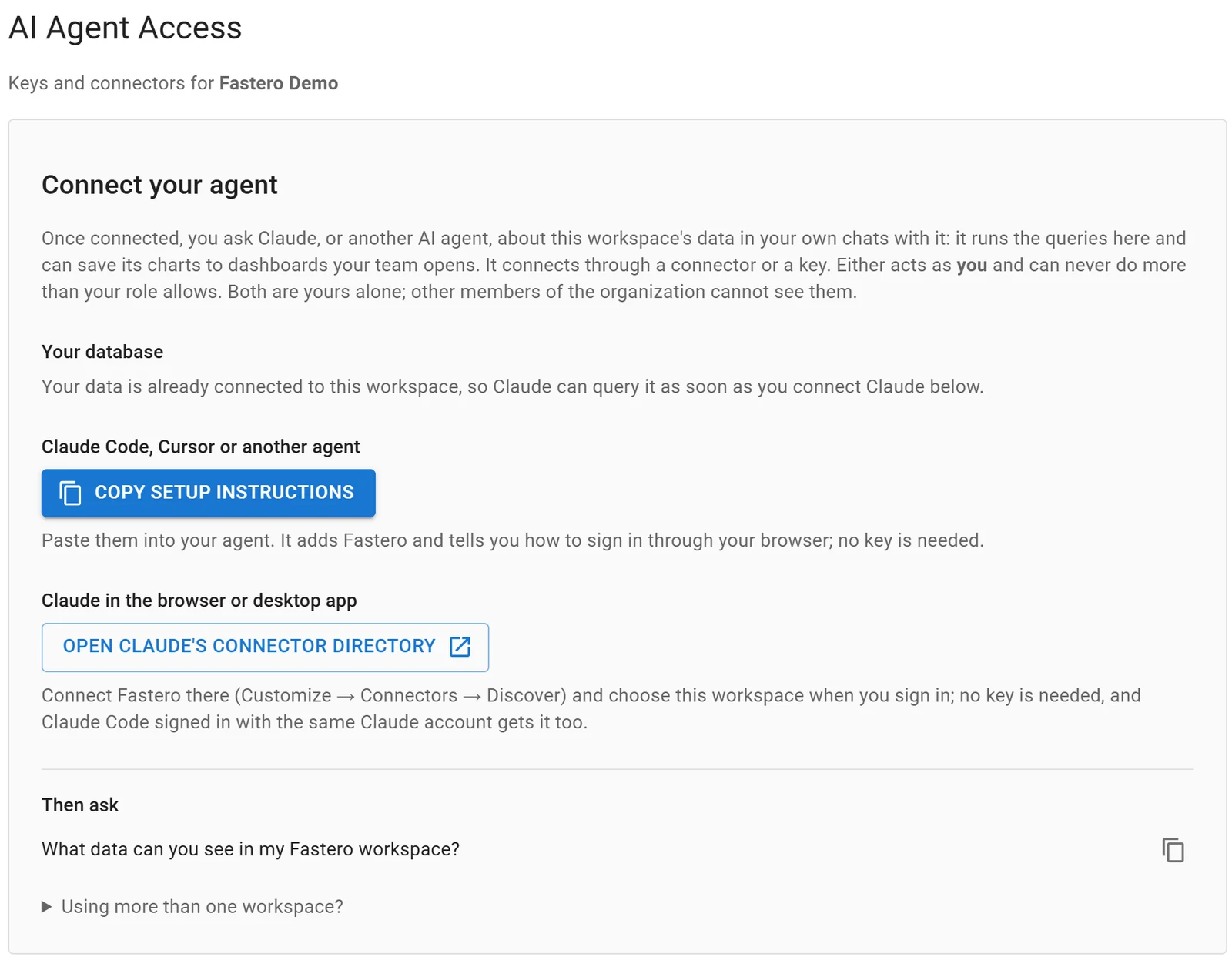
Settings, AI Agent Access: an agent signs in through the browser, so there is no key to copy.
More in Claude Code and MCP and Claude Code Desktop.
FAQ
How do I turn on plan mode in Claude Code?
Press Shift+Tab until the status bar shows ⏸ plan mode on, type /plan (optionally followed by the task), or start with claude --permission-mode plan. For every terminal session in a project, set permissions.defaultMode to "plan" in .claude/settings.json.
What is the shortcut for plan mode?
Shift+Tab cycles the permission modes: two presses from Manual, three from auto mode, where interactive sessions start since v2.1.283. On Windows, Alt+M does the same when the runtime doesn't enable VT input mode.
Can Claude edit files in plan mode?
Not your source: edits stay blocked until you approve the plan. The exception is an interactive terminal session with bypass permissions available, where plan mode's blocks aren't enforced.
How do I exit plan mode?
Approve the plan, which switches to the mode the option names, or press Shift+Tab with no approval prompt open. At the approval prompt, press Esc first, because Shift+Tab there approves the plan.
Where does Claude Code save plans?
In ~/.claude/plans by default. Set plansDirectory, for example to "./plans", to keep them in the project; a path outside the project root falls back to the default.
Sources
Read on 20 November 2026; the --help output is from Claude Code 2.1.284 on Windows 11, and the SQL ran in DuckDB 2.0.0 on Fastero's invented sample data:
- Claude Code docs: Permission modes, Common workflows, Commands, Interactive mode, CLI reference, Settings reference, Model configuration, Subagents, Tools reference, VS Code, Desktop, Changelog