 Fastero Dev Team
Claude Code has well over a hundred commands, flags and settings, and most lists don't say which version they describe. This page keeps the ones worth remembering, checked against Anthropic's docs on 12 November 2026, when the newest release was 2.1.322. Our own install was 2.1.284; where the two differ, we say so.
The short answer: start with claude, run one-off jobs with claude -p "…", and pick up where you left off with claude -c or claude -r. Inside a session, type / for commands (/init, /model, /compact, /clear, /context, /permissions, /mcp, /rewind), ! to run a shell command and @ to mention a file. The shortcuts to learn first: Esc to interrupt, Esc Esc to rewind, Shift+Tab to cycle permission modes, Ctrl+O for the transcript and Ctrl+R for history. Settings live in ~/.claude/settings.json (yours), .claude/settings.json (the team's) and .claude/settings.local.json (yours, for one project); instructions live in CLAUDE.md.
Fastero
Point Claude at your database.
Add Fastero to claude.ai or Claude Code. Claude builds the dashboard, deploys the app or publishes a live page, and your team opens it in Fastero.
Try free →Commands you run in the terminal
| Command | What it does |
|---|---|
claude |
Start an interactive session |
claude "explain this project" |
Start with a first prompt |
claude -p "query" |
Answer once and exit, for scripts and pipes |
claude -c |
Continue the most recent conversation in this folder |
claude -r "<id or name>" |
Resume a particular session |
claude update |
Update to the latest version |
claude doctor |
Read-only check of the install and settings files |
claude mcp |
Add, list and remove MCP servers |
claude plugin |
Install and manage plugins |
claude agents |
Open agent view: background sessions you can watch and start |
claude auth login, claude auth status |
Sign in; show who you're signed in as |
claude setup-token |
Make a long-lived token for CI (needs a Claude subscription) |
CLI flags
| Flag | What it does |
|---|---|
-p, --print |
Non-interactive: print the answer and exit |
--output-format text|json|stream-json |
Output format with -p |
--max-turns 3, --max-budget-usd 2 |
Stop a -p run after N turns or a spend cap |
--model sonnet |
Model for this session: an alias (fable, opus, sonnet, haiku) or full name |
--effort high |
Effort level: low, medium, high, xhigh, max |
--permission-mode plan |
Start in a permission mode (see below) |
--allowedTools "Bash(git *)" Edit |
Tools that run without asking |
--disallowedTools "Bash(rm *)" |
Deny rules for this session |
--add-dir ../shared |
Let Claude read and edit another folder |
--append-system-prompt "…" |
Add to the default system prompt (--system-prompt replaces it) |
--mcp-config ./mcp.json --strict-mcp-config |
Load these MCP servers and only these |
--settings ./ci.json, --setting-sources project |
Extra settings for one session; which settings files to load |
--agent reviewer, --agents '{…}' |
Run the session as a subagent; define subagents inline |
-w, --worktree [name] |
Start in a new git worktree |
--bare |
Skip hooks, skills, plugins, MCP servers, memory and CLAUDE.md: fast scripted runs |
--safe-mode |
Start with every customisation off, to find what broke |
--dangerously-skip-permissions |
Same as --permission-mode bypassPermissions. Containers and VMs only |
Anthropic's docs warn that "claude --help does not list every flag", and 17 of the flags in their table, including --max-turns, --system-prompt-file and --init, weren't in our 2.1.284 --help. Our --help also listed a few the docs table doesn't, such as --brief.
Slash commands
| Command | What it does |
|---|---|
/init |
Write a starter CLAUDE.md for the project |
/memory |
Edit CLAUDE.md files and turn auto memory on or off |
/model, /effort, /fast |
Switch model (saved as your default), effort level, fast mode |
/context |
See what's filling the context window |
/compact [focus] |
Summarise the conversation to free space |
/clear |
New conversation, empty context |
/resume, /branch, /fork |
Go back to a session; branch this one; copy it into a background session |
/rewind |
Roll code and conversation back to a checkpoint (also /checkpoint, /undo) |
/plan [task] |
Enter plan mode |
/btw [question] |
Side question that isn't added to the conversation |
/permissions |
Allow, ask and deny rules |
/config, /status |
Settings screen; version, model, account |
/mcp, /hooks, /skills, /agents |
MCP servers; hook configuration; skills; how to add subagents |
/tasks |
Background work, including finished subagents (also /bashes) |
/diff, /code-review, /security-review |
Review changes; check the diff for bugs (/review is an alias); check it for vulnerabilities |
/usage |
Session cost and plan limits (/cost and /stats open it too) |
/doctor |
Setup checkup that can fix what it finds |
/background, /exit |
Detach the session to run in the background; quit |
Gone or changed: /vim was removed in v2.1.92 (use /config → Editor mode), /pr-comments in v2.1.91, /ultraplan is gone in favour of plan mode, /agents no longer opens a wizard, and the # shortcut for memory was removed: the changelog says "tell Claude to edit your CLAUDE.md instead". Custom commands are now skills.
On Windows, in Git Bash, claude -p "/init" doesn't send /init: Git Bash rewrites arguments that start with /. We checked in Git Bash 5.2.37: /init arrived as C:/Program Files/Git/init. Prefix MSYS_NO_PATHCONV=1, write //init, or use PowerShell. Typing commands inside a session is unaffected.
Keyboard shortcuts
| Shortcut | What it does |
|---|---|
Esc |
Stop Claude mid-turn; it keeps the work done so far |
Esc Esc |
Clear the draft, or with an empty prompt, open rewind |
Ctrl+C |
Interrupt, or clear the input; press again on an empty prompt to exit |
Ctrl+D |
Exit (press twice) |
Shift+Tab |
Cycle permission modes (Alt+M on some Windows setups) |
Ctrl+O |
Transcript with full tool output |
Ctrl+R |
Search earlier prompts |
Ctrl+G |
Edit the prompt in your text editor |
Ctrl+B |
Send a running command or agent to the background |
Ctrl+T |
Show or hide Claude's to-do list |
Ctrl+S |
Stash the prompt; press again to bring it back |
Ctrl+V (Alt+V on Windows) |
Paste an image |
Alt+P, Alt+T, Alt+O |
Switch model, toggle thinking (no effect on the 5.5 and Fable models), toggle fast mode; Option on a Mac |
\ then Enter, or Ctrl+J |
New line, in any terminal |
Ctrl+X Ctrl+K |
Stop all background subagents (press twice) |
!, @, /, ? |
Shell mode, mention a file, commands, shortcut help |
Rebind keys in ~/.claude/keybindings.json. On a Mac, most Alt shortcuts need Option set as Meta in the terminal.
Point Claude at your database.
Start free →Permission modes
| Mode | Runs without asking | Use it for |
|---|---|---|
default (shown as Manual) |
Reads only | Sensitive work |
acceptEdits |
Reads, file edits, common file commands | Iterating on code you review |
plan |
Reads; no edits until you approve a plan | Exploring before changing |
auto |
Everything, with a classifier checking each action | Long tasks |
dontAsk |
Reads and pre-approved tools; the rest is denied | CI and scripts |
bypassPermissions |
Everything | Isolated containers and VMs only |
Shift+Tab cycles Manual, acceptEdits, plan and, where available, bypassPermissions and auto. From v2.1.283, auto mode is where interactive terminal and VS Code sessions start. "Deny rules block in every mode, including bypassPermissions." For scripts: claude -p "run the test suite" --permission-mode dontAsk --allowedTools "Bash(npm test)" "Read".
settings.json keys
Precedence, highest first: managed settings, then command-line flags, then .claude/settings.local.json, .claude/settings.json and ~/.claude/settings.json. Lists such as permissions.allow merge across files instead of replacing each other.
{
  "$schema": "https://json.schemastore.org/claude-code-settings.json",
  "model": "sonnet",
  "permissions": {
    "allow": ["Bash(npm run *)"],
    "ask": ["Bash(git push *)"],
    "deny": ["Read(./.env)"],
    "defaultMode": "acceptEdits"
  },
  "env": { "BASH_DEFAULT_TIMEOUT_MS": "300000" }
}
The $schema line gives autocomplete in VS Code and Cursor.
| Key | What it sets |
|---|---|
model, effortLevel |
Starting model; default effort level |
permissions |
allow, ask, deny, defaultMode, additionalDirectories |
env |
Environment variables for every session |
hooks |
Commands run at lifecycle events (our hooks guide) |
agent |
Start every session as a named subagent |
statusLine, outputStyle, theme, editorMode |
Status line command, response style, colours, vim keys |
autoMemoryEnabled, claudeMdExcludes |
Auto memory on or off; CLAUDE.md files to skip |
cleanupPeriodDays |
Days to keep transcripts (default 30, minimum 1) |
attribution |
Commit and PR attribution (includeCoAuthoredBy is deprecated) |
enabledPlugins, skillOverrides |
Plugins on or off; hide or switch off a skill |
sandbox |
Isolate Bash on macOS, Linux and WSL2 |
Files Claude Code reads
| File | What it's for |
|---|---|
CLAUDE.md or .claude/CLAUDE.md |
Project instructions, loaded every session (what to put in it) |
~/.claude/CLAUDE.md, CLAUDE.local.md |
Your instructions for every project; your private notes for one |
AGENTS.md |
Read when there's no CLAUDE.md in the folder or above it |
.claude/rules/*.md |
Topic instructions, optionally only for some paths |
.claude/settings.json, .claude/settings.local.json |
Team settings; your overrides, kept out of git |
.mcp.json |
MCP servers shared with the team |
.claude/skills/<name>/SKILL.md, .claude/commands/*.md |
Skills and older single-file commands |
.claude/agents/*.md |
Subagents |
~/.claude.json |
App state, account details and personal MCP servers |
~/.claude/projects/<project>/memory/ |
Auto memory: Claude's own notes |
Settings, rules, skills, commands, subagents and output styles also have a ~/.claude/ version for you in every project, and /keybindings opens your shortcuts file. Hooks have no file of their own: they sit under hooks in settings, in skill or subagent frontmatter, or in a plugin's hooks/hooks.json.
Environment variables
| Variable | What it does |
|---|---|
ANTHROPIC_API_KEY |
Use an API key instead of your subscription, even when signed in |
CLAUDE_CODE_OAUTH_TOKEN |
Subscription token for scripts, from claude setup-token |
ANTHROPIC_MODEL |
Model to use |
ANTHROPIC_BASE_URL |
Send requests through a proxy or gateway |
CLAUDE_CONFIG_DIR |
Use another folder instead of ~/.claude, such as a second account |
CLAUDE_CODE_SUBAGENT_MODEL |
Default model for subagents |
CLAUDE_CODE_EFFORT_LEVEL |
Effort level; beats --effort and /effort |
BASH_DEFAULT_TIMEOUT_MS |
Shell command timeout (default 120000, two minutes) |
MCP_TIMEOUT |
MCP server start-up timeout (default 30000) |
CLAUDE_CODE_DISABLE_AUTO_MEMORY |
1 turns auto memory off |
DISABLE_TELEMETRY |
Opt out; "Setting it to 0 or false still opts out" |
CLAUDE_CODE_DISABLE_NONESSENTIAL_TRAFFIC |
Turn off updates, telemetry, error reports and other extras |
Set them in your shell, or under env in a settings file.
When Claude Code's work is for a team
When Claude Code's output is meant for colleagues, such as a query, a chart or a weekly number, it needs to land somewhere they can open. Fastero is an AI and data platform where people and AI agents work together on a team's data, and Claude Code connects to it over MCP:
- Add it once:
claude mcp add --scope user --transport http fastero https://api.fastero.com/api/v1/mcp, then/mcpto sign in through the browser. Settings → AI Agent Access shows the same steps. - Read-only SQL: its
run_sqltool runs oneSELECT,WITH,EXPLAINorSHOWstatement and refuses writes. - Work colleagues can open: saved queries and dashboards stay in the workspace; people sign in to see them, and viewers are free.
- Keys for CI: where nothing can sign in, a key lasts at most 90 days (as of 12 November 2026), defaults to read and SQL, and never exceeds its owner's role.
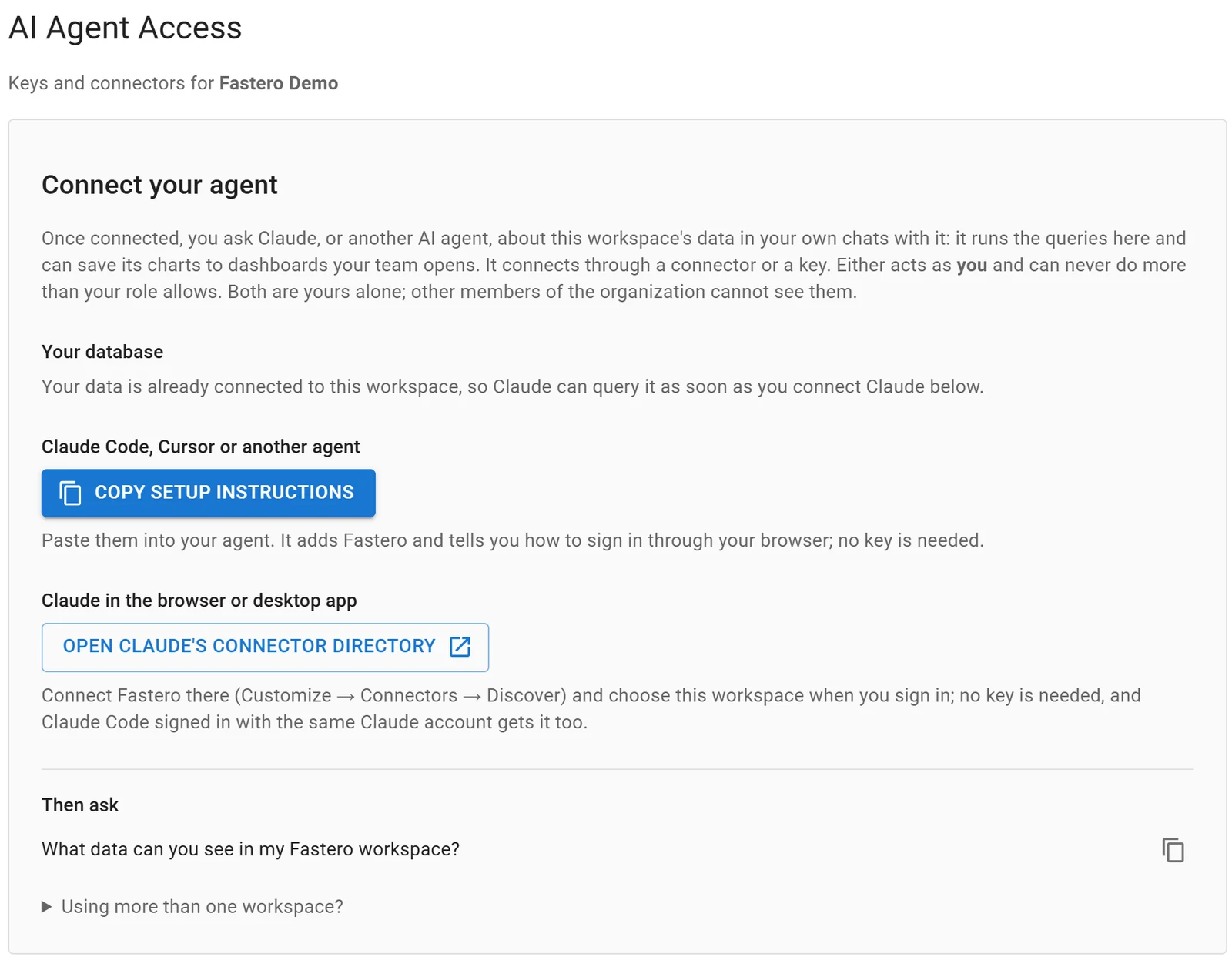
Settings, AI Agent Access: an agent signs in through the browser, so there is no key to copy.
More in Claude Code and MCP and Claude Code for data analysis.
FAQ
What are the most useful Claude Code commands?
/init, /context, /compact, /clear, /model, /rewind and /permissions.
How do I see all Claude Code commands?
Type / in a session, ? on an empty prompt for shortcuts, and claude --help for flags, which doesn't list them all.
Where is the Claude Code settings file?
~/.claude/settings.json for you, .claude/settings.json for the team, .claude/settings.local.json for your overrides in one project. /config edits common ones without opening a file.
How do I switch permission modes in Claude Code?
Press Shift+Tab in a session, or start with --permission-mode plan (or default, acceptEdits, auto, dontAsk). Set a default with permissions.defaultMode.
How do I add a new line in the Claude Code prompt?
\ then Enter, or Ctrl+J, in any terminal. Shift+Enter works natively in iTerm2, WezTerm, Ghostty, Kitty, Warp, Apple Terminal and Windows Terminal; /terminal-setup adds it in VS Code and some others.
Sources
Read on 12 November 2026, when the newest release in the changelog was 2.1.322; our --help comparison and Git Bash check used Claude Code 2.1.284 on Windows 11: