 Fastero Dev Team
There are two ways to run Claude Code inside VS Code: Anthropic's extension, which adds a chat panel, and the claude command in VS Code's terminal. They share settings and history but not a program, which surprised us when we looked at our own machine. Below is what each does, from Anthropic's VS Code docs and the Marketplace listing, read on 20 November 2026.
The short answer: install Claude Code for VS Code (anthropic.claude-code, by Anthropic) from the Extensions view: press Ctrl+Shift+X (Cmd+Shift+X on a Mac), search "Claude Code", click Install. It needs VS Code 1.94.0 or later and a paid Claude plan (Pro, Max, Ultra, Team or Enterprise) or a Console account; you sign in from the panel the first time. Open it from the Spark icon at the top right of an open file or the ✻ Claude Code item in the status bar; Ctrl+Esc then moves focus between your code and Claude. Over the terminal it adds plans that open as a Markdown document you can comment on, side-by-side diffs you accept or reject change by change, Alt+K @-mentions with line ranges, and conversations in tabs. It runs its own bundled copy of Claude Code and doesn't put claude on your PATH, so the CLI in the terminal is a separate install. The two share ~/.claude/settings.json, MCP servers and conversation history. The same extension installs in Cursor and in forks such as Devin Desktop and Kiro, from Open VSX.
Fastero
Point Claude at your database.
Add Fastero to claude.ai or Claude Code. Claude builds the dashboard, deploys the app or publishes a live page, and your team opens it in Fastero.
Try free →Install the extension
- In VS Code, open the Extensions view (
Ctrl+Shift+X), search "Claude Code" and click Install. In Cursor, the docs'cursor:extension/anthropic.claude-codelink does the same; other forks find it in their own Extensions view or on the Open VSX Registry. - Open a file and click the Spark icon in the editor toolbar, or click ✻ Claude Code in the status bar, which works with no file open.
- Click Sign in and finish in the browser. A "Learn Claude Code" checklist follows.
If the icon doesn't appear, run Developer: Reload Window. The extension doesn't run in Restricted Mode, so trust the workspace, and the docs suggest temporarily turning off other AI extensions such as Cline or Continue.
| Listing | Version | Updated | Count | Rating |
|---|---|---|---|---|
| Visual Studio Marketplace | 2.1.329 | 19 November 2026 | 30,652,083 installs, "not including updates" | 3.7 out of 5, 859 ratings |
| Open VSX Registry | 2.1.329 | 19 November 2026 | 68,091,641 downloads | 3.5 out of 5, 79 reviews |
Both read on 20 November 2026. The Marketplace lists it as Free, first published 18 June 2025, with builds for Windows x64 and ARM, macOS Intel and Apple Silicon, Linux x64 and ARM64, and Alpine. "The extension's version number is the Claude Code version it bundles", so a feature that needs Claude Code 2.1.300 needs extension 2.1.300.
What the extension adds over the terminal
From Anthropic's VS Code page:
- Plans you can mark up: in Plan mode, "VS Code automatically opens the plan as a full Markdown document where you can add inline comments to give feedback before Claude begins." Type
/plan fix the auth bugto start one. More in Claude Code plan mode. - Diffs change by change: in Manual mode each edit opens side by side, with Accept this change and Reject this change under every change, and you can edit the proposed text before accepting. Diffs with more than 100 changes are reviewed as a whole file.
- Context from the editor: Claude sees your selection and the open file.
Alt+Kinserts a reference such as@app.ts#5-10;@terminal:nameadds a terminal's output;@browserdrives Chrome through the Claude in Chrome extension. - Conversations as tabs: open several in tabs or windows, group and filter them in the sessions list, and resume cloud sessions from claude.ai in the Web tab. Sessions idle for 14 days are archived.
- Rewind: hover over a message to fork the conversation, rewind the code, or both.
- Dialogs for setup:
/mcpadds and removes MCP servers,/pluginsinstalls plugins with a scope, and the/menu edits hooks, permission rules, memory andCLAUDE.md.
Extension vs the CLI in VS Code's terminal
| Extension (chat panel) | claude in VS Code's terminal |
|
|---|---|---|
| Install | Extensions view; bundles its own Claude Code | The standalone install: see how to install Claude Code |
| Commands and skills | A subset: type / to see them |
All |
! shell shortcut, tab completion |
No | Yes |
Scripts (claude -p) |
No | Yes |
| Reviewing edits | Side-by-side diff, per-change accept and reject | VS Code's diff viewer, once the extension is installed |
| Plans | A Markdown document with inline comments | In the terminal; Ctrl+G opens the plan in your text editor |
| Selection and open file | Attached automatically | Attached too, through the extension's ide server |
| MCP servers | /mcp dialog |
claude mcp add; both save to the same configuration |
| History | Session list with groups and search | claude --resume lists the same conversations |
| Updates | With the extension | With the CLI's own installer |
The terminal CLI gets its editor features from a local MCP server the extension runs, named ide. Start claude in the integrated terminal and it connects by itself; from an outside terminal, run /ide. That server opens diffs in VS Code's viewer, shares your selection and the Problems panel's errors, and can run a cell in the open Jupyter notebook, but only after you click Execute in VS Code. The only CLI flag for it, from our claude --help:
$ claude --help | grep -A1 -- "--ide "
  --ide                                 Automatically connect to IDE on startup
                                        if exactly one valid IDE is available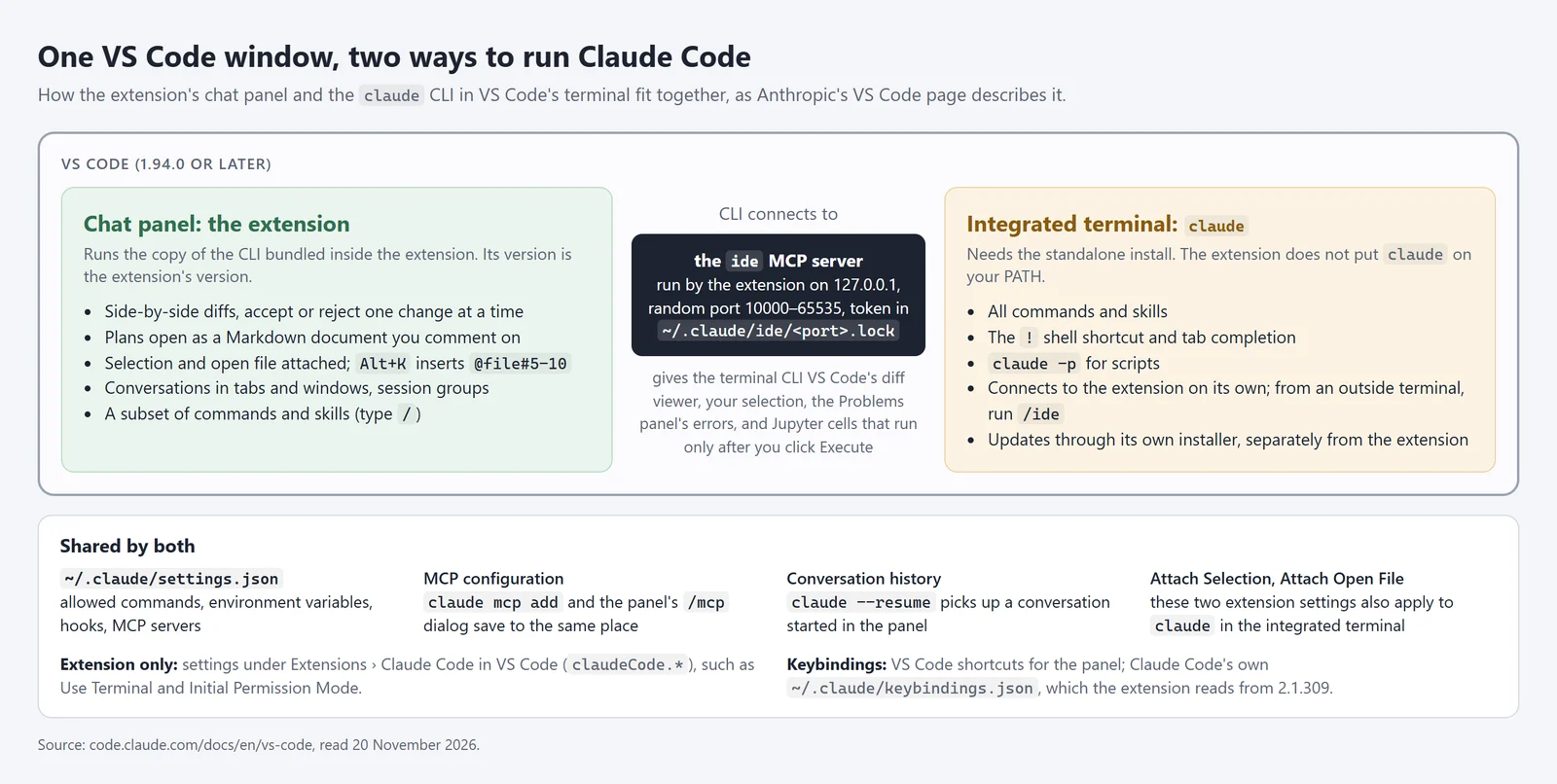
How the extension and the CLI fit together in one VS Code window, drawn from Anthropic's VS Code docs (20 November 2026)
The extension runs its own copy of Claude Code
On our Windows 11 machine, the panel and the terminal ran different versions:
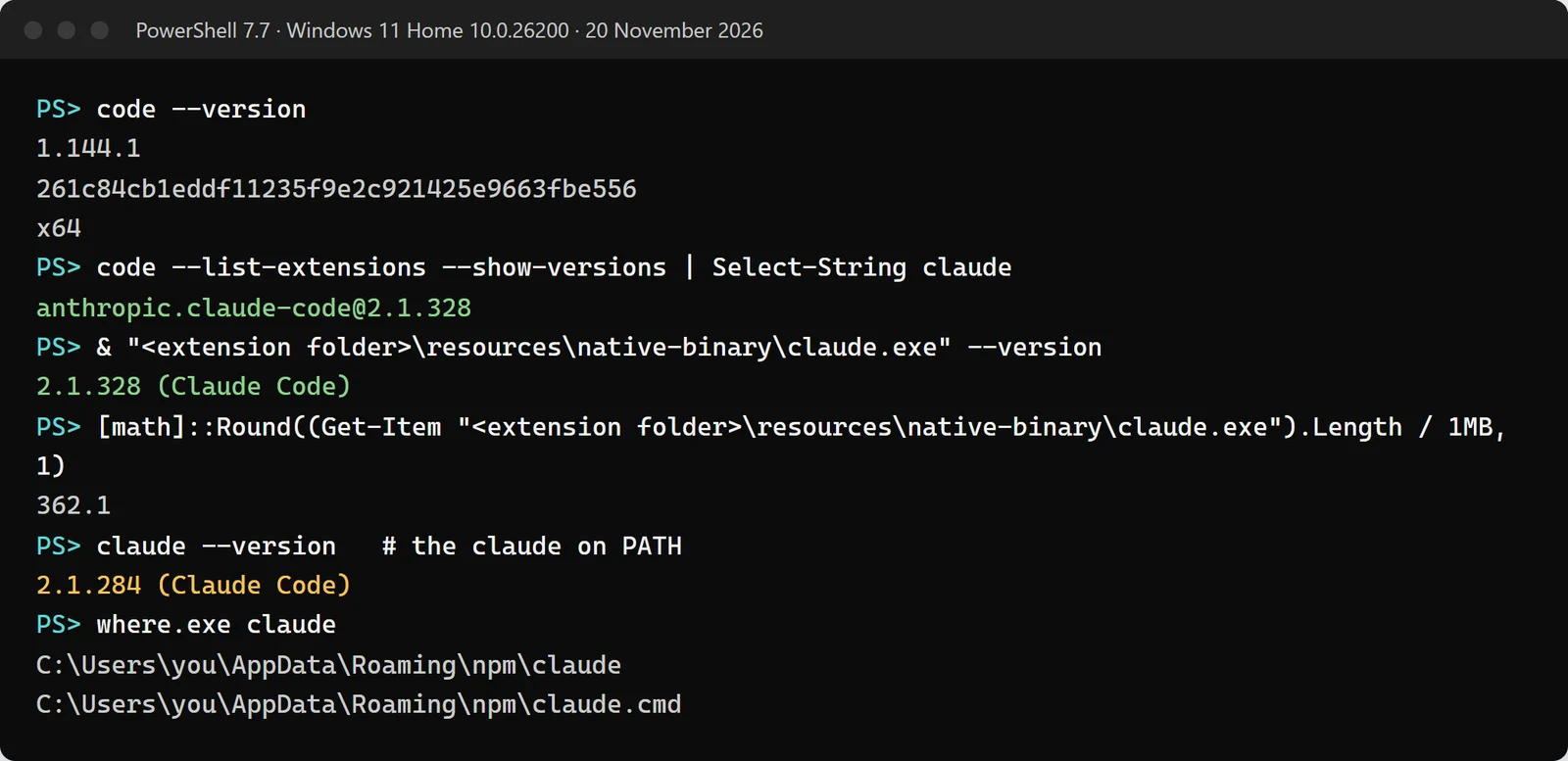
This machine's output on 20 November 2026: the chat panel runs the 362 MB copy of Claude Code inside the extension (2.1.328), while claude in the terminal is a separate npm install (2.1.284). User name replaced with "you".
The extension was on 2.1.328, released the day before. The claude in the terminal was an npm install of 2.1.284, from 28 September, 38 releases behind the panel in the changelog. That's the docs' warning in practice: "Installing the extension does not put claude on your shell PATH", and nothing keeps the two copies in step. Update the CLI with claude update, or use the native install, which updates itself.
Shortcuts
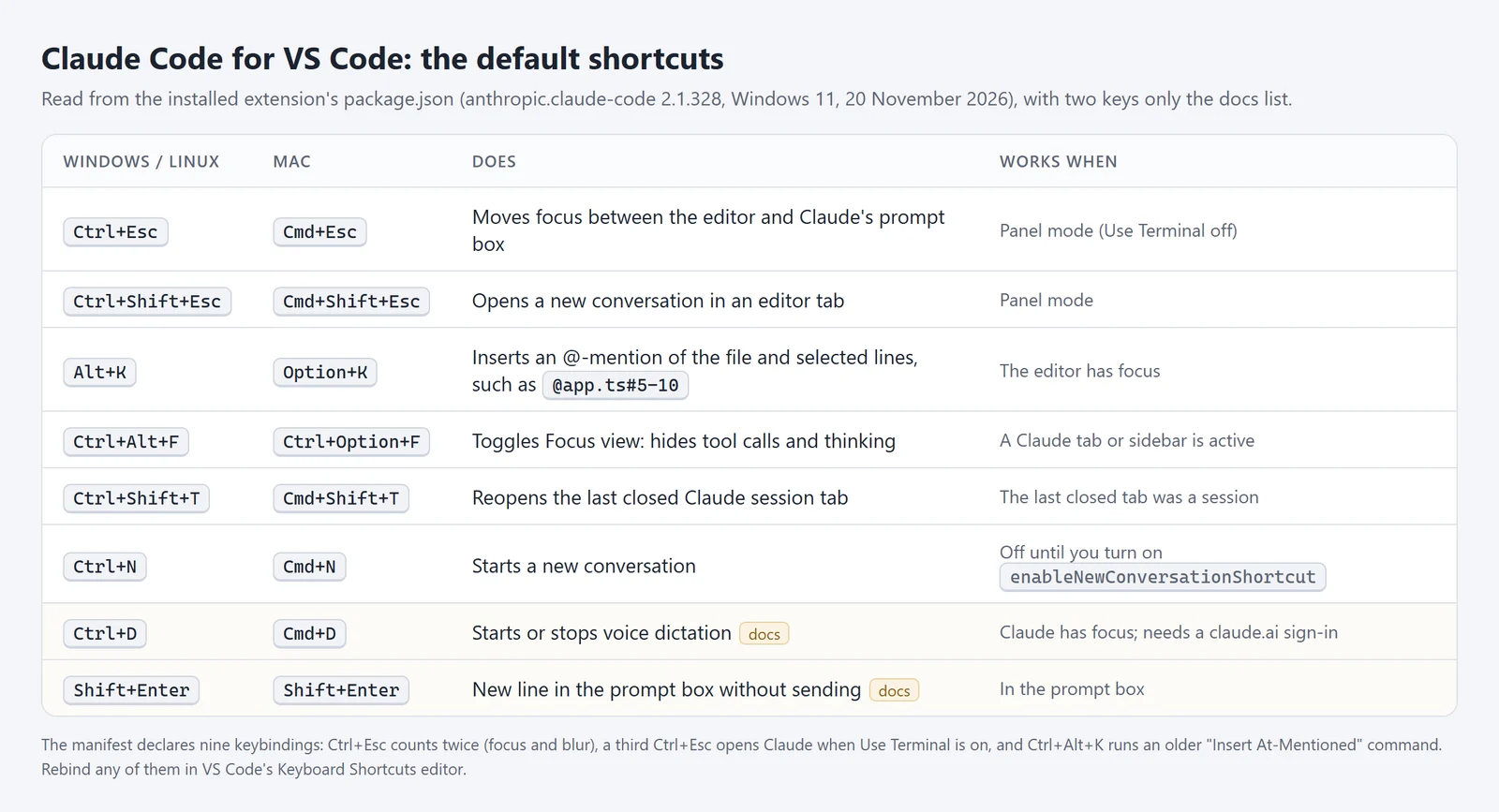
The extension's default shortcuts, read from its package.json (version 2.1.328) on 20 November 2026, plus two the docs list
Ctrl+N stays off until you turn on enableNewConversationShortcut, and on Windows and Linux Ctrl+Alt+F opens VS Code's Find instead when focus is in the Debug Console or a list such as the Explorer. On macOS Tahoe, the system Game Overlay takes Cmd+Esc; the docs say to clear it under Keyboard Shortcuts › Game Controllers, or rebind Claude Code: Focus input.
Point Claude at your database.
Start free →Settings
The extension has its own settings in VS Code (Extensions › Claude Code, or claudeCode.* in settings.json), and reads Claude Code's ~/.claude/settings.json for "allowed commands, environment variables, hooks, and MCP servers", which the CLI uses too. We listed the extension's own settings with a short Python script over its package.json (run in Git Bash; the nine keybinding lines it also prints are in the shortcuts table above):
$ python -I read_manifest.py ~/.vscode/extensions/anthropic.claude-code-2.1.328-win32-x64
Anthropic.claude-code 2.1.328  engines.vscode=^1.94.0
commands: 31   keybindings: 9   settings: 24

[9 keybinding lines]

claudeCode.environmentVariables               default=[]
claudeCode.useTerminal                        default=false
claudeCode.allowDangerouslySkipPermissions    default=null
claudeCode.claudeProcessWrapper               default=null
claudeCode.respectGitIgnore                   default=true
claudeCode.initialPermissionMode              default=null
claudeCode.disableLoginPrompt                 default=false
claudeCode.autosave                           default=true
claudeCode.focusView                          default=false
claudeCode.useCtrlEnterToSend                 default=false
claudeCode.preferredLocation                  default="panel"
claudeCode.lockEditorGroups                   default=true
claudeCode.enableNewConversationShortcut      default=false
claudeCode.enableReopenClosedSessionShortcut  default=true
claudeCode.hideOnboarding                     default=false
claudeCode.attachOpenFile                     default=true
claudeCode.attachSelection                    default=true
claudeCode.continueAfterReload                default=true
claudeCode.scrollToBottomOnSend               default=true
claudeCode.showMessageTimestamps              default=true
claudeCode.promptSuggestions                  default=true
claudeCode.spinnerVerbs                       default={"mode": "append", "verbs": []}
claudeCode.archiveInactiveSessions            default=14
claudeCode.usePythonEnvironment               default=true
The ones worth knowing, as the docs describe them:
| Setting | What it does |
|---|---|
| useTerminal | Runs Claude in terminal mode instead of the panel |
| initialPermissionMode | The mode new conversations start in: default (Manual), plan, acceptEdits or bypassPermissions. Read from user settings only; workspace values are ignored |
| attachSelection, attachOpenFile | Stop your selection or open file going into messages; both apply to claude in the integrated terminal too |
| autosave | Saves files before Claude reads or edits them, though not before a notebook edit |
| usePythonEnvironment | Activates the workspace's Python environment, with the Python extension |
| disableLoginPrompt | For Amazon Bedrock, Google Cloud's Agent Platform or Microsoft Foundry set up in ~/.claude/settings.json |
claudeCode.promptSuggestions is the one setting the docs' table leaves out; the docs turn suggestions off with promptSuggestionEnabled in ~/.claude/settings.json instead. The extension also answers a link, vscode://anthropic.claude-code/open, that opens a new Claude tab from a script or bookmark; add ?prompt=review%20my%20changes to pre-fill the prompt without sending it. The docs' Windows example, in PowerShell:
Start-Process "vscode://anthropic.claude-code/open"Known limits
- Not every command: the panel has a subset of commands and skills, and no
!shortcut or tab completion. Runclaudein the terminal for the rest; the cheat sheet lists them. - The extension's filters stop at the panel: it withholds selected text from files matched by
files.exclude,search.excludeor.gitignore, but "This filter covers the chat panel only." Use aReaddeny rule to keep a file such as.envout of both. - Notebooks: a notebook edit rewrites the
.ipynbfile without touching the kernel and clears the edited cell's output, and autosave doesn't run before it, so save first and re-run changed cells. More in Claude Code with Jupyter notebooks. - Third-party providers: on Bedrock, Agent Platform or Foundry there are no plan usage bars, voice dictation or Web tab. The Web tab also needs a claude.ai subscription rather than a Console login.
- Uninstalling: it comes back if you run
/idefrom an outside terminal; setCLAUDE_CODE_IDE_SKIP_AUTO_INSTALLto1to stop that. On Windows its stored data is under$env:APPDATA\Code\User, inglobalStorage\anthropic.claude-code.
If you'd rather have a separate app than an editor panel, the desktop app's Code tab runs the same engine: see Claude Code Desktop vs the CLI.
When the work in VS Code is for a team
Claude Code in VS Code sees your workspace. A team's numbers sit in a database, and the result usually has to reach people who don't open your editor.
Fastero is an AI and data platform where people and AI agents work together on a team's data. It is a remote HTTP MCP server with OAuth sign-in, tested with Claude and Claude Code:
- Add it once, from the panel's
/mcpdialog or withclaude mcp add --scope user --transport http fastero https://api.fastero.com/api/v1/mcpin the integrated terminal. Both save to the same configuration, so the panel and the terminal get it. - Sign in through the browser from
/mcp; there's no key to keep in the workspace. Databases connect once in Fastero, so no password sits in your repo or.mcp.json. - SQL is read-only: one
SELECT,WITH,EXPLAINorSHOWstatement per call, at most 500 rows. - Saved queries and dashboards stay in the workspace, where colleagues sign in to see them. Viewers are free.
- For scripts that can't sign in, a key lasts at most 90 days and allows reading and SQL by default.
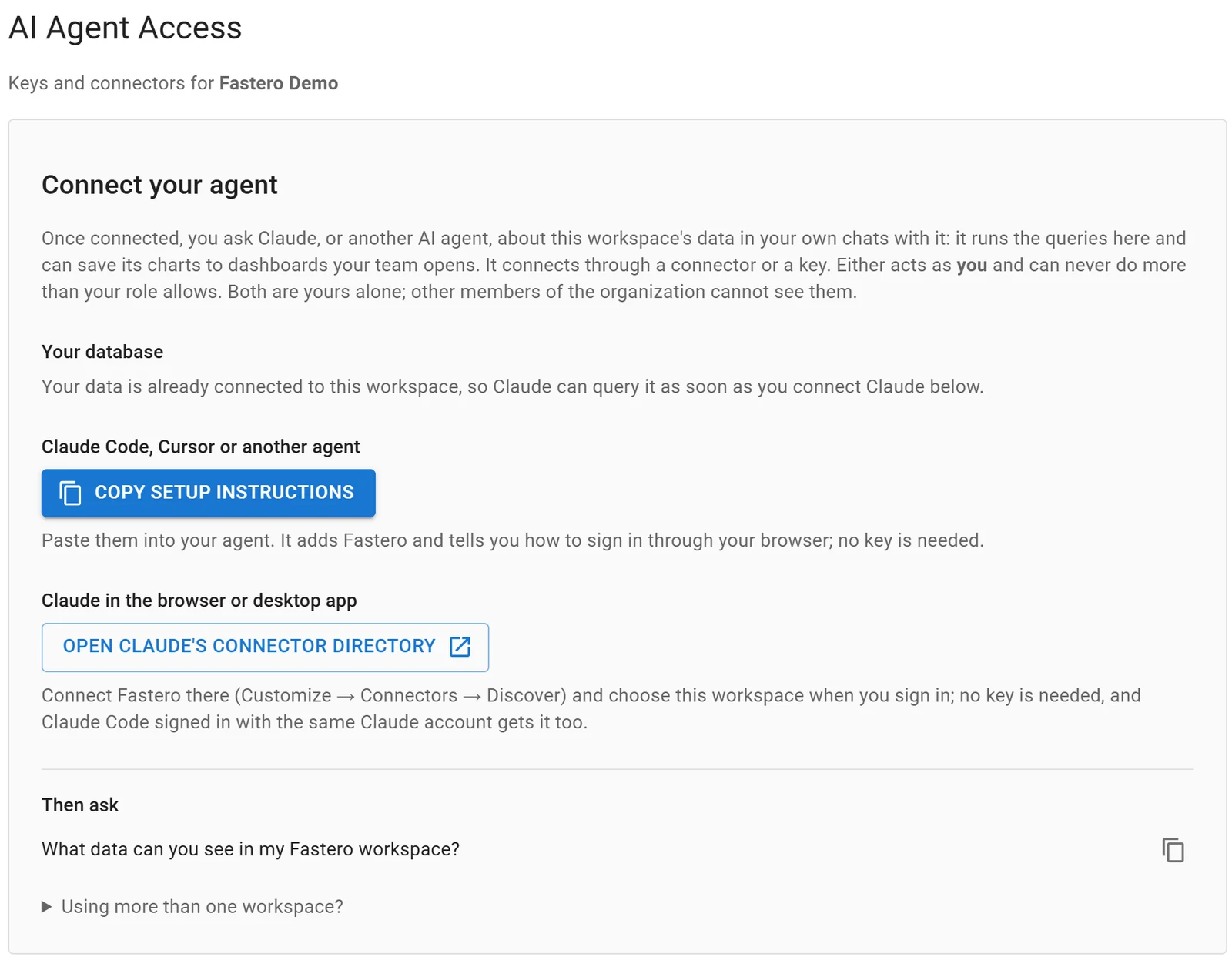
Settings, AI Agent Access: an agent signs in through the browser, so there is no key to copy.
More in Claude Code and MCP.
FAQ
Is there a Claude Code extension for VS Code?
Yes. Anthropic publishes Claude Code for VS Code, ID anthropic.claude-code, on the Visual Studio Marketplace and the Open VSX Registry. It needs VS Code 1.94.0 or later.
Is the Claude Code VS Code extension free?
The extension costs nothing to install, but using it needs a paid Claude plan (Pro, Max, Ultra, Team or Enterprise) or a Claude Console account billed at API rates. The free Claude plan doesn't include Claude Code.
Does the VS Code extension install the Claude Code CLI?
No. It bundles a private copy for its own panel and doesn't add claude to your PATH. To run claude in a terminal, install the CLI separately.
Can I use Claude Code in Cursor?
Yes. The extension installs in Cursor and in other VS Code forks such as Devin Desktop and Kiro, from their Extensions view or the Open VSX Registry. Any editor can also run the CLI in its terminal.
What's the difference between the Claude Code extension and the CLI?
The extension is a graphical panel with plan review, per-change diffs, @-mentions from your selection and conversations in tabs. The CLI has every command and skill, the ! shortcut, tab completion and claude -p for scripts. They share settings, MCP servers and conversation history.
Why is the Claude Code icon not showing in VS Code?
The Spark icon in the editor toolbar appears only when a file is open. Check that VS Code is 1.94.0 or later and the workspace isn't in Restricted Mode, then run Developer: Reload Window; the ✻ Claude Code item in the status bar works without a file open.
Sources
Read on 20 November 2026; the version, manifest and --help output come from VS Code 1.144.1, the extension 2.1.328 and Claude Code 2.1.284 on Windows 11 Home (10.0.26200):