 Fastero Dev Team
Azure Notebooks was Microsoft's free hosted Jupyter service, and it no longer exists. We traced what happened through Microsoft's own documentation history, checked what each replacement costs on 20 November 2026, and moved a small notebook project to three new homes to see what breaks.
The short answer: Azure Notebooks shut down on 15 January 2021. It was a free preview ("a free hosted service to develop and run Jupyter Notebooks in the cloud with no installation"), and Microsoft replaced it with "integrated services from Visual Studio, Azure, and GitHub". Today notebooks.azure.com redirects to a Microsoft page that lists VS Code with the Jupyter extension (free, on your own computer), GitHub Codespaces (120 hours of included compute a month on a free personal account), Azure Machine Learning (no charge for the service, you pay for the virtual machine: $0.185 an hour for a small one in East US), Microsoft Fabric (a 60-day trial) and GitHub for storing notebooks. None of them is a free cloud notebook that runs your code the way Azure Notebooks did. For that, look outside Microsoft: Google Colab, Kaggle or JupyterLite. Checked 20 November 2026.
Fastero
Jupyter notebooks for your team, with nothing to install.
Start a notebook or bring your .ipynb files. SQL cells query your databases with no password in the code, and a notebook runs now or on a schedule. Colleagues open it with their own login; viewers are free.
Try free →What happened to Azure Notebooks
Microsoft's docs described it as "a free service but each project is limited to 4GB memory and 1GB data to prevent abuse", with kernels such as "Python 3.6 + Anaconda3-5.3.0" and R. A project was a folder of notebooks and data files, and notebook servers were "guaranteed to exist for at most 8 hours".
Microsoft gave three different closing dates. Its own docs history and posts show:
| Date | What Microsoft said |
|---|---|
| 1 July 2020 | A Microsoft Sentinel blog post: the service and website "will be retired by September 29th" |
| July 2020 | The banner on every Azure Notebooks doc page: "On October 9, 2020 the Azure Notebooks public preview site will be retired" |
| 9 October 2020 | The banner changed to "On January 15, 2021 the Azure Notebooks public preview site will be retired", and told users "To create new or execute notebook content" to look elsewhere |
| 15 January 2021 | The docs were deleted in a commit titled "retirement of Azure Notebooks service" |
| 8 February 2021 | The banner: "On January 15, 2021 the Azure Notebooks public preview site retired and has been replaced with integrated services from Visual Studio, Azure, and GitHub" |
Before the shutdown, Microsoft's export guide said to open My Projects, select a project and click Download for "a zip file download that contains all of your project files". If you didn't, the files are most likely gone: when someone asked on Microsoft Q&A in February 2021 how to reach their projects, Microsoft's answer pointed to Azure Machine Learning studio and said nothing about recovering them.
What Microsoft points you to now
We followed notebooks.azure.com on 20 November 2026: it redirects to Visual Studio's "Notebooks at Microsoft" page, and so does the old docs address. That page lists five options:
| Replacement | Free tier, as of 20 November 2026 | Sign-in needed | GPU | Best for |
|---|---|---|---|---|
| VS Code + Jupyter extension | Free; runs on your computer | None to run locally | Your own computer's | Notebooks on your own machine |
| GitHub Codespaces | 120 hours of included compute and 15 GB-month of storage a month on GitHub Free; then from $0.18 an hour (2 cores) | GitHub account | Not generally available | A notebook in a repository, opened in the browser |
| Azure Machine Learning | No service charge; you pay for the VM. New Azure accounts get $200 of credit for 30 days | Azure subscription | Yes, with VM quota: a 1-T4 machine is $0.526 an hour | Machine learning on Azure, with experiment tracking |
| Microsoft Fabric | A 60-day trial capacity | Fabric in your organisation's Microsoft tenant | Not mentioned in Fabric's notebook guide | Spark and data engineering on Microsoft's data platform |
| GitHub | Free storage and sharing | GitHub account | Doesn't run code | Keeping and sharing the files |
The details behind each:
- VS Code. Microsoft calls it "a free code editor and development platform that you can use locally or connect to remote container". VS Code's docs say "To run Python code locally in a Jupyter Notebook, use a Python environment with IPyKernel installed", then you pick it in the kernel picker.
- GitHub Codespaces. The 120 hours are counted per core: GitHub's price table gives a 2-core machine an "Included usage multiplier" of 2, so the free quota is 60 hours of a 2-core codespace. Without a payment method, "usage is blocked once you use up your quota", and organisation plans "do not include a free quota". On GPUs: "offered to selected customers during a trial period. This option is not generally available."
- Azure Machine Learning. Its pricing page says "there is no additional charge to use Azure Machine Learning"; you pay for compute and for storage and other services it uses. To run cells "you need a compute instance", which "can incur charges while it runs". Azure's price list for East US, Linux, pay-as-you-go, checked 20 November 2026: a DS11 v2 (2 vCPUs, 14 GiB) is $0.185 an hour and an NC4as T4 v3 (4 vCPUs, 28 GiB, one T4 GPU) is $0.526 an hour. Microsoft suggests a schedule "to automatically start and stop the compute instance, or enable idle shutdown".
- Microsoft Fabric. The trial "gives you free access for 60 days", on an F4 or F64 capacity. Fabric notebooks "recognize the standard Jupyter Notebook .ipynb files". It lives in an organisation's tenant, and "trials might be disabled for your tenant".
- Azure Lab Services, which Microsoft recommended to teachers in 2020, closed to new customers on 15 July 2024 and "will be retired on June 28, 2027". It's gone from the current list, although the Fabric entry's button still reads "Get started with Azure Lab Services".
Move an old Azure Notebooks project: a tested example
We built a project shaped like an Azure Notebooks download: analysis.ipynb, a data/ folder with a CSV of 4,734 invented orders, and requirements.txt listing pandas and matplotlib. The notebook reads data/sample-sales.csv by a relative path, the usual way for a notebook to find files kept beside it.
Step 1: prove it still runs, from the command line
In a fresh virtual environment on Windows 11 (Python 3.14.3, nbconvert 7.17.2, pandas 3.1.1, matplotlib 3.11.2), from inside the project folder:
$ jupyter nbconvert --to notebook --execute analysis.ipynb --output analysis.executed.ipynb
[NbConvertApp] Converting notebook analysis.ipynb to notebook
[NbConvertApp] Writing 38780 bytes to analysis.executed.ipynb
exit code: 0  (17 s)
We've left out two Windows warnings (the zmq event loop and "Kernel is running over TCP without encryption"); the exit code line is ours. The saved notebook holds each cell's output:
4,734 orders, 2024-11-01 to 2026-10-31
region      East    North    South     West
quarter
2024Q4   18313.0  31916.0  17546.0  18698.0
2025Q1   33152.0  47778.0  21479.0  42458.0
[six more quarters trimmed]
2026Q4   18411.0  12265.0  16431.0  10410.0
Exit code 0 means every cell ran. An Azure Notebooks project was written for Python 3.6 and Anaconda3-5.3.0, so expect some of its code to need updating for today's libraries. A run like this stops at the first cell that fails; add --allow-errors to run the rest and see every failure at once. More options in running a notebook from the command line.
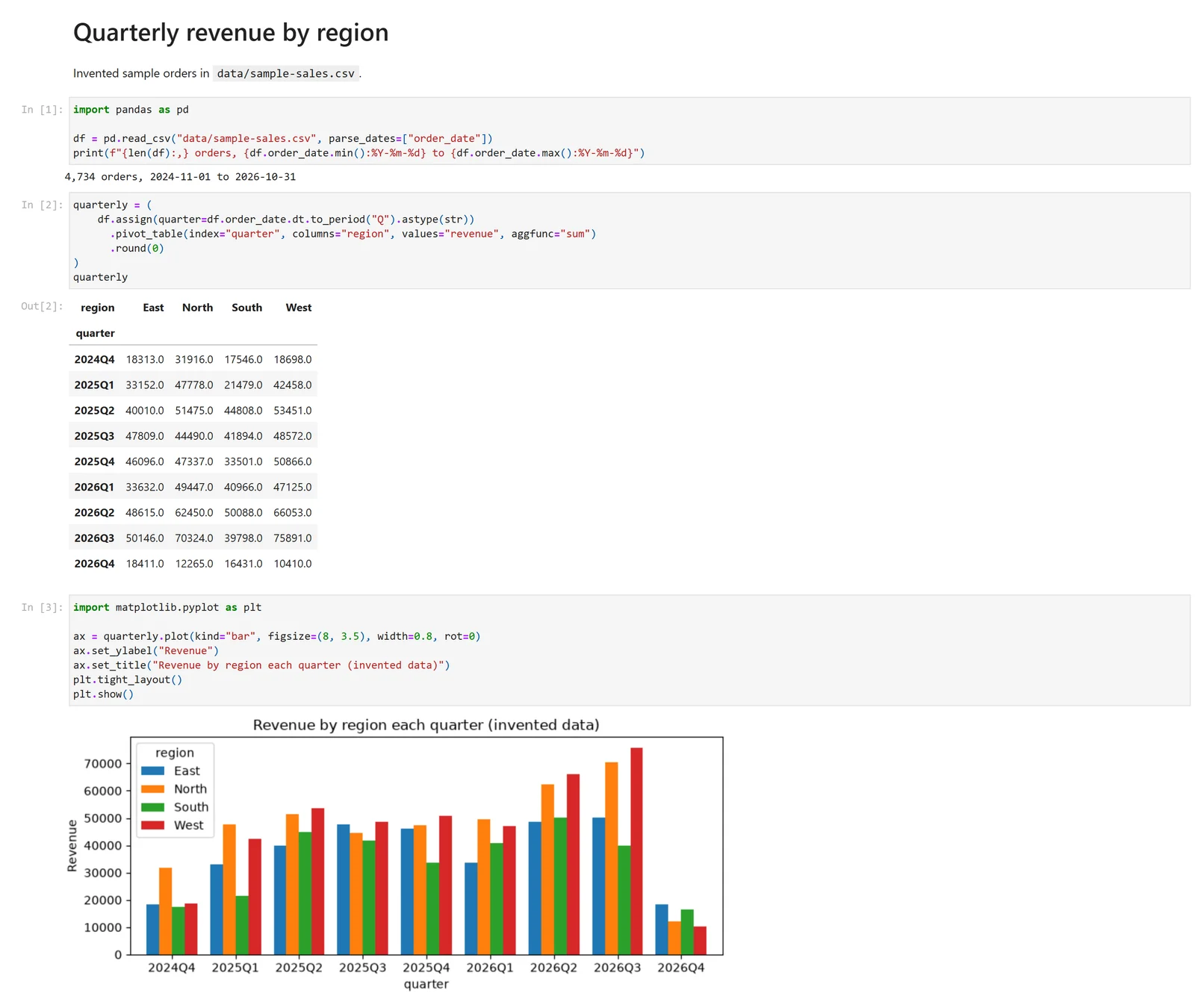
Our test project after jupyter nbconvert --execute: the notebook and its data folder still run. Invented sample data.
Step 2: GitHub Codespaces, with a devcontainer.json
Codespaces builds the environment from .devcontainer/devcontainer.json. Ours follows the pattern in GitHub's Python guide (an image, postCreateCommand to install requirements.txt, and VS Code extensions), with a current image tag:
{
  "name": "sales-project",
  "image": "mcr.microsoft.com/devcontainers/python:3.12",
  "postCreateCommand": "pip3 install --user -r requirements.txt ipykernel",
  "customizations": {
    "vscode": {
      "extensions": ["ms-python.python", "ms-toolsai.jupyter"]
    }
  }
}
We didn't open a codespace, which needs a GitHub account. We checked the file two ways instead. Against the Dev Container spec's JSON schema, with jsonschema 4.26.0, it passed; a copy with two deliberate mistakes failed:
sales-project/.devcontainer/devcontainer.json: valid

[two schema-level errors trimmed]
ERROR at customizations/vscode/extensions : 'ms-toolsai.jupyter' is not of type 'array'
bad/devcontainer.json: 3 error(s)
And the official Dev Containers CLI (@devcontainers/cli 0.90.0) read it and worked out where the project will sit, in about a second (JSON trimmed):
$ devcontainer read-configuration --workspace-folder sales-project
[2026-11-20T18:19:58.280Z] @devcontainers/cli 0.90.0. Node.js v24.12.0. win32 10.0.26200 x64.
{"configuration":{"name":"sales-project","image":"mcr.microsoft.com/devcontainers/python:3.12",
[...]
"workspace":{"workspaceFolder":"/workspaces/sales-project",
[...]
So in the codespace the notebook opens at /workspaces/sales-project/analysis.ipynb, and its relative data/ path still works.
Step 3: JupyterLite, with no account at all
JupyterLite is "a JupyterLab distribution that runs entirely in the browser". We built a site holding the project with jupyter lite build --contents lite-contents (jupyterlite-core 0.8.7 and the Pyodide kernel 0.8.7): 10 seconds and 71 MB, served from our own machine on localhost. Opening analysis.ipynb brought up one prompt, "Select Kernel", because the notebook asks for python3 and JupyterLite's kernel is "Python (Pyodide)". After Select, Run All Cells printed the same 4,734 orders and the same table, and drew the chart, 14 seconds later. The relative data/ path worked unchanged.
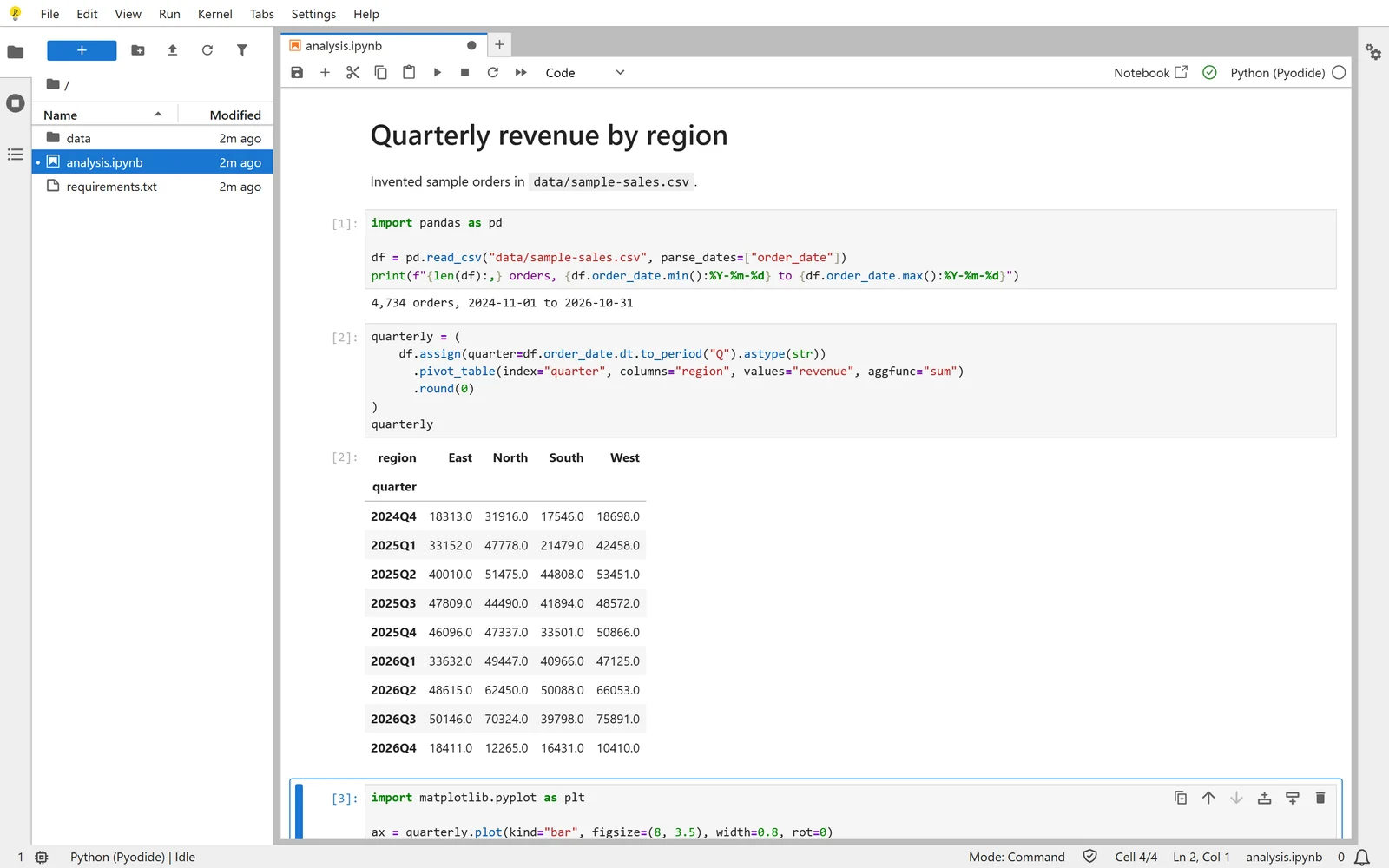
The migrated project in JupyterLite, running in the browser on the Python (Pyodide) kernel with identical results. Invented sample data.
The catch: files stay in the browser, nothing runs on a server, and there's no GPU or database connection. More in our JupyterLite guide.
Jupyter notebooks for your team.
Start free →Other places to run an old Azure Notebooks project
Microsoft's list leaves out the free notebooks outside Microsoft:
| Option | What it gives free | Sign-in | GPU | Pick it when |
|---|---|---|---|---|
| JupyterLite | Python in your browser tab | None | No | You want the closest thing to opening a link and running code |
| Google Colab | A T4 GPU when one is free; Google says "Colab does not publish these limits" | Google account | T4 | Your files are in Google Drive, or you need a GPU now |
| Kaggle Notebooks | GPU T4 x2 within a weekly quota; sessions up to 12 hours | Kaggle account, phone verified for GPU | Two T4s | You need free GPU hours you can plan around |
| Fastero | Free plan with no end date; notebooks and schedules included | Fastero account; viewers are free | No | The notebook reads company data and runs for a team |
The full field is in our guides to running a Jupyter notebook online, Jupyter notebook alternatives and Google Colab alternatives; Kaggle's limits are in Kaggle Notebooks.
When the notebook is a team's report
Many Azure Notebooks projects were exactly this: a notebook, a data folder, and people who opened it to read the result. Fastero is an AI and data platform where people and AI agents work together on a team's data. Here is what the migrated project gets the minute you sign up:
- Bring the
.ipynb: Upload .ipynb, or import it from the project's Git repository, and it opens in Fastero's editor on Python 3.11 with pandas. - The data folder: upload the CSV or Excel files to the project, and a file's menu gives Copy path for notebooks, the path that replaces
data/...in your code. - Or skip the files: SQL cells query a saved connection (Postgres, MySQL, SQL Server, Redshift, Oracle or BigQuery) with its stored credentials, and the rows land in Python as a pandas DataFrame named after the cell. Secrets reach cells as environment variables.
- Run it now or on any cron schedule, on the Free plan, which includes 6 hours a day of notebook and Python run time.
- Colleagues sign in to read it, and viewers are free. Each workspace server has 1 CPU and 2 GB, with no GPU, so keep GPU training on Colab or Kaggle.
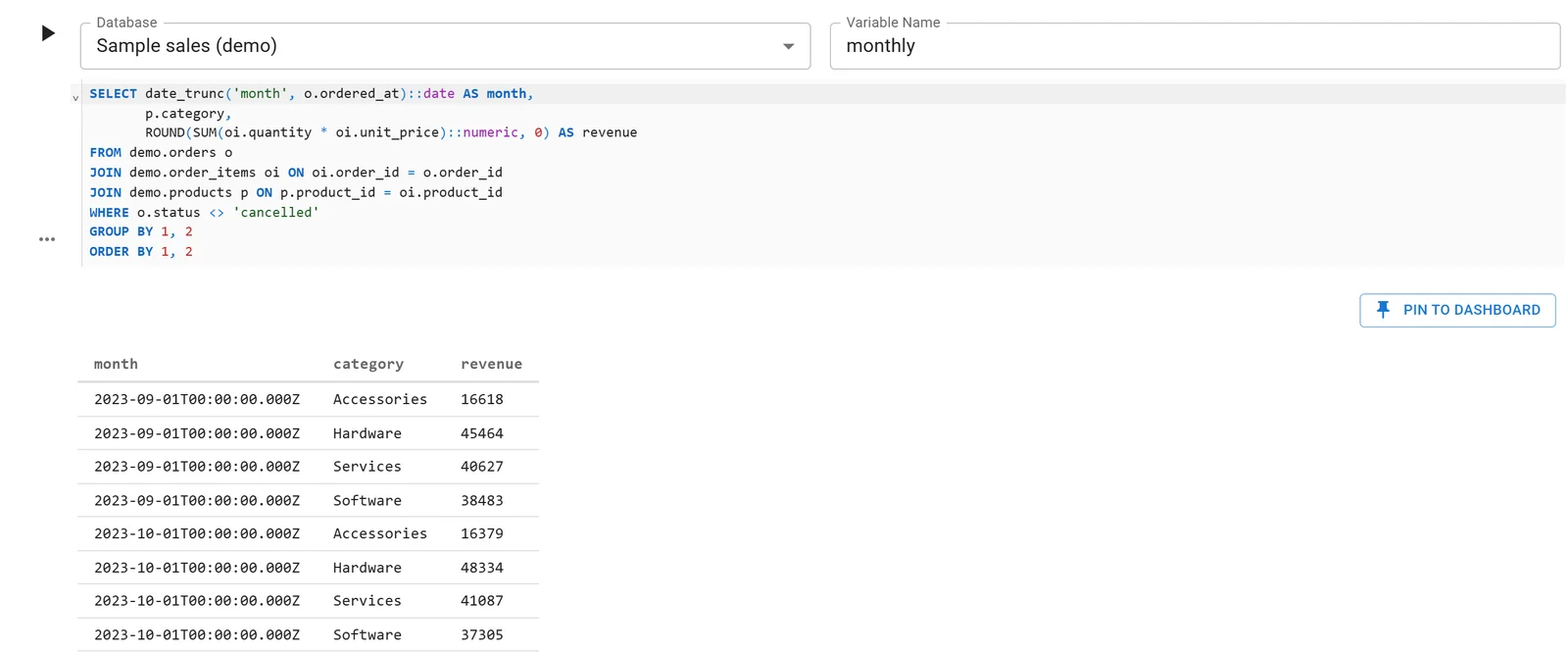
A Fastero notebook whose SQL cell reads a database connection; the rows arrive in Python as a DataFrame. Sample data.
FAQ
What happened to Azure Notebooks?
Microsoft retired it. The free Azure Notebooks preview closed on 15 January 2021 and was "replaced with integrated services from Visual Studio, Azure, and GitHub". notebooks.azure.com now redirects to Microsoft's "Notebooks at Microsoft" page.
When was Azure Notebooks retired?
On 15 January 2021. Microsoft had first announced 29 September 2020 in a blog post and 9 October 2020 in its docs, then moved the date in October 2020.
What replaced Azure Notebooks?
Microsoft lists VS Code with the Jupyter extension, GitHub Codespaces, Azure Machine Learning, Microsoft Fabric and GitHub. Of those, Codespaces is the one that runs notebooks in the browser with a free monthly allowance; Azure Machine Learning bills for the VM.
Can I still download my Azure Notebooks projects?
No. Microsoft's export guide had users download each project as a zip before the site closed. When users asked on Microsoft Q&A in 2021 how to reach their old projects, the answer pointed to Azure Machine Learning and offered no way to recover them.
Is there a free alternative to Azure Notebooks?
Yes. JupyterLite runs notebooks in your browser with no account, Google Colab and Kaggle run them in the cloud with a free GPU, and GitHub Codespaces includes 120 hours of compute a month on a free personal account. VS Code runs them free on your own computer.
Does Azure Machine Learning have a free tier?
The service itself has no charge, but the compute instance that runs your cells is billed while it runs: a DS11 v2 in East US is $0.185 an hour. A new Azure account gets $200 of credit to use within 30 days.
Can I open an Azure Notebooks .ipynb file in VS Code?
Yes. The files are standard Jupyter notebooks: open the folder in VS Code, install the Jupyter extension, and pick a Python environment with IPyKernel as the kernel. Keep the data folder beside the notebook so relative paths still work.
Sources
Read on 20 November 2026; prices are US dollars, Azure prices for East US, Linux, pay-as-you-go.
- Microsoft, Azure Notebooks: Overview (last version before retirement), Export a project, retirement banner history, retirement commit, Sentinel blog, July 2020, Q&A threads 139062 and 279406
- Microsoft today: Notebooks at Microsoft, Jupyter in VS Code, Azure Machine Learning pricing, run notebooks in Azure ML, compute instances, Azure free account, Azure Retail Prices API, Fabric trial, Fabric notebooks, Azure Lab Services retirement
- GitHub: Codespaces billing, Codespaces for machine learning, Python dev container setup, Dev Container schema
- Others: JupyterLite docs, Colab FAQ, Colab CLI session docs, Kaggle CLI kernels docs, Calvin University Kaggle lab
Try Fastero free: bring your old .ipynb, run it on a schedule next to your team's data, and let colleagues open it with their own login. No credit card required.