 Fastero Dev Team
JupyterLite is JupyterLab and Jupyter Notebook running entirely inside your browser tab. There's no server behind it: the Python kernel is Pyodide, a build of CPython for WebAssembly, so the code runs on your own computer, and a JupyterLite site is just static files that most web hosts can serve.
The short answer: to run Python in the browser with nothing installed, open JupyterLite at jupyter.org/try-jupyter or jupyterlite.github.io/demo. Its kernel, Pyodide, runs Python 3.14 with pandas, NumPy, scikit-learn, matplotlib and about 350 other prebuilt packages, and %pip install adds pure-Python packages from PyPI. What it can't do: install packages whose compiled code isn't built for Pyodide (psycopg2 and torch failed in our test), start threads or processes, open sockets, so no direct database connections, fetch from servers that block cross-origin requests, or use more than 4 GB of memory. Your files live in the browser's storage until you clear it. To host your own, pip install jupyterlite-core jupyterlite-pyodide-kernel and jupyter lite build produced a 69 MB static site in about 4 seconds in our test. Versions checked 12 November 2026.
Fastero
Jupyter notebooks for your team, with nothing to install.
Start a notebook or bring your .ipynb files. SQL cells query your databases with no password in the code, and a notebook runs now or on a schedule. Colleagues open it with their own login; viewers are free.
Try free →What JupyterLite and Pyodide are
Pyodide is CPython compiled to WebAssembly, plus a set of scientific packages compiled the same way. Version 314.0.0, released on 9 June 2026, upgraded it to Python 3.14.2; the newest release is 314.0.7, from 14 September 2026.
JupyterLite is, in its own docs' words, "a JupyterLab distribution that runs entirely in the browser". It reuses JupyterLab's interface and runs the kernel in a Web Worker. With the jupyterlite-pyodide-kernel package, that kernel is Pyodide; there's also a Xeus Python kernel that gets its packages from emscripten-forge.
Put together: a notebook interface, a Python kernel and a file browser, served as static files from GitHub Pages or most other static web hosts, with every cell executed on the visitor's machine.
Where to try JupyterLite online
| Site | What it runs | Notes |
|---|---|---|
| jupyter.org/try-jupyter | JupyterLite 0.8.7, JupyterLab or Notebook | Linked from Project Jupyter's Try Jupyter page, with example notebooks |
| jupyterlite.github.io/demo | JupyterLite 0.8.0 | The project's own demo site |
Both need no account. The first run downloads Python, and any packages a notebook imports, into the browser. In our Node.js test of the same runtime, starting Python took 2.2 seconds and loading pandas 5.5 more.
Build your own JupyterLite site
We did this on Windows 11 with Python 3.14.3, in a fresh virtual environment:
python -m venv venv
venv\Scripts\activate          # macOS/Linux: source venv/bin/activate
pip install jupyterlite-core jupyterlite-pyodide-kernel
jupyter lite build --output-dir dist
The install was small:
Successfully installed doit-0.37.0 jupyter-core-5.9.1 jupyterlite-core-0.8.7 jupyterlite-pyodide-kernel-0.8.7 pkginfo-2.0 platformdirs-4.14.5 traitlets-5.16.1The build took 4.3 seconds and printed, among other lines:
.  pre_status:static:jupyter-lite.json
    tarball:         jupyterlite-app-0.8.7.tgz 15MB
.  status:contents:contents
    contents: 0 files
.  pre_build:federated_extensions:copy:ext:@jupyterlite/pyodide-kernel-extension
The dist folder held 792 files, 69 MB in all, and its kernel loads Pyodide 314.0.6 from the jsDelivr CDN. JupyterLite's docs say a site can be served "locally or on most static web hosts".
To ship your own notebooks, put them in a folder and pass --contents. With only the two packages above, that fails:
RuntimeError: jupyter-server is not installed. You cannot add custom content to jupyterlite.
                Please install jupyter-server and try again.
After pip install jupyter-server (2.21.1), the same build copied our notebook and CSV file into the site in 8.4 seconds. For GitHub Pages without building locally, our Binder alternatives guide walks through the jupyterlite/demo template.
What works in JupyterLite
Pyodide 314.0.6's package list has 356 entries, counting the shared libraries some packages need. Among them, with the versions it ships:
| Area | Packages in Pyodide 314.0.6 |
|---|---|
| Data | pandas 3.0.2, NumPy 2.4.6, polars 1.33.1, pyarrow 22.0.0, DuckDB 1.5.1, SQLAlchemy 2.0.48 |
| Science and ML | SciPy 1.18.0, scikit-learn 1.8.0, statsmodels 0.14.6, XGBoost 2.1.4, LightGBM 4.6.0, SymPy 1.14.0, NetworkX 3.6.1 |
| Charts | matplotlib 3.10.8, Bokeh 3.9.0, Altair 6.0.0 |
| Other | requests 2.33.1, Pillow 12.2.0, OpenCV 4.11, Shapely 2.1.2, pydantic 2.12.5 |
Packages not on the list install from PyPI if they're pure Python. To check what the kernel really does, we ran the same Pyodide build in Node.js, which needs no browser:
[python version] OK
3.14.2 on emscripten / wasm32

[load pandas from Pyodide's own packages] OK (5.5 s)
pandas 3.0.2, numpy 2.4.6
region
North    17
South     7
West      9

[micropip: seaborn, plotly, openpyxl from PyPI] OK (11.9 s)
seaborn 0.13.2, plotly 7.1.0, openpyxl 3.1.5
In a JupyterLite notebook the equivalent is %pip install seaborn in a cell. Files in the file browser can be read from code, so a CSV you drag in can be opened with pd.read_csv.
Jupyter notebooks for your team.
Start free →What doesn't work in JupyterLite
| Limit | What happens | Source |
|---|---|---|
| Compiled packages not built for Pyodide | ValueError: Can't find a pure Python 3 wheel for 'psycopg2-binary'. The same for torch |
Our test |
| Threads and processes | RuntimeError: can't start new thread. "Attempts to use threading, multiprocessing, or subprocess will raise a RuntimeError." |
Our test, Pyodide FAQ |
| Sockets, so database drivers | "By default, Pyodide does not support sockets in the browser." Postgres or MySQL drivers can't connect from JupyterLite | Pyodide docs |
| Network requests | Requests go through the browser, so "You also are constrained by browser policies relating to cross-origin requests": a server without CORS headers blocks them | Pyodide docs |
| Memory | wasm32 tops out at 4 GB, "the largest amount of memory possible with 32-bit pointers". Our Node test got MemoryError at 3.75 GB; we didn't measure a browser |
V8 blog, our test |
| SSL and some hashes | ssl is a stub without OpenSSL, and hash functions that depend on OpenSSL are gone |
Pyodide 314.0.0 changelog |
| Missing modules | tkinter, curses, venv and a few others are removed; multiprocessing, threading and socket import but don't work |
Pyodide docs |
| Saving files | Notebooks and files live in the browser's own storage; "Clearing browser data will permanently remove data stored in your browser." Firefox private windows can't register the service worker that lets the kernel read files | JupyterLite docs |
JupyterLite's own troubleshooting page sums up the package side: problems come from packages that "Require native C extensions that are not compiled for WebAssembly", need system libraries, use threads, or touch the file system in ways the browser doesn't allow.
Two practical consequences. First, download anything you care about: a notebook that exists only in one browser's storage is gone the next time someone clears that browser's data. Second, JupyterLite can't read your company's database directly. You can upload a CSV export, or call an HTTP API whose server allows cross-origin requests, but there's no way for the browser to open a Postgres connection.
When you need a real server
JupyterLite is the right tool for teaching, documentation, demos and quick experiments: nothing to install, nothing to pay for, and nothing for a reader to break. Move to a server-backed notebook when:
- You need a database connection, a package with compiled code that Pyodide doesn't ship, or threads.
- The data is bigger than a few GB, or the job runs longer than you want a browser tab open.
- The notebook should run without you, on a schedule, or with secrets that shouldn't sit in a visitor's browser.
- You need a GPU or a deep-learning framework: torch isn't available in Pyodide. See where to run a Jupyter notebook online for free GPU options, or install Jupyter on your own machine.
To run a script on a schedule rather than in a browser tab, our guide to running a Python script online compares the server options.
When the notebook needs your database
That's where Fastero fits. It's an AI and data platform where people and AI agents work together on a team's data, and its notebooks run on a server next to the team's connections rather than in the browser:
- SQL cells query a workspace connection, such as Postgres, MySQL, SQL Server, Snowflake or BigQuery, with its stored credentials and hand the result to Python as a pandas DataFrame. No password sits in the notebook.
- Secrets reach cells as environment variables, in interactive and scheduled runs alike.
- Schedules: run a notebook now, or on a cron schedule, on the Free plan.
- Sharing: colleagues sign in to open it; viewers are free and can read without running or changing it.
- Results that travel: Promote to App turns a notebook into an app behind the same login, and a SQL cell's result can become a dashboard widget that refreshes.
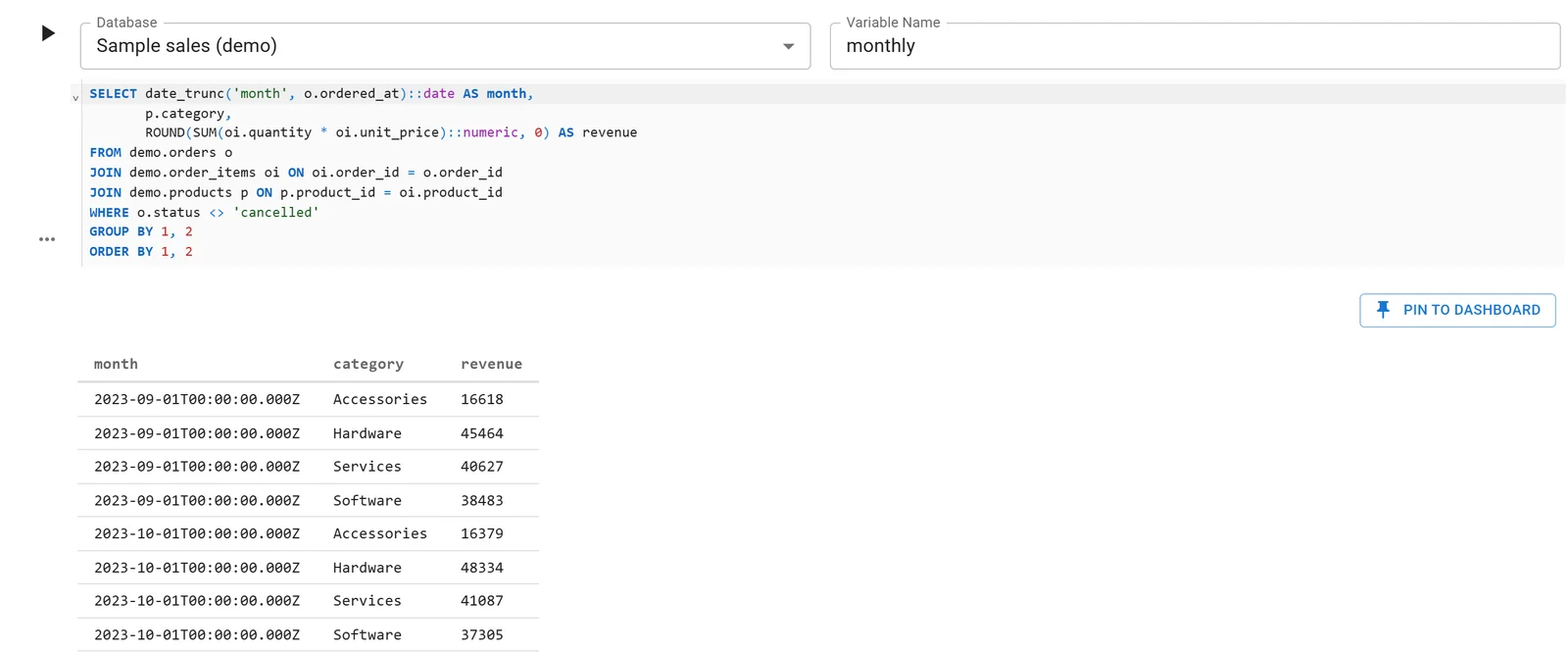
A Fastero notebook whose SQL cell reads a database connection; the rows arrive in Python as a DataFrame. Sample data.
Each workspace's notebook server has 1 CPU and 2 GB, with no GPU. Fastero's Free plan has no end date, and Pro is $20 per editor a month. More on SQL in a Jupyter notebook.
FAQ
What is JupyterLite?
JupyterLab and Jupyter Notebook running entirely in your browser, with no server. The Python kernel is Pyodide, CPython compiled to WebAssembly, and a JupyterLite site is static files you can host on GitHub Pages or most other static web hosts.
What is Pyodide?
A port of CPython to WebAssembly, with scientific packages such as NumPy, pandas, SciPy and scikit-learn compiled for it. Pyodide 314.0.0 moved to Python 3.14 in June 2026. JupyterLite uses it as its Python kernel, and it also runs in Node.js.
Can I pip install packages in JupyterLite?
Yes, with %pip install in a cell, for pure-Python packages on PyPI and for the packages Pyodide builds itself. Packages with compiled code that Pyodide doesn't build, such as psycopg2 or torch, fail with "Can't find a pure Python 3 wheel".
Where are JupyterLite files saved?
In your browser's storage, on that device and in that browser only. Clearing browser data deletes them, so download notebooks you want to keep.
Can JupyterLite connect to a database?
Not to a database server such as Postgres or MySQL: Pyodide has no sockets in the browser. It can read files you upload and call HTTP APIs that allow cross-origin requests, and DuckDB and SQLite are available inside Pyodide for local data.
How much memory can JupyterLite use?
At most 4 GB, the limit of 32-bit WebAssembly. In our Node.js test of the same Pyodide build, Python raised MemoryError at 3.75 GB; we didn't measure a browser.
Is JupyterLite free?
Yes. Trying it at jupyter.org/try-jupyter needs no account, and building your own site needs two pip packages (three to include your own notebooks) and a static web host.
Sources
Read and tested on 12 November 2026:
- JupyterLite: Documentation, Troubleshooting, Storage, Deploy quickstart, Pyodide kernel, Demo
- Project Jupyter: Try Jupyter
- Pyodide: Home, Python compatibility, FAQ, Sockets, Packages, Changelog, Package lock for 314.0.6
- V8: Up to 4GB of memory in WebAssembly
- Our test: Windows 11, Python 3.14.3, jupyterlite-core 0.8.7, jupyterlite-pyodide-kernel 0.8.7, jupyter-server 2.21.1; Pyodide 314.0.6 from npm on Node.js 24.12.0