 Fastero Dev Team
Anaconda Notebooks is Anaconda's hosted JupyterLab: you sign in, pick a ready-made Python environment and start coding in the browser. It is a good free place to learn and to try packages, with two catches worth knowing before you build on it: a daily CPU quota, and licence terms that change once your employer passes 200 people.
The short answer: Anaconda Notebooks is free with an Anaconda account, at nb.anaconda.com. As of 20 November 2026, the Free plan includes "Notebooks with 5GB cloud storage"; Starter costs $15 per user a month for "10GB storage per user"; Business is $50 per user a month. Each kernel gets up to 6 GB of RAM, and each plan a daily allowance of CPU seconds, after which your code keeps running at lower priority until the next day. The Notebooks docs describe no GPUs and no scheduled runs. The old Anaconda Cloud address, anaconda.cloud, now redirects to anaconda.com/app. Use is free for individuals and for companies of 200 or fewer employees and contractors; a bigger company needs Business. If you want no quotas, install Miniconda on your own computer, which needs no admin rights.
Fastero
Jupyter notebooks for your team, with nothing to install.
Start a notebook or bring your .ipynb files. SQL cells query your databases with no password in the code, and a notebook runs now or on a schedule. Colleagues open it with their own login; viewers are free.
Try free →What Anaconda Notebooks is today, and where Anaconda Cloud went
Anaconda describes it as "a hosted Jupyter notebook environment that runs entirely in your browser". You get a "dedicated JupyterLab instance" with "persistent cloud storage, hundreds of data science packages, and a managed infrastructure". The docs list what's included, each "limited based on your subscription plan":
- A curated JupyterLab interface, with SSD storage that is backed up
- "CPU seconds, refreshed daily"
- Anaconda Assistant, an AI helper built on "Claude Sonnet running on AWS Bedrock"
- Publishing a notebook as a Panel app at its own URL
- Read-only runtimes built from Anaconda Distribution, plus your own conda environments
- Example notebooks and sample datasets ("data catalogs")
What changed, with dates:
- Anaconda Cloud is a redirect now. On 20 November 2026, anaconda.cloud answered with a 301 to anaconda.com/app, and nb.anaconda.com sent us to Anaconda's login page. The docs call the web platform "Package Security Manager (Cloud)"; the product page still says "anaconda.cloud account".
- The runtimes lag the installer. The runtimes page lists
anaconda-2025.12-py312andanaconda-ai-2025.12-py312as live, with Python 3.12. Anaconda Distribution 2026.07-1, dated 29 July 2026, ships Python 3.14. - The pricing page is organised by product. It now leads with four: Anaconda Platform, Kilo (bought on 15 July 2026), Enkrypt AI and Anaconda Core. Notebooks appears in Core's Free plan.
- conda asks you to accept terms. Since Anaconda Distribution 2025.06, the installers include a plugin that asks you to accept the terms of service of Anaconda's own package channels before conda will use them. We hit it below.
Free vs Starter vs Business
From Anaconda's pricing page and Notebooks docs, checked 20 November 2026:
| Free | Starter | Business | |
|---|---|---|---|
| Price | $0 | $15 per user a month | $50 per user a month |
| Cloud storage | 5 GB | 10 GB per user | Not listed |
| CPU seconds a day | Not published | Not published | Not published |
| RAM | 6 GB per kernel | 6 GB per kernel | Not listed |
| Also includes | Anaconda Assistant, intro courses | On-demand courses, team workspace controls | Vulnerability scanning, audit trails, SSO |
The pricing page no longer gives the CPU numbers. In April 2024 a reply on Anaconda's community forum put them at "1000 seconds of compute time" a day on Free and 8,000 on Starter; treat those as old.
How the quota works, from the docs: a CPU second is "one second of running code on a single CPU core at 100%". Once you hit the limit, your instance "is not shut down, but instead given lower CPU priority", and loading a CSV "might take 10 seconds instead of half a second" until the daily reset. Kernels keep spending CPU seconds after you log out, so shut them down from the Running Terminals and Kernels tab. A process over 6 GB of RAM is terminated; for more, the docs say to contact Anaconda's sales team.
Storage fills fastest with your own environments. Free-plan users "are recommended to avoid complex environment building and to limit this to one environment at a time".
Who can use it for free
Anaconda's Terms of Service, dated 15 July 2025, make use free if you are an individual working for "personal, non-commercial purposes", at an eligible school or non-profit, or "on behalf of a for-profit organization with 200 or fewer total employees or contractors (including all Affiliates)". Above 200, a paid Business Plan subscription is required. The pricing page repeats it: "Users within organizations with 200+ employees/contractors (including Affiliates) require a paid Business license."
The Notebooks FAQ reads more strictly: "Anaconda Notebooks alone does not provide commercial compliance", and it names "Pro (legacy), Business, or Custom" plans as the ones "permitted to use all Anaconda products for commercial use". The terms are the binding text: over 200 people, budget for Business or use something else, such as plain pip (how to install Jupyter without Anaconda).
Anaconda Notebooks vs Anaconda or Miniconda on your computer
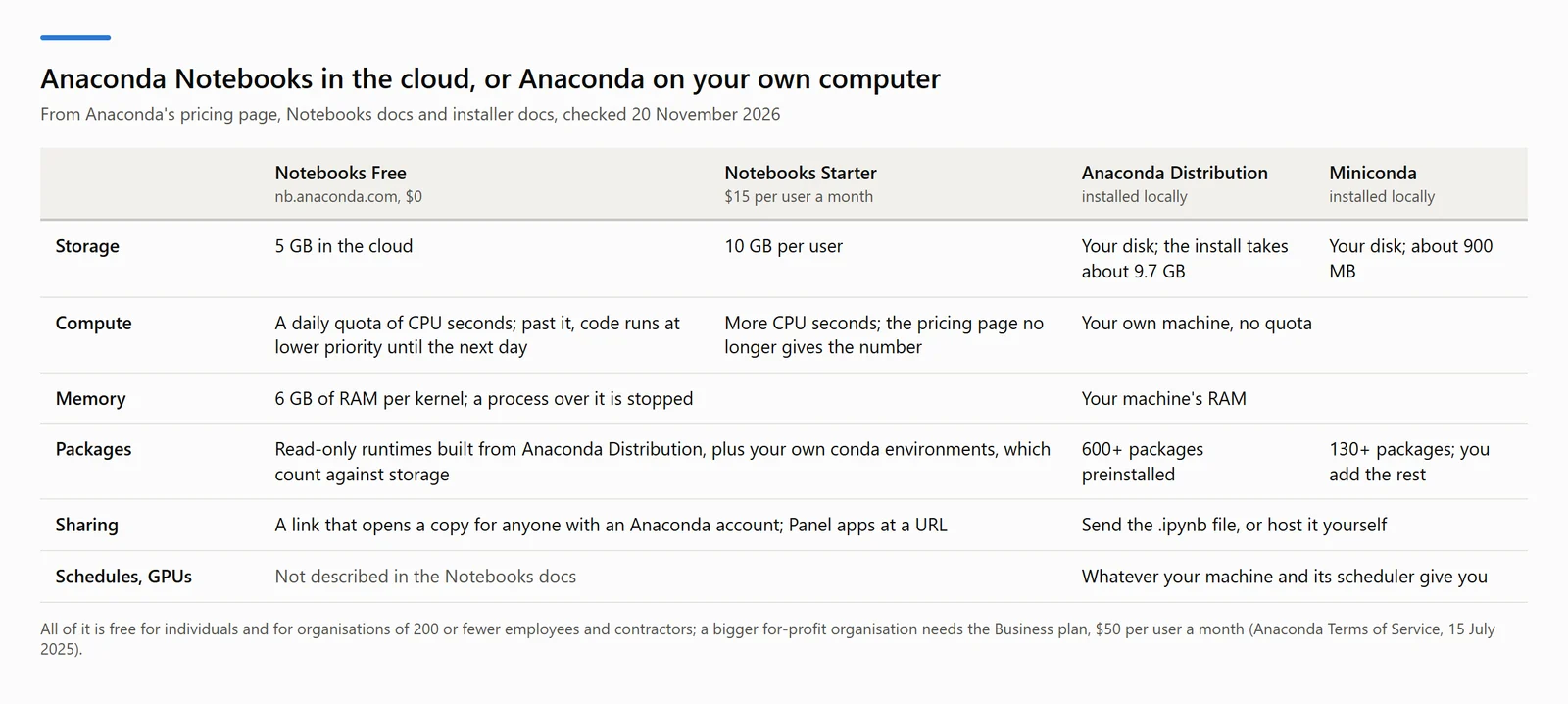
Anaconda Notebooks against a local install, from Anaconda's own pages, checked 20 November 2026.
Anaconda's docs put Anaconda Distribution at "600+" packages and about 9.7 GB installed, and Miniconda at "130+" and about 900 MB. Locally there's no CPU quota or 6 GB ceiling, and environments don't eat a 5 GB allowance. In the cloud there's nothing to install, and a colleague can open a copy of your notebook from a link, once they have an Anaconda account.
Hands-on: a reproducible notebook with Miniconda
We installed Miniconda 26.9.4-1 (released 10 November 2026) on Windows 11 on 20 November, without admin rights, and built an environment that runs a notebook over invented sample sales data. The installer was 155 MB and matched the SHA-256 on repo.anaconda.com. We ran it silently for the current user, with the installer's options for no PATH change, no registry entries and no shortcuts (our folder path shortened):
Start-Process -Wait .\Miniconda3-py314_26.9.4-1-Windows-x86_64.exe -ArgumentList '/InstallationType=JustMe','/AddToPath=0','/RegisterPython=0','/NoRegistry=1','/NoShortcuts=1','/S','/D=C:\work\miniconda3'It finished in 130 seconds and left no uninstall entry or Start menu shortcut behind. The first conda create stopped at the terms-of-service plugin, because a fresh install points at Anaconda's channels:
$ conda create --dry-run --prefix ./envs/tos-test python=3.12

CondaToSNonInteractiveError: Terms of Service have not been accepted for the following channels. Please accept or remove them before proceeding:
    - https://repo.anaconda.com/pkgs/main
    - https://repo.anaconda.com/pkgs/r
    - https://repo.anaconda.com/pkgs/msys2

To accept these channels' Terms of Service, run the following commands:
    conda tos accept --override-channels --channel https://repo.anaconda.com/pkgs/main
    ...
Listing nodefaults in the environment file didn't get past it: the plugin reads the channels in the conda configuration, as its docs say. So we did what Anaconda recommends and removed defaults, adding the community conda-forge channel instead:
$ conda config --file <install>\.condarc --add channels conda-forge
$ conda config --file <install>\.condarc --remove channels defaults
$ conda config --show channels
channels:
  - conda-forge
The environment file pins Python 3.12, the version Anaconda Notebooks' default runtime uses, and includes ipykernel, which Notebooks needs to show an environment as a runtime:
name: sales-notebook
channels:
  - conda-forge
  - nodefaults
dependencies:
  - python=3.12
  - pandas=2.3
  - matplotlib-base=3.10
  - ipykernel
  - nbconvert
conda env create --file environment.yml downloaded 247.6 MB, installed 128 packages and took 4 minutes. Then we ran the notebook from the command line with nbconvert. On Windows the kernel died when we called the environment's python.exe directly; through conda run, which activates the environment first, it worked (two warnings left out):
$ time conda run --prefix ../envs/sales-notebook jupyter nbconvert --to notebook --execute sales.ipynb --output sales-run.ipynb
[NbConvertApp] Converting notebook sales.ipynb to notebook
[NbConvertApp] Writing 232401 bytes to sales-run.ipynb

real    0m11.016s
Two of the notebook's cells, as saved in sales-run.ipynb:
Python 3.12.16 | pandas 2.3.3 | matplotlib 3.10.9
4,734 orders, 01 Nov 2024 to 31 Oct 2026

            orders   revenue  avg_order  share
channel
Online        2338  708129.0      303.0   48.0
Sales team    1423  461237.0      324.0   31.0
Partner        973  304335.0      313.0   21.0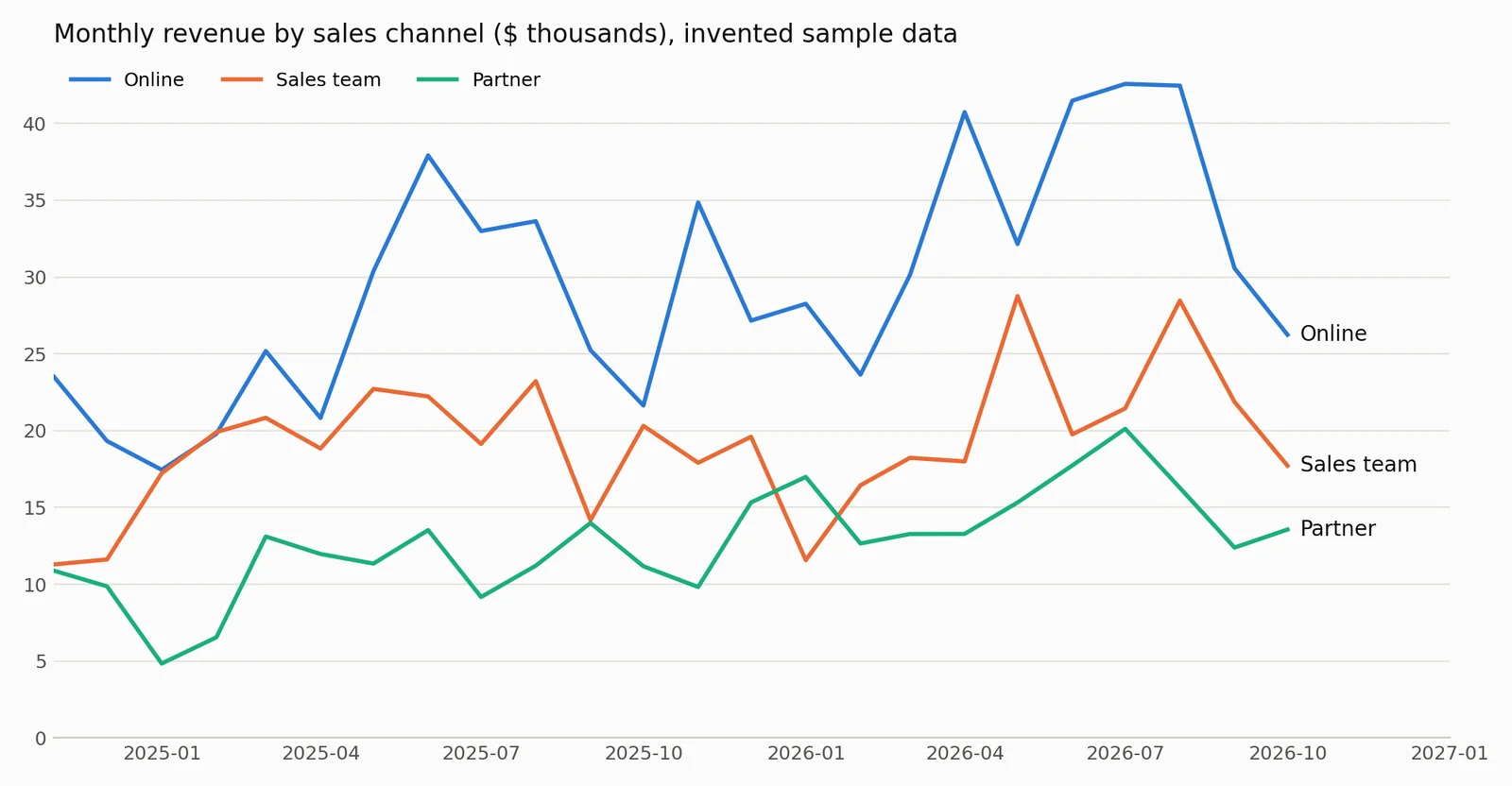
The chart the notebook drew when nbconvert ran it, in a conda-forge environment built from the environment.yml above. Invented sample data.
To use the same file in Anaconda Notebooks, note that uploading an environment.yml to create a runtime "is only available for the local version of Toolbox". In the cloud, open a terminal and run conda create --name <env> ipykernel <packages>, as the runtimes page shows, and the environment counts against your 5 GB. More ways to run notebooks headless: run a Jupyter notebook from the command line.
Jupyter notebooks for your team.
Start free →Where else to run a notebook free
| Option | What you get free | Pick it when |
|---|---|---|
| Anaconda Notebooks | 5 GB, a daily CPU quota, 6 GB RAM per kernel | You're learning, or want Anaconda's packages and courses with nothing to install |
| Miniconda, locally | Your own machine, no quotas | You want full control and reproducible environments |
| Google Colab | Free, with limits Google doesn't publish; sessions up to 12 hours | You need a GPU for an experiment |
| Kaggle Notebooks | A weekly GPU and TPU quota | You need GPU hours you can plan around |
| Fastero | Notebooks and scheduled runs on the Free plan, 6 hours of notebooks and Python a day | A team's notebooks on company data, read by colleagues |
Colab's free GPUs are "heavily restricted", and Google switched off scheduled notebooks in consumer Colab on 27 March 2026. More options in 12 Google Colab alternatives, where to run Jupyter online and our Kaggle Notebooks guide. To run JupyterLab for a whole team on your own servers, see JupyterHub hosting.
When the notebook is for a team
Anaconda Notebooks is built around one person and their environments; sharing hands someone a copy. Fastero is an AI and data platform where people and AI agents work together on a team's data, and its notebooks run next to that data. What you get when you sign up:
- Real
.ipynbnotebooks: upload yours, or import them from the project's Git repository. Python 3.11 with pandas, SQLAlchemy, seaborn, psycopg2 and the BigQuery client. - SQL cells query a workspace connection (Postgres, MySQL, SQL Server, Redshift, Oracle or BigQuery) with its stored credentials and hand the rows to Python as a pandas DataFrame. Uploaded CSV and Excel files open by path.
- Secrets reach cells as environment variables, in interactive and scheduled runs.
- Run now or on a cron schedule, on the Free plan, which is $0 with no end date and includes notebooks and Python for up to 6 hours a day.
- Colleagues open it with their own login, and viewers are free. Pro is $20 per editor a month.
- One CPU and 2 GB per workspace server, no GPUs, and 500 MB of storage on Free. For more memory or your own conda environments, Anaconda Notebooks or Miniconda fit better; for a GPU job, Kaggle or Colab.
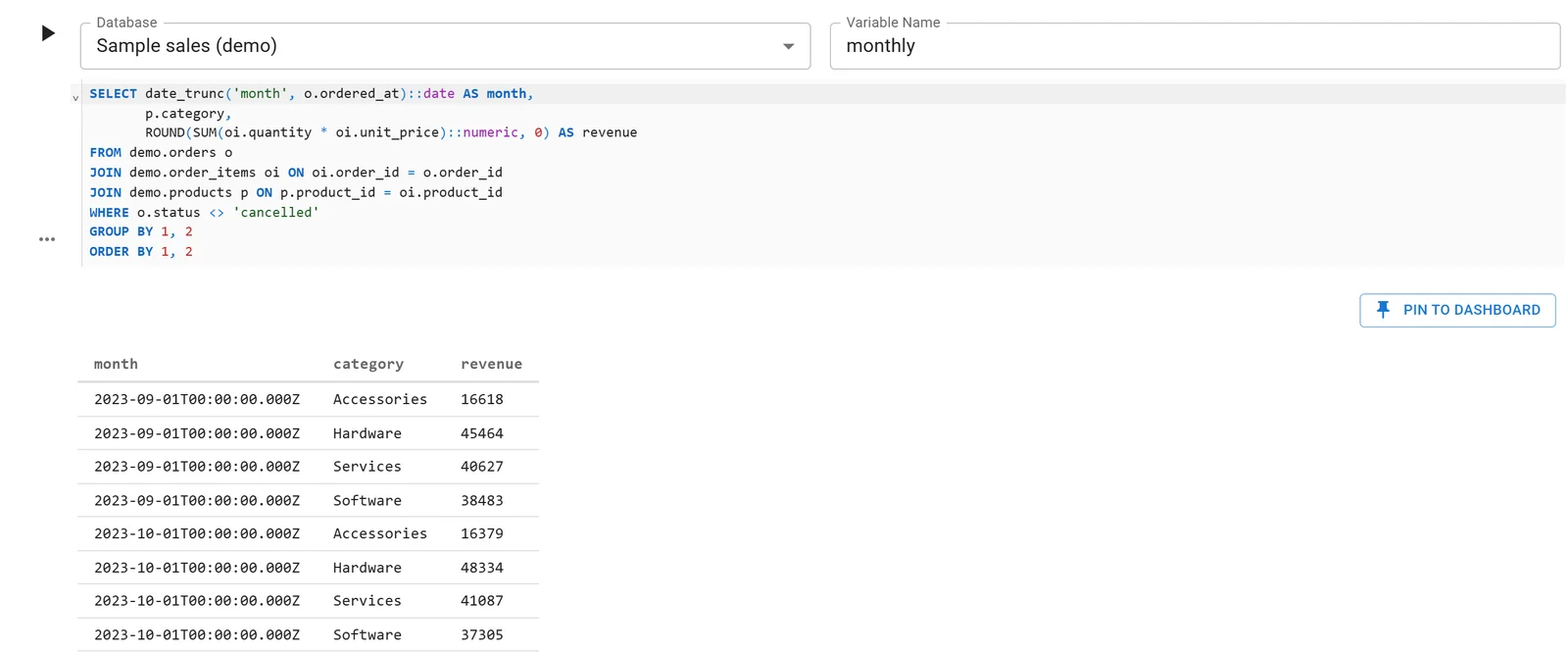
A Fastero notebook whose SQL cell reads a database connection; the rows arrive in Python as a DataFrame. Sample data.
FAQ
Is Anaconda Notebooks free?
Yes. The Free plan includes 5 GB of cloud storage, a daily allowance of CPU seconds and 6 GB of RAM per kernel. Starter is $15 per user a month for 10 GB. Companies with more than 200 employees and contractors need the Business plan, $50 per user a month.
What happened to Anaconda Cloud?
The anaconda.cloud address now redirects to anaconda.com/app, where you sign in; Anaconda Notebooks is at nb.anaconda.com. Anaconda's docs call the web platform Package Security Manager (Cloud).
How much storage does Anaconda Notebooks give you?
5 GB on Free and 10 GB per user on Starter, on backed-up SSD storage that persists between sessions. Custom conda environments use the most of it, so Anaconda advises Free users to keep to one at a time.
Is Anaconda free for commercial use?
For a for-profit organisation with 200 or fewer employees and contractors, including affiliates, Anaconda's terms say yes. Above 200, a Business subscription is required. The Notebooks FAQ is stricter in its wording, so check with Anaconda if your case is close to the line.
Should I install Anaconda or Miniconda?
Anaconda Distribution installs 600+ packages and takes about 9.7 GB; Miniconda installs 130+ and takes about 900 MB, and you add what each project needs. Anaconda recommends Miniconda if you're comfortable at the command line. We installed Miniconda for one user, without admin rights, in about two minutes.
Can I share a notebook from Anaconda Notebooks?
Yes. Share gives a link or an embeddable badge that opens a copy of the notebook; anyone without an Anaconda account is asked to create one. To share results instead of code, publish the notebook as a Panel app.
Sources
Read on 20 November 2026. The hands-on run used Miniconda 26.9.4-1, conda 26.9.4, Python 3.12.16, pandas 2.3.3, matplotlib 3.10.9, nbconvert 7.17.2 and ipykernel 7.4.0 from conda-forge, on Windows 11.
- Anaconda: Notebooks product page, Pricing, Terms of Service, Miniconda EULA, Kilo acquisition
- Anaconda Notebooks docs: overview, getting started, FAQ, runtimes, storage and memory, sharing, publishing
- Anaconda install docs: Anaconda Distribution vs Miniconda, Miniconda on Windows, Terms of Service on the command line, Miniconda release notes, Anaconda Distribution release notes, installer list with hashes
- Anaconda community forum: Compute time limits (the 2024 CPU-second figures)
- Google: Colab FAQ, Deprecation notice of scheduled notebooks; Kaggle: quota command reference