 Fastero Dev Team
A Jupyter notebook is a JSON file that holds your code, everything the code printed, plots encoded as base64 text, a counter for every cell you ran, and metadata about the kernel. Git compares it line by line, so a one-character fix arrives in review buried in output and counters. We tried each fix in a throwaway repository.
The short answer: use nbstripout to keep outputs and execution counts out of your commits (pip install nbstripout, then nbstripout --install in each clone), and nbdime to read and merge notebooks cell by cell (nbdiff, nbdiff-web, and nbdime config-git --enable to make git diff and git merge use it). Add Jupytext if reviewers should read a plain .py file: jupytext --set-formats ipynb,py:percent notebook.ipynb pairs the two and keeps them in sync. JupyterLab's Git extension installs nbdime and shows notebook diffs in the sidebar, VS Code has a notebook diff editor, and GitHub shows rich notebook diffs in pull requests once you switch on its feature preview.
Fastero
Jupyter notebooks for your team, with nothing to install.
Start a notebook or bring your .ipynb files. SQL cells query your databases with no password in the code, and a notebook runs now or on a schedule. Colleagues open it with their own login; viewers are free.
Try free →Why notebook diffs are unreadable
We built a four-cell notebook with invented data in a fresh repository, committed it, then did what people do: changed a filter from >= 100 to >= 90 and reran the cells. Python 3.14 in a venv, checked 12 November 2026. Plain git diff said 1 file changed, 6 insertions(+), 6 deletions(-):
-   "execution_count": 2,
+   "execution_count": 3,
...
-      "{1: 120, 2: 150, 3: 170}\n"
+      "{1: 120, 2: 245, 3: 170}\n"
...
-    "big = [o for o in orders if o['amount'] >= 100]\n",
+    "big = [o for o in orders if o['amount'] >= 90]\n",
...
-   "execution_count": 3,
+   "execution_count": 4,
...
-      "image/png": "iVBORw0KGgoAAAANSUhEUgAAAPAAAAB4CAIAAABD1OhwAAACsElEQVR4nO3SAW0E… [1,019 characters on one line]
+      "image/png": "iVBORw0KGgoAAAANSUhEUgAAAPAAAAB4CAIAAABD1OhwAAACu0lEQVR4nO3SAQkD… [1,031 characters]
...
-     "execution_count": 3,
+     "execution_count": 4,
One of the six changed lines is the code. The rest are three kinds of noise:
- Outputs. Printed results, tables and charts are saved in the file. A chart is a PNG stored as base64 on a single line, so any change to it rewrites a line of a thousand characters or more.
- Execution counts. Every time you run a cell its counter goes up, in the cell and in its output. Run cells in a different order and the counts change with no code change at all.
- Metadata. The notebook records the kernel and the exact Python version it last ran on (ours says
"version": "3.14.3"), and each cell carries an id, so running it somewhere else changes the file too.
Merges are worse than diffs. When two people edit the same notebook, git's text merge sees conflicting counters and images and writes <<<<<<< markers into the JSON, which leaves a file Jupyter can't open.
nbdime: diffs and merges that understand cells
nbdime ("diffing and merging of Jupyter Notebooks") compares notebooks as notebooks. pip install nbdime, then compare the working copy with the last commit:
$ nbdiff HEAD analysis.ipynb
## replaced /cells/2/execution_count:
-  2
+  3

## modified /cells/2/outputs/0/text:
-{1: 120, 2: 150, 3: 170}
+{1: 120, 2: 245, 3: 170}

## modified /cells/2/source:
-big = [o for o in orders if o['amount'] >= 100]
+big = [o for o in orders if o['amount'] >= 90]

## inserted before /cells/3/outputs/0:
+      image/png: iVBORw0K...<snip base64, md5=07d995ec0885e2f7...>
(Shortened: the real output also lists the chart cell's new execution count and the deleted old image.) Images become a hash, and each change is labelled with the cell it belongs to. nbdiff -s shows sources only, which here is just the one changed line. nbdiff-web opens the same diff in a browser, with the images rendered.
To make git use it, run nbdime config-git --enable inside a repository, or add --global for every repository. It writes the drivers to .git/config and two lines to .git/info/attributes:
*.ipynb	diff=jupyternotebook
*.ipynb	merge=jupyternotebook
After that, git diff prints the cell-by-cell view above. One catch: the config calls git-nbdiffdriver by bare name, so git has to find nbdime's commands on your PATH. If nbdime lives in a virtual environment, activate it before running git. When git can't run the driver, git diff stops with "external diff died".
Merging. One copy of our notebook changed the filter; another changed the title and reran everything twice. git merge-file on the raw JSON produced 3 conflicts. nbmerge base.ipynb local.ipynb remote.ipynb produced none: both edits landed, and the clashing execution counts were cleared, so rerun after merging. When a real conflict remains, nbdime's docs say the merge driver leaves "a valid notebook that can be viewed in the normal notebook viewer", and nbdime mergetool opens a web view to settle it.
nbstripout: keep outputs out of commits
nbstripout works like the notebook's Clear All Output, but only for git. Its README puts it as: "keep your output in the file on disk, but don't commit the output to Git." It runs as a git filter (paths shortened):
$ nbstripout --install
$ nbstripout --status
nbstripout is installed in repository '...\repo2'

Filter:
  clean = ".../.venv/Scripts/python.exe" -m nbstripout
  smudge = cat
  diff= ".../.venv/Scripts/python.exe" -m nbstripout -t
  extrakeys=

Attributes:
  *.ipynb: filter: nbstripout
We committed the same notebook through the filter. The file on disk kept its outputs at 4,320 bytes; the committed version was 2,761 bytes with no images. Then the same edit as before:
$ git diff
@@ -34,7 +34,7 @@
    "metadata": {},
    "outputs": [],
    "source": [
-    "big = [o for o in orders if o['amount'] >= 100]\n",
+    "big = [o for o in orders if o['amount'] >= 90]\n",
That is the whole diff. Before adopting it:
- The filter lives in
.git/config, which git doesn't share, so everyone runsnbstripout --installafter cloning (--attributes .gitattributesputs the attribute line in a committed file). It's declaredrequired, so a failure stops git rather than letting outputs through. - It only cleans new commits. Old outputs stay in history; the README shows a
git filter-reporewrite, with the warning "This will affect the history of the repository, so use with caution!" - Colleagues get notebooks without outputs.
--keep-outputand--keep-countkeep them if you need to. - The pre-commit hook is different: in that mode "This also modifies your working copy!", while the filter leaves your file alone.
Jupyter notebooks for your team.
Start free →Jupytext: review a .py file instead
Jupytext saves notebooks as .py or .md files, which its site calls "friendly to version control". Converting our notebook to the percent format:
$ jupytext --to py:percent analysis.ipynb
[jupytext] Reading analysis.ipynb in format ipynb
[jupytext] Writing analysis.py in format py:percent
An excerpt of analysis.py, without its header and the other two code cells:
# %% [markdown]
# # Weekly orders
# Invented data.

# %%
big = [o for o in orders if o['amount'] >= 90]
by_week = {}
for o in big:
    by_week[o['week']] = by_week.get(o['week'], 0) + o['amount']
print(by_week)
Each # %% starts a cell, a format VS Code, PyCharm Professional and Spyder also read. Outputs aren't saved, so diffs are pure code.
Pairing keeps both files. jupytext --set-formats ipynb,py:percent analysis.ipynb adds "jupytext": {"formats": "ipynb,py:percent"} to the notebook's metadata, and saving in Jupyter then updates both. We edited only the .py, ran jupytext --sync analysis.py, and the .ipynb took the new code and kept its chart: "the inputs are loaded from the most recent file in the pair, while the outputs are loaded from the .ipynb file". Those outputs belong to the old code until you rerun.
You can then commit only the .py (Jupytext's docs: "you can put under version control only the .py or .md representation"), or both. In JupyterLab the commands are under File → Jupytext, and there's a pre-commit hook too.
Diffs in JupyterLab, GitHub and VS Code
- JupyterLab's Git extension adds a Git tab to JupyterLab's left panel, with branches and file diffs. Install it with
pip install --upgrade jupyterlab jupyterlab-git; it needs JupyterLab 4.0 or later and installs nbdime along with it. Version 0.55.0 shipped on 7 October 2026. - GitHub renders
.ipynbfiles as static HTML. Rich notebook diffs in pull requests launched as a feature preview in March 2023: "you can compare cell-level inputs and outputs (including images), as well as notebook and cell metadata, thanks to nbdime." Switch it on under your avatar → Feature preview. At launch you couldn't comment on lines in rich mode. We found no later announcement that it left preview. - GitLab shows cleaner notebook diffs on every tier, Free included, up to 100,000 lines.
- VS Code has a rich diff editor for notebooks; you choose which parts of a cell it compares.
Which to use
| Tool | What it fixes | Changes what's committed? | Setup | Best for |
|---|---|---|---|---|
| nbstripout | Outputs and counts in commits | Yes, strips them | nbstripout --install in each clone |
Teams that don't need outputs in git |
| nbdime | Reading diffs, merging | No | nbdime config-git --enable |
Anyone who commits outputs, and every merge |
| Jupytext | Reviewing code as code | Yes, adds or replaces with .py/.md |
--set-formats per notebook, or a config file |
Code review, linting, notebooks edited in an IDE |
| JupyterLab Git | Git from the notebook UI | No | pip install jupyterlab-git |
People who live in JupyterLab |
| GitHub rich diffs | Reviewing pull requests | No | Feature preview toggle | Reviewers on GitHub |
| VS Code diff editor | Local review | No | None | VS Code users |
In short: if outputs don't belong in git, use nbstripout plus nbdime for merges. If code review matters most, pair with Jupytext and review the .py. If the outputs are the deliverable, such as a report's charts, don't strip: use nbdime locally and rich diffs on GitHub.
When the notebook is for a team
Git settles history and review. Running a notebook every morning against the team's database, and showing the result to people who never open a repository, is a separate job. Fastero is an AI and data platform where people and AI agents work together on a team's data, and its notebooks run next to that data:
- Standard
.ipynb. Bring a notebook in with Upload .ipynb, or import it from the project's Git repository. The import is one-way: edits made in Fastero don't go back to the repository. - No passwords in the notebook. Secrets reach cells as environment variables, so a notebook from your repository reads
os.environinstead of a hard-coded password, and SQL cells query a workspace connection with its stored credentials and return a pandas DataFrame. - Schedules on the Free plan: run a notebook now, or on any cron schedule.
- Readers sign in. Colleagues open it with their own login; viewers are free and can read it without running or changing it.
- One editor at a time. There's no real-time co-editing: when two people save the same notebook, the later save wins.
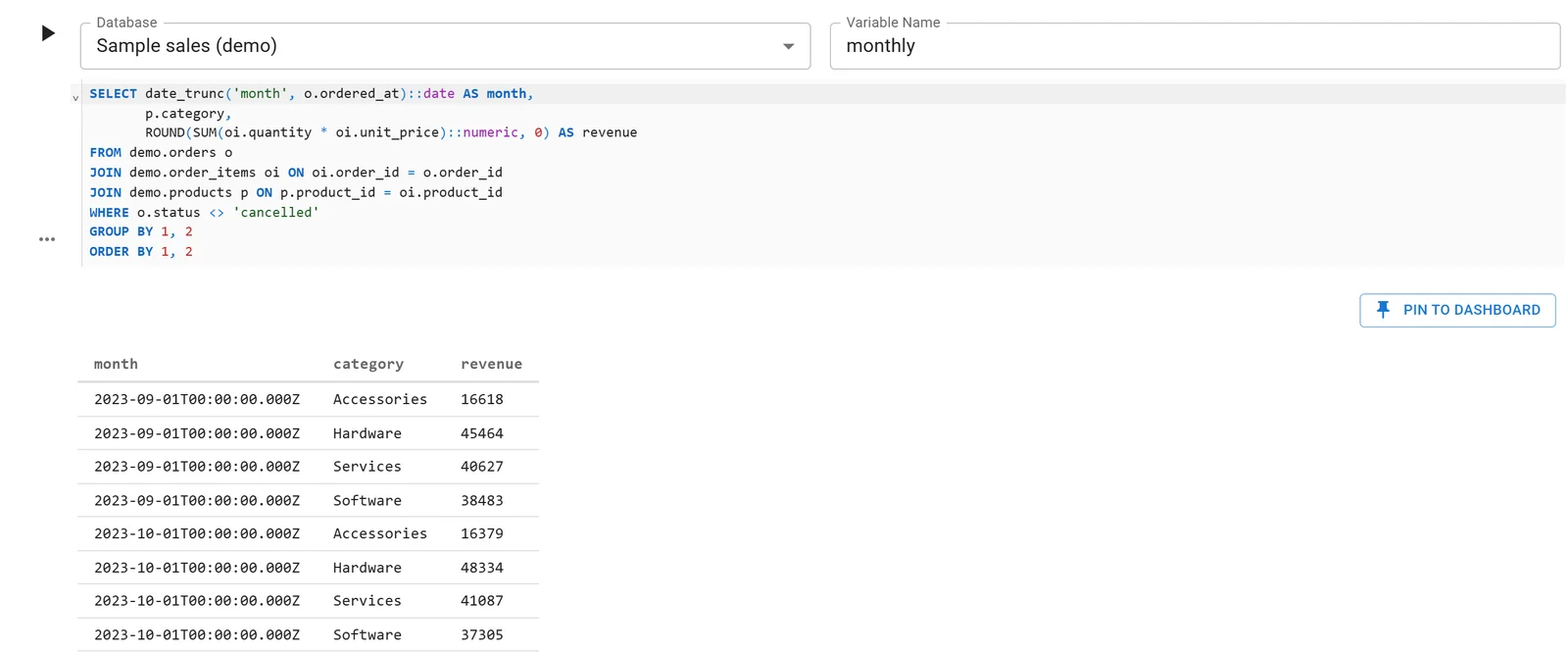
A Fastero notebook whose SQL cell reads a database connection; the rows arrive in Python as a DataFrame. Sample data.
More on sharing a notebook with your team, running one on a schedule and SQL in a Jupyter notebook. For the SQL side of version control, see version-controlling SQL queries with Git.
FAQ
How do I make Jupyter notebook diffs readable in Git?
Strip outputs before they're committed with nbstripout, and read diffs with nbdime, which compares cells instead of JSON lines. nbdime config-git --enable makes git diff use it.
What is nbdime?
An open-source tool for diffing and merging Jupyter notebooks. nbdiff prints a cell-by-cell diff in the terminal, nbdiff-web shows it in a browser with images, and its git drivers make git diff and git merge notebook-aware.
Should I use nbstripout or nbdime?
Usually both: they solve different problems. nbstripout changes what gets committed, removing outputs and counts. nbdime changes how you read and merge what's there. If your outputs must stay in the repository, use nbdime alone.
What is Jupytext used for?
Saving notebooks as .py or .md text files, so they diff, review and lint like ordinary code. Paired with an .ipynb, it keeps both in sync, with outputs in the .ipynb only.
Should I commit notebook outputs to Git?
For code, usually not: outputs bloat the repository, can hold data you didn't mean to publish, and make diffs noisy. For reports where the charts are the point, commit them and review with nbdime.
How do I fix a merge conflict in a .ipynb file?
Enable nbdime's merge driver (nbdime config-git --enable) before merging, so git merges cell by cell, and use nbdime mergetool for what's left.
Sources
Read on 12 November 2026; commands run that day in a throwaway repository, in a Python 3.14 venv:
- nbdime: documentation, version control integration, console commands, PyPI (4.0.4)
- nbstripout: README on PyPI (0.9.1), GitHub
- Jupytext: jupytext.org, paired notebooks, notebooks as code, PyPI (1.19.6)
- jupyterlab-git README and PyPI (0.55.0)
- GitHub: Feature preview: rich Jupyter notebook diffs, working with non-code files; CodeRefinery: notebooks and version control
- GitLab: Jupyter Notebook files, VS Code: Jupyter notebooks