 Fastero Dev Team
You wrote something useful: a script that pulls yesterday's orders and emails a summary, a notebook that reconciles payments, a Streamlit app the sales team loves. It runs on your laptop. When the laptop is closed, on holiday or replaced, it stops, and the people who depended on it find out the hard way. Putting it somewhere it can keep running sounds like it should take ten minutes. Then you meet servers, cron syntax, secrets and logins.
The short answer: to run one script in a browser, any online Python runner will do. To keep a script, notebook or app running for a team, you need three things: somewhere that runs it on a schedule, a safe place for its passwords and keys, and a way for colleagues to see results without your laptop. GitHub Actions is the best free scheduler if your code is in GitHub (every 5 minutes at most, with delays at busy times). AWS Lambda with EventBridge is cheap but caps runs at 15 minutes. Several free options closed in 2026: new free PythonAnywhere accounts lost scheduled tasks, consumer Google Colab stopped scheduling notebooks, and Hugging Face now charges to create Gradio and Docker Spaces. If you want scripts, notebooks and apps in one place behind your team's login, with database connections and secrets built in, a data workspace such as Fastero runs all three.
Fastero
Jupyter notebooks for your team, with nothing to install.
Start a notebook or bring your .ipynb files. SQL cells query your databases with no password in the code, and a notebook runs now or on a schedule. Colleagues open it with their own login; viewers are free.
Try free →What "running it online" actually involves
| Need | Why it matters |
|---|---|
| A schedule | The script runs every morning at 7, not when you remember |
| Secrets | Database passwords and API keys stay out of the code |
| Data access | It can reach your database or APIs from wherever it runs |
| Logs and failure alerts | You hear when it breaks, instead of a colleague noticing stale numbers |
| Somewhere to see the result | An email, a dashboard or an app link, not a file on your desktop |
| Who can open it | Behind your team's login, not public by accident |
Most options cover two or three of these. That's where the extra work comes from.
The options compared
| Option | Free tier | Scheduling | Limits worth knowing |
|---|---|---|---|
| GitHub Actions | Free in public repositories; $12 a month of compute on the free plan for private ones | Cron, UTC by default, optional time zone; at most every 5 minutes | Runs can be delayed or dropped at busy times; schedules in public repos switch off after 60 days without activity |
| PythonAnywhere | Free Beginner plan; Developer $10 a month | Free accounts created after 15 January 2026 get no scheduled tasks; paid accounts get up to 20, daily or hourly | Free plan: 100 CPU seconds, 512 MiB disk |
| AWS Lambda + EventBridge | 1 million requests and 400,000 GB-seconds a month; 14 million scheduler invocations | Cron or rate schedules | A run can last at most 15 minutes |
| Render cron jobs | None | Cron, UTC | Minimum $1 a month per cron job; runs stopped after 12 hours |
| Railway | 30-day trial with $5 credit | Cron, UTC, at least 5 minutes apart | If the last run is still going, the next is skipped |
| Replit | No free plan on the pricing page; Core $20 a month | Scheduled Deployments with a time zone and failure alerts | Scheduled jobs have no public address |
| Streamlit Community Cloud | Free | Apps only, no jobs | Apps sleep after 12 hours without visitors; one private app at a time |
| Hugging Face Spaces | Static Spaces free; Gradio and Docker Spaces need a paid plan to create (PRO $9 a month) | Not a scheduler | Free hardware sleeps when unused; the built-in Streamlit option is deprecated |
| Google Colab | Free notebooks up to 12 hours | Scheduled notebooks switched off in consumer Colab on 27 March 2026 | Colab Enterprise on Google Cloud still schedules |
All figures from each provider's own pages, checked 5 November 2026.
Jupyter notebooks for your team.
Start free →What changed in 2026
Three free routes that older tutorials recommend no longer work for new users:
- PythonAnywhere: its scheduled tasks now come with a warning: "this will only work in paid accounts or free accounts created before 2026-01-15 (or 2026-01-08 in the EU system)".
- Google Colab: "Due to low usage of scheduled notebooks and our need to focus on areas of growing interest, we're turning this feature off starting today, Friday March 27th, 2026."
- Hugging Face: "Gradio and Docker Spaces run on compute and require a paid plan to create". Static Spaces are still free.
The details that catch people out
GitHub Actions isn't a precise clock. GitHub's docs say: "The schedule event can be delayed during periods of high loads of GitHub Actions workflow runs. High load times include the start of every hour. If the load is sufficiently high enough, some queued jobs may be dropped." Schedule for 7:13 rather than 7:00. And in a public repository, "scheduled workflows are automatically disabled when no repository activity has occurred in 60 days", so a script that just works quietly can switch itself off.
Lambda is short. Fifteen minutes is plenty for a report and too little for a heavy notebook.
Streamlit Community Cloud sleeps and is public by default. "All apps without traffic for 12 hours go to sleep," and apps inherit their repository's visibility: "if your repo is private your app will be private and if your repo is public your app will be public." You get one private app at a time.
Secrets are your job. On most of these, you set environment variables per service, and every new script means setting them again. Paste a password into code once and it's in your Git history for good.
A minimal scheduled script on GitHub Actions
If your code is already in GitHub, this runs report.py at 07:13 UTC on weekdays, with a database URL kept as a repository secret:
name: daily-report
on:
  schedule:
    - cron: "13 7 * * 1-5"
  workflow_dispatch:
jobs:
  run:
    runs-on: ubuntu-latest
    steps:
      - uses: actions/checkout@v4
      - uses: actions/setup-python@v5
        with:
          python-version: "3.12"
      - run: pip install -r requirements.txt
      - run: python report.py
        env:
          DATABASE_URL: ${{ secrets.DATABASE_URL }}
workflow_dispatch adds a button to run it by hand. What it doesn't give you is somewhere for colleagues to see the output, a database login shared with the rest of your team's tools, or the notebook and app that grew up next to the script.
Scripts, notebooks and apps in one team workspace
The options above each run one kind of thing. Fastero runs all three in a workspace your team signs in to, next to your database connections:
- Python projects on a schedule. Write or upload the
.pyfiles, run them, and set a cron schedule. Each run keeps its log and the files it saved, and a scheduled run can email or post to Slack the charts it produced. - Secrets in one place. Database URLs and API keys are stored as workspace secrets and reach the code as environment variables, in scheduled runs too. Nothing goes in the code.
- Notebooks that run on their own. Upload
.ipynbfiles or import them from Git. SQL cells run on a connected database with stored credentials, and a notebook can run on a cron schedule, updating any dashboard it feeds. - Streamlit apps behind your login. Import an app from GitHub or upload
app.py. Colleagues open it by signing in to the workspace, not through a public link, and on Pro apps can stay always on.
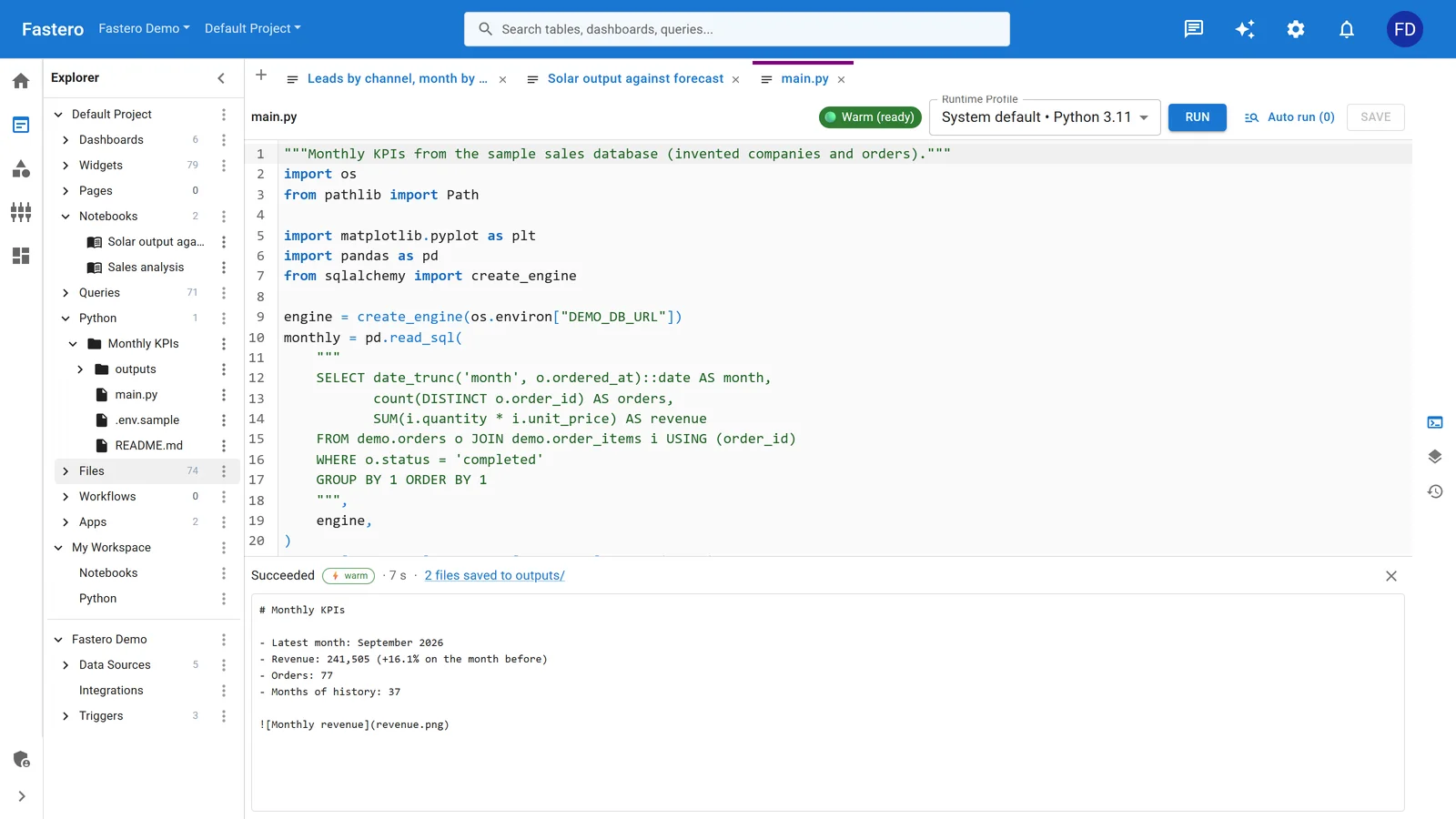
A Python job in Fastero: the code reads the database through a secret, and each run keeps its status and output. Sample data.
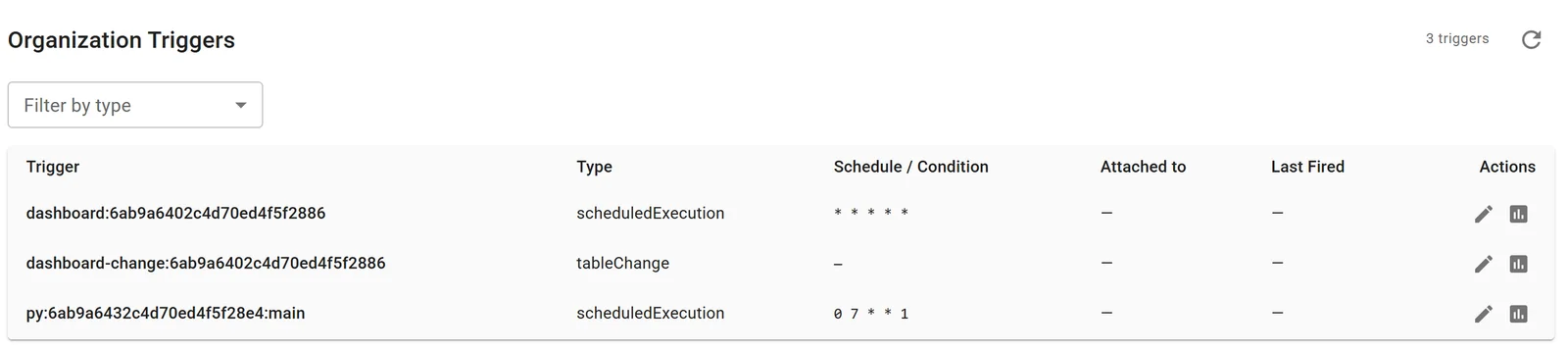
The same job on a schedule: 07:00 every Monday.
Claude can set this up too, through Fastero's connector: write the script, run it, read the log and fix what failed, then put it on a schedule. Notebooks and schedules are on the Free plan; Pro is $20 per editor a month with 750 compute hours per editor included, and viewers are free.
Which one should you use?
- One script, code already in GitHub, timing can be loose: GitHub Actions.
- One short script, cheapest possible: AWS Lambda with EventBridge, if you're comfortable in AWS.
- A long-running job: Render or Railway cron jobs.
- A public demo app: Streamlit Community Cloud, accepting that it sleeps.
- Scripts, notebooks and apps a team relies on, on your company's data: a team workspace, so schedules, secrets, database access and sharing aren't four separate setups.
FAQ
How do I run a Python script online for free?
For a one-off run, any online Python runner works. To run on a schedule for free, GitHub Actions in a public repository is the main option left, with runs at most every 5 minutes, possible delays, and schedules that switch off after 60 days without repository activity.
Can Google Colab run a notebook on a schedule?
Not in consumer Colab: Google switched scheduled notebooks off on 27 March 2026. Colab Enterprise on Google Cloud still schedules notebooks.
Can PythonAnywhere run scheduled tasks on a free account?
Only on free accounts created before 15 January 2026 (8 January in the EU system). Newer free accounts need a paid plan, from $10 a month.
Why does my Streamlit app keep going to sleep?
Streamlit Community Cloud puts apps to sleep after 12 hours without traffic. A visitor wakes it, after a wait. Hosting that keeps the app always on avoids it.
How long can a scheduled Python job run?
It depends where: 15 minutes on AWS Lambda, 12 hours on Render and on PythonAnywhere's paid scheduled tasks, and up to 12 hours for a free Colab notebook run by hand.
Where should I keep passwords for a scheduled script?
In the platform's secrets store, such as GitHub repository secrets or a workspace's secrets, passed to the script as environment variables. Never in the code or the repository.
Related reading:
- Python cron jobs
- Schedule a Jupyter notebook
- Why your Streamlit app keeps sleeping
- Streamlit Community Cloud vs paid hosting
- Google Colab alternatives
Sources: GitHub Actions: events that trigger workflows, GitHub Actions billing, PythonAnywhere scheduled tasks, PythonAnywhere pricing, AWS Lambda pricing, EventBridge pricing, Render cron jobs, Railway cron jobs, Replit scheduled deployments, Replit pricing, Streamlit Community Cloud: manage your app, Streamlit Community Cloud: share your app, Hugging Face Spaces, Colab scheduled notebooks announcement, Colab FAQ. Checked 5 November 2026.
Try Fastero free — run your scripts, notebooks and Streamlit apps on a schedule, with secrets and database connections built in, behind your team's login. No credit card required.