 Fastero Dev Team
You can run Jupyter notebooks on an Android phone, in Chrome or in an app, but the phone changes what is practical. We built a JupyterLite site, ran a pandas notebook on it in Chrome at a Pixel 7's screen size, and checked every app and service below against its own pages on 20 November 2026.
The short answer: the quickest way is the browser. Google Colab and Kaggle run notebooks on their own servers and need only Chrome and an account; JupyterLite, at jupyter.org/try, runs Python inside the browser with no account. To run notebooks on the phone itself, use Pydroid 3, a Python app whose package repository includes Jupyter, or Termux, a Linux terminal where pip install notebook installs the real Jupyter server. A phone runs a small notebook but is a poor place to write one: at 412 pixels wide, code and tables run off the screen, Android can stop a busy background process, and there's no NVIDIA GPU for CUDA code. For a GPU, use Colab or Kaggle from the phone's browser.
Fastero
Jupyter notebooks for your team, with nothing to install.
Start a notebook or bring your .ipynb files. SQL cells query your databases with no password in the code, and a notebook runs now or on a schedule. Colleagues open it with their own login; viewers are free.
Try free →7 ways to run a Jupyter notebook on Android
Checked 20 November 2026.
| Option | Where the code runs | What you get free | Best for |
|---|---|---|---|
| Google Colab in Chrome | Google's servers | Free; sessions up to 12 hours; GPUs "heavily restricted" on the free tier | Notebooks kept in Google Drive |
| Kaggle Notebooks in Chrome | Kaggle's servers | Free, with a weekly GPU and TPU quota; GPU T4 x2 | A free GPU you can plan around |
| JupyterLite in Chrome | On the phone, inside the browser | Free, no account; files stay in the browser's storage | Trying Jupyter, small CSV files |
| Binder in Chrome | mybinder.org's servers | 1 to 2 GB of memory, up to six hours, ends after 10 idle minutes | A public GitHub repository's notebooks |
| Pydroid 3 app | On the phone | Free with ads; some libraries need Premium | Learning Python, offline |
Termux with pip install notebook |
On the phone | Free and open source | A real Jupyter server on the phone |
| Your computer's Jupyter, opened from the phone | Your computer | Free | Your own files and a full-size machine |
In the browser: what Colab, Kaggle, JupyterLite and Binder do on a phone
Google Colab opens .ipynb notebooks from Google Drive or GitHub. Its FAQ says Colab "works with most major browsers, and is most thoroughly tested with the latest versions of Chrome, Firefox and Safari." Free notebooks "can run for at most 12 hours", runtimes "will time out if you are idle", and the virtual machine is deleted when idle for a while. On a phone, that suits a short run, not a long job you check on later. Our Google Colab alternatives compare the other hosted options.
Kaggle Notebooks run on Kaggle's machines with a free GPU, which Kaggle's command-line docs name "GPU T4 ×2", within a weekly GPU and TPU quota. The hours are in our Kaggle GPU guide.
JupyterLite is JupyterLab running entirely in the browser, with Python from Pyodide. Its docs say uploads "up to ~50MB should be fine", that files live in the browser's storage, and that "Clearing browser data will permanently remove data stored in your browser." On Android, a JupyterLite site can also be installed to the home screen as an app, from the browser's Install button. More on how it works in JupyterLite and Pyodide.
Binder builds a public GitHub repository into a temporary JupyterLab. Each session gets "at least 1GB of RAM, with a maximum of 2GB", up to six hours, and shuts down after "more than 10 minutes of inactivity". Binder counts a JupyterLab window left "open in the foreground" as activity, so on a phone, ten minutes in another app can end the session. Nothing is kept afterwards.
We ran JupyterLite at a Pixel 7's screen size
We built our own JupyterLite site on Windows 11 with Python 3.14.3 in a fresh virtual environment, with the invented sample sales file (4,734 orders) and a notebook in a content folder:
python -m venv venv
venv\Scripts\activate
pip install jupyterlite-core jupyterlite-pyodide-kernel jupyter-server
jupyter lite build --contents content --output-dir dist
That installed jupyterlite-core 0.8.7, jupyterlite-pyodide-kernel 0.8.7 and jupyter-server 2.21.1 (needed for --contents). A clean build took 7.5 seconds and printed, among other lines:
    tarball:         jupyterlite-app-0.8.7.tgz 15MB
.  status:contents:contents
    contents: 4 files
.  build:contents:copy:sales-phone.ipynb
.  build:contents:copy:sample-sales.csv
The dist folder held 811 files, 70 MB, with JupyterLab 4.6 and Notebook 7.6 inside, and a kernel that loads Pyodide 314.0.6 from the jsDelivr CDN. One gotcha: python -m http.server refused connections when the page fetched its 300-plus files, so we served it with a 10-line script that raises the connection backlog.
We opened it in Chrome 157 with Playwright's Pixel 7 profile: a 412 by 839 pixel touch screen. That is Chrome on a computer at a phone's size, not a real phone. We tapped each cell, then the run button:
import pandas as pd
df = pd.read_csv("sample-sales.csv", parse_dates=["order_date"])
print(len(df), "orders,", df.order_date.min().date(), "to", df.order_date.max().date())
4734 orders, 2024-11-01 to 2026-10-31df.groupby("region")["revenue"].sum().round().sort_values(ascending=False)region
North 417482.0
West 413523.0
East 336184.0
South 306511.0
Name: revenue, dtype: float64The notebook was on screen after 2.8 seconds. The first cell answered 30.5 seconds after we tapped run, nearly all of it downloading and starting Python and pandas; the next cells took 0.2 to 0.3 seconds. Opening the page and running it downloaded 25.5 MB in all, 17.7 MB of it Python and its packages from jsDelivr. That was on a desktop connection and processor; a phone on mobile data will differ, and we didn't measure one.
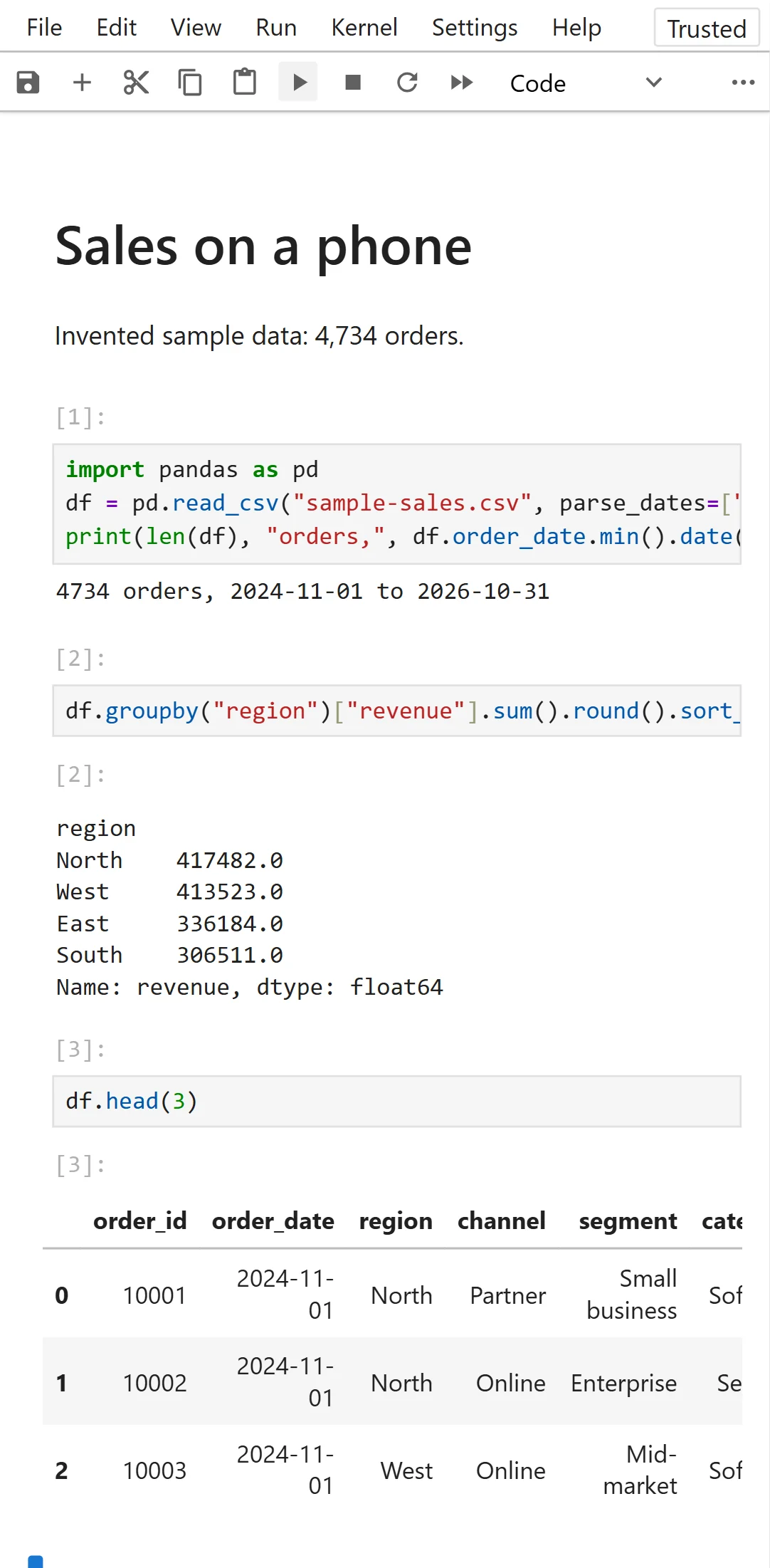
JupyterLite in Chrome at a Pixel 7's screen size, after running three cells on invented sample data. Code lines and the ten-column table run off the right edge.
What's hard on a 412-pixel screen
- Lines of code don't wrap.
parse_dates=["order_date"]disappears off the right edge of the cell, and so does the end of thegroupbyline. Keep lines short, or scroll sideways inside the cell. - Wide tables don't fit.
df.head(3)has ten columns and rendered 674 pixels wide in a 374-pixel output area, so everything aftersegmentis off screen. Transposing it withdf.head(3).Tturns the columns into rows: 354 pixels wide, and it fits. - JupyterLab's file browser takes over. Opened at the same size, JupyterLab showed its file browser across most of the screen and squeezed the notebook into a strip at the right. On a phone, use the Notebook interface (the
/notebooks/address), which gives the notebook the whole width, or close the side panel. - The keyboard is the slow part. Shift+Enter runs a cell; on a touch keyboard, the toolbar's run button is easier. Brackets and quotes are slow to type, so phones suit running and reading notebooks more than writing them.
- Background work can stop. Termux's README warns that Android 12 and later stop background ("phantom") processes beyond 32, counted across all apps, and "kill any processes using excessive CPU".
- No GPU you can use. CUDA, which most GPU code in PyTorch and TensorFlow relies on, needs an NVIDIA GPU, and phone graphics chips are not NVIDIA's. Use Colab or Kaggle in the browser, where their GPU does the work.
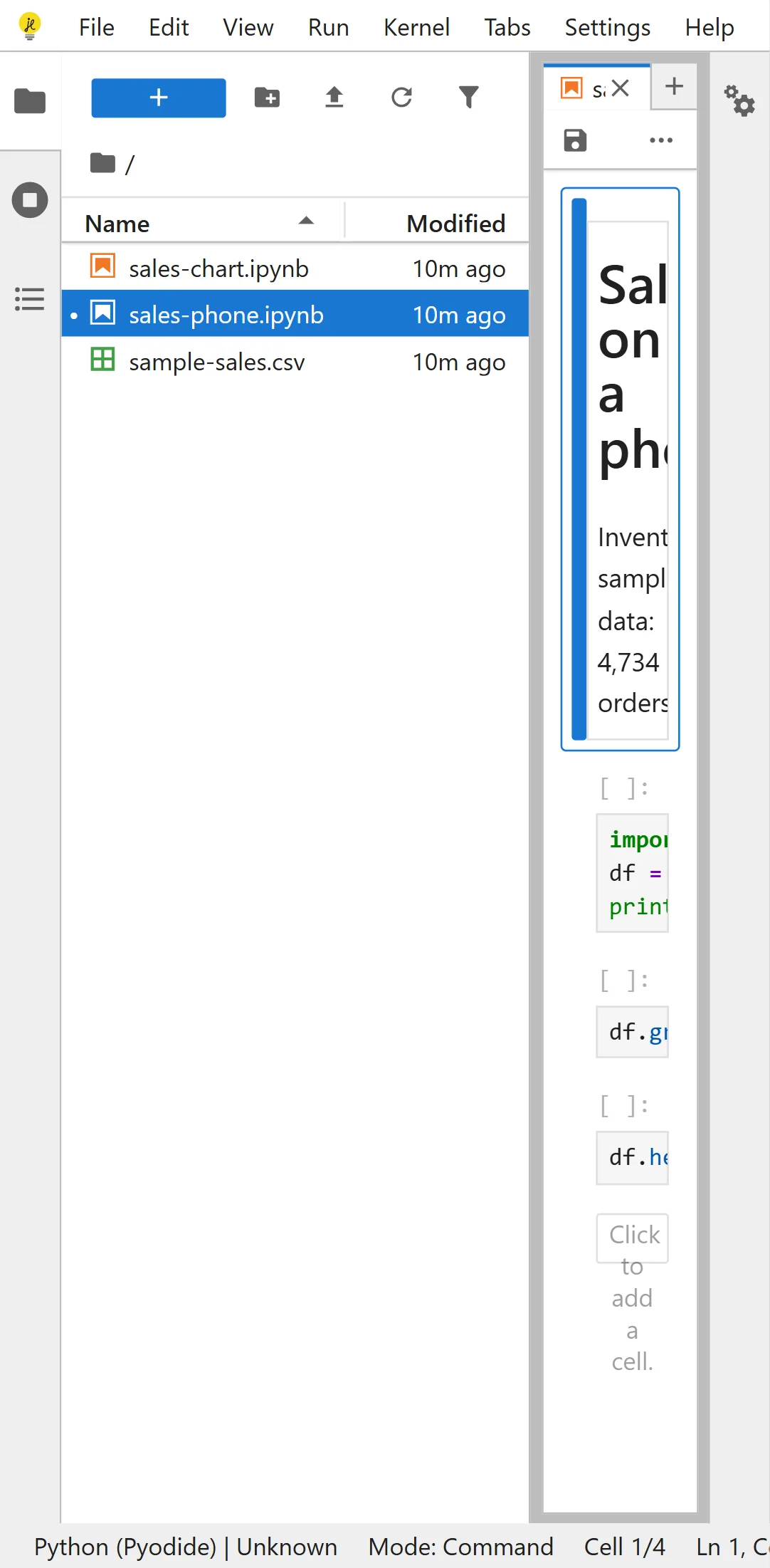
The same site's JupyterLab interface at the same size: the file browser fills the screen and the notebook gets a strip. Invented sample data.
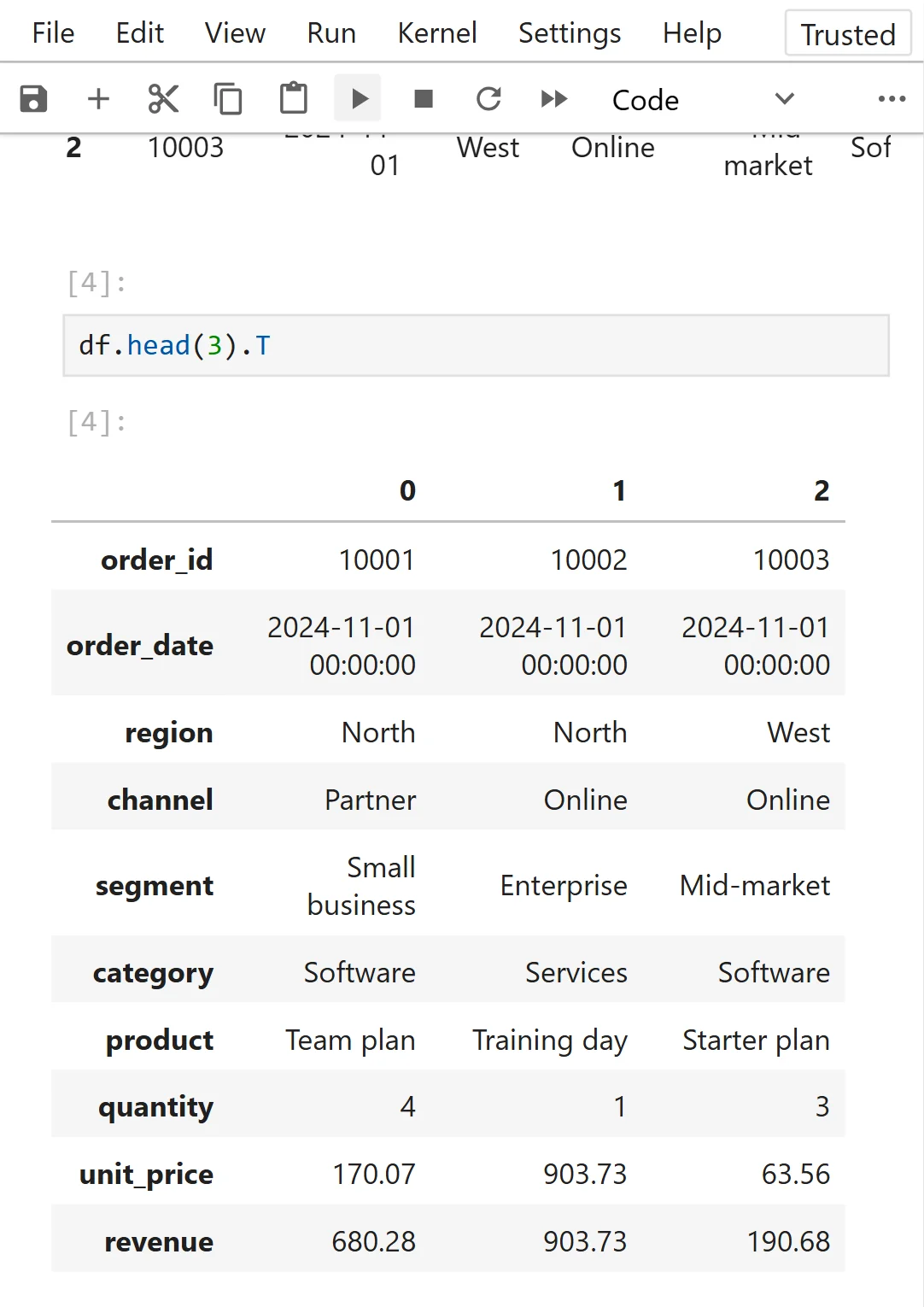
Transposing a wide table, here df.head(3).T, makes it fit a phone's width. Invented sample data.
Jupyter notebooks for your team.
Start free →Apps: Pydroid 3 and Termux
Pydroid 3, from Lider Soft KZ, is a Python IDE on Google Play with over 10 million downloads, ads and in-app purchases, last updated 18 November 2026. Its listing promises an "Offline Python 3 interpreter: no Internet is required to run Python programs" and a "custom repository for prebuilt wheel packages for enhanced scientific libraries, such as numpy, scipy, matplotlib, scikit-learn and jupyter." TensorFlow and PyTorch are Premium only, and it "requires at least 250MB free internal memory." The listing doesn't describe how notebooks open, and we couldn't test it.
Termux is an Android terminal and Linux environment that, in its own words, "works directly with no rooting or setup required." Its README recommends installing it from F-Droid or GitHub. The Google Play build, for Android 11 and later, "has missing functionality and bugs", and you can't mix builds from different sources.
We can't run Android here, so the steps below are untested. They are put together from Termux's package repository, which ships python, python-pip and a ready-built python-pandas, and from Jupyter's install page, which gives pip install notebook and jupyter notebook:
pkg upgrade
pkg install python python-pip python-pandas
pip install notebook
jupyter notebook
Jupyter isn't in Termux's main package repository, so pip downloads it from PyPI; if pip stops to compile something and finds no compiler, Termux has a build-essential package. Jupyter's server listens on 127.0.0.1:8888 by default, so open the localhost address it prints in Chrome on the same phone. Don't run pip install --upgrade pip: Termux's patched pip refuses with "Installing pip is forbidden, this will break the python-pip package (termux)."
Use your computer's Jupyter from the phone
The phone can be a screen for Jupyter on a computer. Jupyter Server runs at 127.0.0.1:8888 "and is accessible only from localhost", so the phone needs it on a public interface, with a password and HTTPS. The minimum settings for jupyter_server_config.py, copied from Jupyter Server's documentation:
c.ServerApp.certfile = u'/absolute/path/to/your/certificate/mycert.pem'
c.ServerApp.keyfile = u'/absolute/path/to/your/certificate/mykey.key'
c.ServerApp.ip = '*'
c.ServerApp.password = u'sha1:bcd259ccf...<your hashed password here>'
c.ServerApp.open_browser = False
c.ServerApp.port = 9999
The same page says this is for "someone who wants remote access to their personal machine"; for several users, the official answer is JupyterHub. Files and packages stay on the computer, and the phone shows the same JupyterLab as in our screenshots.
When the notebook is for a team
A phone is a fine place to read a notebook's result, not to keep one running. Fastero is an AI and data platform where people and AI agents work together on a team's data. Its notebooks are built for a computer's browser, not a phone, but what they produce reaches one:
- Your notebooks as they are: real
.ipynbfiles; upload the ones you have. They run on the workspace's server, now or on a cron schedule, on the Free plan, so a run doesn't depend on a phone staying awake. - Data without passwords in code: SQL cells query a workspace connection with its stored credentials and hand the rows to Python as a pandas DataFrame, and Secrets reach cells as environment variables.
- Results for the phone: a cell's result can become a dashboard widget, and a dashboard can be emailed daily, weekly or monthly with its numbers, charts and tables plus a PDF, or shared by a public link you can turn off. That is what a colleague opens on a phone.
- Colleagues sign in with their own login, and viewers are free.
- Limits: one workspace server with 1 CPU and 2 GB, and no GPUs, so a training job belongs on Kaggle or Colab.
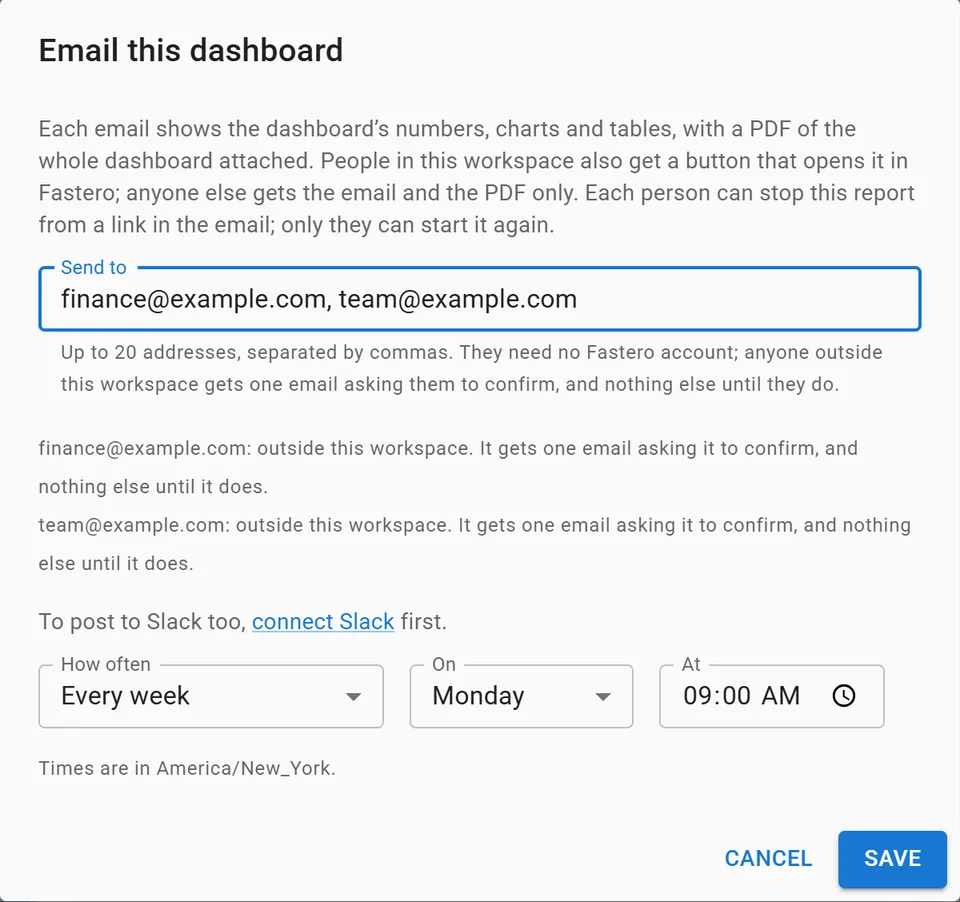
Setting up a weekly email of a dashboard, with invented addresses.
The Free plan has no end date; Pro is $20 per editor a month, and a new account starts with 14 days of Pro and $20 of AI usage. Using an iPad instead? See Jupyter Notebook on iPad; for computers, where to run a Jupyter notebook online.
FAQ
Can I run Jupyter Notebook on Android?
Yes. In Chrome, Google Colab and Kaggle run notebooks on their servers, and JupyterLite runs Python inside the browser with no account. On the phone itself, Termux runs the real Jupyter server after pip install notebook, and Pydroid 3's package repository includes Jupyter.
Is there a Jupyter Notebook app for Android?
Project Jupyter's install page lists none. The usual apps are Pydroid 3, a Python IDE whose package repository includes Jupyter, and Termux, a Linux terminal where you install Jupyter with pip. A JupyterLite site can also be added to the home screen as a web app.
Can I use Google Colab on my phone?
Yes, in the phone's browser: Google says Colab works with most major browsers and is tested most with Chrome, Firefox and Safari. Free sessions last at most 12 hours and time out when idle, so it suits short runs.
How do I install Jupyter in Termux?
Install Termux from F-Droid or GitHub, run pkg install python python-pip, then pip install notebook and jupyter notebook, and open the localhost address it prints in Chrome. We couldn't test this on a phone.
Can I run Python notebooks offline on Android?
Yes, with an app. Pydroid 3 says its interpreter needs no internet to run Python programs, and Termux can run Jupyter on the phone once it is installed. JupyterLite, as we built it, downloads Python from a CDN on first use (17.7 MB in our test).
Can I use a GPU in a Jupyter notebook on my phone?
Not the phone's own: CUDA code needs an NVIDIA GPU, and phone graphics chips are not NVIDIA's. Open the notebook in Colab or Kaggle from the phone's browser and their GPU does the work; Kaggle's free GPU is two T4s within a weekly quota.
Sources
Read on 20 November 2026. App details are from the Google Play listing and the developers' own pages.
- Project Jupyter: Try Jupyter, Installing Jupyter, Running a public Jupyter Server
- JupyterLite: Documentation, Using JupyterLite, Troubleshooting, Browser storage
- Google: Colab FAQ
- Kaggle: CLI quota reference, kernel metadata
- Binder: User guidelines
- Pydroid 3: Google Play listing
- Termux: termux.dev, termux-app README, Package Management, package build files for python, python-pip and python-pandas. The Termux wiki sits behind a bot check, so we didn't use it.
- Our test: Windows 11, Python 3.14.3, jupyterlite-core 0.8.7, jupyterlite-pyodide-kernel 0.8.7, jupyter-server 2.21.1, Pyodide 314.0.6; Chrome 157 driven by playwright-core 1.63.0 with its Pixel 7 device profile; invented sample sales data
Try Fastero free: run notebooks on a schedule next to your team's data and send the results to a colleague's phone. No credit card required.