 Fastero Dev Team
An iPad can run Jupyter notebooks in an app, in Safari, or as a window onto a server elsewhere, and with a keyboard it is closer to a laptop than a phone is. We checked each option against its App Store listing or its own docs on 20 November 2026, and ran a notebook with a chart in JupyterLite at an iPad's screen size.
The short answer: to run notebooks on the iPad itself, offline, install Carnets (free: Jupyter with Python 3.13, NumPy, pandas and matplotlib; a second free version adds SciPy, scikit-learn and seaborn) or Juno (editing is free; running code is free to try, then $39.99 once). For more computing power, use Safari: Google Colab is tested with it, and Binder and GitHub Codespaces open JupyterLab in the browser. JupyterLite runs in Safari with no account, but its docs list only Chrome and Firefox as supported, and iPad browsers use Safari's engine, except some in the EU and Japan. Add a hardware keyboard: Jupyter is built around Shift+Enter and Esc, and JupyterLab also takes Ctrl+M for Esc.
Fastero
Jupyter notebooks for your team, with nothing to install.
Start a notebook or bring your .ipynb files. SQL cells query your databases with no password in the code, and a notebook runs now or on a schedule. Colleagues open it with their own login; viewers are free.
Try free →Ways to run Jupyter on an iPad, compared
Prices from the US App Store, checked 20 November 2026.
| Option | Where the code runs | Price | Needs | Good for |
|---|---|---|---|---|
| Carnets | On the iPad | Free | iPadOS 15, 1.5 GB | Offline notebooks with pandas and matplotlib |
| Carnets with scipy | On the iPad | Free | iPadOS 15, 2.3 GB | Adds SciPy, scikit-learn and seaborn |
| Juno | On the iPad | Free to edit; running code free to try, then $39.99 once | iPadOS 17, 1.2 GB | A notebook editor designed for the iPad |
| Juno Connect | A remote Jupyter server | $4.99 | iPadOS 13 | Your own server through an iPad app |
| Google Colab in Safari | Google's servers | Free; sessions up to 12 hours | A Google account | GPU work, notebooks in Google Drive |
| Binder in Safari | mybinder.org's servers | Free; 1 to 2 GB, up to six hours | Nothing | A public GitHub repository |
| GitHub Codespaces in Safari | GitHub's servers | 120 hours of compute a month on GitHub Free | A GitHub account | Notebooks inside a repository |
| JupyterLite in Safari | Inside the browser | Free | Nothing | Trying Jupyter; Safari isn't on its supported list |
| Your own Jupyter server | Your computer | Free | A password and HTTPS | Your files on a full-size machine |
Apps that run notebooks on the iPad itself
Carnets, by Nicolas Holzschuch, is open source and "a complete, stand-alone, implementation of Jupyter notebooks. Everything runs on your device, using the embedded Python interpreter; you do not need an internet connection." You choose between the classic notebook and JupyterLab in Settings. NumPy, SymPy, Matplotlib, pandas, bokeh and ipywidgets come installed; %pip install adds more, "but only if they are pure Python." For SciPy, scikit-learn and seaborn, its developer points you to the second app, Carnets with scipy. Version 1.9.1, from 26 November 2025, moved both to Python 3.13.
Juno, from Rational Matter, edits notebooks for free and charges for one thing: "Only one thing in Juno is Pro: running code." A trial allowance runs code before you buy; after that, Juno Pro Unlock is $39.99, "not a subscription." Pro runs notebooks offline on a built-in Python 3.13 with NumPy, pandas, Polars, DuckDB, Matplotlib, SciPy and scikit-learn, installs "any pure Python package", and keeps "Long-running scripts and Jupyter sessions" going in the background. It needs iPadOS 17.
Pick Carnets to try Jupyter on an iPad for nothing, or for open source. Pick Juno if you'll use it often and want the bigger package set and an editor designed for the iPad. Neither can add a package with compiled code it doesn't already ship.
In Safari: Colab, Binder, Codespaces and JupyterLite
Browsers on an iPad run on WebKit, Safari's engine. Apple's App Review rule 2.5.6 says apps that browse the web "must use the appropriate WebKit framework and WebKit JavaScript", and Apple offers entitlements for other engines only in the EU and Japan. Elsewhere, switching to Chrome on an iPad changes the menus, not the engine.
Google Colab says it "is most thoroughly tested with the latest versions of Chrome, Firefox and Safari." Its FAQ adds that it needs third-party cookies, or the hostname googleusercontent.com allowed, to show rich outputs, and Safari blocks third-party cookies by default, so that is the setting to check if Colab asks. Free sessions last at most 12 hours and "will time out if you are idle". Our Google Colab alternatives compare the other hosted services.
Binder turns a public GitHub repository into a temporary JupyterLab with "at least 1GB of RAM, with a maximum of 2GB", for up to six hours, ending after 10 minutes of inactivity.
GitHub Codespaces opens a repository on GitHub's machines, in VS Code or JupyterLab; VS Code's docs say "VS Code for the Web can run on tablets, like iPads." A free personal account includes 120 hours of compute a month, counted double on the smallest 2-core machine, so about 60 hours.
JupyterLite, linked from jupyter.org/try, runs Python inside the browser, as we explain in JupyterLite and Pyodide. Two iPad catches. Its troubleshooting page says "Currently we support the latest Chrome and Firefox versions," and Safari isn't named. And it saves files in the browser's IndexedDB, which WebKit deletes "after seven days of Safari use without user interaction on the site." WebKit gives web apps added to the Home Screen their own counter of days, so add the site to the Home Screen if you use it, and download notebooks you want to keep.
Connect the iPad to your own Jupyter server
The iPad can also be the screen for Jupyter running on a computer you own. Jupyter Server listens on 127.0.0.1:8888, "accessible only from localhost", so the iPad needs it on a public interface with a password and HTTPS. Jupyter Server's documentation walks through it; its minimum settings include:
c.ServerApp.ip = '*'
c.ServerApp.password = u'sha1:bcd259ccf...<your hashed password here>'
c.ServerApp.certfile = u'/absolute/path/to/your/certificate/mycert.pem'
Then open the server's address in Safari. The Android post has the full config from the same page.
Juno Connect ($4.99) puts Juno's editor in front of a remote server, "either by connecting directly via HTTP/HTTPS, or by establishing an SSH tunnel". Two cautions. For servers on JupyterLab 4.0 or later, Juno's own troubleshooting page says to pip install nbclassic on the server and connect to /nbclassic/tree. And the sources disagree on services: juno.sh still lists CoCalc and Binder, while the App Store listing says "Binder, CoCalc and NAAS are no longer supported." Its last update, 1.6.13, was on 18 September 2022.
We ran JupyterLite at iPad size
We used the JupyterLite site built for the Android test (jupyterlite-core 0.8.7, JupyterLab 4.6, Pyodide 314.0.6) and opened it in Chrome 157 with Playwright's "iPad (gen 11) landscape" profile: 944 by 656 pixels, touch, and iPad Safari's user agent. It is Chrome's engine at an iPad's size, not Safari, which we couldn't run here. We ran each cell with Shift+Enter, as you would with a keyboard attached, on the invented sample sales data:
df.pivot_table(index="region", columns="channel", values="revenue", aggfunc="sum").round()The notebook draws the result as an HTML table (screenshot below). Its text form, printed by the same line in pandas 3.1.1 on our machine:
channel    Online  Partner  Sales team
region
East     151488.0  64769.0    119927.0
North    213297.0  88855.0    115330.0
South    142073.0  67118.0     97320.0
West     201271.0  83592.0    128660.0
The first cell took 14.0 seconds, mostly loading Python and pandas; the next two took 0.3 and 0.2 seconds. In landscape, JupyterLab looked as it does on a laptop. With the file browser open, the notebook got 512 pixels of width, so a ten-column df.head(3) table, 674 pixels wide, ran off the right edge. Tapping the folder icon to close the side panel gives the notebook the full width.
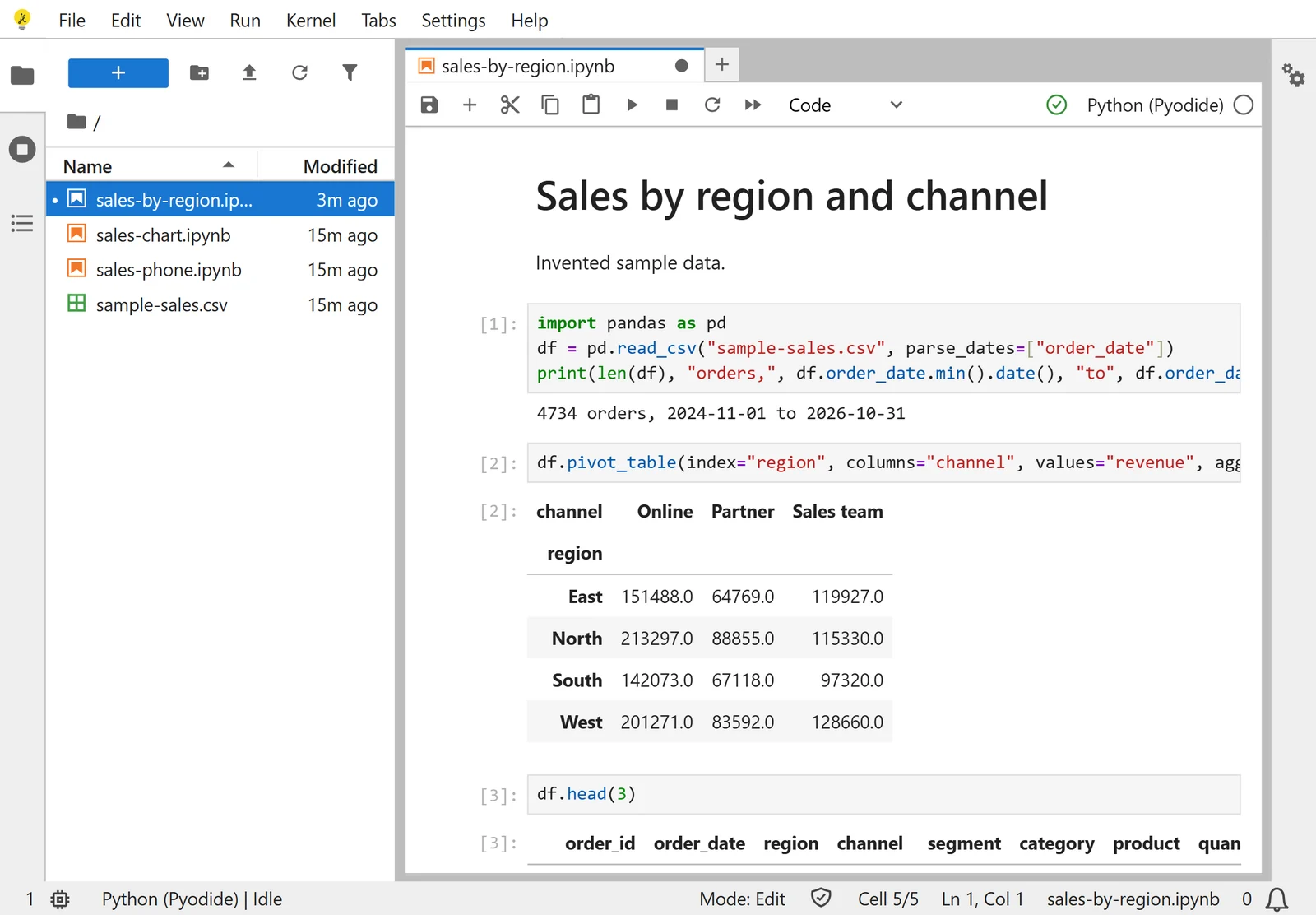
JupyterLite's JupyterLab at an iPad (gen 11) landscape size, after running the cells with Shift+Enter. Invented sample data.
Then a chart, in a second notebook with the file browser closed:
import pandas as pd
import matplotlib.pyplot as plt

df = pd.read_csv("sample-sales.csv", parse_dates=["order_date"])
monthly = df.set_index("order_date")["revenue"].resample("MS").sum() / 1000

fig, ax = plt.subplots(figsize=(10, 3.6))
ax.bar(monthly.index, monthly.values, width=22, color="#2a78d6")
ax.set_title("Monthly revenue, $ thousands (invented data)", loc="left", color="#0b0b0b")
ax.grid(axis="y", color="#e6e5e1")
ax.set_axisbelow(True)
for s in ("top", "right", "left"):
    ax.spines[s].set_visible(False)
ax.tick_params(colors="#52514e", length=0)
plt.show()
This notebook's first cell, which also imports matplotlib, took 29.3 seconds. The chart came back as an 817 by 336 pixel image, scaled to 764 pixels wide, so a 10-inch-wide matplotlib figure works on an iPad held sideways. We didn't test portrait.
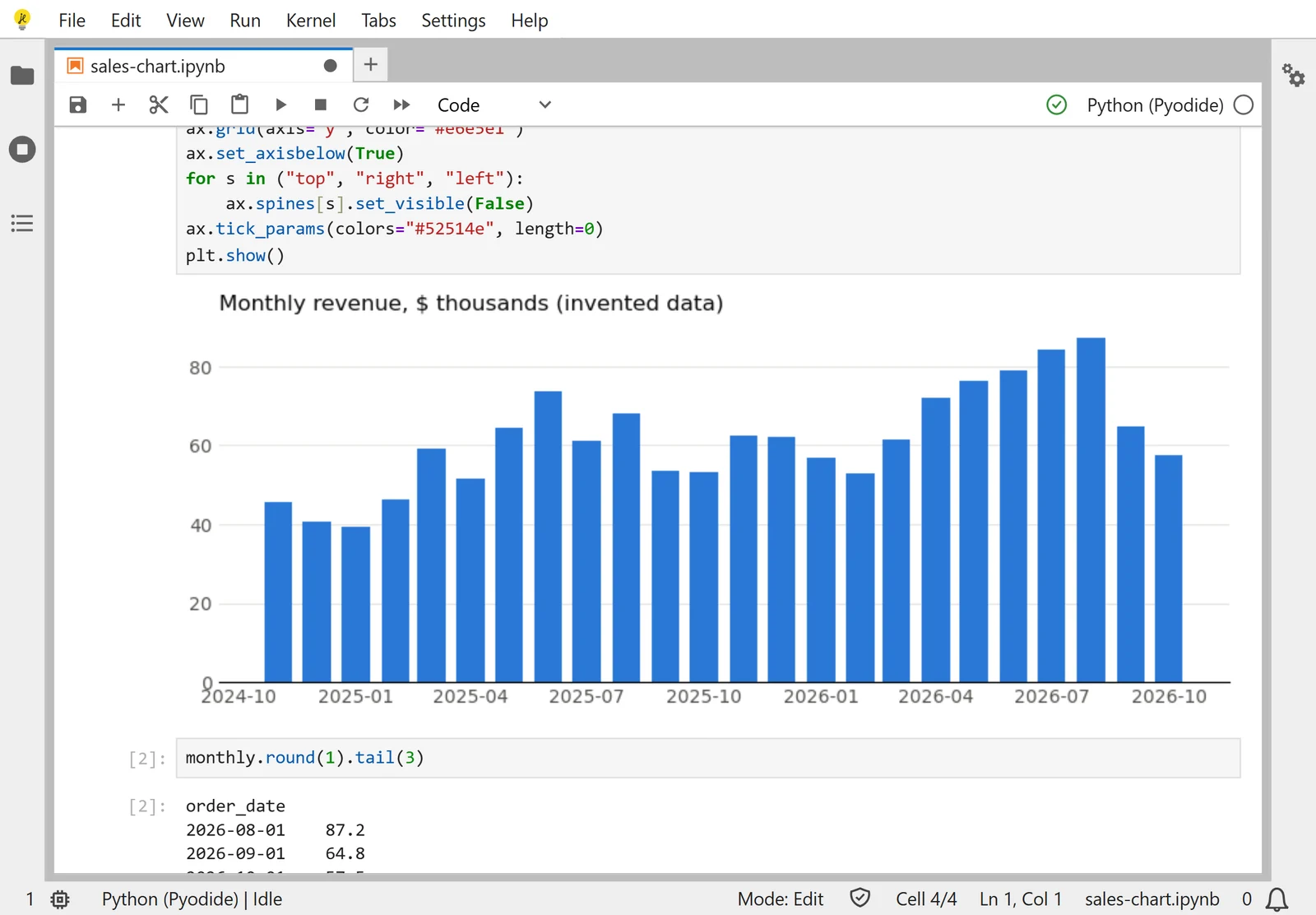
A matplotlib chart drawn by Python running inside the browser, at an iPad (gen 11) landscape size. Invented sample data.
Jupyter notebooks for your team.
Start free →Keyboard, files and other iPad limits
- Keyboard shortcuts. In the JupyterLab we built, Shift+Enter runs a cell and moves on, Esc or Ctrl+M switches to command mode, and in command mode B adds a cell below and M makes it Markdown. If your keyboard lacks an Esc key, use Ctrl+M; iPadOS also lets you change what a key such as Caps Lock does, under Settings > General > Keyboard > Hardware Keyboard > Modifier Keys.
- Touch alone is slow. Without a keyboard, you tap the toolbar's run button and type code on the on-screen keyboard. Carnets adds a toolbar of actions to the keyboard, and Juno a customizable keyboard toolbar.
- No CUDA. GPU code written for NVIDIA cards won't run on an iPad. Juno ships Apple's MLX and Keras for on-device work; for CUDA, run the notebook in Colab from Safari.
- Packages. On-device apps install only pure-Python packages beyond what they ship. Juno's docs give the reason: "iOS does not allow apps to load compiled code that wasn't signed into the app bundle."
- Files. Carnets can open a whole directory and Juno can bookmark folders outside its sandbox; JupyterLite keeps files in Safari's storage, under the seven-day rule above.
When the notebook is for a team
An iPad is a good screen for reading a team's results and a cramped one for keeping a notebook running. Fastero is an AI and data platform where people and AI agents work together on a team's data. Its notebooks are built for a computer's browser, not a tablet, and their results are easy to open on one:
- Your notebooks as they are: real
.ipynbfiles; upload the ones you have. They run on the workspace's server, now or on a cron schedule, on the Free plan. - Data without passwords in code: SQL cells query a workspace connection with its stored credentials and return a pandas DataFrame; Secrets reach cells as environment variables.
- Results for the tablet: a cell's result can become a dashboard widget, and a dashboard can be shared by a public link you can turn off, or emailed daily, weekly or monthly with a PDF. A colleague on an iPad opens either.
- Colleagues sign in with their own login, and viewers are free.
- Limits: one workspace server with 1 CPU and 2 GB, and no GPUs, so GPU jobs belong on Colab or Kaggle.
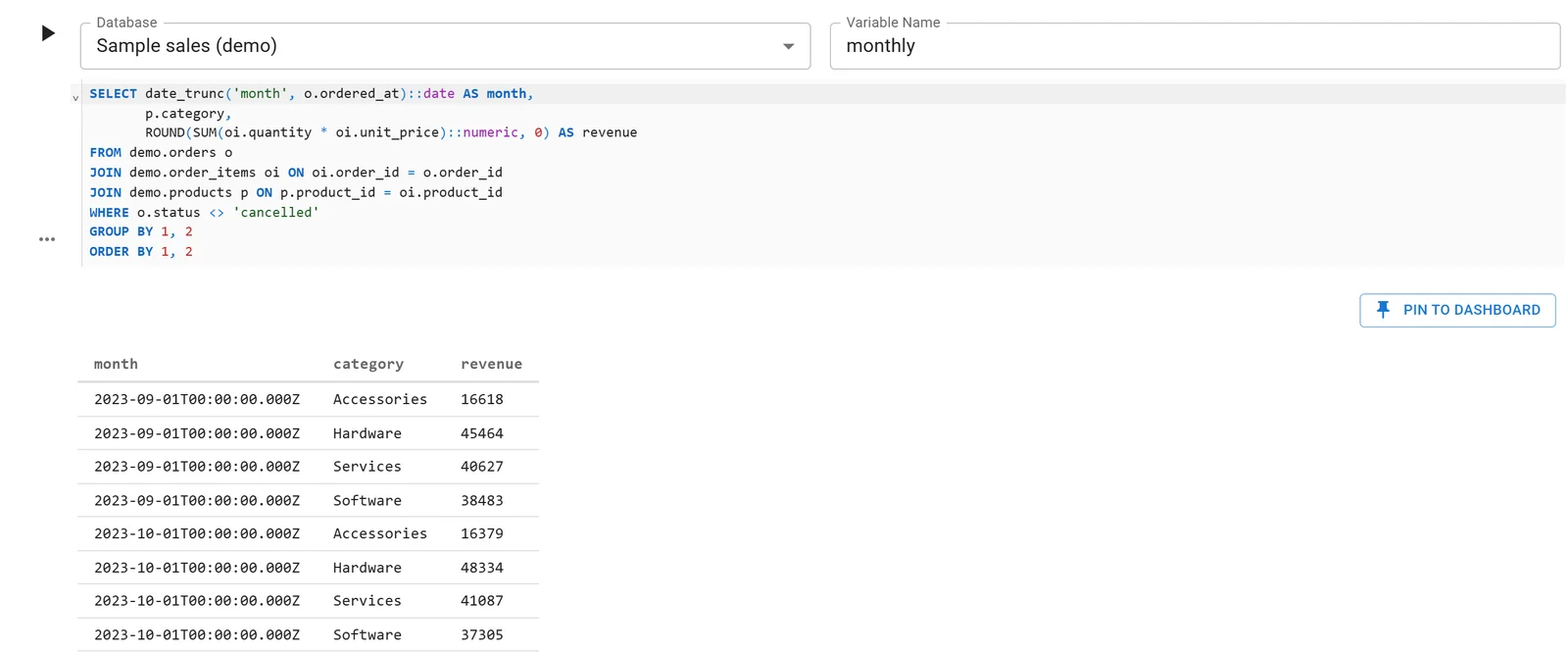
A Fastero notebook whose SQL cell reads a database connection; the rows arrive in Python as a DataFrame. Sample data.
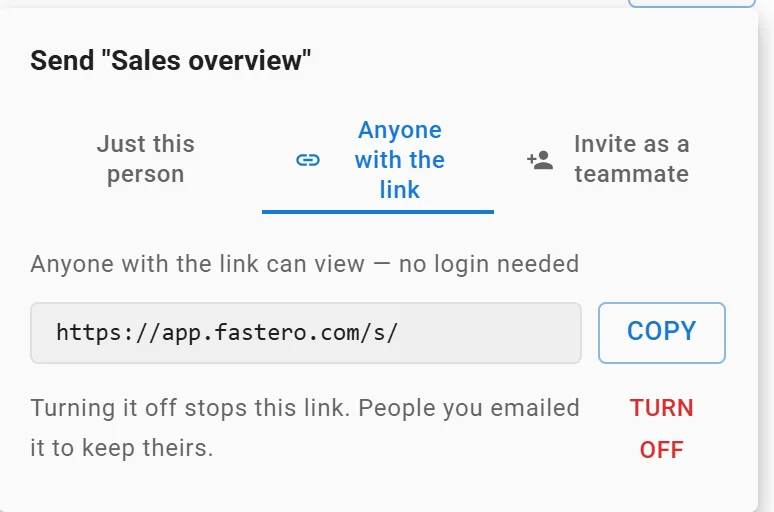
A dashboard's public link: anyone with it can view without a login, and turning it off stops it. Link shortened.
The Free plan has no end date; Pro is $20 per editor a month, and a new account starts with 14 days of Pro and $20 of AI usage. For computers, see where to run a Jupyter notebook online.
FAQ
Can you run Jupyter Notebook on an iPad?
Yes. Carnets and Juno run Jupyter notebooks on the iPad itself, offline. In Safari, Google Colab, Binder and GitHub Codespaces run them on their servers, and JupyterLite runs them inside the browser, though its docs list only Chrome and Firefox.
Is Carnets free?
Yes. Carnets and Carnets with scipy are both free on the App Store, open source, and need iPadOS 15. The second adds SciPy, scikit-learn and seaborn; both install only pure-Python packages with %pip.
Is Juno free?
Partly. Browsing and editing notebooks is free, and running code is free to try. After the trial, running code takes Juno Pro Unlock, a one-time $39.99 purchase on the US App Store, checked 20 November 2026.
Does Google Colab work on iPad?
Yes, in Safari: Google says Colab is most thoroughly tested with Chrome, Firefox and Safari. If it asks for third-party cookies, Colab's FAQ says you can allow googleusercontent.com instead of all sites. Free sessions last at most 12 hours.
Can I connect my iPad to a remote Jupyter server?
Yes. Run Jupyter Server on a public interface with a password and HTTPS, then open its address in Safari, or use Juno Connect ($4.99), which also connects over an SSH tunnel. For JupyterLab 4 servers, Juno Connect needs nbclassic installed on the server.
What keyboard shortcuts work in Jupyter on an iPad?
With a hardware keyboard, the usual ones: Shift+Enter runs a cell, Esc or Ctrl+M switches to command mode, then B adds a cell and M makes it Markdown. Ctrl+M is the one to use on a keyboard without Esc.
Sources
Read on 20 November 2026. App Store pages are the US store.
- Carnets: website, GitHub, App Store: Carnets, Carnets with scipy
- Juno: website, package manager, Juno Connect, Juno Connect troubleshooting, App Store: Juno, Juno Connect
- Apple: App Review Guidelines, iPad keyboard shortcuts; WebKit: 7-day cap on script-writable storage, storage policy
- Google: Colab FAQ; Binder: User guidelines
- GitHub and Microsoft: Codespaces billing, Codespaces for machine learning, VS Code for the Web
- Project Jupyter: Running a public Jupyter Server, Try Jupyter, JupyterLite Using JupyterLite and Troubleshooting
- Our test: Windows 11, Python 3.14.3, jupyterlite-core 0.8.7, jupyterlite-pyodide-kernel 0.8.7, Pyodide 314.0.6; Chrome 157 driven by playwright-core 1.63.0 with its "iPad (gen 11) landscape" profile; invented sample sales data
Try Fastero free: run notebooks on a schedule next to your team's data, and open the results on any screen. No credit card required.