 Fastero Dev Team
The fastest way to get good at Jupyter notebooks is to read good ones: how the authors split code into cells, where they put the explanation, how they show a result. Plenty of famous notebooks are public, but lists of them go stale quickly, as repositories move and links break. Every link below was opened on 5 November 2026.
The short answer: for data analysis, start with Jake VanderPlas's Python Data Science Handbook and Julia Evans's pandas cookbook. For charts, Google Colab's charts notebook. For machine learning, Kaggle's Titanic tutorial, Aurélien Géron's handson-ml3 and the TensorFlow classification tutorial. For SQL in a notebook, DuckDB's JupySQL notebook. For science, LIGO's gravitational-wave tutorials. For programming craft, Peter Norvig's pytudes. Most open straight in Google Colab, so you can run them without installing anything.
Fastero
Jupyter notebooks for your team, with nothing to install.
Start a notebook or bring your .ipynb files. SQL cells query your databases with no password in the code, and a notebook runs now or on a schedule. Colleagues open it with their own login; viewers are free.
Try free →14 Jupyter notebook examples at a glance
| Notebook | By | What it teaches | Opens in |
|---|---|---|---|
| Python Data Science Handbook | Jake VanderPlas | NumPy, pandas, matplotlib, scikit-learn | Colab (chapter links) |
| Pandas cookbook | Julia Evans | pandas on real, messy data | Browser (JupyterLite), nbviewer |
| Think Stats, 3rd edition | Allen B. Downey | Exploratory data analysis and statistics | Colab |
| Charts in Colaboratory | matplotlib, Seaborn, Altair, Plotly, Bokeh | Colab | |
| Exploratory Data Visualization with Altair | Jake VanderPlas | Declarative charts with Altair | Colab |
| Titanic Tutorial | Alexis Cook, Kaggle | A first machine learning model, end to end | Kaggle |
| handson-ml3 | Aurélien Géron | Machine learning with scikit-learn, Keras, TensorFlow | Colab |
| Basic classification | TensorFlow team | Training a neural network on images | Colab |
| The fastai book | Jeremy Howard, Sylvain Gugger | Deep learning with fastai and PyTorch | Colab |
| scikit-learn example gallery | scikit-learn | One notebook per technique | Browser (JupyterLite), Binder |
| DuckDB in Jupyter notebooks | DuckDB | SQL cells in a notebook with JupySQL | Colab |
| Getting started with BigQuery | Querying BigQuery from a notebook | Colab | |
| LIGO gravitational-wave tutorials | GWOSC | Signal processing on real detector data | Colab (Quickview), Binder |
| pytudes | Peter Norvig | Short, elegant Python programs | Colab, nbviewer |
Data analysis notebooks
Python Data Science Handbook
Jake VanderPlas's book is the most widely recommended free introduction to data science in Python, written entirely as notebooks: 70 of them covering IPython, NumPy, pandas (indexing, grouping, pivot tables, time series), matplotlib and scikit-learn. In its own words: "This website contains the full text of the Python Data Science Handbook by Jake VanderPlas; the content is available on GitHub in the form of Jupyter notebooks." The code is MIT-licensed.
One catch: the "Open in Colab" badge on the repository's front page points to an index notebook that no longer exists, so Colab shows an error. The chapter notebooks work. For example, Aggregation and Grouping in Colab opens fine.
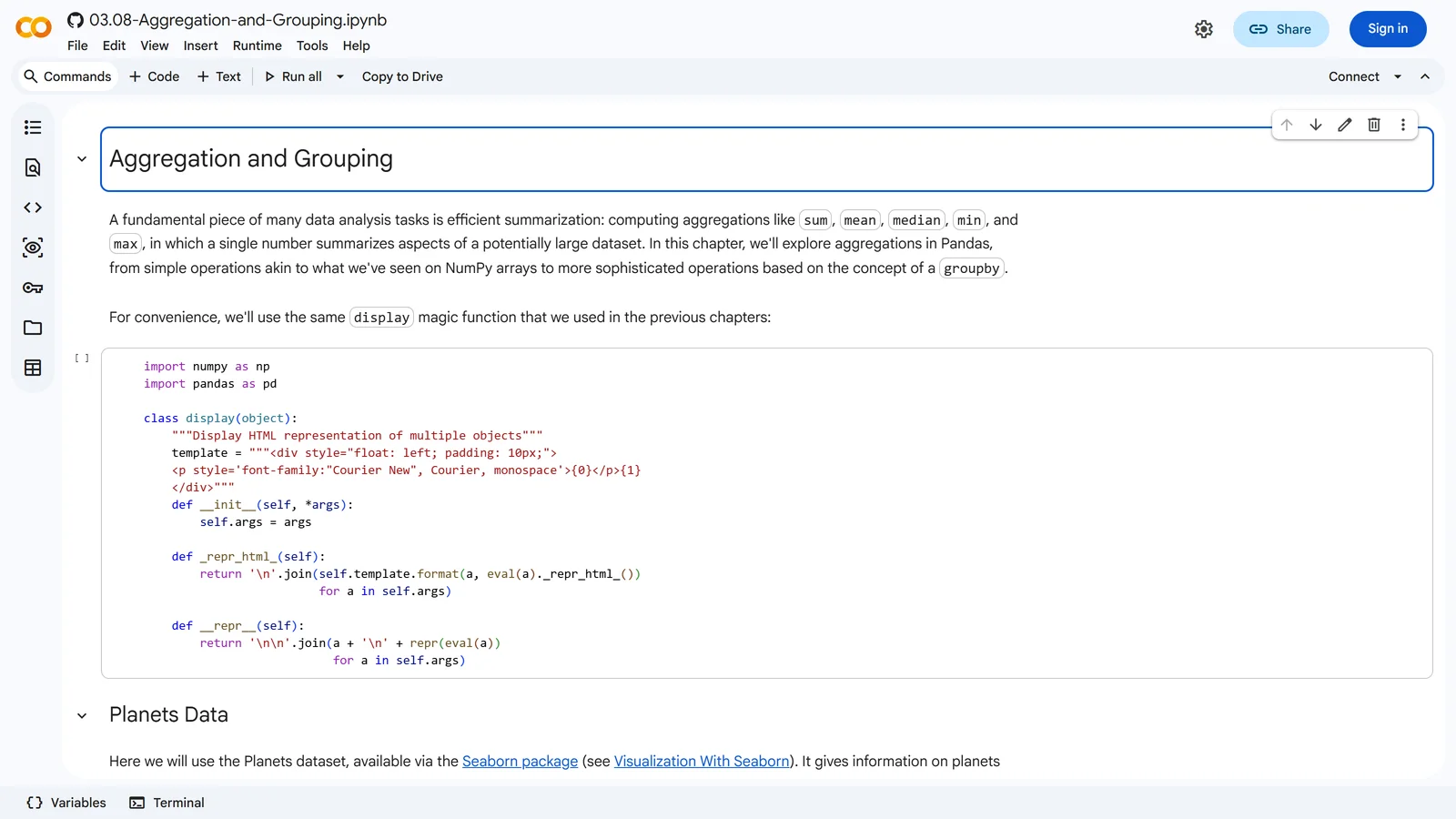
A chapter of the Python Data Science Handbook, opened in Colab straight from GitHub, 5 November 2026.
Pandas cookbook
Julia Evans's cookbook teaches pandas on real, untidy data: New York 311 service calls, Montréal bike-path counts and Montréal weather. The data ships with the repository, and the whole cookbook runs in your browser through JupyterLite, with nothing to install. It's licensed CC BY-SA 4.0.
Think Stats, 3rd edition
Allen B. Downey's book teaches exploratory data analysis and statistics through notebooks: distributions, estimation, hypothesis testing, regression, time series and survival analysis. Every chapter on the book's site has a Colab link, and the code is MIT-licensed.
Chart and visualisation notebooks
Charts in Colaboratory
Google's own sample notebook starts from the premise that "A common use for notebooks is data visualization using charts." It walks through matplotlib line, bar, histogram, scatter, stacked and pie charts and 3D plots, then Seaborn, Altair, Plotly and Bokeh, each with code you can run in place. Open it in Colab.
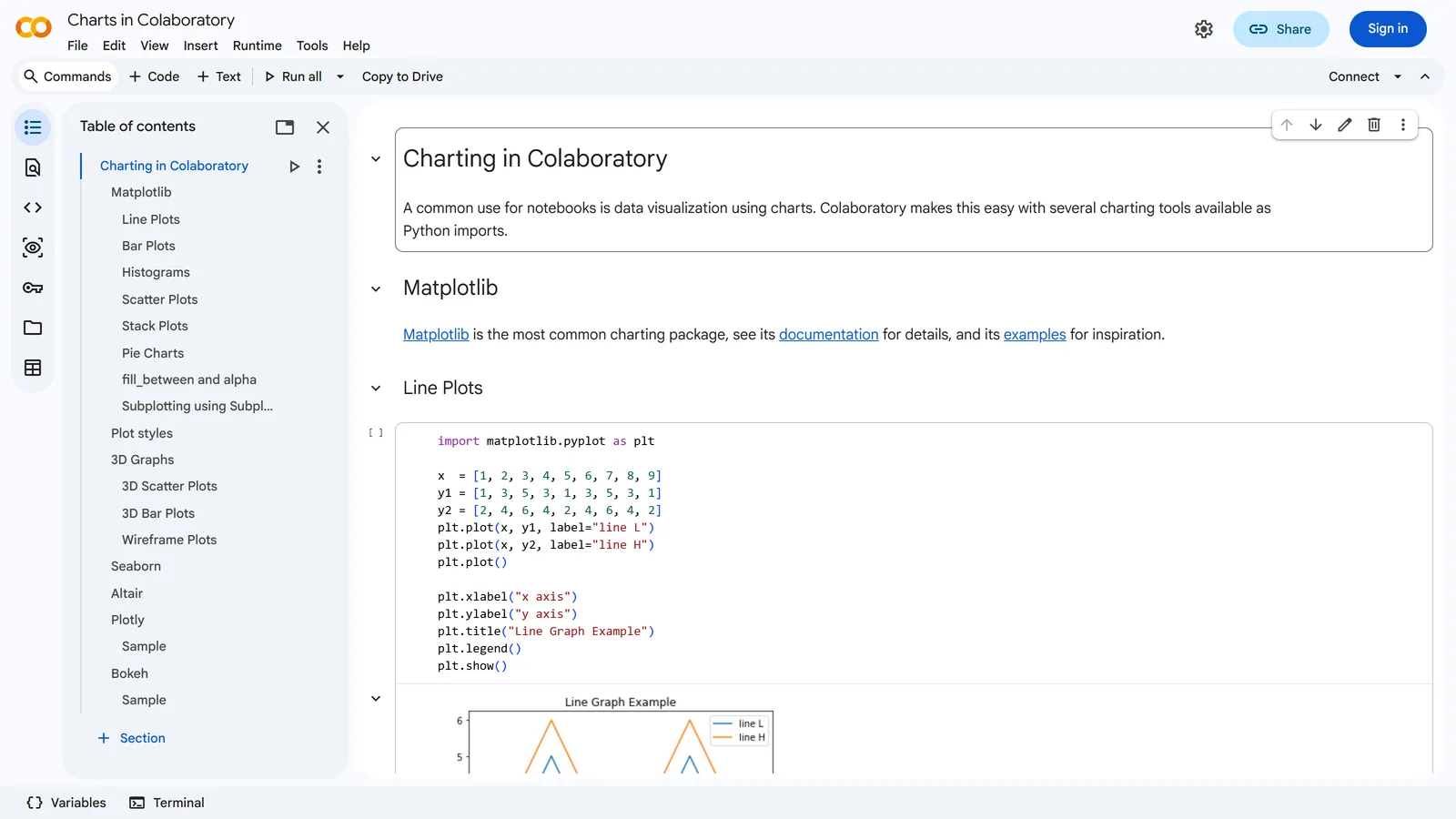
Charts in Colaboratory, one of Google's sample notebooks, 5 November 2026.
For more matplotlib, our matplotlib examples post has ten business charts with code.
Exploratory Data Visualization with Altair
Jake VanderPlas's PyCon tutorial on Altair, which builds charts by describing them rather than drawing them. It's from 2018, but Altair's approach hasn't changed much, and the notebooks open in Colab from the repository's README.
Machine learning notebooks
Titanic Tutorial (Kaggle)
The most-used beginner notebook on Kaggle: load the passenger data, look for a pattern, train a random forest and submit predictions. On 5 November 2026 it showed 3,353,845 views, 61,887 upvotes and 53,119 copies. "This Notebook has been released under the Apache 2.0 open source license." It runs on Kaggle; click Copy & Edit to get your own copy.
handson-ml3
Aurélien Géron's notebooks for Hands-on Machine Learning with Scikit-Learn, Keras and TensorFlow, 3rd edition, from an end-to-end housing-price project to deep learning. They're Apache 2.0-licensed and open in Colab. The README's warning applies to every Colab notebook: "Colab provides a temporary environment: anything you do will be deleted after a while, so make sure you download any data you care about."
Basic classification (TensorFlow)
TensorFlow's tutorial trains a small neural network to classify Fashion MNIST, 70,000 grayscale images of clothing in 10 categories. Short, well explained, with a "Run in Google Colab" button on the tutorial page.
The fastai book
The notebooks behind Jeremy Howard and Sylvain Gugger's deep learning book, using fastai and PyTorch. The authors recommend Colab for beginners: "This is the recommended approach for folks who are just getting started." The code is GPL v3; the prose isn't licensed for reuse.
scikit-learn example gallery
Not one notebook but hundreds: every example in scikit-learn's gallery has a "Download Jupyter notebook" link and can run in your browser through JupyterLite or Binder. Search the gallery for a technique and you'll find a worked notebook for it.
SQL notebook examples
Most example lists skip SQL, yet a lot of real notebook work starts with a query.
- DuckDB in Jupyter notebooks. DuckDB's guide comes with a Colab notebook that runs SQL cells through the JupySQL extension, on files and DataFrames, with no database server. As the guide notes, "DuckDB's Python client can be used directly in Jupyter notebooks with no additional configuration, as the first section shows."
- Getting started with BigQuery. One of Colab's samples, querying Google's public datasets from a notebook.
In a Fastero notebook, SQL is a cell type of its own: pick one of your workspace's database connections, write the query, and the rows arrive in Python as a pandas DataFrame with the name you give it. Credentials stay in the workspace, out of the notebook.
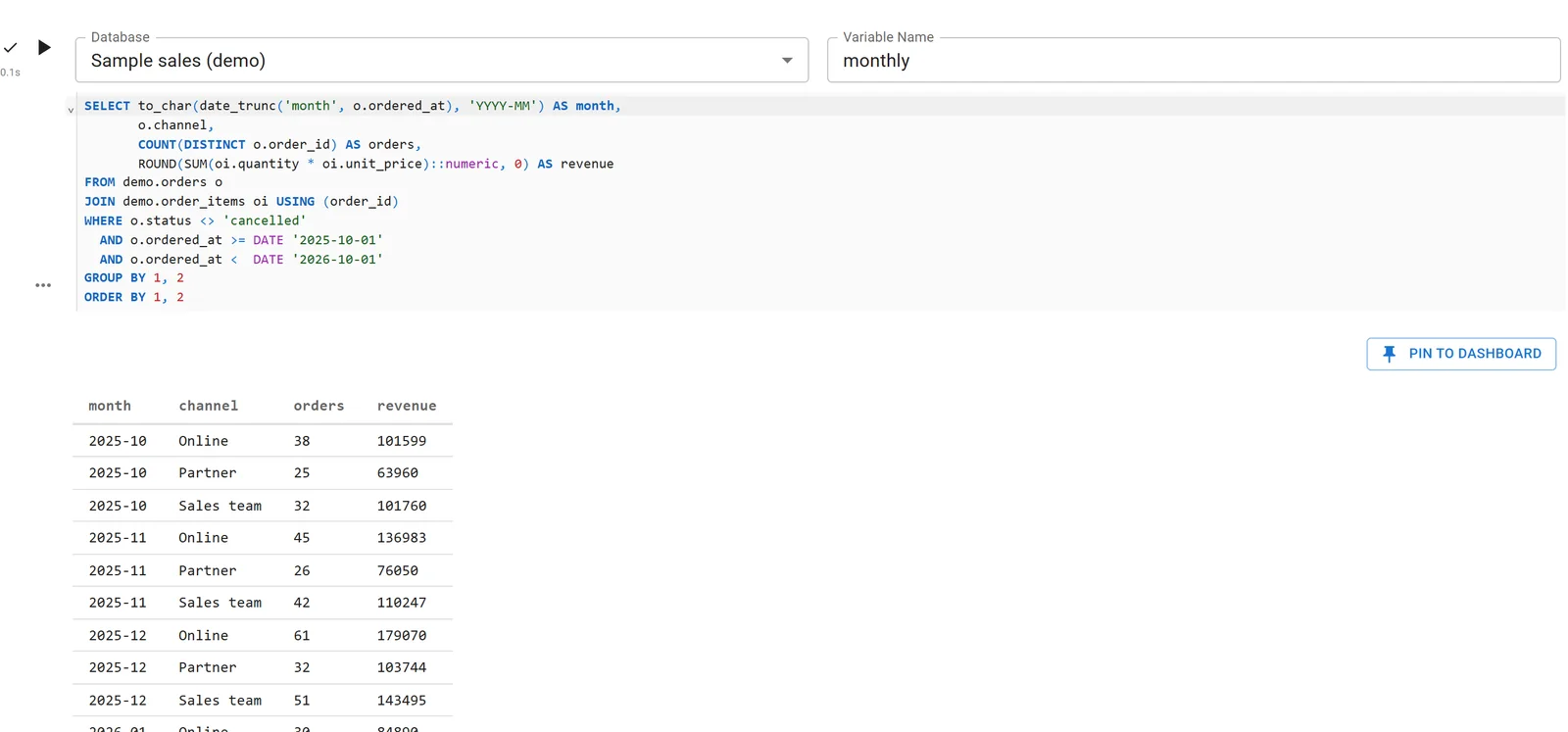
A SQL cell in a Fastero notebook, whose result becomes the DataFrame monthly. Sample data.
Our SQL notebooks guide compares the other options.
Jupyter notebooks for your team.
Start free →Science and programming notebooks
LIGO gravitational-wave tutorials
The Gravitational Wave Open Science Center publishes the notebooks behind the first detection of black holes merging, using real detector data: reading the strain signal, whitening it, plotting spectrograms and even turning the signal into sound. The classic event tutorial opens in Binder. For one-click Colab, use GWOSC's Quickview notebook, which finds, reads and plots gravitational-wave data. The data is released under CC BY 4.0.
pytudes
Peter Norvig's collection of "Python programs, usually short, for perfecting particular programming skills." Start with A Concrete Introduction to Probability. Every notebook in the index has a Colab link and an nbviewer link, and the code is MIT-licensed. Recent additions set Project Euler solutions written by a person next to versions solved by AI models, which makes an interesting comparison.
Where to find more
- A gallery of interesting Jupyter Notebooks, on the Jupyter project's GitHub wiki: "This page is a curated collection of Jupyter/IPython notebooks that are notable." It's organised by subject, from introductory tutorials to reproducible papers; some older links no longer work.
- Colab's sample notebooks, listed from the Welcome notebook.
- Kaggle Code, which lists the public notebooks people have written for each Kaggle dataset and competition.
How to open any GitHub notebook in Colab
In the notebook's GitHub address, replace github.com with colab.research.google.com/github and keep the rest. For example:
https://github.com/norvig/pytudes/blob/main/ipynb/Probability.ipynb
https://colab.research.google.com/github/norvig/pytudes/blob/main/ipynb/Probability.ipynb
Colab opens a copy you can run. To keep your changes, choose File › Save a copy in Drive. If Colab says it can't load the notebook, the file has usually moved or been deleted in the repository, as with the Python Data Science Handbook's index.
Run them on your own data
Example notebooks run on sample data. To run one against your own database, on a schedule, with results your team can open, upload the .ipynb file to a Fastero workspace, or import it from a Git repository. Add a SQL cell for your data, keep passwords in the workspace's secrets instead of the code, and pin the result to a dashboard that updates each time the notebook runs on its schedule. Colleagues sign in to read it, and viewers are free.
FAQ
Where can I find good Jupyter notebook examples?
The Python Data Science Handbook, the pandas cookbook, Kaggle's Titanic tutorial and Peter Norvig's pytudes are good starting points. For more, browse the Jupyter wiki's gallery of interesting notebooks, Colab's sample notebooks and Kaggle Code.
How do I open a GitHub notebook in Google Colab?
Replace github.com in the notebook's address with colab.research.google.com/github. Colab opens it ready to run; save a copy to Drive to keep your changes.
Are Colab notebooks the same as Jupyter notebooks?
Yes. In Google's words, "Colab notebooks are Jupyter notebooks that are hosted by Colab." They use the same .ipynb format, so you can download one and open it in Jupyter, or the other way round.
Why does "Open in Colab" say it can't load the notebook?
The file has usually moved or been deleted in its repository; the Python Data Science Handbook's front-page badge is a current example. A notebook in a private repository also needs you to sign in to GitHub from Colab.
Can I run SQL in a Jupyter notebook?
Yes. JupySQL adds %sql and %%sql cells, and DuckDB's Colab notebook shows it working on files with no database. Some hosted notebooks, including Fastero's, have SQL cells that run on a connected database and return a DataFrame.
Is my work in Colab saved?
Your notebook is saved to Google Drive once you save a copy there, but files you create while it runs are temporary and disappear when the session ends. Download anything you want to keep.
Related reading:
- Matplotlib examples
- Jupyter notebook alternatives
- SQL notebooks
- Open an .ipynb file
- Run a Jupyter notebook online
- Google Colab alternatives
Sources: Python Data Science Handbook, its repository, pandas cookbook, Think Stats, Charts in Colaboratory, Altair tutorial, Kaggle Titanic Tutorial, handson-ml3, TensorFlow basic classification, fastbook, scikit-learn examples, DuckDB in Jupyter, GWOSC tutorials, pytudes, Jupyter notebook gallery, Colab Welcome notebook. Links checked 5 November 2026.
Try Fastero free — upload any of these notebooks, add a SQL cell for your own data, and run it on a schedule your team can see. No credit card required.